StopWatch
Erstellt von - Thread Integrations
Installationen - 900+ Installationen
Bewertung 3,8
(12)

Führend
Anforderungen
HubSpot-Produktversion HubSpot-Account-Berechtigungen - Erforderliche Account-Berechtigungen anzeigen
Zugriffstyp Geteilt StopWatch-Abonnement - Produktversionen: Kostenlos 🤗, Team 👥 oder Unbegrenzt 💫
Übersicht
1/8 - StopWatch für HubSpot – Demo-Video – Demonstration der Verwendung der StopWatch-App-Karte und der Einstellungen
⭐️⭐️⭐️⭐️⭐️ „Eine praktikable Lösung für die Zeiterfassung in HubSpot“ A. Lupori
⭐️⭐️⭐️⭐️⭐️ „Einfach zu bedienen, kostengünstig“ K. Kiryshin
⭐️⭐️⭐️⭐️⭐️ „Einfach und effektiv“ M. Jiran
⭐️⭐️⭐️⭐️⭐️ „Unglaublich hilfreiches Business-Tool mit reaktionsschnellem Entwickler-Support“ D. Zingleman
⭐️⭐️⭐️⭐️⭐️ „Kinderleicht“ S. Bakker
💥 14-tägige kostenlose Testphase: Installieren Sie einfach die App und genießen Sie 14 Tage lang kostenlosen Zugriff auf alle App-Funktionen (begrenzt auf eine Einlösung pro HubSpot-Portal)
StopWatch for HubSpot ist eine einfache, intuitive Zeiterfassungs-App, die speziell für HubSpot entwickelt wurde. Wir sind die einzige dedizierte Zeiterfassungslösung auf dem Markt, die von HubSpot zertifiziert ist. Alle erfassten Zeiten werden direkt in HubSpot als „Time Log“- Einträge gespeichert.
Mithilfe der „StopWatch“-App-Karte kann Ihr Team ganz einfach die Zeit erfassen, die für HubSpot-Kontakte, Unternehmen, Deals, Tickets, Projekte, Dienstleistungen, Termine, Angebote und Kurse (sowie auf besonderen Wunsch auch für benutzerdefinierte Objekte) sowie für CRM-Interaktionen (einschließlich Aufgaben, Besprechungen und Anrufe) aufgewendet wird.
👥 Team-Abonnenten erhalten außerdem Zugriff auf:
1 Zeiterfassungsdatensatz pro Sitzung, was eine leistungsstarke Segmentierung der Zeiterfassungssitzungen ermöglicht, einschließlich benutzerdefinierter Kategorisierung, Titel und Beschreibungen.
Zuordnung von Interaktionen, wodurch es möglich ist, Ihre Zeiterfassungssitzungen mit HubSpot-Interaktionen zu verknüpfen, einschließlich Aufgaben, Anrufen und Besprechungen.
App-Ereignisse für Zeiterfassungssitzungen, mit denen Sie HubSpot-Workflows auf der Grundlage von übermittelten Zeiterfassungssitzungen auslösen können, sowie zusätzliche HubSpot-Berichtsfunktionen.
💫 „Unlimited“-Abonnenten erhalten außerdem Zugriff auf:
Alle Funktionen, die 👥 Team-Abonnenten zur Verfügung stehen.
Benutzerdefinierte Workflow-Aktionen, mit denen Sie flexible, workflowbasierte Timer starten und stoppen können (1.000 Anfragen pro Tag). So lässt sich beispielsweise nachverfolgen, wie lange ein einzelner CRM-Datensatz in einer bestimmten Phase verbleibt (z. B. Deal-Phase, Kontakt-Lebenszyklus, Ticket-Status). Sie können sogar festlegen, dass Zeiten außerhalb der Bürozeiten bei diesen Zeiterfassungsberechnungen nicht berücksichtigt werden.
Automatisch berechnete Rechnungen, die Ihre Prozesse von der Zeiterfassung bis zur Rechnungsstellung optimieren.
Web-Benutzeroberfläche, die es ermöglicht, Zeiten für HubSpot-CRM-Datensätze zu erfassen, wo immer Sie Zugriff auf einen Webbrowser haben. Ideal für Teams, die nicht an ihren Schreibtisch gebunden sind.
StopWatch-API, die Ihnen programmatischen Zugriff auf Ihre Zeiterfassungsdaten ermöglicht.
Webhooks, die es ermöglichen, Push-basierte Integrationen für Ihre Zeiterfassungssitzungen zu erstellen
Entwickelt für Teams und Unternehmen , die eine intuitive Zeiterfassungslösung suchen , die tief in HubSpot CRM integriert ist. Nutzen Sie die leistungsstarken Berichts- und Automatisierungstools von HubSpot, wobei die Zeiterfassungsprotokolle Ihres Teams im Mittelpunkt stehen.
Funktionen
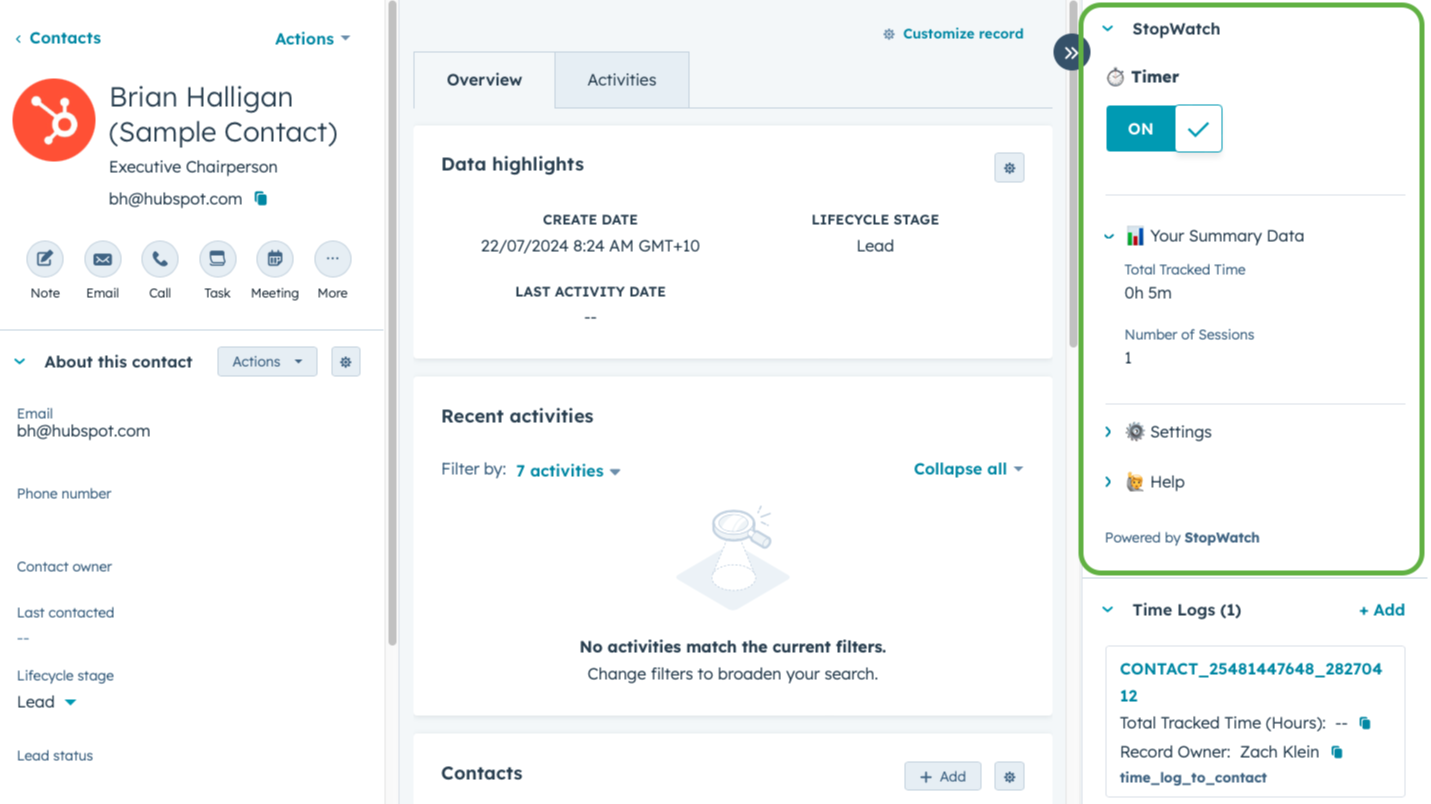
⏱️ Erfassung der für HubSpot-CRM-Datensätze aufgewendeten Zeit
Möchten Sie nachverfolgen, wie viel Zeit Ihr Team für Zielkunden, Kundendienstanfragen oder Verkaufschancen aufwendet? Mit „StopWatch for HubSpot“ können Sie die Zeiterfassung für Ihr gesamtes Team mit nur einem Klick direkt in HubSpot CRM durchführen. Es ist sogar möglich, zwischen „abrechnungsfähiger“ und „gesamter“ erfasster Zeit zu unterscheiden.
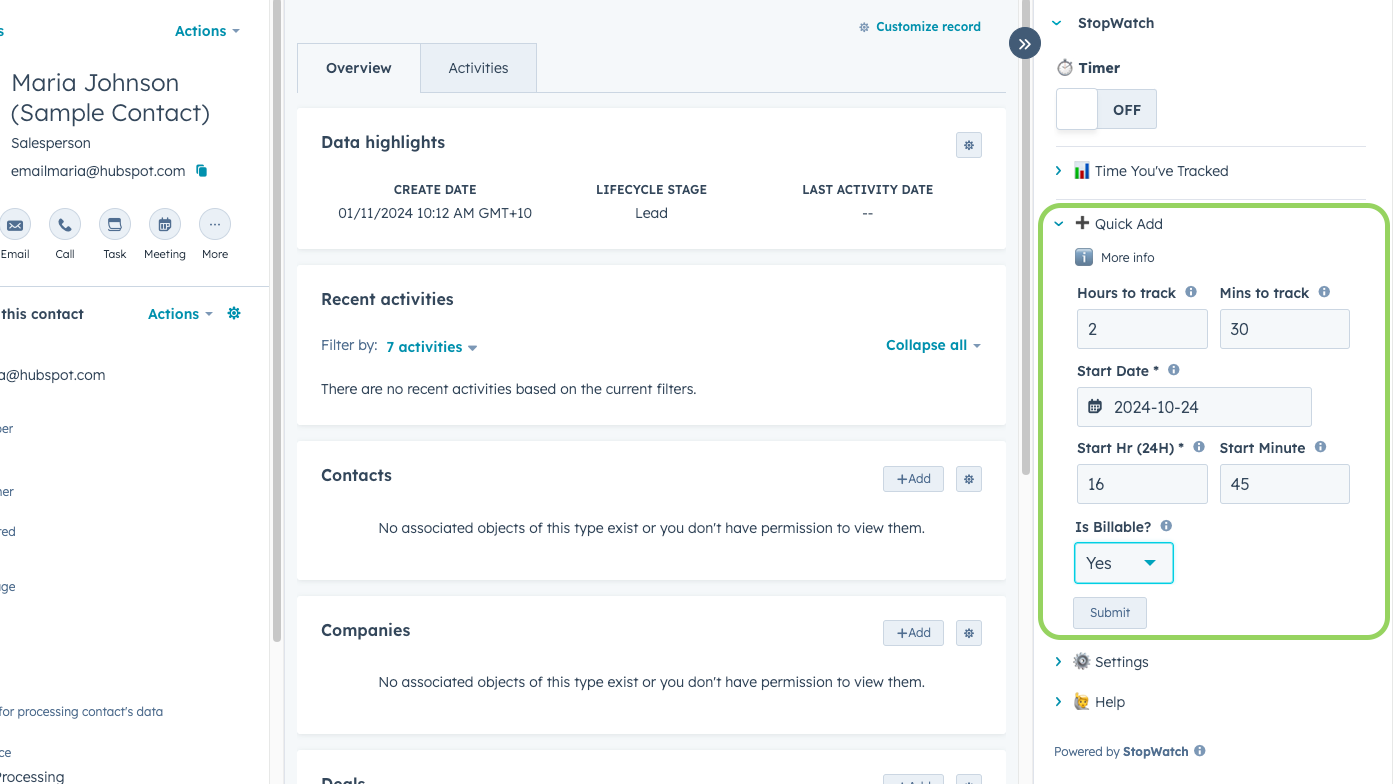
➕ „Schnell hinzufügen“ – Zeiterfassungssitzungen
Möchten Sie Ihre erfassten Zeiten lieber gebündelt erfassen (zum Beispiel am Ende Ihres Arbeitstages)? Oder vergessen Sie vielleicht gelegentlich, Ihre Zeit zu erfassen, während Sie an einer Aufgabe arbeiten? StopWatch bietet für diese häufigen Anwendungsfälle die Möglichkeit, Zeiterfassungssitzungen manuell per „Schnellhinzufügen“ zu erfassen (es stehen die Bearbeitungsmodi „Einfach“ und „Detailliert“ zur Verfügung).
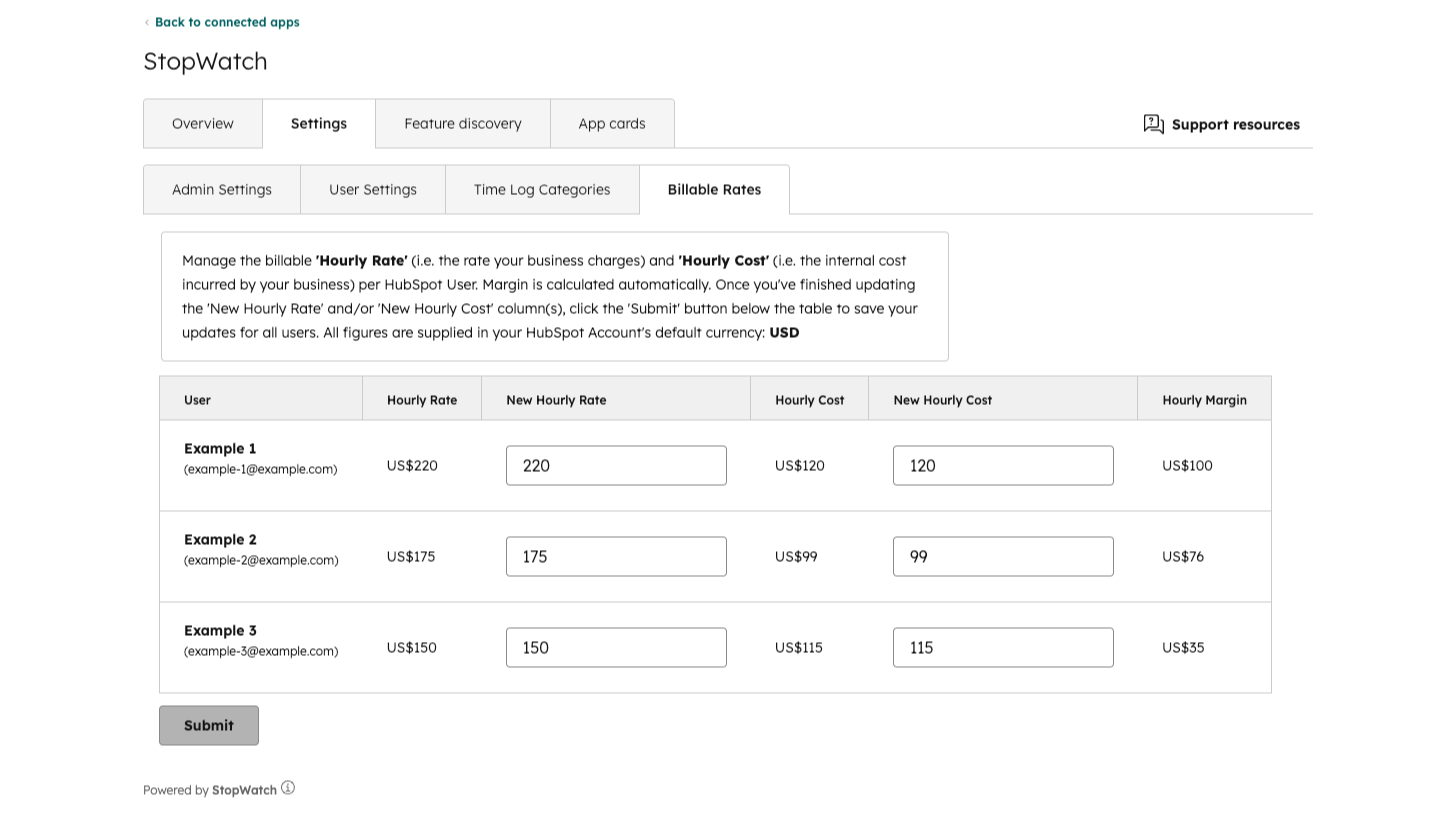
💸 Rechnungsbeträge automatisch auf Basis der erfassten Arbeitszeit berechnen
Die Zeitprotokoll-Eigenschaften „Abrechnungsbetrag“, „Kostenbetrag“ und „Margebetrag“ werden automatisch auf der Grundlage Ihrer konfigurierten Einstellungen für die abrechnungsfähigen Sätze ausgefüllt. Diese Funktion wurde entwickelt, um gängige Anwendungsfälle im Bereich der Rechnungsstellung und der Rentabilität von Mitarbeitern zu unterstützen. Bitte beachten Sie, dass diese Funktion nur für Abonnenten von StopWatch für HubSpot „💫 Unlimited“ verfügbar ist.
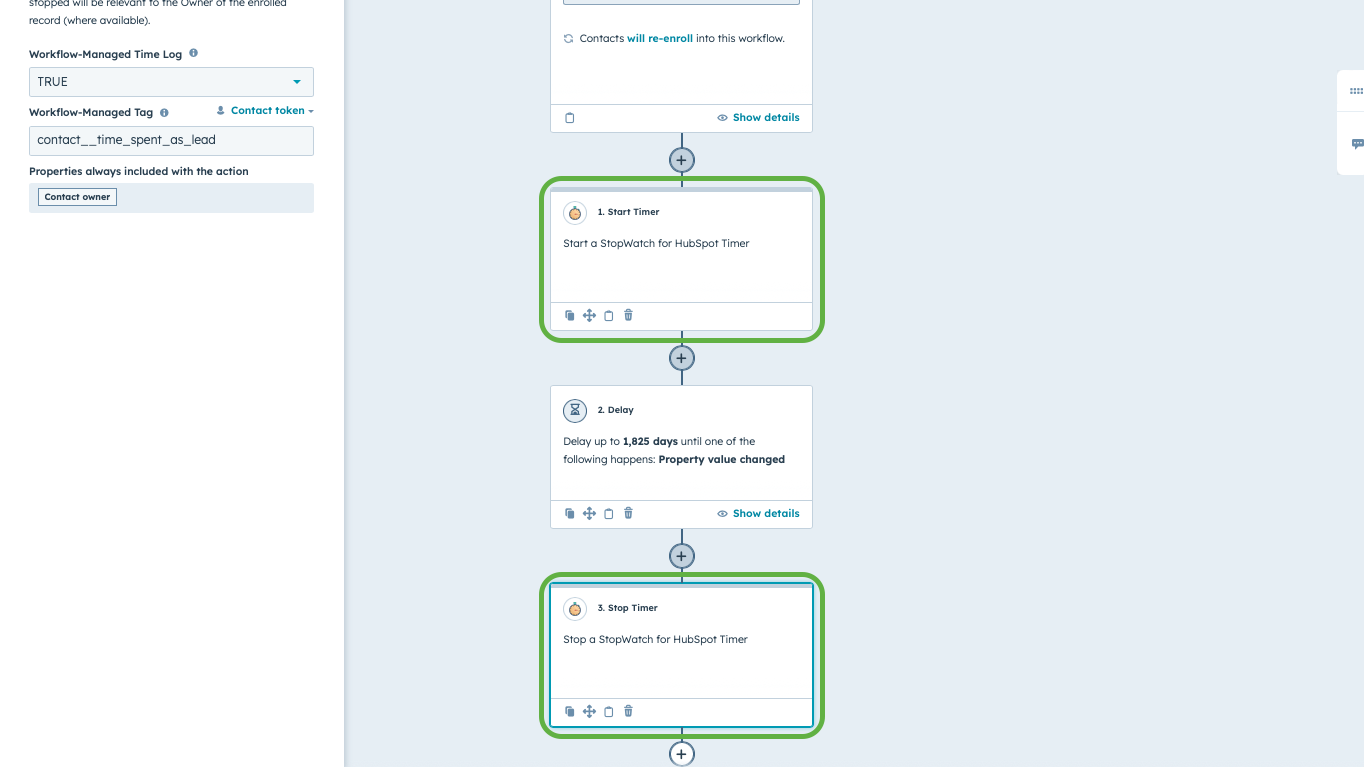
⚡ Timer starten und stoppen mithilfe von HubSpot-Workflows
Starten und stoppen Sie flexible Timer über HubSpot-Workflows. Verfolgen Sie, wie lange ein einzelner CRM-Datensatz in einer bestimmten Pipeline-Phase verbleibt, einschließlich oder ausschließlich der Zeiten außerhalb der Bürozeiten. Bitte beachten Sie, dass diese Funktion ausschließlich für „💫 Unlimited“-Abonnenten verfügbar ist und Zugriff auf HubSpot-Workflows erfordert. Standardmäßig ist die Anzahl der Anfragen auf 1.000 pro Tag begrenzt (kann auf Anfrage erhöht werden).
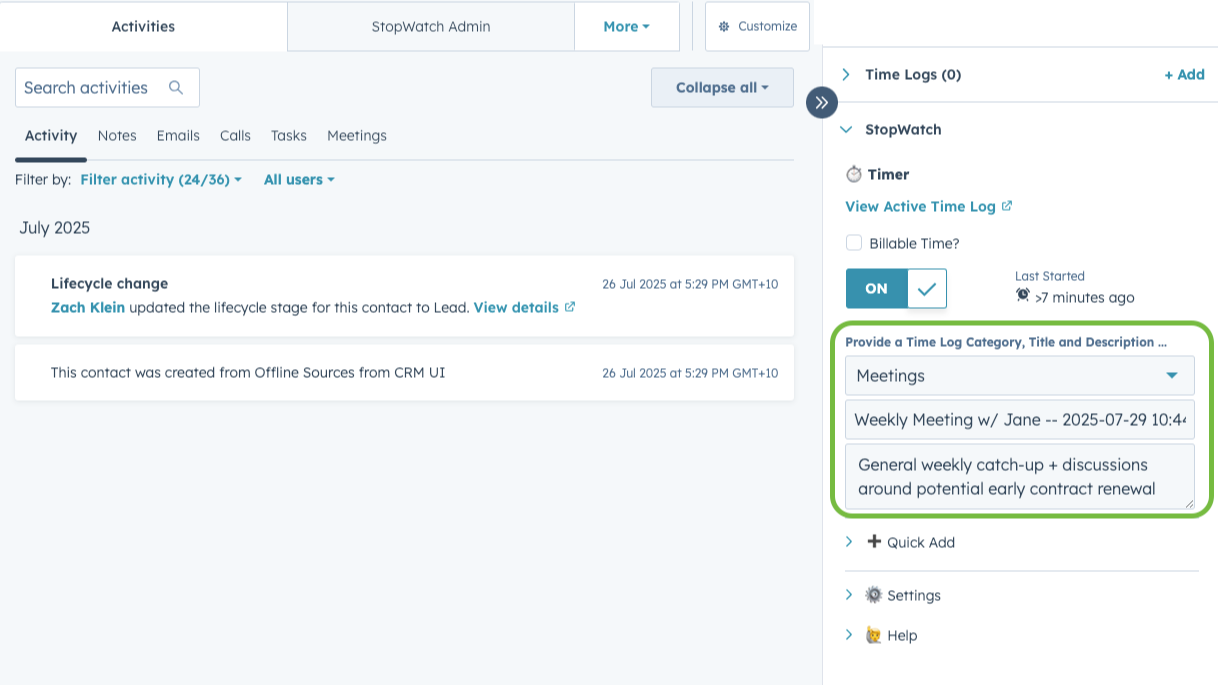
1️⃣ Optimieren Sie die Segmentierung Ihrer Zeiterfassung mit „1 Zeiterfassung pro Sitzung“
Fügen Sie Ihren Zeiterfassungsprotokollen eine „Kategorie“, einen „Titel“ und eine „Beschreibung“ hinzu, um die Segmentierungsmöglichkeiten zu verbessern. Wenn diese benutzerspezifische Einstellung aktiviert ist, wird jede übermittelte Zeiterfassungssitzung als einzelnes Zeiterfassungsprotokoll dargestellt. Die Kategorien für Zeiterfassungsprotokolle sind individuell anpassbar. Bitte beachten Sie, dass diese Funktion nur für Abonnenten der Tarife „👥 Team“ und „💫 Unlimited“ verfügbar ist.

🖥️ StopWatch für HubSpot Web
Möchten Sie unterwegs Zeit für HubSpot-CRM-Datensätze erfassen? „💫 Unlimited“-Abonnenten können StopWatch für HubSpot Web nutzen, um Zeit über unsere Weboberfläche (zugänglich über einen Webbrowser) zu erfassen. Melden Sie sich einfach über unsere App-Startseite an, suchen Sie nach dem HubSpot-CRM-Datensatz, für den Sie die Zeit erfassen möchten, und starten Sie eine Zeiterfassungssitzung.
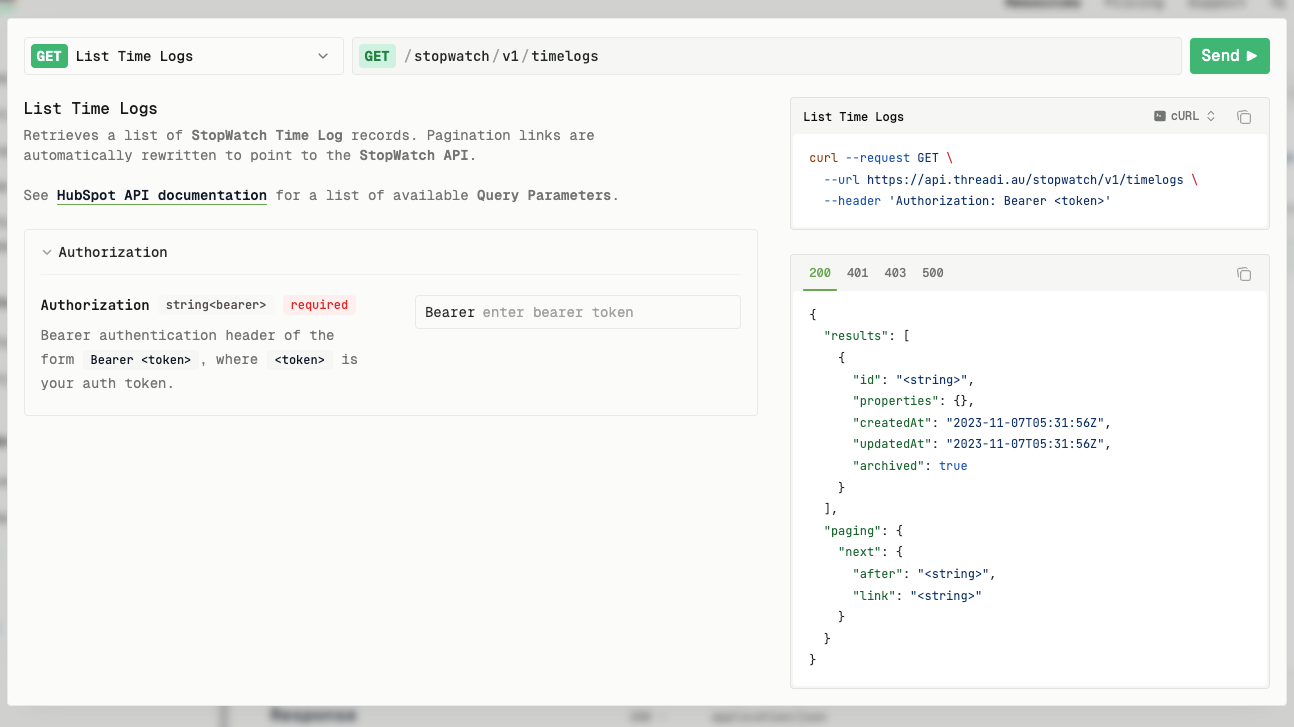
🧩 StopWatch-API
Die StopWatch-API fungiert als sicherer Authentifizierungs-Wrapper für bestimmte HubSpot-CRM-Objekt- und -Eigenschafts-APIs, die für die App „StopWatch for HubSpot“ relevant sind. Sie wurde speziell entwickelt, um den programmatischen Lesezugriff auf StopWatch-Zeiterfassungsdatensätze und -Eigenschaften zu ermöglichen. Bitte beachten Sie, dass diese Funktion ausschließlich für „💫 Unlimited“-Abonnenten verfügbar ist.
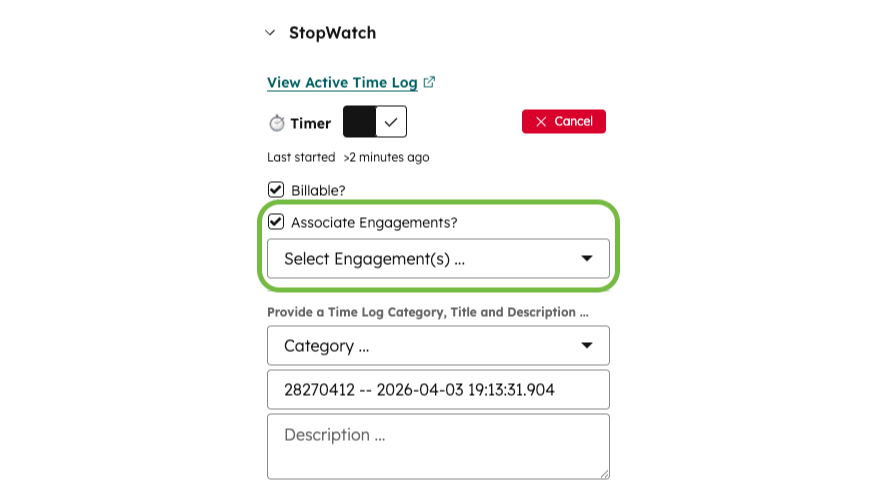
📝 Aufträge für Associate-Mitarbeiter
Nutzen Sie leistungsstarke Berichts- und Automatisierungsfunktionen, indem Sie selektive Verknüpfungen zwischen Zeiterfassungen und bestimmten HubSpot-Interaktionen herstellen. Erstellen Sie beispielsweise benutzerdefinierte Berichte, um die Zeit zu analysieren, die Sie für bestimmte Aufgaben, Besprechungen und Anrufe aufgewendet haben. Verfügbar für unsere 👥 Team- und 💫 Unlimited-Abonnenten.
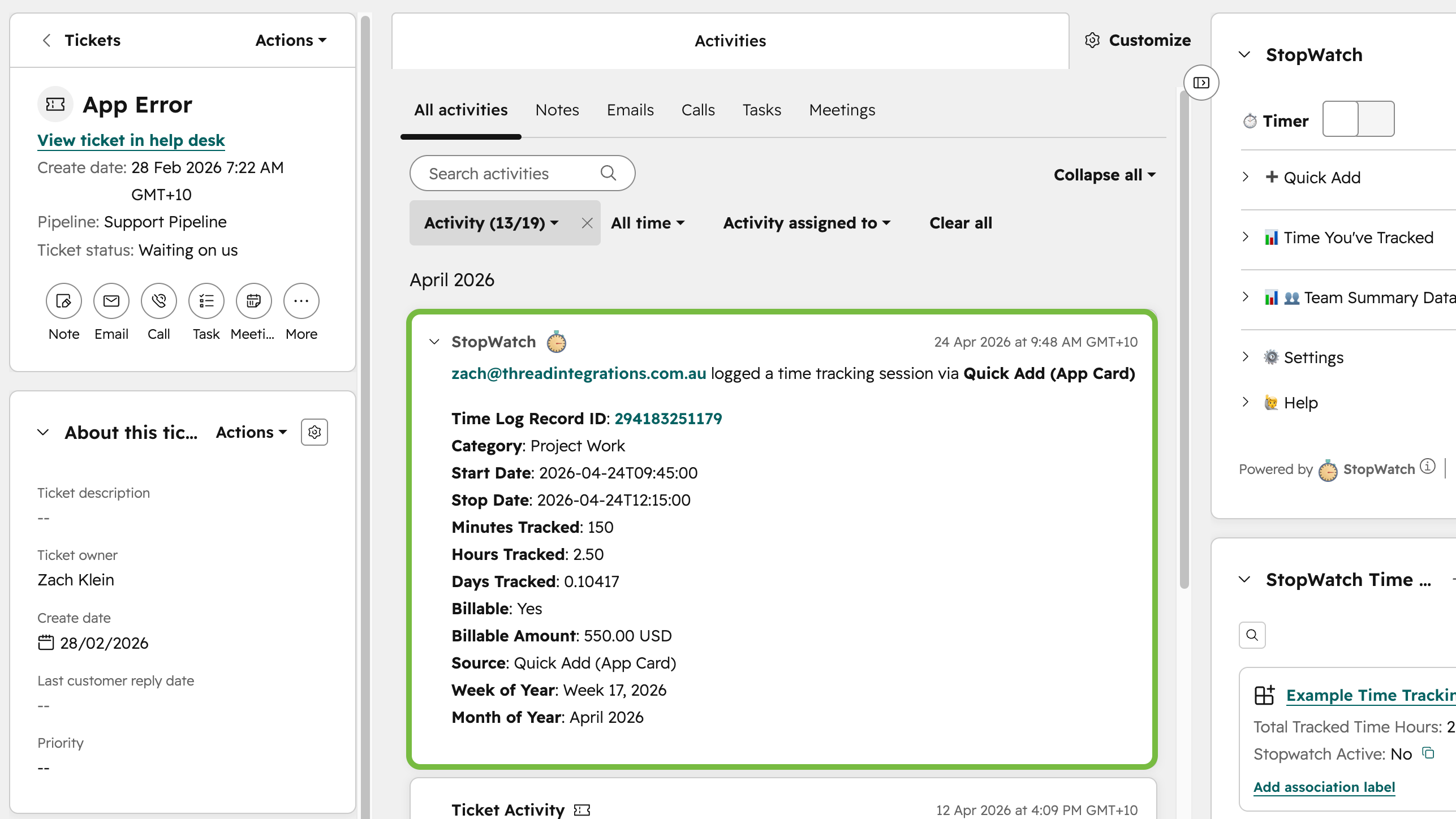
▶️ App-Ereignisse für Zeiterfassungssitzungen
Wenn diese Funktion aktiviert ist, werden App-Ereignisse für jede übermittelte Zeiterfassungssitzung in der Aktivitätszeitleiste des entsprechenden HubSpot-CRM-Datensatzes protokolliert. Auf diese Weise lassen sich HubSpot-Workflows und benutzerdefinierte Berichte auf der Grundlage der Übermittlung einzelner Zeiterfassungssitzungen erstellen.
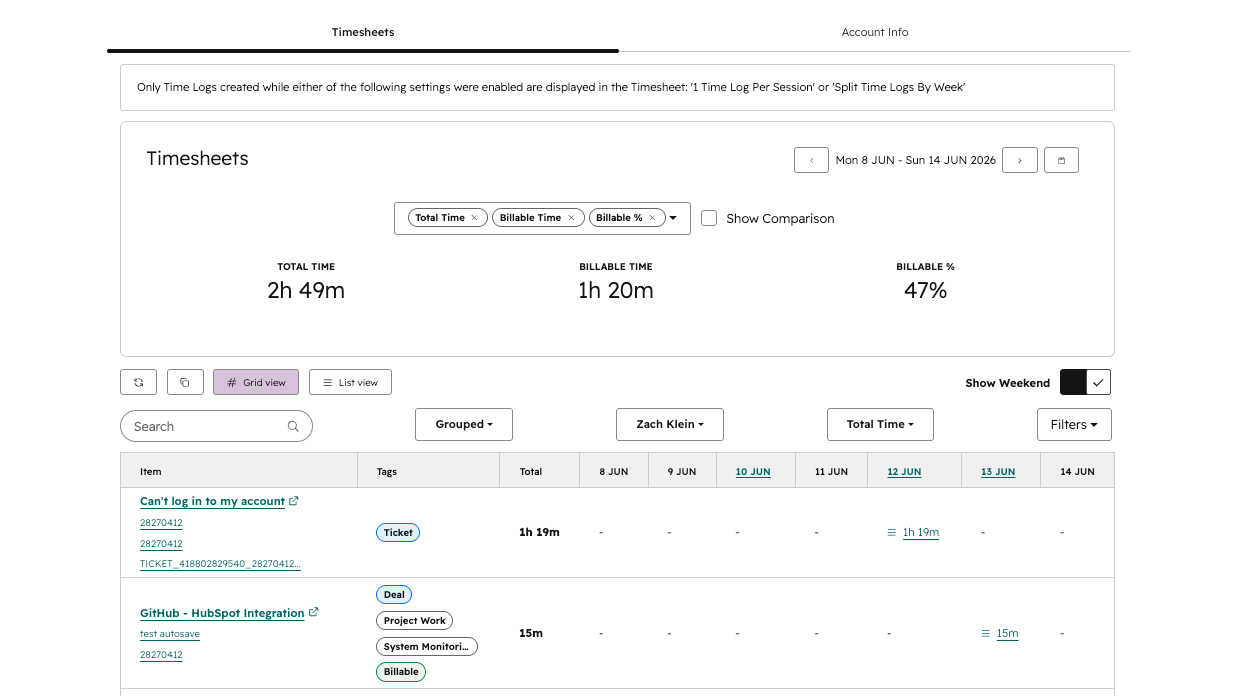
📋 Arbeitszeitnachweise
Mit unserer Zeiterfassungsfunktion können Sie erfasste Zeiten schnell überprüfen und verwalten, ohne Berichte erstellen oder zwischen verschiedenen CRM-Datensatzansichten hin- und herspringen zu müssen. Erkennen Sie fehlende oder fehlerhafte Zeiterfassungssätze, konzentrieren Sie sich auf einen bestimmten Tag oder eine bestimmte Woche und segmentieren Sie Ihre Zeiterfassungsdaten für gängige Anwendungsfälle wie Berichterstellung, Rechnungsstellung und Analyse der Teamauslastung.
App-Funktionalität
Time Logs | ||
Time Logs | Stopwatch time logs Stopwatch time logs | |
Time Logs | ||
Time Logs | ||
Time Logs | ||
Time Logs | ||
Time Logs | ||
Time Logs | ||
Time Logs | ||
Time Logs |
Alle von dieser App verwalteten Daten werden ausschließlich in HubSpot gespeichert (als „Time Log“-Einträge).
Dadurch kann sich Ihr Team ganz auf seine Arbeit in HubSpot konzentrieren, da weniger zwischen verschiedenen Apps gewechselt werden muss.
Rezensionen
3,8
12
3,8
12
- 2. Juli 2026
Funktioniert super
Der Entwickler hat sich bei mir gemeldet und mir geholfen, das Ganze richtig einzurichten, nachdem ich ein paar Probleme hatte. Schnelle Antwort und sehr hilfsbereit. Funktioniert super.
Rosmarin, N.
- 11. Dez. 2025
Unglaublich hilfreiches Business-Tool mit reaktionsschnellem Entwickler-Support
Stopwatch war unglaublich hilfreich für unser Unternehmen. Es deckt einen wesentlichen Bedarf für unser System - die Zeiterfassung - ab, den HubSpot nicht abdeckt, und man kann Zeitdatensätze mit einer Vielzahl von Objekten verknüpfen. Der Entwickler hat unglaublich schnell auf E-Mails und Eingaben reagiert.
Einfache Implementierung und einfache Berichterstattung. Die Entwickler haben im Laufe der Zeit weitere Funktionen hinzugefügt.
Aufgrund der HubSpot-Beschränkungen für Anwendungs-GUIs kann sich die Verwendung etwas klobig anfühlen, aber auch das hat sich mit der Zeit gebessert. Einige Eigenschaften werden standardmäßig ausgefüllt, während für andere spezifische App-Einstellungen erforderlich sind, um sie auszufüllen.
ZINGLEMAN, D.
Kostenlos 🤗
0 $
Für kleine Teams oder UAT-/Testkonten
Kostenlos
Bis zu 3 benannte Benutzer
Keine Rotation der benannten Benutzer
Kostenlos 🤗
0 $
Für kleine Teams oder UAT-/Testkonten
Kostenlos
Bis zu 3 benannte Benutzer
Keine Rotation der benannten Benutzer
* Die hier angegebenen Preise dienen nur zu Illustrationszwecken. Alle Preise enthalten keine Steuern, Sonderangebote, Rabatte oder sonstigen Preisvarianten. Bitte wenden Sie sich direkt an den Partner, um aktuelle und korrekte Preisinformationen zu erhalten. HubSpot übernimmt keine Verantwortung für Preisinformationen, die von unseren Partnern bereitgestellt werden. Letzte Aktualisierung der Preisinformationen: 22.07.2026
Weitere Infos
Erstellt von - Thread Integrations
Installationen - 900+ Installationen
Kategorien Sprachen, in denen diese App verfügbar ist Englisch