
Docusign Enhanced Integration
An improved integration for Docusign that enables better automation
Créé par - Integration Glue
Installation - 200+ installations
Évaluation 2,3
(3)

Leading
Exigences
Abonnement HubSpot Autorisations de compte HubSpot - Afficher les autorisations de compte requises
Type d'accès Shared Abonnement à Docusign Enhanced Integration - Abonnements : Free, Starter, Professional ou Enterprise
Vue d'ensemble
1/4
Send Docusign envelopes directly from HubSpot
Trigger contact automation with information from DocuSign
Apply HubSpot Fields in Docusign
Improved sales and marketing workflows: Real-time notifications and document status updates keep your sales teams well-informed throughout the signing process, because they know what documents are being looked at and when
Marketing teams can also incorporate record signing into their campaigns, delivering a more unified customer experience
Enhanced data accuracy and security: Centralised storage of signed documents and associated data makes it simple for your team to access what they need, when they need it.
Secure cloud storage of signed copies mitigates the risk of data loss
This integration ensures adherence to legal and regulatory requirements, offering peace of mind regarding data protection and privacy
Associate documents with relevant records in HubSpot - with the new integration, documents can be associated with specific company or contact records
Get access to custom fields - Integration Glue used in combination with the DocuSign integration allows the user to use any field in the object
Track the signature flow - we can map all Docusign webhooks to HubSpot properties to allow HubSpot users to track the status of the signing process
This integration can read and surface information from custom object properties for the user to view and utilize in workflows if they choose. It can also populate properties on custom objects when a document is sent via the integration.
Fully managed within HubSpot Workflows - once installed you do not need to login to any other system other than Docusign to manage the generation and eSign of documents using Docusign.
When you register for Integration Glue, you will get access to a whole bunch of HubSpot Workflow and Data productivity actions, such as Document Generation, Actions to Clone records (including associated records), get User/Owner information and add to a Property or manage associations.
Integration Glue pricing is based on utilisation, so you can use all of our apps together under a single license and you will only be charged for the total credits you use per month.
Integration Glue does not retain any data when using this app; it simply reads and outputs data to your own HubSpot portal.
Fonctionnalités
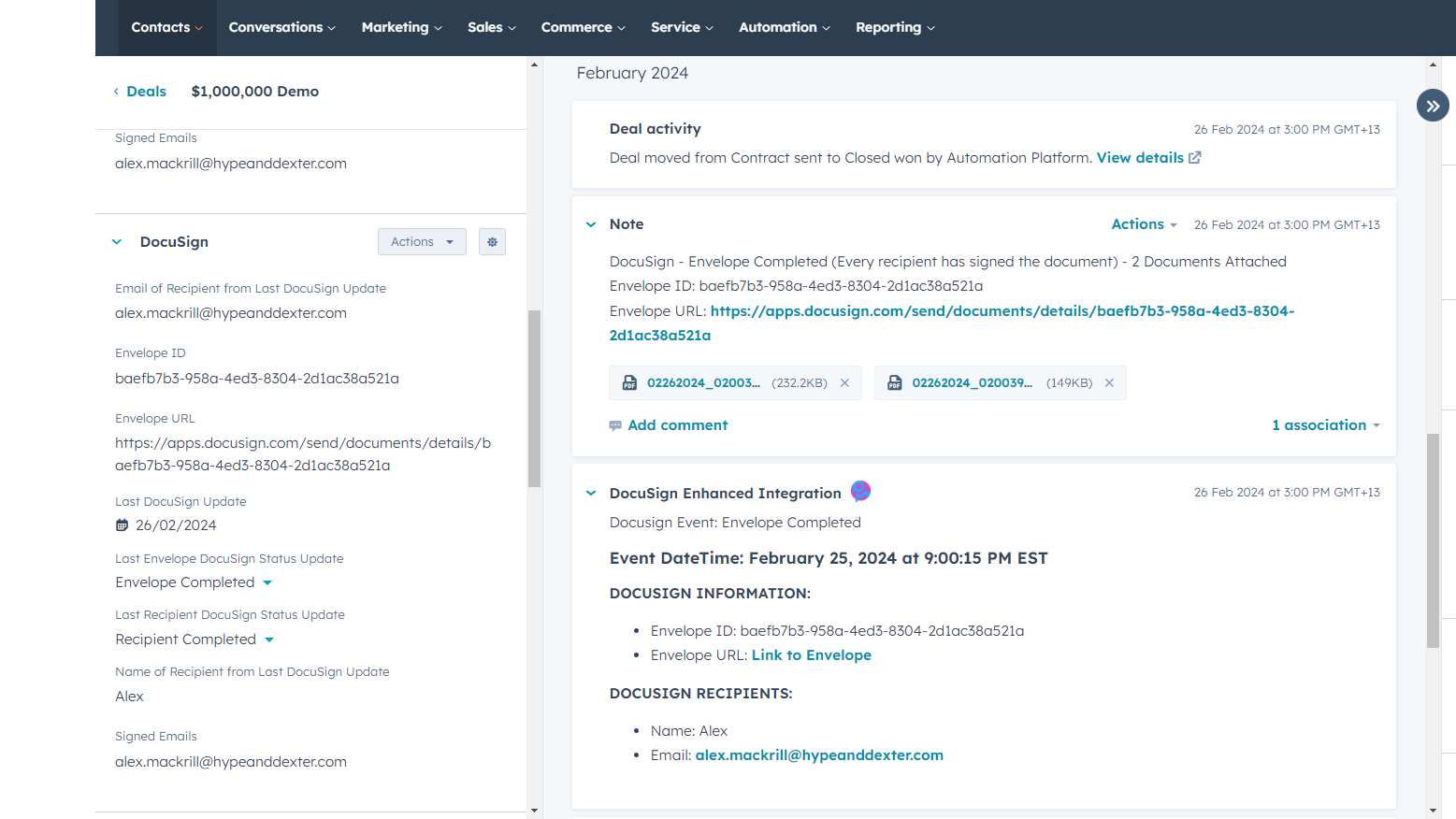
Capture signed documents in HubSpot
Unlike other integrations, our enhanced integration will capture the signed copy of your Docusign document in a note in the object's activity timeline.
Send Docusign documents via workflows
Set up to 4x signatories and contacts to CC on your send, and trigger the send from a HubSpot workflow.
Sending Docusign templated documents from HubSpot
Once created in Docusign, your document templates will work seamlessly with HubSpot.
Void Docusign Envelope
If a document is sent via the integration, the user has the option to void the document. This will trigger an automated email to be sent to the recipient, notifying them that the sender has voided the document, with the appropriate reasoning.
Create and populate custom properties
The integration will automatically give you all the properties you need to manage your Docusign process via HubSpot. And changes to these are updated automatically on the relevant object record.
Fonctionnalité de l'application
Données partagées
Docusign Envelope | ||
Envelope Status | ||
Signed Documents |
Avis
- 9 avr. 2026
Complètement cassé et inutilisable - n'a rien attiré du tout
il ne l'a pas fait
aucun
non utilisable
latimer, A.
- 18 mars 2026
Nous sommes extrêmement satisfaits du travail accompli - un flux de travail transparent de signature de contrat en un seul clic qui répond exactement à nos besoins.
Notre entreprise vend des produits de construction de maisons personnalisées, provenant généralement de plusieurs fabricants, combinés en une seule transaction. En raison de l'utilisation de plusieurs transactions pour recueillir des données claires sur les valeurs liées aux types de produits et aux fabricants, nous ne sommes pas en mesure d'utiliser les outils intégrés dans HubSpot. Comme nous devons commander ces produits personnalisés sur la base des spécifications du client, nous avons besoin de la signature et de l'approbation du client pour indiquer qu'il est d'accord avec toutes les spécifications personnalisées que nous avons rédigées dans les devis que nous générons à partir des outils de cotation des fabricants. Auparavant, nous construisions chaque contrat de vente en saisissant manuellement toutes les valeurs des contrats dans un modèle, en l'imprimant au format PDF, en le combinant avec plusieurs devis au format PDF et en envoyant ce document pour signature après avoir identifié chaque emplacement Sign Here après chaque devis. Maintenant, en utilisant ce produit Integration Glue Docusign, associé à DocMergy, nous générons des contrats de vente, y compris tous les documents de devis connexes, en un seul clic (DocMergy), et après avoir vérifié l'exactitude des données du document de sortie DocMergy, nous l'envoyons pour signature en un autre clic (intégration Docusign). Les mises à jour automatiques dans HubSpot à l'achèvement de la signature nous permettent de générer des mises à jour de statut et des notifications automatiques au département financier pour le paiement. Cette efficacité et cette rapidité nous ont permis d'économiser environ 30 minutes de travail pour chaque contrat et chaque demande de paiement que nous réalisions auparavant manuellement. Si l'on multiplie ce chiffre, cela représente environ 300 heures de travail que notre équipe de vente de 8 personnes aura économisées au cours d'une année. Absolument impressionnant.
Réponse quasi instantanée de l'équipe d'Integration Glue pendant les heures d'ouverture. Mes problèmes complexes sont résolus très rapidement, généralement lors d'une réunion en direct qui est enregistrée et qui m'est ensuite fournie afin que je puisse revoir les instructions plus tard. L'équipe ajoute des améliorations au code dans des sprints de deux semaines. Les choses que je demande ont été promises rapidement et livrées.
Le seul inconvénient est le décalage horaire. Je suis au Texas et l'équipe d'assistance est en Nouvelle-Zélande. Cela signifie que je dois attendre jusqu'à 14 heures (heure française) pour avoir une personne en direct dans leur chat d'assistance. Ils disposent d'un chat alimenté par l'IA pour les aider pendant les temps d'arrêt.
Bidlack, J.
Free
0 $US
Great for small teams starting out or anyone who wants to learn more
100 Credits = 20-50 runs of the Custom Actions (dependent on actions used)
Free
0 $US
Great for small teams starting out or anyone who wants to learn more
100 Credits = 20-50 runs of the Custom Actions (dependent on actions used)
* Les prix mentionnés ici sont uniquement présentés à titre indicatif. Tous les prix n'incluent pas les taxes, les offres spéciales, les réductions ni les autres facteurs pouvant affecter les tarifs. Vous devez contacter le partenaire pour obtenir les tarifs les plus récents. HubSpot n'assume aucune responsabilité pour les informations de tarification fournies par ses partenaires. Dernière mise à jour des prix : 09/08/2025
Informations supplémentaires
Créé par - Integration Glue
Installation - 200+ installations
Catégories Langues dans lesquelles cette application est disponible Anglais
Attirer l'attention aujourd'hui