Create Google Docs/PDF + eSign
Automate Quote, Contract & Proposal PDFs inc. eSignatures | ⭐️⭐️⭐️⭐️⭐️

Diriger
Exigences
Abonnement HubSpot Autorisations de compte HubSpot - Afficher les autorisations de compte requises
Type d'accès Shared Abonnement à Create Google Docs/PDF + eSign - Abonnements : Pro, Teams ou Free
Vue d'ensemble
1/6
⭐️⭐️⭐️⭐️⭐️ 4.8/5 Stars
🏵️ HubSpot Certified App
🏆 HubSpot's Essential Apps 2025
🚀 Automate Your Documents, in One Click from HubSpot
Portant seamlessly connects HubSpot with Google Docs, Google Slides, Google Sheets, Microsoft Word & Microsoft Powerpoint enabling effortless document creation, sharing, and signing—without switching between apps. Generate stunning, personalized documents in seconds using your HubSpot data and streamline your workflows like never before.
🎨 Design & Customize your templates with Google Tools
Craft, format, and control your templates directly in:
✅ Google Docs
✅ Google Slides
✅ Google Sheets
✅ Microsoft Word
✅ Microsoft Powerpoint
✅ PDF templates
🥸 Personalize with HubSpot Data
Automatically pull in data from:
✔️ Deals
✔️ Contacts
✔️ Companies
✔️ Tickets
✔️ Custom Objects
✔️ Object Library (appointments, courses, listings and services)
+ All Custom Properties
🧰 Add Dynamic Document Components
🚀 Line Item Tables – Auto-generate and sort lists of objects from HubSpot
🤖 AI-Powered text – Insert dynamic text using AI prompts
🧮 Formulas & Calculations – Perform real-time property-based math
🔀 Conditional Content – Show/hide sections based on HubSpot rules
⚙️ Automate Key Actions
✍️ Request Signatures – Secure e-signatures with ease
✅ Approval & Review Workflows – Get internal buy-in before sending
📤 Send via Gmail/Outlook – Auto-generate personalized emails
📄 Save & Export Documents as:
📝 Google Docs, Slides, Sheets
📎 PDFs
📄 Microsoft Word, PowerPoint, Excel
🔗 Deep HubSpot Integration
🧡 Document Data Stored in HubSpot
Every document’s details are saved as Custom Properties and App Objects, making them easy to track, report on, and trigger Workflows.
Document link (Single line text property)
Document Status (Dropdown select property)
PDF Files (File Property)
PDF Link (Single line text property)
Signable document link (Single line text property)
Workflow (Single line text property)
📌 Plus: Portant automatically updates the object's Activity Feed and attaches document outputs to the HubSpot record.
⚡ Automate with HubSpot Workflows and Breeze Tools
Portant runs as an action inside HubSpot Workflows, allowing you to:
✔️ Auto-generate documents from triggers (e.g., deal stage changes)
✔️ Seamlessly integrate document generation into sales & ops processes
✨ NEW: Portant workflows can also be run as a Breeze Tool
Native HubSpot App Cards
Portant now integrates with HubSpot App Cards, giving you a fully embedded experience inside HubSpot.
✅ View all generated documents directly within HubSpot
✅ Track real-time statuses (Signed, Approved, Completed, etc.)
🚀 Why Portant?
📈 Scale Faster – Automate tedious tasks, reduce errors, and free up time.
🧘 Seamless & Intuitive – Works inside Google tools you already use daily.
🖼️ Customizable & Beautiful – Full formatting control with Google Docs & Slides or Microsoft Word & Powerpoint
And we’re just getting started…
🎯 Have a feature request? We’re always evolving! Let us know at contact@portant.co
🔄 Ideal Use Cases
💰 Quotes
📈 Pitch Decks & Proposals
✉️ Sales Letters
🧾 Invoices
✍️ Contracts
🎟️ Tickets
🏆 Certificates
… and much more!
Portant is perfect for:
✔️ Replacing manual copy-pasting from HubSpot into documents
✔️ Simplifying automation workflows (a no-code alternative to Zapier, Workato, Integromat)
✔️ A simpler, more flexible alternative to PandaDoc, DocuSign, Proposify, and Formstack
💡 Ready to streamline your document workflows? Get started with Portant today!
Trusted and recommended by HubSpot
🏵️ HubSpot Certified App
🏆 HubSpot Essential App 2025
Fonctionnalités
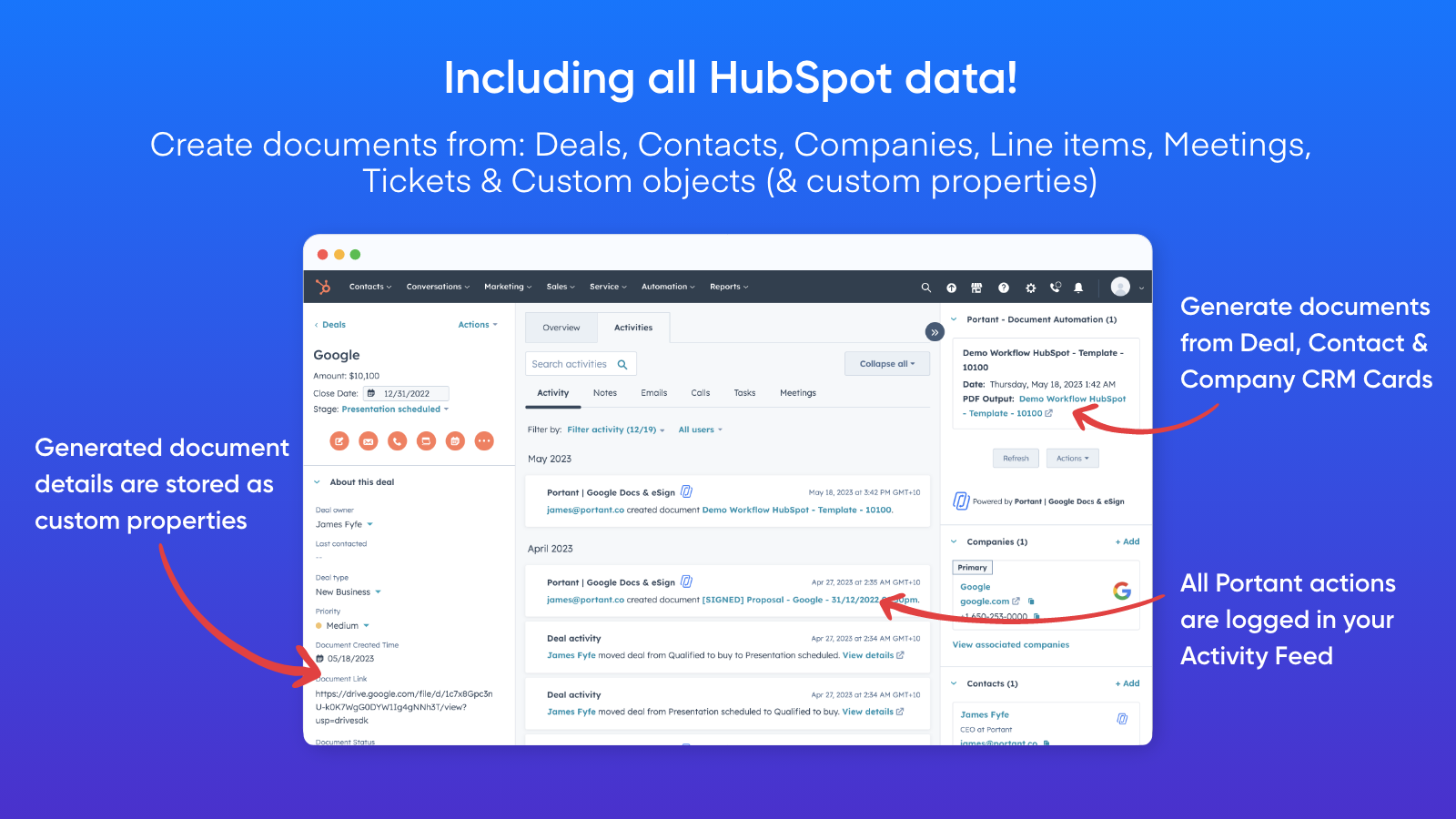
Works with any HubSpot Object property
Generate Docs/Slides/PDF files from HubSpot data like: - Deals - Companies - Contacts - Line items - Meetings - Tickets - Custom objects & custom properties Other features include: - All activity logged in the activity section - Generate documents from Deal, Contact, Company or Ticket CRM Cards - Save document details as custom properties.
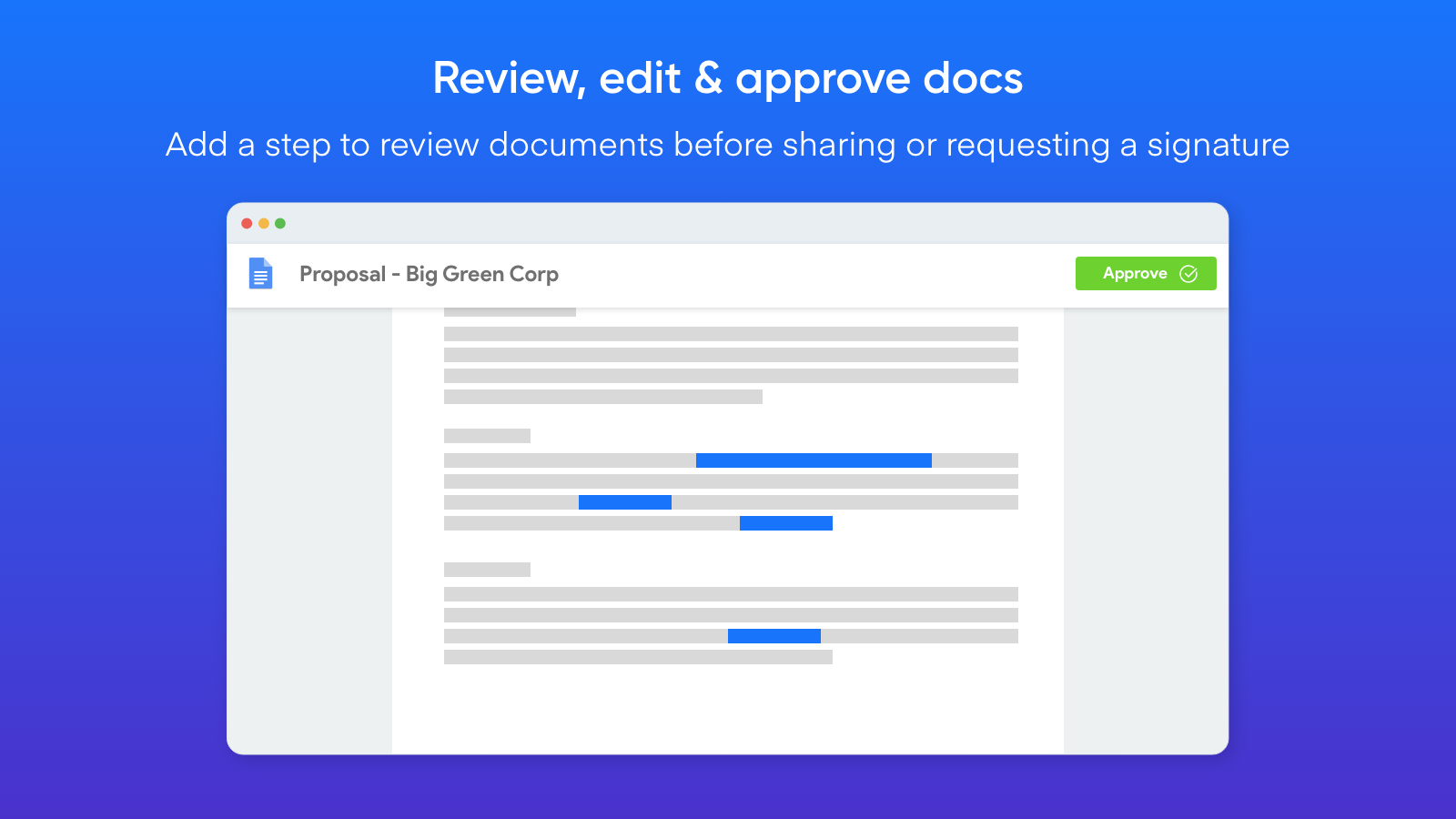
Review generated documents before they are sent
You can add a step to review any document generated by Portant. This enables you to review, edit and then approve the document to be shared or requested to be signed.
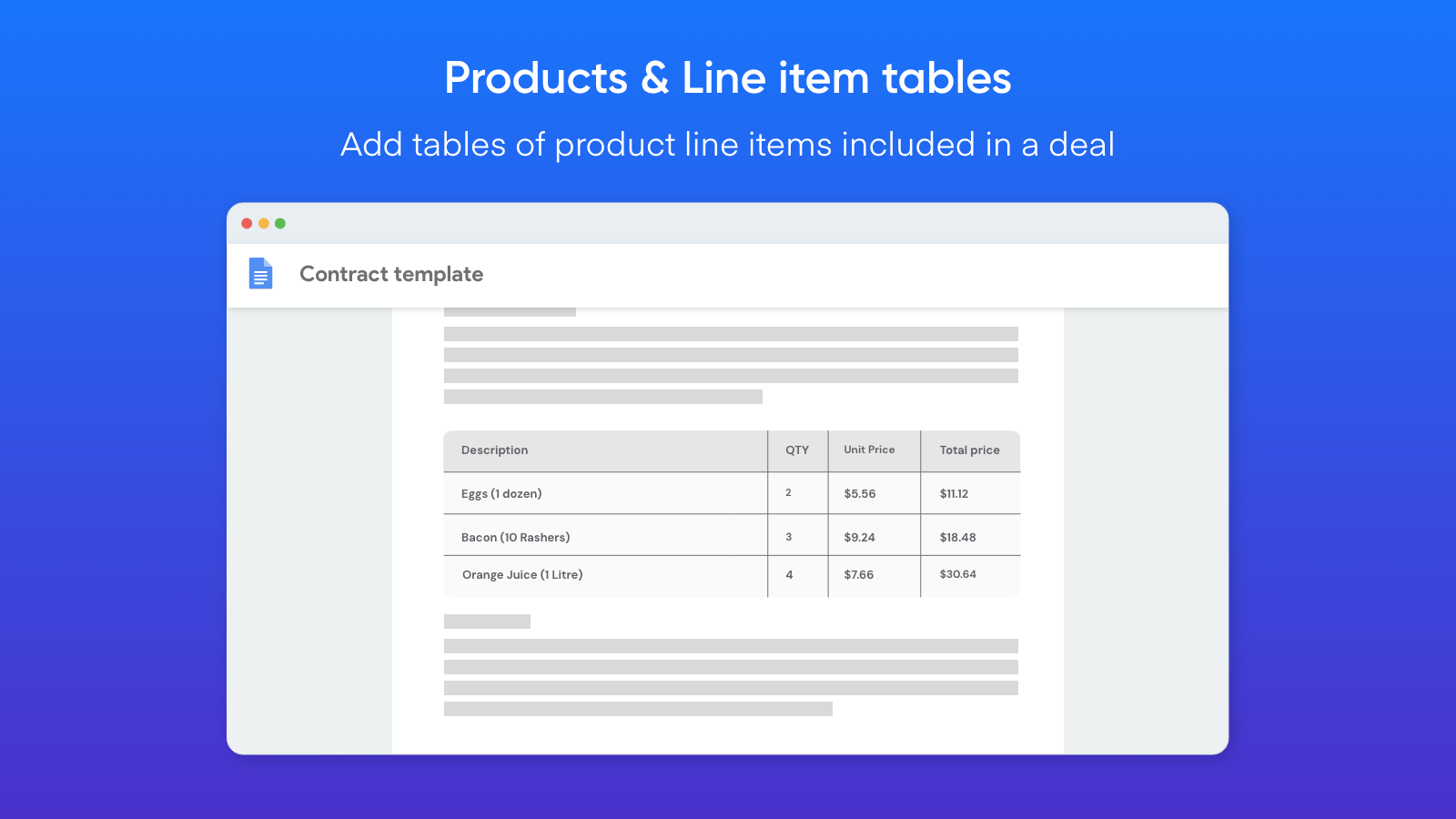
Add tables of HubSpot Product Line Items
Portant can insert all line items added to a deal in a table in your document. This is perfect for quotes or invoices when you need each component of the deal itemised in the document. It also works with any HubSpot object (not just line items).
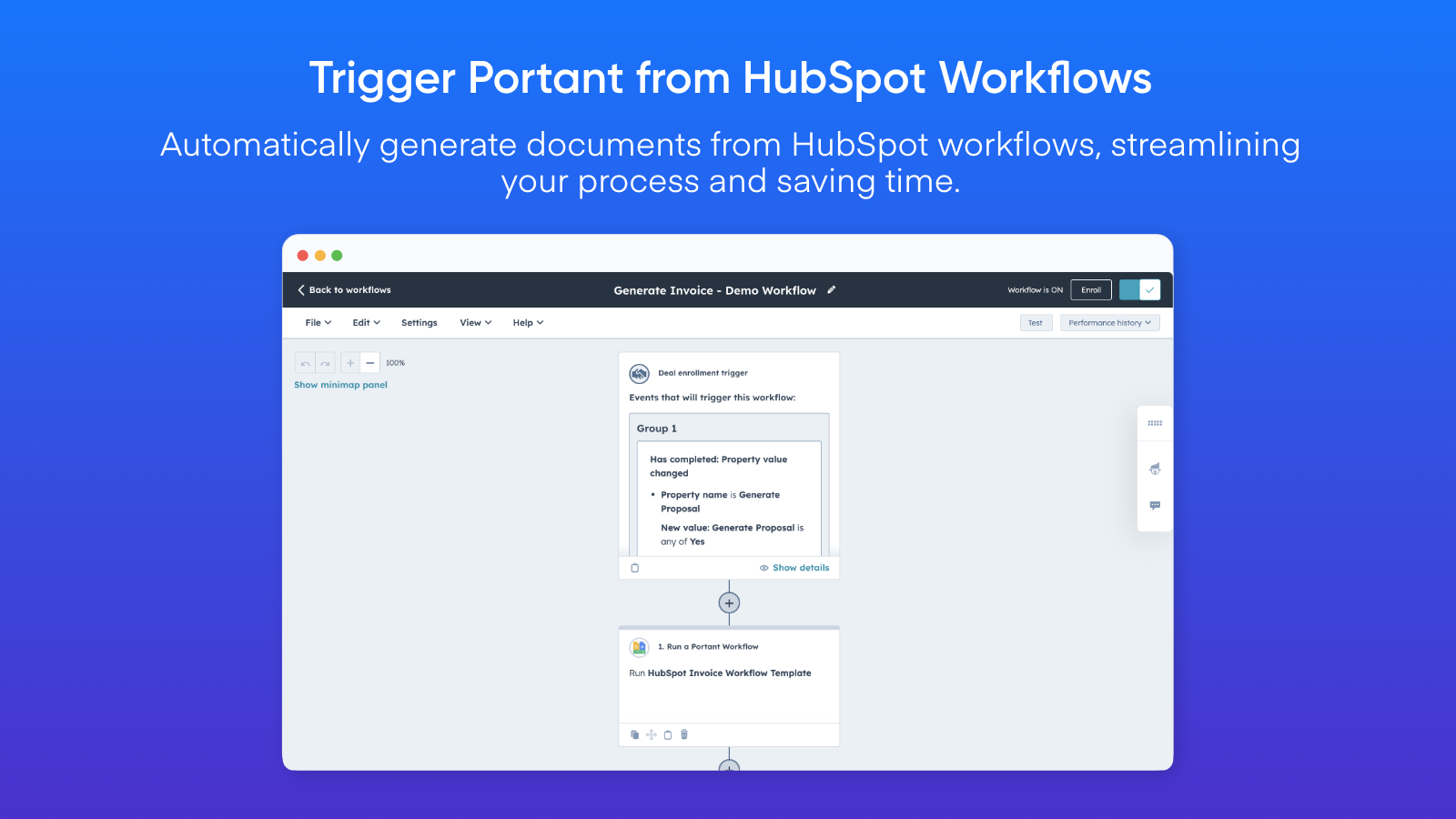
Automate Document Creation via HubSpot Workflows
You can trigger document generation within HubSpot in countless ways. Simply add a Portant Action to your HubSpot workflows to seamlessly run a Portant workflow from within HubSpot.
Automate Document Creation via HubSpot Workflows
You can trigger document generation within HubSpot in countless ways. Simply add a Portant Action to your HubSpot workflows to seamlessly run a Portant workflow from within HubSpot.
Fonctionnalité de l'application
Document Outputs | Portant documents Portant documents | |
HubSpot Company Fields | ||
HubSpot Contact Fields | ||
HubSpot Contact Lists | ||
HubSpot Deal Fields | ||
HubSpot Meeting Fields | ||
HubSpot Product Fields | ||
HubSpot Ticket Fields | ||
Owners Data | ||
Portant Document Properties | ||
Portant Document Properties | ||
Portant Document Properties | ||
Timeline |
Avis
4,8
19
4,8
19
- 7 févr. 2026
Une solution parfaite pour les besoins en PDF avec un support client exceptionnel
Très bonne application, fait le travail, le support et l'aide sont 10/10
Fait tout ce dont j'ai besoin pour sortir les pdf
Mirkovic, L.
- 18 nov. 2025
Solution documentaire impressionnante par sa fluidité et sa convivialité, qui se distingue par une collaboration transparente et une signature pratique, bien qu'elle manque de certaines fonctions de formatage avancées par rapport à Microsoft Word.
Google Docs, avec ses fonctionnalités d'exportation PDF et de signature électronique, est devenu l'une des solutions de gestion de documents les plus pratiques et les plus efficaces disponibles aujourd'hui. Que vous soyez étudiant, entrepreneur, travailleur indépendant ou que vous fassiez partie d'une grande organisation, la plateforme offre un moyen accessible de créer, de partager et de signer des documents sans avoir besoin d'un logiciel complexe.
L'interface est simple et intuitive, ce qui en fait un outil idéal pour les débutants comme pour les professionnels.
Bien qu'il soit parfait pour les documents de base, Google Docs ne dispose pas de certaines fonctionnalités avancées de mise en page et de formatage que l'on trouve dans Microsoft Word ou dans les outils Adobe.
Muhammed, A.
Tarification
Pro
41,58 $US
/moisFor individuals that need more documents/month
2000 Documents/month
Document workflows - with Portant branding removed
eSign
Export and Share as PDF
Template gallery
Chat and email support
Pro
41,58 $US
/moisFor individuals that need more documents/month
2000 Documents/month
Document workflows - with Portant branding removed
eSign
Export and Share as PDF
Template gallery
Chat and email support
* Les prix mentionnés ici sont uniquement présentés à titre indicatif. Tous les prix n'incluent pas les taxes, les offres spéciales, les réductions ni les autres facteurs pouvant affecter les tarifs. Vous devez contacter le partenaire pour obtenir les tarifs les plus récents. HubSpot n'assume aucune responsabilité pour les informations de tarification fournies par ses partenaires. Dernière mise à jour des prix : 22/12/2025
Informations supplémentaires
Créé par - Portant
Installation - 3 k installations
Catégories Langues dans lesquelles cette application est disponible Allemand ,Anglais ,Espagnol etFrançais
Attirer l'attention aujourd'hui