
.png)
AdRoll Marketing & Advertising
開発元 - AdRoll, Inc
インストール数 - 2千件のインストール
評価 3.8
(5)

必要な条件
HubSpotエディション HubSpotアカウント権限 - 必要なアカウント権限を表示
アクセス権のタイプ 共有 AdRoll Marketing & Advertisingの契約内容 - プラン:HubSpotとの無料連携
概要
1/3
HubSpotとの連携機能により、HubSpotアカウント内の静的なメールリストをAdRollに直接同期することができます。当社のCRMデータ取り込みプロセスを通じて照合されるこの連携機能により、リストを簡単にターゲティング可能なオーディエンスに変換し、有料デジタルメディアやアカウントベースの広告キャンペーンで活用することができます。
この連携の要件
HubSpot Marketing Hubの有料アカウント(Starter、Professional、またはEnterprise)をお持ちである必要があります。
CRMリストの読み込みを正常に行うには、各リストに少なくとも100件のユニークなユーザーメールアドレスが含まれている必要があります。
CRMオーディエンスの同期
HubSpot 連携ツールを見つけるには:
- 左側のナビゲーションメニューから [オーディエンス] タブに移動します。
- [接続済みのオーディエンス] をクリックします。
- [アプリ] の下にある [他のマーケティングアプリを接続] をクリックします。
- HubSpot アイコンをクリックし、[接続] をクリックします。
- HubSpotアカウントにログインします。
- AdRollに戻り、「HubSpot IDを入力」フィールドにIDを貼り付けます。
- [HubSpot ID で認証] > [承認] をクリックします。
- [リストの選択] をクリックして、AdRollのオーディエンス用のリストを選択します。
ベストプラクティス
CRM データの取り込みに向けてリストを準備するためのヒントは以下の通りです。
- リストには、少なくとも100件のメールアドレスが含まれている必要があります。
- 一致率が高くなるため、可能な限り個人のメールアドレスを使用してください。
- メールアドレスデータベースが最新であることを確認してください。登録ワークフローにメールアドレスの検証ステップを追加すると、ユーザーが有効なメールアドレスを入力していることを確認するのに非常に役立ちます。
- パフォーマンスを向上させるために、CRMオーディエンスを他のオーディエンスタイプと組み合わせることを検討してください。
- HubSpotから静的リストをアップロードするようにしてください。スマートリストは現在サポートされていません。
HubSpot でのリストの管理について、詳細をご覧ください。
インポートされたオーディエンス
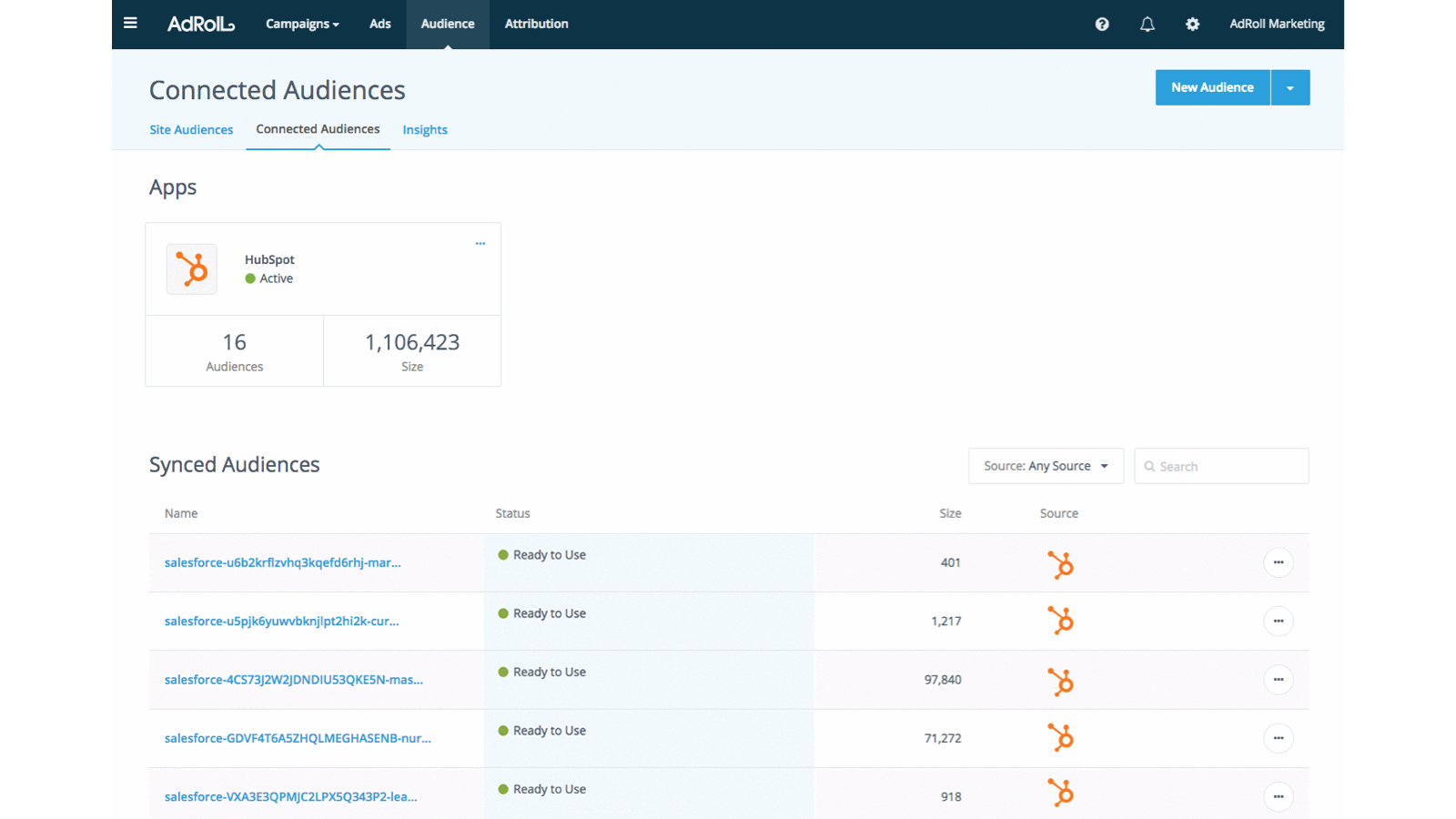
HubSpot CRMのオーディエンスは、AdRollにすぐには表示されない場合があります。新しいリストの照合処理は6時間以内に開始されます。処理開始後に追加された新しいメールアドレスについては、照合に最大2週間かかる場合があります。
インポートされたオーディエンス名には、自動的に「HubSpot」という接尾辞が付きます。
メールアドレスリストが表示された後、Cookieの照合が開始されます。キャンペーンで完全に有効になるまで、最大7日ほどかかる場合があります。
今後の流れ
- HubSpotから新しいメールアドレスを24時間ごとに取得します。
- 米国の広告主様の場合、CRMはWebおよびFacebookの両方で利用可能です。可能な限り、米国ベースのメールアドレスを使用することをお勧めします。
- 米国以外では、WebキャンペーンにおけるCRMオーディエンスの機能が制限されます。米国以外の広告主様には、代わりにFacebookでのCRMリターゲティングの利用をお勧めします。
- CRMオーディエンスは、一度作成すると編集できません。
- Facebookでのクッキーマッチングには24時間未満かかります。
- Web でのクッキーの照合には、メールリストの規模にもよりますが、最大 7 日かかります。
照合されたメールアドレス
HubSpot 連携を通じて当初アップロードされたメールアドレスの数を表示します。
WebまたはFacebookで正常にマッチングされたメールアドレスの数を確認するには、「オーディエンス」タブでHubSpotオーディエンスの名前をクリックしてください。
機能
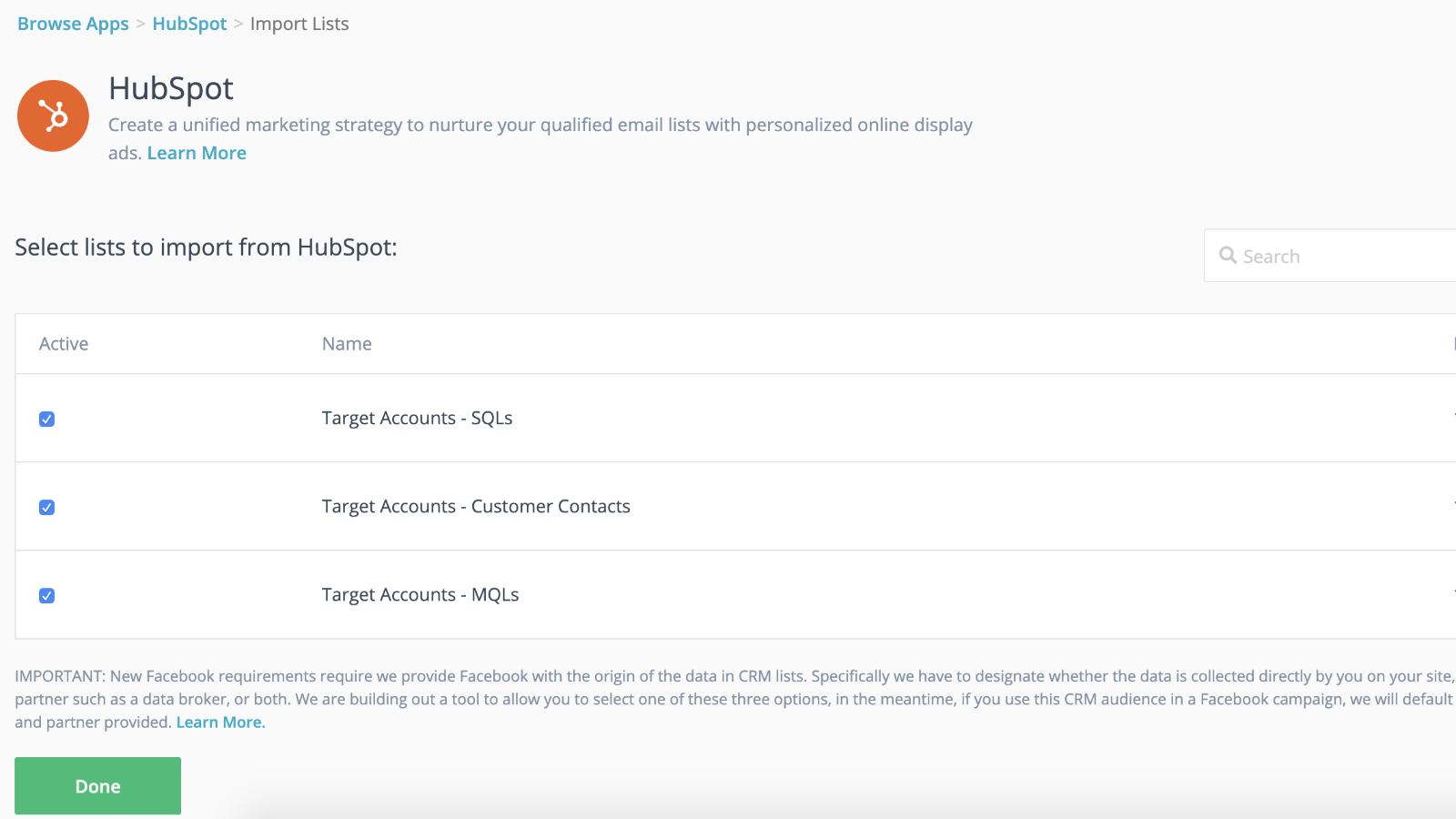
ダイナミックオーディエンス同期とのシームレスな連携と、より迅速なローンチ
CRMのリストをリターゲティングキャンペーンに連携させれば、バックグラウンドでリターゲティングキャンペーンが本格化するまでの間、先行して準備を進めることができます。リストをAdRollにインポートすれば、準備は完了です。連絡先リストの同期は、24時間ごとに自動的に行われます。
見込み客に合わせた体験を提供する
HubSpot CRMの顧客属性を活用して、ターゲットを絞った、成果の高い顧客体験を創出しましょう。
アプリ機能
共有されるデータ
AdRoll Audience |
確認
3.8
5
3.8
5
- 2024年11月21日
Gumbayan, J.
- 2021年10月20日
Retargeting with Adroll/HubSpot Integration
It works like a CHARM! It was easy to set up the HubSpot/AdRoll integration. Syncing our HubSpot lists with AdRoll was also seamless. The AdRoll platform is intuitive and allows you to set up different campaigns and "advertiser" profiles so you can segment the spend by department, making the expense reporting and ROI calculations easy.
We are using AdRoll for retargeting campaigns for our annual conference and select programs.
Syncing lists from HubSpot to AdRoll allows us to exclude customers/prospects from our retargeting efforts more easily that if we didn't have the integration.
The biggest drawback is that, unlike Google & Linkedin, the data sync is only one way...HubSpot TO AdRoll. If this were a two-way sync so that the metrics were included with our other Advertising Metrics on the HubSpot Ads section it would be even better! Also you can't manage the campaigns from within HubSpot...you have to set up and manage campaigns on the AdRoll platform
Grassley Clarke, M.
非営利 - 従業員11人~25人
価格
HubSpotとの無料連携
$0
今すぐHubSpotのリストをAdRollと同期して、広告ターゲティングキャンペーンを始めましょう
HubSpotとの無料連携
$0
今すぐHubSpotのリストをAdRollと同期して、広告ターゲティングキャンペーンを始めましょう
* こちらの価格は参考表示価格です。どの価格にも税、インセンティブ、値引など、価格に関する変動要素は含まれていません。価格に関する正確な最新情報については、この提供元パートナーまでお問い合わせください。HubSpotは、パートナー各社が提供する価格情報について一切の責任を負わないものとします。価格の最終更新:2026/07/29