

ClearSync
Anforderungen
HubSpot-Produktversion HubSpot-Account-Berechtigungen - Erforderliche Account-Berechtigungen anzeigen
Zugriffstyp Geteilt ClearSync-Abonnement - Produktversion: ClearSync Professional
Übersicht
1/9 - Sehen Sie sich unsere Demo an, um zu erfahren, wie Sie Ihre Stripe-MRR-Daten direkt in HubSpot abrufen können.
ClearSync überträgt hochwertige Daten zu Stripe-Abonnements, MRR-Änderungen und Zahlungen in HubSpot und ermöglicht so einen Echtzeit- und historischen Überblick über den MRR, der Ihren Kunden und Kontakten zugeordnet ist.
Durch die Bereitstellung von Umsatzdaten, auf die sich Ihr gesamtes Team verlassen und die es nutzen kann, vereint ClearSync die Teams aus den Bereichen Finanzen, RevOps und GTM um eine einzige, vertrauenswürdige Quelle für die tatsächlichen Stripe-MRR-Werte – und das alles innerhalb von HubSpot.
Wie funktioniert ClearSync?
ClearSync wandelt Ihre Stripe-MRR-Daten um und überträgt sie an HubSpot CRM, sodass alle Ihre Daten in Echtzeit auf dem neuesten Stand bleiben. Es nutzt einen schreibgeschützten Zugriff auf Ihr Stripe-Konto und überträgt MRR- und Zahlungsdaten an Ihr HubSpot CRM, damit Gründer und GTM-Teams diese in HubSpot-Berichten und -Automatisierungen nutzen können.
Für wen ist ClearSync gedacht?
ClearSync wurde für SaaS-Unternehmen entwickelt, die Stripe für Abonnements und HubSpot für das CRM nutzen. Wir haben uns überlegt, wie sich Ihre MRR- und Umsatzdaten am besten so in HubSpot übertragen und synchronisieren lassen, dass sie für Gründer, Finanz-, Betriebs- und GTM-Teams optimal nutzbar sind.
Erstellt ClearSync für mich neue Unternehmen und Kontakte in HubSpot?
Ja, wenn Sie dies wünschen. ClearSync sucht in Ihrem HubSpot-Konto nach bestehenden Unternehmen und Kontakten und legt diese an, falls sie noch nicht vorhanden sind. Sind sie bereits vorhanden, ordnet ClearSync alle Stripe-Daten benutzerdefinierten „Subscription“- und „Event“-App-Objekten zu und verknüpft sie mit Ihren HubSpot-Unternehmen und -Kontakten. (HubSpot Enterprise ist nicht erforderlich!)
Überschreibt ClearSync meine bestehenden HubSpot-Daten?
Nein. ClearSync findet vorhandene Unternehmen und Kontakte in HubSpot und ergänzt sie mit Stripe-Daten in neuen Feldern und HubSpot-App-Objekten. Wenn ClearSync kein passendes Unternehmen oder keinen passenden Kontakt finden kann, können wir eines bzw. einen für Sie anlegen.
Kann ich in HubSpot neue Käufe, Abwanderungen, Verkleinerungen und Erweiterungen im Zeitverlauf einsehen?
Ja. ClearSync wurde speziell für diesen Anwendungsfall entwickelt. ClearSync ist so konzipiert, dass es Ihnen neue Käufe, Erweiterungen, Verkleinerungen und Abwanderungen in Echtzeit anzeigt.
Kann ich mehrere Stripe-Konten mit demselben HubSpot-Konto verbinden?
Ja! Sie können mehrere Stripe-Konten mit ClearSync verbinden und die Daten an dasselbe HubSpot-Konto übertragen. Schreiben Sie uns einfach, wenn Sie diesen Anwendungsfall haben, und wir helfen Ihnen bei der Einrichtung.
Bieten Sie Unterstützung bei der Implementierung an?
Ja, ClearSync wurde von zwei ehemaligen HubSpot-Mitarbeitern entwickelt, die Experten auf diesem Gebiet sind. Wir helfen Ihnen gerne bei der Einrichtung und beantworten alle Fragen zu Berichten oder Best Practices in HubSpot oder Stripe.
Funktionen
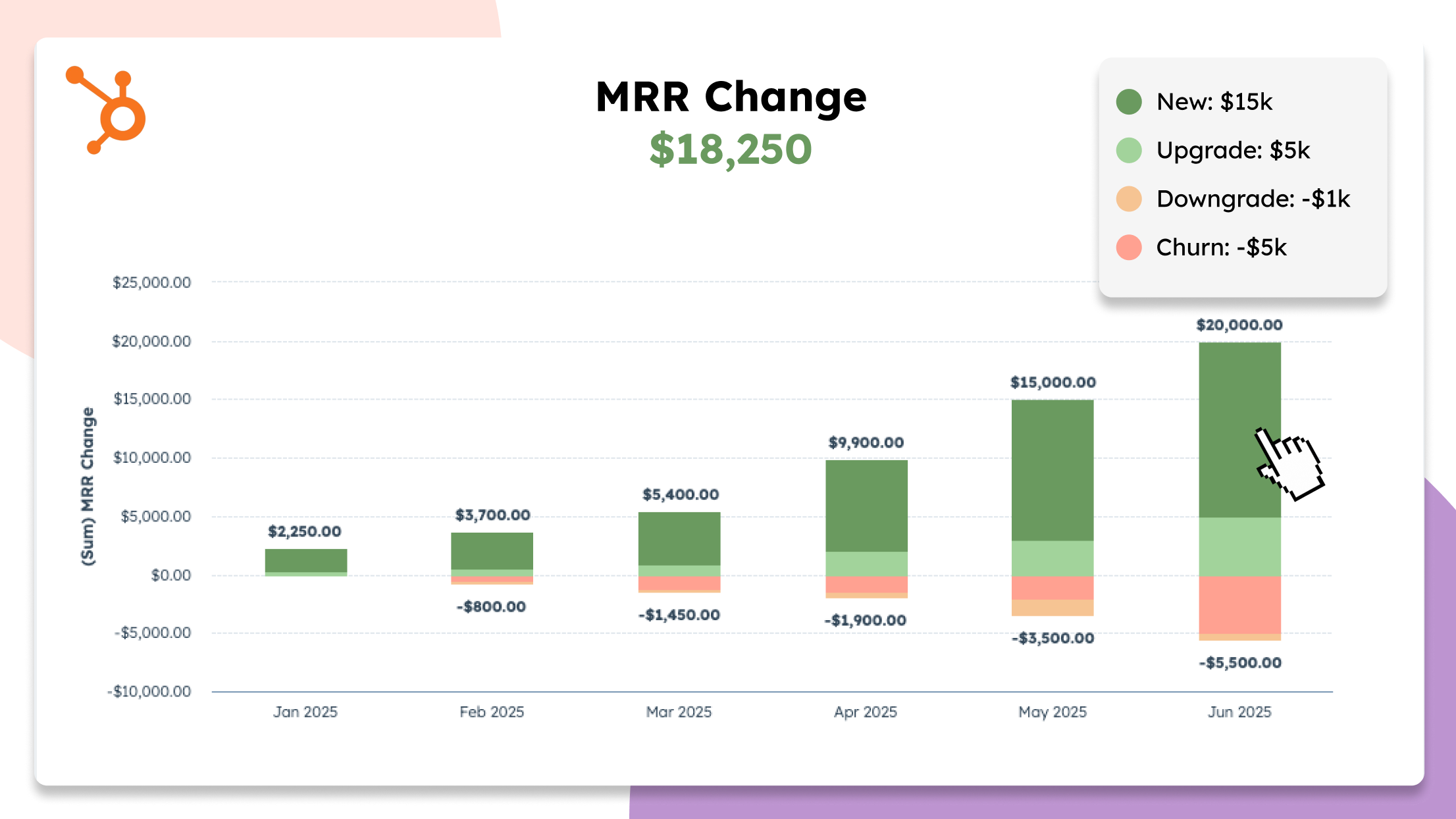
Umfassende MRR-Berichterstellung speziell für SaaS-Teams
- Einheitliche MRR-Berichterstattung von Stripe in HubSpot für Self-Service- und vertriebsorientierte Teams - Erfasst jeden neuen Kauf, jedes Upgrade, jedes Downgrade, jede Kündigung sowie jede Produkt- und Tarifänderung mit Datumsangaben - ClearSync wird in Echtzeit aktualisiert, sobald sich Abonnements in Stripe ändern - Führen Sie Segmentanalysen in HubSpot durch, um Quellen für neuen MRR oder Umsatzverluste zu identifizieren
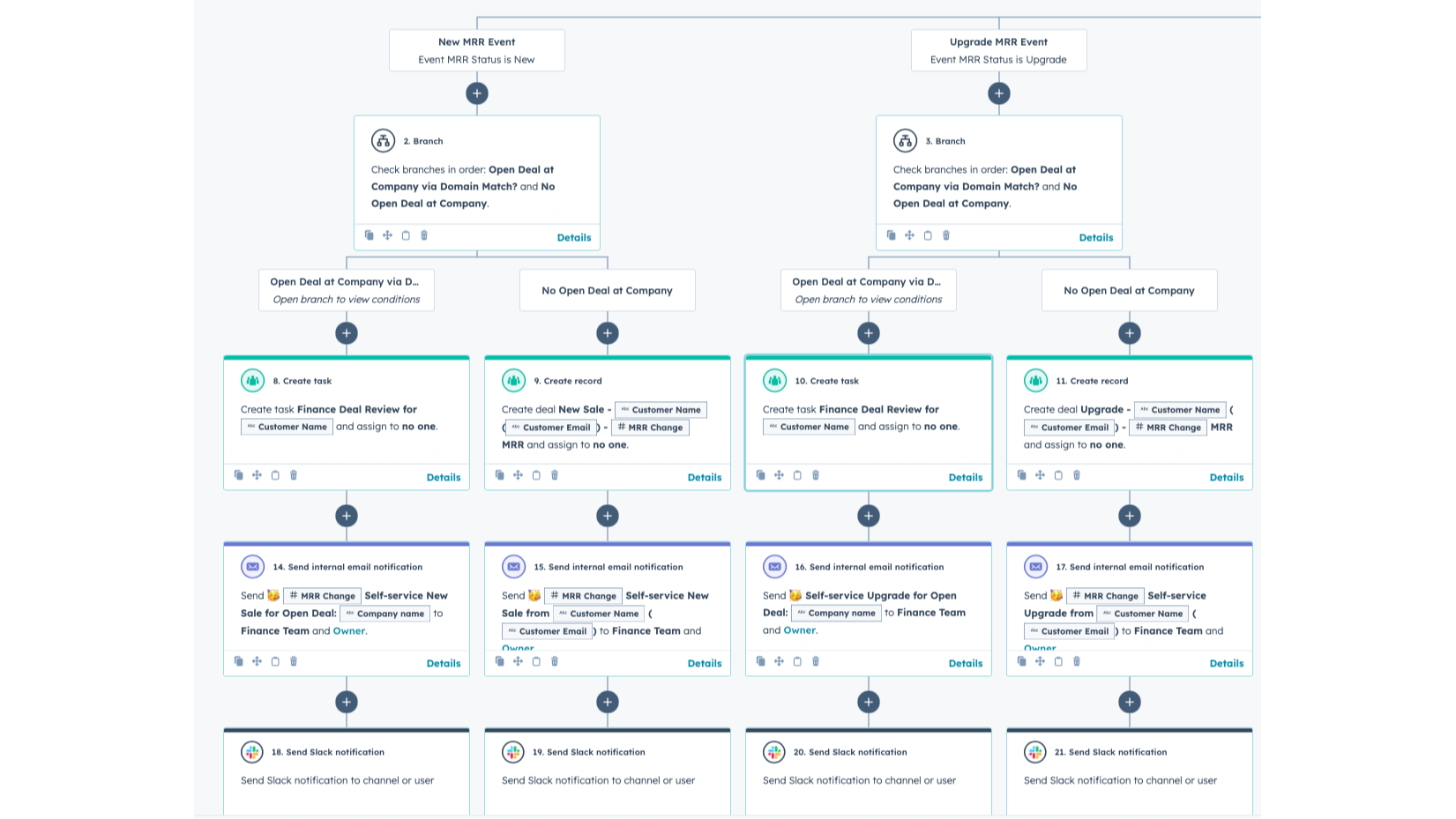
Stripe-Umsatzereignisse in eine HubSpot-GTM-Aktion umwandeln
- Automatisieren Sie Hunderte von GTM-Aktionen in HubSpot mithilfe detaillierter Stripe-Daten - Automatisieren Sie Kampagnen zur Kundenrückgewinnung und bei Zahlungsausfällen - Lösen Sie Upselling-Workflows basierend auf dem Kundenkontext aus - Warnen Sie Teams vor Verlängerungsrisiken oder geplanten Kündigungen - Verknüpfen Sie Produktänderungen mit GTM-Kampagnen
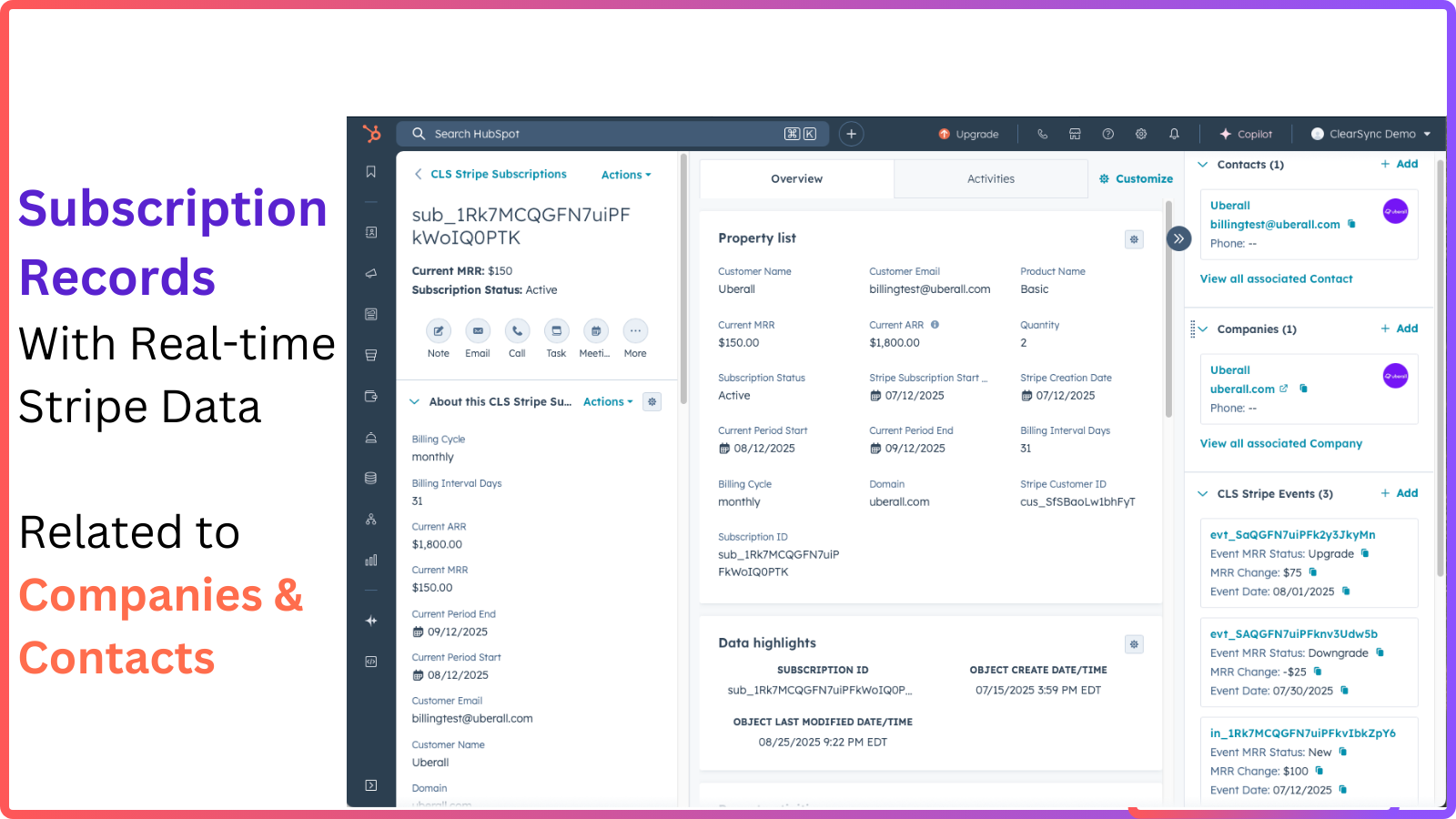
Stellen Sie Ihren CSMs die Daten zur Verfügung, die sie benötigen
- Mit ClearSync haben Sie in HubSpot stets den Überblick über die aktuellen Produkte, Ausgaben und den MRR Ihrer Kunden - Erhalten Sie eine Zeitleiste aller Ereignisse, die sich auf den MRR auswirken: Upgrades, Downgrades, Abwanderungen und Neukäufe - Gehen Sie mit Hintergrundwissen und Selbstvertrauen in Kundengespräche - Erstellen Sie automatisierte Strategien zur Kundenbindung auf Basis des Kundenverhaltens
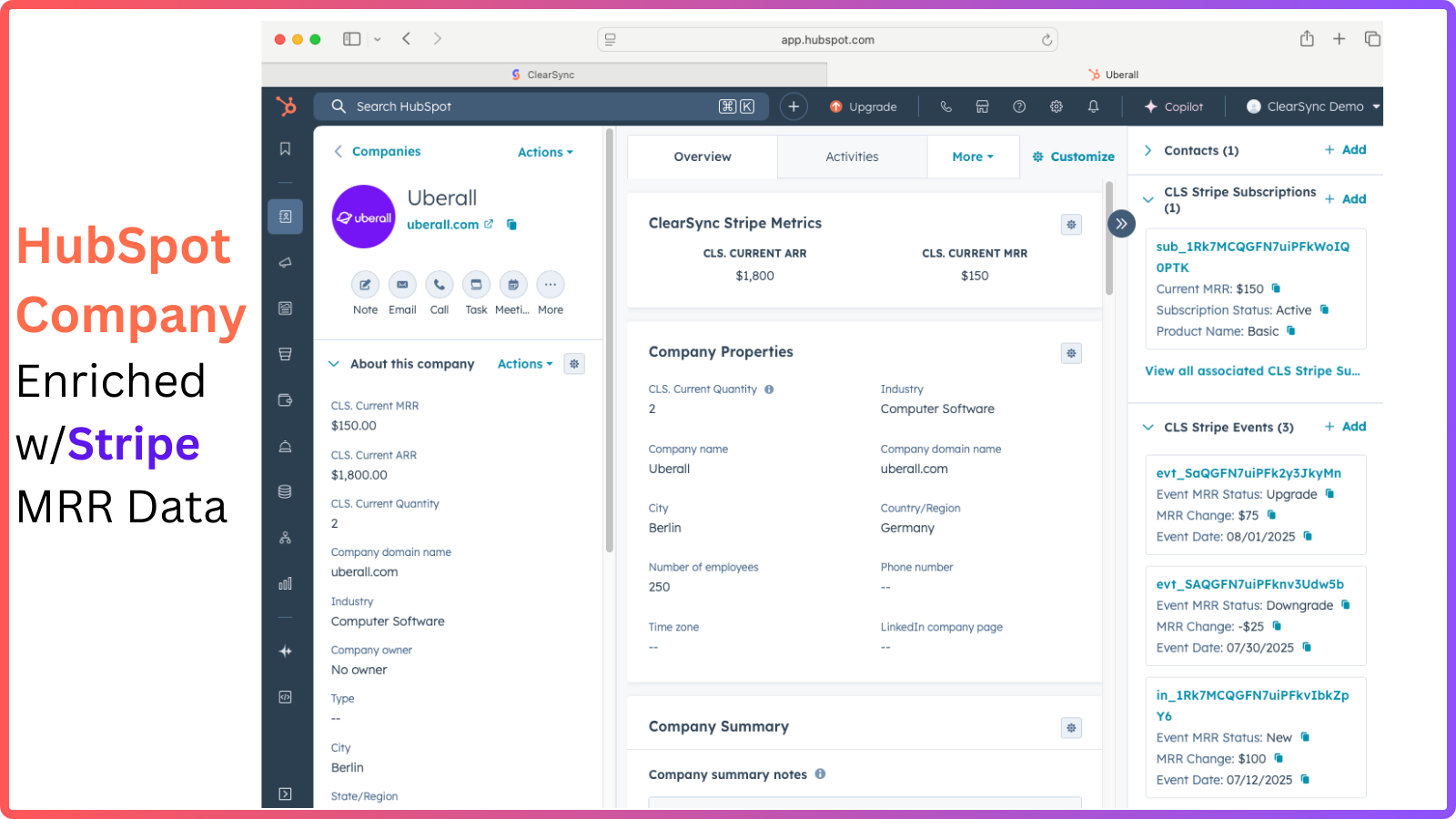
ClearSync vereinfacht die Stripe-Daten für SaaS-Unternehmen
- Integrierte Best Practices für SaaS-MRR - ClearSync übernimmt automatisch anteilige Abrechnungen, Rabatte, Abrechnungsintervalle, gestaffelte Preise, Steuern, Rückerstattungen und Testphasen und stellt so sicher, dass Ihr MRR stets korrekt ist - Erfahren Sie, welche Faktoren den MRR beeinflussen – von kostenlosen Testphasen bis hin zu Upgrade-Kampagnen
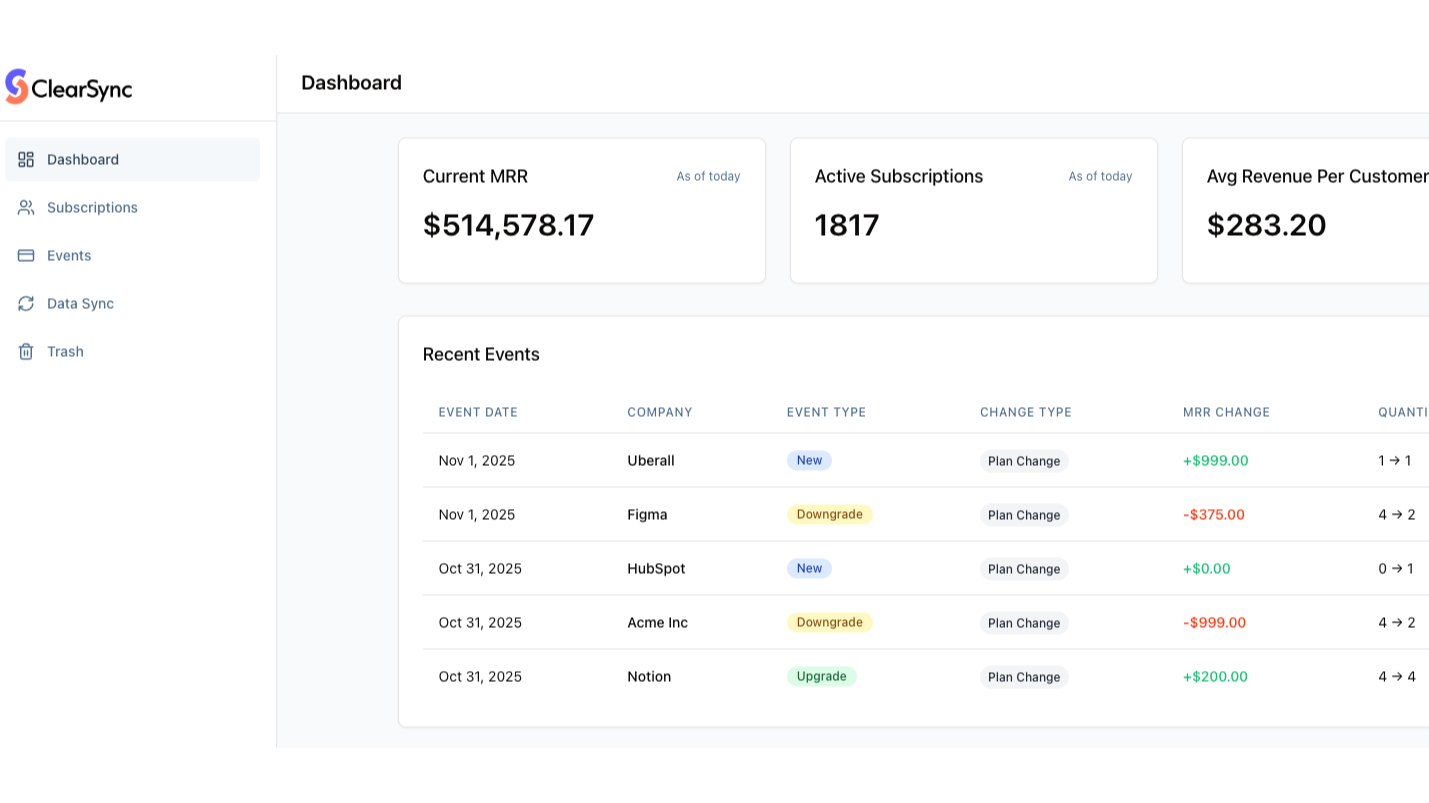
Importieren Sie alle historischen Stripe-Daten und gewinnen Sie sofort Einblicke
- ClearSync importiert 100 % Ihres Stripe-Abonnementverlaufs, einschließlich der Kunden, die gekündigt haben - Erkennen Sie Wachstumsmuster über Kunden und Produkte hinweg - Rekonstruieren Sie MRR-Veränderungen für eine präzise Berichterstattung an die Finanzabteilung und die Geschäftsleitung - Ergänzen Sie jedes HubSpot-Unternehmen und jeden HubSpot-Kontakt mit historischen Abrechnungsdaten
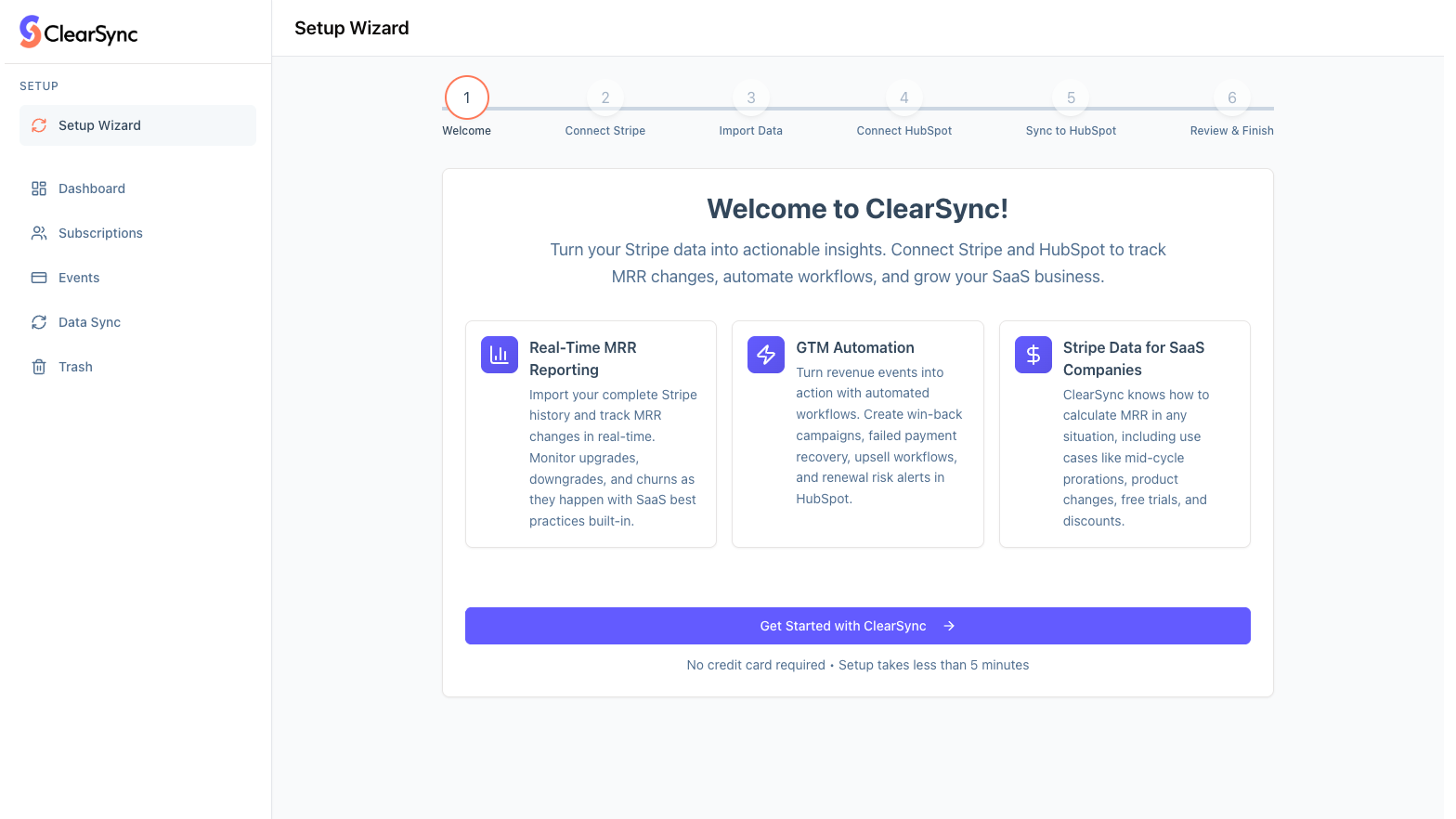
ClearSync in wenigen Minuten einrichten – ganz ohne Programmierkenntnisse
- Keine Entwickler, keine Skripte, kein Aufwand für das Produktteam – verbinden Sie einfach Ihr Stripe-Konto und legen Sie los. - Überprüfen Sie die MRR-Entwicklung und den Verlauf bei Stripe ganz in Ruhe, bevor die Daten mit HubSpot synchronisiert werden. - Sparen Sie sich wochenlange Arbeit an benutzerdefinierten Integrationen – ClearSync lässt sich sauber und schnell einrichten. - Dank des schreibgeschützten Zugriffs auf Stripe bleiben Ihre Abrechnungsdaten unverändert.
App-Funktionalität
Datenaustausch
ClearSync Stripe-Abonnement | Clearsync stripe subscriptions Clearsync stripe subscriptions | |
ClearSync Stripe-Ereignisse | Clearsync stripe events Clearsync stripe events | |
ClearSync Stripe-Abonnements & ClearSync Stripe-Ereignisse | ||
ClearSync Stripe-Abonnements & ClearSync Stripe-Ereignisse |
Rezensionen
5,0
5
5,0
5
- 30. Apr. 2026
Hockin, K.
- 24. März 2026
Tolle App und Unterstützung
ClearSync war einfach zu installieren und einzurichten und ersetzte einen manuellen monatlichen Prozess durch MRR- und ARR-Daten in Echtzeit und höherer Qualität. Wir lieben es, dass es mit allen HubSpot-Versionen funktioniert und mit unseren bestehenden Stripe-IDs für Unternehmen verknüpft ist. Das Team war sehr hilfsbereit und die Zusammenarbeit mit ihm war großartig. Sie haben einige tolle Berichte und Dashboards für uns erstellt, die uns einen besseren Einblick in unseren Kundenstamm und die Faktoren für Umsatz und Abwanderung geben.
MRR-Daten in Echtzeit und in der Vergangenheit sind eine enorme Verbesserung im Vergleich zu unserem früheren Verfahren, bei dem wir MRR-Daten aus Stripe exportierten, sie mit unseren HubSpot-Datensätzen abglichen und dann importierten.
Wir verwenden ein benutzerdefiniertes Objekt für unsere Konten, so dass es ein wenig zusätzlicher Einrichtung bedurfte (ClearSync hat aber auch dies hervorragend unterstützt)
Wheatcraft, K.
ClearSync Professional
124,92 $
/MonatFür wachsende SaaS-Unternehmen, die einen vollständigen Überblick über MRR, Abwanderungsrate und Umsatzereignisse wünschen – ohne HubSpot jemals verlassen zu müssen.
MRR-Berichterstattung über native HubSpot-Berichte
Stripe-Ereignisdatensätze, die für Echtzeit-Workflows bereit sind
Stripe-Abonnement und Veranstaltungssynchronisierung
Transparenz zum MRR bei Stripe mit vollständigem Verlauf, verknüpft mit HubSpot-Kontakten und -Unternehmen
Erhalten Sie in HubSpot sofort Einblicke in Ihre Umsätze
ClearSync Professional
124,92 $
/MonatFür wachsende SaaS-Unternehmen, die einen vollständigen Überblick über MRR, Abwanderungsrate und Umsatzereignisse wünschen – ohne HubSpot jemals verlassen zu müssen.
MRR-Berichterstattung über native HubSpot-Berichte
Stripe-Ereignisdatensätze, die für Echtzeit-Workflows bereit sind
Stripe-Abonnement und Veranstaltungssynchronisierung
Transparenz zum MRR bei Stripe mit vollständigem Verlauf, verknüpft mit HubSpot-Kontakten und -Unternehmen
Erhalten Sie in HubSpot sofort Einblicke in Ihre Umsätze
* Die hier angegebenen Preise dienen nur zu Illustrationszwecken. Alle Preise enthalten keine Steuern, Sonderangebote, Rabatte oder sonstigen Preisvarianten. Bitte wenden Sie sich direkt an den Partner, um aktuelle und korrekte Preisinformationen zu erhalten. HubSpot übernimmt keine Verantwortung für Preisinformationen, die von unseren Partnern bereitgestellt werden. Letzte Aktualisierung der Preisinformationen: 05.08.2026
Weitere Infos
Erstellt von - ClearSync
Installationen - 80+ Installationen
Kategorien Sprachen, in denen diese App verfügbar ist Englisch