

WhatHub: WhatsApp Integration
Save WhatsApp conversations, access HubSpot contact info from WhatsApp
Desarrollado por - Leadsruptive
Instalaciones - 3K instalaciones
Clasificación 3,4
(122)

Leading
Requisitos
Plan de HubSpot Permisos de cuenta de HubSpot - Ver los permisos de cuenta requeridos
Tipo de acceso Compartida Suscripción: WhatHub: WhatsApp Integration - Suscripciones: Starter, Basic o Professional
Vista general
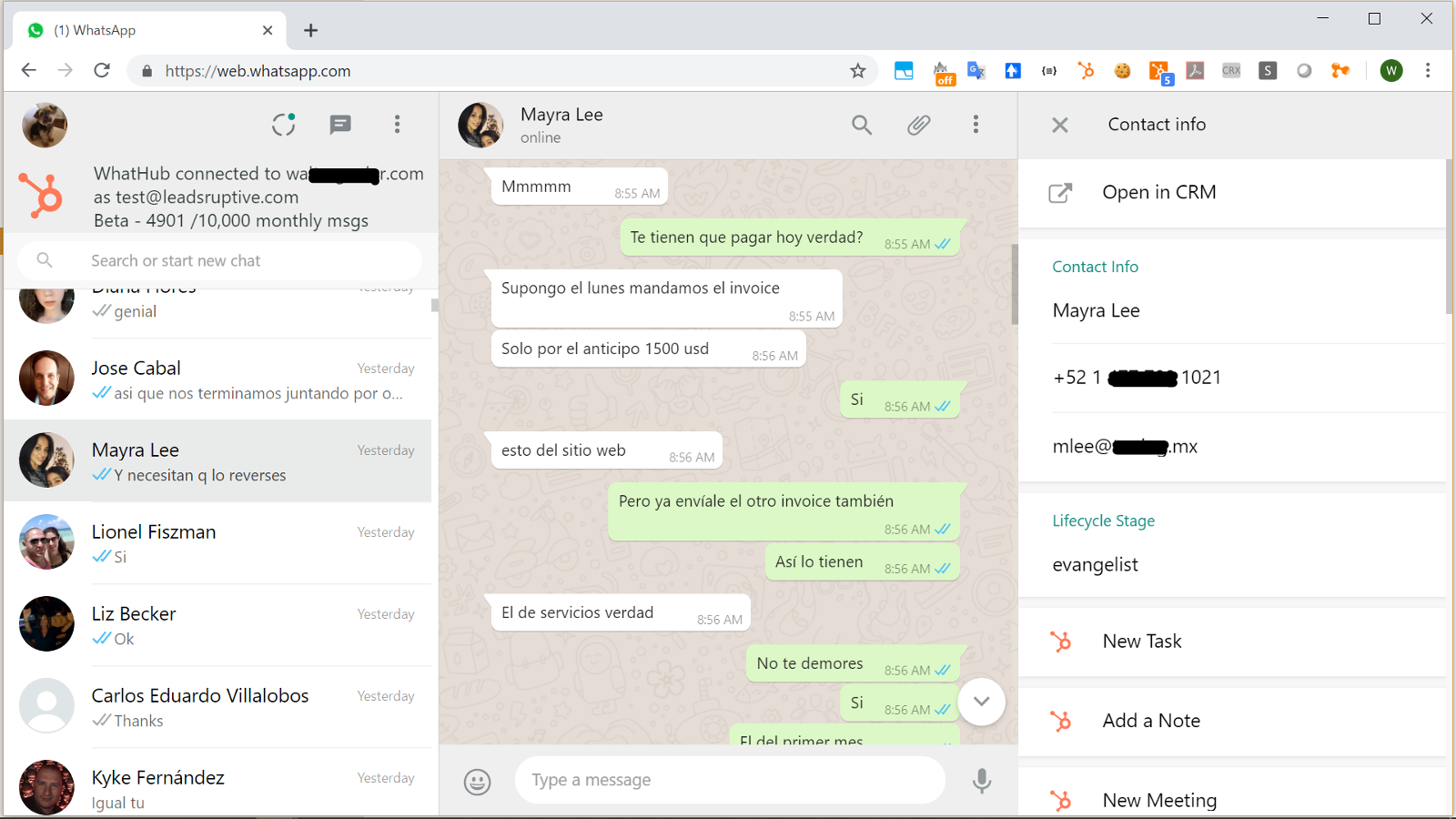
1/1 - Supercharge WhatsApp with the power of HubSpot CRM
WhatHub brings the full power of HubSpot CRM into the WhatsApp Web interface, allowing the user to see information about their WhatsApp contacts and perform HubSpot tasks without ever leaving the WhatsApp UI.
WhatHub is distributed and supported by Leadsruptive, HubSpot Elite Solutions Partner specialized in HubSpot integrations.
WhatHub also allows you to send 1:1 messages to any HubSpot contact and records all the conversations your agents have with your contacts into their timeline, allowing you to configure advanced automations like triggering workflows when certain keyword is mentioned in a WhatsApp message.
Key benefits of WhatHub include:
- Allow agent accountability by keeping track of all conversations inside HubSpot.
- Improve interactions by providing the agent with all relevant information about the contact. No need to waste time asking the same questions repeatedly. If it's in the CRM the agent will see it.
- Save time by being able to perform most common HubSpot Tasks from the WhatsApp UI and using templates and tokens to send messages: Update lead status, deal stage, owner, lifecycle stage, and more.
- Provide privacy and compliance by allowing for configuration of which contacts will be recording.
- Deploy in minutes by keeping your existing messaging interface: WhatHub let's your agents use the chat interface they already know and love while providing all the extra features they need.
- Create reports, lists, and trigger workflow automations based on the content of the WhatsApp messages
- No complicated deployment, no learning curve, no hidden costs
Who should use WhatHub?
WhatHub was designed as a companion for the account manager. You are a greate fit for WhatHub if your company has an account management role either in the Sales or Custome Service process.
DISCLAIMER: In compliance with WhatsApp Terms of Service, you should use the WhatsApp Business app when integrating with HubSpot CRM in a live environment.
Can I use WhatHub to do bulk messaging /automation?
Bulk Messaging is strictly prohibited by WhatsApp. If you have been approved to use the WhatsApp API we would be glad to help send notifications from a HubSpot contact workflow.
Do I need WhatsApp Business?
WhatHub works with the Web interface of either WhatsApp Personal or WhatsApp Business apps, however using WhatsApp Business is recommended.
What type of companies and industries already use WhatHub?
We have clients in multiple industries, both B2C and B2B, from micro companies and solopreneurs using HubSpot Free CRM to large corporations with HubSpot Enterprise and 100+ users.
What type of companies are NOT a good fit for WhatHub?
If you have a large contact center but you don't provide personalized service (no account manager role) you will probably need a full featured contact center solution. WhatsApp Web currently allows only 4 (four) computer/user to be concurrently connected to a phone device/number (10 users on selected markets where "WhatsApp Premium" is available), so you won't be able to handle more than 4 users having private conversatios while using the same phone number.
However as a Certified HubSpot Solution Partner we have 5 years of experience integrating different contact center solutions with HubSpot and we would be glad to help you.
Características
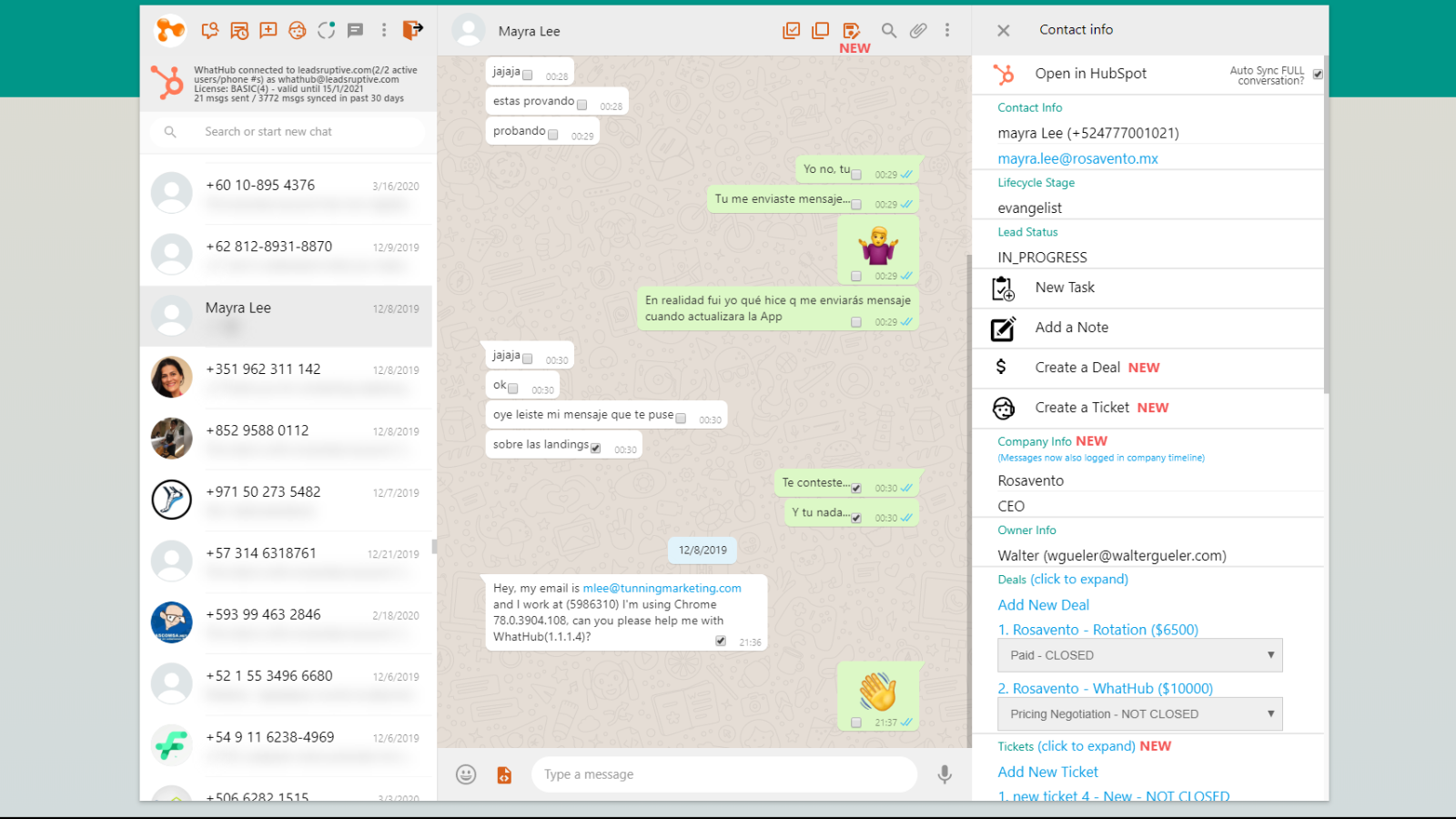
View and edit an existing HubSpot contact from the WhatsApp Web UI
WhatHub will search into your HubSpot CRM. If a contact matching the WhatsApp conversation is found, it will show the information in the right side panel. You will be able to view and edit the contact name, email, lifecycle stage, status, owner, company, deals, and tickets.
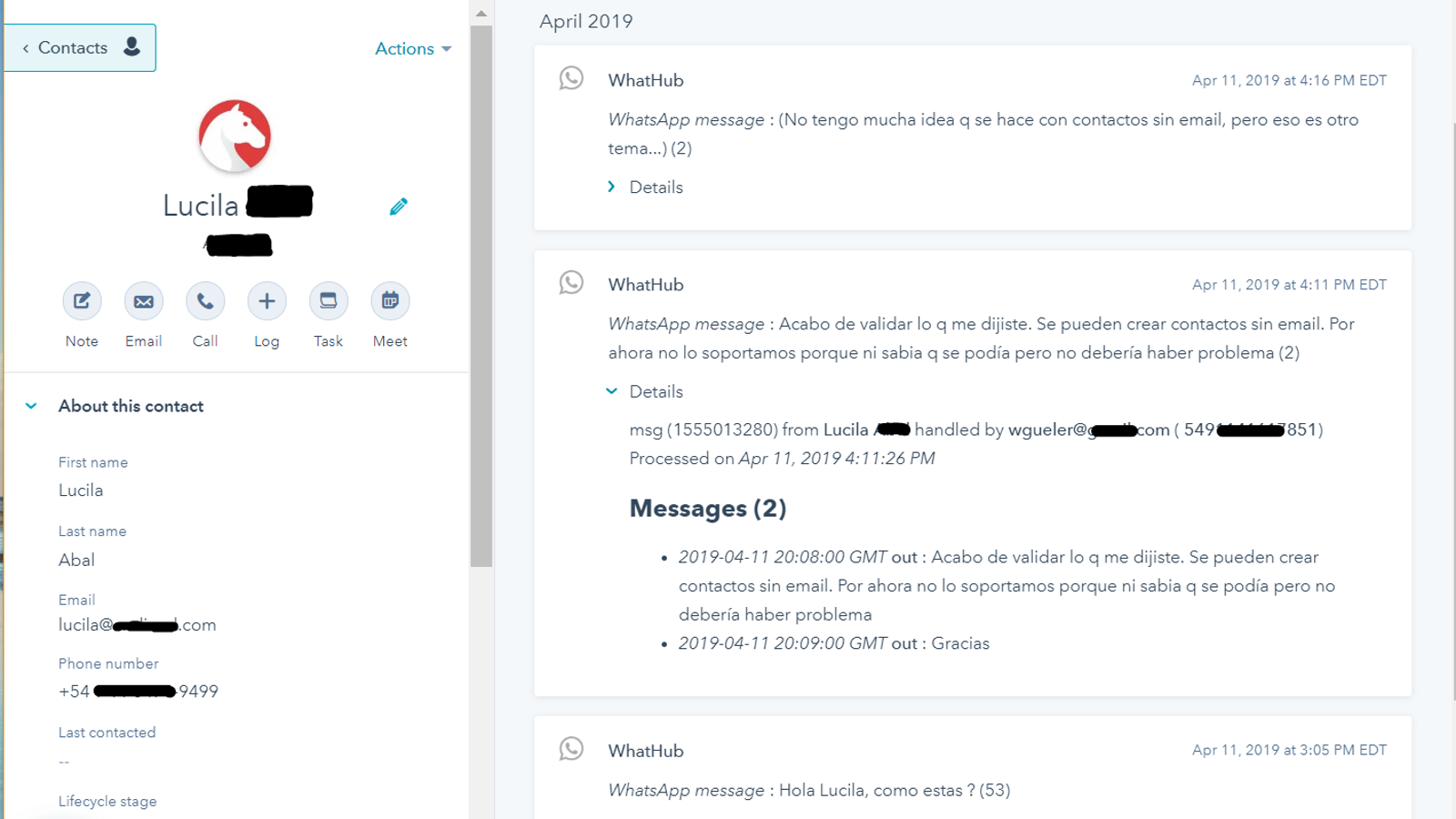
Automatically log your relevant business conversations into HubSpot
WhatHub adds a "sync" contact property. Using that property you will be able to define which contacts will have the conversations automatically logged into the timeline. There's no risk of personal/private conversations getting logged by mistake. Update sync status using manually or using workflows
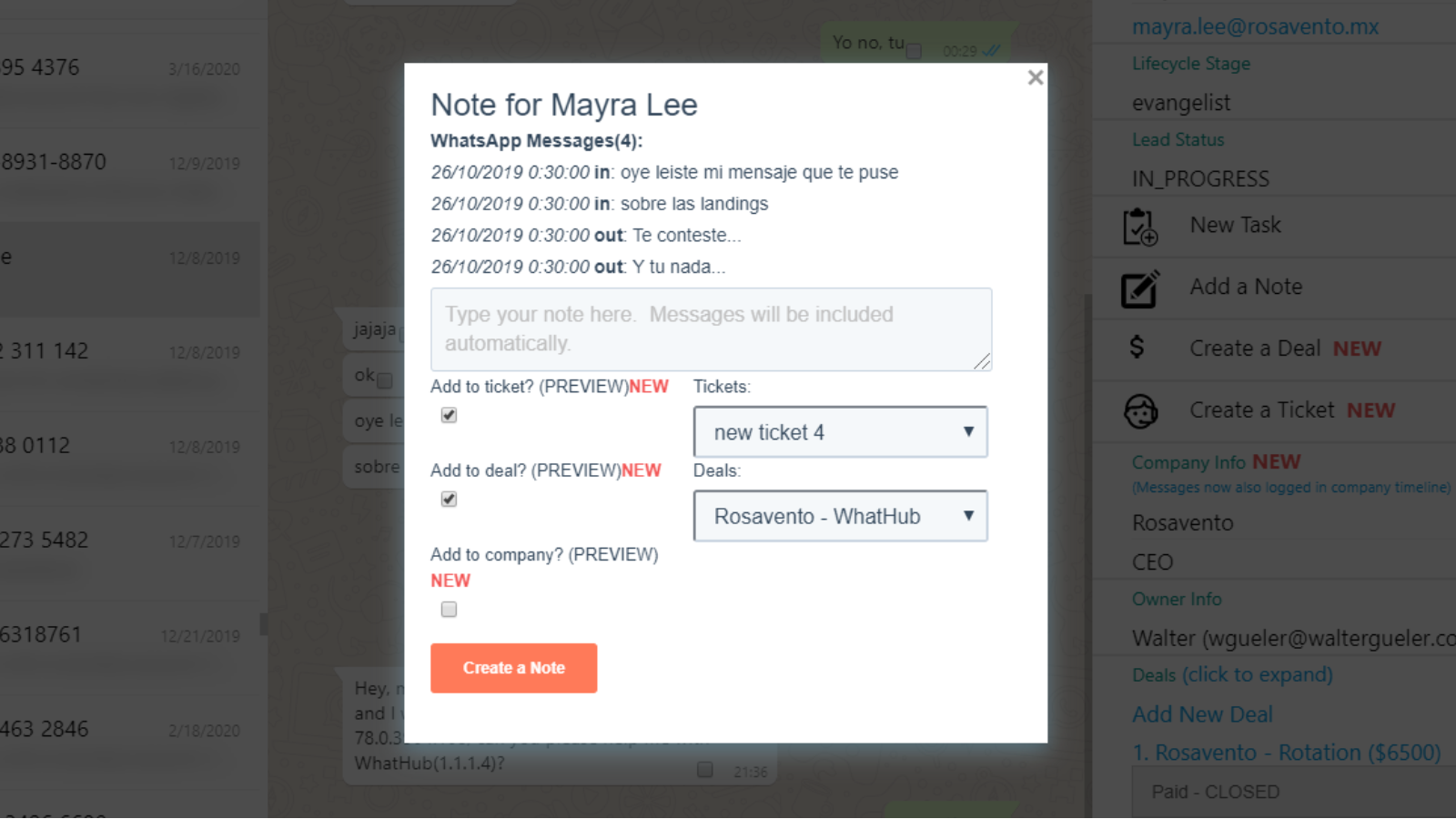
Manually save relevant messages as Notes or Tickets. Add them to Deals
With WhatHub you can save the WhatsApp messages both automatically and manually into HubSpot. Manually saving messages is useful when you want to create a note or a ticket from a specific set of messages. You can save the note into the contact, company or deals, and even create a new ticket!
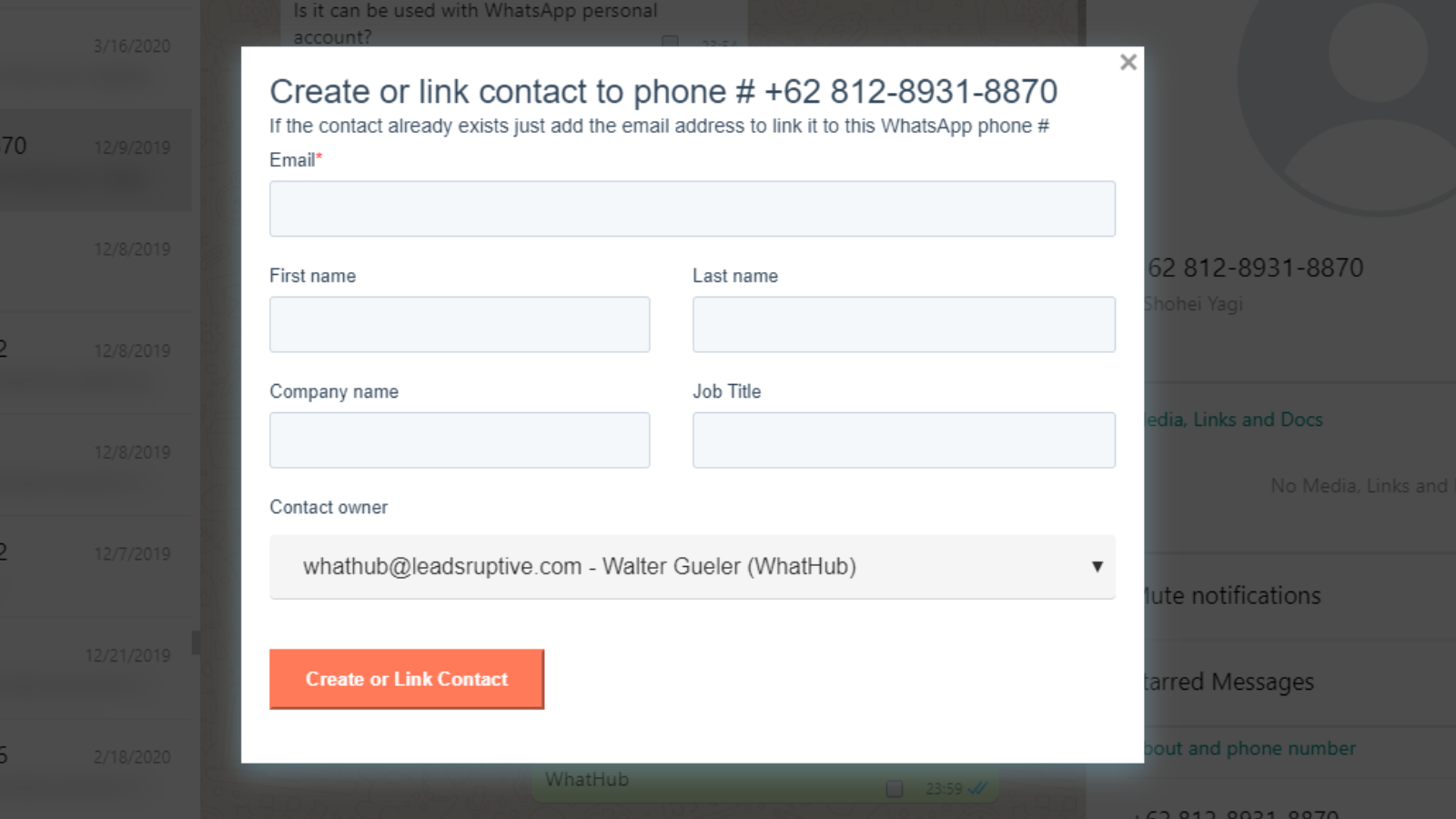
Create new contacts / Link existing contacts
If a contact is not automatically found by WhatHub that means that it doesn't exist in the CRM or that it's missing its phone number. Using the "Create/Link in HubSpot" button, you can easily add the contact without ever leaving WhatsApp. If the contact already exists, it will update it's phone #.
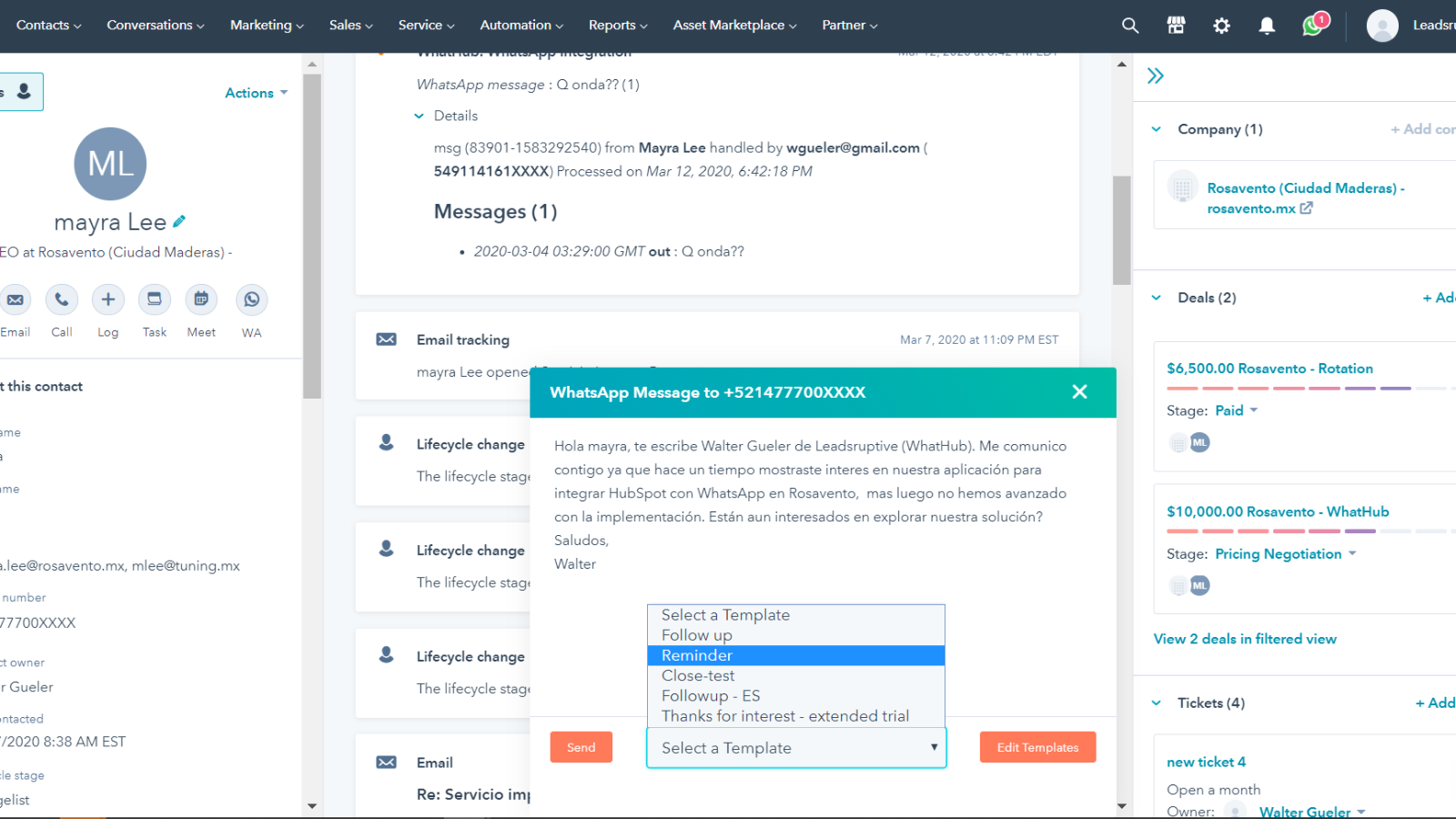
Send WhatsApp messages from HubSpot and use templates
WhatHub saves you time by letting you use message template, including contact and user tokens. Edit your templates, and rapidly send messages both from HubSpot UI WhatsApp web including relevant info like the contact name, company, products and more. You can even use your custom properties!
Funcionalidad de la aplicación
Datos compartidos
Contacts | ||
Sync | ||
Deals | ||
Tasks/Notes | ||
Owners | ||
Contact-Deals | ||
Lead Stages | ||
Timeline | ||
Send message workflow extension |
Valoraciones
3,4
122
3,4
122
- 18 de nov. de 2025
¡Estafa terrible con cancelación imposible y soporte insensible - HubSpot necesita eliminar este addon inmediatamente!
ESTAFA - no podemos cancelar la suscripción en ningún sitio, y su soporte ha dejado de responder. @HubSpot, esto realmente necesita su atención. Deberían deshacerse de este terrible complemento.
Novacek, J.
- 29 de sep. de 2025
El peor servicio absoluto con un soporte terrible que te bloquea durante un año. Evítalo a toda costa, especialmente a Walter Gueler, que tarda 3 días en responder.
Una porquería de aplicación - el peor servicio de la historia
a veces funciona
Esta aplicación es definitivamente la peor aplicación que puedes usar - mantente alejado especialmente de WALTER GUELER - que tarda casi 3 días en responder.. y te bloquean durante todo un año - porque saben lo malos que son
Melwani, A.
Starter
10 US$
/mesFor individual users & micro companies
Supports only one user/phone per HubSpot Portal
Only compatible with HubSpot Free CRM & HubSpot Starter plans
Automated + Manual message logging
2500 messages logged /month
500 messages sent from HubSpot UI/month
250 engagements/month (new tasks/notes)
3 local templates
Only preview of Tickets+Deals
Only preview WhatsApp Groups
“WhatHub” branding ("sent by Whathub")
⚠ Only available for Free CRM / Starter users
⚠ Max 1 user/phone line per portal
Starter
10 US$
/mesFor individual users & micro companies
Supports only one user/phone per HubSpot Portal
Only compatible with HubSpot Free CRM & HubSpot Starter plans
Automated + Manual message logging
2500 messages logged /month
500 messages sent from HubSpot UI/month
250 engagements/month (new tasks/notes)
3 local templates
Only preview of Tickets+Deals
Only preview WhatsApp Groups
“WhatHub” branding ("sent by Whathub")
⚠ Only available for Free CRM / Starter users
⚠ Max 1 user/phone line per portal
* El precio que aparece aquí es solo para fines de visualización. Los precios no incluyen impuestos, incentivos, descuentos u otras variables. Debes comunicarte con nuestro partner para obtener la información de precios más actualizada y correcta. HubSpot no se hace responsable de los precios que proporcionan nuestros partners. Precios actualizados por última vez: 09/08/2025
Más información
Desarrollado por - Leadsruptive
Instalaciones - 3K instalaciones
Categorías Idiomas en los que está disponible esta aplicación Inglés
Nuevas llegadas

Mobile Message SMS
Envía SMS desde flujos de trabajo HubSpot - desde sólo 1,6c por mensaje

ClientlyBase - Document Collection & File Requests
Solicita, recopila y realiza el seguimiento de los documentos de los clientes directamente desde HubSpot Deals and Contacts, sin necesidad de enviar y recibir correos electrónicos.
