

WhatHub: WhatsApp Integration
開発元 - Leadsruptive
インストール数 - 3千件のインストール
評価 3.4
(123)

必要な条件
HubSpotエディション HubSpotアカウント権限 - 必要なアカウント権限を表示
アクセス権のタイプ 共有 WhatHub: WhatsApp Integrationの契約内容 - プラン:Starter、またはBasic、またはProfessional
概要
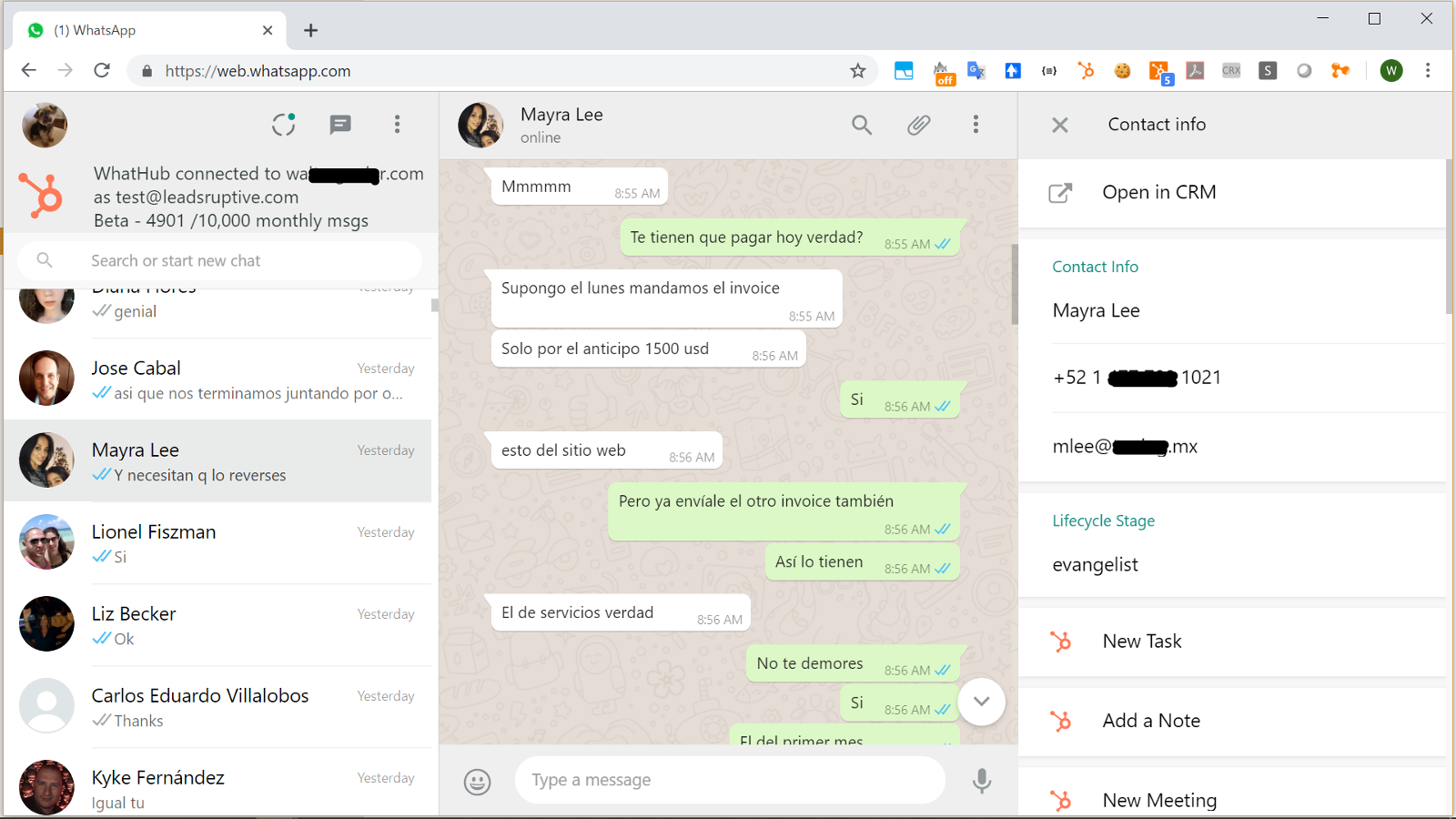
1/1 - Supercharge WhatsApp with the power of HubSpot CRM
WhatHub brings the full power of HubSpot CRM into the WhatsApp Web interface, allowing the user to see information about their WhatsApp contacts and perform HubSpot tasks without ever leaving the WhatsApp UI.
WhatHub is distributed and supported by Leadsruptive, HubSpot Elite Solutions Partner specialized in HubSpot integrations.
WhatHub also allows you to send 1:1 messages to any HubSpot contact and records all the conversations your agents have with your contacts into their timeline, allowing you to configure advanced automations like triggering workflows when certain keyword is mentioned in a WhatsApp message.
Key benefits of WhatHub include:
- Allow agent accountability by keeping track of all conversations inside HubSpot.
- Improve interactions by providing the agent with all relevant information about the contact. No need to waste time asking the same questions repeatedly. If it's in the CRM the agent will see it.
- Save time by being able to perform most common HubSpot Tasks from the WhatsApp UI and using templates and tokens to send messages: Update lead status, deal stage, owner, lifecycle stage, and more.
- Provide privacy and compliance by allowing for configuration of which contacts will be recording.
- Deploy in minutes by keeping your existing messaging interface: WhatHub let's your agents use the chat interface they already know and love while providing all the extra features they need.
- Create reports, lists, and trigger workflow automations based on the content of the WhatsApp messages
- No complicated deployment, no learning curve, no hidden costs
Who should use WhatHub?
WhatHub was designed as a companion for the account manager. You are a greate fit for WhatHub if your company has an account management role either in the Sales or Custome Service process.
DISCLAIMER: In compliance with WhatsApp Terms of Service, you should use the WhatsApp Business app when integrating with HubSpot CRM in a live environment.
Can I use WhatHub to do bulk messaging /automation?
Bulk Messaging is strictly prohibited by WhatsApp. If you have been approved to use the WhatsApp API we would be glad to help send notifications from a HubSpot contact workflow.
Do I need WhatsApp Business?
WhatHub works with the Web interface of either WhatsApp Personal or WhatsApp Business apps, however using WhatsApp Business is recommended.
What type of companies and industries already use WhatHub?
We have clients in multiple industries, both B2C and B2B, from micro companies and solopreneurs using HubSpot Free CRM to large corporations with HubSpot Enterprise and 100+ users.
What type of companies are NOT a good fit for WhatHub?
If you have a large contact center but you don't provide personalized service (no account manager role) you will probably need a full featured contact center solution. WhatsApp Web currently allows only 4 (four) computer/user to be concurrently connected to a phone device/number (10 users on selected markets where "WhatsApp Premium" is available), so you won't be able to handle more than 4 users having private conversatios while using the same phone number.
However as a Certified HubSpot Solution Partner we have 5 years of experience integrating different contact center solutions with HubSpot and we would be glad to help you.
機能
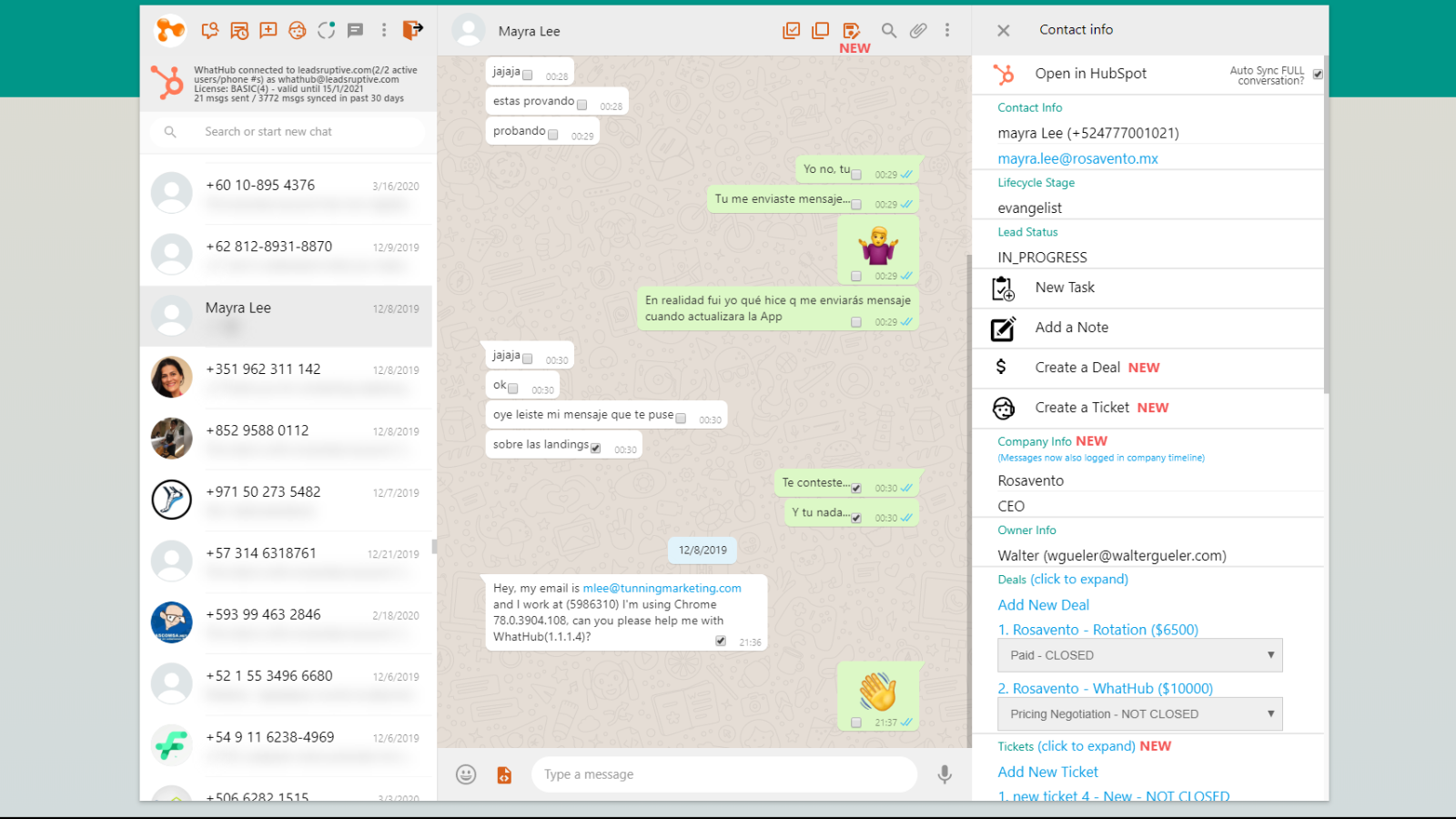
View and edit an existing HubSpot contact from the WhatsApp Web UI
WhatHub will search into your HubSpot CRM. If a contact matching the WhatsApp conversation is found, it will show the information in the right side panel. You will be able to view and edit the contact name, email, lifecycle stage, status, owner, company, deals, and tickets.
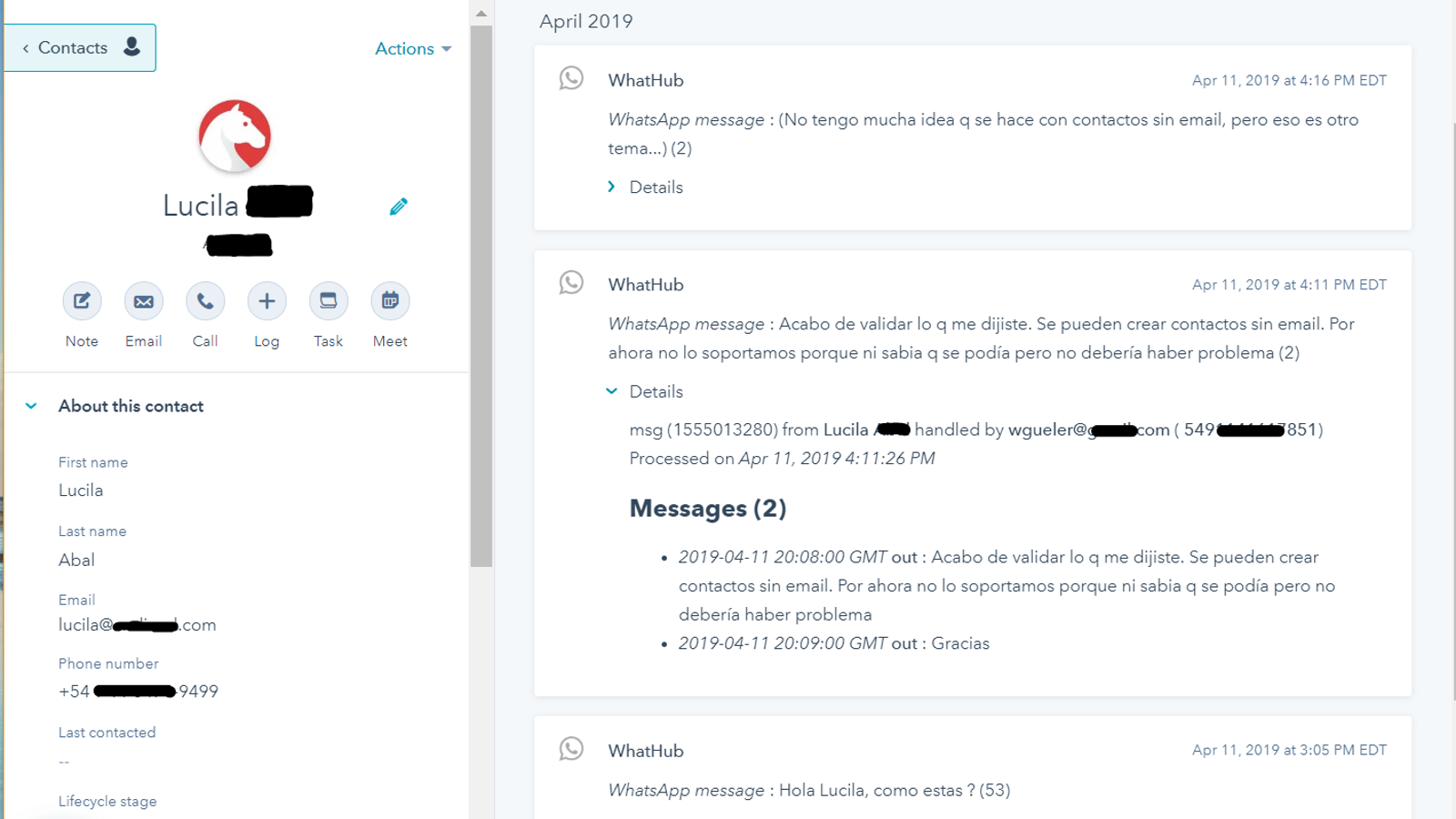
Automatically log your relevant business conversations into HubSpot
WhatHub adds a "sync" contact property. Using that property you will be able to define which contacts will have the conversations automatically logged into the timeline. There's no risk of personal/private conversations getting logged by mistake. Update sync status using manually or using workflows
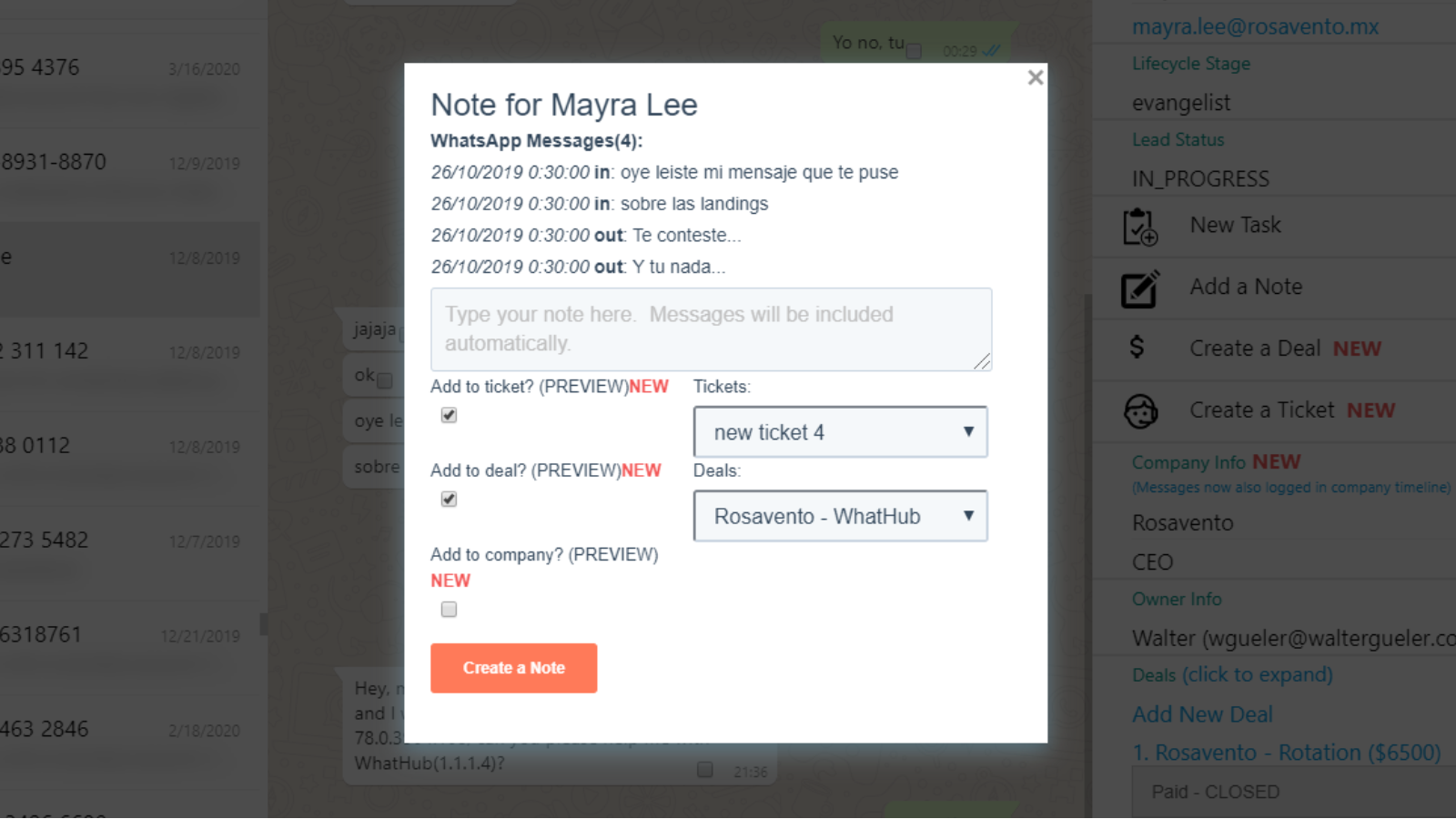
Manually save relevant messages as Notes or Tickets. Add them to Deals
With WhatHub you can save the WhatsApp messages both automatically and manually into HubSpot. Manually saving messages is useful when you want to create a note or a ticket from a specific set of messages. You can save the note into the contact, company or deals, and even create a new ticket!
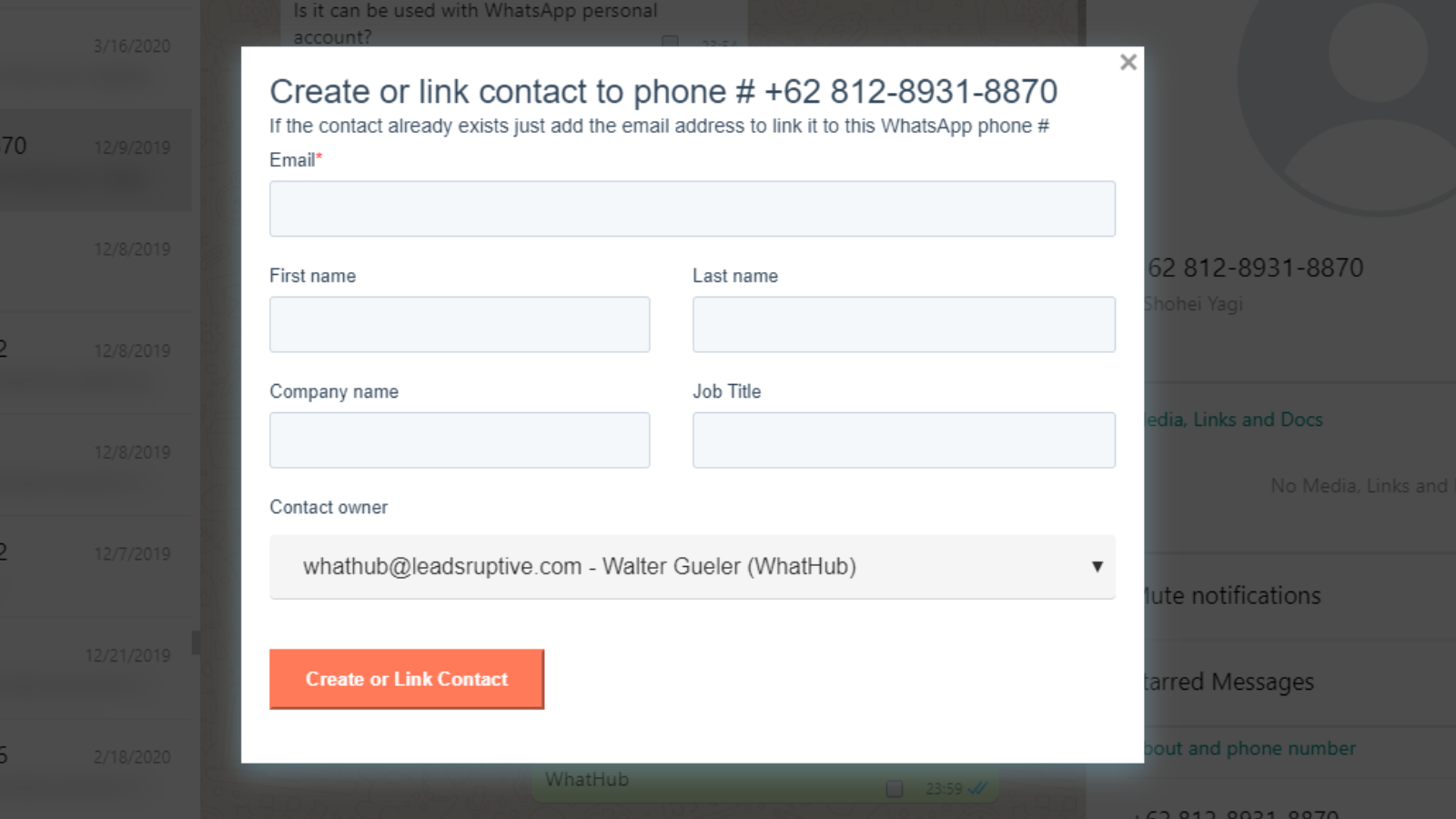
Create new contacts / Link existing contacts
If a contact is not automatically found by WhatHub that means that it doesn't exist in the CRM or that it's missing its phone number. Using the "Create/Link in HubSpot" button, you can easily add the contact without ever leaving WhatsApp. If the contact already exists, it will update it's phone #.
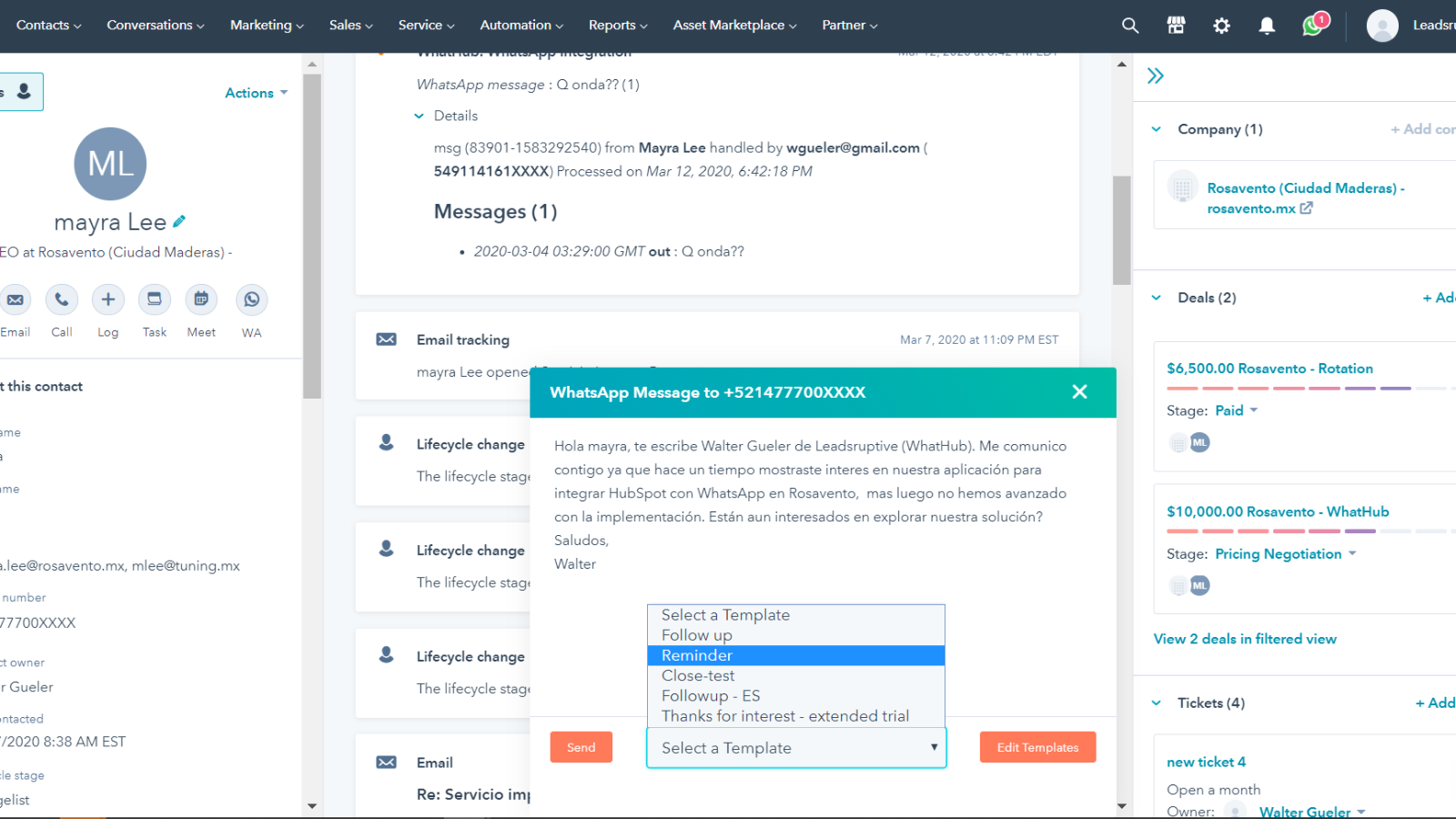
Send WhatsApp messages from HubSpot and use templates
WhatHub saves you time by letting you use message template, including contact and user tokens. Edit your templates, and rapidly send messages both from HubSpot UI WhatsApp web including relevant info like the contact name, company, products and more. You can even use your custom properties!
アプリ機能
Contacts | ||
Sync | ||
Deals | ||
Tasks/Notes | ||
Owners | ||
Contact-Deals | ||
Lead Stages | ||
Timeline | ||
Send message workflow extension |
確認
3.4
123
3.4
123
- 2026年8月2日
カスタマーサービスの不在
これは、基本的なWhatsAppアカウントをHubSpotアカウントに連携させるための、コストを抑えたソリューションです。ただし、前述されている機能の一部が欠けています。
HubSpot Salesのアップグレードにお金をかけたくないというのであれば、それで構いません。
チケットの作成ができなかった。 カスタマーサービスはまったく機能していない。 過剰請求されたが、返金もされない。
Gosnell, A.
- 2025年11月18日
キャンセルが不可能で、サポートも全く対応してくれないというひどい詐欺です。HubSpotはこのアドオンを直ちに削除すべきです!
詐欺です。どこを探してもサブスクリプションを解約できず、サポートからの返信も途絶えてしまいました。@HubSpot、これはぜひ対応をお願いします。このひどいアドオンは廃止すべきです!
Novacek, J.
Starter
$10
/月For individual users & micro companies
Supports only one user/phone per HubSpot Portal
Only compatible with HubSpot Free CRM & HubSpot Starter plans
Automated + Manual message logging
2500 messages logged /month
500 messages sent from HubSpot UI/month
250 engagements/month (new tasks/notes)
3 local templates
Only preview of Tickets+Deals
Only preview WhatsApp Groups
“WhatHub” branding ("sent by Whathub")
⚠ Only available for Free CRM / Starter users
⚠ Max 1 user/phone line per portal
Starter
$10
/月For individual users & micro companies
Supports only one user/phone per HubSpot Portal
Only compatible with HubSpot Free CRM & HubSpot Starter plans
Automated + Manual message logging
2500 messages logged /month
500 messages sent from HubSpot UI/month
250 engagements/month (new tasks/notes)
3 local templates
Only preview of Tickets+Deals
Only preview WhatsApp Groups
“WhatHub” branding ("sent by Whathub")
⚠ Only available for Free CRM / Starter users
⚠ Max 1 user/phone line per portal
* こちらの価格は参考表示価格です。どの価格にも税、インセンティブ、値引など、価格に関する変動要素は含まれていません。価格に関する正確な最新情報については、この提供元パートナーまでお問い合わせください。HubSpotは、パートナー各社が提供する価格情報について一切の責任を負わないものとします。価格の最終更新:2025/08/09