
Data Bridge - Bring Any (Sync) Data into CRM Objects

Johtava
Vaatimukset
HubSpot-tilaus HubSpot-tilin käyttöoikeudet - Tarkastele vaadittuja tilin käyttöoikeuksia
Pääsytyyppi Jaettu Data Bridge - Bring Any (Sync) Data into CRM Objects-tilaus - Basic tai Ammattilainen 🔥 paketit
Yhteenveto
-1.png)
1/6 - Lisää Google Workspace, videoita, tekstiä, iframed-linkkejä - ja näytä ne ehtojen tai mukautettujen sääntöjen perusteella HubSpotissa.
Tehosta HubSpot-tietueesi Data Bridgen avulla! Synkronoi ulkoista sisältöä - verkkosivustoja, kuvia, videoita, Google Sheets -taulukoita, asiakirjoja ja paljon muuta - kaikki näkyy siellä, missä tiimisi työskentelee. Synkronoi Data Bridge -sovellus - auttaa sinua lisäämään relevanttia sisältöä sinne, missä sillä on eniten merkitystä, mikä tekee CRM:stäsi helppokäyttöisemmän ja informatiivisemman. Integroi HubSpot suosikkisovelluksiisi vain yhdellä napsautuksella.
Hanki ilmainen Live Onboarding - Ota yhteyttä ja sovi aikataulu.
Jokainen Data Bridge -käyttäjä saa ilmaisen live-onboarding-istunnon tuote-/tukitiimimme kanssa. Olet täysin varustautunut ensimmäisestä päivästä lähtien - voit luottavaisin mielin rakentaa juuri sitä, mitä yrityksesi tarvitsee!!! Näytä ulkoiset tiedot HubSpot-tietueissa! Upota Google Sheets! Etsitkö yksinkertaista tapaa käsitellä tietojen integrointia ja tietojen synkronointia HubSpotissa? Data Bridgen avulla voit yhdistää ulkoisia tietoja, upottaa kojelautoja ja jopa hallita mukautettuja objekteja suoraan HubSpot-tietueiden sisällä. Olipa kyse sitten tietojen siirtämisestä, mukautetusta liittimestä tai mahdollisuudesta tuoda/viedä tietoja Google Sheetsistä, Excelistä tai tietokannoista, Data Bridge tekee HubSpotin automatisoinnista, raportointiintegraatiosta ja ETL:stä vaivatonta. Luo mukautettavia ruudukoita, upota/näytä tarvitsemasi tiedot ja tee HubSpot-tietueistasi todellinen komentokeskus.
Data Bridgen tärkeimmät ominaisuudet
Upota kuvia ja linkkejä suoraan HubSpot-tietueisiin.
Lisää tuotekuvia, markkinointimateriaaleja tai mitä tahansa visuaalista aineistoa suoraan yhteystietoihin, yrityksiin, kauppoihin, lippuihin tai mukautettuihin objekteihin. Pidä tiimisi linjassa visuaalisten kuvien kanssa suoraan siellä, missä he työskentelevät.
Live Google Sheets, Docs -integraatio
Upota Google Sheets -taulukot HubSpot-tietueiden sisään ja kehystä ne, jotta voit näyttää reaaliaikaisia raportteja, seurantatietoja tai kojelautoja. Sopii erinomaisesti edistymisen seurantaan, KPI-mittareihin tai jaettuihin asiakastietoihin.
YouTube-videoiden upotukset
Tuo opetusohjelmia, tuote-esittelyjä tai asiakaspäivityksiä suoraan HubSpot-tietueisiin. Tiimit pääsevät välittömästi oikeaan videosisältöön poistumatta CRM:stä.
Mukautetun ruudukon rakentaja
Suunnittele täysin mukautettavia ruudukoita HubSpot-tietueiden sisälle. Lisää tunnisteita, tekstiä, tilamerkkejä, linkkejä, kuvia, kuvakkeita, sähköposteja tai hälytyksiä. Käytä värikoodattuja variantteja (Success, Warning, Error, Info) ja lisämerkintöjä, jotta monimutkaisia tietoja on helppo tulkita ja toimia niiden perusteella.
Ehdolliset näyttösäännöt
Näytä tai piilota moduulit kaupan vaiheen, ominaisuuksien arvojen tai mukautettujen ehtojen perusteella, jotta jokainen tiimin jäsen näkee vain sen, mikä on tärkeää oikeaan aikaan.
Saumaton HubSpot-integraatio
Toimii natiivisti kaikkien HubSpotin vakio-objektien (yhteystiedot, yritykset, kaupat, liput) ja mukautettujen objektien kanssa - ei vaadi koodausta tai ylimääräisiä kirjautumisia.
Tiedosto- ja mediatuki
Lataa ja näytä kuvia, PDF-tiedostoja tai mediatiedostoja tietueiden sisällä nopeuttaaksesi yhteistyötä ja keskitettyä kontekstia.
Minne voit sijoittaa sisältöä
Kaikki tietueet - näytä sisältö kaikkialla CRM:ssäsi.
Tietty tietue - lisää sisältöä yksittäiseen tietueeseen, jota katselet.
Suodatetut tietueet - kohdista tietueet, jotka vastaavat valitsemiasi kriteerejä.
Suodattimet toimivat mille tahansa sisältötyypille, joten oikeat tiedot näkyvät oikeassa paikassa.
Miksi se on hyödyllinen - Oikea sisältö oikeassa paikassa.
Pidä ulkoinen sisältö saatavilla poistumatta HubSpotista.
Vähennä välilehtien vaihtamista ja hajallaan olevaa tietoa.
Voisitko antaa tiimillesi ajantasaista visuaalista kuvaa ja tietoa asiayhteydessä?
Paranna tietueita toiminnallisella sisällöllä, johon tiimisi voi viitata välittömästi.
Top 5 käytännön liiketoimintakäyttötapausta, joissa se loistaa:
1. Asiakkaiden sisäänottokeskittymä (Saas / Tekniikka)
Upota käyttöönoton tarkistuslistat, pelikirjat ja aloituspuhelun tallenteet suoraan sopimuksen tai yrityksen tietueeseen.
Näytä eri ohjeet riippuen sisäänoton vaiheesta (esim. "Setup Pending" vs. "Live").
CSM:t päivittävät edistymistä suoraan HubSpotissa ilman työkalun vaihtamista.
2. Tilin tilan ja menestyksen seuranta (Customer Success)
Lisää elävä Google Sheet tai kojelauta, jossa on KPI:t, uusimispäivämäärät ja NPS-tulokset.
Näytä varoitukset, kun käyttö laskee, sopimuksen uusiminen on lähellä tai tietyt ominaisuudet merkitsevät riskejä.
Pidä CSM:t linjassa pikalinkkien avulla (mailto account owner, uusintatarjousmallit).
3. Myynnin pelikirjat ja ohjeistus (myyntitiimit)
Näytä dynaamiset ohjeet sopimuksen vaiheen mukaan ("Discovery" = näytä karsintakysymykset, "Proposal Sent" = näytä sopimuksen tarkistuslista).
Lisää pikakuvakkeita, kuten sähköpostilinkkejä oikeudellista tai rahoituksellista hyväksyntää varten.
Vähennä edustajan käynnistymisaikaa tuomalla oikeat tiedot näkyviin vain silloin, kun niitä tarvitaan.
4. Kenttähuolto ja asennukset (valmistus / palvelut)
Upota asennuksen tarkistuslista tikettiin.
Teknikot voivat ladata ennen/jälkeen -kuvia, videoita tai allekirjoitettuja asiakirjoja.
Näytä turvallisuusohjeet tai vaatimustenmukaisuutta koskevat huomautukset vain, jos tietty tuotetyyppi on valittu.
5. Luovien / markkinointivarojen tarkistukset (toimistot tai omat tiimit)
Säilytä luovia tiedotteita, lataa suunnitteluluonnoksia ja esikatseluvideoita yhdessä tietueessa.
Näytä "Review Pending" -ilmoitus, kunnes asiakas merkitsee hyväksynnän.
Asiakkuuspäälliköt voivat ladata tiedostoja, kun taas johtajat hallitsevat rakennetta ja malleja.
Lyhyesti sanottuna: Sync Data Bridge vähentää työkalujen vaihtamista ja tuo oikean sisällön oikeaan aikaan suoraan HubSpot-tietueisiin. #1 HubSpot-liitin!
Ominaisuudet
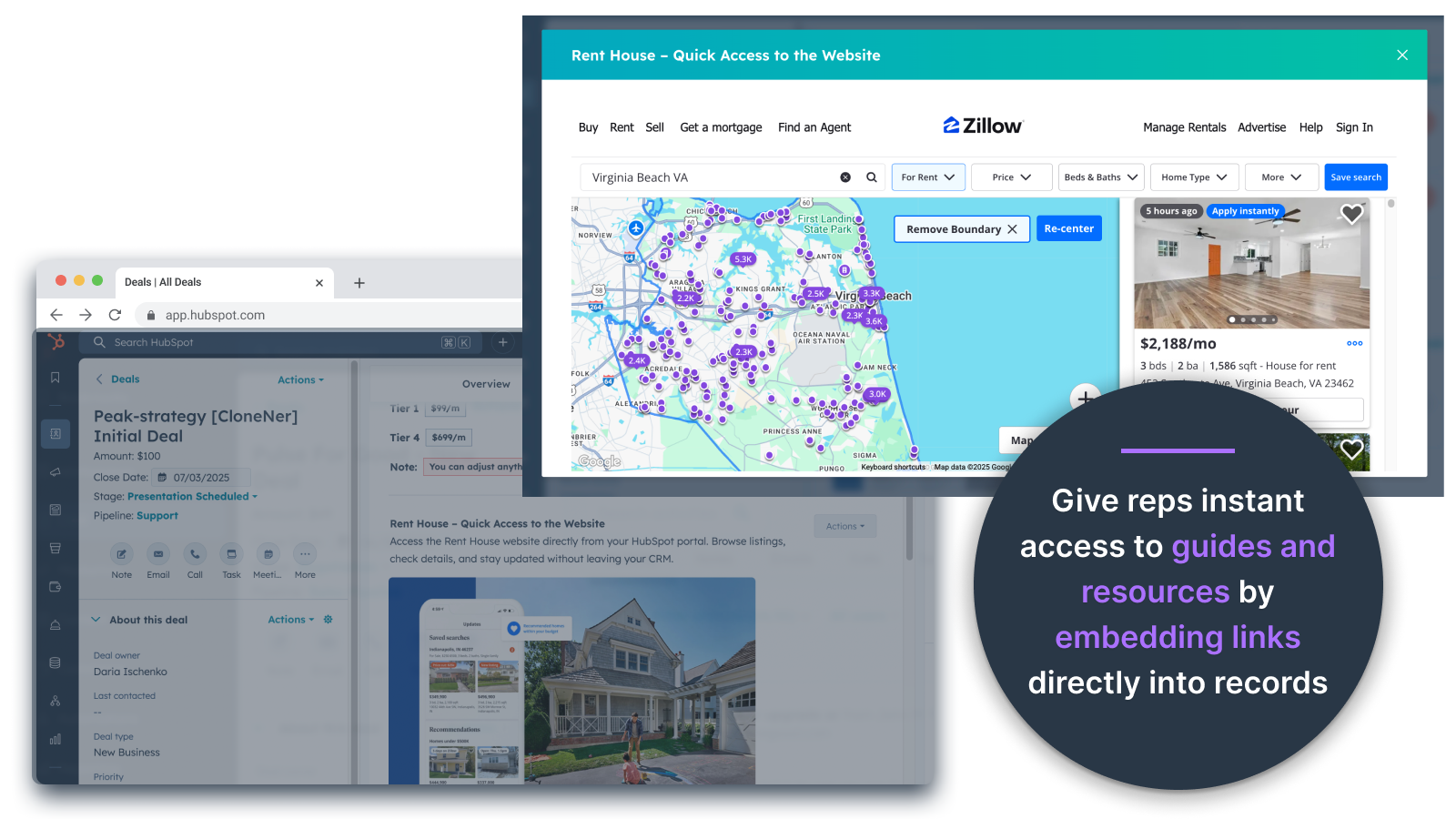
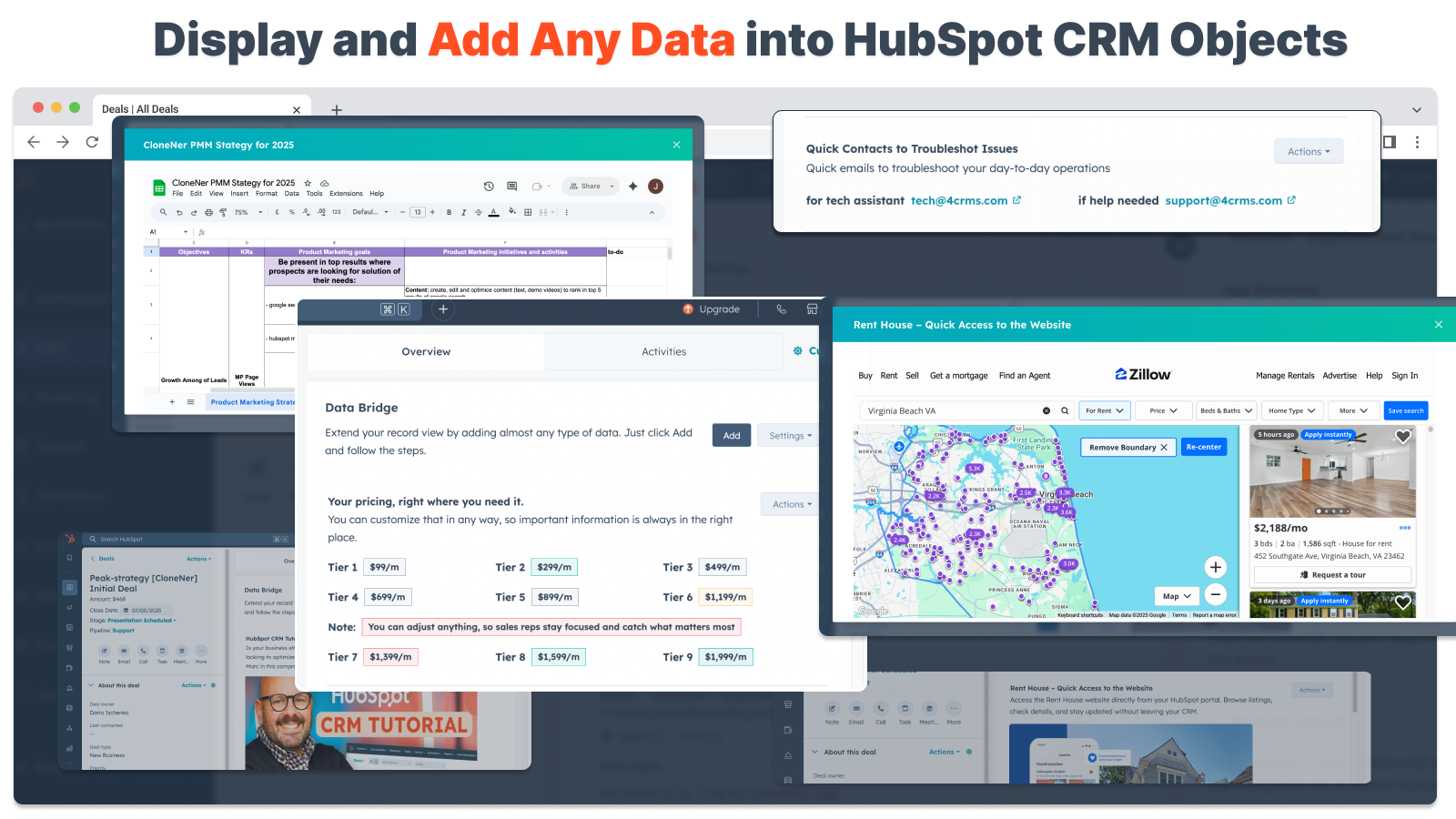
Upota kuvat suoraan tarjouksiin, lippuihin ja muihin tietueiden näkymiin
Lisää tuotekuvia, markkinointimateriaalia tai muita visuaalisia aineistoja suoraan yhteystietoihin, yrityksiin, tarjouksiin, lippuihin tai mukautettuihin kohteisiin. Pidä tiimisi linjassa visuaalisten materiaalien kanssa siellä, missä he työskentelevät.
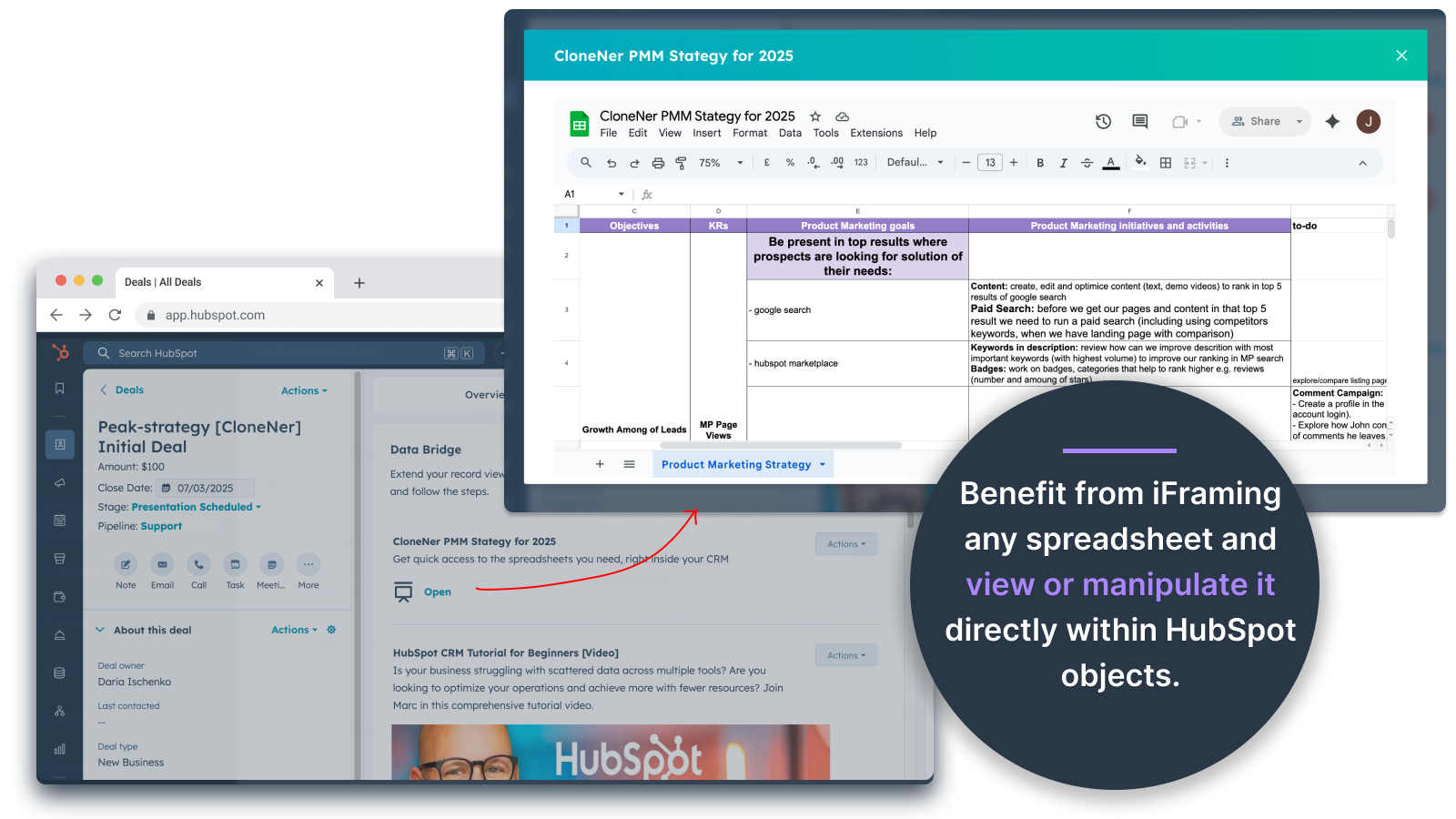
Google Sheets ja Docs - näkymä suoraan tarjousten, lippujen jne. sisällä.
Upota Google Sheets -taulukot HubSpot-tietueiden sisään ja kehystä ne, jotta voit näyttää reaaliaikaisia raportteja, seurantatietoja tai kojelautoja. Sopii erinomaisesti edistymisen seurantaan, KPI-mittareihin tai jaettuihin asiakastietoihin.
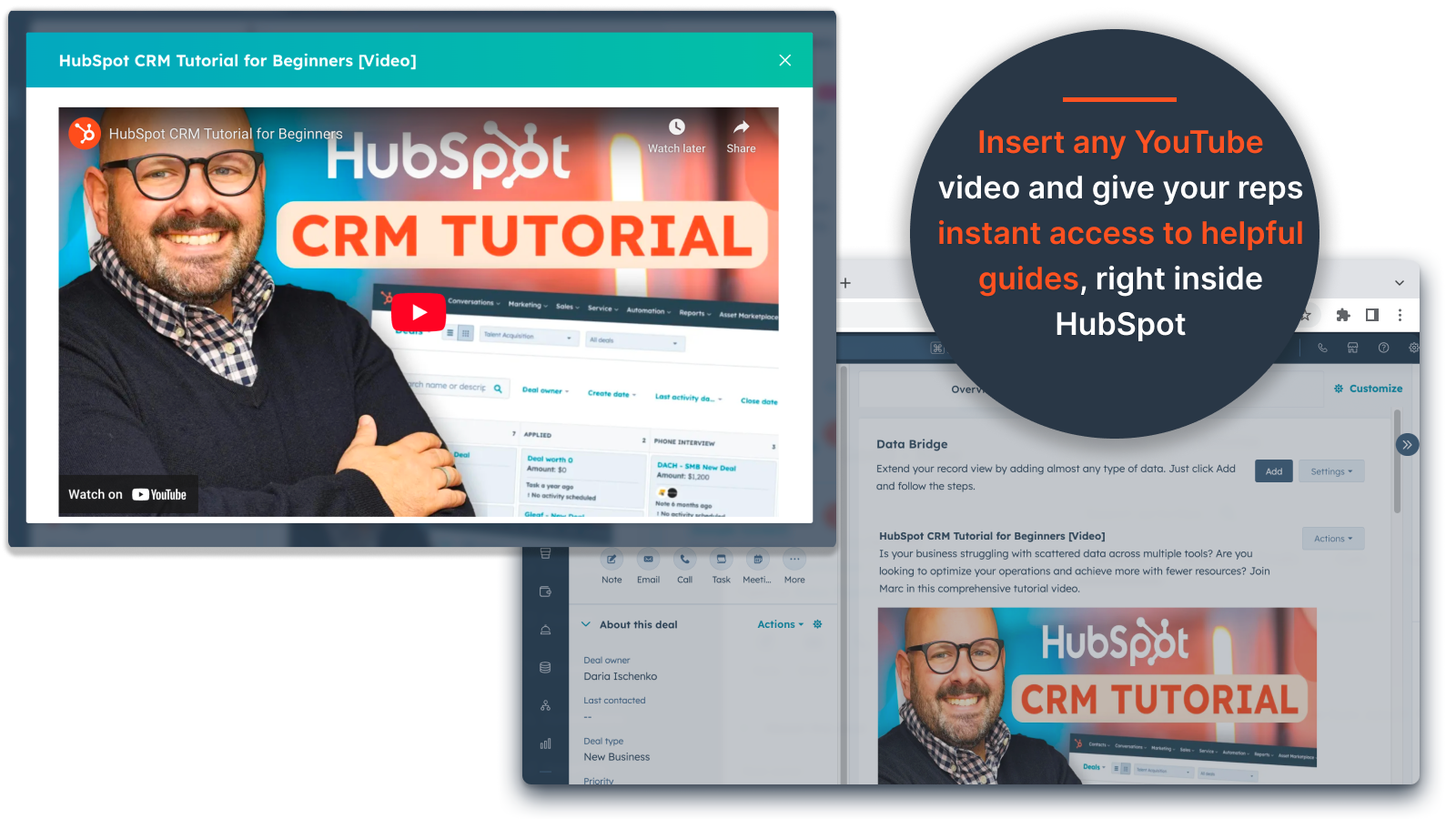
YouTube Video Embeds
Tuo opetusohjelmat, tuote-esittelyt tai asiakaspäivitykset suoraan HubSpot-tietueisiin. Tiimit pääsevät välittömästi oikeaan videosisältöön poistumatta CRM:stä.
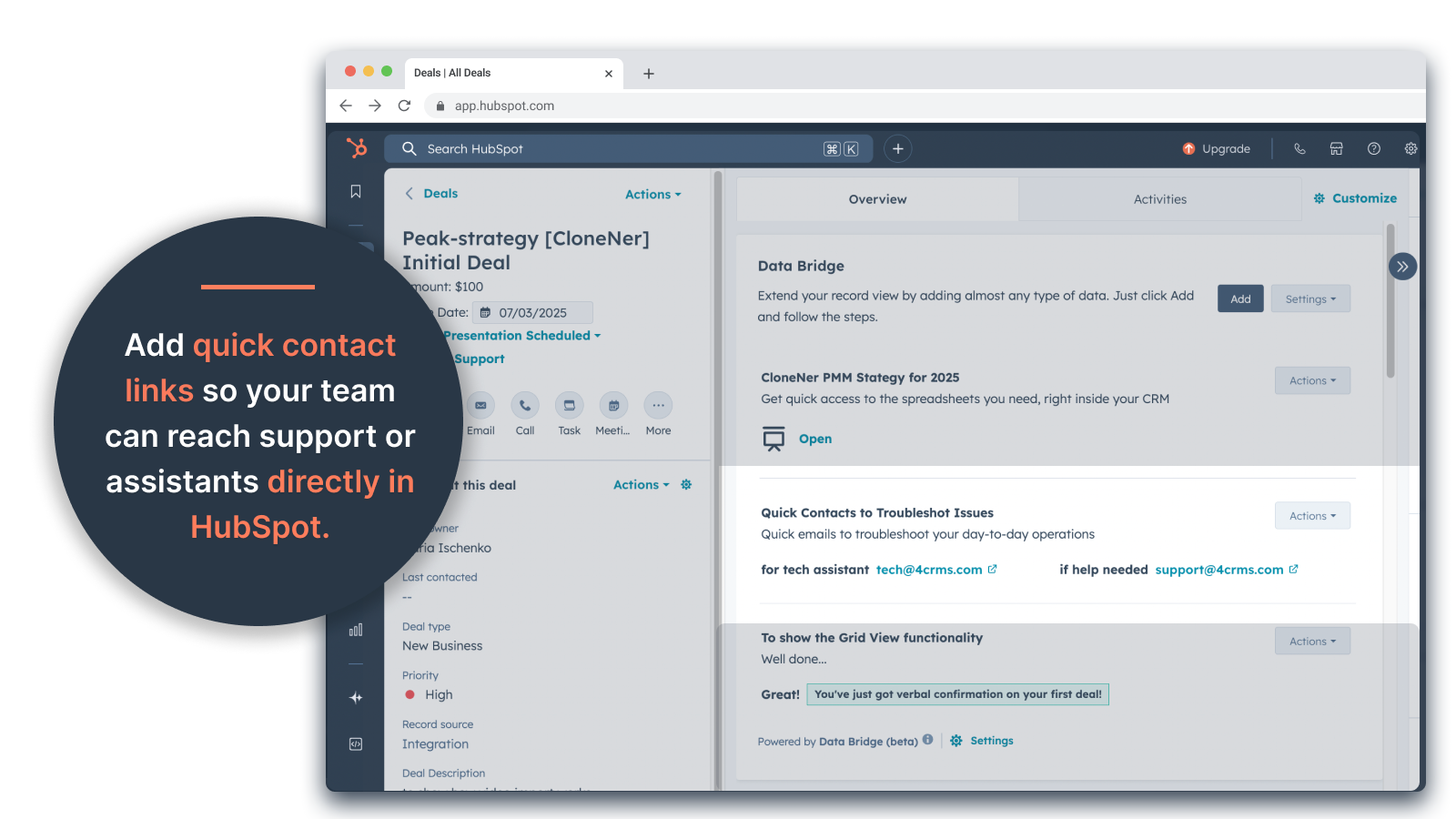
Custom Grid Builder
Suunnittele täysin mukautettavia ruudukoita HubSpot-tietueiden sisällä. Lisää tunnisteita, tekstiä, tilamerkkejä, linkkejä, kuvia, kuvakkeita, sähköposteja tai hälytyksiä. Käytä värikoodattuja variantteja (Success, Warning, Error, Info) ja lisämerkintöjä, jotta monimutkaisia tietoja on helppo tulkita ja toimia niiden perusteella.
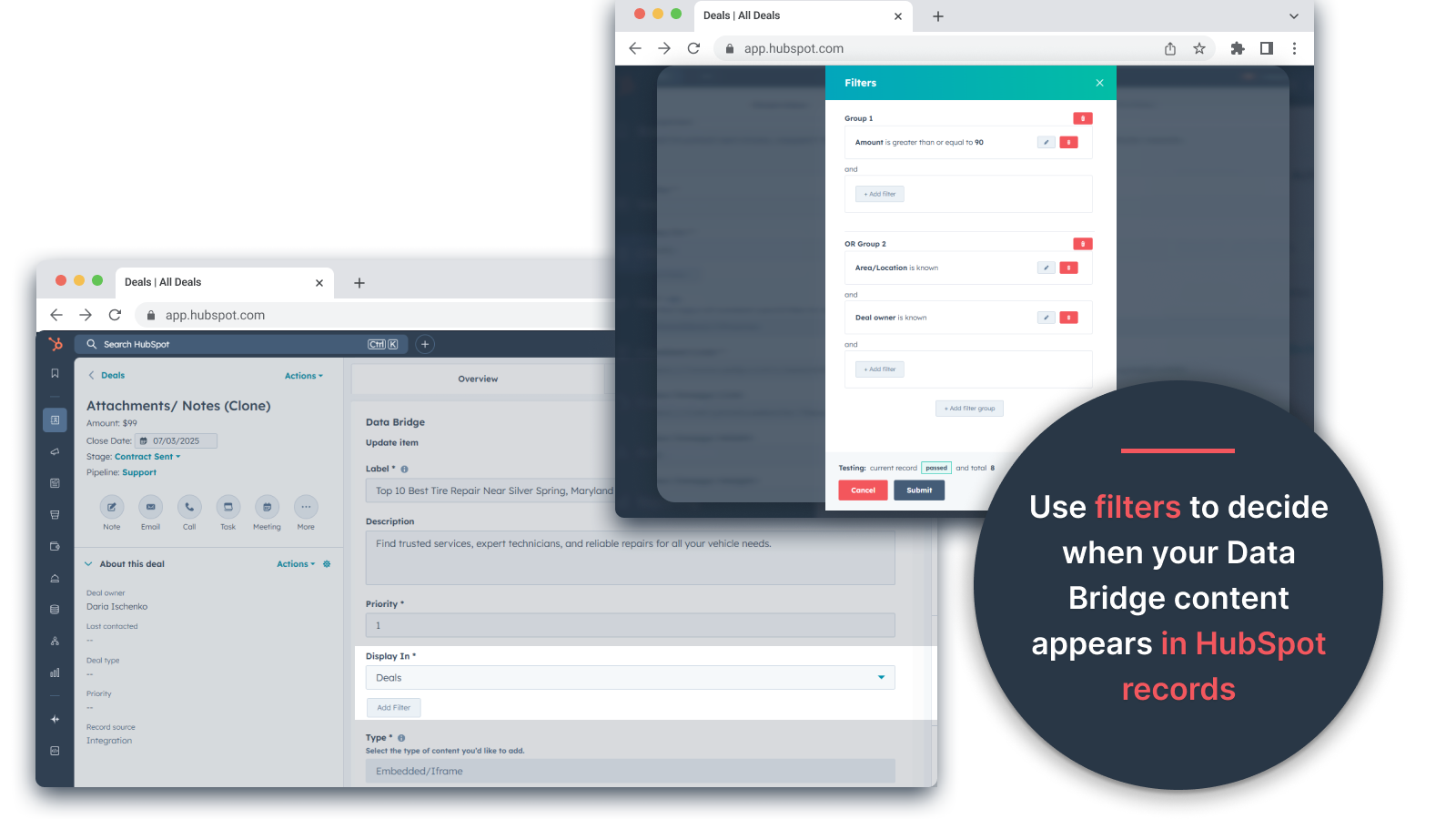
Ehdolliset näyttösäännöt
Näytä tai piilota moduulit kaupan vaiheen, kiinteistöjen arvojen tai mukautettujen ehtojen perusteella, jotta jokainen tiimin jäsen näkee vain sen, mikä on tärkeää oikeaan aikaan.
Saumaton HubSpot-integraatio
Toimii natiivisti kaikkien HubSpotin vakio-objektien (Yhteystiedot, yritykset, sopimukset, liput) ja mukautettujen objektien kanssa - ei vaadi koodausta tai ylimääräisiä kirjautumisia.
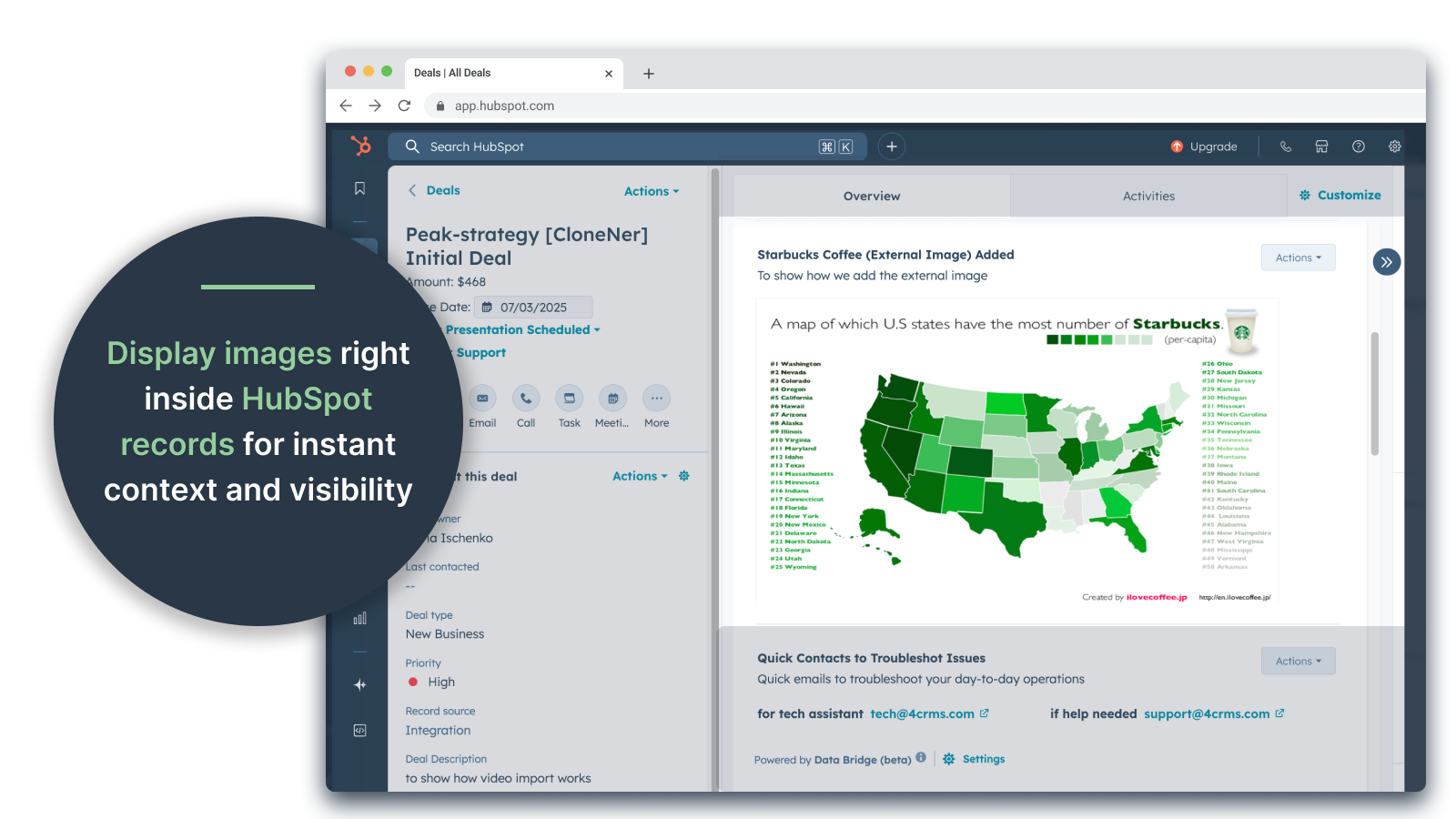
Tiedostojen ja median tuki
Lataa ja näytä kuvia, PDF-tiedostoja tai mediatiedostoja tietueiden sisällä nopeuttaaksesi yhteistyötä ja keskitettyä kontekstia.
Sovelluksen toiminnallisuus
Jaetut tiedot
Contacts | ||
Custom Objects | ||
Company | ||
Deal | ||
Ticket | ||
Owners | ||
Deal Pipelines |
Arvostelut
- 25. syys 2025
Suuri ajansäästäjä, joka poistaa hajallaan olevien tiedostojen hallinnan vaivan ja tuo kaiken suoraan sinne, missä sitä tarvitset!
Tietosilta voittaa! Tarvitsimme helpon tavan siirtää Excelissä olevat kuluraportit HubSpotiin, ja tämä ratkaisi tämän ongelman ilman, että tarvitsisi hallita tonneittain Google Drive -kansioita. Nyt edustajat voivat helposti kloonata kuluraportteja, upottaa ne suoraan niihin liittyviin sopimuksiin ja käyttää niitä helposti ilman, että heidän tarvitsee kaivella Google Drive -asemaa. Tämä säästää paljon aikaa ja stressiä!
Helppo käyttöönotto, tuo ulkopuoliset resurssit suoraan HubSpotiin, jotta ne ovat helposti käytettävissä.
yhtään ei ole vielä löytynyt!
Estey, Z.
- 19. syys 2025
Muuttaa HubSpotin komentokeskukseksi
Tiimimme aloitti Data Bridge! by 4CRM:n käytön hiljattain, ja se on jo tehostanut työnkulkuamme tehokkaalla tavalla. Mahdollisuus upottaa Google Sheets -taulukoita, asiakirjoja, videoita ja muita ulkoisia resursseja suoraan HubSpotin tietueisiin on poistanut valtavasti edestakaista työtä ja tehnyt CRM:stämme paljon toimivamman. Se on intuitiivinen, joustava ja tuo oikeat tiedot oikeaan paikkaan oikeaan aikaan.
- Erittäin helppo ottaa käyttöön ja aloittaa käyttö - Sisällyttää kriittisen myyntisisällön (kuten live sheetit, referenssimateriaalit, perehdytysasiakirjat) suoraan HubSpotiin - Mukautettavat ruudukot helpottavat tärkeimpien tietojen järjestämistä ja näyttämistä - Suuri apu, jotta tietueet tuntuvat aidolta "komentokeskukselta" - Tehokkuuden lisääminen ja välilehtien vaihtelun vähentäminen.
- Joidenkin upotettujen sisältöjen (esim. tietyt videosoittimet) näyttö voi olla omituista selaimen asetuksista riippuen.
Stern, D.
Hinnoittelu
Basic
19 $
/kuukausi👉 Hanki 45 päivää ilmaiseksi - 🔓 vapauta kaikki ominaisuudet. Tee HubSpot-tietueista älykkäämpiä UI-elementtien avulla juuri siellä, missä työskentelet. Tuo tiedot yhteystietoihin, yrityksiin ja kauppoihin.
3 UI-elementtiä: Jokainen lisätty elementti lasketaan yhdeksi elementiksi (esim. kuva tai video jne.).
Yhteystiedot: Data Bridge UI-elementtien näyttäminen yhteystietueiden sisällä
Yritykset: Data Bridge -käyttöliittymäelementtien näyttäminen yritystietueiden sisällä.
Tarjoukset: Näytä Data Bridge -käyttöliittymäelementit kauppatietueiden sisällä.
Upota kuvia, YouTube, Google Docs, Slides ja Sheets iFrameilla - kaikki näkyvät suoraan HubSpot-tietueissa.
Suodattimet: ⚠️ Ei käytettävissä (vain kohdekohtaisesti tai kaikki kohteet).
Custom Grid Builder: ⚠️ Ei käytettävissä. Ei voi luoda ruudukkoja, joissa on tunnisteita, linkkejä, kuvia ja muistiinpanoja.
Basic
19 $
/kuukausi👉 Hanki 45 päivää ilmaiseksi - 🔓 vapauta kaikki ominaisuudet. Tee HubSpot-tietueista älykkäämpiä UI-elementtien avulla juuri siellä, missä työskentelet. Tuo tiedot yhteystietoihin, yrityksiin ja kauppoihin.
3 UI-elementtiä: Jokainen lisätty elementti lasketaan yhdeksi elementiksi (esim. kuva tai video jne.).
Yhteystiedot: Data Bridge UI-elementtien näyttäminen yhteystietueiden sisällä
Yritykset: Data Bridge -käyttöliittymäelementtien näyttäminen yritystietueiden sisällä.
Tarjoukset: Näytä Data Bridge -käyttöliittymäelementit kauppatietueiden sisällä.
Upota kuvia, YouTube, Google Docs, Slides ja Sheets iFrameilla - kaikki näkyvät suoraan HubSpot-tietueissa.
Suodattimet: ⚠️ Ei käytettävissä (vain kohdekohtaisesti tai kaikki kohteet).
Custom Grid Builder: ⚠️ Ei käytettävissä. Ei voi luoda ruudukkoja, joissa on tunnisteita, linkkejä, kuvia ja muistiinpanoja.
*Hinnoittelu tässä on vain esittelytarkoituksessa. Kaikki hinnat eivät sisällä veroja, kannustimia, alennuksia tai muita hinnoittelumuuttujia. Pyydä kumppanilta ajantasaiset ja oikeat hintatiedot. HubSpot ei ota vastuuta näistä kumppaneidemme tarjoamista hintatiedoista. Hinnoittelu päivitetty viimeksi: 05.05.2026