

QuickBooks Online Advanced Automation
The Only HubSpot ↔ QuickBooks Integration You'll Ever Need.
Rakentanut - HelloCODER LLP
Asennukset - Yli 500 asennusta
Arvostelu 4,2
(20)

Rising
Vaatimukset
HubSpot-tilaus HubSpot-tilin käyttöoikeudet - Tarkastele vaadittuja tilin käyttöoikeuksia
Pääsytyyppi Shared QuickBooks Online Advanced Automation-tilaus - Professional, Business Max, Corporate tai Professional Annual paketit
Yhteenveto

1/6 - SyncQ - HubSpot QuickBooks Automation
Seamlessly Sync All QuickBooks Transactions with HubSpot
Two-Way Accounting Sync — from Customers & Projects to Payments, with AI Insights. Covers both Accounts Receivable & Accounts Payable.
Record and Manage Income with Ease
SyncQ allows you to create, send, and view Estimates, Invoices, Payments, and Sales Receipts directly from HubSpot records. With Business Max and Corporate plans, unlock advanced sync capabilities for HubSpot Custom Objects, including
QuickBooks Project as HubSpot Deal,
QuickBooks Job/sub-customer as HubSpot Deal and attach related invoices as Deal Invoices,
Bi-directional QuickBooks Invoice with HubSpot Invoice/Deal,
Deposits, Vendor Credits, Chart of Accounts, and more.
Enjoy FREE Mapping Assistance and Zero Onboarding Cost.
AI-Powered Insights, Autonomous Sync, 100% Customizable Sync
SyncQ offers advanced, AI-powered business insights. Ask any question about your business and get instant answers. (complimentary limited trial on every plan, + paid editions).
100% customizable mappings that let you map HubSpot Objects including custom objects and fields to most QuickBooks transactions including Invoice and Estimate custom fields, plus taxes and classes, to fit your 360-degree business needs.
With intelligent automation, you can choose to sync automatically or manually with a single click—without logging into QuickBooks. It also automatically syncs QuickBooks Online records to HubSpot, including received payments and pending balances.
Empower Sales with Instant Access to Financial Data
SyncQ automatically displays QuickBooks Estimates, Invoices, and Payment details inside HubSpot Companies/Contacts note sections, giving your sales team instant access to critical financial insights—without needing to contact accounting or log into QuickBooks Online.
Enterprise-Grade Security & Intuit Certification
SyncQ is Intuit Approved and meets industry-standard security requirements. It is regularly evaluated by Intuit as per NIST security standards (The National Institute of Standards and Technology, U.S. Department of Commerce). Find SyncQ inside your QuickBooks account or on the Intuit App Store.
Key Features
✔ Intuit Approved – Meets industry standards for financial security
✔ Automated & manual bi-directional and mono-directional sync
✔ Automatically sync QuickBooks transactions to HubSpot records
✔ AI-Powered Insights – Know more about your business and customers
✔ Sync HubSpot Companies/Contacts with QuickBooks Customers/Vendors
✔ Sync HubSpot Deals/Tickets with QuickBooks Estimates, Invoices, Purchase Orders, Bills & more
✔ View QuickBooks transaction history in HubSpot notes, including QuickBooks Invoice PDF links (license required to view)
✔ Sync QuickBooks Products with HubSpot Products
✔ Email Estimates & Invoices directly from HubSpot
✔ Track sales trends & receivables inside HubSpot
✔ Fully customizable field mappings for unique business needs
✔ Sync HubSpot custom fields & QuickBooks custom fields
✔ Connect multiple QuickBooks Companies
SyncQ – The #1 QuickBooks Automation Tool with AI Insights
SyncQ is the leading QuickBooks automation solution for multiple CRMs, including Salesforce and Pipedrive. Trusted by hundreds of businesses, SyncQ ensures seamless AI-powered automation, transaction sync, and financial insights.
All our integrations are Intuit approved.
Ominaisuudet
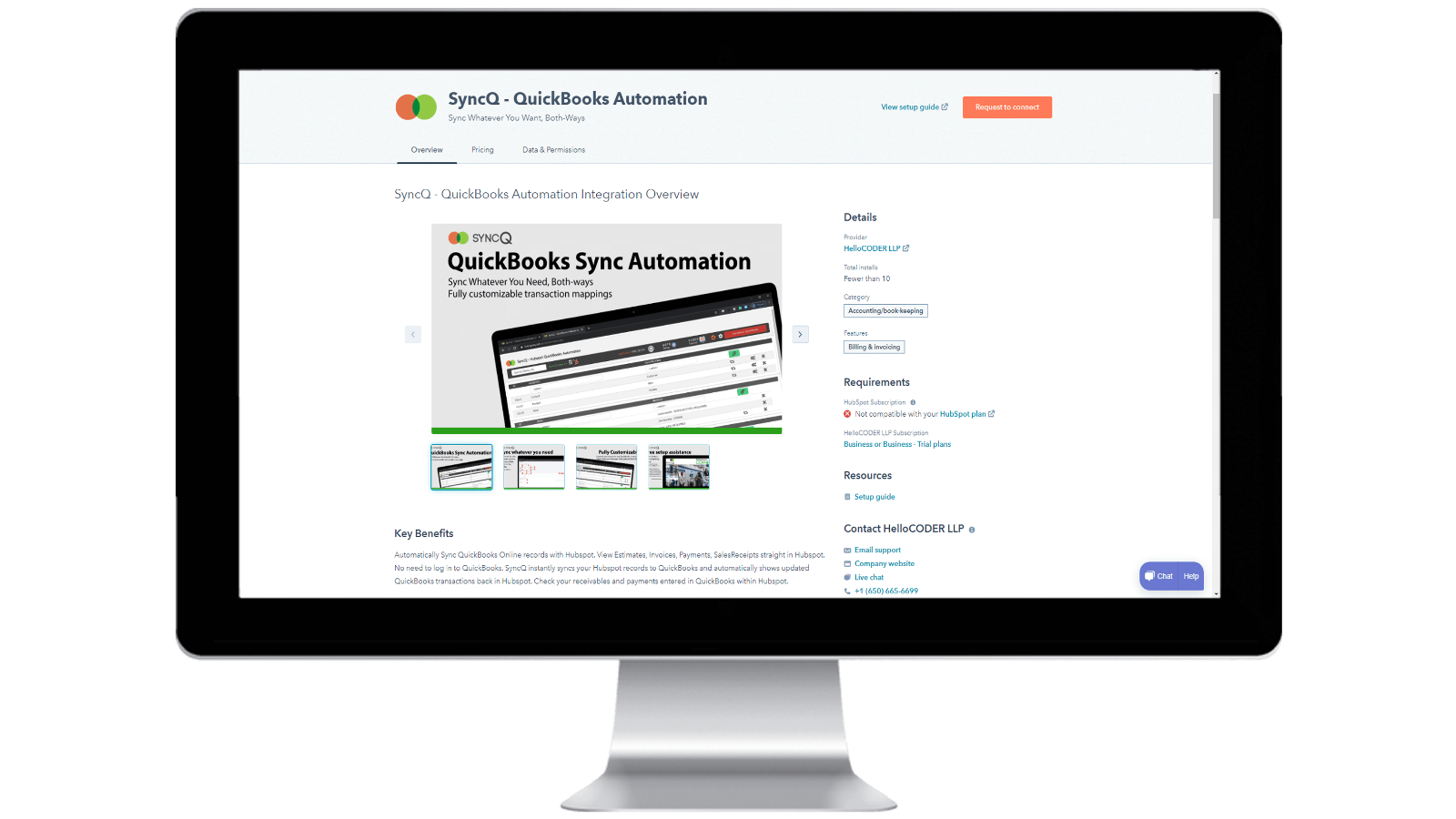
Installing SyncQ into your HubSpot account & Unsubscribing SyncQ
Install SyncQ from Intuit or HubSpot AppStore. For InstaView, contact SyncQ support. To unsubscribe to SyncQ, click on the Unsubscribe button within the SyncQ app or cancel your Paypal recurring payment or contact SyncQ support. Merely disconnecting SyncQ app from HubSpot does not unsubscribe SyncQ
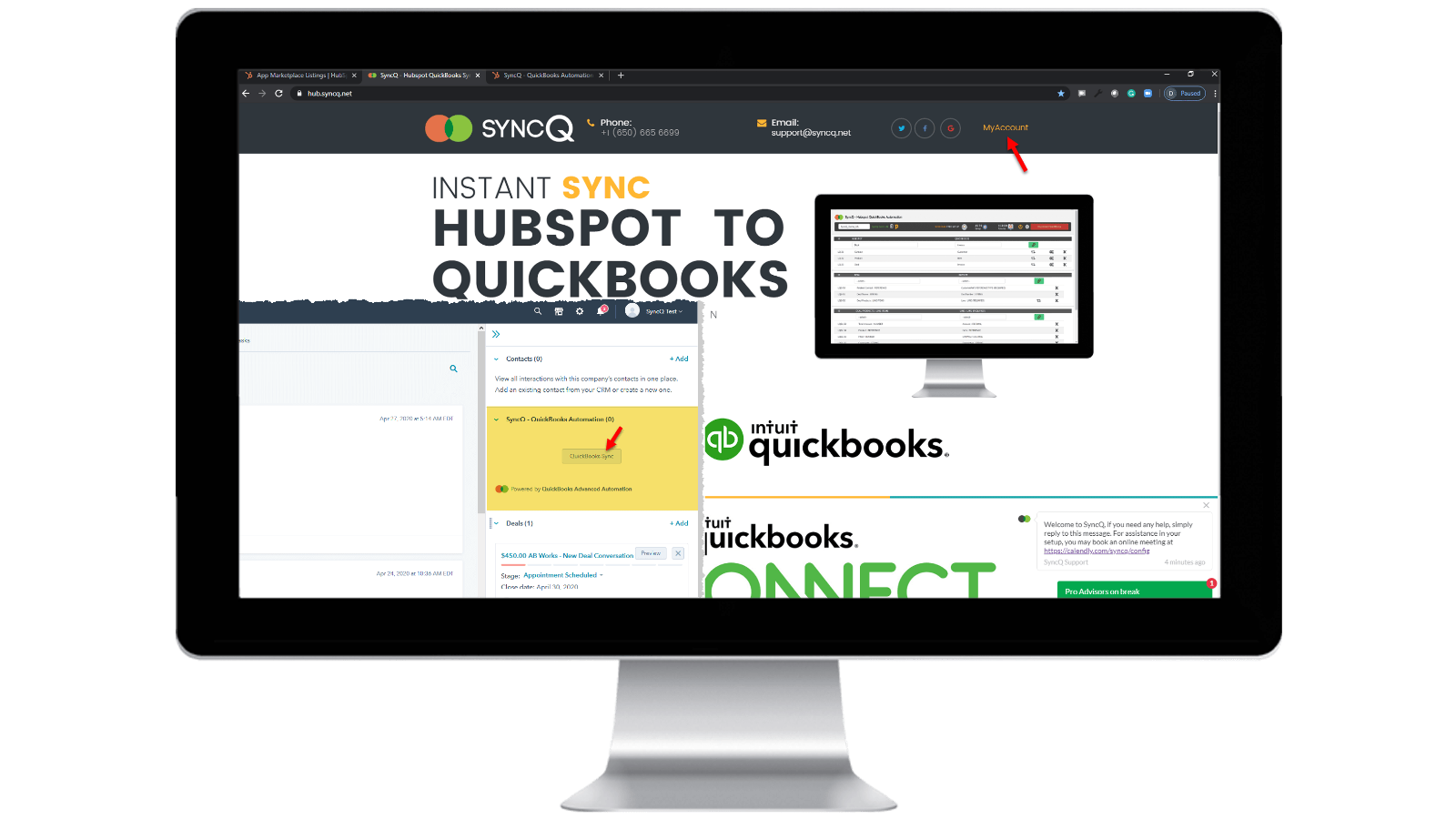
Log into your SyncQ account
Browse to https://hb.syncq.net and click on My Account. The easy way: goto any record in HubSpot, find SyncQ card tab on the right tabs, and then click on QuickBooks Sync. Then enter your HubSpot user email id. You will receive a verification code to verify your account.
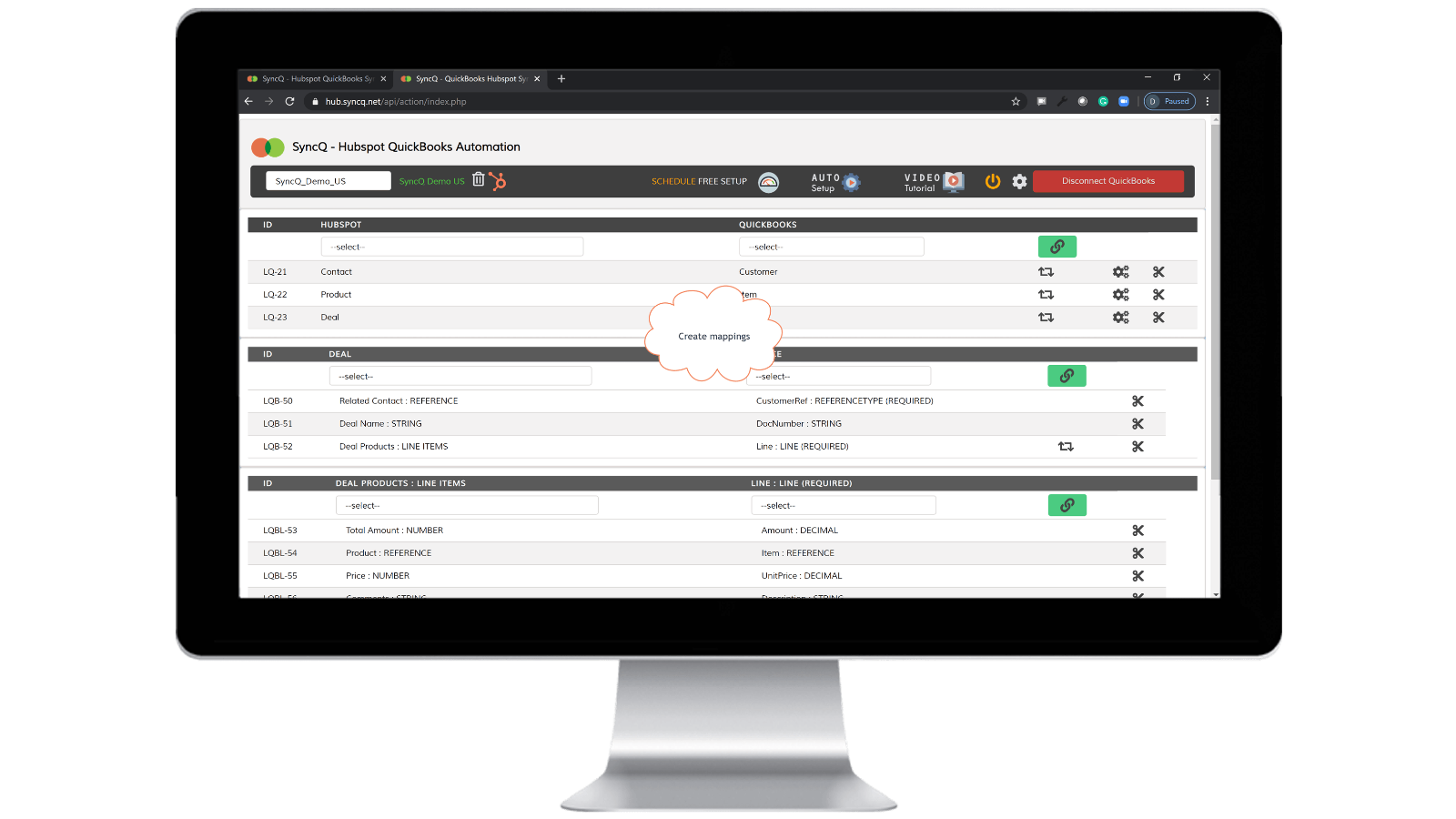
Connect QuickBooks Company, create mappings and enable auto sync.
Click on Connect to QuickBooks, your QuickBooks company will automatically show up. Click on the setup wheel button to create your mappings or click on Auto Setup. Enable auto-sync against individual mappings. You can also do manual sync by clicking on the SyncQ card button from HubSpot record.

Manual and instant record sync, both-ways
Goto to the HubSpot record that you want to sync. Find the SyncQ card on right and then click on QuickBooks Sync. You will get options to sync the related HubSpot record. Click on the Sync button. HubSpot record will instantly sync to QuickBooks. A summary of QuickBook's record will show up.
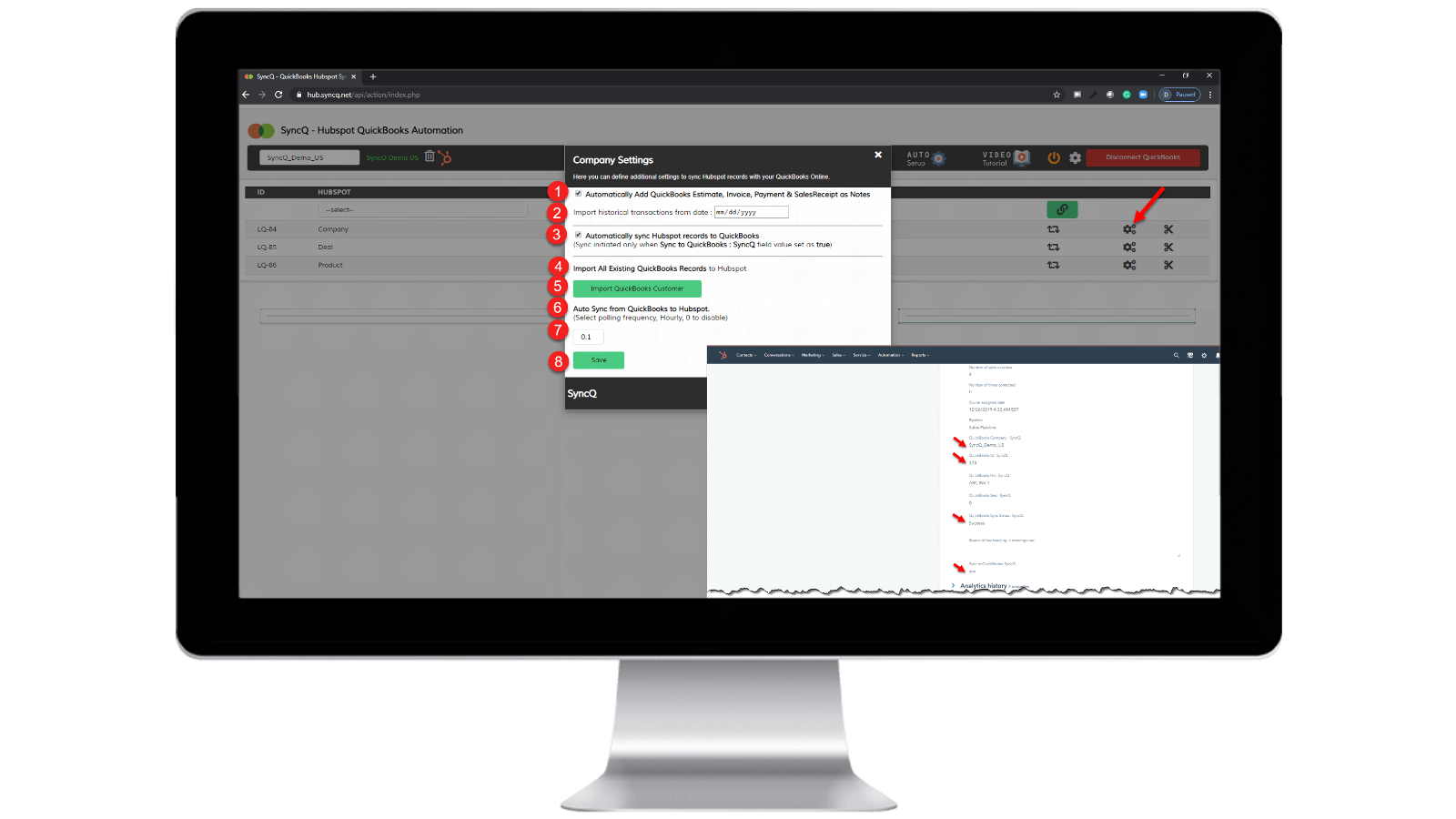
Enable auto-sync.
From QuickBooks to HubSpot: 1) Check "Automatically sync HubSpot records to QuickBooks" From HubSpot to QuickBooks: 1) Specify the hourly frequency of "Auto Sync from QuickBooks to HubSpot." 2) On the specific HubSpot record that you want to sync, set "SyncQ to QuickBooks: SyncQ" as "yes".
Sovelluksen toiminnallisuus
Jaetut tiedot
1. Customers / Vendors | ||
2. Customers / Vendors | ||
3. Items | ||
4. Estimates/Invoice/Bill/PurchaseOrder | ||
5. Inovoice | ||
6. Estimate/Invoice/Deposit/Bill/VendorCredit & More | ||
7. Job / Sub Customer / Project |
Arvostelut
4,2
20
4,2
20
- 22. syys 2025
Hyvä synkronointitoiminto, mutta huono käyttöliittymä ja avuton tukitiimi.
Kaiken kaikkiaan hyvä integrointi, jossa on joitakin pieniä ongelmia, tukea on parannettava.
Synkronointi on hyvä, nopea ja erilaisia vaihtoehtoja kartoituskenttien kartoituksessa HS - QB:ssä.
Joitakin pieniä virheitä vielä ponnahtaa synkronointi, kuten yhteystiedot ei synkronoida kunnolla, tietojen ylikirjoittaminen. Myös käyttöliittymä ei ole niin intuitiivinen tarvitsee edelleen parannusta. Seuraavaksi tukitiimin tiimien on oltava avuliaampia ja nopeampia synkronointiongelmien ja kyselyiden suhteen.
Tasnimul, M.
- 3. heinä 2025
VÄLTÄ TÄTÄ SOVELLUSTA
Tarkistin kommentit ennen lataamista ja toivon, että olisin noudattanut muiden neuvoja - vältä tätä sovellusta. Hyödytön
Sovellus nappaa QB-maksutietosi heti (hienoa heille, huono juttu minulle, koska minun täytyy ajaa heitä takaa (Yhdistyneessä kuningaskunnassa) peruuttaakseni).
sovellus ei toiminut - se ei tehnyt mitään
McDermott, J.
Hinnoittelu
Professional
49 $
/kuukausiINCLUDES 2 LICENSES
Sync HubSpot Contacts or Companies, Products, and Deals with QuickBooks.
Manual and Automated Sync.
Unlimited Sync.
Customer AI insights. Full features with additional plans.
Bi-directional Sync of QuickBooks Customers and Vendors with HubSpot.
Auto-import Estimates, Invoices, and Sales Receipts to Deals.
Automatically import Estimates, Invoices, Payments, and Sales Receipts to Organizations or People.
Professional
49 $
/kuukausiINCLUDES 2 LICENSES
Sync HubSpot Contacts or Companies, Products, and Deals with QuickBooks.
Manual and Automated Sync.
Unlimited Sync.
Customer AI insights. Full features with additional plans.
Bi-directional Sync of QuickBooks Customers and Vendors with HubSpot.
Auto-import Estimates, Invoices, and Sales Receipts to Deals.
Automatically import Estimates, Invoices, Payments, and Sales Receipts to Organizations or People.
*Hinnoittelu tässä on vain esittelytarkoituksessa. Kaikki hinnat eivät sisällä veroja, kannustimia, alennuksia tai muita hinnoittelumuuttujia. Pyydä kumppanilta ajantasaiset ja oikeat hintatiedot. HubSpot ei ota vastuuta näistä kumppaneidemme tarjoamista hintatiedoista. Hinnoittelu päivitetty viimeksi: 10.04.2026
Lisätietoja
Rakentanut - HelloCODER LLP
Asennukset - Yli 500 asennusta
Kategoriat Kielet, joilla tämä sovellus on saatavilla Englanti
Uusia sovelluksia

-1-2.jpeg)
