

Dialer Sync (dialer.io)
Créé par - The Moderate Genius
Installation - 40+ installations
Exigences
Abonnement HubSpot Autorisations de compte HubSpot - Afficher les autorisations de compte requises
Type d'accès Partagé Abonnement à Dialer Sync (dialer.io) - Abonnement : Free
Vue d'ensemble
1/4 - DialerSync Overview
Dialer Sync addresses the technical and operational challenges of synchronizing call activity between Dialer and HubSpot in a reliable, observable, and scalable way.
Sales teams require call data in HubSpot to be accurate, timely, and correctly attributed to users and contacts. Many integrations fail at this due to brittle automations, delayed processing, or repeated API lookups that introduce errors and rate-limit risk. Dialer Sync provides a direct, webhook-driven integration that processes call events in real time and logs them into HubSpot with deterministic agent and disposition mapping.
The application minimizes API dependency through local caching of users and call outcomes, reducing redundant lookups and improving performance. It includes structured error handling and per-event visibility, allowing teams to trace each call from webhook ingestion through HubSpot API response.
In addition to inbound call synchronization, Dialer Sync extends HubSpot workflows with native actions that allow contacts to be added to or removed from Dialer campaigns directly from HubSpot. This removes reliance on third-party automation tools and ensures that CRM-driven logic remains the source of truth.
By prioritizing explicit data flow, minimal permissions, and operational transparency, Dialer Sync provides a technically robust and maintainable integration between Dialer and HubSpot.
Fonctionnalités
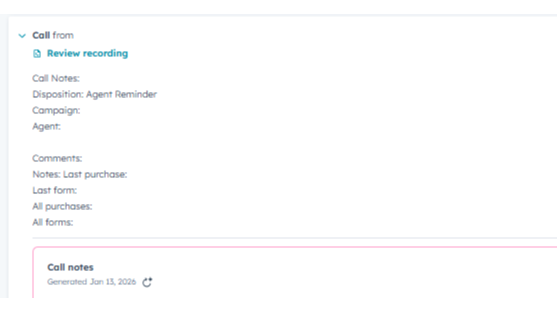
Real-Time Call Logging from Dialer to HubSpot
Automatically logs inbound and outbound calls from Dialer into HubSpot in real time. Each call is associated with the correct contact using phone or email matching and appears in the contact’s activity timeline with key call details. This ensures HubSpot remains the system of record for call activity without manual entry or delayed syncing.
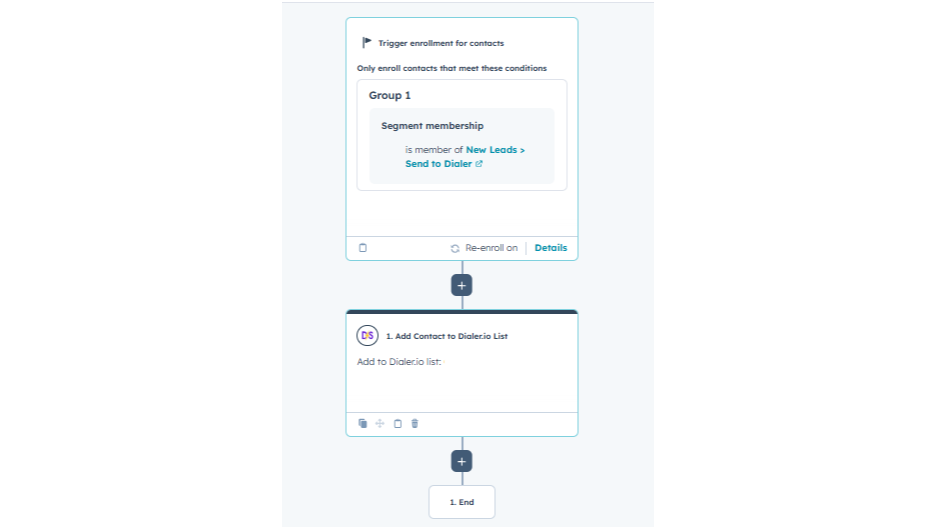
Sending Leads from HubSpot into Dialer
Allows HubSpot workflows to send contacts into Dialer campaigns based on CRM logic such as list membership, lifecycle stage, or form submission. This enables teams to use HubSpot as the system of record for lead routing without manual exports or third-party automation tools.
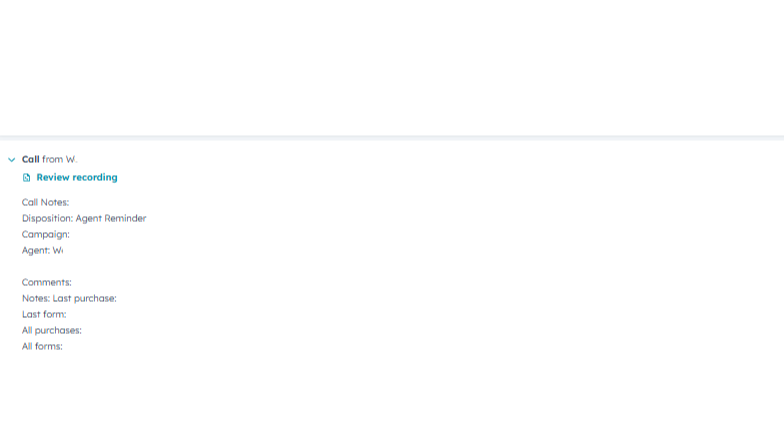
Agent Mapping for Accurate Call Attribution
Maps Dialer agents to HubSpot users to ensure calls are attributed to the correct agent. This maintains accurate reporting and accountability across sales teams as new agents are added or roles change.
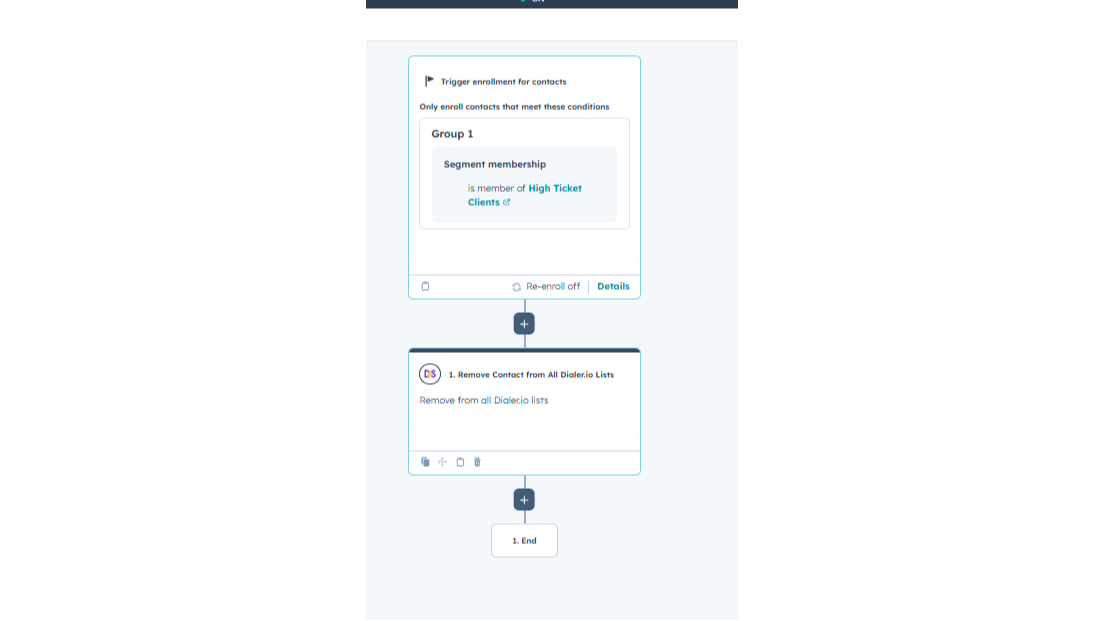
Removing Leads from Dialer
Allows HubSpot workflows to remove contacts from Dialer campaigns or lists based on CRM logic such as lifecycle stage changes, disqualification, or booking completion. This ensures contacts are automatically excluded from Dialer when they should no longer be called, without manual intervention or third-party automation tools.
Fonctionnalité de l'application
Données partagées
Contacts | ||
Deals | ||
Companies | ||
Owners | ||
Contact Properties |
Dialer Sync processes only the data required to synchronize call activity and execute user-configured workflow actions between Dialer and HubSpot.
Data shared from Dialer to HubSpot includes call metadata such as timestamp, duration, and direction, call outcomes, Dialer agent identifiers, contact identifiers like phone number or email, and structured call notes derived from Dialer fields. This data is used solely to create or update call records in HubSpot and associate calls with the correct contact and owner.
Data shared from HubSpot to Dialer includes contact identifiers such as first name, last name, phone number, and email, along with campaign or list identifiers when executing Dialer actions from HubSpot workflows. Supported workflow actions include adding contacts to Dialer campaigns, removing contacts from specific Dialer lists, or removing contacts from all Dialer lists. Data is transmitted only when a customer explicitly configures and runs a workflow.
The application does not access unrelated CRM objects or properties, does not process or store call audio or recordings, and does not share data with third parties outside of Dialer and HubSpot. Limited local caching is used only for user and disposition mappings to improve reliability.
Cached data is scoped per organization; customers may request deletion of cached and processed data, and deletions do not affect other organizations. This controlled data model ensures predictable behavior, reduced risk, and compliance with HubSpot platform requirements.
Avis
Tarification
Free
0 $US
Free
0 $US
* Les prix mentionnés ici sont uniquement présentés à titre indicatif. Tous les prix n'incluent pas les taxes, les offres spéciales, les réductions ni les autres facteurs pouvant affecter les tarifs. Vous devez contacter le partenaire pour obtenir les tarifs les plus récents. HubSpot n'assume aucune responsabilité pour les informations de tarification fournies par ses partenaires. Dernière mise à jour des prix : 03/02/2026
Informations supplémentaires
Créé par - The Moderate Genius
Installation - 40+ installations
Catégories Langues dans lesquelles cette application est disponible Anglais
Attirer l'attention aujourd'hui

SurveyMonkey
Agissez sur vos données SurveyMonkey dans HubSpot.

Adobe Acrobat Sign
Create and manage agreements directly from HubSpot
