

Snowflake
Créé par HubSpot
Installation - 500+ installations
Évaluation 4,5
(2)
Exigences
Abonnement HubSpot Autorisations de compte HubSpot Aucune autorisation requise Type d'accès Partagé Abonnement à Snowflake - Abonnement : Snowflake Standard, Enterprise ou Business Critical
Vue d'ensemble
1/4
Importez directement les données d'entreprise de Snowflake dans HubSpot pour bénéficier d'une vision unifiée de la clientèle et d'une croissance alimentée par l'IA. Utilisez la synchronisation des données pour relier de manière transparente les données de Snowflake à votre CRM HubSpot grâce à une synchronisation sécurisée et automatisée. Avec Data Studio de HubSpot, combinez, enrichissez et exploitez vos données via une interface intuitive de type tableur, sans aucune expertise technique.
Principaux cas d’utilisation :
Créez des segments comportementaux sophistiqués pour un marketing ciblé et personnalisé
Déclenchez des workflows automatisés qui transforment l’utilisation des produits en opportunités de mise à niveau
Démontrez l’impact de vos actions marketing grâce à une attribution avancée reliant les campagnes au chiffre d’affaires
Alimentez vos outils d’IA grâce à des informations complètes sur vos clients
Pour rendre les données HubSpot disponibles dans Snowflake, installez notre application complémentaire Data Share ici.
Avec Snowflake, vous pouvez importer des données depuis n'importe quelle table ou vue de votre base de données Snowflake pour créer et/ou mettre à jour des enregistrements d'objets standard dans HubSpot.
Fonctionnalités
-1.png)
Optimisez et exploitez vos données avec Data Studio
Conçu spécialement pour les professionnels du marketing, Data Studio, intégré à Data Hub, vous permet de combiner des données dans une interface familière, semblable à celle d'un tableur, grâce à l'intelligence artificielle. Exploitez vos données en créant des ensembles de données personnalisés qui facilitent la segmentation avancée, l'automatisation et la création de rapports.
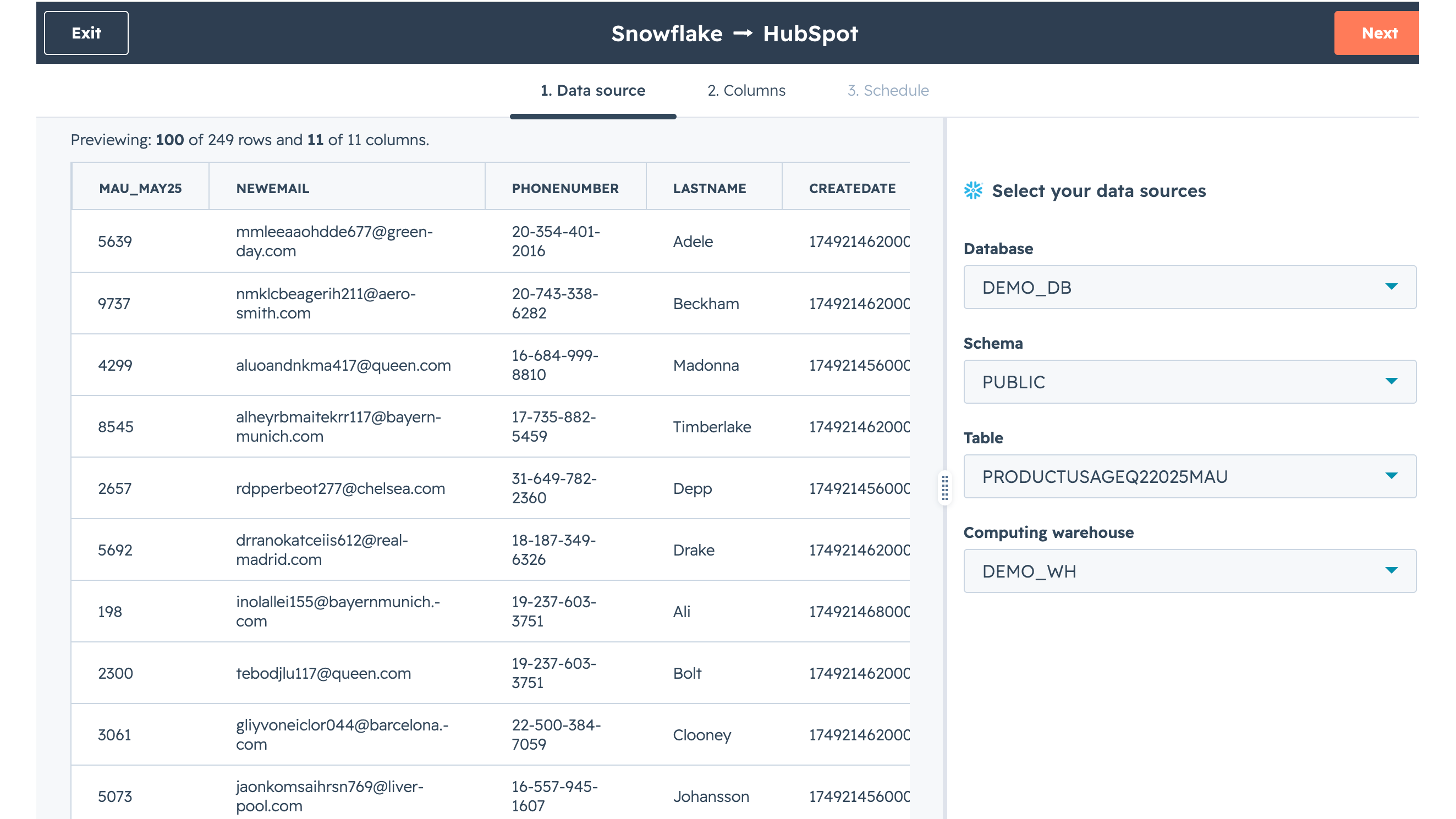
Synchroniser les données directement depuis Snowflake vers HubSpot
Un moyen simple et efficace de synchroniser des données directement depuis Snowflake vers votre CRM. Vous pouvez également prévisualiser vos données source avant d'enregistrer votre synchronisation. Ce mécanisme de synchronisation prend également en charge la synchronisation multi-objets et la synchronisation des associations.
Fonctionnalité de l'application
Données partagées
Chaque objet dispose de mappages de champs qui relient les informations correspondantes issues de la table de la source de données Snowflake.
Vous pouvez également choisir de connecter votre source de données Snowflake à Data Studio pour créer ou modifier des ensembles de données et activer
Snowflake table | ||
Snowflake table | ||
Snowflake table | ||
Snowflake table | ||
Snowflake table | ||
Snowflake table | ||
Snowflake table | ||
Snowflake table | ||
Snowflake table | ||
Snowflake table | ||
Snowflake table | ||
Snowflake table | ||
Snowflake table | ||
Snowflake table |
- 23 févr. 2026
Lamirand, J.
- 11 févr. 2026
Dotel, S.
Tarification
Snowflake Standard, Enterprise ou Business Critical
Snowflake Standard, Enterprise ou Business Critical
* Les prix mentionnés ici sont uniquement présentés à titre indicatif. Tous les prix n'incluent pas les taxes, les offres spéciales, les réductions ni les autres facteurs pouvant affecter les tarifs. Vous devez contacter le partenaire pour obtenir les tarifs les plus récents. HubSpot n'assume aucune responsabilité pour les informations de tarification fournies par ses partenaires. Dernière mise à jour des prix : 27/06/2026
Informations supplémentaires
Créé par HubSpot
Installation - 500+ installations
Catégories Langues dans lesquelles cette application est disponible Anglais