
.png)
AdRoll Marketing & Advertising
제작자 - AdRoll, Inc
설치 - 설치 수 2천개
평가 3.8
(5)

요구 사항
HubSpot 요금제 HubSpot 계정 권한 - 필수 계정 권한 보기
액세스 유형 공유됨 AdRoll Marketing & Advertising 구독 - HubSpot과의 무료 연동 플랜
개요
1/3
HubSpot 연동 기능을 통해 계정 내의 정적 HubSpot 이메일 목록을 AdRoll로 직접 동기화할 수 있습니다. 당사의 CRM 데이터 온보딩 프로세스를 통해 매칭되는 이 연동 기능을 활용하면, 목록을 유료 디지털 미디어 및 계정 기반 광고 캠페인에 활용할 수 있는 타겟팅 가능한 잠재 고객으로 손쉽게 전환할 수 있습니다.
이 연동을 위한 요구 사항
HubSpot Marketing Hub 유료 계정(Starter, Professional 또는 Enterprise)이 있어야 합니다.
CRM 리스트가 정상적으로 불러오기되려면 각 리스트에 최소 100명의 고유 사용자 이메일 주소가 포함되어 있어야 합니다.
CRM 타겟층 동기화
HubSpot 연동 도구를 찾으려면:
- 왼쪽 탐색 메뉴에서 ‘Audiences ’ 탭으로 이동합니다.
- '연결된 대상'을 클릭합니다.
- '앱' 아래에 있는 '다른 마케팅 앱 연결'을 클릭합니다.
- HubSpot 아이콘을 클릭한 다음 ‘연결’을 클릭합니다.
- HubSpot 계정에 로그인합니다.
- AdRoll로 돌아가서 'HubSpot ID 입력' 필드에 ID를 붙여넣으세요.
- 'HubSpot ID로 인증' > '승인'을 클릭합니다.
- '목록 선택'을 클릭하여 AdRoll 타겟 고객에 대한 목록을 선택합니다.
모범 사례
CRM 데이터 연동을 위해 리스트를 준비하는 데 도움이 되는 팁은 다음과 같습니다.
- 목록에는 최소 100개의 이메일 주소가 포함되어야 합니다.
- 일치율이 더 높으므로 가능한 경우 개인 이메일 주소를 사용하십시오.
- 이메일 데이터베이스가 최신 상태인지 확인하십시오. 가입 워크플로우에 이메일 유효성 검사 단계를 추가하면 사용자가 유효한 이메일을 제공하도록 하는 데 큰 도움이 될 수 있습니다.
- 성과를 높이기 위해 CRM 타겟층을 다른 유형의 타겟층과 결합하는 것을 고려해 보세요.
- HubSpot에서 정적 리스트를 업로드해야 합니다. 현재 스마트 리스트는 지원되지 않습니다.
HubSpot 내에서 리스트를 관리하는 방법에 대해 자세히 알아보세요.
가져온 타겟 그룹
HubSpot CRM 타겟팅 그룹이 AdRoll에 즉시 표시되지 않을 수 있습니다. 새로운 목록에 대한 매칭 프로세스는 6시간 이내에 시작됩니다. 프로세스가 시작된 후 추가된 새로운 이메일 주소는 매칭되는 데 최대 2주가 소요될 수 있습니다.
가져온 타겟팅 그룹 이름은 자동으로 ‘HubSpot’으로 끝납니다.
이메일 리스트가 표시되면 쿠키 매칭이 시작됩니다. 캠페인에서 완전히 활성화되기까지 최대 7일이 소요될 수 있습니다.
예상되는 사항
- 24시간마다 HubSpot에서 새로운 이메일 주소를 가져옵니다.
- 미국 광고주의 경우, CRM은 웹과 페이스북 모두에서 실행할 수 있습니다. 가능한 경우 미국 기반 이메일 주소를 사용하는 것을 권장합니다.
- 미국 이외 지역의 경우, 웹 캠페인에서 CRM 타겟팅의 기능이 제한됩니다. 미국 이외 지역의 광고주는 대신 Facebook에서 CRM 리타게팅을 활용하는 것을 권장합니다.
- CRM 타겟팅 그룹은 생성된 후에는 수정할 수 없습니다.
- Facebook에서의 쿠키 매칭은 24시간 이내에 완료됩니다.
- 웹에서의 쿠키 매칭은 이메일 목록의 규모에 따라 최대 7일이 소요됩니다.
매칭된 이메일
HubSpot 연동을 통해 처음 업로드된 이메일 수를 표시해 드립니다.
웹 또는 Facebook에서 성공적으로 매칭된 이메일 수를 확인하려면 ‘대상’ 탭에서 HubSpot 대상 그룹의 이름을 클릭하세요.
기능
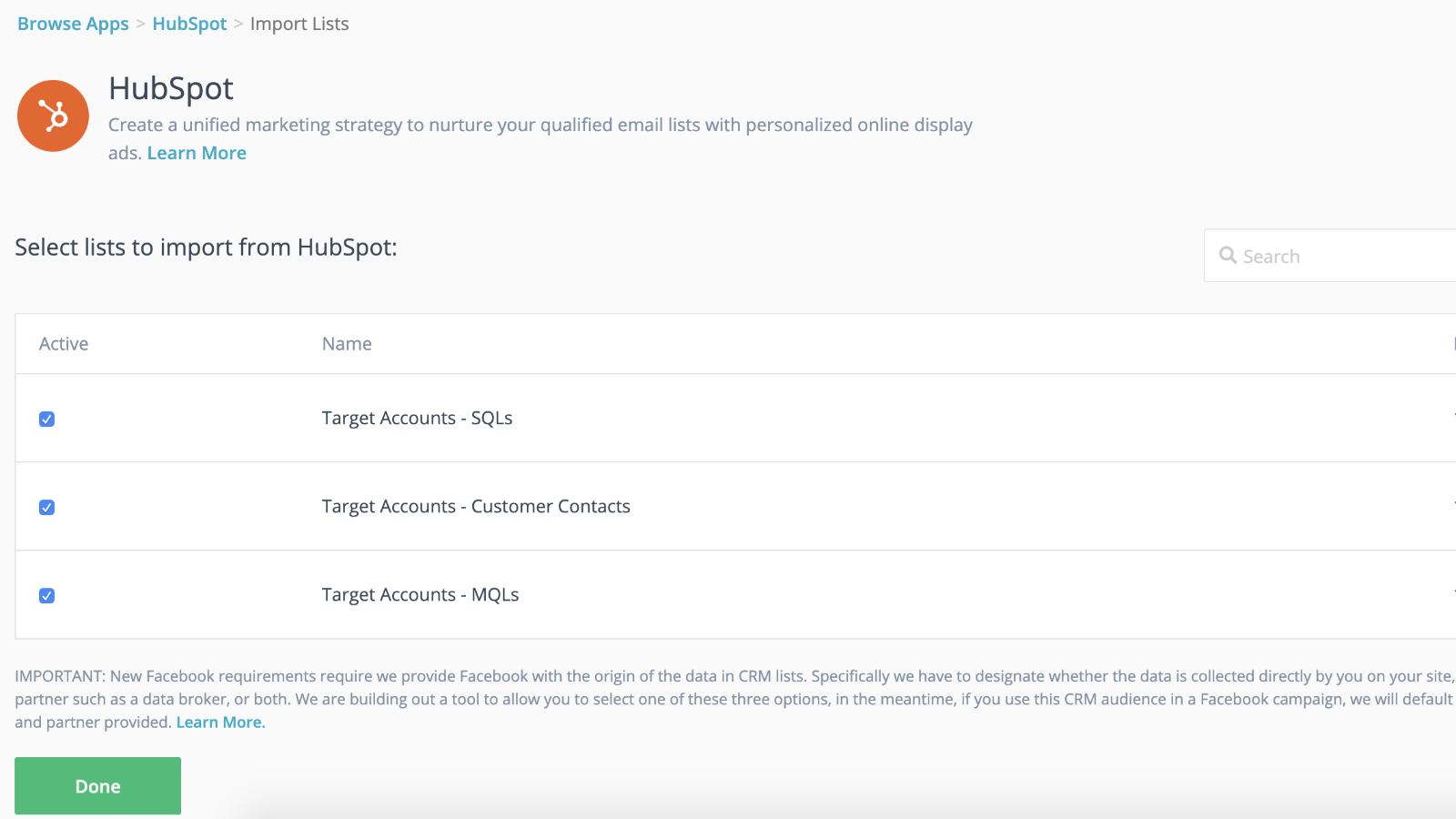
동적 타겟팅 동기화 기능과의 원활한 통합 및 더 빠른 출시
CRM 목록을 리타게팅 캠페인에 연결하면, 리타게팅 캠페인이 백그라운드에서 본격적으로 가동되는 동안 미리 준비를 마칠 수 있습니다. AdRoll에 목록을 가져오기만 하면 모든 준비가 완료됩니다. 연락처 목록은 24시간마다 자동으로 동기화되므로 별도로 신경 쓸 필요가 없습니다.
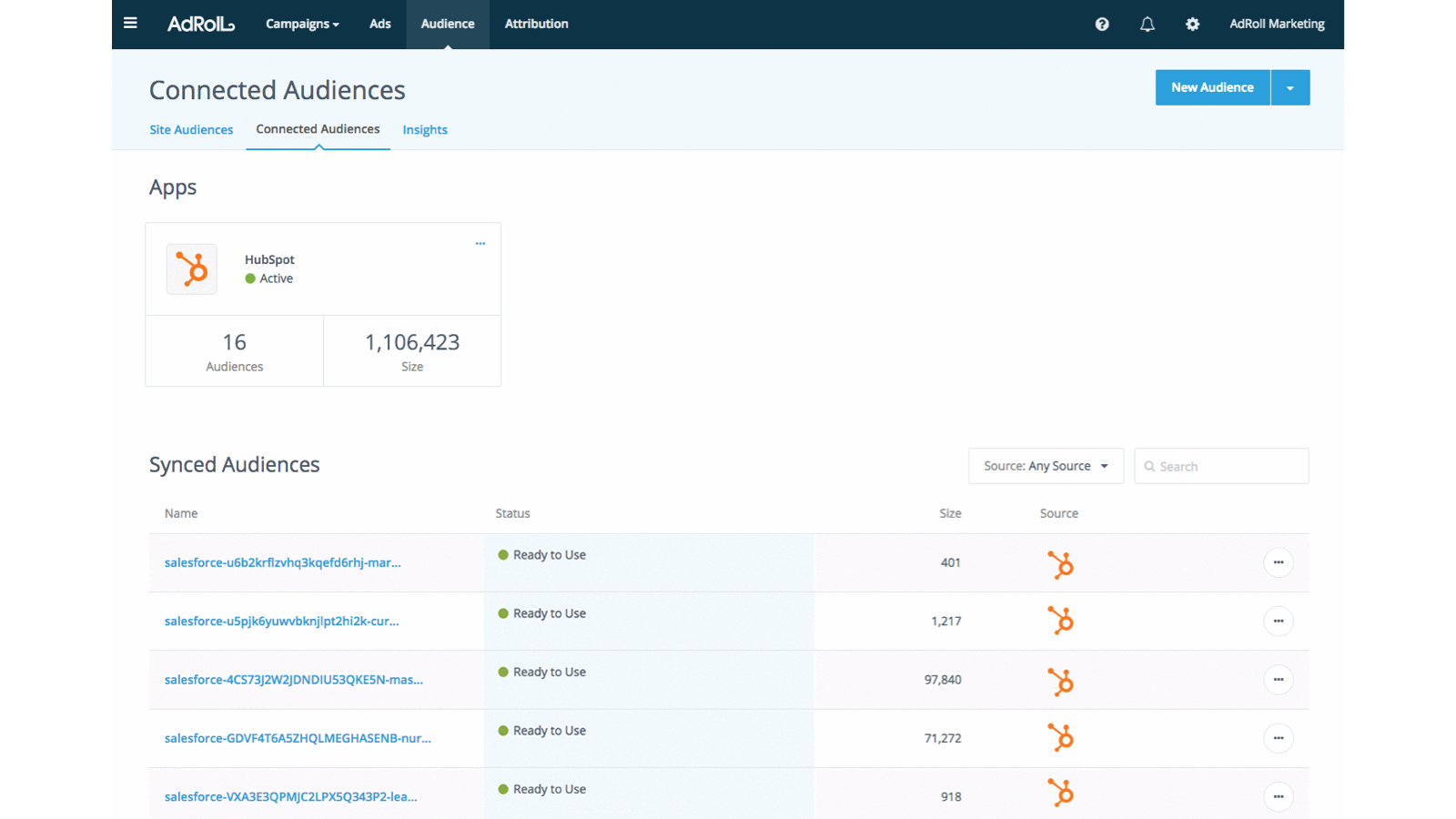
잠재 고객을 위한 맞춤형 경험 제공
HubSpot CRM의 고객 속성을 활용하여 타겟팅이 명확하고 성과가 뛰어난 고객 경험을 창출하세요.
앱 기능
공유 데이터
AdRoll Audience |
리뷰
3.8
5
3.8
5
- 2024년 11월 21일
Gumbayan, J.
- 2021년 10월 20일
Retargeting with Adroll/HubSpot Integration
It works like a CHARM! It was easy to set up the HubSpot/AdRoll integration. Syncing our HubSpot lists with AdRoll was also seamless. The AdRoll platform is intuitive and allows you to set up different campaigns and "advertiser" profiles so you can segment the spend by department, making the expense reporting and ROI calculations easy.
We are using AdRoll for retargeting campaigns for our annual conference and select programs.
Syncing lists from HubSpot to AdRoll allows us to exclude customers/prospects from our retargeting efforts more easily that if we didn't have the integration.
The biggest drawback is that, unlike Google & Linkedin, the data sync is only one way...HubSpot TO AdRoll. If this were a two-way sync so that the metrics were included with our other Advertising Metrics on the HubSpot Ads section it would be even better! Also you can't manage the campaigns from within HubSpot...you have to set up and manage campaigns on the AdRoll platform
Grassley Clarke, M.
비영리 단체 - 직원 11~25명
가격 책정
HubSpot과의 무료 연동
US$0
오늘 바로 HubSpot 목록을 AdRoll과 연동하여 광고 타겟팅 캠페인을 시작해 보세요
HubSpot과의 무료 연동
US$0
오늘 바로 HubSpot 목록을 AdRoll과 연동하여 광고 타겟팅 캠페인을 시작해 보세요
* 여기에 표시된 가격은 표시 목적으로만 사용됩니다. 모든 가격에는 세금, 인센티브, 할인 또는 기타 가격 변수가 포함되어 있지 않습니다. 가장 최신의 정확한 가격 정보를 알고 싶다면 파트너에게 연락해야 합니다. HubSpot은 파트너가 제공하는 이 가격 정보에 대해 어떠한 책임도 지지 않습니다. 마지막 가격 업데이트 날짜: 2026.07.29.