
Emergency Unmerge
Undo accidental HubSpot merges; restore contacts, companies, and…
Built by - Third Space LLC
Installs - <10 installs
Requirements
HubSpot Plan HubSpot Account permissions - View the required account permissions
Emergency Unmerge Subscription - Free Scan, Emergency 100, Emergency 250, Emergency 500, or Emergency - Buy What You Need plans
Overview
1/11 - Demo walkthrough of Emergency Unmerge inside HubSpot
Emergency Unmerge is the only app that reverses merges already performed through HubSpot's native merge function.
When contacts, companies, or deals are accidentally merged in HubSpot, the original records are destroyed. Properties are overwritten, associations are tangled, and activities from two separate records land on one. HubSpot has no undo button. HubSpot support cannot reverse it. Manual reconstruction can take days for complex records.
Emergency Unmerge solves this in under 5 minutes, working directly inside HubSpot as a CRM as middle or right sidebar card. Bulk unmerge via HubSpot Segments or CSV Upload within our Account Portal gives you full control over what records you are unmerging, along with what properties and associations belong to which record.
How it works
Open any merged record and click Scan. The scan is always free and shows you exactly what happened and what it will cost to fix. Click Reconstruct and the app uses AI to analyze every property's revision history, every association, and every activity to determine which data belonged to which original record. Review the full reconstruction with per-field confidence scores before anything changes in your CRM.
What it handles
Contacts, companies, and deals
Chain merges (A into B into C) with selective undo
Merges from any source: manual, bulk operations, third-party dedup tools, Salesforce sync, or API
All HubSpot tiers: Free, Starter, Professional, and Enterprise
Confidence scoring on every reconstructed field
Post-execution property editor for quick corrections
Recovery snapshots on every operation
Pricing
No subscription. Pay only for what you use. The scan is always free, and you see the exact credit cost before committing. Failed operations are automatically refunded.
Per-credit: $0.05 each, no minimum
100 credits: $4.99 ($0.05 per credit)
250 credits: $9.99 ($0.04 per credit, save 20%)
500 credits: $19.99 ($0.04 per credit, save 20%)
Simple unmerges start at 4 credits ($0.20). Complex records with many associations and activities use more credits. The free scan tells you the exact cost before you commit.
Important note on HubSpot API limitations
Due to HubSpot API limitations, Emergency Unmerge creates new records with new Record IDs rather than restoring the original merged record. HubSpot-generated read-only fields (such as Create Date and analytics source data) on new records will reflect the new record's creation date, not the original.
Emergency Unmerge automatically preserves the original values in a dedicated custom property group called "Emergency Unmerge" on each new record, including the original Create Date, original Record ID, and a complete JSON backup of all read-only fields.
Features
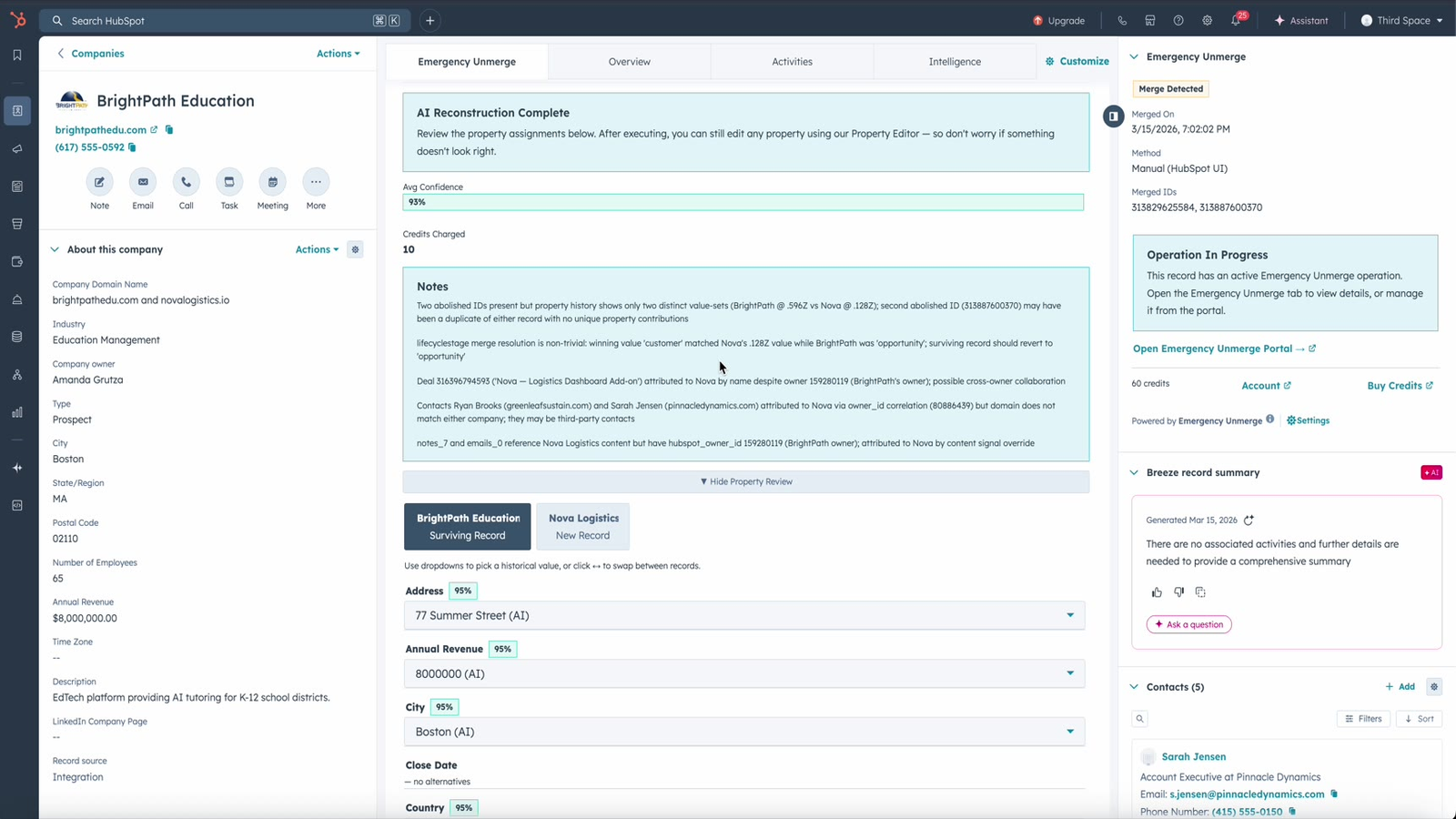
AI-Powered Merge Reconstruction
A rep merges the wrong contacts. A bulk deduplication tool matches too aggressively. A Salesforce sync goes sideways. Emergency Unmerge analyzes every property's revision history, every association, and every activity to determine which data belonged to which original record. Every field gets a confidence score and reasoning.
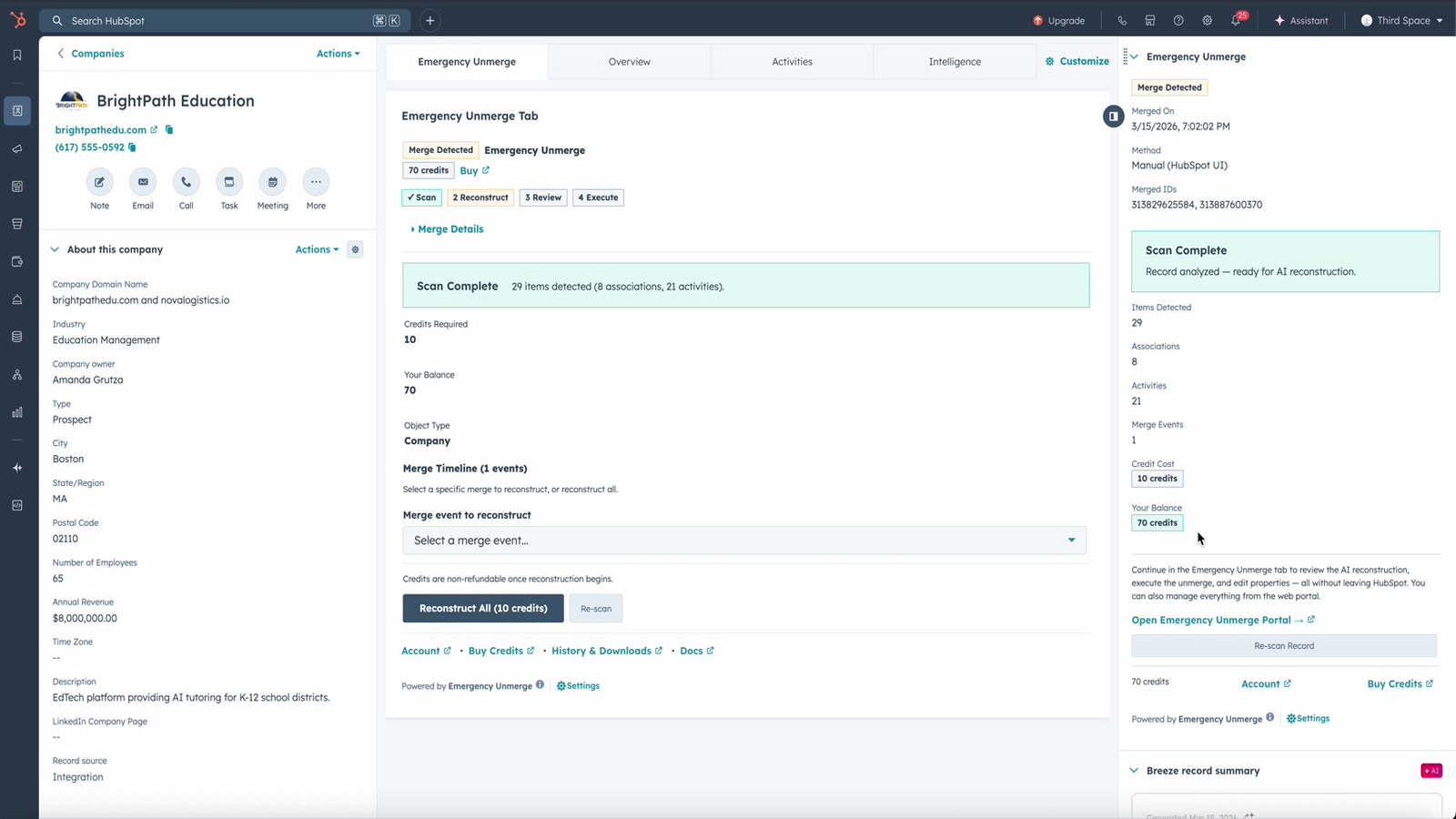
Free Scan on Every Record
Open any merged record and click Scan — always free. See the full complexity breakdown: property count, association count, activity count, and the exact credit cost for reconstruction. You know what you're paying before you spend a single credit. The scan also flags warnings like truncated property history or a merge still processing.
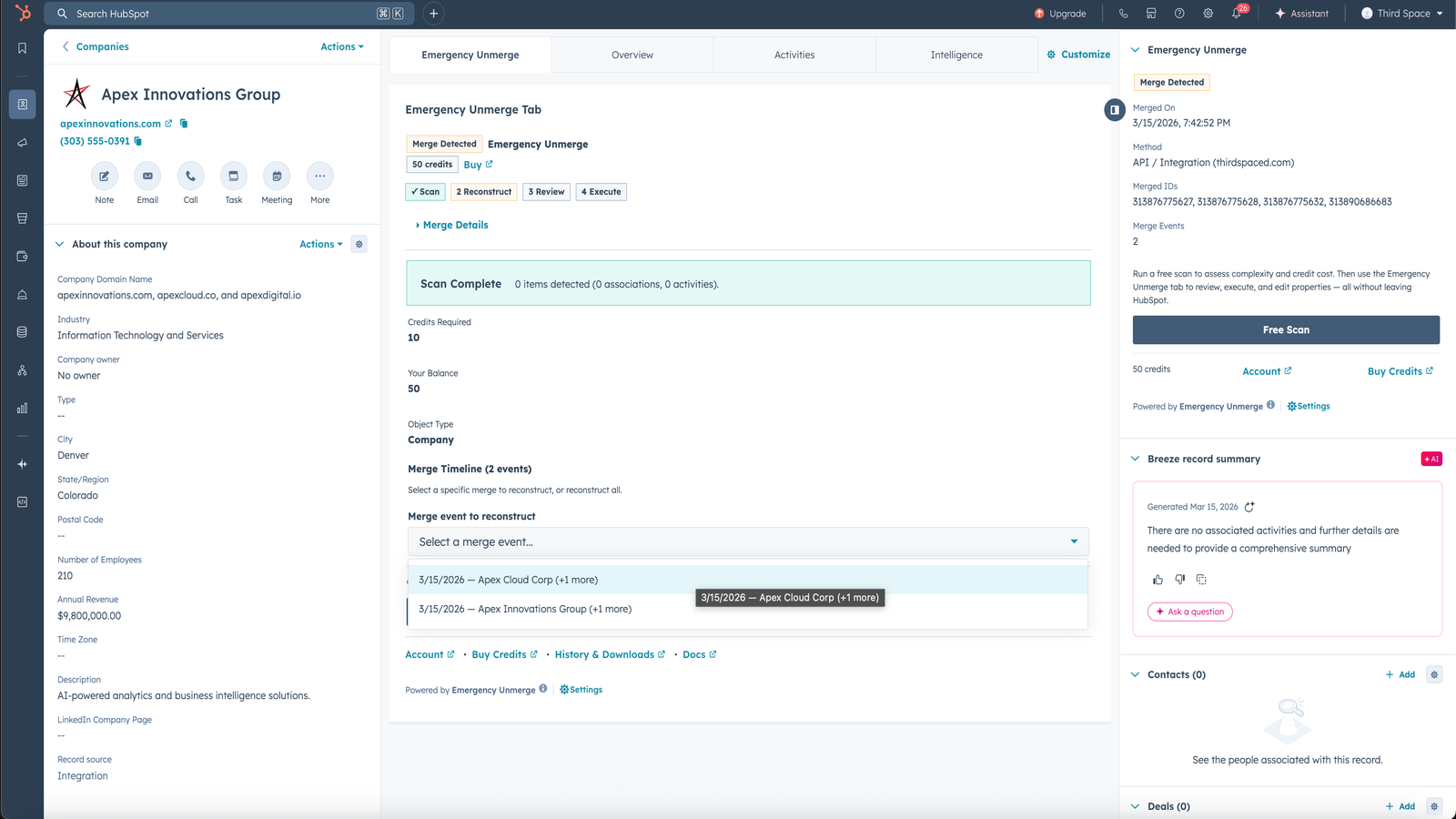
Chain Merge Support with Selective Undo
When a record has been merged multiple times — A into B, then B into C — Emergency Unmerge shows the full merge timeline with dates and record names. Undo all merges at once, or select just the specific merge event you want to reverse. Each record in the chain can be individually included or excluded.
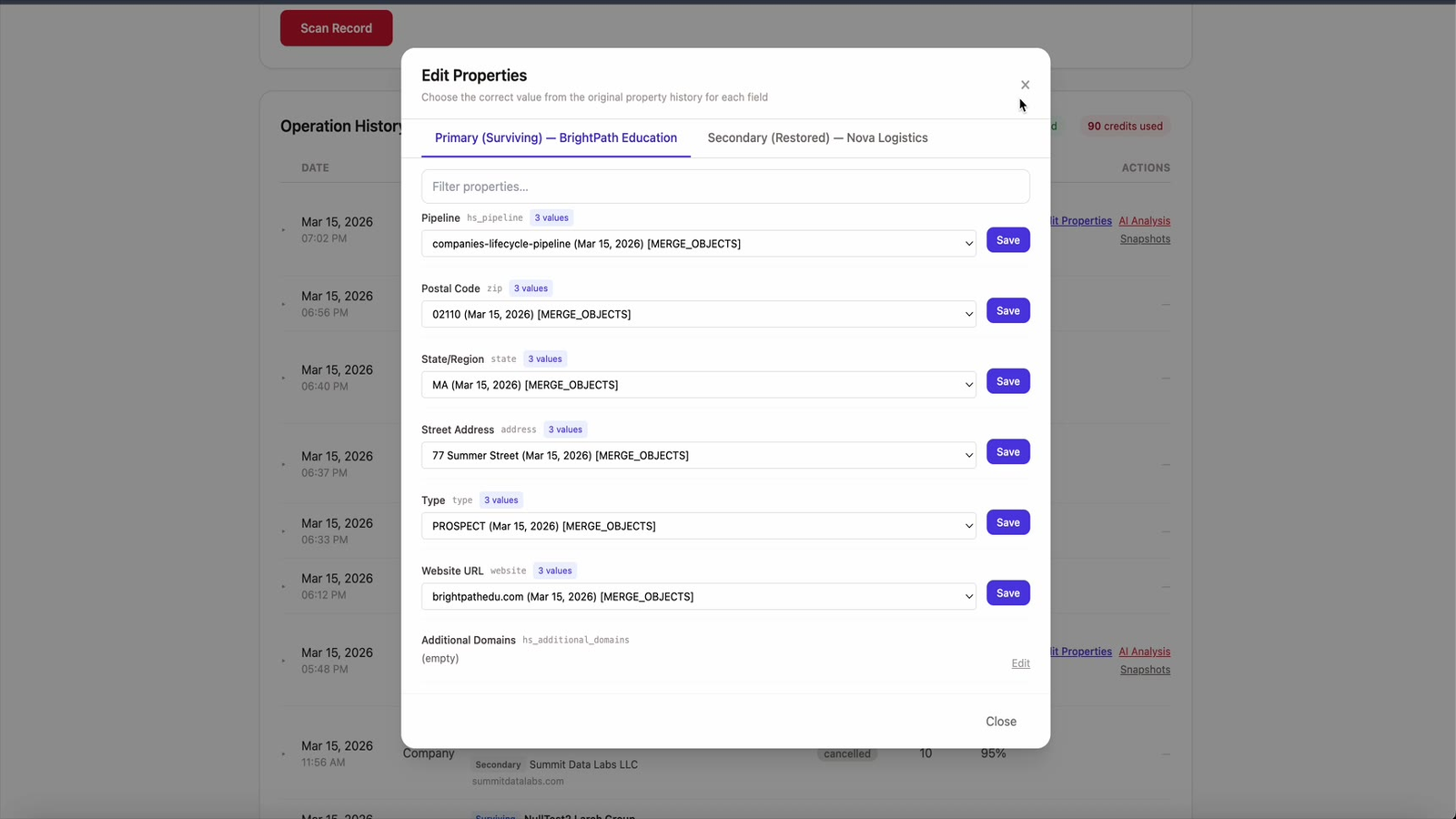
Post-Execution Property Editor
After executing an unmerge, correct any field the AI got wrong — directly from HubSpot. For each property, see the current value, a dropdown of every historical value from HubSpot's property history with timestamps and sources, and save with one click. The AI doesn't need to be perfect when you have a fast way to fix anything.
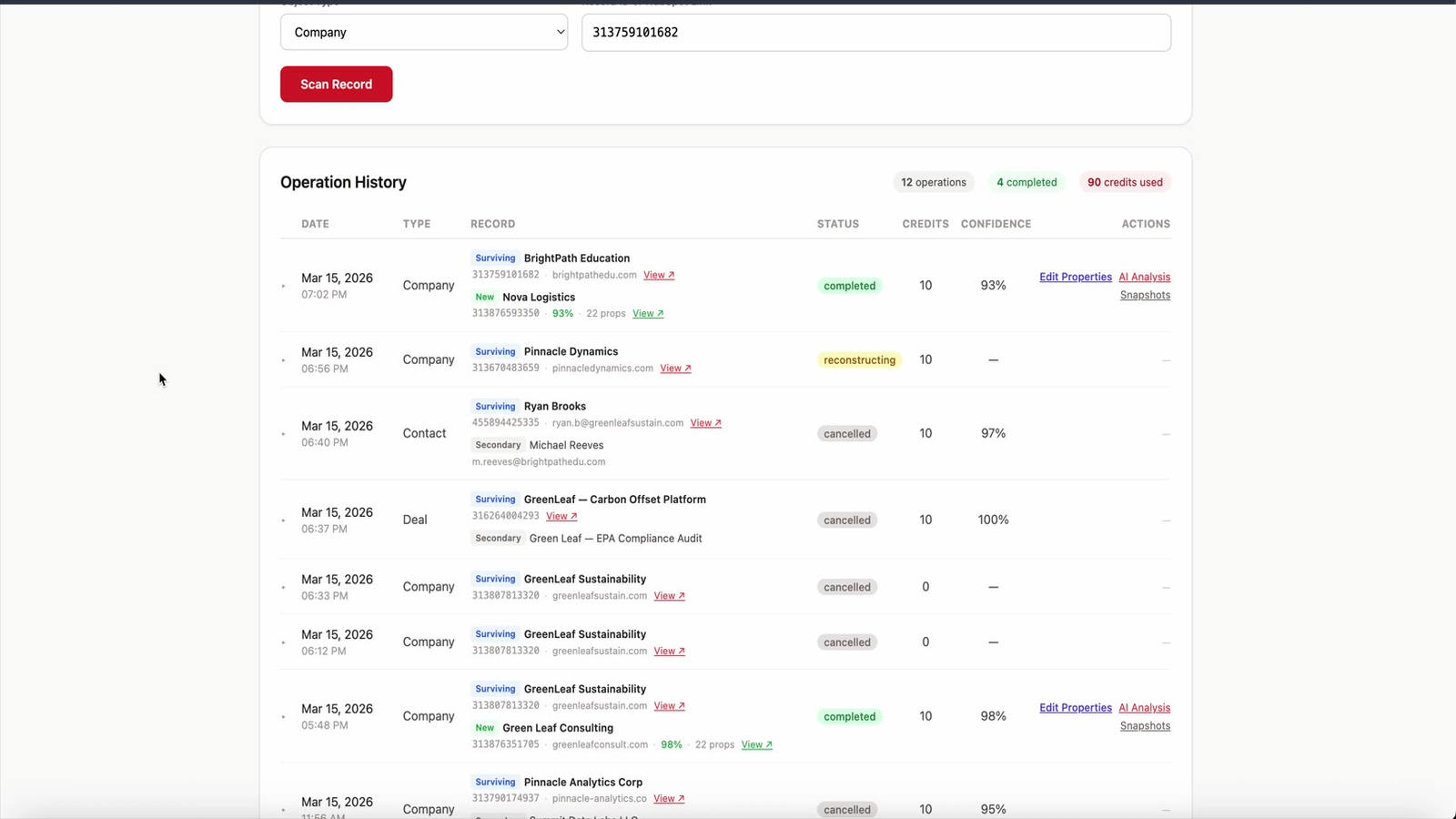
Recovery Snapshots and Audit Trail
Every execution captures before-and-after JSON snapshots of all affected records — every property and every association. Downloadable anytime from your operation history. Cross-linked audit notes are added to both the surviving and recreated records so your team always knows what happened and when.
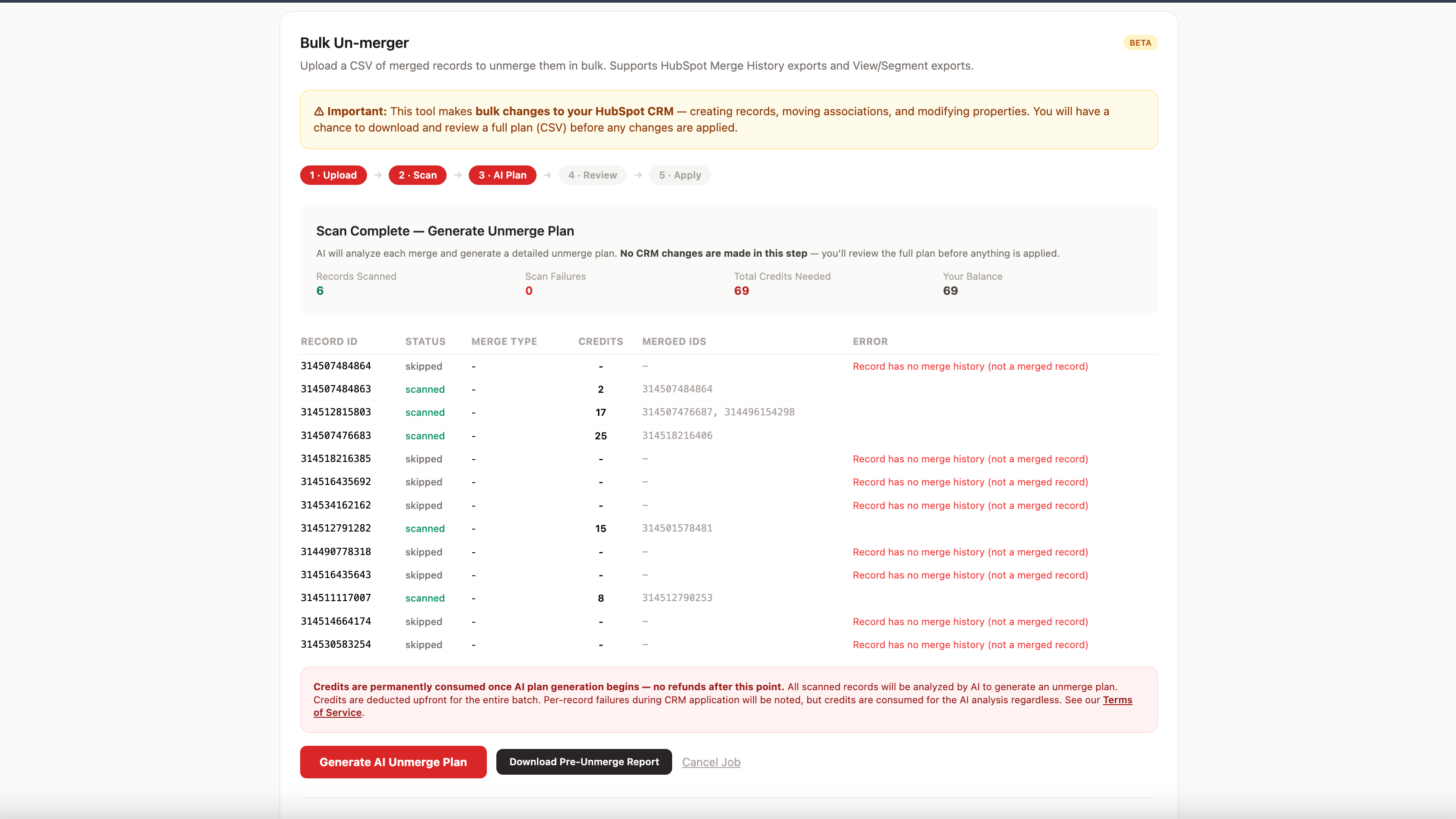
Bulk Unmerge via CSV
Reverse bulk merges with either pre-built Hubspot Segments or CSV upload. Select any Segments from your Hubspot or export any HubSpot view, segment, or merge history, upload it and our AI scans each record, generates a detailed unmerge plan, and recreates the original records with properties, associations, and activities restored.
App Functionality
Shared Data
Activities | ||
Activities | ||
Activities | ||
Activities | ||
Associations | ||
Companies | ||
Company Properties | ||
Contact Lists | ||
Contact Properties | ||
Contacts | ||
Custom Objects | ||
Deal Properties | ||
Deals | ||
Line Items | ||
Notes | ||
Orders | ||
Quotes Template |
How Emergency Unmerge uses your data
Emergency Unmerge reads CRM data during the scan phase and writes data during the execution phase. Here's exactly what happens at each step:
Scan (read-only): The app reads property values, property history, associations, and activity metadata from the merged record. This data is used to build a forensic picture of the merge. No changes are made to your CRM during scanning.
Reconstruct (external processing): The scanned data is sent to Anthropic's Claude API for AI analysis. This data is processed in memory only, is not stored by Anthropic, and is not used to train AI models. Emergency Unmerge stores only operation metadata (record IDs, timestamps, confidence scores) — not your full CRM data.
Execute (write): The app creates one new CRM record with reconstructed properties, restores associations to the correct records, and adds audit trail notes to both the surviving and recreated records. Recovery snapshots (before/after JSON) are stored encrypted and accessible only to authenticated portal administrators.
What we do NOT do:
We do not store your full CRM data on our servers
We do not sync data on a recurring schedule; the app only accesses data when you click Scan
We do not access records you haven't explicitly scanned
All API communication uses HTTPS/TLS encryption. Authentication uses OAuth 2.0 with portal-scoped access isolation.
Reviews
Be the first to write a customer review
Pricing
Free Scan
$0
Install free. Scan any merged record free. Pay only when you reconstruct.
CRM sidebar card with automatic merge detection
Works on all HubSpot tiers
Works on contacts, companies, and deals
See exact credit cost before committing
Unlimited free scans on any merged record
Free install with no credit card required
Free Scan
$0
Install free. Scan any merged record free. Pay only when you reconstruct.
CRM sidebar card with automatic merge detection
Works on all HubSpot tiers
Works on contacts, companies, and deals
See exact credit cost before committing
Unlimited free scans on any merged record
Free install with no credit card required
* The pricing here is for display purposes only. All prices do not include taxes, incentives, discounts, or other pricing variables. You should contact the partner for the most up to date and correct pricing information. HubSpot does not take any responsibility for this pricing information, which is provided by our partners. Pricing last updated: 03/27/2026
More info
Built by - Third Space LLC
Installs - <10 installs
Categories Languages this app is available in English - Australia ,English - Belgium ,English - Canada ,English - China ,English - Egypt ,English - Estonia ,English - Finland ,English - France ,English - Germany ,English - Hong Kong ,English - India ,English - Indonesia ,English - Ireland ,English - Kenya ,English - Luxembourg ,English - Malaysia ,English - Malta ,English - Mexico ,English - New Zealand ,English - Pakistan ,English - Philippines ,English - Portugal ,English - Singapore ,English - South Africa ,English - Spain ,English - Sweden ,English - Switzerland ,English - Thailand ,English - The Netherlands ,English - Tunisia ,English - United Arab Emirates ,English - United Kingdom ,English - United States ,English - Vietnam , andEnglish - Zimbabwe
New arrivals