

ClearoutPhone-Phone validator
Built by - ClearoutPhone
Installs - 100+ installs
Rating 5
(3)
Requirements
HubSpot Plan HubSpot Account permissions - View the required account permissions
Access Type Shared ClearoutPhone-Phone validator Subscription - Pay as You Go or Subscription Plan plans
Overview
1/7
Why ClearoutPhone?
ClearoutPhone validates and enriches phone numbers through a seamless 2-way integration, directly enriching your HubSpot CRM contacts, helping sales and marketing teams identify reachable contacts, choose the right outreach channel, and prioritize the best prospects before launching call or SMS campaigns.
Turn raw HubSpot phone numbers into sales-ready contact data by eliminating dead numbers, reducing failed cold calls, and improving SMS campaign success.
Phone Validation & Live Intelligence:
ClearoutPhone provides comprehensive phone verification and real-time telecom enrichment directly inside HubSpot:
Real-Time Deliverability & Reachability: Verify active status across 248+ countries. Dynamically trigger deep network checks for hard-to-verify numbers (such as ported or VoIP lines) to ensure maximum delivery confidence before outreach.
Line-Type Identification: Instantly distinguish between Mobile, Landline, and VoIP numbers to direct contacts to the right communication channel.
Carrier & Portability Detection: Identify registered network carriers, active network status, and ported numbers to optimize outreach and routing.
Geolocation & Time Zone Enrichment: Capture country, region, city, and local time zone data to schedule calls and messages during optimal business hours.
E.164 Global Standard Formatting: Automatically format and standardize international numbers for seamless integration with auto-dialers, SMS gateways, and CRM workflows.
Use Cases & Business Value for HubSpot Users:
Sales & SDR Teams (Context-Aware Outreach & Live Engagement): Route active mobile numbers to priority dialer queues while directing landlines to automated voice drops. Leverage real-time timezone and roaming insights to ensure SDRs only call reachable prospects during appropriate local hours, boosting live connection rates and maximizing rep efficiency.
Marketing & RevOps (SMS Budget Protection & Database Cleansing): Automatically purge dead numbers and filter out landlines or VoIP lines before launching high-volume SMS campaigns. Reduce messaging overhead by up to 40%, protect brand sender reputation, and build dynamic CRM segments based on location and carrier tier.
Engineering & DevOps (Smart Message Routing & CRM Hygiene): Implement fallback workflows (such as email or push notifications) when a phone line is offline or unreachable. Enforce standard E.164 formatting at point-of-capture on web forms to eliminate gateway timeout errors and keep system data clean.
Security & Risk Management (Fraud & SIM Swap Prevention): Detect unexpected international roaming activity or physical SIM identity changes during multi-factor authentication or account setup. Block high-risk proxy transactions and protect user accounts from Account Takeover (ATO) attacks.
Telecom & Interconnect Operations (Optimized Carrier Billing): Identify ported numbers and active network providers to route outbound voice and SMS traffic through direct, lower-cost pathways, significantly reducing interconnect fees and preventing routing loops.
CRM Data Quality & Tool Readiness: Keep all HubSpot contact records clean, formatted, and dialer/SMS ready, ensuring your entire GTM stack operates on accurate, high-quality phone data.
ClearoutPhone gives your team the context and confidence needed to reach the right contacts through the right channel, at the right time.
Features
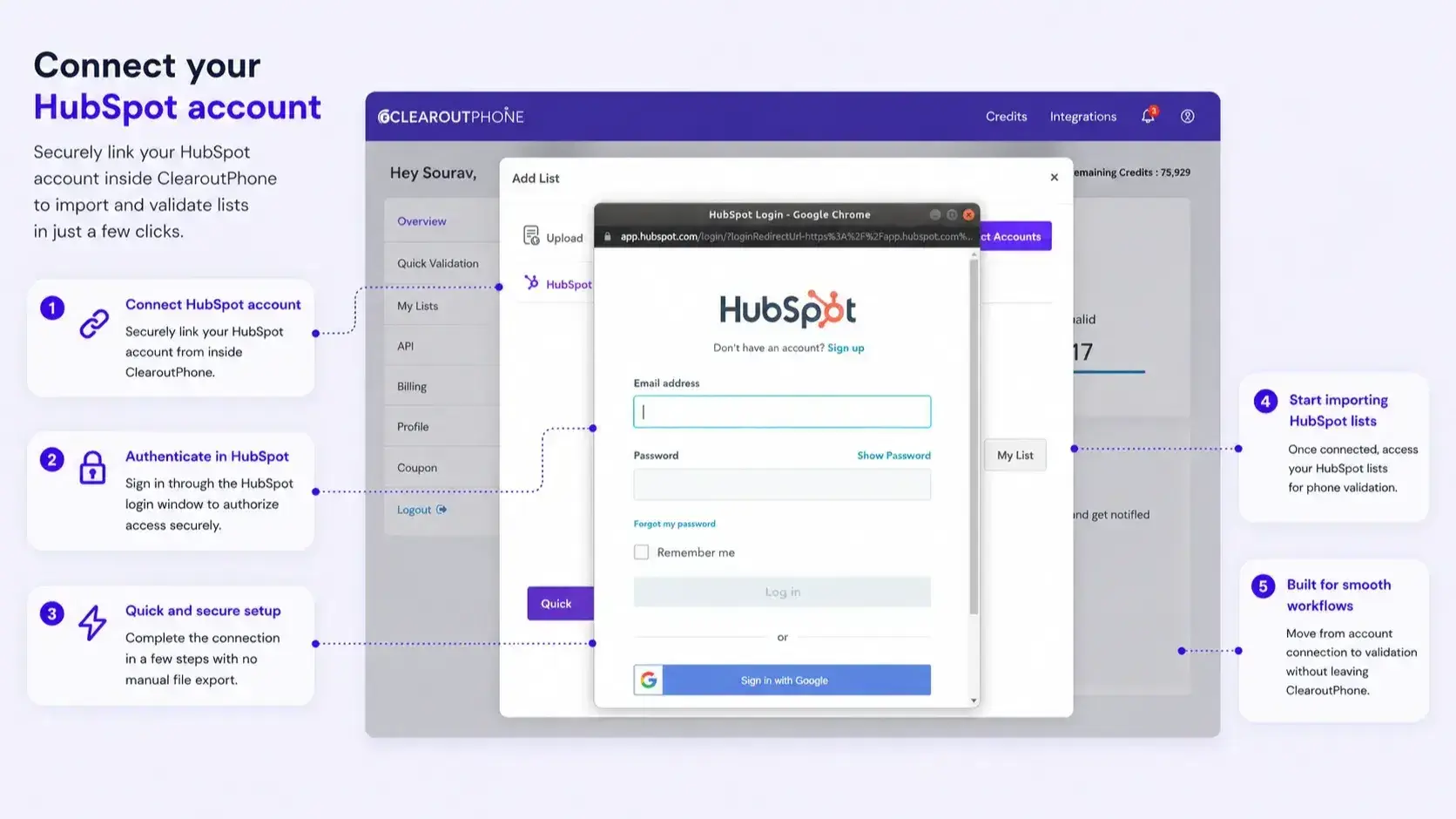
1. Connect account
After logging in to your ClearoutPhone account, 1. go to the 'Integration' page and select 'HubSpot'. 2. Click on "Add Account" to add your HubSpot account. 3. Then login to the HubSpot account. 4. If already connected: Click on the HubSpot integration to see the list of the contacts
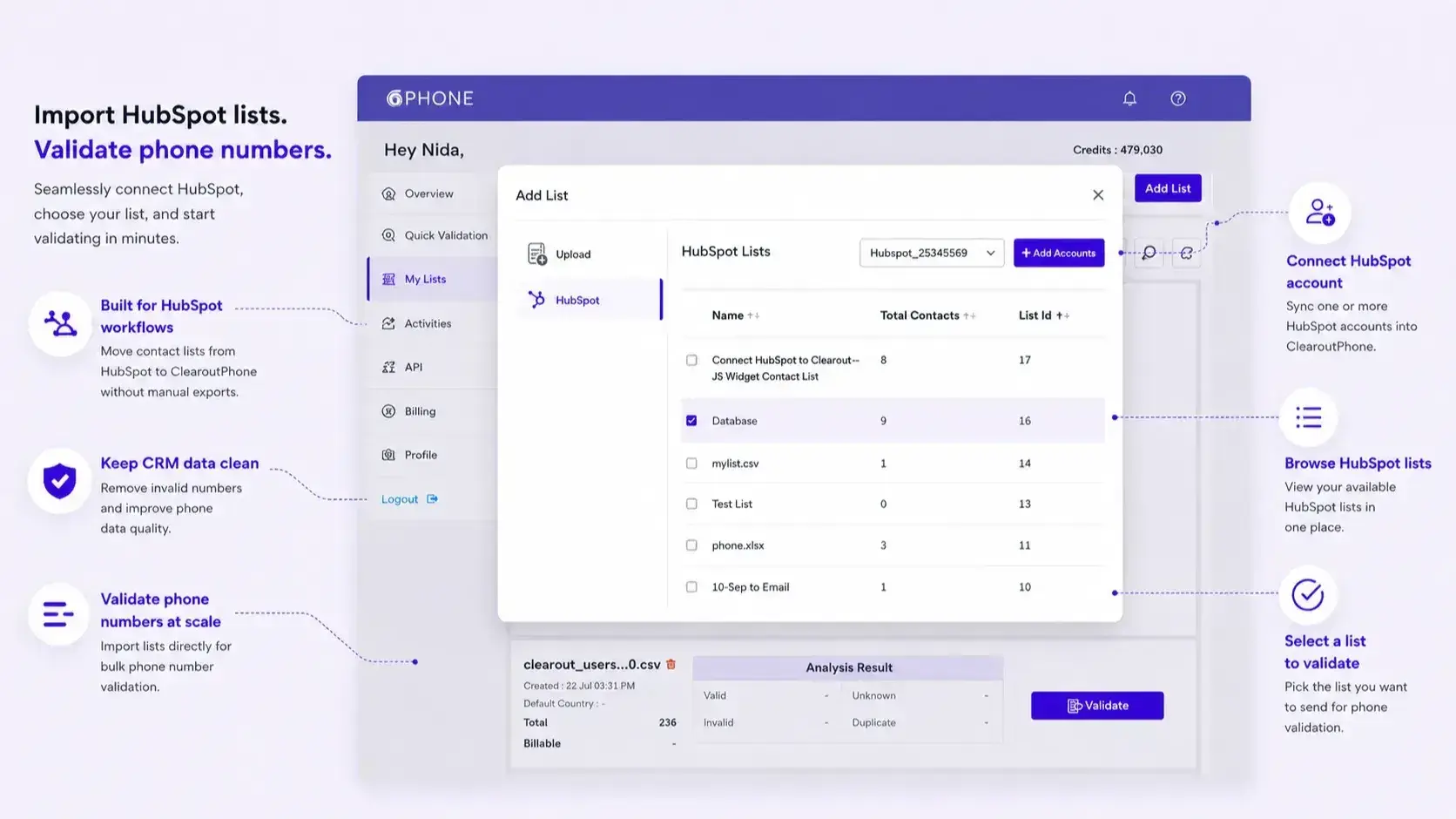
2. Add the Contacts list
1. Validate & enrich your list by easily adding them from the HubSpot account. 2. After successful login, select the list(s) you wish to validate from the HubSpot account linked. 3. Once the lists are selected click on 'Add to my list'
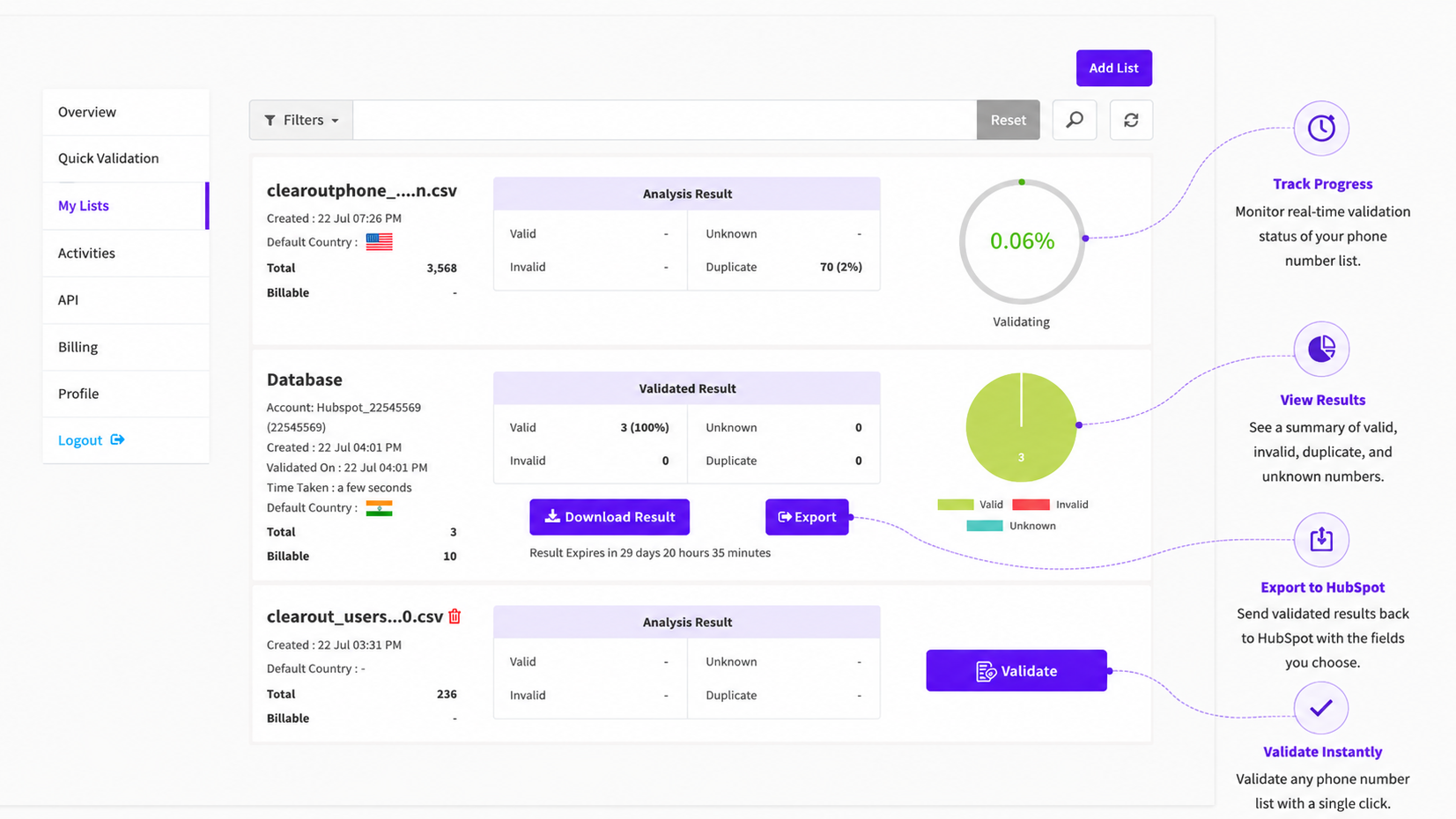
3. Validate the Contacts list
Once the contact list is successfully added, click on the "Validate" to start validating the added list.
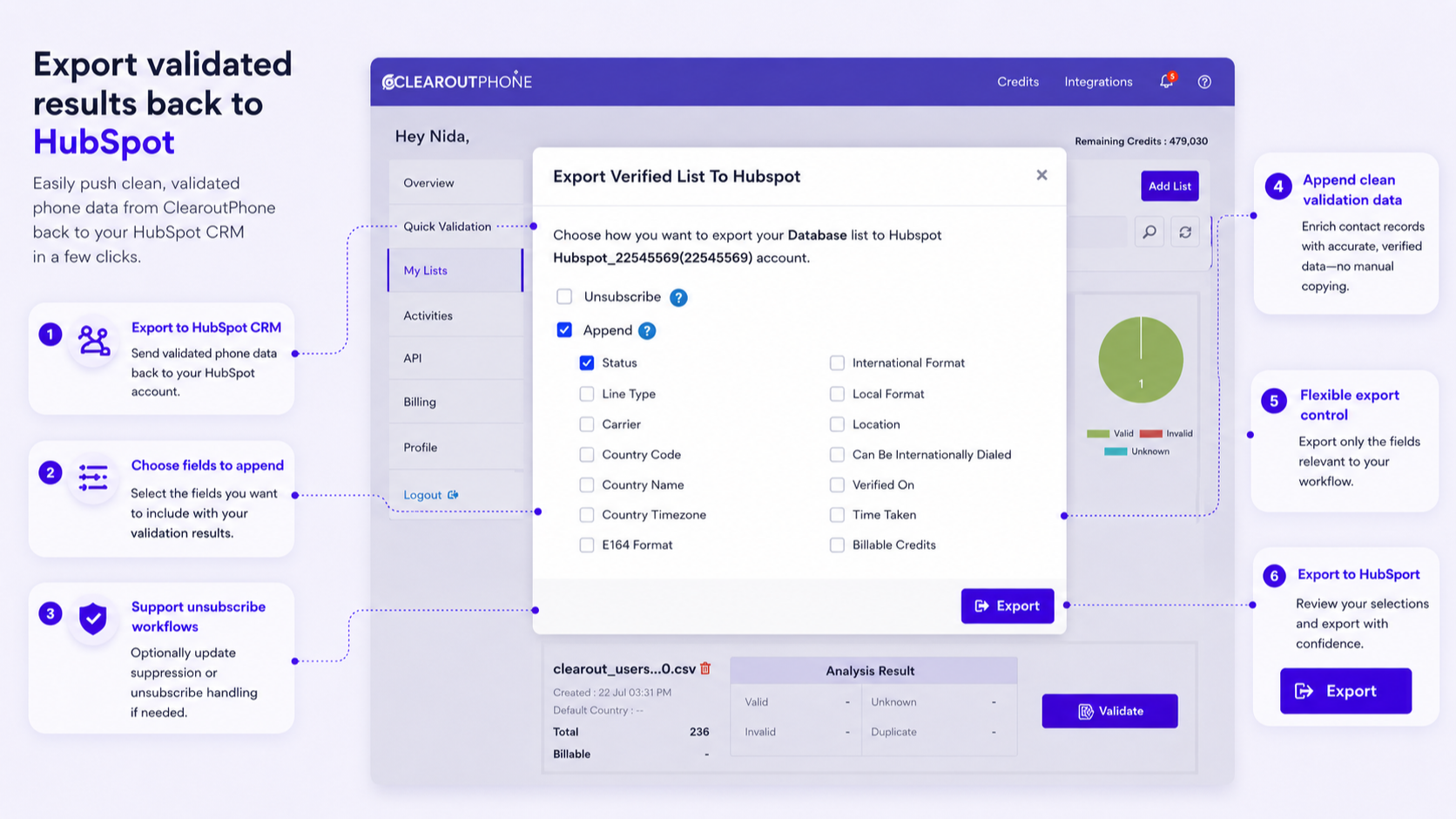
4. Export the validated results
Once the validation is complete, the user can either download the result (in CSV, XLSX) or directly export it to the HubSpot account. The user can export the result by selecting either unsubscribe, append or both.
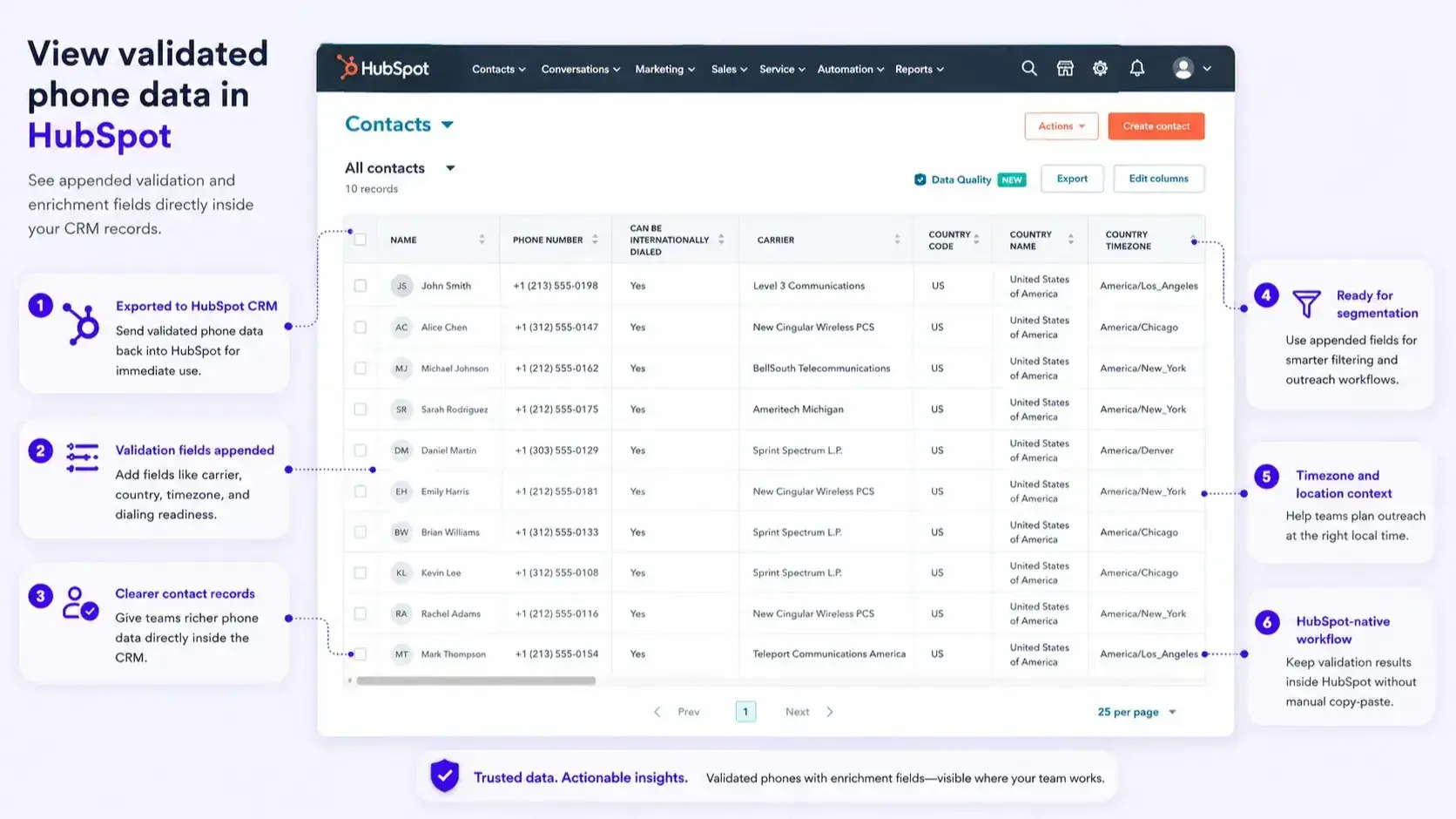
5. Export view in HubSpot
Once the file is exported you can navigate to HubSpot account-->Contacts-->List and Select the validated list. You can see the validated contacts in the list with the appended result.
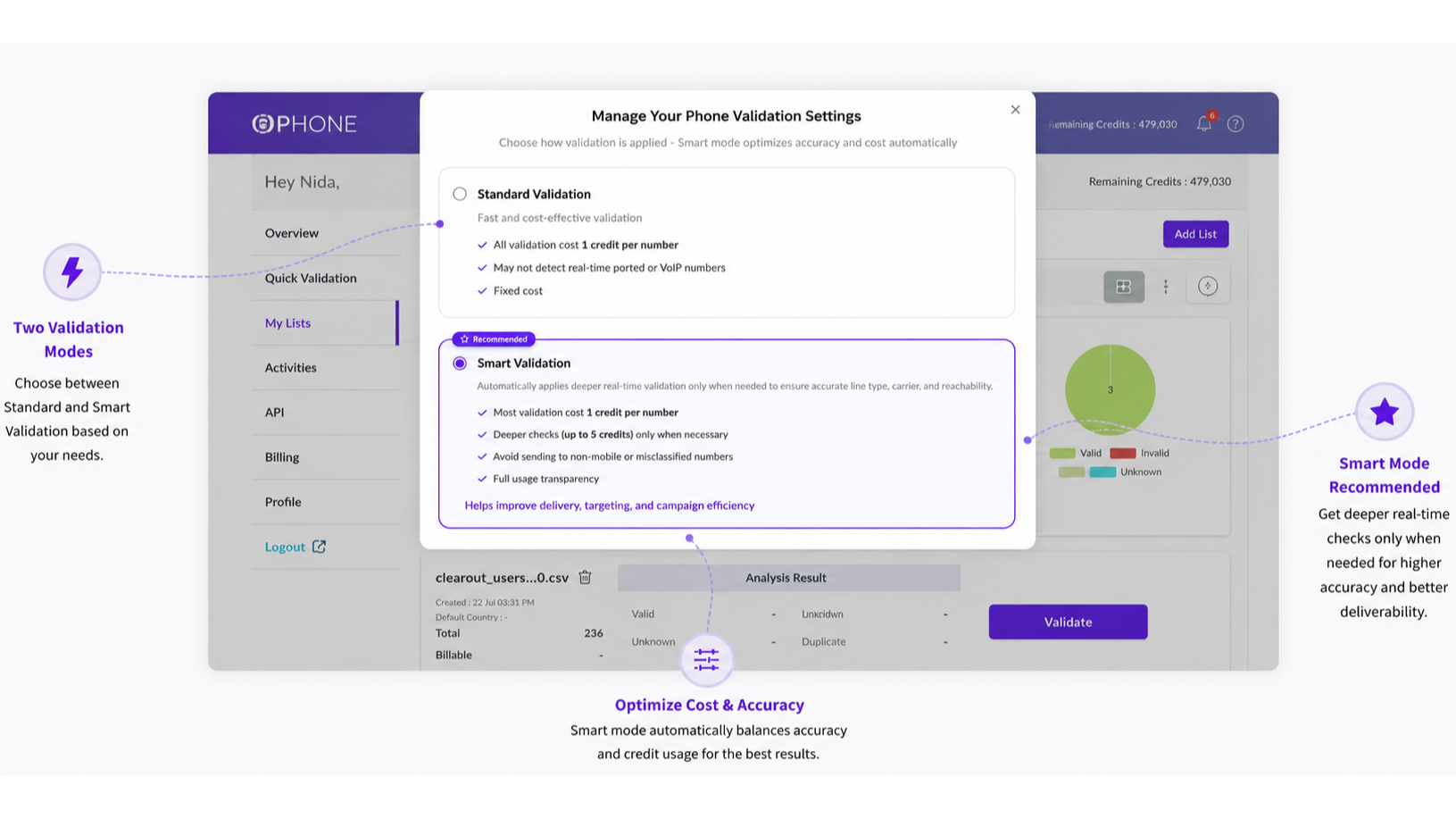
6. Select Your Validation Settings
Choose between Standard Validation for fast, fixed-cost checks or Smart Validation for deeper real-time verification when greater accuracy is needed.
App Functionality
Shared Data
Phone numbers |
Reviews
- Oct 22, 2026
Made Phone Number Validation Much Easier
I was looking for a simple way to check phone numbers before using them for outreach, as having incorrect numbers in a contact list can waste a lot of time. I tried ClearoutPhone and found the validation process pretty straightforward. It helps me identify invalid numbers and get useful information about the contacts I’m working with. I also like that I can check numbers in bulk instead of going through them one by one. It’s been a useful addition to my workflow for keeping contact lists cleaner.
Simple and easy to use.
More detailed explanations of certain validation statuses would be helpful.
Sridharan, S.
- Oct 22, 2026
Helpful for verifying lead contacts
So I deal with lots of leads and their contact details. I use ClearoutPhone to verify phone numbers before reaching out to prospects. it helps me understand which numbers are reachable and saves me from wasting time on some numbers that might not work. its been handy when I have a bulk list of leads to go through. i get info like line type, carrier, and even timezone, which is useful when im reaching out to people in different regions. its made verifying contact details a lot easier for me.
Usually have a bunch of leads to go through, so being able to verify numbers in bulk is a big help. the line type, carrier and timezone info are useful too, especially when I'm calling leads from different regions. saves me from going through each number manually. I have even attached it my workflows now to automate everything
Havent faced any issues so far
Sharma, P.
Pricing
Pay as You Go
$35
one-time feeOne Time Payment - Get 100 Free credits
Deeper Real-time Validation with Smart Validation
Sign up using No-card attached
Instant or Quick Validation
Bulk Verification
Data enrichment like Location,Line Type,carrier info etc
Zapier and HubSpot integrations
Real-time API validation
File Download (xlsx or .csv)
Pay as You Go
$35
one-time feeOne Time Payment - Get 100 Free credits
Deeper Real-time Validation with Smart Validation
Sign up using No-card attached
Instant or Quick Validation
Bulk Verification
Data enrichment like Location,Line Type,carrier info etc
Zapier and HubSpot integrations
Real-time API validation
File Download (xlsx or .csv)
* The pricing here is for display purposes only. All prices do not include taxes, incentives, discounts, or other pricing variables. You should contact the partner for the most up to date and correct pricing information. HubSpot does not take any responsibility for this pricing information, which is provided by our partners. Pricing last updated: 07/27/2026
More info
Built by - ClearoutPhone
Installs - 100+ installs
Categories Languages this app is available in English
Most popular

Gmail
Bring HubSpot to your inbox with the HubSpot integration for Gmail.

Google Calendar
Book meetings quickly and easily with HubSpot and Google Calendar.
