Google Meet
Wymagania
Plan HubSpot Uprawnienia konta HubSpot Nie wymaga uprawnień Typ dostępu Osobiste Subskrypcja Google Meet - Darmowy, Podstawy Google Workspace lub Google Workspace Enterprise planu
Przegląd
-1.jpeg)
1/5 - Utwórz link do spotkania za pomocą listy rozwijanej "wybierz lokalizację".
Integracja ze spotkaniami HubSpot - zamienia każde spotkanie zarezerwowane w HubSpot CRM w spotkanie Google Meet.
Jak Google Meet integruje się z HubSpot:
Zaplanuj spotkanie Google Meet z poziomu osi czasu kontaktu
Chcesz sprawdzić potencjalnego klienta lub klienta? Jako przedstawiciel handlowy lub serwisowy nie ma nic lepszego niż szybkie spotkanie, aby dowiedzieć się, czego potrzebuje Twój potencjalny klient lub klient, aby odnieść sukces. Łatwo zaplanuj spotkanie Google Meet z dowolnego rekordu kontaktu, aby rozpocząć spotkanie.
Szybkie i łatwe potwierdzenie
Po wysłaniu zaproszenia na spotkanie Google Meet potwierdzi, że wiadomość e-mail z zaproszeniem została wysłana do kontaktu w tym samym miejscu, w którym zaplanowano spotkanie.
Automatyczne nagrywanie, transkrypcja i analiza spotkań
Podgląd spotkań w powiązanych rekordach oraz automatyczne nagrywanie i transkrypcja spotkań do odtwarzania. Na stronie indeksu HubSpot można uzyskać dostęp do pełnej listy spotkań zespołu, filtrować spotkania według właściwości obiektu i przeszukiwać spotkania pod kątem kluczowych terminów.
Automatyczne nagrywanie spotkań Google Meet przez HubSpot
Nigdy więcej nie zapomnij nagrać ważnego spotkania, pozwalając HubSpot na włączenie "automatycznego nagrywania" na Twoim koncie Google Meet. W połączeniu z "nagrywaniem spotkań i synchronizacją transkrypcji" w HubSpot zapewni, że wszystkie ważne dane spotkania zostaną przechwycone.
Korzystanie z HubSpot podczas spotkań na żywo w Google Meet
Zobacz rekordy kontaktów HubSpot dla uczestników spotkań i dodawaj do nich notatki podczas spotkań Google Meet. Ponadto możesz powiązać spotkania i notatki z firmami, transakcjami i biletami HubSpot. Możesz też uzyskać dostęp do playbooków, aby prowadzić rozmowy z klientami.
Cechy
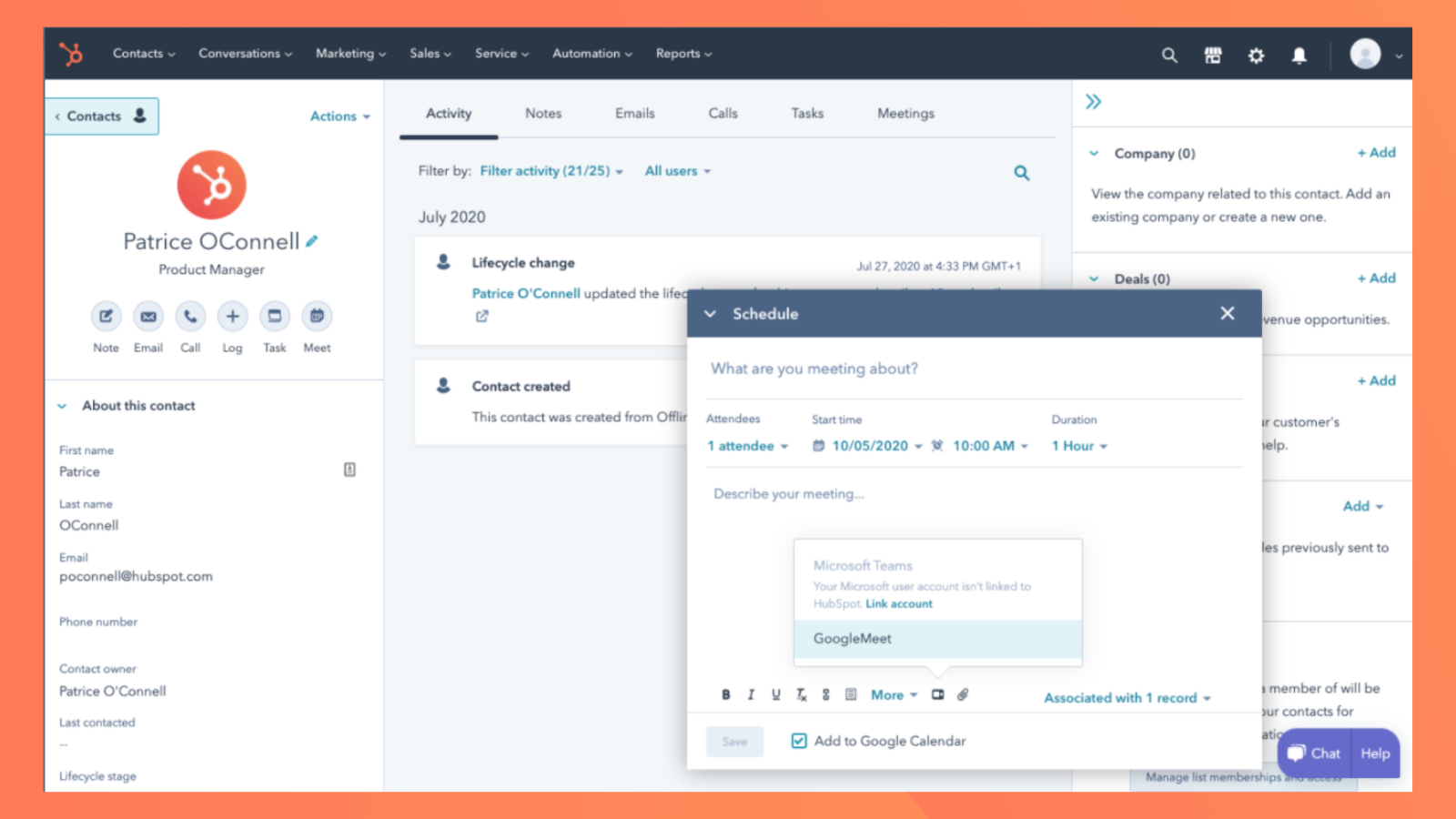
Utwórz link do spotkania dla Google Meet w HubSpot
Łatwo zaplanuj spotkanie Google Meet z dowolnego rekordu kontaktu, aby rozpocząć czat wideo.
-2-1.png)
Konfiguracja spotkań Google Meet w HubSpot
Uczyń wszystkie swoje spotkania spotkaniami Google Meets, konfigurując integrację dla wszystkich spotkań.
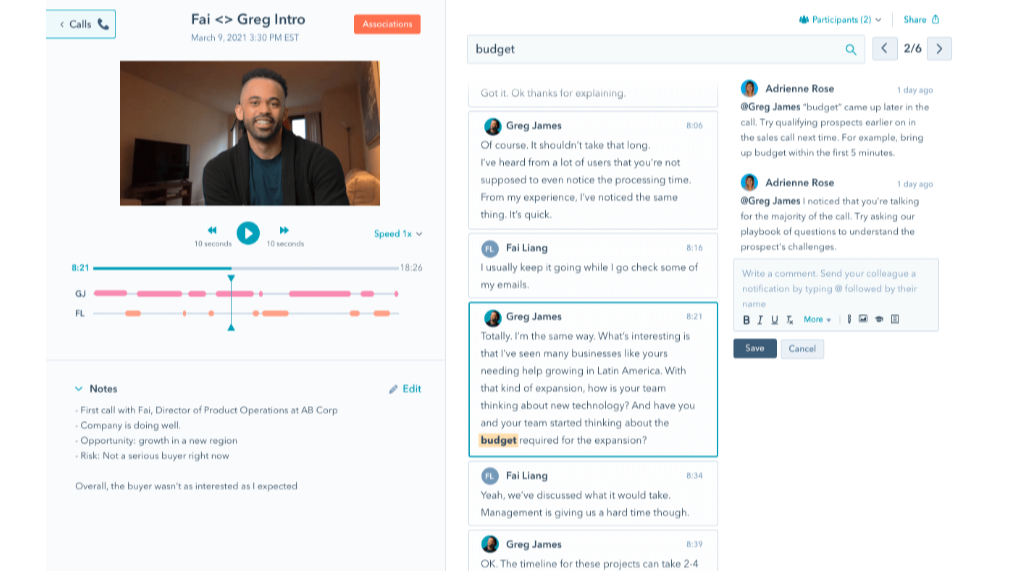
Automatycznie nagrywaj, transkrybuj i analizuj spotkania
Podgląd spotkań w powiązanych rekordach oraz automatyczne nagrywanie i transkrypcja spotkań w celu ich odtworzenia. Na stronie indeksu HubSpot można uzyskać dostęp do pełnej listy spotkań zespołu, filtrować spotkania według właściwości obiektu i przeszukiwać spotkania pod kątem kluczowych terminów.
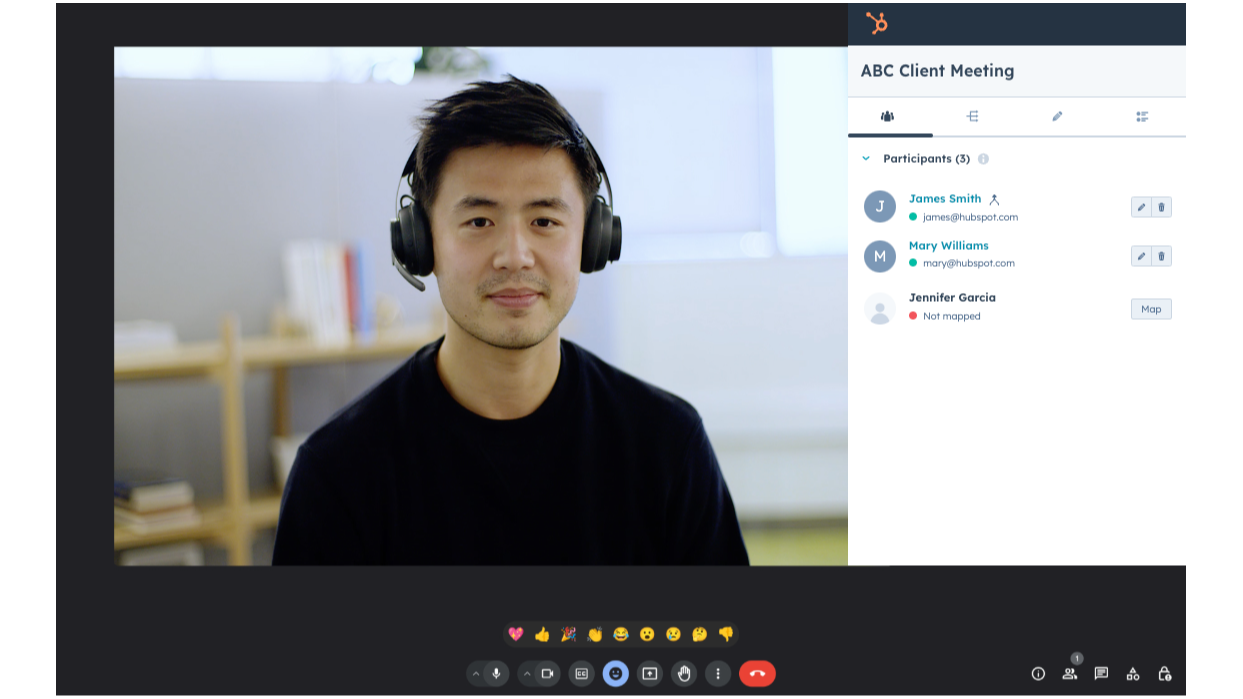
Korzystanie z HubSpot w ramach spotkań Google Meet
Zobacz rekordy kontaktów HubSpot dla uczestników spotkań i dodawaj do nich notatki podczas spotkań Google Meet. Ponadto spotkania i notatki można powiązać z firmami, transakcjami i biletami HubSpot. Możesz też uzyskać dostęp do playbooków, aby prowadzić rozmowy z klientami.
Funkcjonalność aplikacji
Udostępnione dane
Kontakty |
Recenzje
4,1
433
4,1
433
Użytkownicy podkreślają, że integracja ta stanowi płynny sposób na zautomatyzowanie planowania spotkań i generowanie linków do Google Meet bezpośrednio na platformie. Chociaż niektórzy zwracają uwagę na problemy związane z brakującymi linkami w wiadomościach e-mail z przypomnieniami lub niemożnością synchronizacji nagrań ze spotkań, narzędzie to skutecznie upraszcza proces rezerwacji i zapewnia klientom łatwy sposób na dołączenie do rozmów.
- 21 wrz 2025
Funkcjonalne, ale zbyt inwazyjne, z niepożądanym rejestrowaniem spotkań
Działa dobrze, ale powinno umożliwiać nagrywanie poszczególnych spotkań za pomocą przycisku w aplikacji Google Meet (tak jak w przypadku dosłownie wszystkich innych programów do nagrywania rozmów)
Działa, jeśli chcesz przyznać aplikacji pełny dostęp do swojego kalendarza i pozwolić jej rejestrować zbędne spotkania
Wymaga zdecydowanie zbyt wielu uprawnień do kalendarza, rejestruje niepotrzebne spotkania
MacDonald, J.
- 29 sie 2025
Savaliya, S.
Darmowy
0 USD
Zawsze za darmo
Maksymalna długość spotkania 1 godzina
100 uczestników
liczba spotkań nieograniczona
Dysk Google 15 GB na użytkownika
Darmowy
0 USD
Zawsze za darmo
Maksymalna długość spotkania 1 godzina
100 uczestników
liczba spotkań nieograniczona
Dysk Google 15 GB na użytkownika
* Powyższe ceny zostały podane wyłącznie w celach informacyjnych. Nie zawierają one podatków, premii, zniżek lub innych zmiennych cenowych. Skontaktuj się z partnerem w celu uzyskania najbardziej aktualnych i poprawnych informacji o cenach. HubSpot nie ponosi żadnej odpowiedzialności za informacje cenowe, które są dostarczane przez naszych partnerów. Ostatnia aktualizacja cen: 26.05.2026