

Bubble
Erstellt von - Red Cactus B.V.
Installationen - 400+ Installationen
Bewertung 3,6
(11)
Anforderungen
HubSpot-Produktversion HubSpot-Account-Berechtigungen - Erforderliche Account-Berechtigungen anzeigen
Zugriffstyp Geteilt Bubble-Abonnement - Produktversion: Free trial available for 30 days!
Übersicht
1/9
Connecting the HubSpot embedded integration to your telephony environment is hugely important for improving customer satisfaction and working more efficiently. With integration tool Bubble, during an incoming or outgoing phone call, you no longer have to look for customer details manually but they appear directly in a HubSpot pop-up notification and you can perform various actions such as opening a customer card from there.
Embedded pop-up notification
Bubble has a number of unique features. This integration ensures that you immediately get all relevant customer data on a phone call. From the overview that appears, which can also be fully customised by the user, department or company, you can immediately perform the desired action. When transferring a call to a colleague, the customer information moves with it. By default, the pop-up notification in HubSpot is visible from the moment your softphone, desk phone or other device rings until the call ends.
Functionalities
In addition to the above mentioned pop-up notification capabilities, Bubble is equipped with many more functionalities. If you also use other applications, you can even show the CRM information or buttons from other applications in the HubSpot integration, if you wish. Down below are some important functions:
Bubble is a HubSpot "calling provider" allowing you to use the official calling icons within HubSpot.
With Call Control, you control your desk phone, softphone or other device directly from HubSpot (provided your telephony platform supports it).
Easily search CRM contact data in the Searchbar and perform the desired action (call, whatsapp, Teams chat, mail, etc.).
The Call Waiting function lets you easily switch between pop-up notifications of incoming phone calls.
If several relations are known under one number you can browse through the results with the Multi result function.
The Call History function allows you to see all contact moments with the phone number over the last 90 days so you can immediately see which colleague had the last contact.
At the end of every call, there will be pushed a Call Log to the CRM, so that every call is logged under the relation card in the CRM.
Make a call note immediately with the Call Note function that will be logged together with the Call Log and becomes visible to you and your colleagues in the Call History.
Determine the Theme Modes yourself by setting the colours to day or dark modes.
Easy and secure login based on Single sign-on (Microsoft, Google or Apple account).
Customization
To meet your specific needs, Bubble is equipped with the Automations module. With this module it is possible to add your own If-This-Then-That flows. Think, for example of running a script.
Funktionen
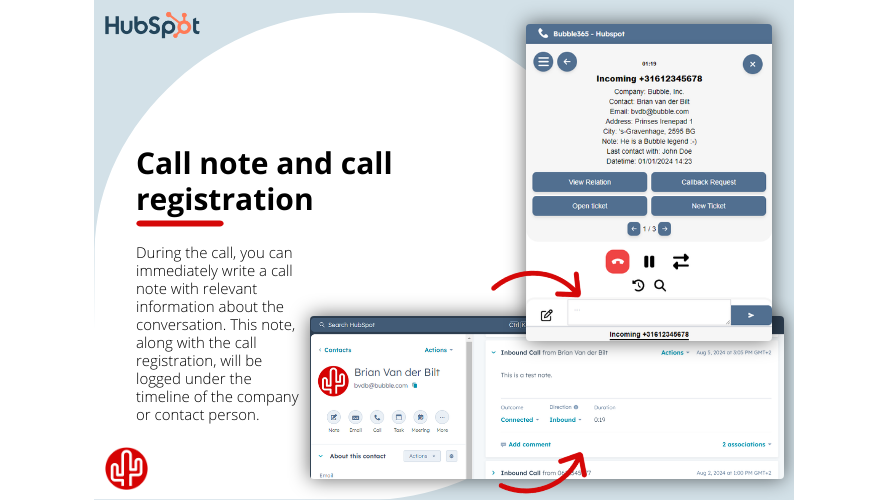
Call note and call registration
From the pop-up notification, you can directly write a call note, which will be recorded under the correct contact in HubSpot after the call ends. If no call note is written, it is still possible to automatically add a call log under the contact, containing call details such as the time, duration, and the employee involved.
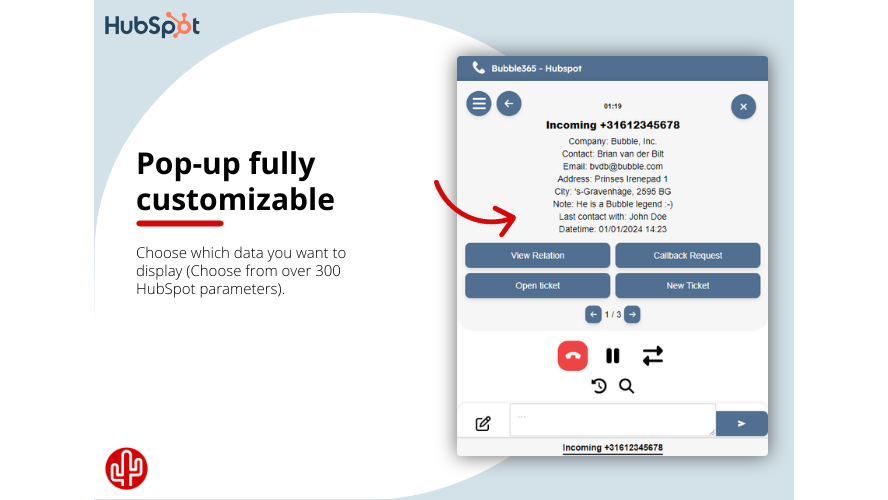
Content pop-up
Determine the content of the pop-up per user, department or organization with data from HubSpot. The list of data fields available form HubSpot contains more than 300 variables including newly added custom fields.
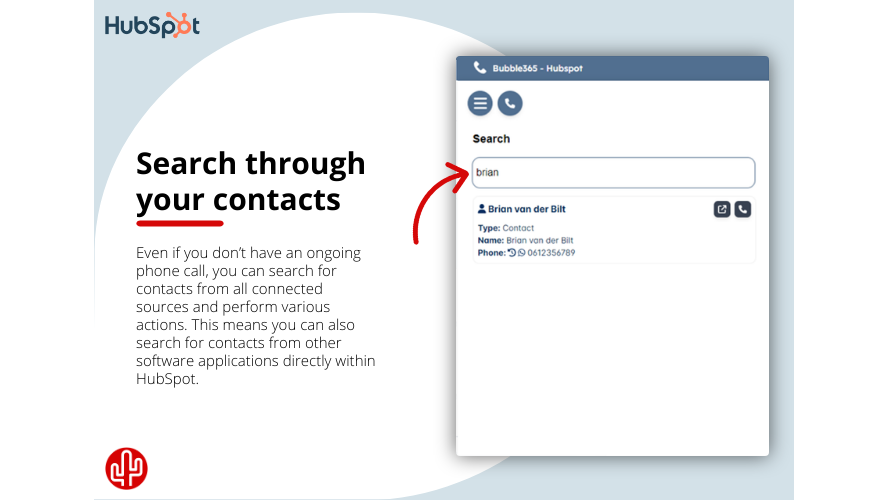
Searchbar
Easily search CRM contact data in the Searchbar and perform the desired action, such as: - Starting an outgoing telephone call - Sending a WhatsApp message - Sending a Microsoft Teams chat message - Send an email - Opening the call history - Opening the customer card in HubSpot
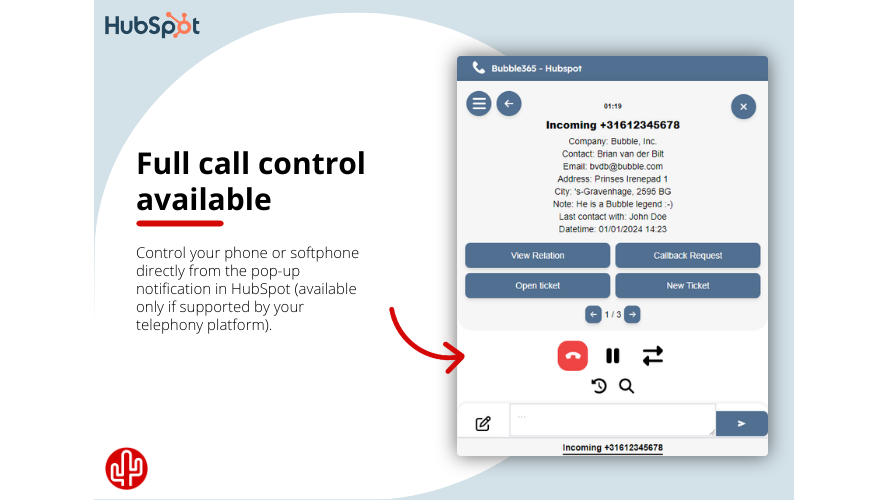
Call Control
Full call control is available in the embedded pop-up notification (provided your telephony platform supports it), allowing you to control your desk phone, softphone or other device from the pop-up notification in HubSpot. The following actions are supported: - Answer call - Ending a call - Put call on hold - Transfer call
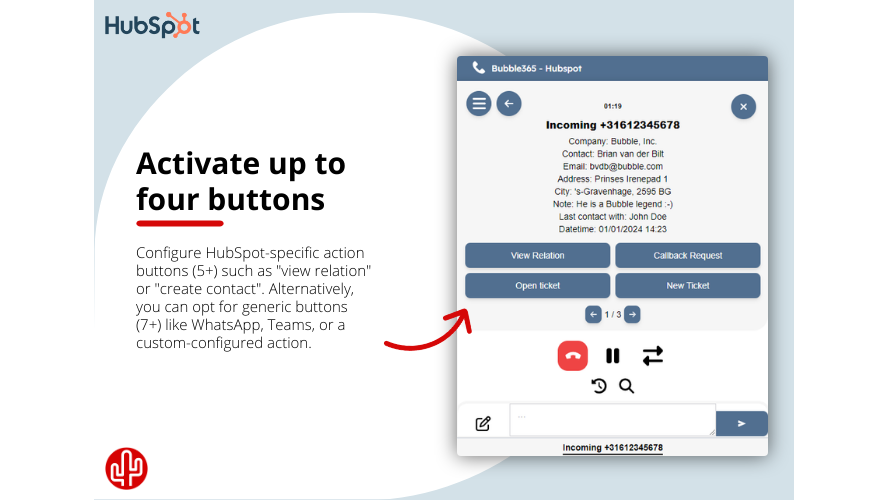
Action buttons
From the overview that appears, which can also be fully customized by the user, you can immediately perform the desired action. You have a choice of different buttons. HubSpot specific action buttons are: - Open relation - Open contact - Open company - Create a contact - Create a company
App-Funktionalität
Datenaustausch
Calls | ||
Contacts | ||
Companies | ||
Owners | ||
Contact Properties | ||
Company Properties |
Rezensionen
3,6
11
3,6
11
- 9. Juli 2026
Einfach einzurichten, funktioniert gut und lässt sich nahtlos integrieren
Damit lässt sich schnell herausfinden, wer zuletzt mit einem gesprochen hat, und man kann direkt Notizen zu dem Kontakt hinzufügen, mit dem man gerade im Gespräch ist. Ich würde es ohne zu zögern weiterempfehlen.
Cozens, J.
- 2. Juli 2026
macht die Aufgaben nicht einfacher
Ich muss Anrufe immer noch manuell aufzeichnen oder sie nachträglich korrekt protokollieren. Das Notizfeld wird auch nicht immer angezeigt, wenn ich verbunden bin. Und ich muss mich regelmäßig anmelden.
nicht praktisch
Babcock, J.
Free trial available for 30 days!
Integrate with (almost) every phone system!
Click to dial from CRM
Hotkey dial from CRM
Multi result pop-up
Call registration (+note)
Custom field variables
SearchBar
Call control
Call waiting
Realtime API (user based)
Bubble embedded pop-up
Content pop-up customization
Single sign-on
Auto-hide
Multi-languages
Mute
Sorting result
Recall conversations
Call back
Talk duration timer
Call history
Call notes
Multiple profiles
Native Windows applicatie
Native macOS applicatie
Automations
Free trial available for 30 days!
Integrate with (almost) every phone system!
Click to dial from CRM
Hotkey dial from CRM
Multi result pop-up
Call registration (+note)
Custom field variables
SearchBar
Call control
Call waiting
Realtime API (user based)
Bubble embedded pop-up
Content pop-up customization
Single sign-on
Auto-hide
Multi-languages
Mute
Sorting result
Recall conversations
Call back
Talk duration timer
Call history
Call notes
Multiple profiles
Native Windows applicatie
Native macOS applicatie
Automations
* Die hier angegebenen Preise dienen nur zu Illustrationszwecken. Alle Preise enthalten keine Steuern, Sonderangebote, Rabatte oder sonstigen Preisvarianten. Bitte wenden Sie sich direkt an den Partner, um aktuelle und korrekte Preisinformationen zu erhalten. HubSpot übernimmt keine Verantwortung für Preisinformationen, die von unseren Partnern bereitgestellt werden. Letzte Aktualisierung der Preisinformationen: 09.08.2025
Weitere Infos
Erstellt von - Red Cactus B.V.
Installationen - 400+ Installationen
Kategorien Sprachen, in denen diese App verfügbar ist Afrikaans ,Albanisch ,Arabisch ,Armenisch ,Baskisch ,Birmanisch ,Bulgarisch ,Chinesisch ,Dänisch ,Deutsch ,Englisch ,Estnisch ,Färöisch ,Farsi ,Finnisch ,Französisch ,Galizisch ,Georgisch ,Griechisch ,Gujarati ,Hebräisch ,Hindi ,Indonesisch ,Irisch ,Isländisch ,Italienisch ,Japanisch ,Kanada ,Kasachisch ,Katalanisch ,Kirgisisch ,Konkani ,Koreanisch ,Kroatisch ,Lettisch ,Litauisch ,Malaiisch ,Maltesisch ,Marathi ,Mazedonisch ,Mongolisch ,Niederländisch ,Norwegisch ,Norwegisches Bokmal ,Panjabi ,Polnisch ,Portugiesisch ,Rumänisch ,Russisch ,Sanskrit ,Schwedisch ,Serbisch ,Slowakisch ,Slowenisch ,Spanisch ,Swahili ,Syrisch ,Tamil ,Tatarisch ,Telugu ,Thailändisch ,Tschechisch ,Türkisch ,Ukrainisch ,Ungarisch ,Urdu ,Vietnamesisch undWeißrussisch