
要求
HubSpot 版本 HubSpot 帳戶權限 - 檢視所需的帳戶權限
Bubble 訂閱 - Free trial available for 30 days! 版本
總覽
1/9
Connecting the HubSpot embedded integration to your telephony environment is hugely important for improving customer satisfaction and working more efficiently. With integration tool Bubble, during an incoming or outgoing phone call, you no longer have to look for customer details manually but they appear directly in a HubSpot pop-up notification and you can perform various actions such as opening a customer card from there.
Embedded pop-up notification
Bubble has a number of unique features. This integration ensures that you immediately get all relevant customer data on a phone call. From the overview that appears, which can also be fully customised by the user, department or company, you can immediately perform the desired action. When transferring a call to a colleague, the customer information moves with it. By default, the pop-up notification in HubSpot is visible from the moment your softphone, desk phone or other device rings until the call ends.
Functionalities
In addition to the above mentioned pop-up notification capabilities, Bubble is equipped with many more functionalities. If you also use other applications, you can even show the CRM information or buttons from other applications in the HubSpot integration, if you wish. Down below are some important functions:
Bubble is a HubSpot "calling provider" allowing you to use the official calling icons within HubSpot.
With Call Control, you control your desk phone, softphone or other device directly from HubSpot (provided your telephony platform supports it).
Easily search CRM contact data in the Searchbar and perform the desired action (call, whatsapp, Teams chat, mail, etc.).
The Call Waiting function lets you easily switch between pop-up notifications of incoming phone calls.
If several relations are known under one number you can browse through the results with the Multi result function.
The Call History function allows you to see all contact moments with the phone number over the last 90 days so you can immediately see which colleague had the last contact.
At the end of every call, there will be pushed a Call Log to the CRM, so that every call is logged under the relation card in the CRM.
Make a call note immediately with the Call Note function that will be logged together with the Call Log and becomes visible to you and your colleagues in the Call History.
Determine the Theme Modes yourself by setting the colours to day or dark modes.
Easy and secure login based on Single sign-on (Microsoft, Google or Apple account).
Customization
To meet your specific needs, Bubble is equipped with the Automations module. With this module it is possible to add your own If-This-Then-That flows. Think, for example of running a script.
功能
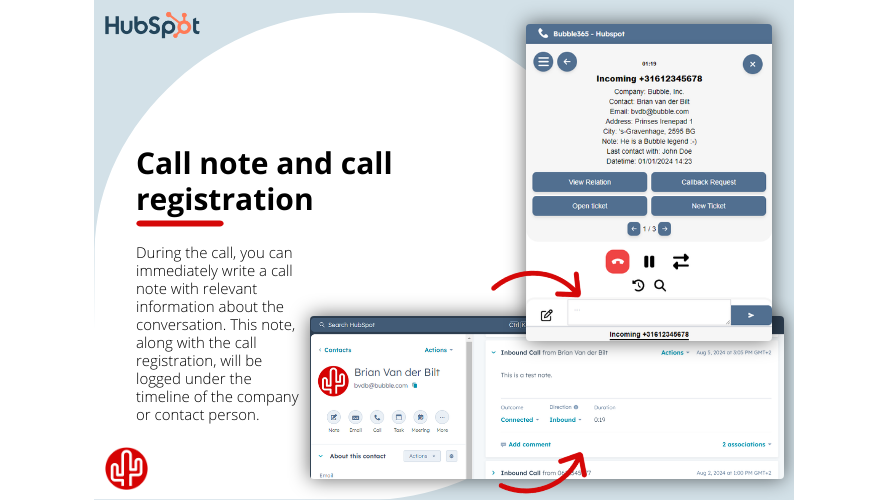
Call note and call registration
From the pop-up notification, you can directly write a call note, which will be recorded under the correct contact in HubSpot after the call ends. If no call note is written, it is still possible to automatically add a call log under the contact, containing call details such as the time, duration, and the employee involved.
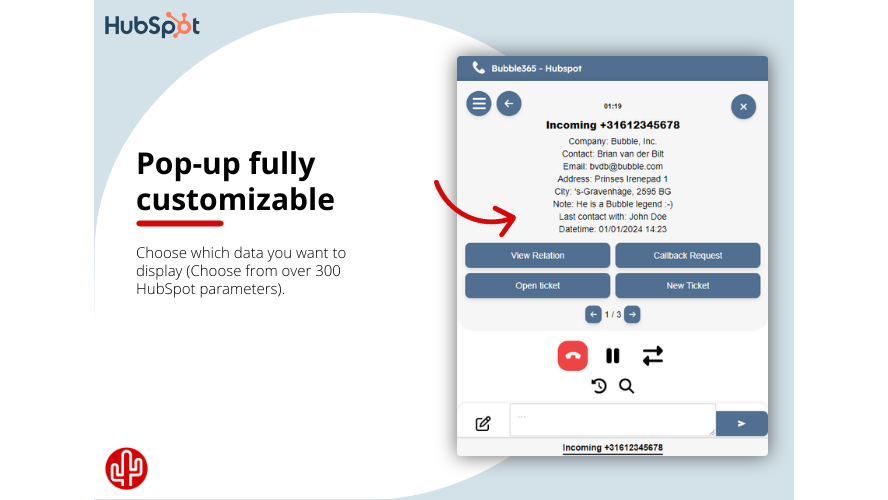
Content pop-up
Determine the content of the pop-up per user, department or organization with data from HubSpot. The list of data fields available form HubSpot contains more than 300 variables including newly added custom fields.
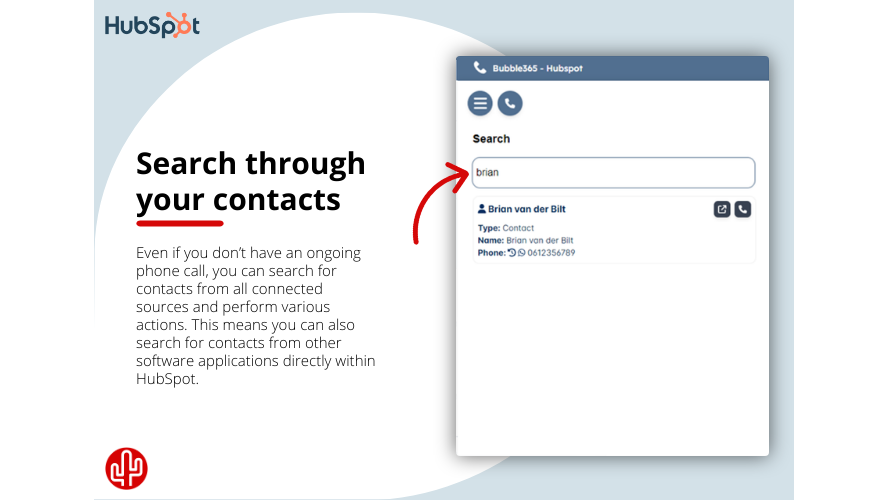
Searchbar
Easily search CRM contact data in the Searchbar and perform the desired action, such as: - Starting an outgoing telephone call - Sending a WhatsApp message - Sending a Microsoft Teams chat message - Send an email - Opening the call history - Opening the customer card in HubSpot
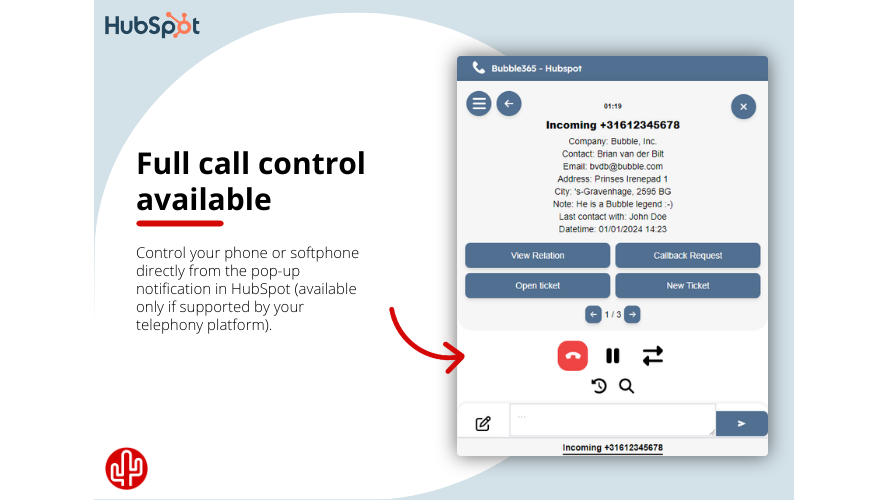
Call Control
Full call control is available in the embedded pop-up notification (provided your telephony platform supports it), allowing you to control your desk phone, softphone or other device from the pop-up notification in HubSpot. The following actions are supported: - Answer call - Ending a call - Put call on hold - Transfer call
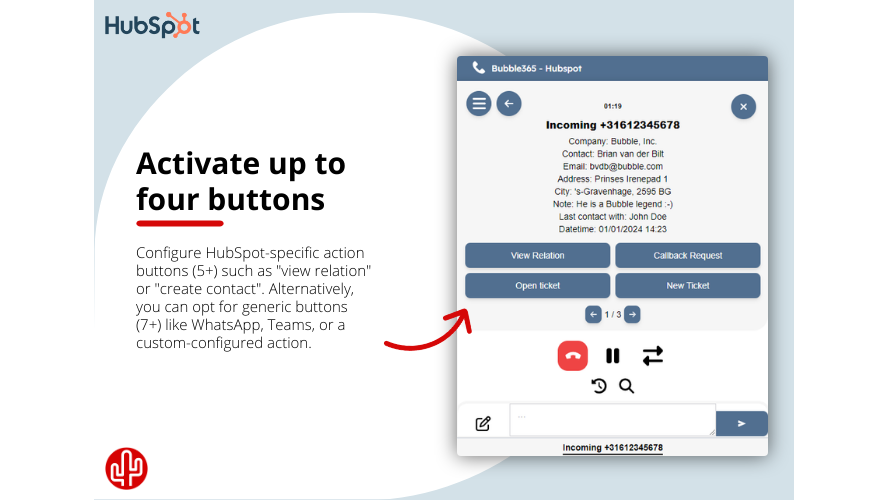
Action buttons
From the overview that appears, which can also be fully customized by the user, you can immediately perform the desired action. You have a choice of different buttons. HubSpot specific action buttons are: - Open relation - Open contact - Open company - Create a contact - Create a company
應用程式功能
共用資料
Calls | ||
Companies | ||
Company Properties | ||
Contact Properties | ||
Contacts | ||
Owners |
評論
3.9
7
3.9
7
- 2025年7月15日
Öz, T.
- 2025年6月14日
无法正常工作
verhoeven, M.
價格
Free trial available for 30 days!
Integrate with (almost) every phone system!
Click to dial from CRM
Hotkey dial from CRM
Multi result pop-up
Call registration (+note)
Custom field variables
SearchBar
Call control
Call waiting
Realtime API (user based)
Bubble embedded pop-up
Content pop-up customization
Single sign-on
Auto-hide
Multi-languages
Mute
Sorting result
Recall conversations
Call back
Talk duration timer
Call history
Call notes
Multiple profiles
Native Windows applicatie
Native macOS applicatie
Automations
Free trial available for 30 days!
Integrate with (almost) every phone system!
Click to dial from CRM
Hotkey dial from CRM
Multi result pop-up
Call registration (+note)
Custom field variables
SearchBar
Call control
Call waiting
Realtime API (user based)
Bubble embedded pop-up
Content pop-up customization
Single sign-on
Auto-hide
Multi-languages
Mute
Sorting result
Recall conversations
Call back
Talk duration timer
Call history
Call notes
Multiple profiles
Native Windows applicatie
Native macOS applicatie
Automations
* 此處顯示的價格僅供參考。所有價格均不包含稅金、獎勵、折扣或其他價格變數。如需最新的正確價格資訊,請連絡合作夥伴。HubSpot 對合作夥伴所提供的價格資訊不承擔任何責任。上次更新價格時間:2025/08/09
更多資訊
建立者 - Red Cactus B.V.
安裝次數 - 超過 300 次安裝
類別 此應用程式可用的語言 中文 、丹麥文 、亞美尼亞文 、俄羅斯文 、保加利亞文 、克羅埃西亞文 、冰島文 、加利西亞文 、加泰隆尼亞文 、匈牙利文 、南非荷蘭文 、印地文 、印尼文 、古吉拉特文 、史瓦希利文 、吉爾吉斯文 、哈薩克文 、喬治亞文 、土耳其文 、坦米爾文 、塞爾維亞文 、孔卡尼文 、巴斯克文 、希伯來文 、希臘文 、康納達文 、德文 、愛沙尼亞文 、愛爾蘭文 、拉脫維亞文 、挪威文 、挪威書面語 、捷克文 、敘利亞文 、斯洛伐克文 、斯洛維尼亞文 、旁遮普文 、日文 、梵文 、法文 、法羅文 、波斯文 、波蘭文 、泰文 、泰盧固文 、烏克蘭文 、烏爾都文 、瑞典文 、白俄羅斯文 、立陶宛文 、緬甸文 、羅馬尼亞文 、義大利文 、芬蘭文 、英文 、荷蘭文 、葡萄牙文 、蒙古文 、西班牙文 、越南文 、阿拉伯文 、阿爾巴尼亞文 、韃靼文 、韓文 、馬來文 、馬其頓文 、馬拉提文 和馬爾他文