

Sage Business Cloud Accounting
Anforderungen
HubSpot-Produktversion HubSpot-Account-Berechtigungen Keine Berechtigungen erforderlich Zugriffstyp Geteilt Sage Business Cloud Accounting-Abonnement - Produktversion: Review Sage Business Cloud Accounting's Pricing Page
Übersicht
1/2
Here’s what you get with Data Sync by HubSpot:
- Two-way sync: Data is shared between Sage Business Cloud Accounting and HubSpot in real time
- Default field mappings: Set-up is quick with out-of-the-box field mappings already created for you
- Historical syncing: Your existing data will sync right away, and updates will sync as they happen
This syncs HubSpot with Sage Business Cloud Accounting formerly known as Sage One (UK/IE).
This is not a sync for any other Sage version (BusinessVision/Intacct/50/100/200/...). Please defer to other integrations on the HubSpot app marketplace or solution partners.
Funktionen
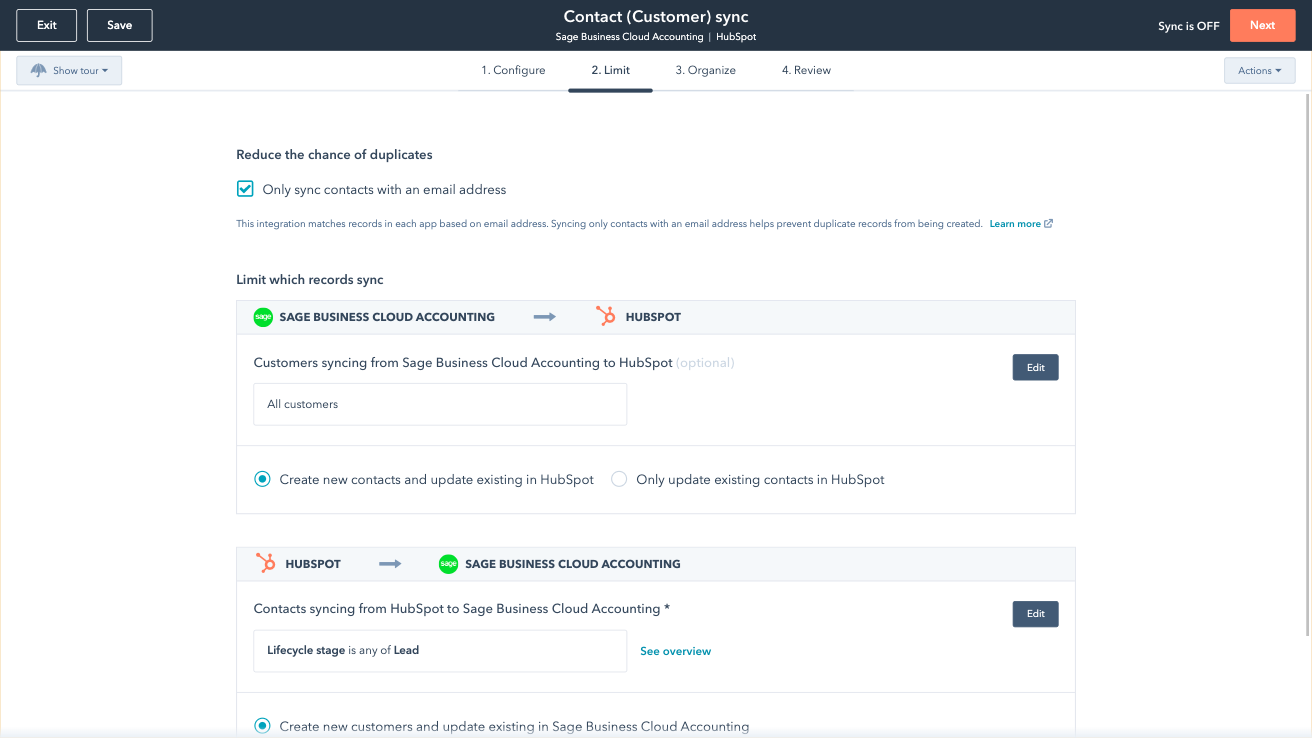
Sync Sage Business Cloud Accounting and HubSpot in the background
Make manual data entry a thing of the past by syncing data (see below) between HubSpot and Sage Business Cloud Accounting. When records are created or updated in either app, that information will be automatically shared with the other one. You can also add a filter for any to sync exactly what you want—and nothing you don’t.
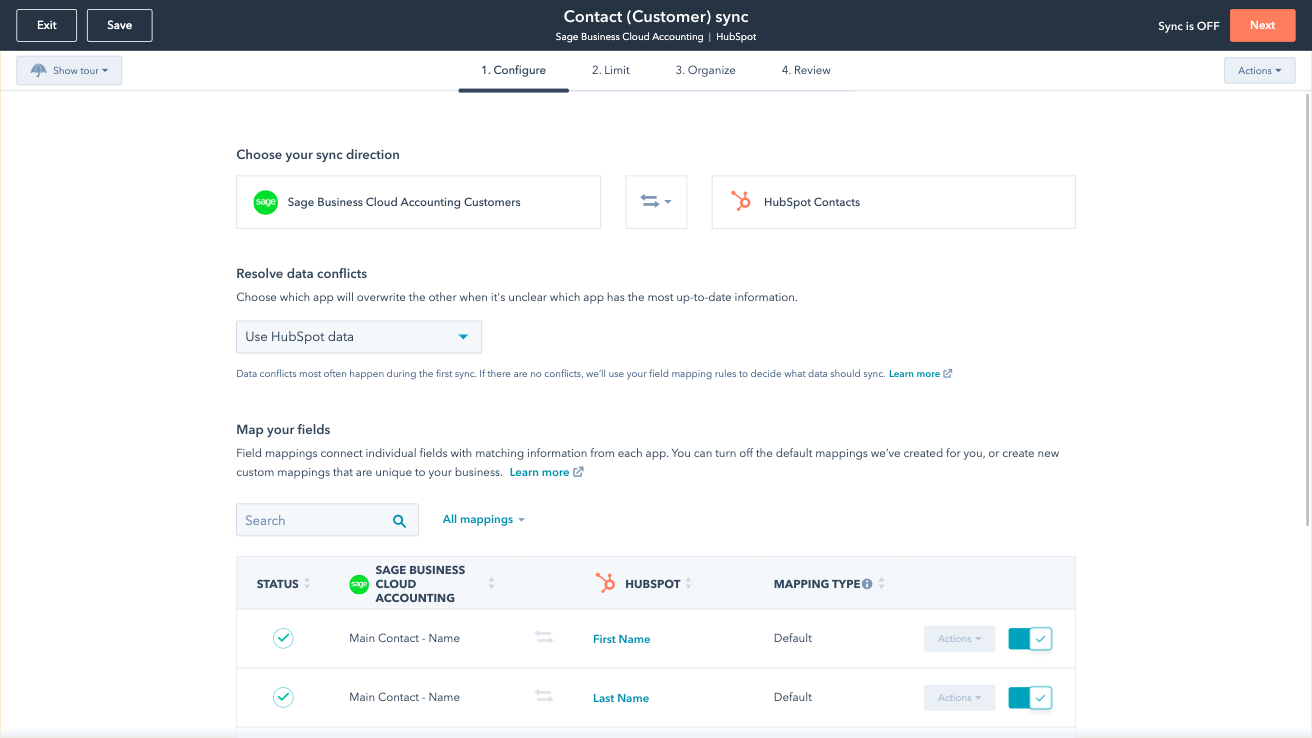
Custom Field Mappings
You can set up a one- or two-way sync, which means you can either sync data from Sage Business Cloud Accounting to HubSpot, from HubSpot to Sage, or back-and-forth! Out-of-the-box default field mappings make set-up quick and keep your data clean and organized. Custom field mappings are available with Data Hub Starter or above.
App-Funktionalität
Datenaustausch
Each object has field mappings that connect matching information from each app. Default mappings are listed below. If you want to change these default mappings or create your own, custom field mappings are available with Data Hub Starter and up.
Customers | ||
Sales Invoices | ||
Vendors |
Rezensionen
- 3. Dez. 2025
Tolle Einzelanwendungen, aber die Integration ist mangelhaft - fehlende Synchronisierung von Rechnungsposten, Angeboten und Kostenvoranschlägen
Unabhängig voneinander sind sowohl HubSpot als auch Sage Cloud großartig, aber sie kommunizieren nicht sehr gut. Angebote und Kostenvoranschläge werden nicht synchronisiert und auch nicht die Positionen auf der Rechnung.
Legt neue Kunden an oder fügt Rechnungsnummern zu bestehenden Kunden hinzu
Enthält keine Artikel auf der Rechnung. Synchronisiert keine Kostenvoranschläge. Synchronisiert keine Kostenvoranschläge. Es wird auch kein PDF der Rechnung übertragen, so dass ich immer noch auf Sage gehen muss, um die Details der Bestellung zu finden, da sie nicht in HubSpot enthalten ist.
Crotchett, C.
- 16. Jan. 2023
Doppelte Datensätze
Die App funktioniert zwar, hat aber in HubSpot Duplikate erstellt. Alle Kontaktnamen wurden durch „MAIN Contact“ ersetzt. Die Rechnungen werden nicht in HubSpot hochgeladen, obwohl ich davon ausgegangen war, dass die App dies bei der Verbindung ermöglichen würde. Es sollten Support- oder Integrationsvideos sowie eine Anleitung bereitgestellt werden. Die App ist recht einfach gehalten und informiert weder über Fehler noch darüber, wie man den Vorgang rückgängig machen kann.
Wir nutzen es für die Rechnungsstellung an Kunden
Alle Kontaktnamen werden durch „MAIN Contact“ ersetzt. Die Rechnungen werden nicht in HubSpot hochgeladen, obwohl ich dachte, dass die App dies bei der Verbindung ermöglichen würde.
Singh, R.
Bildung - 11 bis 25 Mitarbeitende
Review Sage Business Cloud Accounting's Pricing Page
0 $
Use the 'See all pricing options' link on the righthand side
Make sure to confirm the HubSpot subscription and Sage Business Cloud Accounting subscription needed to install this integration
Note: "Free" is referring to the cost of the integration, not the app subscriptions
Review Sage Business Cloud Accounting's Pricing Page
0 $
Use the 'See all pricing options' link on the righthand side
Make sure to confirm the HubSpot subscription and Sage Business Cloud Accounting subscription needed to install this integration
Note: "Free" is referring to the cost of the integration, not the app subscriptions
* Die hier angegebenen Preise dienen nur zu Illustrationszwecken. Alle Preise enthalten keine Steuern, Sonderangebote, Rabatte oder sonstigen Preisvarianten. Bitte wenden Sie sich direkt an den Partner, um aktuelle und korrekte Preisinformationen zu erhalten. HubSpot übernimmt keine Verantwortung für Preisinformationen, die von unseren Partnern bereitgestellt werden. Letzte Aktualisierung der Preisinformationen: 03.09.2025
Weitere Infos
Erstellt von - HubSpot
Installationen - 100+ Installationen
Kategorien Sprachen, in denen diese App verfügbar ist Englisch
Am beliebtesten

Gmail
Holen Sie HubSpot in Ihren Posteingang – mit der HubSpot-Integration für Gmail

Google Calendar
Buchen Sie schnell und einfach Meetings mit HubSpot und Google Kalender.
