

Sage Business Cloud Accounting
Wymagania
Plan HubSpot Uprawnienia konta HubSpot Nie wymaga uprawnień Typ dostępu Udostępniono Subskrypcja Sage Business Cloud Accounting - Review Sage Business Cloud Accounting's Pricing Page plan
Przegląd
1/2
Here’s what you get with Data Sync by HubSpot:
- Two-way sync: Data is shared between Sage Business Cloud Accounting and HubSpot in real time
- Default field mappings: Set-up is quick with out-of-the-box field mappings already created for you
- Historical syncing: Your existing data will sync right away, and updates will sync as they happen
This syncs HubSpot with Sage Business Cloud Accounting formerly known as Sage One (UK/IE).
This is not a sync for any other Sage version (BusinessVision/Intacct/50/100/200/...). Please defer to other integrations on the HubSpot app marketplace or solution partners.
Cechy
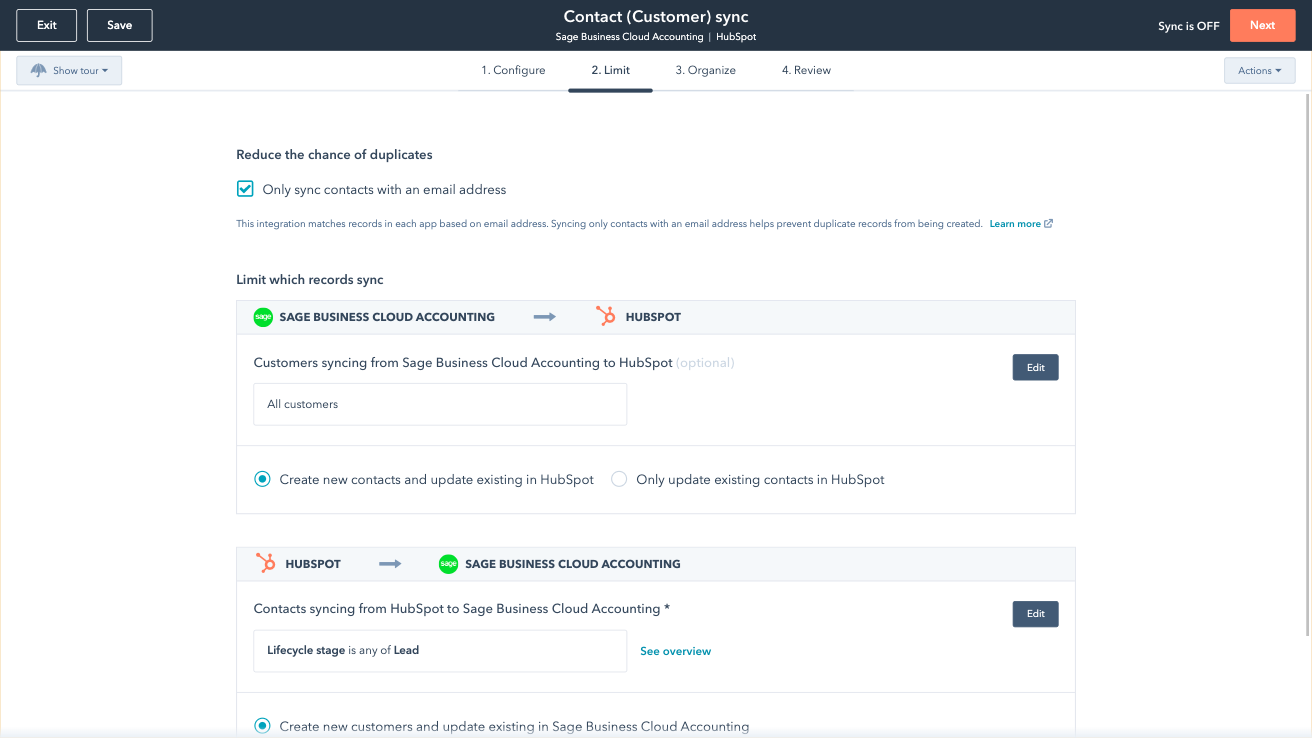
Sync Sage Business Cloud Accounting and HubSpot in the background
Make manual data entry a thing of the past by syncing data (see below) between HubSpot and Sage Business Cloud Accounting. When records are created or updated in either app, that information will be automatically shared with the other one. You can also add a filter for any to sync exactly what you want—and nothing you don’t.
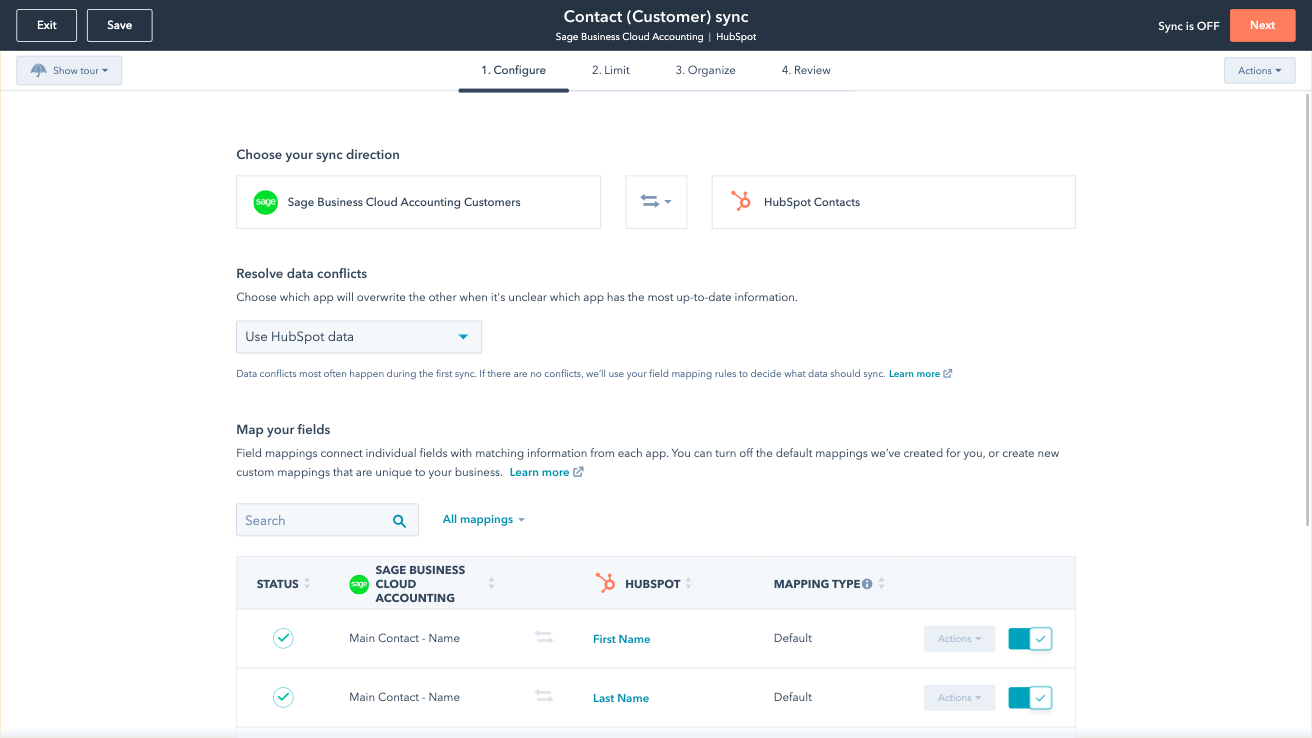
Custom Field Mappings
You can set up a one- or two-way sync, which means you can either sync data from Sage Business Cloud Accounting to HubSpot, from HubSpot to Sage, or back-and-forth! Out-of-the-box default field mappings make set-up quick and keep your data clean and organized. Custom field mappings are available with Data Hub Starter or above.
Funkcjonalność aplikacji
Udostępnione dane
Each object has field mappings that connect matching information from each app. Default mappings are listed below. If you want to change these default mappings or create your own, custom field mappings are available with Data Hub Starter and up.
Customers | ||
Sales Invoices | ||
Vendors |
Recenzje
- 3 gru 2025
Świetne aplikacje indywidualnie, ale brakuje integracji - brakuje synchronizacji pozycji faktur, ofert i szacunków
Niezależnie HubSpot i Sage Cloud są świetne, ale nie komunikują się zbyt dobrze. Wyceny i szacunki nie są synchronizowane, podobnie jak pozycje na fakturze
Tworzy nowych klientów lub dodaje numery faktur do istniejących klientów.
Nie uwzględnia pozycji na fakturze. Nie synchronizuje ofert. Nie synchronizuje szacunków. Nie przenosi również pliku PDF faktury, więc nadal muszę przejść do sage, aby znaleźć szczegóły zamówienia, ponieważ nie ma go w HubSpot.
Crotchett, C.
- 16 sty 2023
Duplikaty rekordów
Aplikacja działa, ale w HubSpocie utworzyła duplikaty. Nazwy wszystkich kontaktów zostały zastąpione przez „MAIN Contact”. Nie przesyła faktur do HubSpotu, a właśnie to, jak sądziłem, aplikacja miała umożliwić po połączeniu. Powinny być dostępne materiały pomocnicze, filmy instruktażowe i przewodniki dotyczące integracji. Aplikacja jest dość prosta i nie informuje o błędach ani o tym, jak cofnąć proces.
Wykorzystujemy to do wystawiania faktur dla klientów
Wszystkie nazwy kontaktów zostały zastąpione nazwą „MAIN Contact”. Aplikacja nie przesyła faktur do HubSpot, a właśnie to, jak sądziłem, miało się stać po nawiązaniu połączenia.
Singh, R.
Edukacja - Od 11 do 25 pracowników
Review Sage Business Cloud Accounting's Pricing Page
0 USD
Use the 'See all pricing options' link on the righthand side
Make sure to confirm the HubSpot subscription and Sage Business Cloud Accounting subscription needed to install this integration
Note: "Free" is referring to the cost of the integration, not the app subscriptions
Review Sage Business Cloud Accounting's Pricing Page
0 USD
Use the 'See all pricing options' link on the righthand side
Make sure to confirm the HubSpot subscription and Sage Business Cloud Accounting subscription needed to install this integration
Note: "Free" is referring to the cost of the integration, not the app subscriptions
* Powyższe ceny zostały podane wyłącznie w celach informacyjnych. Nie zawierają one podatków, premii, zniżek lub innych zmiennych cenowych. Skontaktuj się z partnerem w celu uzyskania najbardziej aktualnych i poprawnych informacji o cenach. HubSpot nie ponosi żadnej odpowiedzialności za informacje cenowe, które są dostarczane przez naszych partnerów. Ostatnia aktualizacja cen: 03.09.2025
Więcej informacji
Utworzone przez - HubSpot
Instaluje - Ponad 100 instalacji
Kategorie Języki, w których dostępna jest ta aplikacja Angielski
Przyciąganie uwagi już dziś

Microsoft Teams
Korzystaj z aplikacji Microsoft Teams i HubSpot do organizowania spotkań, prowadzenia rozmów i nie tylko!

Zoom
Korzystaj z Zoom w połączeniu z funkcjami HubSpot, takimi jak spotkania, przepływy pracy, rekordy kontaktów i nie tylko.
