
-1-1.png)
Calendly Events by Ulgebra
View & Schedule new calendly events from HubSpot contacts

Leading
Requirements
HubSpot Plan HubSpot Account permissions - View the required account permissions
Access Type Shared Calendly Events by Ulgebra Subscription - Classic Plan plan
Overview
-1.png)
1/8 - Book Calendly appointments with any HubSpot contact
Integrate the Calendly account of your Organization with HubSpot to schedule and manage appointments with HubSpot Contacts, Companies, Tickets & Deals. Complete the installation in no time by authorizing your HubSpot and Calendly accounts. This way the complete Calendly organization can be synced to HubSpot. Go through the complete setup of the extension here.
Some of the applications of Calendly Events for HubSpot are given below.
Book Calendly appointments for the preferred Calendly agent from within any HubSpot contact. You can also view the details of the appointments booked within the respective contact.
View the history of all the upcoming and past Calendly appointments scheduled with the HubSpot contact.
Select any appointment from the history to view the details of the booking. In case of upcoming Calendly events, you can reschedule or cancel the appointment as well.
Obtain the booking links of any Calendly agent within the organization. Also, get single-use links to be shared with contacts for each event.
Receive instant notifications for Calendly appointments booked at the bell icon within the application.
Map the HubSpot fields based on your requirements for the incoming Calendly events.
Map the Calendly agents within the Organization to the respective HubSpot users to receive the incoming Calendly events appropriately.
As the HubSpot admin, you can enable users to utilize a shared Calendly account.
Click on your Ulgebra profile to access the application settings. Here you can view all the features such as incoming setup, field mapping, application analytics and so on.
Go through the detailed working of the application here.
Features
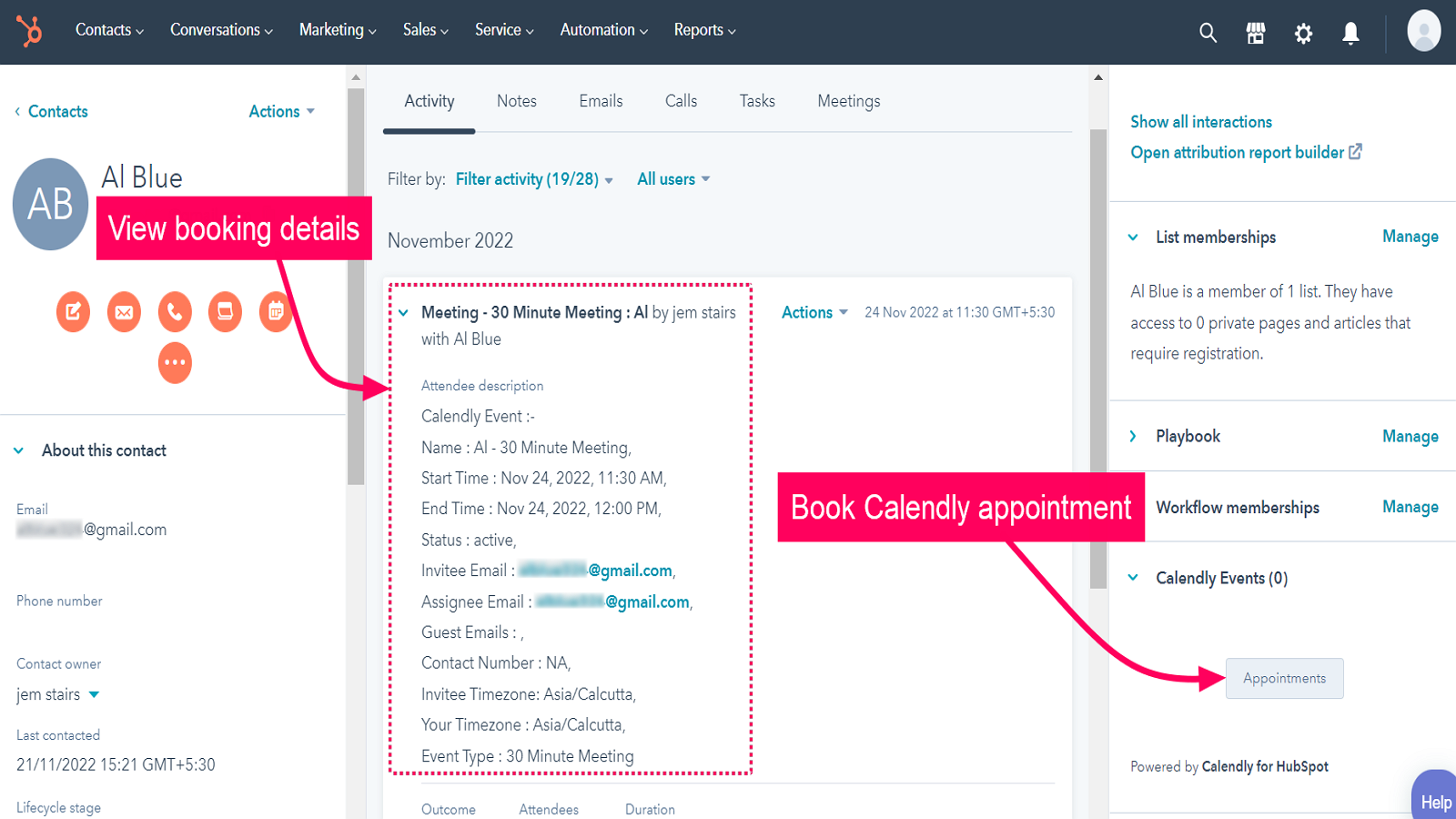
Calendly Appointments
Under Calendly Events within any HubSpot Contact, Company, Deal, or Ticket, click on 'Appointments' to book your Calendly meetings. Select the Calendly agent with whom the appointment is to be booked. Select the event, date and time for the appointment. Enter the details and schedule the appointment. View the booking details inside the contact.
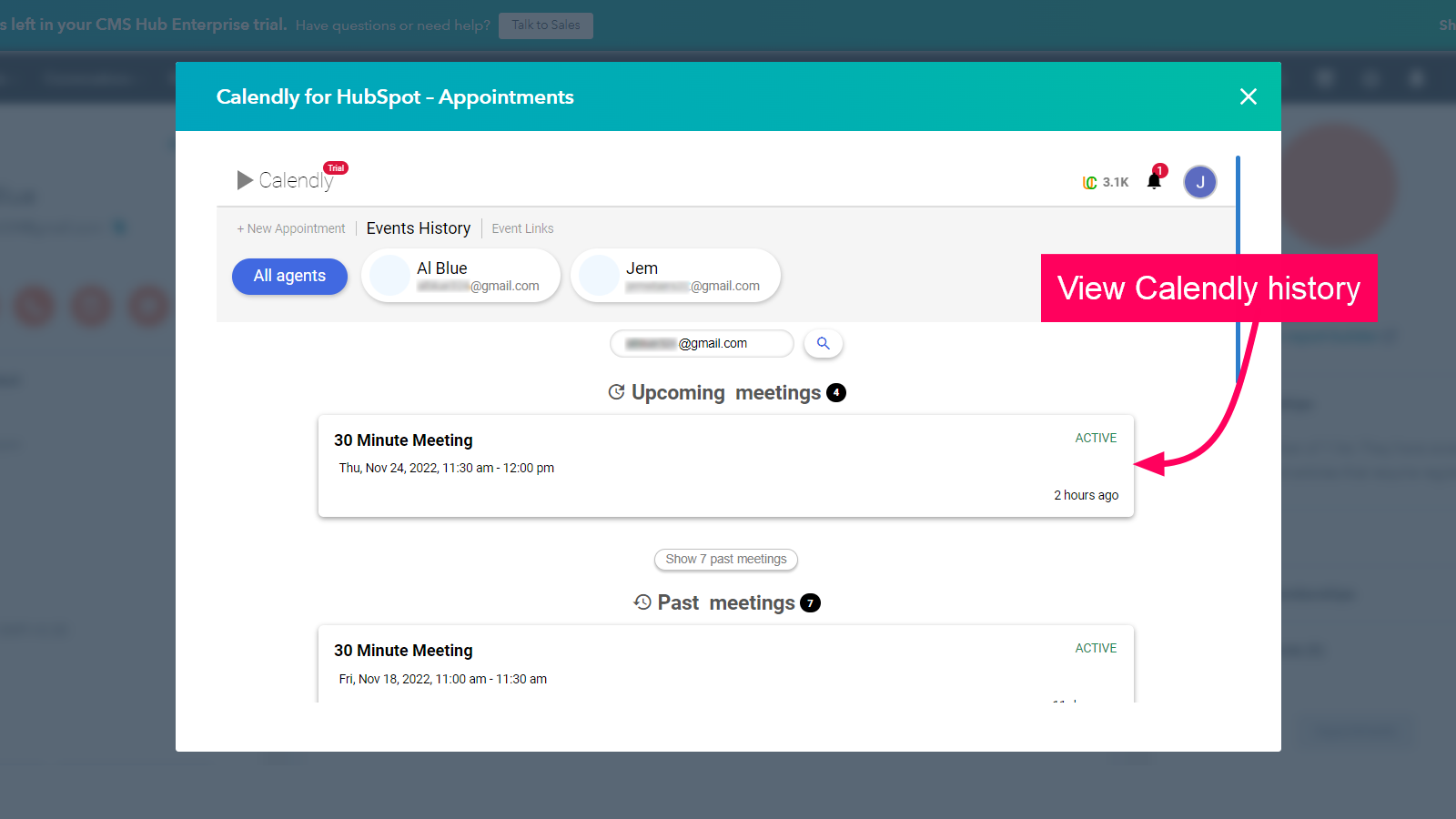
Events History
Select 'Events History' within the application to access the upcoming and past Calendly appointments scheduled with the contact. Select any appointment to view the booking details. In case of upcoming events, you can also reschedule or cancel the appointment if required.
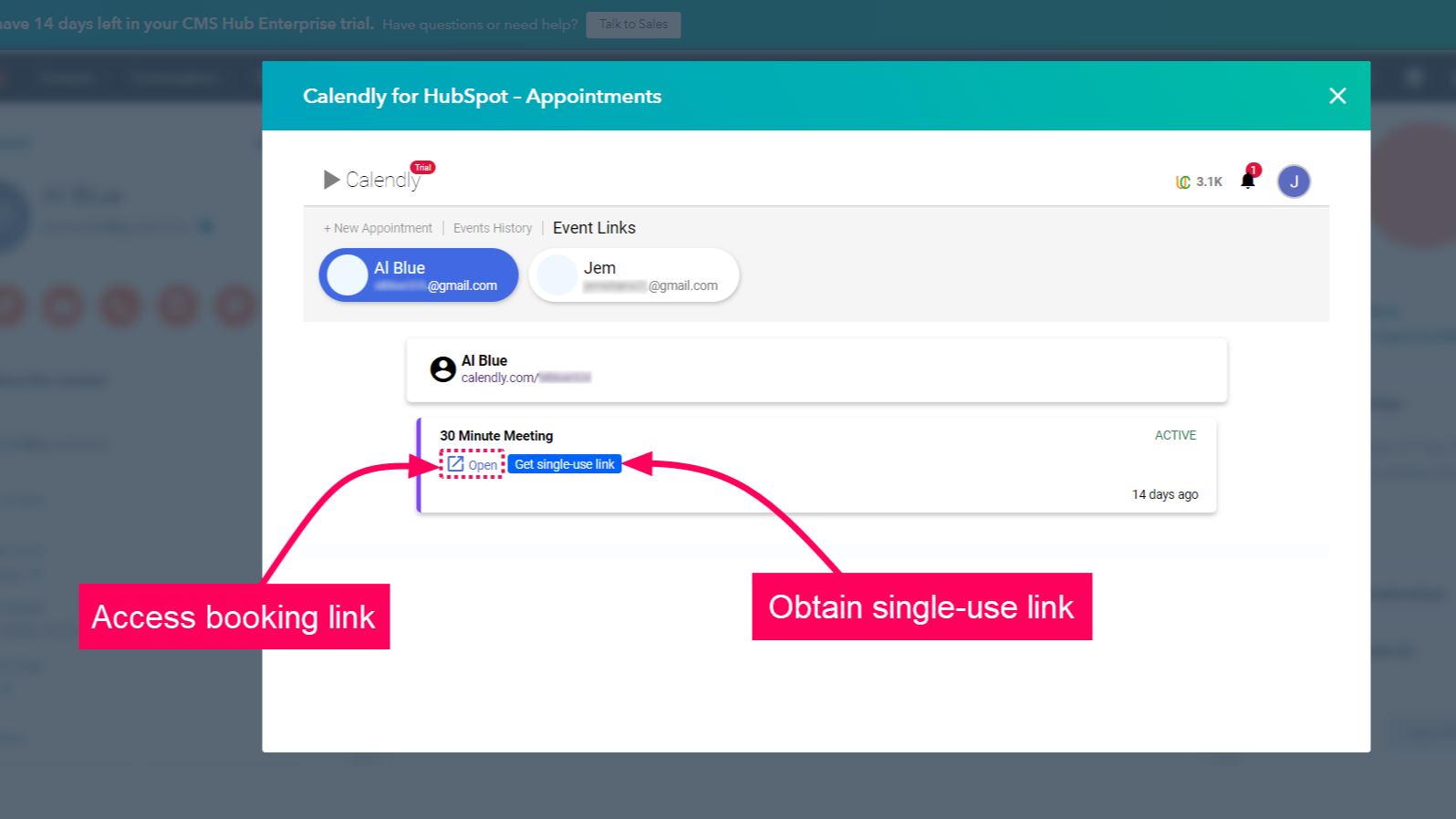
Booking Links
Select 'Event Links' to access the booking links of Calendly agents. Select the Calendly agent whose event links you wish to access. Click on 'Get single-use link' to obtain a one-time booking link to be shared with contacts.
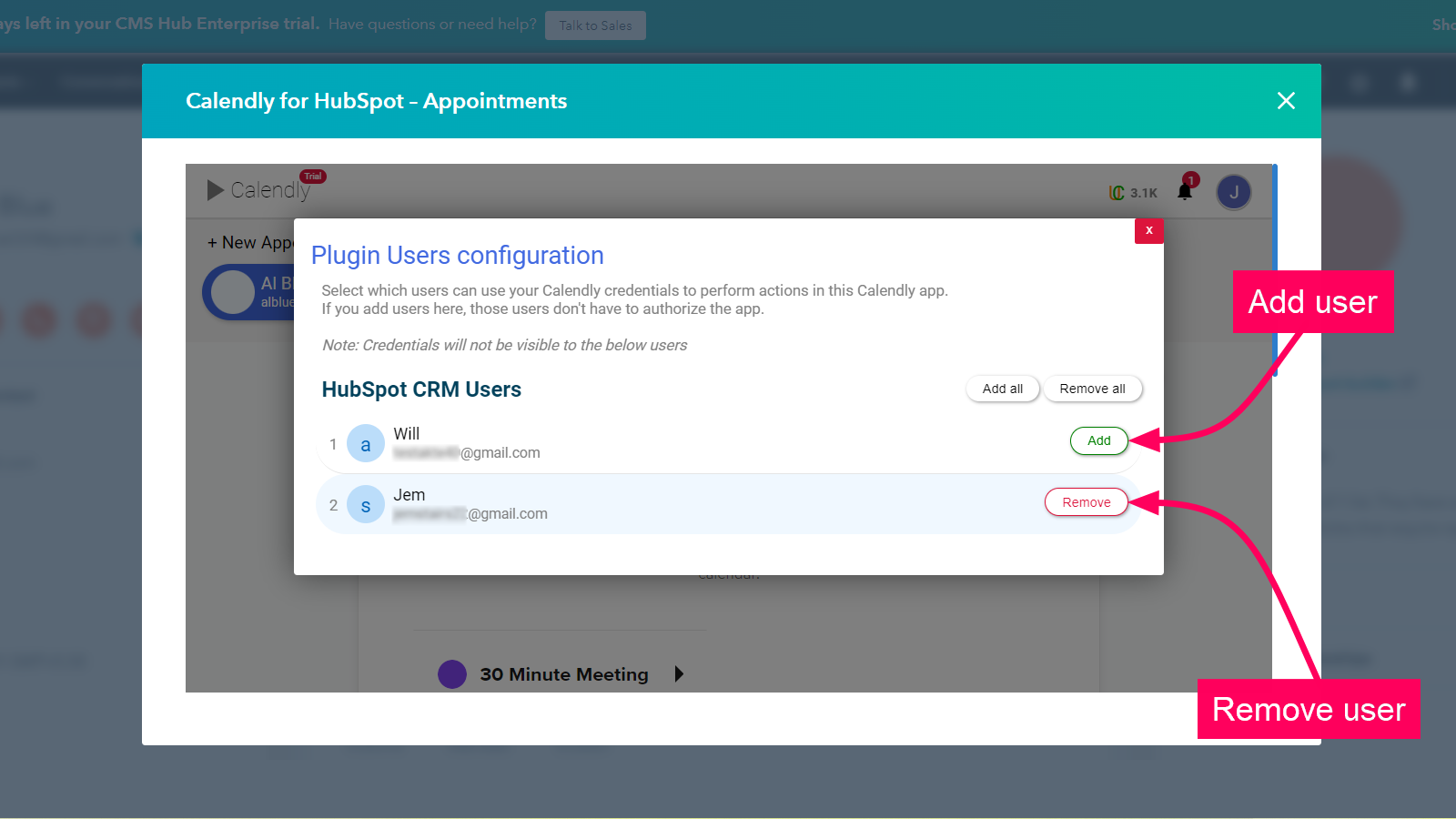
Calendly User Management (For HubSpot Admin)
The HubSpot admin can allow users to utilize the authorized Calendly organization account. Select 'Manage App Users' within the settings page to view the list of HubSpot users. Add the users for whom you wish to enable the feature. You can also remove, add all and remove all users based on your requirement.
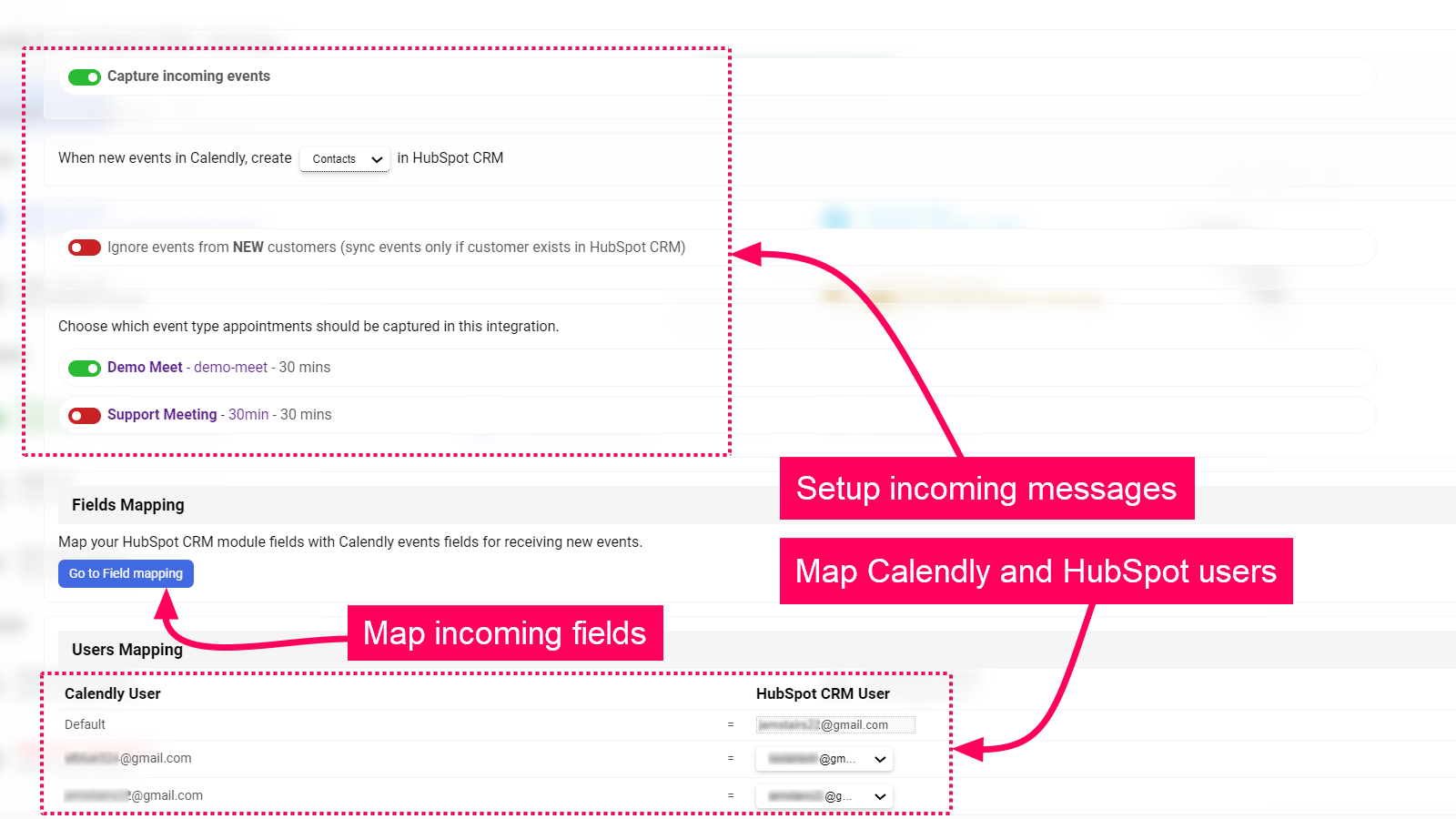
Incoming Events
Select 'Incoming events sync' from the application settings page to access the incoming settings. Here you can enable incoming events and select the Calendly events from which you wish to receive incoming. Also, map the HubSpot fields to the details of the event. You can also map the Calendly agent to the respective HubSpot user.
App Functionality
Shared Data
Calendly Event Link |
Reviews
3.8
4
3.8
4
- Nov 21, 2024
Simple and Effective
We were looking for a solution to extract data out of calendly not using Zapier and this app performed well above expectation
Easy Install, simple field mapping
none
van der Merwe, J.
- Jul 24, 2024
Generally good, solving some basic sync issues with Calendly
solving main pains of Calendly native integration like missing mapping and synching only selected meetings
meetings sync
mapping and selective meeting options
rather ugly UI
Sedov, S.
- 6 to 10 employees
Pricing
Classic Plan
$5
/monthBook appointment from HubSpot
View booked meetings history
Notifications inside HubSpot board for new calendly events.
Get contacts and events as records created inside HubSpot board for new calendly events.
Priority Support
Access to all new upcoming features.
+Ulgebra Credits for paid amount
Classic Plan
$5
/monthBook appointment from HubSpot
View booked meetings history
Notifications inside HubSpot board for new calendly events.
Get contacts and events as records created inside HubSpot board for new calendly events.
Priority Support
Access to all new upcoming features.
+Ulgebra Credits for paid amount
* The pricing here is for display purposes only. All prices do not include taxes, incentives, discounts, or other pricing variables. You should contact the partner for the most up to date and correct pricing information. HubSpot does not take any responsibility for this pricing information, which is provided by our partners. Pricing last updated: 08/10/2025
Most popular


