

Keen
Built by - Keen
Installs - 10+ installs
Requirements
HubSpot Plan HubSpot Account permissions - View the required account permissions
Access Type Shared Keen Subscription - Free, Basic, Pro, or Enterprise plans
Overview
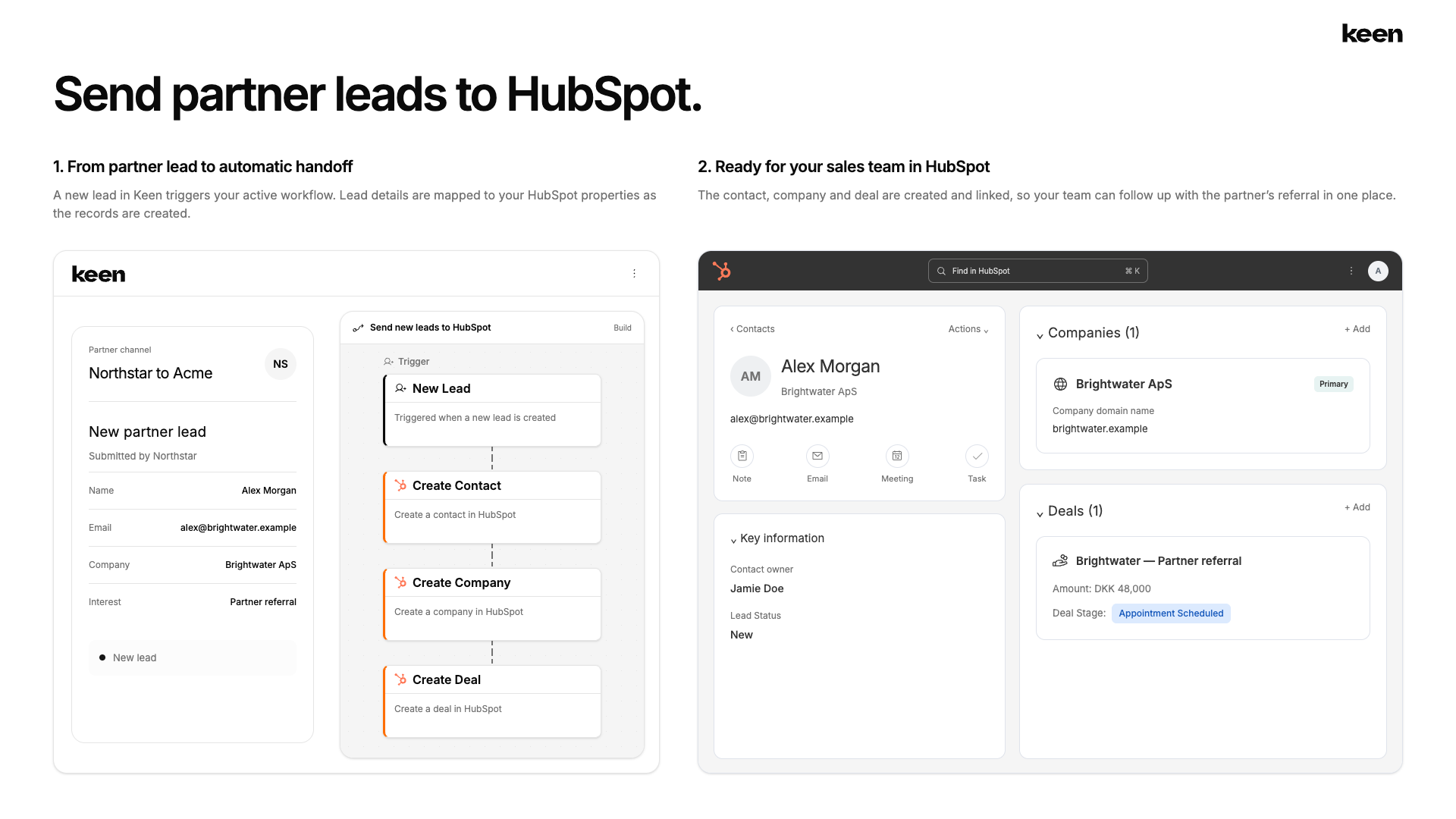
1/8 - Keen partner lead creates records in HubSpot.
The operating system for partner programs. Connected to HubSpot.
Keen is AI-native partner relationship management (PRM) software designed to ease your administrative workload and let you focus on what matters. Bring your partners, leads, communication, resources, rewards, and reporting together in one platform.
Connect Keen with HubSpot to make partner leads part of your existing sales process. Your team works in its CRM, your partners stay informed, and workflows handle the updates between both sides.
One shared view of the partnership
Partner leads often move between companies through emails, spreadsheets, and separate CRMs. The introduction happens, but the follow-up becomes difficult to see. Partners ask for updates, sales teams copy information, and partner managers spend time keeping everyone aligned.
Keen sits between both sides of the partnership, giving you and your partners a shared view of lead progress, activity, and results. Connecting HubSpot brings your sales process into that picture, so the work happening in your CRM stays connected to the partner who made the introduction.
Keep leads and updates moving
Partner leads into HubSpot. Use workflows to create contacts, companies, and deals from leads shared through Keen, individually or together. Transfer the relevant information so your team can follow up in its existing pipeline.
HubSpot opportunities to partners. Send deals into the relevant Keen partner channel when a partner should take the next step.
Progress back to Keen. Update the matching lead’s status when a deal changes stage in HubSpot, keeping partners informed without a separate status email.
Connected information. Update existing HubSpot records through workflows as relevant contact, company, and deal details change.
Choose the information you share and configure the workflows around your partner process.
Refer and receive from the same platform
A partner can introduce customers to you and receive opportunities from your team. Keen supports both roles from one account.
Set up channels that define who refers and who receives, while keeping the partner relationship together. Track the leads you send, the leads you receive, and the results of each collaboration without splitting your partner work across separate systems.
Everything around the lead
Give partners access to the resources and communication they need to keep the relationship active. Keep conversations alongside the partnership and opportunity-specific comments attached to the lead.
Define rewards around the outcomes that matter, with fixed or percentage-based calculations. When HubSpot updates a lead’s status in Keen, configured reward workflows can apply. Rewards are grouped into reports for review and payment, giving your team and partners a clearer view of what has been earned.
Follow leads, rewards, and performance across channels to understand which relationships are creating value and where more attention is needed.
Your process. Your workflows.
Build automations visually, with no code required, or let Keen AI help assemble the steps. Choose a trigger, add actions, and use filters and branches when different opportunities need different paths.
Start with a partner referral creating a HubSpot deal. Connect deal-stage changes back to Keen. Extend the workflow as your partner process develops.
Ask Keen also helps you understand your partnership data. Explore partner performance, find stalled leads, and review rewards without first exporting and combining spreadsheets.
Already connecting partner work with HubSpot
Flex Funding uses Keen to capture partner opportunities and send leads into HubSpot. Status updates return to Keen, keeping partners informed and supporting partner reporting.
A consistent path from partner introduction to sales follow-up, with a shared view of progress as the channel grows.
Grow the program, not the workload.
From startups building their first partner program to established enterprises managing a growing network. Keen brings structure to your partnerships and connects them with the tools your team already uses.
Features
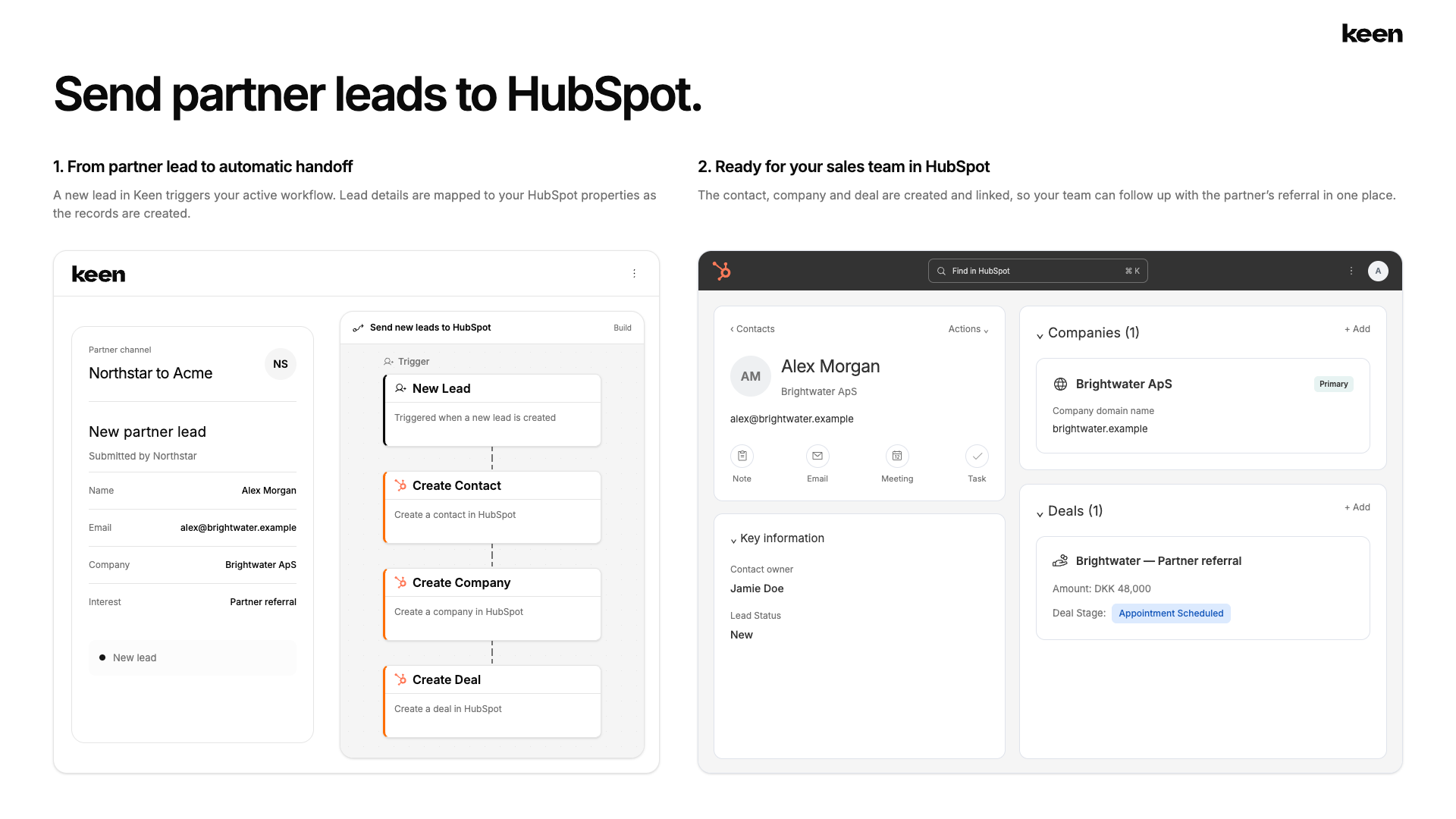
Send leads from Keen to HubSpot
Automatically bring partner leads from Keen into HubSpot. Create contacts, companies, deals or a combination of these, and map lead details to your HubSpot properties so your sales team can follow up without copying information manually.
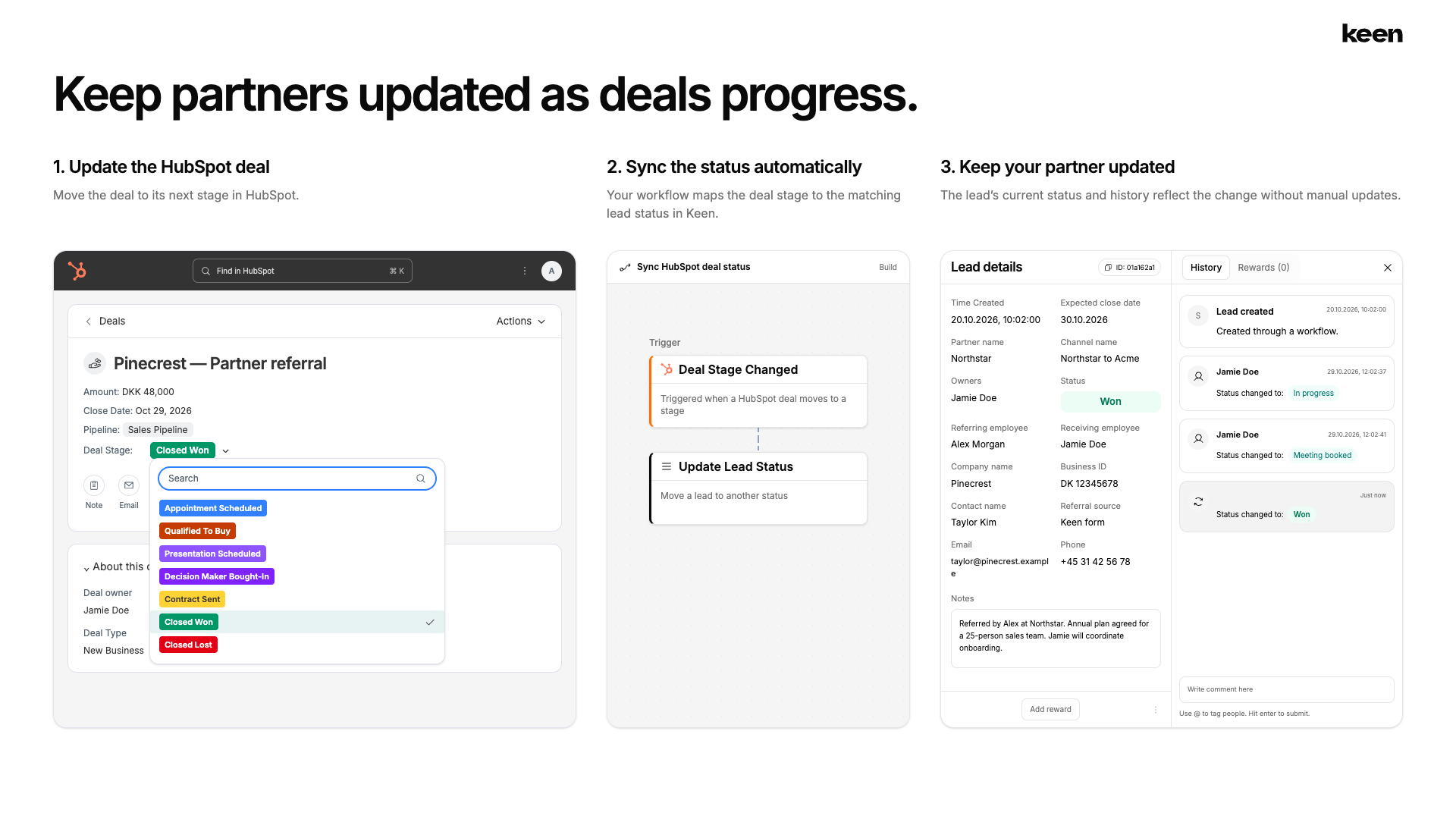
Sync HubSpot statuses to Keen
Keep partners informed without manual updates. When a deal stage or lead status changes in HubSpot, Keen automatically updates the matching partner lead’s status. Map your HubSpot stages and statuses to the relevant statuses in Keen.
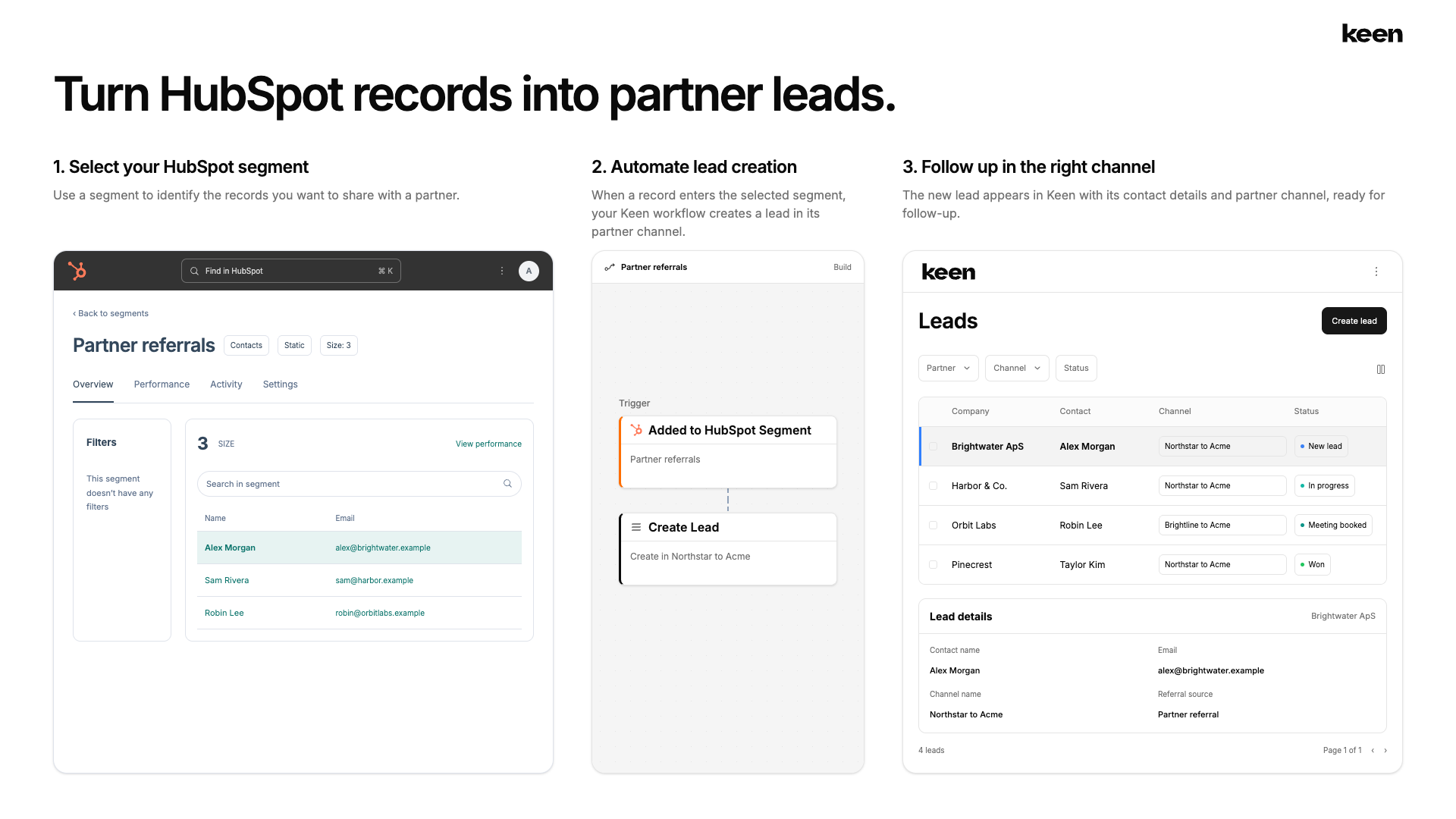
Send records from HubSpot to Keen
Send relevant HubSpot records to your partners without copying information manually. When a contact, company, deal or lead is added to a selected HubSpot segment, Keen automatically creates a lead in the chosen partner channel using your field mapping.
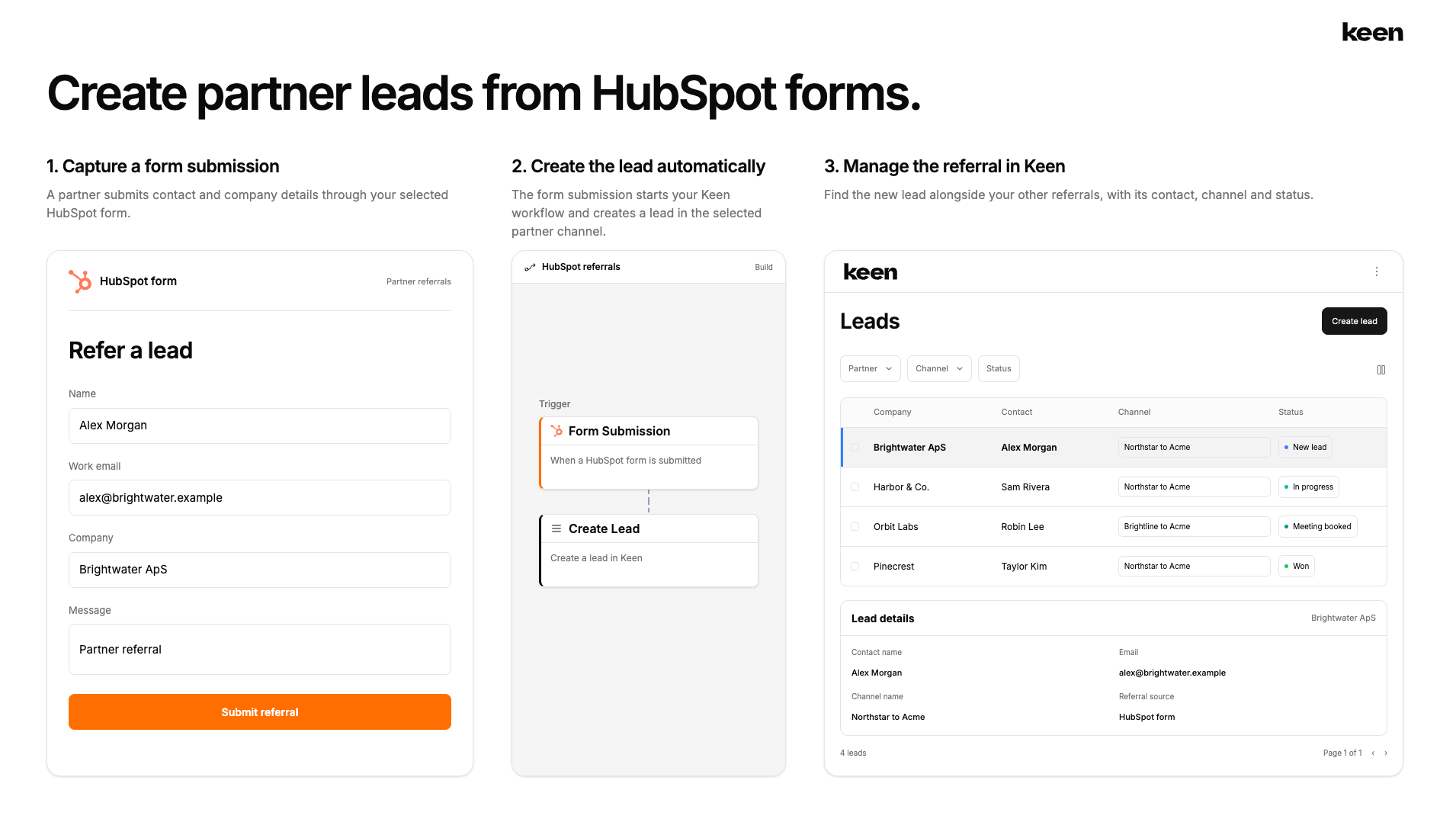
Create Keen leads from HubSpot forms
Turn HubSpot form submissions into partner leads in Keen automatically. Choose the form, map submitted details to Keen fields, and create the lead in the relevant partner channel without copying information manually.
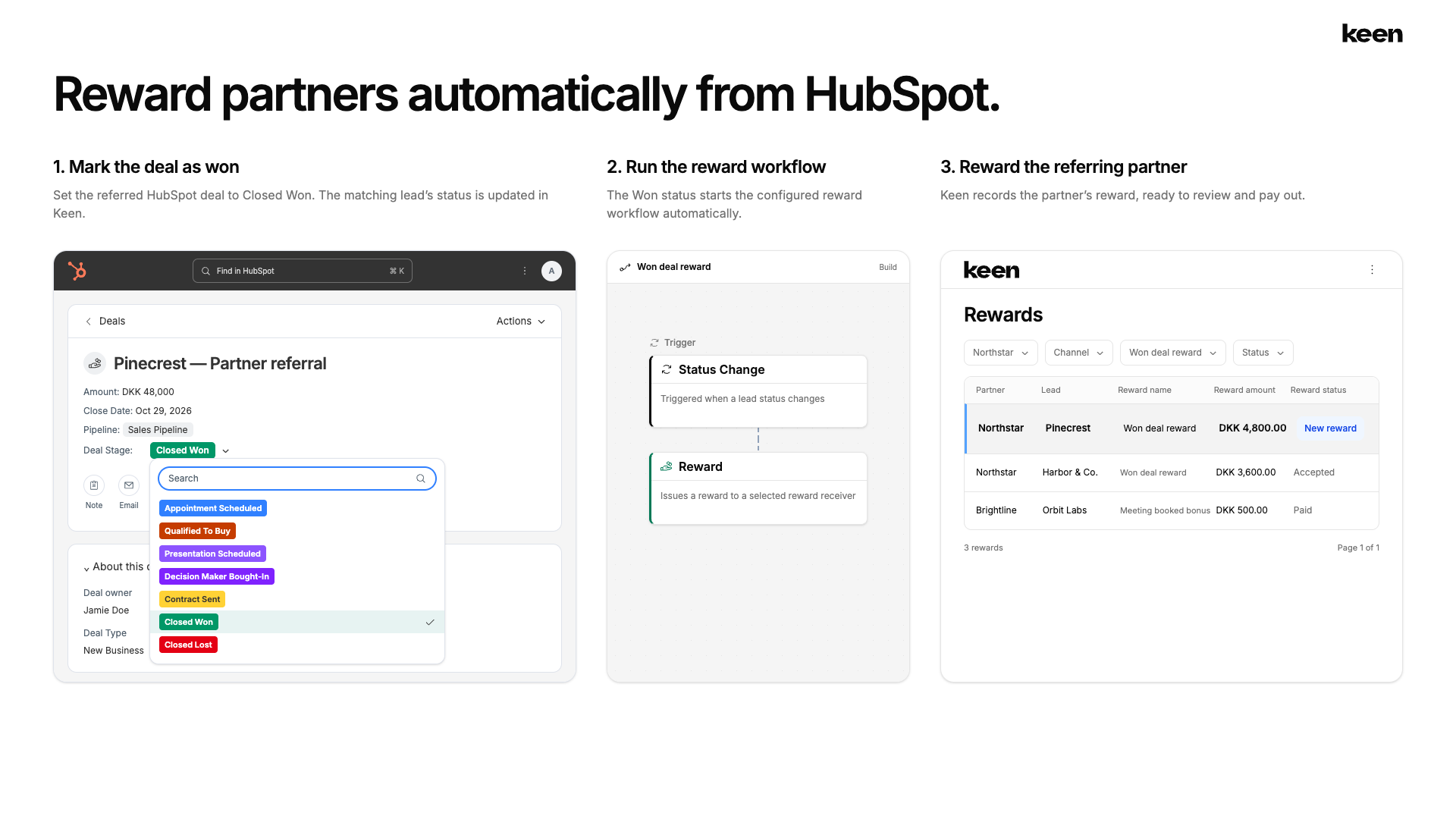
Automate partner rewards from HubSpot
Reward partners automatically as referred opportunities progress in HubSpot. A HubSpot status change updates the matching lead in Keen, triggering a separate reward workflow based on your rules.
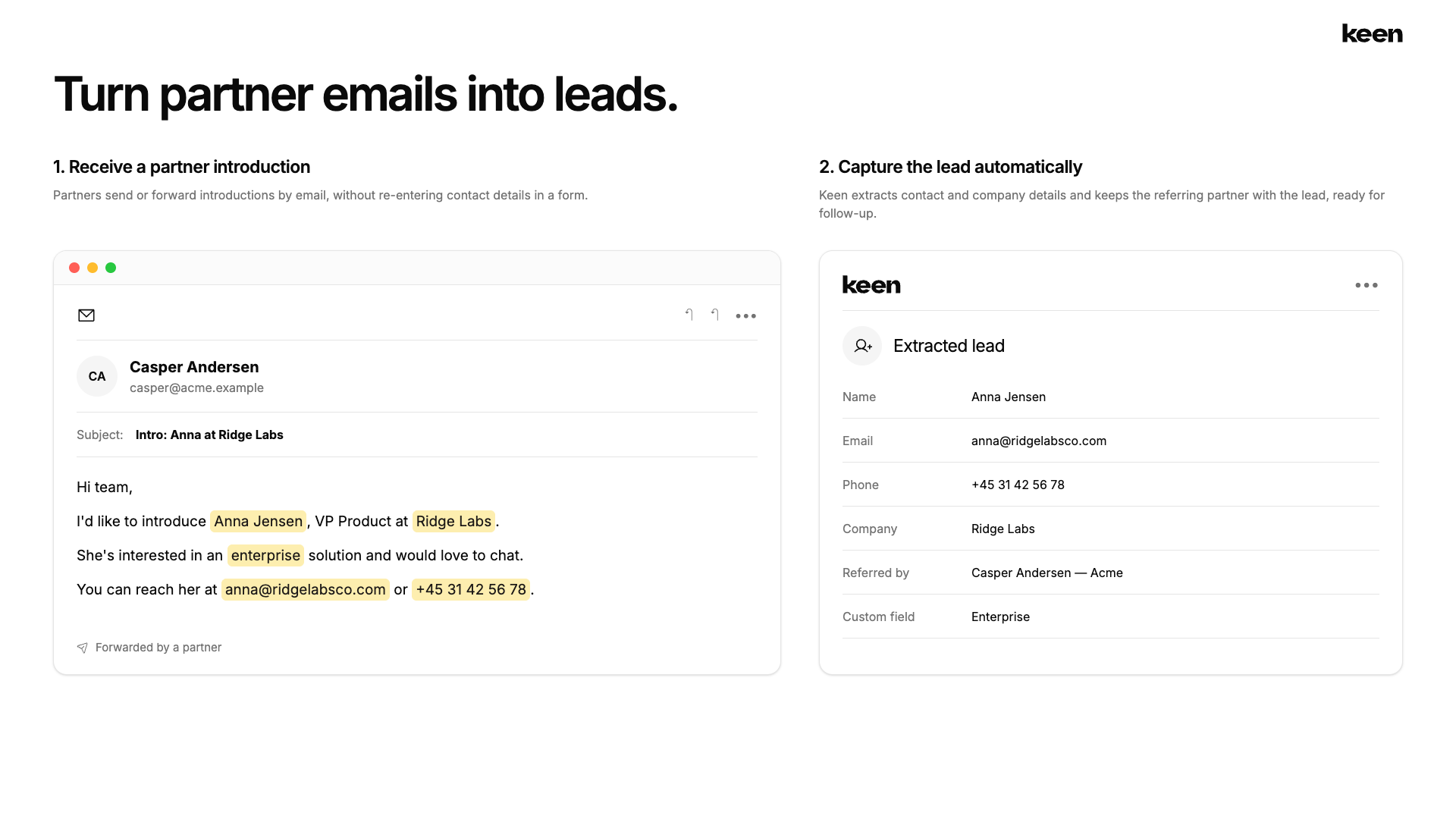
Capture leads from partner emails
Turn partner introductions into leads without copying details manually. Keen extracts contact and company information from partner emails, so you can capture referrals and follow up in one place.
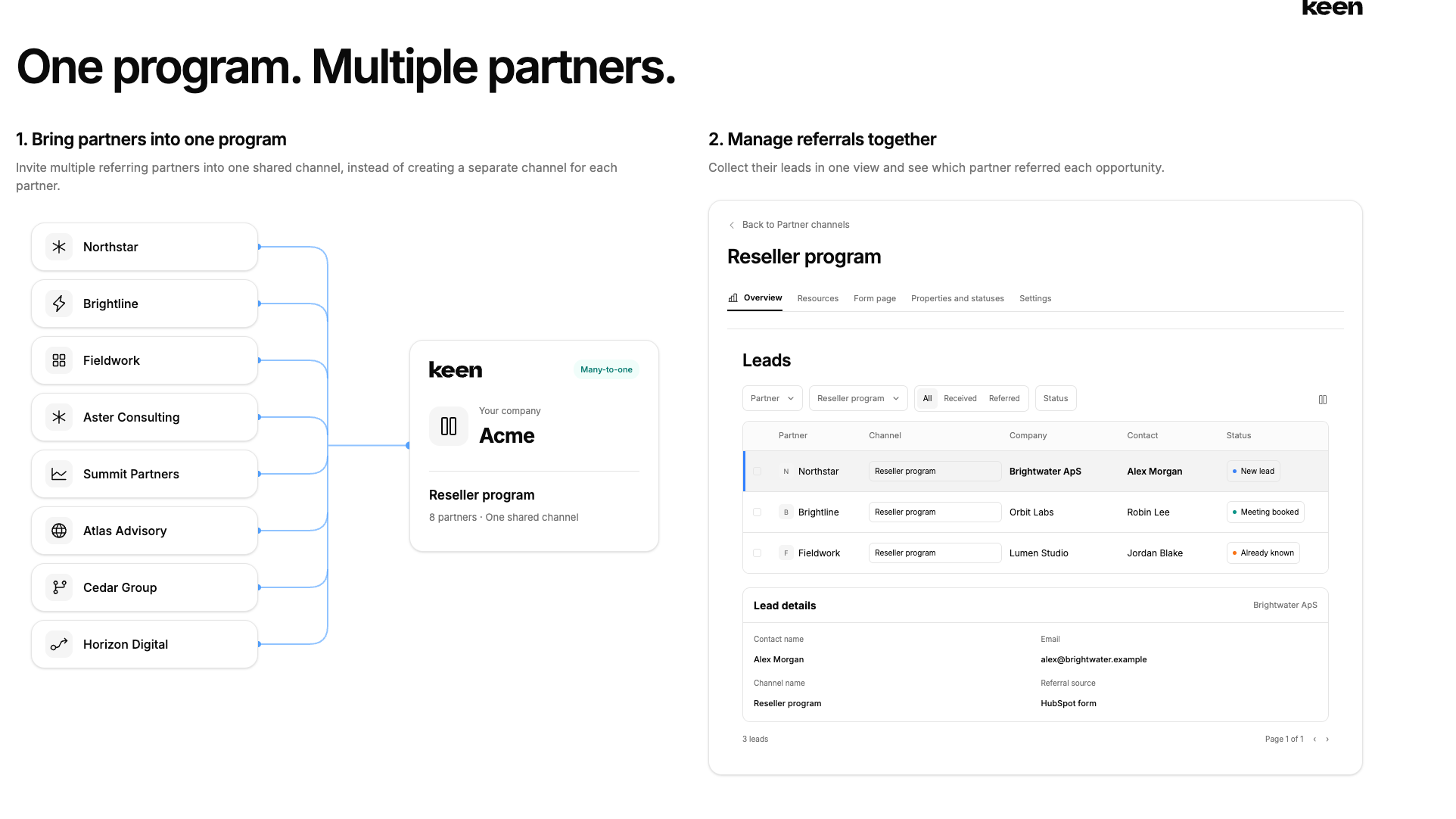
Manage partner programs
Bring multiple referring partners into one shared program. Collect their leads in a single Keen channel, see which partner referred each lead, and manage the program without setting up a separate channel for every partner.
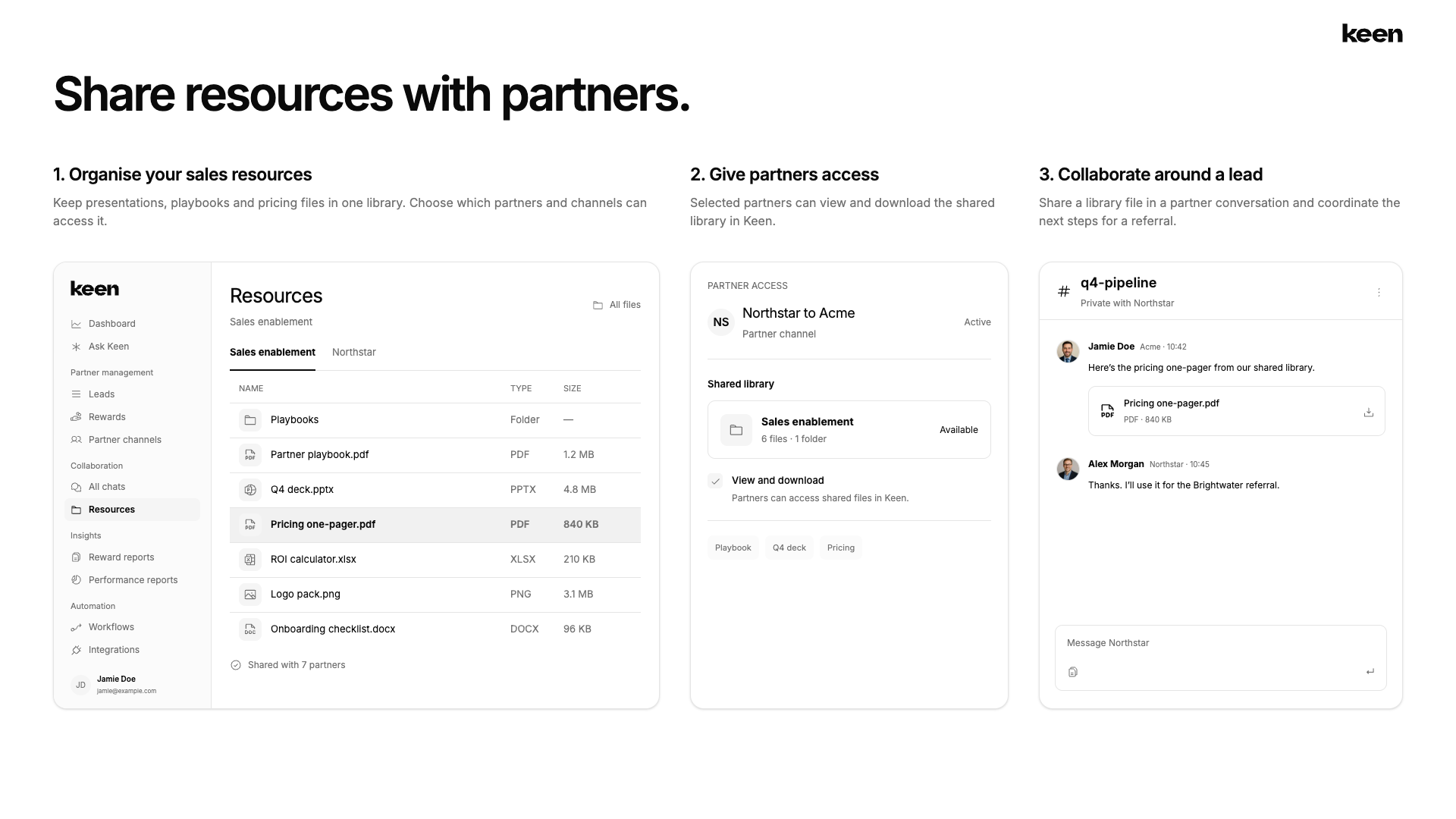
Share resources with partners
Give partners access to the materials they need to sell and refer effectively. Share libraries of presentations, brochures, pricing documents and other files with selected partners or channels, so partners can view and download them in Keen.
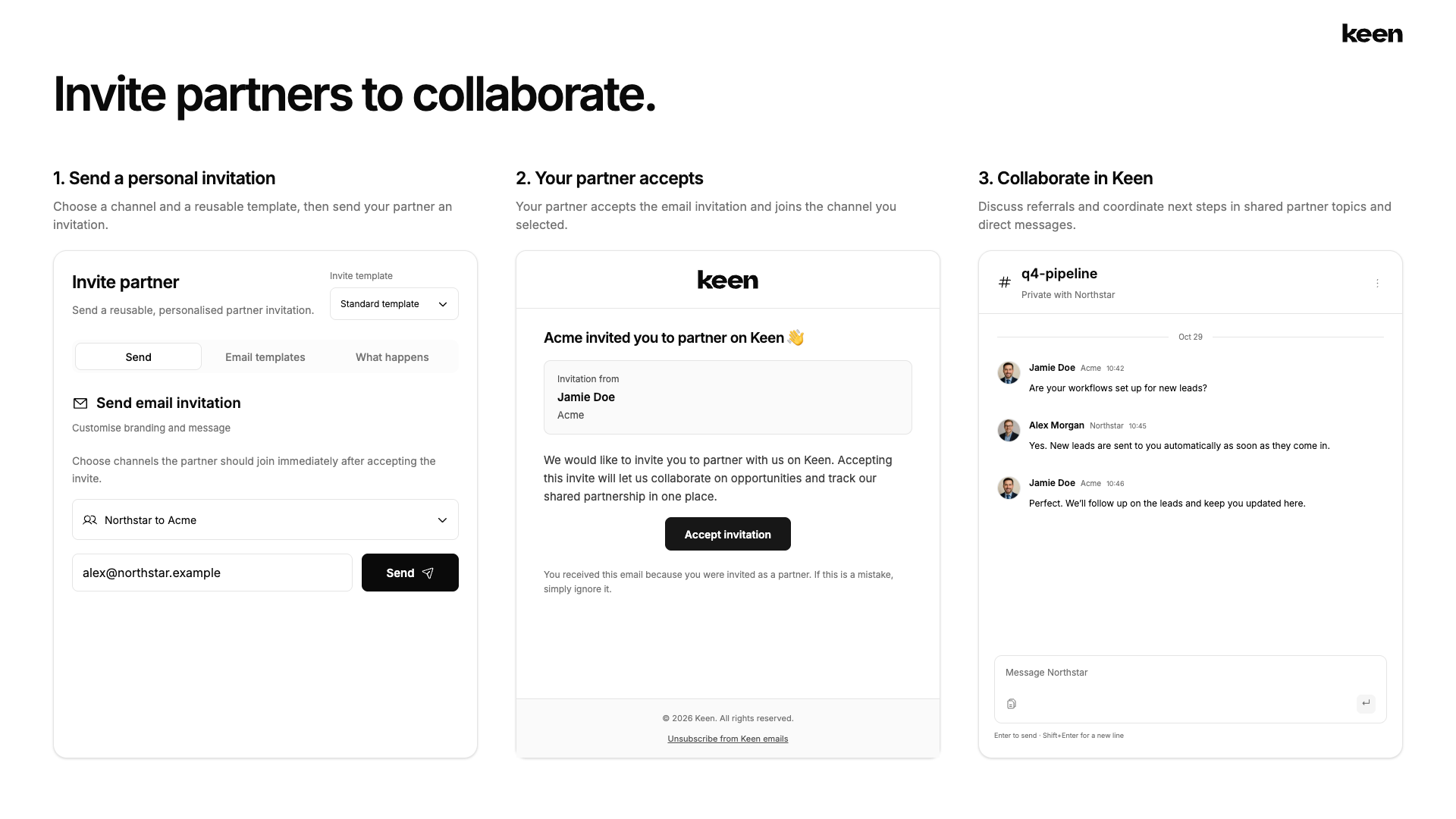
Invite partners to collaborate
Start new partnerships with a personalized email invitation. Choose which channels a partner should join after accepting, and reuse invitation templates to make onboarding additional partners easier.
App Functionality
Shared Data
Keen leads | ||
Lead contact details | ||
Lead company details | ||
Deal field definitions | ||
Contact field definitions | ||
Company field definitions | ||
Form submission data | ||
Keen Leads |
Keen shares data with HubSpot through the workflows you configure. You choose the triggers, partner channels, actions, and field mappings that determine which records and information move between the two platforms.
Workflows can create or update HubSpot records from Keen lead data and create Keen leads from supported HubSpot events, including new deals and form submissions. Shared information depends on your mappings and may include contact details, company details, deal information, and the Keen lead ID.
HubSpot deal-stage changes can update lead statuses in Keen. Store the Keen lead ID on the corresponding HubSpot record so each update reaches the correct lead. If a record starts in HubSpot, the workflow should create the Keen lead and then save its new Keen lead ID back to HubSpot.
Keen also reads HubSpot property definitions to support field mapping during workflow setup. Two-way sync describes the supported data directions; the records, fields, and updates transferred depend on your active workflows. Connecting the integration does not automatically sync every record or field.
Reviews
Pricing
Free
€0
Free for everyone
Native CRM integrations
Workflows
In app ticket support
2 seats
10 channels
Unlimited leads
Unlimited Partners
Free
€0
Free for everyone
Native CRM integrations
Workflows
In app ticket support
2 seats
10 channels
Unlimited leads
Unlimited Partners
* The pricing here is for display purposes only. All prices do not include taxes, incentives, discounts, or other pricing variables. You should contact the partner for the most up to date and correct pricing information. HubSpot does not take any responsibility for this pricing information, which is provided by our partners. Pricing last updated: 11/18/2026
More info
Built by - Keen
Installs - 10+ installs
Categories Languages this app is available in English - United Kingdom
New arrivals
Keen
The operating system for partner programs. An AI-native partner relationship management (PRM) platform designed to ease your administrative workload. Send and receive leads through connected workflows, bring partner leads directly into your CRM, and give both sides a single source of truth for lead status, rewards, and performance. Grow the program, not the workload.

Streamkap
Stream HubSpot CRM data to your data warehouse in real time
