

PDF Extension
Built by - ナウビレッジ株式会社
Installs - 10+ installs
Requirements
HubSpot Plan HubSpot Account permissions - View the required account permissions
Access Type Shared PDF Extension Subscription - Starter, Professional, or Enterprise plans
Overview
1/9 - PDF Extension Introduction Video
PDF Extension is an app that creates documents—such as quotes, invoices, packing slips, and contracts—by populating them with information from HubSpot deals, companies, contacts, tickets, and custom objects, and then saves them to HubSpot.
• Select a template from the cards on the record screen, preview it, and generate the document with a single click. The generated file is saved in HubSpot Files and is automatically attached to the record’s notes or stored in its properties.
• Use the drag-and-drop editor to create templates with your company’s custom layout. You can also import your existing PDF, Excel, or image files to replicate their layout.
• Product details are inserted as a table, with automatic page breaks based on the number of rows. You can also use values from related companies, contacts, and custom objects.
・You can use your existing Word or Excel files directly as templates and export them as Word or Excel files.
・You can automatically issue documents via workflow actions.
・On the Enterprise plan, you can comment on, approve, or reject documents while previewing them, and you can hold issuance until approval is complete.
This eliminates the need for manual data entry and switching between document creation tools, allowing you to complete all document-related tasks entirely within HubSpot.
Features
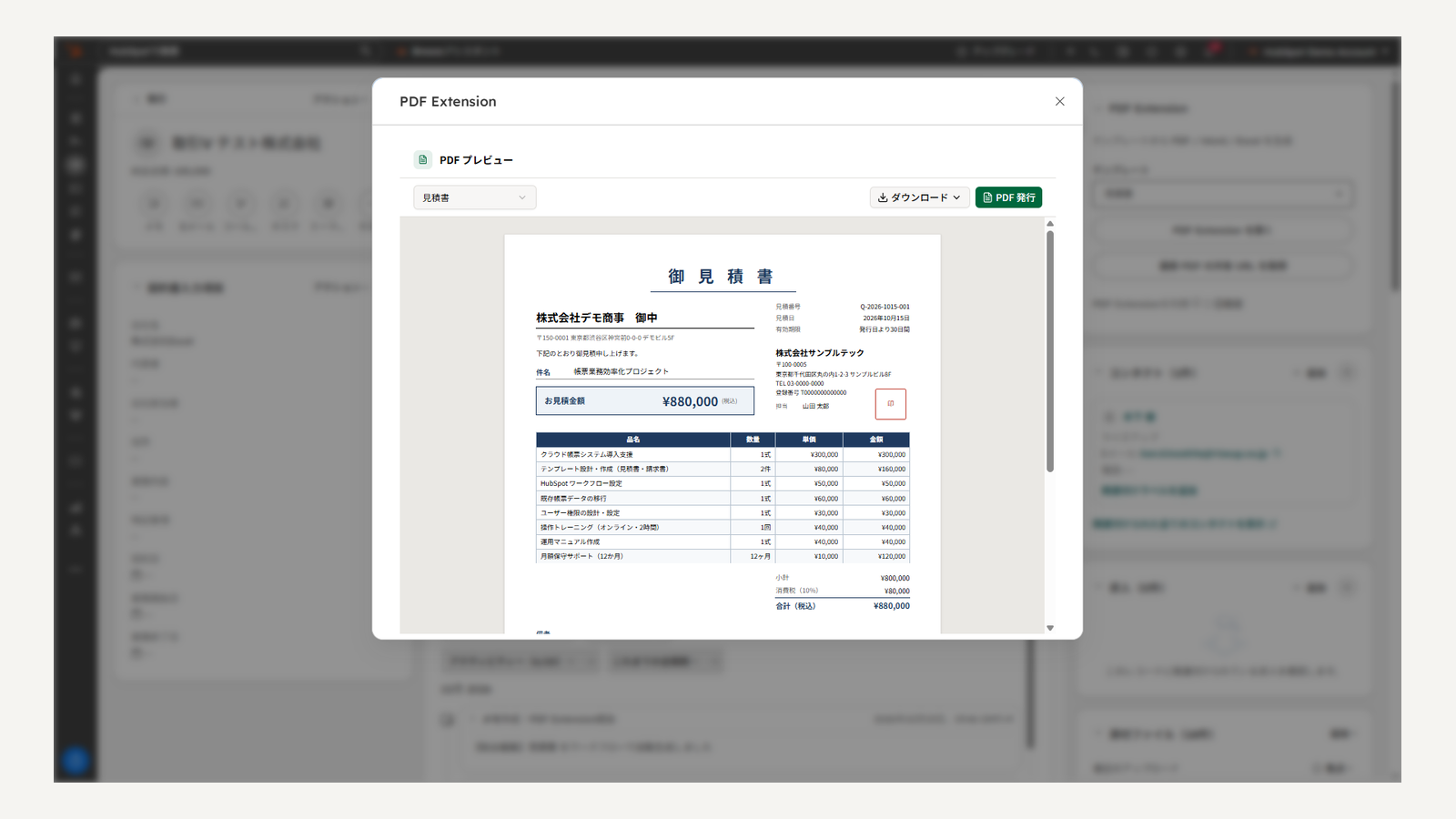
Issue documents from records with a single click
You can select a template from the card on the record screen (such as for transactions), preview it with the record's actual data filled in, and then generate the document. The generated file is saved to HubSpot, and the system automatically attaches it to the record's notes and stores it in the relevant properties, eliminating the need to manually transcribe or save documents.
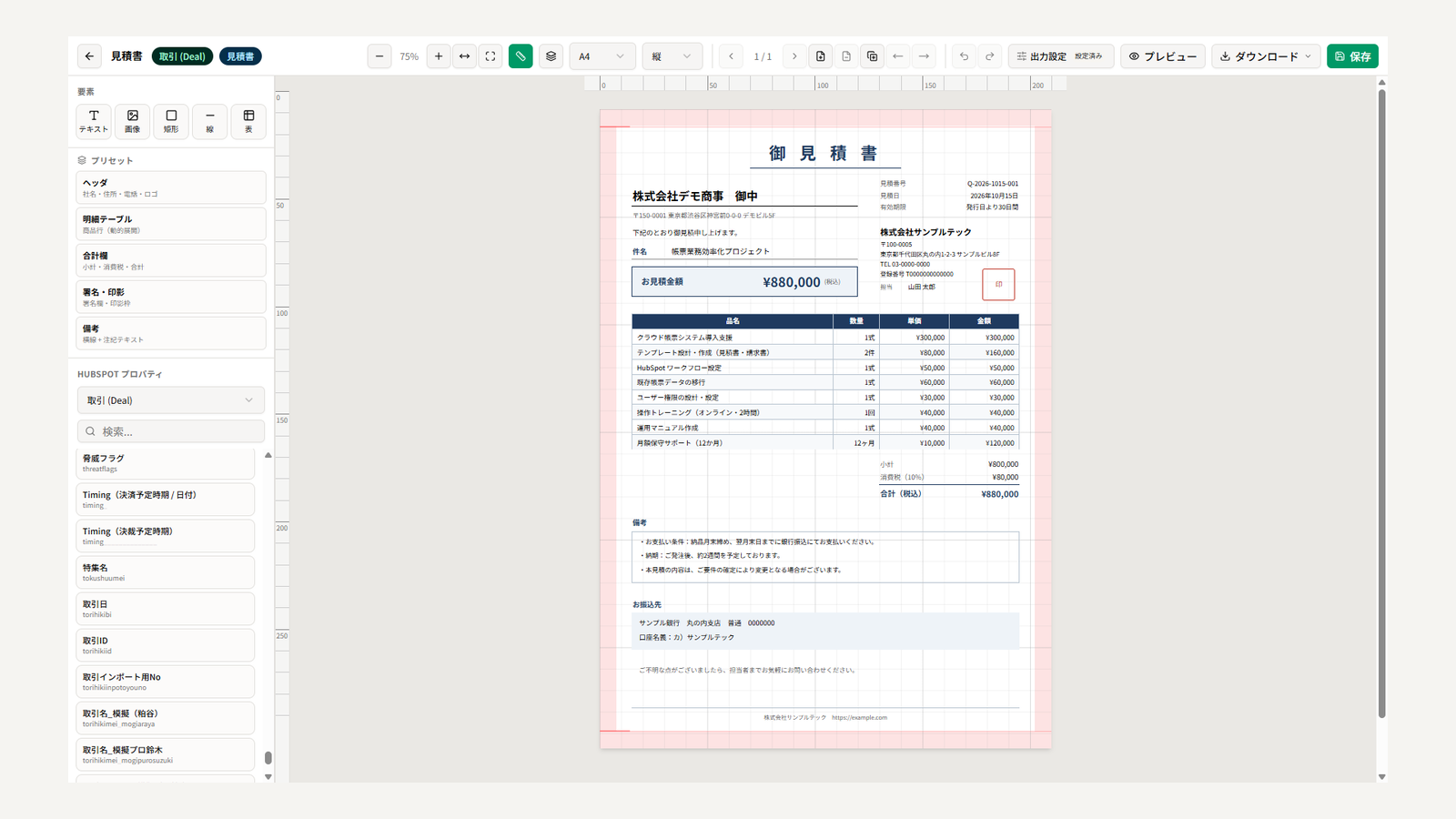
Create Document Templates Using Drag-and-Drop
You can create custom layouts for quotes, invoices, and other documents by dragging and dropping components and HubSpot properties. You can also import your existing PDF, Excel, or image files to recreate your existing layouts.
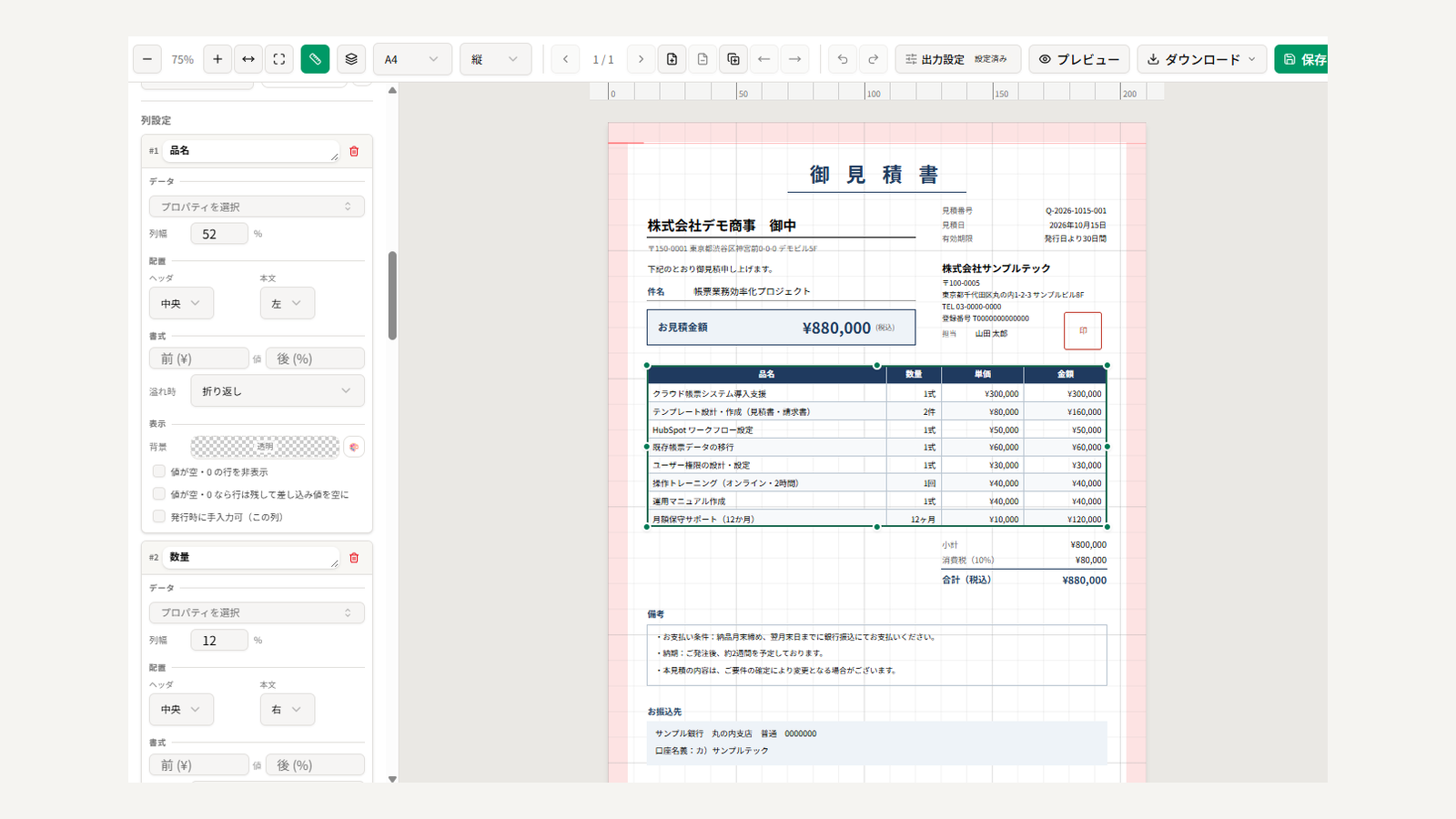
Insert the product (itemized) list as a table
You can insert transaction items (details) and related records as tables. The table expands to accommodate the number of rows and automatically wraps to the next page, so you can easily create quotes and invoices with a large number of details. You can set the width, alignment, and formatting for each column.
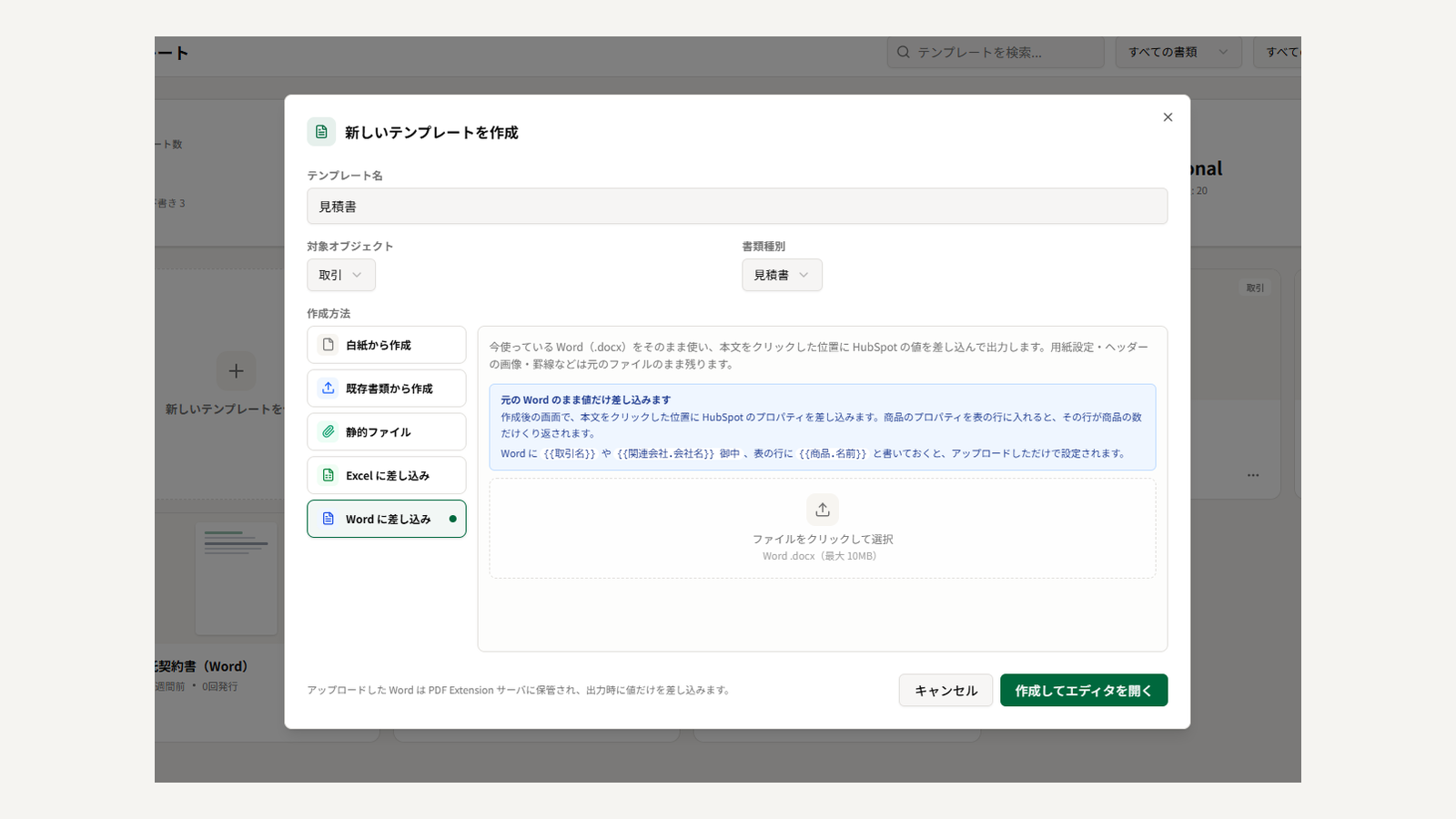
Turn the Word and Excel files you're currently using into templates as-is
Simply add placeholders to the Word and Excel documents you use internally to turn them into templates, and you can export them directly from Word and Excel. You can send your current documents from HubSpot without having to reformat them.
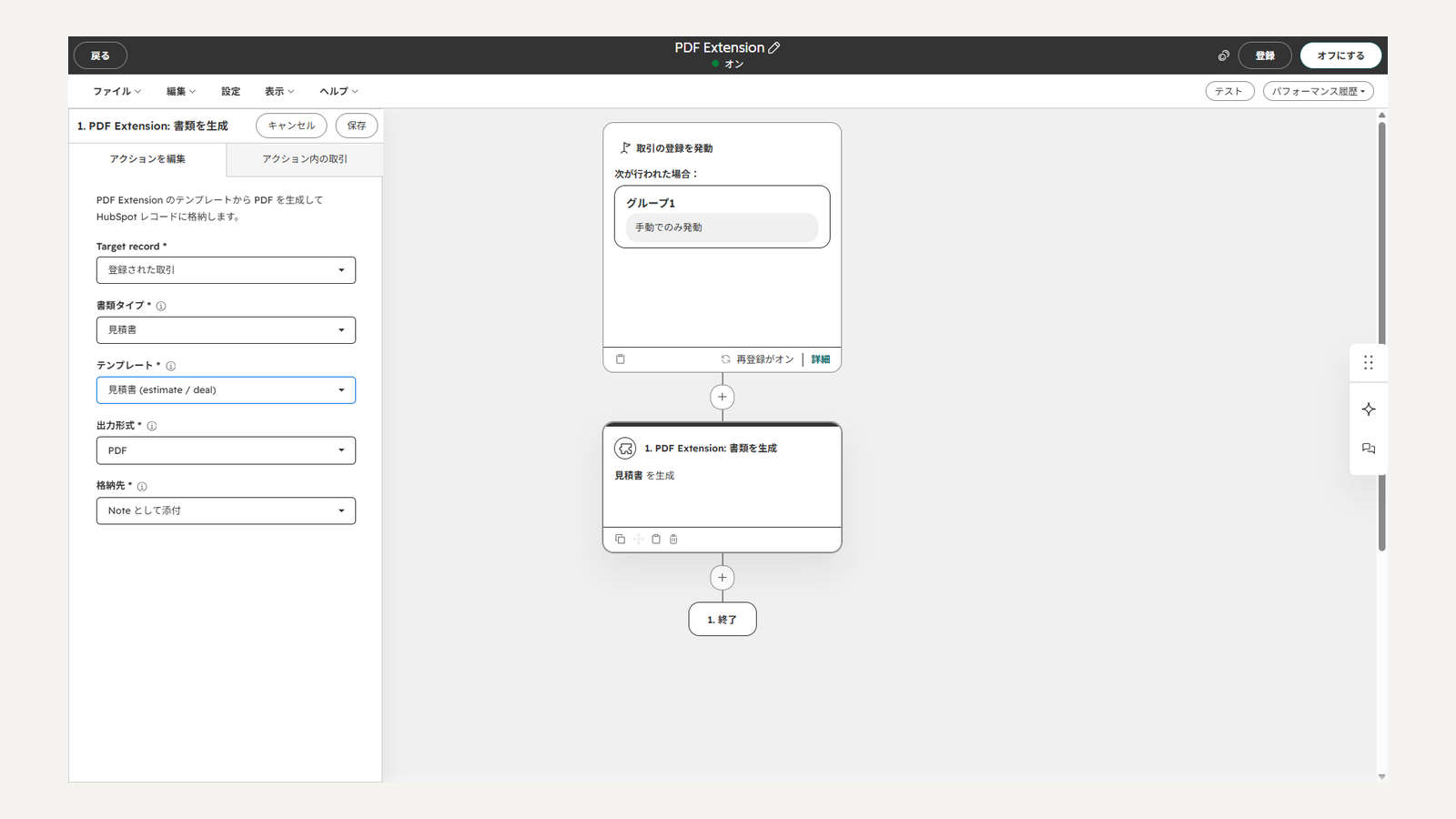
Documents are automatically generated through the workflow.
By adding the "Generate Document" workflow action, you can automatically generate documents—triggered by events such as a change in the deal stage—and save them to the record. You can select the template, output format, and save location within the action.
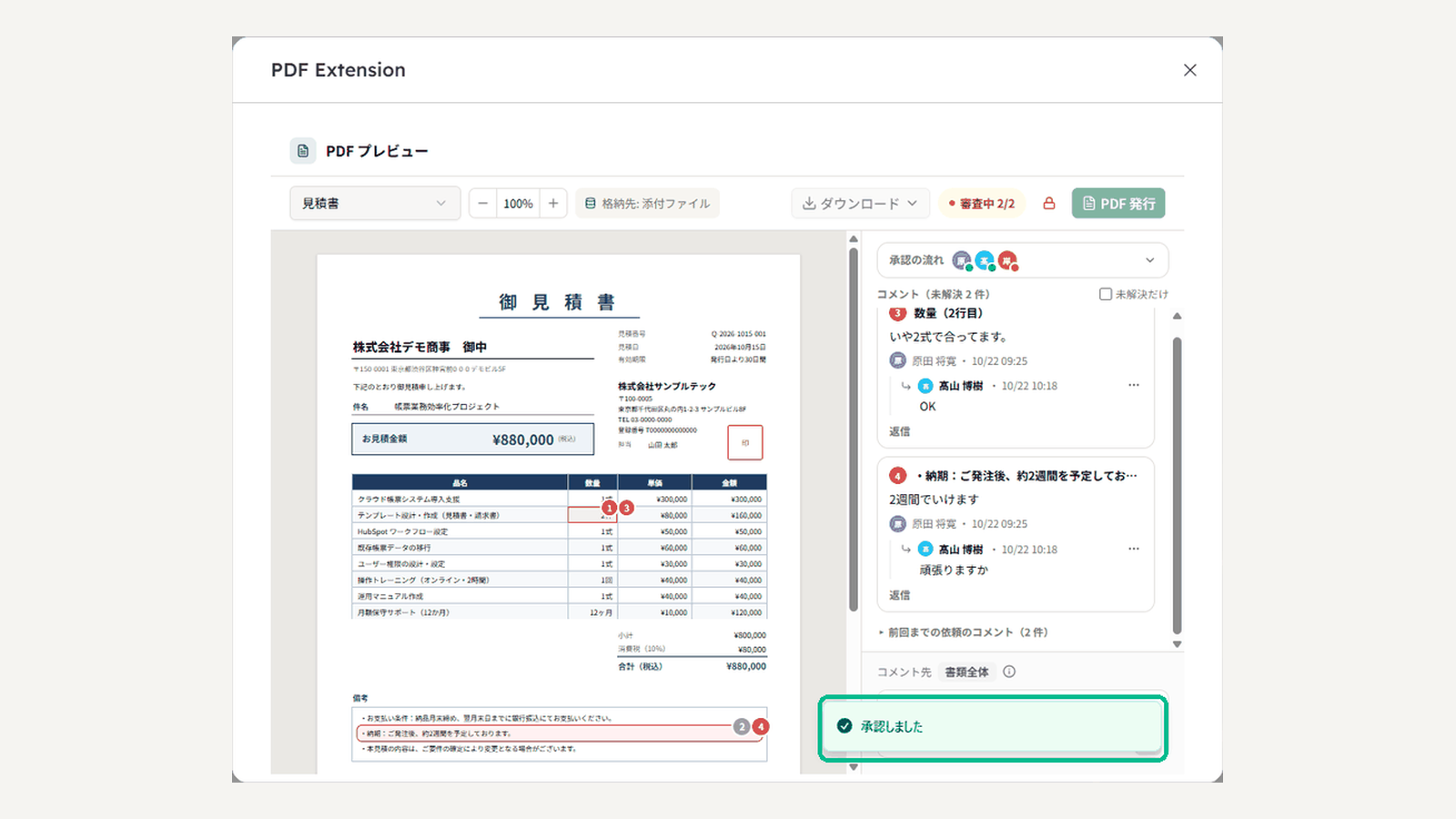
Pre-Publication Approval Workflow (Enterprise)
With the Enterprise plan, you can route the document to approvers in sequence before it is issued. Approvers can view a preview of the document, add comments to fields or table cells, and approve or reject it. Issuance and downloading are paused until approval is complete, and a record of the process is saved in the record’s notes and properties.
App Functionality
書類 | ||
書類 | ||
書類 | ||
書類 | ||
書類 | ||
書類 | ||
承認フロー | ||
発行した書類 | ||
利用者 |
・Reads the record's properties and inserts them into the document, then writes the file name, URL, and issuance date and time of the issued document to the properties specified in the template.
・In the approval workflow, the system reads the requester and approver properties and writes the approval status, comments, approver name, and approval date to the specified properties and notes. Comment content is saved only in HubSpot and is not saved on the PDF Extension server.
・Product items (line items) are read only for insertion into the itemized list; they are not written to the document.
・The generated PDF, Word, and Excel files are saved to HubSpot Files and attached to the record’s notes.
・The user (owner) is retrieved to determine which users and teams can use the template and to verify the approver.
• Only when “Create from Existing Document” is used to select an image or Excel file will that file (or, for Excel, the text in the header row) be sent to the Google Gemini API (paid version; not used for training) for analysis. After analysis, the data is immediately deleted and not saved. HubSpot CRM data is not sent to Gemini.
Reviews
Pricing
Starter
¥4,230
/monthFor teams that want to start with a small number of documents
Mail Merge Templates for Word and Excel
Create a template from existing documents
Monthly publication volume: 100 items
5 Templates
Starter
¥4,230
/monthFor teams that want to start with a small number of documents
Mail Merge Templates for Word and Excel
Create a template from existing documents
Monthly publication volume: 100 items
5 Templates
* The pricing here is for display purposes only. All prices do not include taxes, incentives, discounts, or other pricing variables. You should contact the partner for the most up to date and correct pricing information. HubSpot does not take any responsibility for this pricing information, which is provided by our partners. Pricing last updated: 11/17/2026
More info
Built by - ナウビレッジ株式会社
Installs - 10+ installs
Categories Languages this app is available in Japanese
New arrivals
PDF Extension
HubSpotのレコードから見積書・請求書をPDF / Word / Excel で発行

WorkBuddy AI
Turn HubSpot CRM context into customer briefs, deal reviews, and follow-up drafts.
