

SeqBridge
Built by - CraftWave Innovations
Installs - <10 installs
Requirements
HubSpot Plan HubSpot Account permissions - View the required account permissions
Access Type Shared SeqBridge Subscription - Free, Growth, or Scale plans
Overview
1/5 - seqbridge
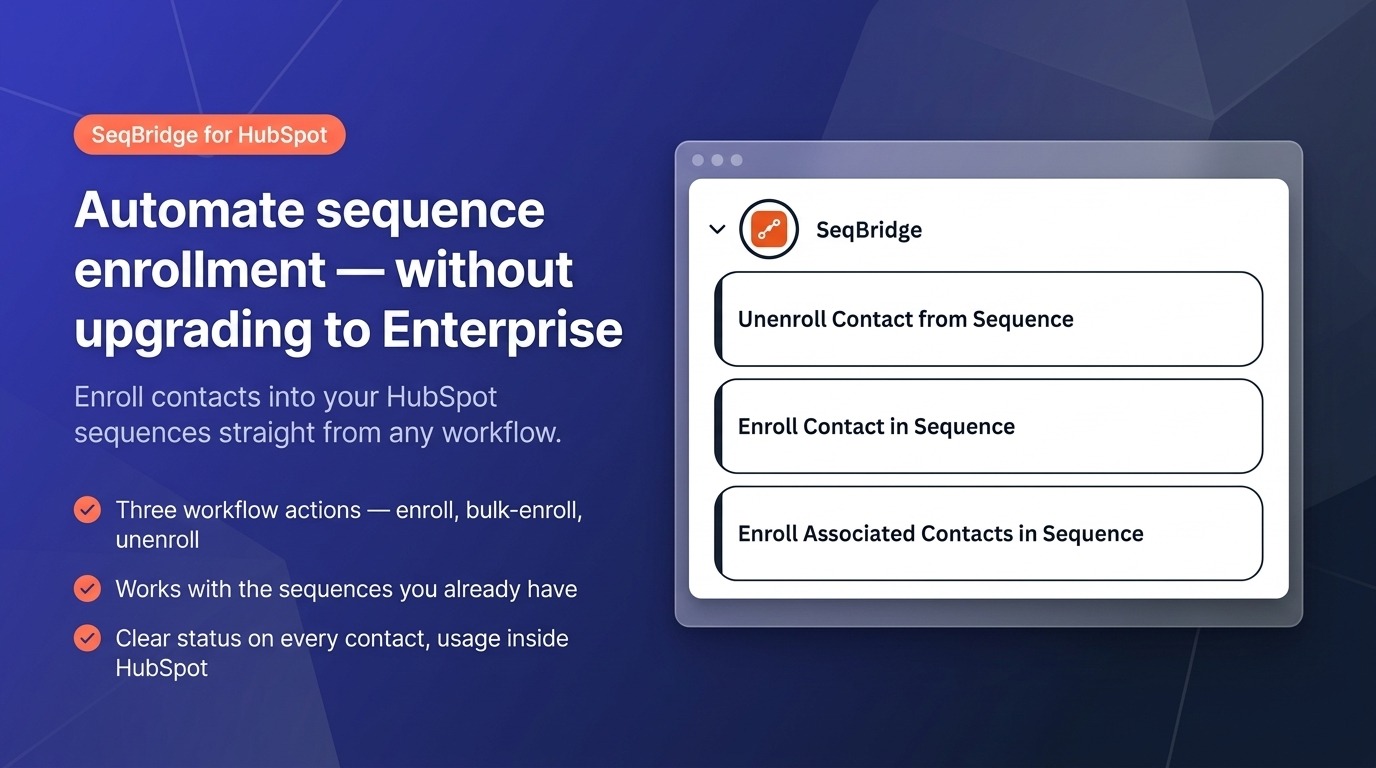
SeqBridge adds sales sequence enrollment as a workflow action — the automation that Sales Hub Professional doesn't include.
On Professional, you can only enroll contacts into sequences by hand, one at a time. Automatic, workflow-based enrollment is an Enterprise-only feature. SeqBridge closes that gap with custom workflow actions you drop into any workflow, so a form submission, a lifecycle stage change, or a deal moving stages can enroll the right contacts into the right sequence automatically.
It works with the sequences you already have, sends from a real connected inbox (a specific user or the record's owner), lets you enroll every contact associated with a company/deal/ticket, and can unenroll a contact when they reply or convert. Every attempt is written to a "Sequence enrollment" card on the contact record with a clear reason if anything needs attention, and your plan and usage are visible inside HubSpot. Start free with 60 enrollments a month.
Features
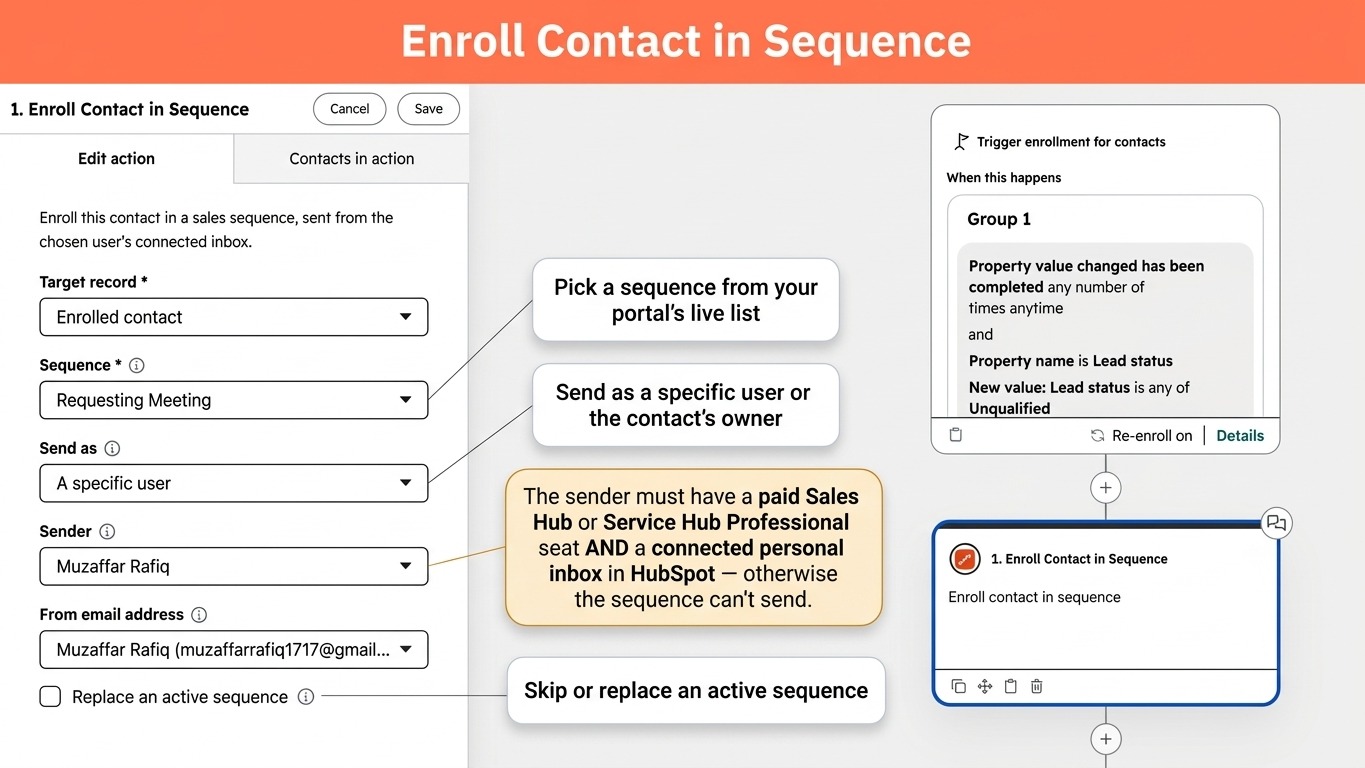
Automatically enroll Contact in Sequence
Automatically enroll a contact into a sales sequence from any workflow. It sends from the chosen user's inbox, so that sender needs a paid Sales or Service Hub Professional seat AND a connected inbox. Pick the sequence and sender from live dropdowns of your portal, and skip or replace contacts already in a sequence.
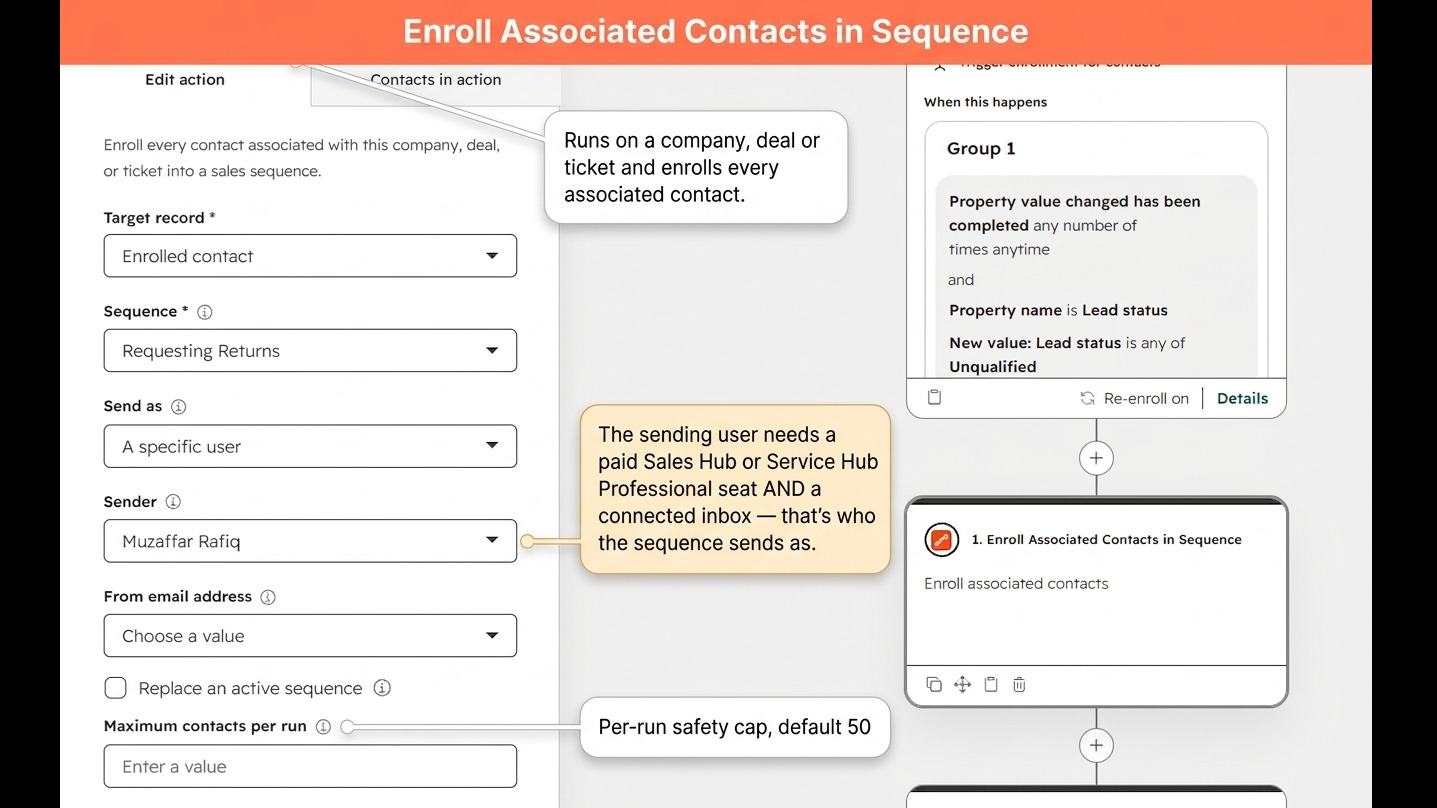
Enroll Associated Contacts in Sequence
From a company, deal, or ticket workflow, enroll every associated contact at once, with a per-run cap (default 50) to protect your daily send limit. Like the single-contact action, the sending user needs a paid Sales or Service Hub Professional seat and a connected inbox.
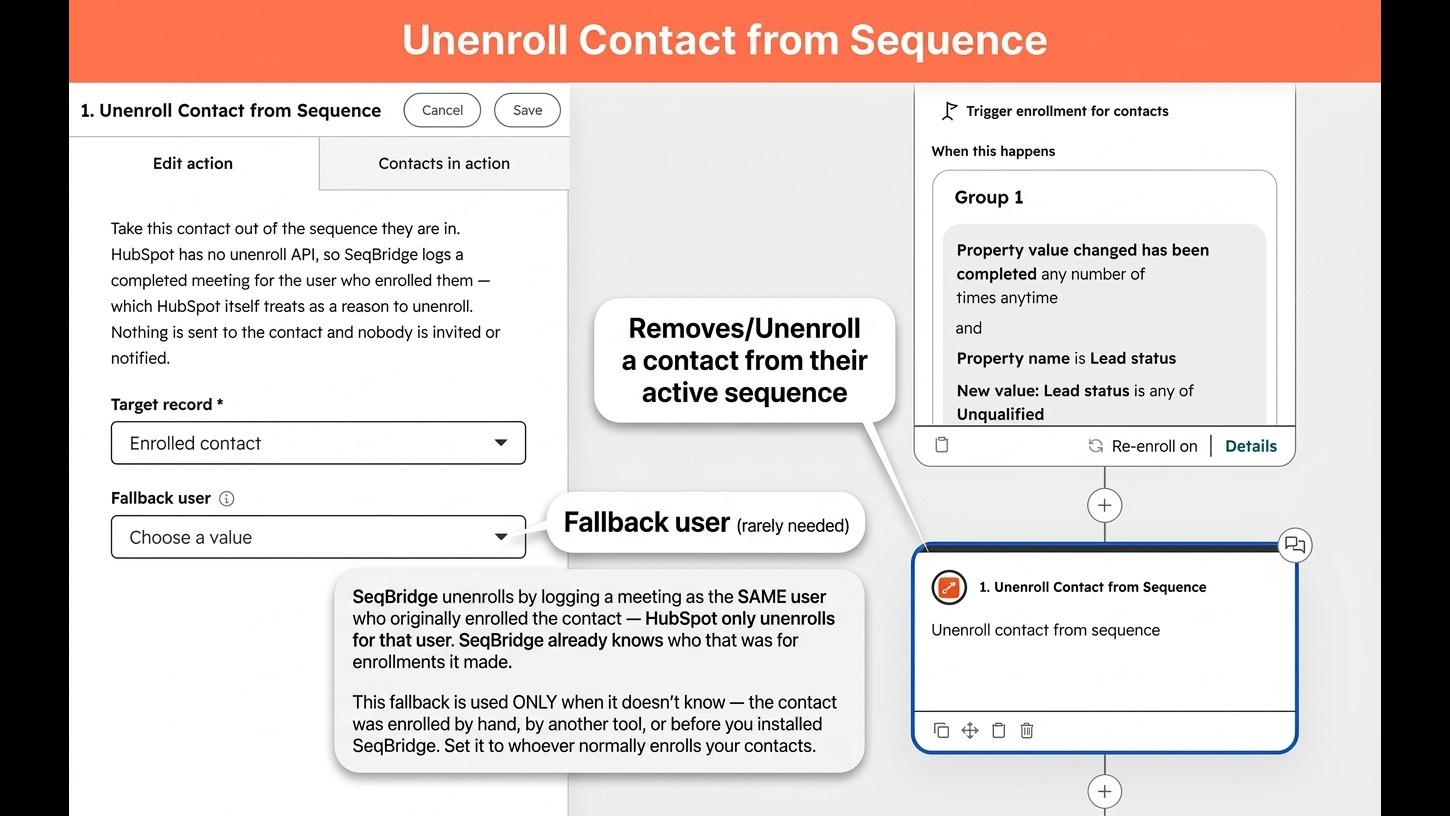
Unenroll Contact from Sequence
Unenroll a contact from their active sequence as a workflow action. for example when they reply or convert. Optional: Set a fallback user for contacts SeqBridge didn't enroll itself.
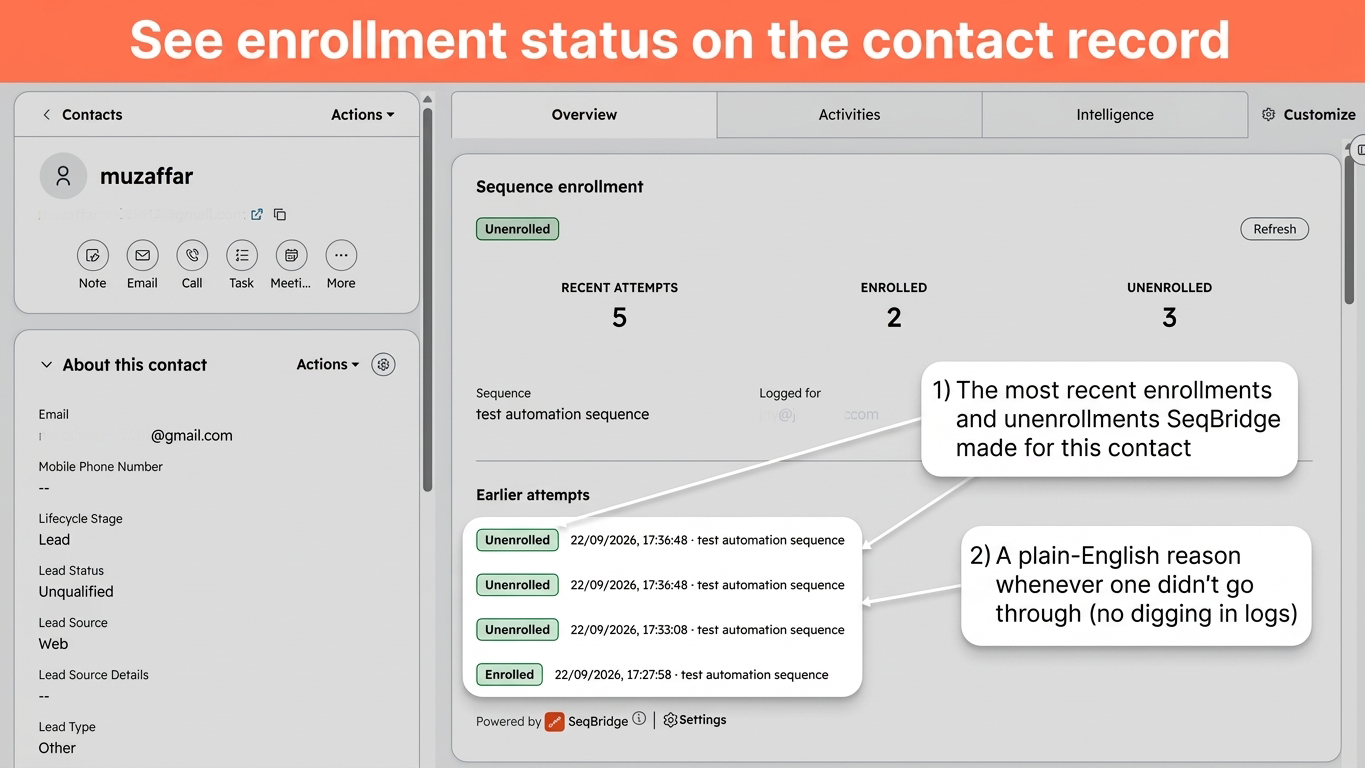
Sequence enrollment Contact Card
A Sequence enrollment card on every contact record shows the most recent enrollment and unenrollment attempts SeqBridge made for that contact, each with its status and, whenever something didn't go through, a plain-English reason. No leaving the record to see what happened.
App Functionality
Contacts | ||
Deals | ||
Companies | ||
Owners |
SeqBridge reads only what it needs to enroll a contact and writes only what enrollment and unenrollment require. It reads contacts (email and owner), companies, deals, tickets and owners to resolve who to enroll and who sends. It reads your sequences and creates enrollments through HubSpot's Sequences API. The unenroll action logs a meeting engagement on the contact, which triggers HubSpot's own unenrollment (HubSpot publishes no unenroll API). SeqBridge never reads or stores the content of your emails or sequences. It stores an audit record per attempt — portal ID, contact ID, sequence ID, resolved sender, status and reason — plus OAuth tokens for the portal.
Reviews
Pricing
Free
$0
Run it on a real workflow before you pay anything.
Up to 60 automated sequence enrollments per month
Up to 20 automated unenrollments per month
Works in Contact, Company, Deal and Ticket workflows
Enroll contacts as any user (Must have Sales or Service Hub Pro Seat & connect inbox)
Enroll as a user property, such as the contact's owner (Must have Sale or Service Hub Pro Seat & connected inbox)
Bulk-enroll every contact associated with the Company, Deal or Ticket
Enrollment status shown on every contact record
Usage & quota visible inside HubSpot in App Settings
Email support
Free
$0
Run it on a real workflow before you pay anything.
Up to 60 automated sequence enrollments per month
Up to 20 automated unenrollments per month
Works in Contact, Company, Deal and Ticket workflows
Enroll contacts as any user (Must have Sales or Service Hub Pro Seat & connect inbox)
Enroll as a user property, such as the contact's owner (Must have Sale or Service Hub Pro Seat & connected inbox)
Bulk-enroll every contact associated with the Company, Deal or Ticket
Enrollment status shown on every contact record
Usage & quota visible inside HubSpot in App Settings
Email support
* The pricing here is for display purposes only. All prices do not include taxes, incentives, discounts, or other pricing variables. You should contact the partner for the most up to date and correct pricing information. HubSpot does not take any responsibility for this pricing information, which is provided by our partners. Pricing last updated: 10/07/2026
More info
Built by - CraftWave Innovations
Installs - <10 installs
Categories Languages this app is available in English - United Kingdom andEnglish - United States
Most popular

Gmail
Bring HubSpot to your inbox with the HubSpot integration for Gmail.

Google Calendar
Book meetings quickly and easily with HubSpot and Google Calendar.
