
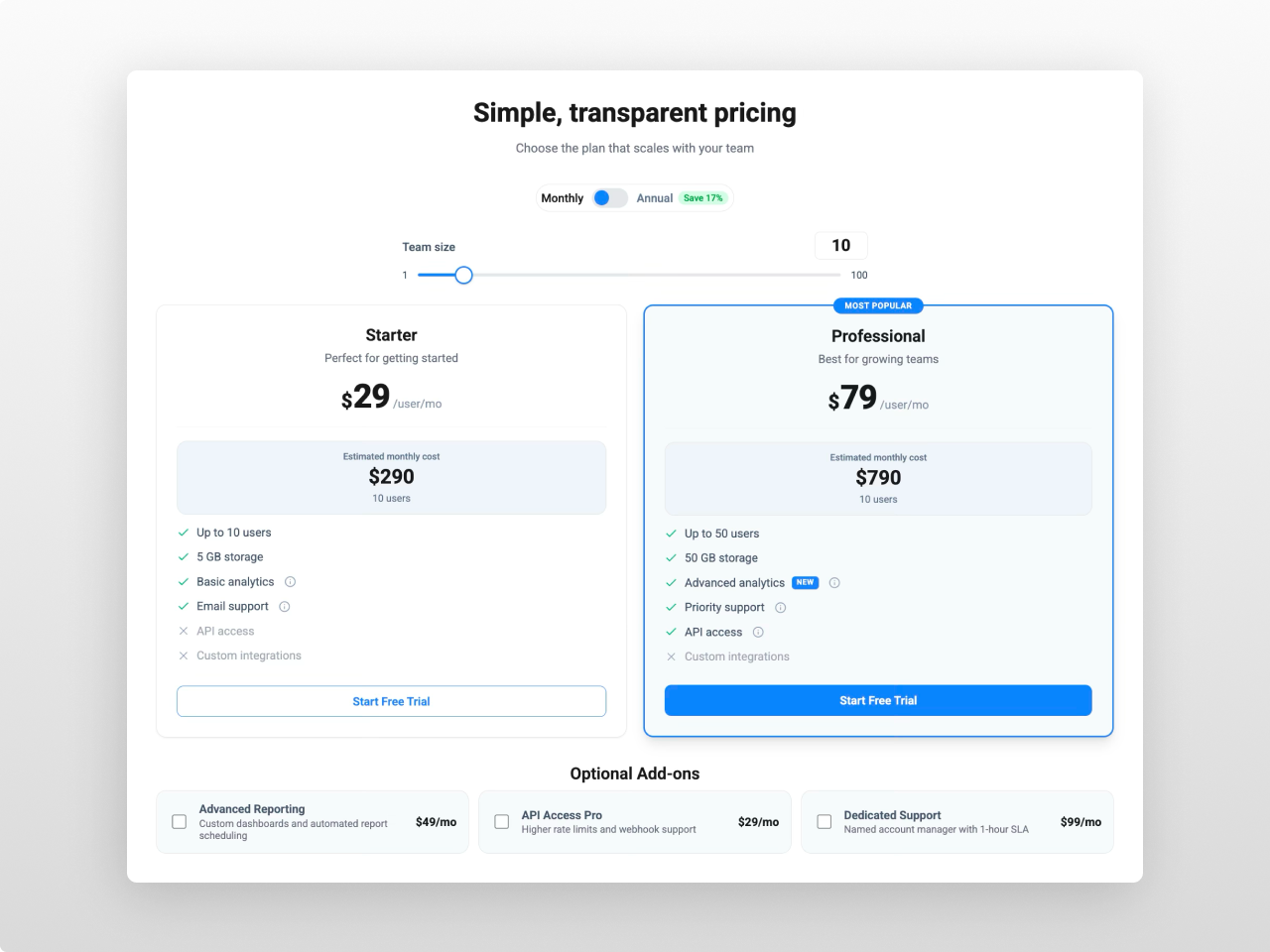
1/3 - Two columns
Overview
A premium interactive pricing calculator built for SaaS, agencies, and service businesses. Pricing Calculator Pro combines a billing toggle, quantity slider with live number input, tiered pricing cards, optional add-ons, an estimated cost calculator, and a collapsible feature comparison table — all in one module with zero hardcoded values.
Every pixel is controlled from the Style tab: card backgrounds, borders, shadows, padding, typography, button colors, toggle styling, slider track and thumb, badge positioning, tooltip design, comparison table colors, and responsive breakpoints. 90+ style fields in total.
What you can build:
SaaS pricing pages with per-seat or per-unit calculations
Tiered pricing with volume discount breakpoints
Monthly/annual billing toggles with animated discount badges
Side-by-side plan comparison with stacked card layouts
Interactive cost estimators with live breakdown formulas
Add-on selectors that feed into total cost calculations
Horizontal single-row pricing strips for compact layouts
Content features: Unlimited pricing tiers, each with dual pricing options (e.g. monthly/annual), custom price text for "Contact Us" plans, strikethrough original prices, per-tier feature lists with included/excluded icons, NEW badges, info tooltips, estimated cost boxes with live breakdown, primary and secondary CTAs, and configurable badges with three position options (top center, left, right).
Billing toggle: Animated switch between two pricing options with customizable labels. Optional discount badge positionable above, inline, or below the toggle. Smooth transition between price sets with optional counting animation.
Quantity slider: Draggable range slider synced with a number input field — visitors can drag or type exact values. Three pricing modes: per-unit multiplication, volume-tiered breakpoints, and flat pricing. Optional min/max labels. Slider label is conditional — hide it for cleaner layouts.
Add-ons: Checkbox-based add-on items with icons, descriptions, and pricing. Each add-on can be flat-rate or per-unit priced. Add-ons feed directly into the estimated cost calculation. Independent layout settings — columns, gap, and padding are separate from the pricing cards.
Comparison table: Collapsible feature comparison across all tiers with categorized rows, check/cross icons, sticky headers, and horizontal scroll on mobile. Opens and closes with an animated chevron trigger.
Estimated cost: Per-tier calculated cost box that updates live as visitors move the slider, toggle billing, or check add-ons. Shows total price with optional breakdown formula (e.g. "50 users × $10/user + $29 add-on").
Layout modes: 1 to 5 column grids. Single-column renders a horizontal row layout (header, price, features grid, CTA in one line). Setting gap to 0 activates stacked mode — cards share a unified border and shadow wrapper with dividers between them. Vertical single-card mode available for simple pricing pages.
Analytics: Built-in event tracking for slider changes, toggle switches, add-on selections, and CTA clicks. Events auto-push to Google Tag Manager (dataLayer), HubSpot behavioral events (_hsq), and custom DOM events for any tracking setup.
CTA parameter passing: When enabled, CTA buttons append the visitor's selections (plan, billing period, quantity, add-ons) as URL parameters — letting checkout or signup pages pre-fill configuration automatically.
Style tab (90+ fields): Full visual control over every element — cards, badges, buttons, toggle, slider, add-ons, comparison table, tooltips, estimated cost boxes, and responsive breakpoints. Colors, typography, spacing, shadows, hover states, animations — nothing is hardcoded. If you can see it, you can style it.
Three mobile layout modes: stack (single column), horizontal scroll (swipeable cards), and tabbed navigation (one tier visible at a time with tab buttons). Featured card auto-promotes to top position on mobile.
Works on any HubSpot template, no theme required. Pure vanilla JavaScript — no jQuery, no external dependencies.
Features
Live Pricing Calculator with Slider & Toggle
Real-time price calculation as visitors adjust quantity via the slider or number input, toggle billing periods, and select add-ons. Three pricing modes — per-unit, volume-tiered, and flat — cover every business model.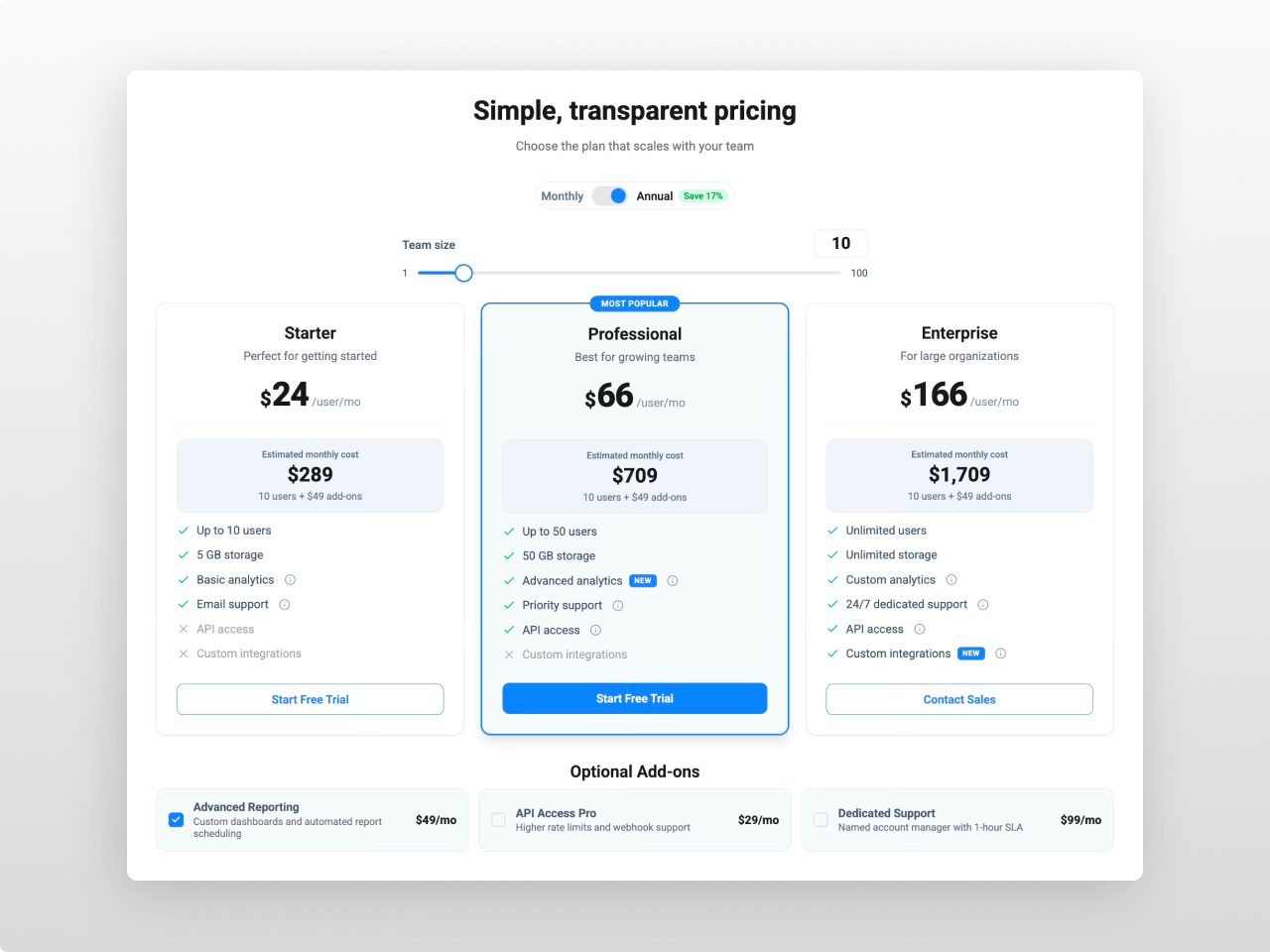
5 Layout Modes, Stacked & Horizontal
Display 1 to 5 columns with automatic responsive collapsing. Single-column mode renders a compact horizontal row layout. Set gap to zero for stacked mode — cards merge into a unified comparison-style panel with shared borders.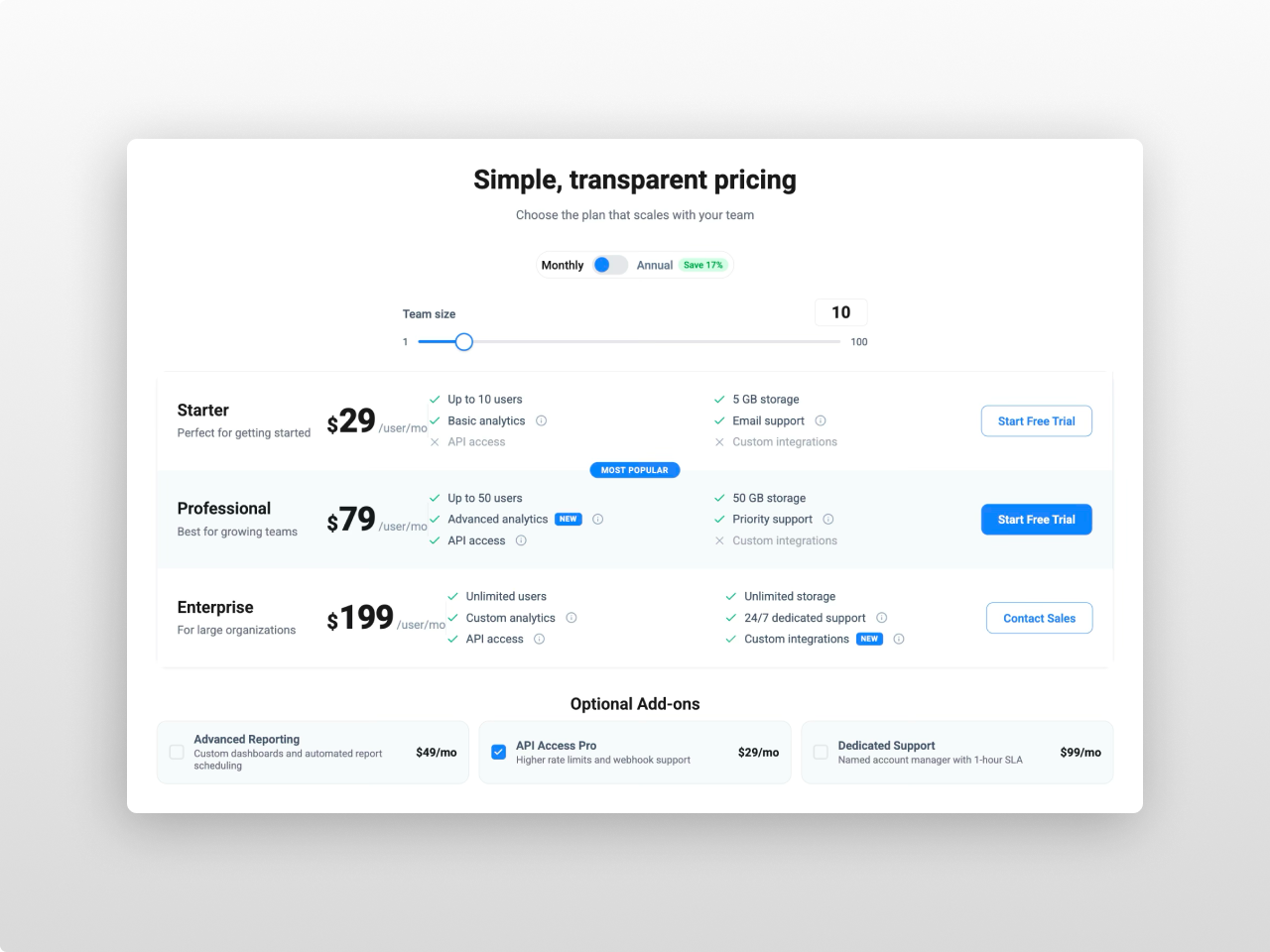
90+ Style Controls, Built-in Analytics
Every visual element is configurable — card shadows with animated hover transitions, badge positioning, tooltip design, toggle switch dimensions, slider thumb styling, and responsive breakpoints. Built-in event tracking pushes to GTM dataLayer, HubSpot behavioral events, and custom DOM events.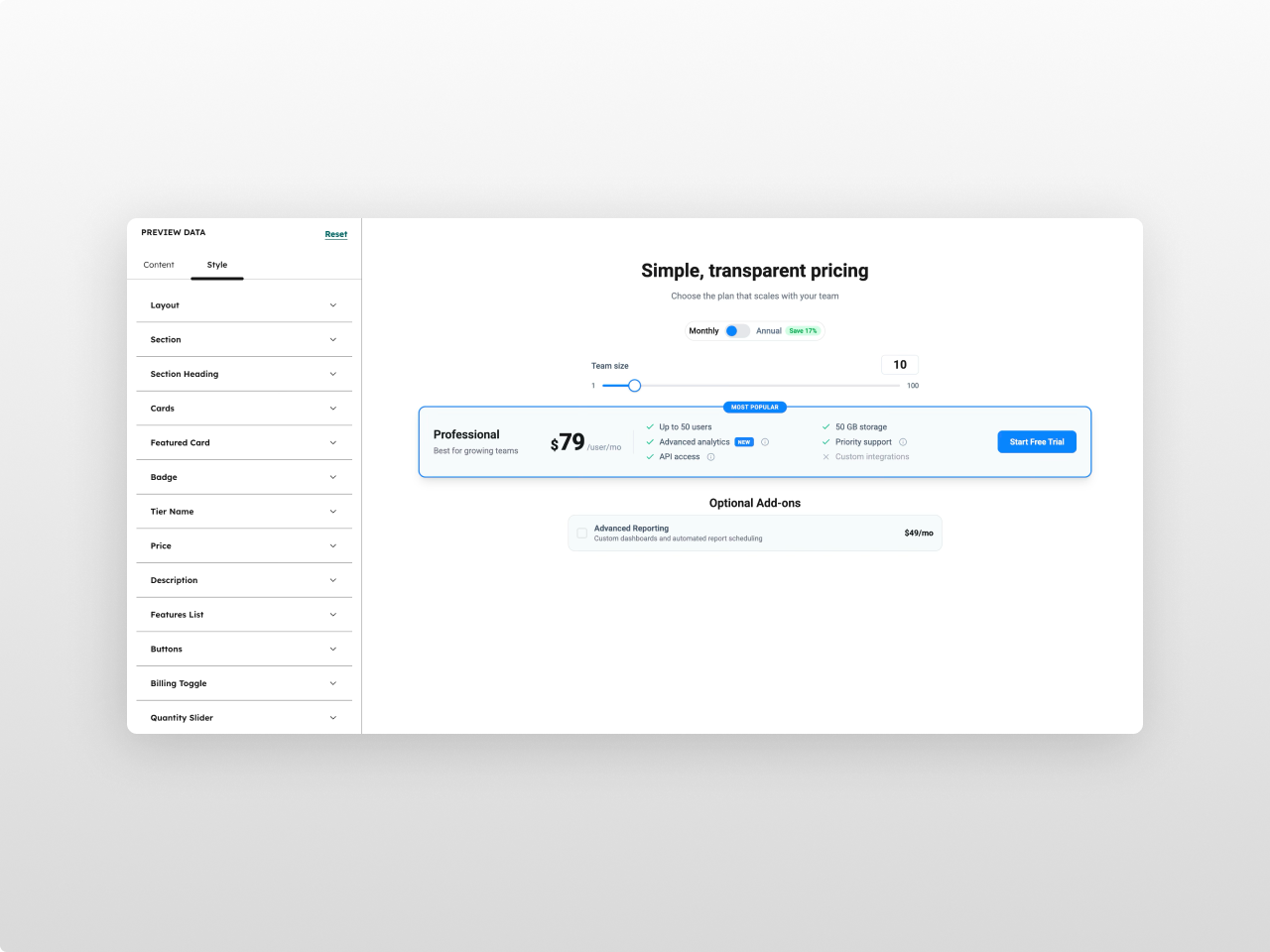
About Module
Total installs Fewer than 10 Created - Feb 26, 2026
Version 1 - Feb 26, 2026
Categories Tags
Requirements
HubSpot Subscription Works with all HubSpot plans
Contact Studio Nope
Legal Stuff
Please refer to the developer's Privacy Policy and Terms for more information.
Support
Studio Nope
- Romania
Visit website
Studio Nope designs and builds fast, clean HubSpot CMS websites and custom themes for teams that care about performance, editing experience, and reliable tracking.
Unlimited email support
Studio Nope typically responds in
- Monday
9:00 AM - 5:00 PM (EET) - Tuesday
9:00 AM - 5:00 PM (EET) - Wednesday
9:00 AM - 5:00 PM (EET) - Thursday
9:00 AM - 5:00 PM (EET) - Friday
9:00 AM - 5:00 PM (EET)