
%20(9).png)
1/3 - In this section, you'll find tabs featuring both icons and text. When you click on a tab.
Overview
To style the content in the "Tab Navigator" module, first access the module and enter its edit mode through the interface. Once in edit mode, locate the specific tab whose content you want to style. Look for styling options, usually presented in a visual editor toolbar. This editor provides tools for applying formatting and offers color customization list creation, and media insertion. To apply styles, select the desired text and use the available tools. Preview your changes if possible, to visualize the impact on content appearance. After finalizing your styling, save the changes and exit the edit mode to see your styled content within the standard view of the "Tab Navigator" module. Keep in mind that the actual styling features might vary based on the specific module and platform, so consulting provided documentation or guides can offer more precise instructions.
Features
Accessing the Module Content
Look for an option that allows you to edit the content of the "Tab Navigator" module. This might be represented by an "Edit" button, an "Edit" icon (such as a pencil), or a context menu when right-clicking on the module.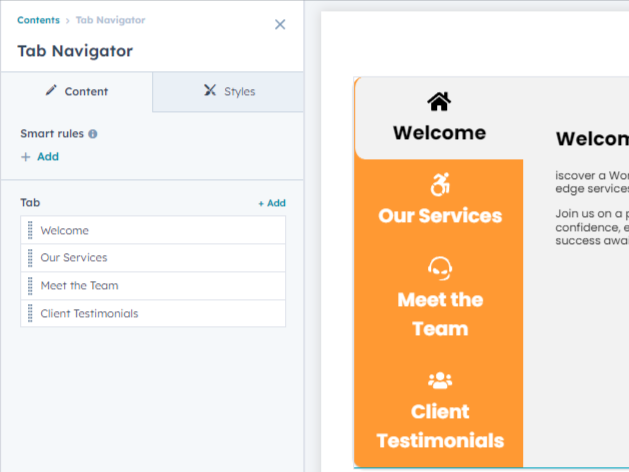
Accessing the Module Styling
Some interfaces have a preview mode that lets you see how your styled content will look to users. Use this to ensure that your styling choices are visually appealing and effective. Once you're satisfied, save your changes as described earlier.-1.png)
About Module
Total installs Fewer than 10 Created - Aug 22, 2023
Version 1 - Aug 22, 2023
Categories Tags
Requirements
HubSpot Subscription Works with all HubSpot plans















Contact StraightGrowth
Legal Stuff
Please refer to the developer's Privacy Policy and Terms for more information.
Support
StraightGrowth
- India
Visit website
Our cutting-edge, targeted solutions help you attract the right customers, convert leads and grow your business. How do you know your marketing program is efficient and cost-effective? Straight Growth, a top Digital marketing company, creates measurable marketing campaigns — tracking every click, every call, every lead — so you know that your advertising dollars are working hard to bring you more business.