

EverSend
สร้างโดย - The Moderate Genius
ติดตั้ง - <10 การติดตั้ง
ข้อกำหนด
แผน HubSpot สิทธิ์บัญชี HubSpot - ดูสิทธิ์บัญชี ที่จำเป็น
ประเภทสิทธิ์การเข้าถึง แชร์แล้ว การสมัครใช้บริการ EverSend - Free แพ็กเกจ
ภาพรวม
1/5 - EverSend Overview
EverSend helps sales teams using Dialer.io and HubSpot automate what usually breaks after the call—follow-up.
Outbound sales teams generate thousands of conversations, dispositions, callbacks, and missed opportunities inside their dialer, but most leads go cold because reps fail to follow up consistently or fast enough. EverSend was built to solve that gap.
EverSend connects dialer activity, CRM automation, AI conversations, and appointment booking into one workflow. Using HubSpot workflows, teams can automatically send contacts into EverSend AI agents or campaigns based on lead behavior, list membership, lifecycle stages, or sales triggers.
EverSend reads HubSpot contact data, owner information, lists, and meeting availability to personalize outreach, qualify leads, handle objections, nurture prospects, and book appointments automatically. It also supports pausing or removing contacts from AI automation when a human rep takes over, ensuring clean handoffs between automation and the sales floor.
By connecting EverSend with HubSpot, sales teams can improve speed-to-lead, recover leads that would otherwise go cold, increase booking rates, and turn more outbound conversations into revenue.
ฟีเจอร์
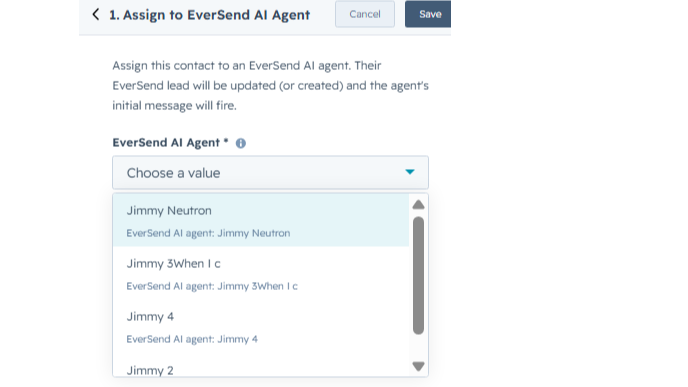
HubSpot Contact Enrollment
Allows EverSend to read HubSpot contact records and enroll the correct contacts into EverSend campaigns or AI agents from HubSpot workflows. EverSend uses contact details like name, phone number, and email to create or update the lead inside EverSend and start the selected follow-up automation.
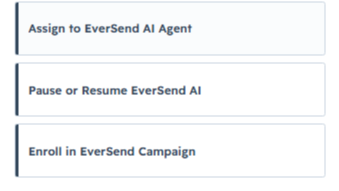
Workflow Actions
Adds EverSend actions inside HubSpot workflows so users can automatically send contacts to an EverSend campaign or AI agent. Users can also pause or remove a contact from an AI agent directly from workflow logic when a lead is disqualified, handed off to a rep, or no longer needs AI follow-up.
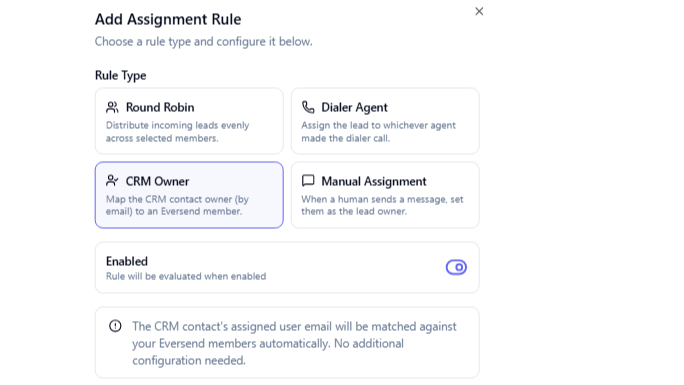
Contact Ownership Ownership
Allows EverSend to read HubSpot owner information so contacts can be matched to the correct team member when needed. This helps support owner-based routing, human handoff, and assignment logic when contacts are sent from HubSpot into EverSend.
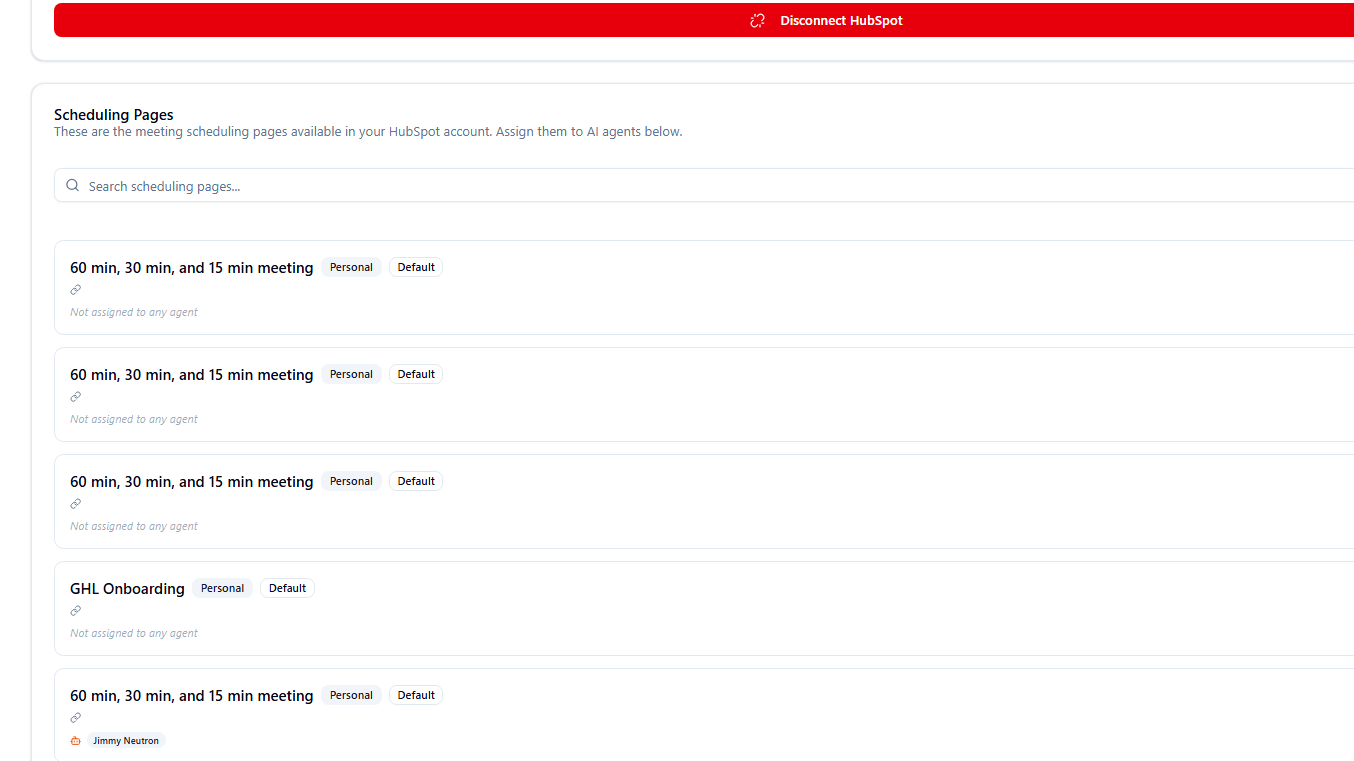
Appointments & Calendar Data
Allows EverSend to access HubSpot appointment and meeting link data so AI agents can support booking-related workflows. EverSend can use available meeting links and appointment information to help route contacts toward the correct booking flow and keep appointment-related activity aligned with HubSpot.
Custom Objects
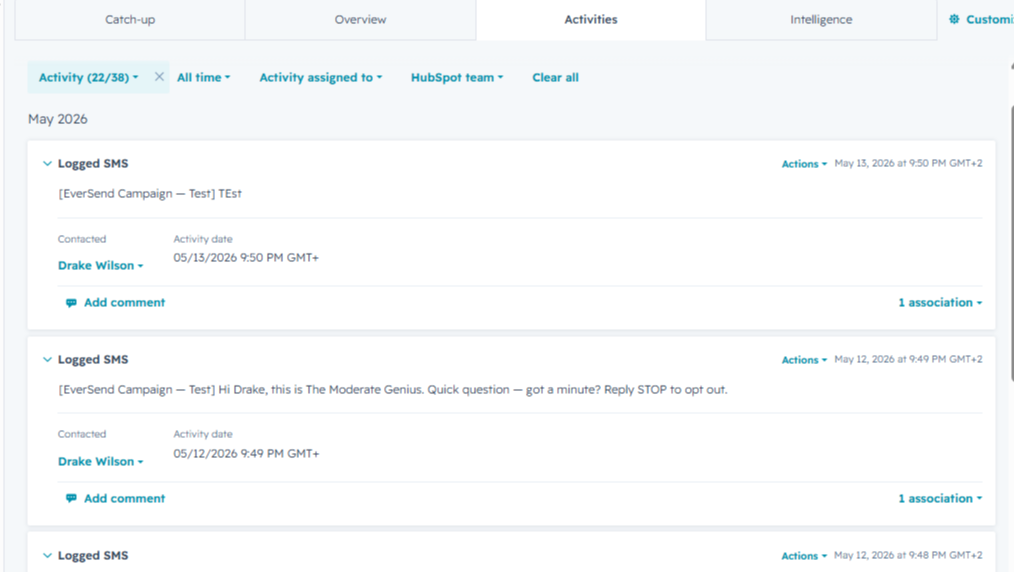
We use these scopes to access HubSpot’s Communications object, where SMS engagements are stored. This allows EverSend to mirror inbound and outbound SMS activity onto the HubSpot contact timeline so sales reps can view the full conversation history natively inside HubSpot.EverSend does not read, create, or update customer-defined custom objects.
Media & File Sharing in Conversations
verSend uses HubSpot file access to support media-rich sales conversations. This allows EverSend AI agents and campaigns to send files, images, documents, and hosted resource links directly within SMS or messaging conversations.
Lists
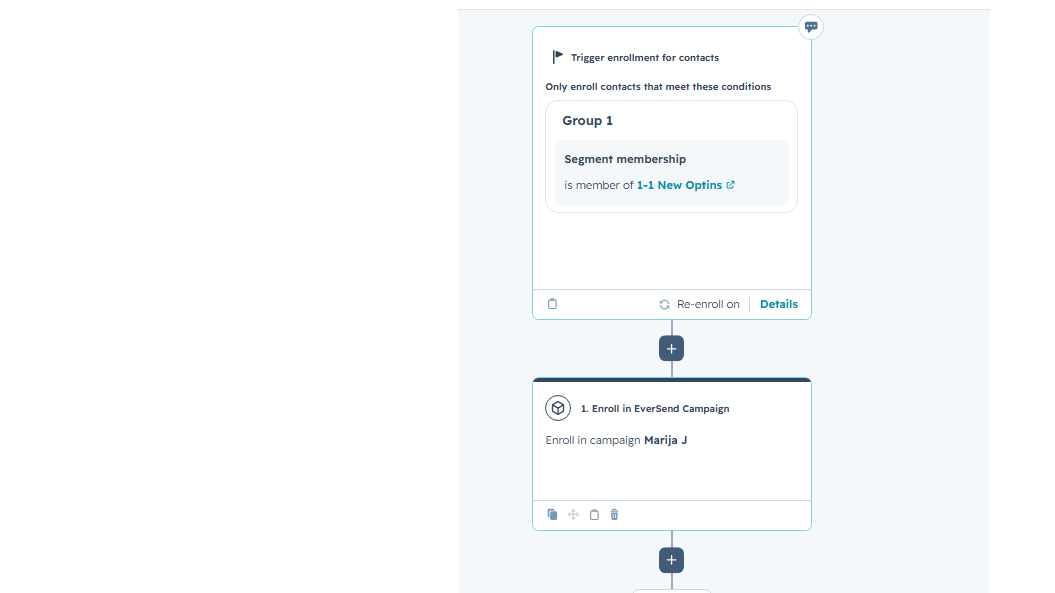
Access HubSpot Lists directly within EverSend to power campaign enrollment, AI agent routing, and audience segmentation. Teams can use existing HubSpot Lists to automatically send contacts into EverSend campaigns or AI agents without manually exporting data.
Sending Files
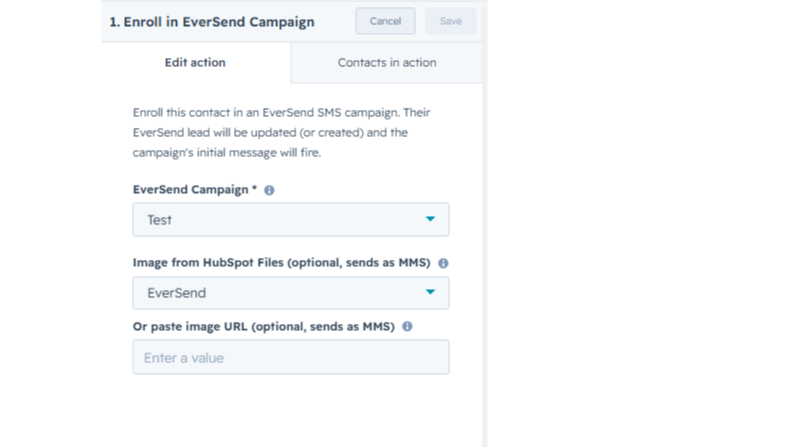
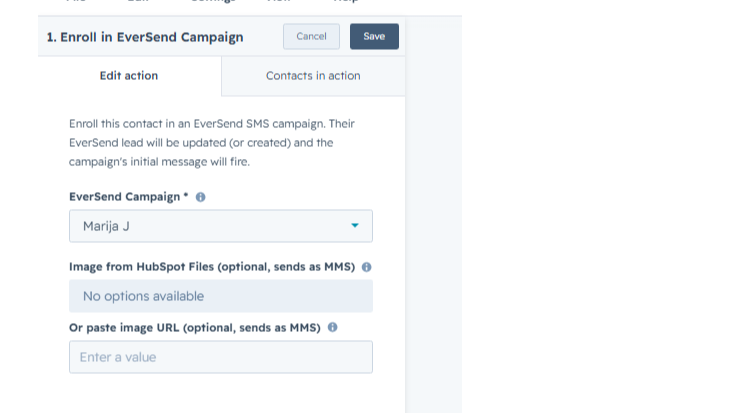
Send images and file attachments from EverSend using files stored in HubSpot. users can select a file directly from HubSpot Files or provide a file URL. EverSend then sends the image or file as part of an MMS message, allowing businesses to share documents, images, confirmations, and other resources during automated follow-up conversations.
ฟังก์ชันการทำงานแอป
ข้อมูลที่แบ่งปัน
Contacts | ||
Owners | ||
Appointment Appointment | ||
CMS Files | ||
Contact Lists | ||
Workflows | ||
Contact Properties |
EverSend connects with HubSpot to automate lead engagement, qualification, and appointment booking directly from HubSpot workflows.
Contact Data
EverSend reads HubSpot contact records, including first name, last name, phone number, and email address, when a contact is enrolled through a HubSpot workflow. This data is used to create or update the contact inside EverSend and trigger either an AI agent or campaign workflow.
List & Segmentation Data
EverSend reads HubSpot list data to support segmentation-based automation. This allows customers to use existing HubSpot lists and workflow enrollment logic to control which contacts enter specific EverSend automations.
Owner Data
EverSend reads HubSpot owner information to support owner-based routing, assignment workflows, and human handoff scenarios where leads need to be transferred from AI automation to a sales representative.
Meeting & Calendar Data
EverSend reads meeting availability and scheduling information from HubSpot to support AI-driven booking conversations. When a lead books an appointment through EverSend, appointment details are created or updated in HubSpot so both systems stay aligned.
Workflow-Based Automation
HubSpot users can trigger EverSend directly through HubSpot workflow actions. Available workflow actions include:
Add contact to EverSend Campaign
Add contact to EverSend AI Agent
Pause EverSend AI Agent
Remove contact from EverSend AI Agent
This allows customers to use their existing HubSpot automation logic while EverSend handles the conversation, qualification, follow-up, and booking experience.
รีวิว
การกำหนดราคา
Free
US$0
Eversend is the AI setter built for Dialer.io. The instant your team's call goes unanswered, an AI agent picks up the SMS qualifying the lead.
Free
US$0
Eversend is the AI setter built for Dialer.io. The instant your team's call goes unanswered, an AI agent picks up the SMS qualifying the lead.
* ราคาที่แสดงนี้มีไว้เพื่อแสดงข้อมูลเท่านั้น ราคาทั้งหมดยังไม่รวมภาษี สิทธิพิเศษ ส่วนลด หรือตัวแปรราคาอื่นๆ คุณควรติดต่อพาร์ทเนอร์เพื่อรับข้อมูลราคาล่าสุดและถูกต้องที่สุด HubSpot จะไม่รับผิดชอบใดๆ ต่อข้อมูลราคานี้ซึ่งจัดทำโดยพาร์ทเนอร์ของเรา การกำหนดราคาอัปเดตล่าสุด: 29/06/2026
ข้อมูลเพิ่มเติม
สร้างโดย - The Moderate Genius
ติดตั้ง - <10 การติดตั้ง
หมวดหมู่ ภาษาที่แอปนี้สามารถใช้ได้ อังกฤษ
ยอดนิยม

Gmail
Bring HubSpot to your inbox with the HubSpot integration for Gmail.

Google Calendar
Book meetings quickly and easily with HubSpot and Google Calendar.
