

Power BI Connector
สร้างโดย - Metrica Software Inc.
ติดตั้ง - 10+ การติดตั้ง
ข้อกำหนด
แผน HubSpot สิทธิ์บัญชี HubSpot - ดูสิทธิ์บัญชี ที่จำเป็น
ประเภทสิทธิ์การเข้าถึง แชร์แล้ว การสมัครใช้บริการ Power BI Connector - Business หรือ Enterprise แพ็กเกจ
ภาพรวม
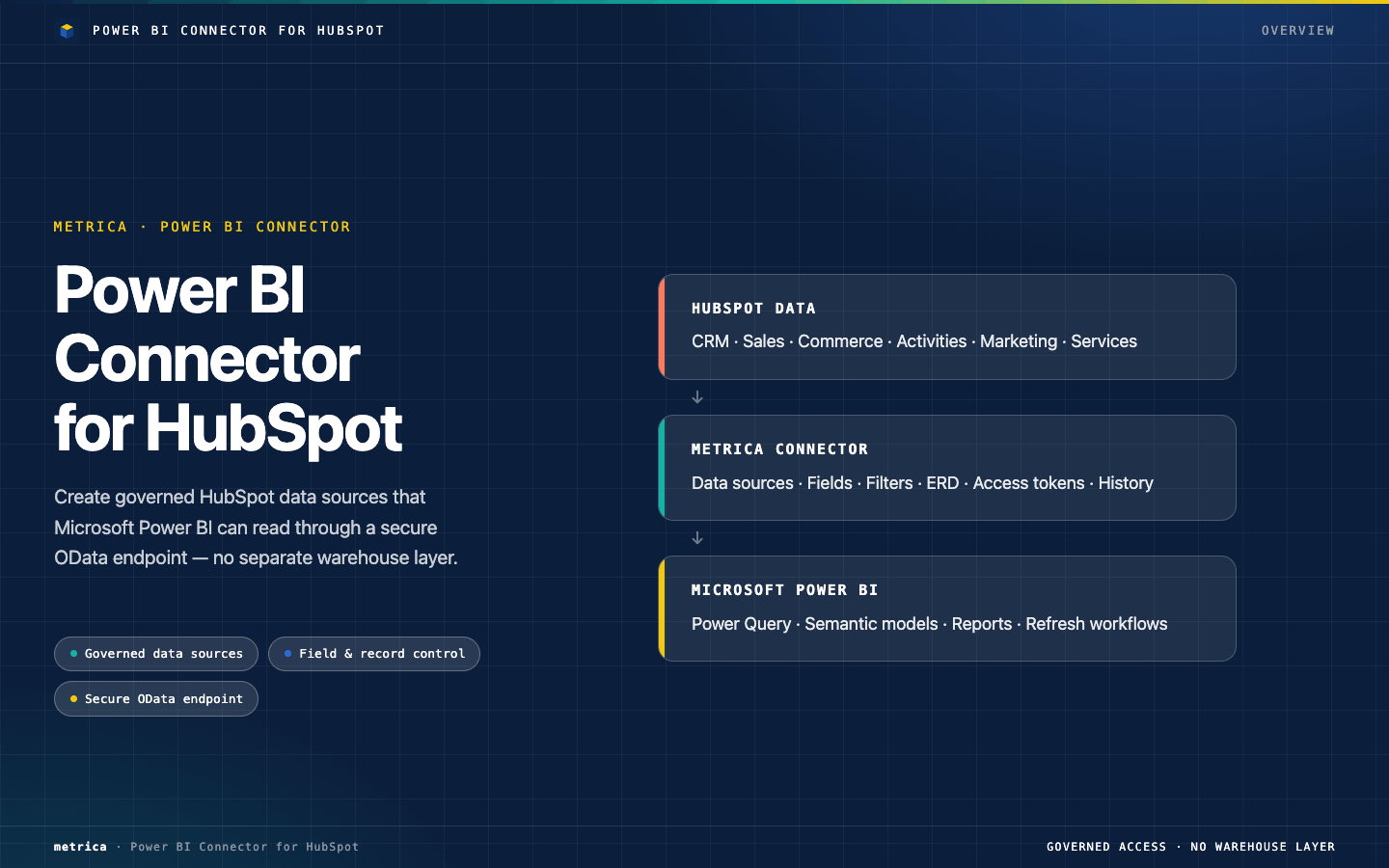
1/8 - Metrica Power BI Connector for HubSpot — overview and data pipeline
Power BI Connector for HubSpot enables organizations to bring HubSpot data directly into Microsoft Power BI for analytics, reporting, and visualization. Instead of building custom API integrations or maintaining warehouse-based ETL pipelines, teams can create a governed data source that Power BI accesses through a secure OData endpoint.
The connector supports HubSpot's complete data model, including custom objects, custom properties, and associations, allowing teams to create dashboards, track KPIs, monitor pipeline performance, measure marketing effectiveness, and analyze customer data in Power BI.
How it works
From installation to your first Power BI report in three steps.
Create a data source — Select the HubSpot objects and properties your reports need, apply filters if required, and save. The connector generates a unique OData URL for your data source.
Create an access token — Generate a personal access token so Power BI can securely access your data source. Tokens have configurable expiry and can be revoked instantly.
Import into Power BI — Paste the OData URL into Power BI Desktop as an OData feed, authenticate with your token, and select which objects to load. Your HubSpot data is now in Power BI.
Supported data
Power BI Connector supports HubSpot's full data model across all seven hubs, including standard and custom objects:
CRM: Contacts, Companies, Deals, Deal Splits, Tickets, Leads, Users, Lists & Segments, Contact / Company / Deal / Ticket Properties History
Sales: Quotes, Line Items, Products, Goals, Product Properties History
Commerce: Orders, Carts, Invoices, Payments, Subscriptions, Taxes, Discounts, Fees
Activities: Engagements, Tasks, Calls, Emails, Meetings, Notes, Postal Mail, Communications (SMS / WhatsApp), Conversations, Engagements History
Marketing: Marketing Campaigns, Marketing Emails, Marketing Events, Form Submissions, Feedback Submissions, Workflows, Website Pages
Services: Appointments, Courses, Listings, Services, Partner Clients
Custom Events: Custom Behavioral Events — discovered automatically per portal
Key capabilities
Multiple data sources — Create as many data sources as needed for different teams, reports, or use cases. Each gets its own unique OData URL.
Row-level filtering — Filter data at the source before it reaches Power BI using basic or advanced filter expressions per object. Only the data your report needs is transferred.
Data source sharing — Share data sources with individual HubSpot users or entire HubSpot teams. Recipients get read-only access — they can use the OData URL but cannot modify the data source.
ERD — Visualize relationships between selected HubSpot objects as an ERD before building your Power BI model.
Token management — Each user maintains their own personal access tokens. Admins configure org-wide token expiry policies and can revoke any token instantly.
Admin permissions — Control which HubSpot users have access to the connector at the application level.
Audit log — Three separate logs covering data source changes, token lifecycle events, and Power BI refresh requests — with user, timestamp, and change detail on every entry.
Why choose Metrica Power BI Connector
No-code setup — Anyone can create, configure, and share data sources without engineering involvement. No scripts, no pipelines, no technical configuration required.
Data never leaves HubSpot — The connector queries HubSpot directly on every refresh. No data is stored, cached, or replicated outside your HubSpot portal — keeping data where it belongs and simplifying compliance.
Enterprise governance built in — Token-based access control, configurable expiry policies, and a full audit log of every data source change and Power BI refresh request give IT and compliance teams the visibility and control they need.
Scales with your data — Designed for high-volume HubSpot portals. Row-level filtering at the data source keeps Power BI models lean and refresh times predictable, regardless of how much data your HubSpot portal contains.
Avoid custom API maintenance — Build Power BI reporting without developing and maintaining direct HubSpot API integrations.
No warehouse-based ETL required — Work with HubSpot data in Power BI without replicating data into external databases or managing synchronization pipelines.
Centralized reporting layer — Create a governed data source once and share it across teams. Everyone reports from the same connection - no duplicate setups, no conflicting numbers.
Full HubSpot data coverage — Access standard objects, custom objects, properties, and associations from a single connection.
🔗 Get started
ฟีเจอร์
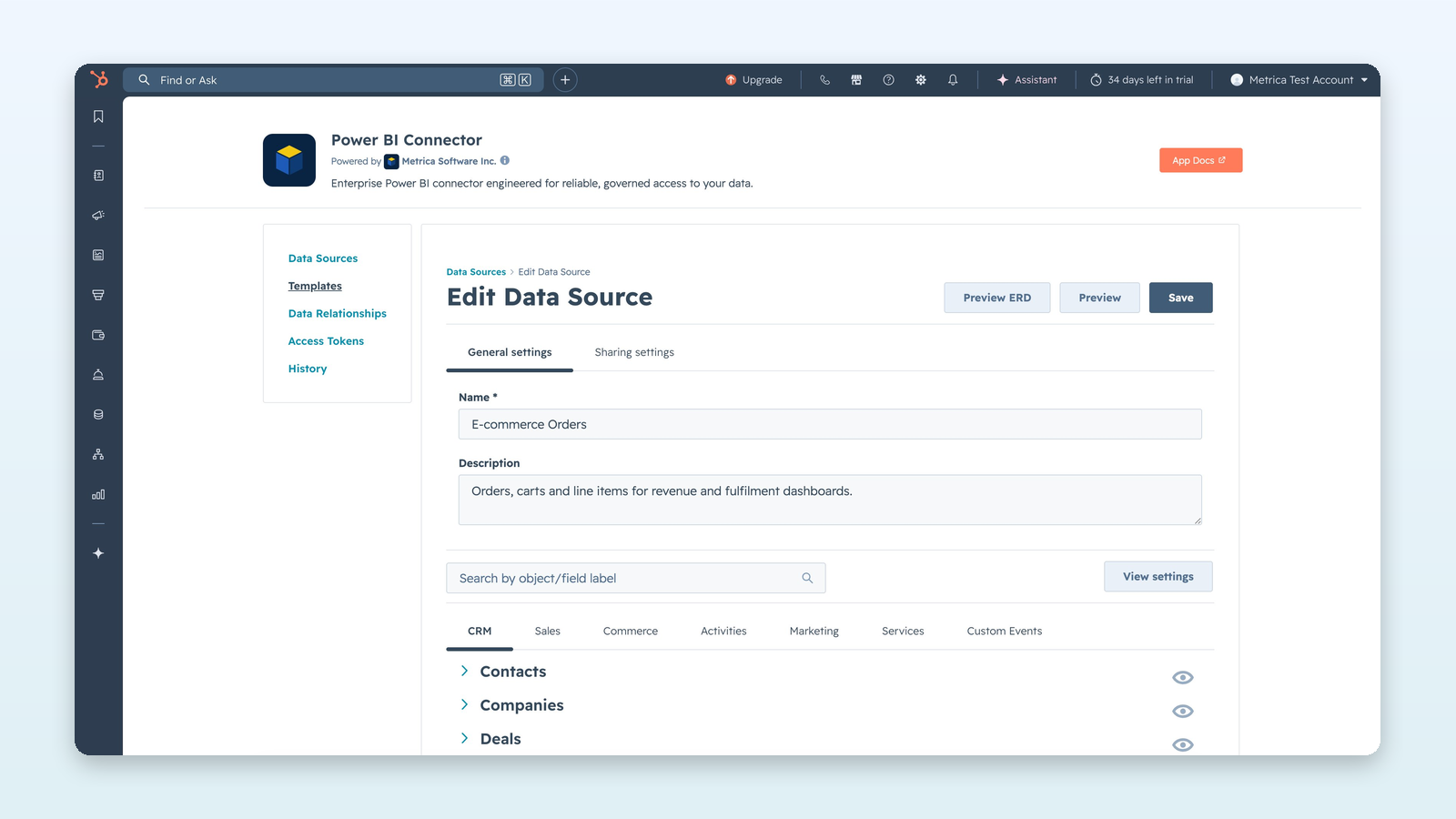
Unlimited Data Sources
Create as many data sources as your organization needs — for different teams, reports, or use cases. A sales ops team can maintain their own pipeline data source while marketing runs campaign analytics from a separate one. Each gets its own dedicated OData URL for Power BI.
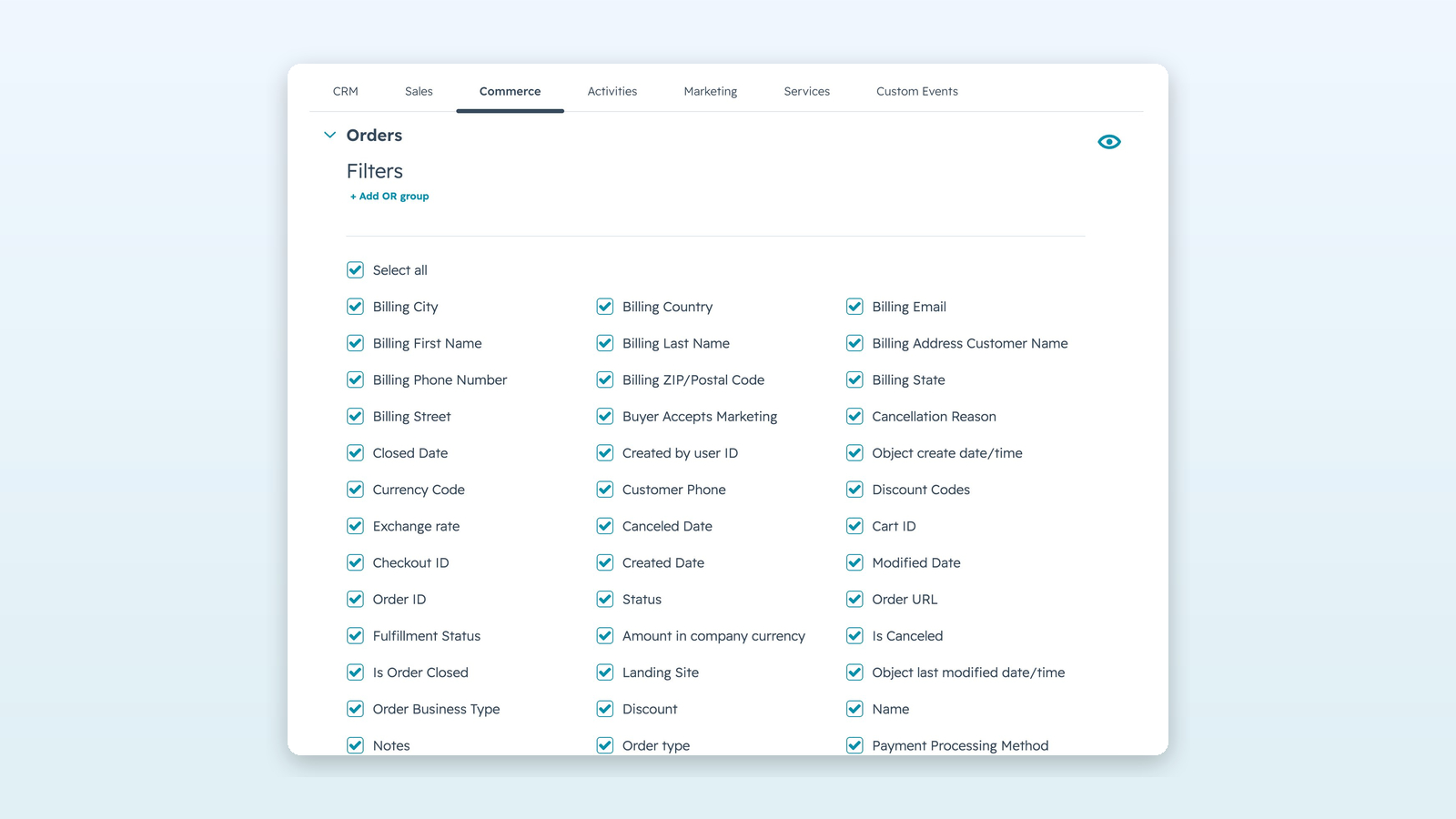
Unlimited Rows
No limits on how many HubSpot records you can export to Power BI. Select your objects and properties and export as many rows as your reports need — no caps, no sampling, no restrictions on data volume.
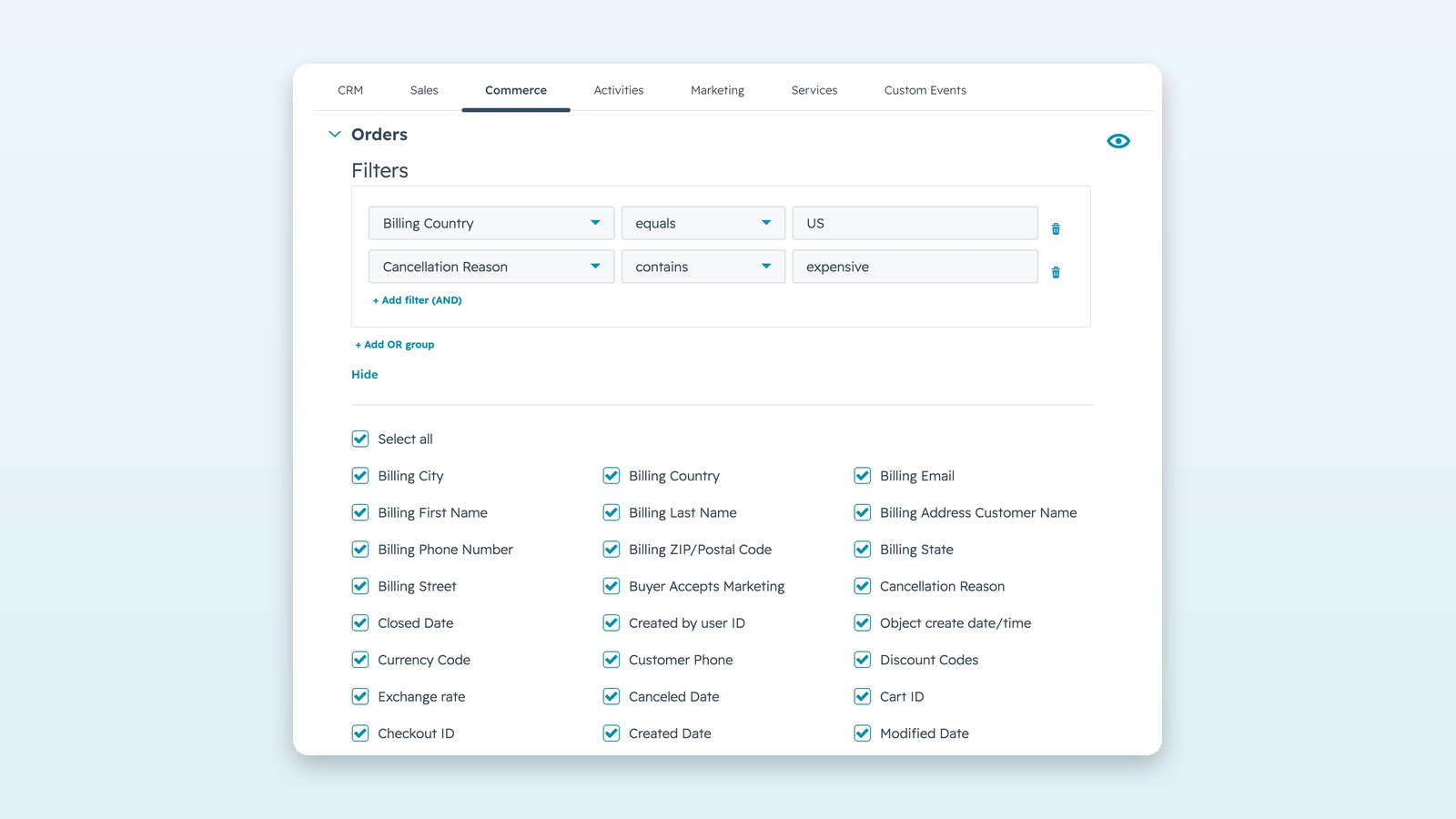
Data Filtering
Control exactly which HubSpot records get exported to Power BI. Each object has its own independent filter — build conditions with a visual AND/OR editor, or write OData expressions for advanced logic. Export only what your reports need, keeping Power BI datasets focused and refreshes fast.
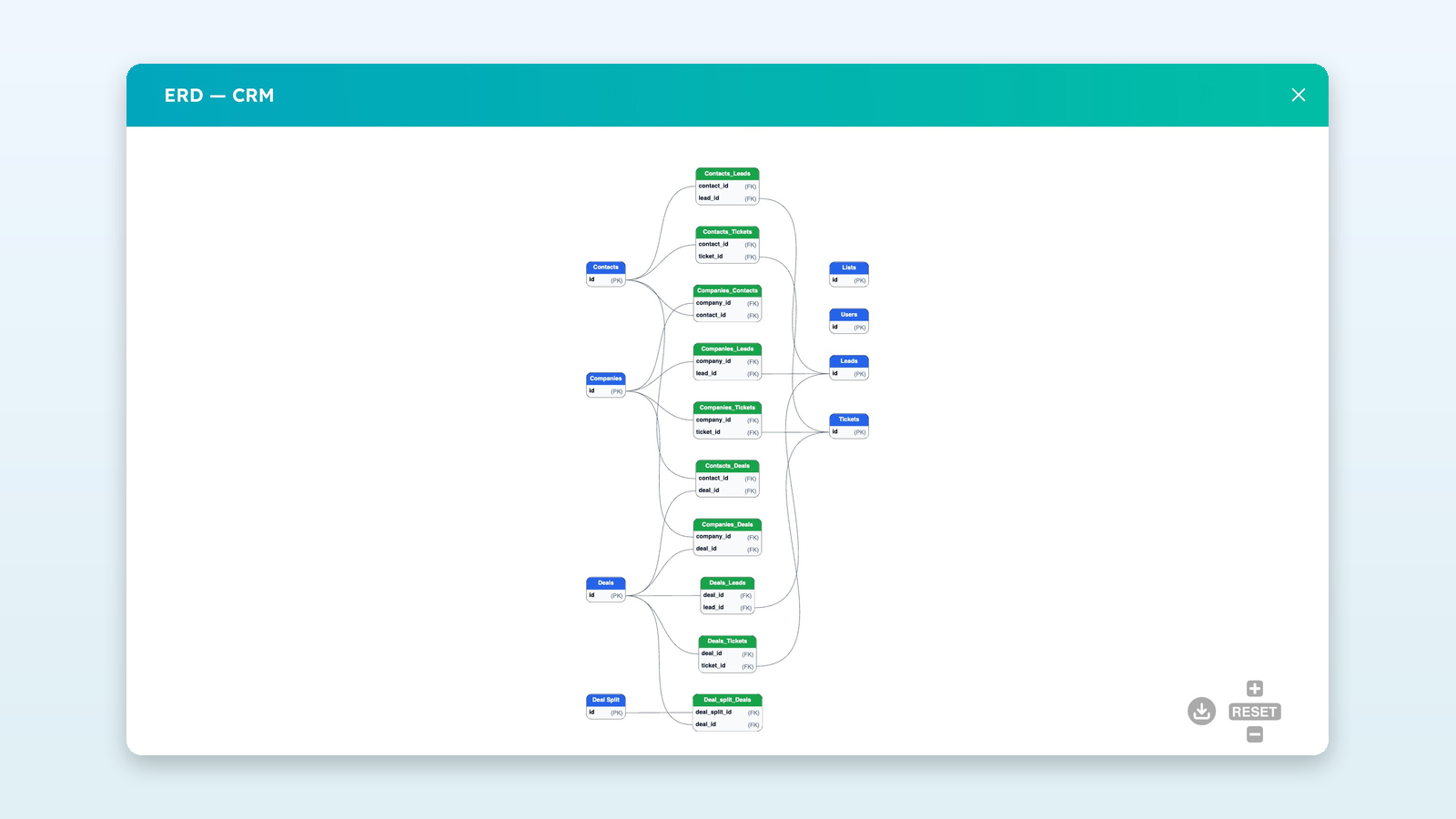
Entity Relationship Diagram (ERD)
A visual map of the HubSpot objects in your data source and how they connect — the easiest way to understand how a multi-object selection fits together before building in Power BI. Shows each object, its associations, and cardinality markers. Export as SVG, PNG, or PDF.
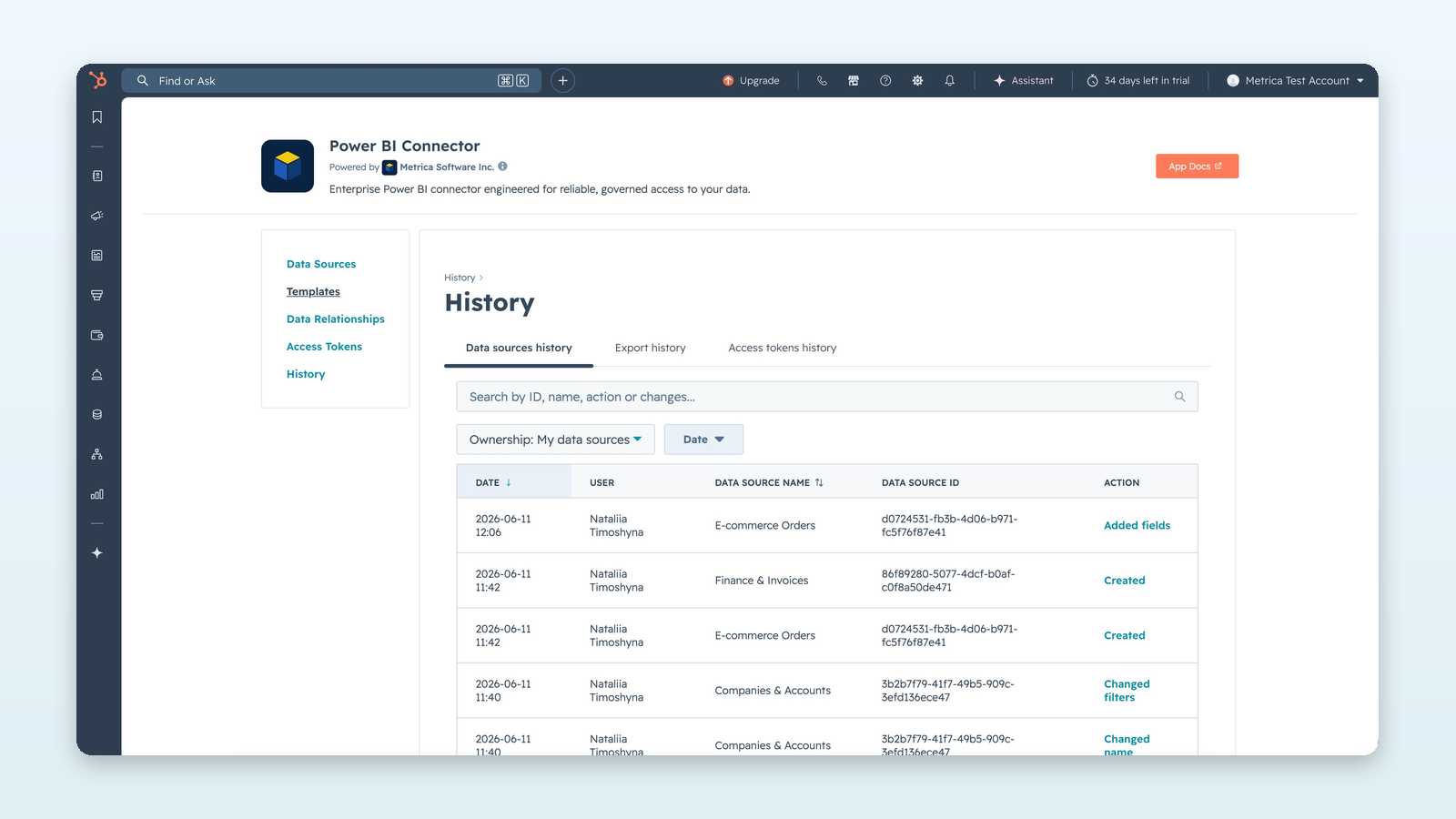
Audit Log & Change History
Complete governance visibility for enterprise deployments. Full audit log covering three areas: who created, edited, or deleted data sources and what changed; every access token issued, revoked, or expired; every time Power BI pulled data from a data source. Gives IT and compliance teams complete accountability over HubSpot data access in Power BI.
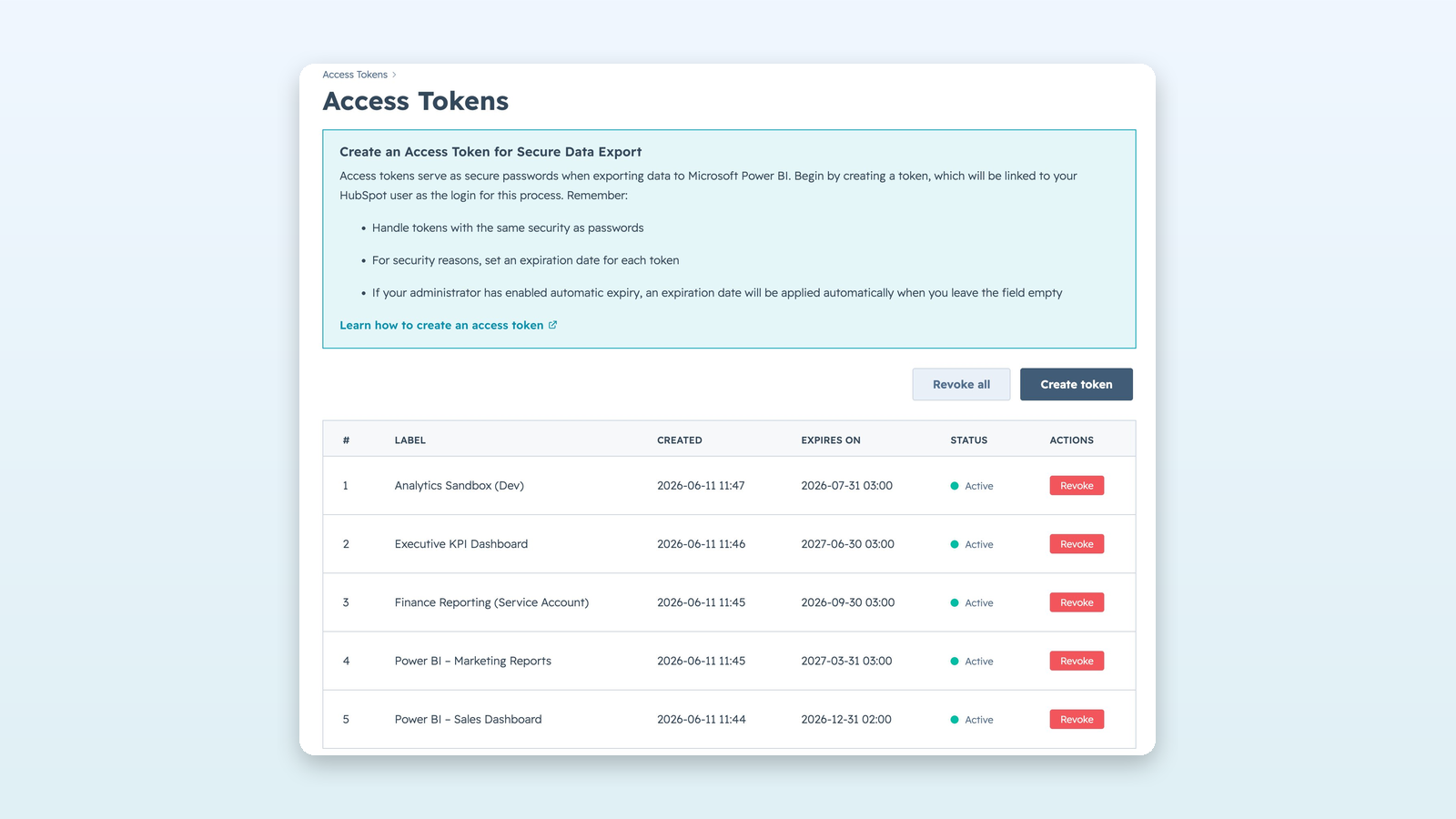
Token-Based Access Control
Each user or service account gets their own access token to authenticate Power BI. Tokens expire automatically on a set date and can be revoked instantly without affecting anyone else's reports. IT teams maintain full visibility over who accesses HubSpot data in Power BI.
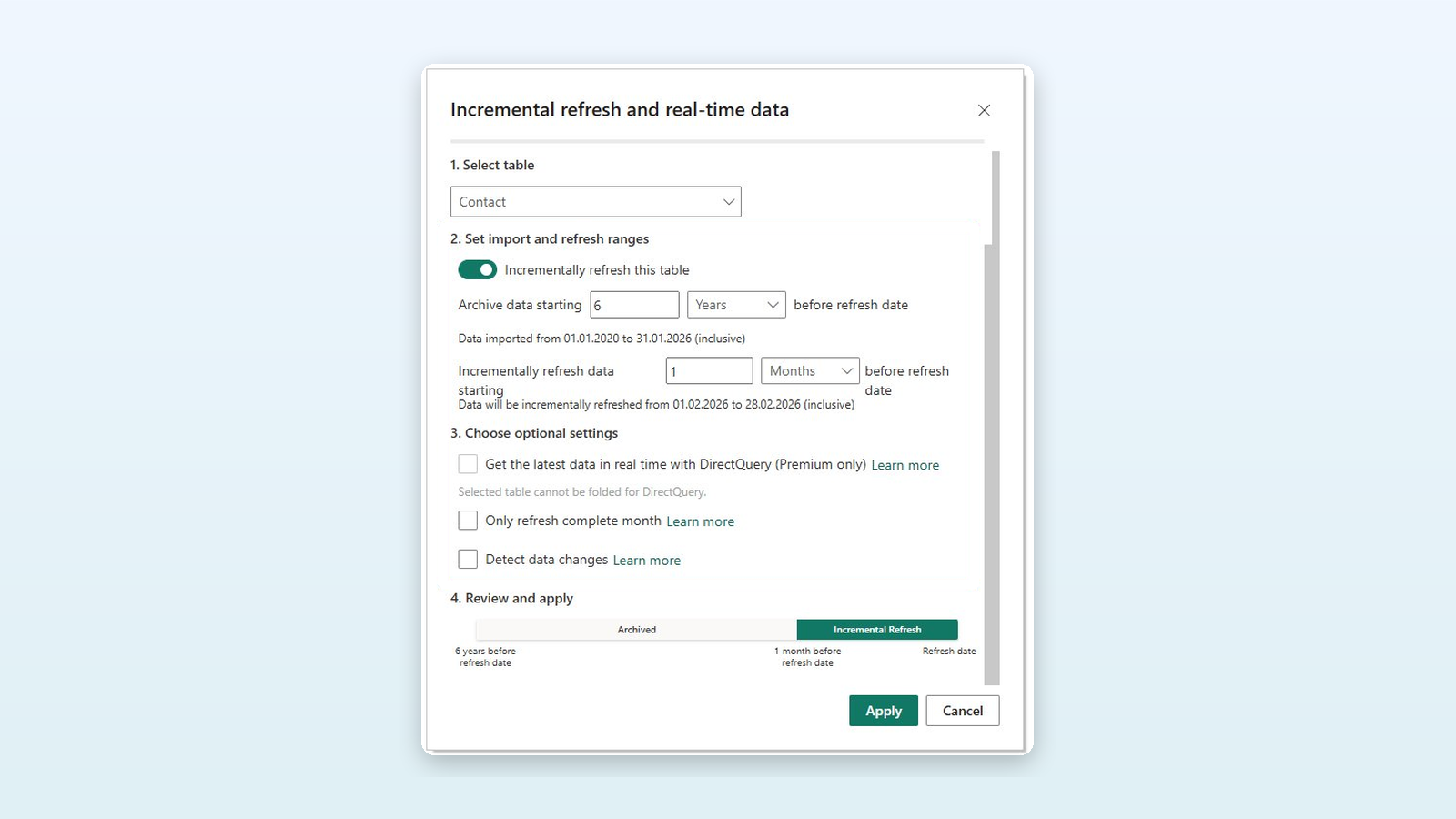
Incremental Refresh
Power BI Connector for HubSpot supports Power BI's native incremental refresh. Instead of reloading the full HubSpot dataset on every refresh, Power BI imports only new and recently modified records based on a defined time window. For large HubSpot portals this means significantly faster refreshes and less data processed each cycle.
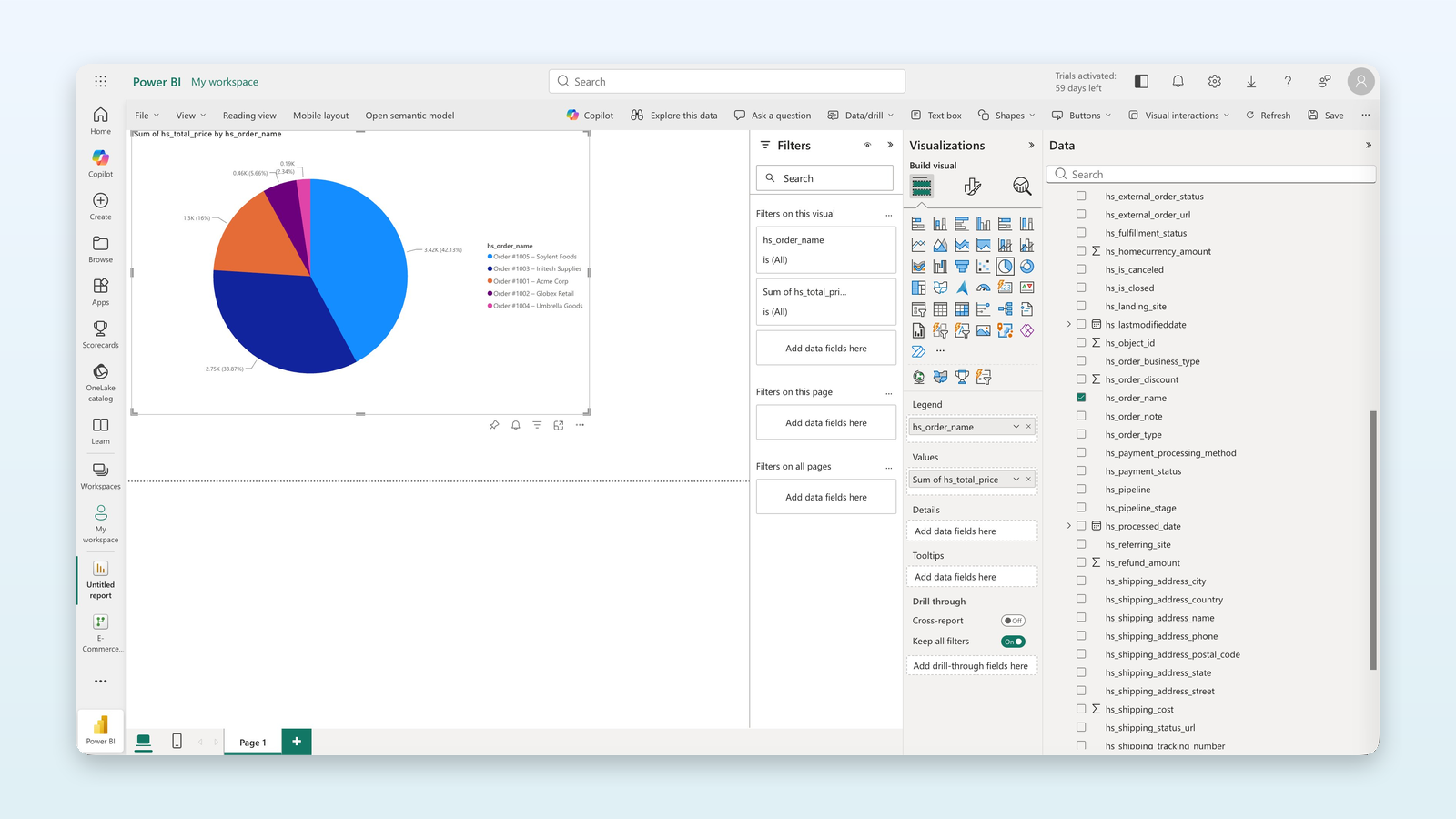
HubSpot Data in Power BI
Once connected, HubSpot data is available in Power BI like any other source. Build pipeline dashboards, marketing performance reports, or revenue forecasts — or combine HubSpot with finance and ERP data using Power Query.
ฟังก์ชันการทำงานแอป
ข้อมูลที่แบ่งปัน
Companies | ||
Contacts | ||
Deals | ||
Deal Splits | ||
Tickets | ||
Leads | ||
Users | ||
CRM Lists | ||
Contact Properties History | ||
Company Properties History | ||
Deal Properties History | ||
Quotes | ||
Line Items | ||
Products | ||
Goals | ||
Product Properties History | ||
Orders | ||
Carts | ||
Invoices | ||
Payments | ||
Commerce Subscriptions | ||
Taxes | ||
Discounts | ||
Fees | ||
Engagements | ||
Engagements History | ||
Tasks | ||
Calls | ||
Emails | ||
Meetings | ||
Notes | ||
Postal Mail | ||
Communications | ||
Conversations | ||
Marketing Campaigns | ||
Marketing Emails | ||
Marketing Events | ||
Form Submissions | ||
Feedback Submissions | ||
Workflows | ||
Website Pages | ||
Appointments | ||
Courses | ||
Listings | ||
Services | ||
Partner Clients | ||
Custom Behavioral Events | ||
Ticket Properties History |
รีวิว
การกำหนดราคา
Business
US$199
/เดือนFor organizations that need a full-featured HubSpot to Power BI integration without compliance and audit requirements
Entity Relationship Diagram (ERD)
Incremental Refresh
Data Filtering
Unlimited Rows
Unlimited Data Sources
Business
US$199
/เดือนFor organizations that need a full-featured HubSpot to Power BI integration without compliance and audit requirements
Entity Relationship Diagram (ERD)
Incremental Refresh
Data Filtering
Unlimited Rows
Unlimited Data Sources
* ราคาที่แสดงนี้มีไว้เพื่อแสดงข้อมูลเท่านั้น ราคาทั้งหมดยังไม่รวมภาษี สิทธิพิเศษ ส่วนลด หรือตัวแปรราคาอื่นๆ คุณควรติดต่อพาร์ทเนอร์เพื่อรับข้อมูลราคาล่าสุดและถูกต้องที่สุด HubSpot จะไม่รับผิดชอบใดๆ ต่อข้อมูลราคานี้ซึ่งจัดทำโดยพาร์ทเนอร์ของเรา การกำหนดราคาอัปเดตล่าสุด: 20/11/2026
ข้อมูลเพิ่มเติม
สร้างโดย - Metrica Software Inc.
ติดตั้ง - 10+ การติดตั้ง
หมวดหมู่ ภาษาที่แอปนี้สามารถใช้ได้ อังกฤษ
สินค้ามาใหม่

Hunter Email Verification
Verify HubSpot contact email addresses and keep invalid ones out of campaigns, sequences, and your CRM.
Power BI Connector
Connect HubSpot to Power BI in minutes. Metrica's Power BI Connector gives enterprise analytics teams a stable, governed way to bring HubSpot data into Power BI — with shared data sources, token-based access control, and full audit history. No data warehouse, ETL pipelines, or custom integrations required. Built for long-term production use. Free trial available.
