

要求
HubSpot 计划 HubSpot 帐户权限 - 查看必要帐户权限
访问类型 Shared QuickBooks Online Advanced Automation 订阅 - 专业人员、业务最大化、企业或专业年度 计划
概览

1/6 - SyncQ - HubSpot QuickBooks Automation
将所有 QuickBooks 交易与 HubSpot 无缝同步
双向会计同步--从客户和项目到付款,并提供人工智能洞察。涵盖应收账款和应付账款。
轻松记录和管理收入
SyncQ 允许您直接从 HubSpot 记录创建、发送和查看估算、发票、付款和销售收据。使用Business Max 和 Corporate 计划,可为HubSpot 自定义对象解锁高级同步功能,包括
将QuickBooks项目作为HubSpot交易、
将 QuickBooks 工作/子客户作为 HubSpot Deal,并将相关发票作为 Deal Invoices 的附件、
双向 QuickBooks 发票与 HubSpot 发票/交易、
存款、供应商信用、会计科目表等。
享受免费制图协助和零入门成本。
人工智能驱动的洞察力、自主同步、100% 可定制同步
SyncQ 提供先进的、人工智能驱动的业务洞察力。您可以提出任何有关业务的问题,并立即获得答案。 (每个计划都有免费的有限试用版,还有付费版本)。
100% 自定义映射 ,让您将 HubSpot 对象(包括自定义对象和字段)映射到大多数 QuickBooks 交易(包括发票和估算自定义字段),以及税收和类别,以满足您的 360 度业务需求。
通过智能自动化功能,您可以选择自动同步或手动同步,只需单击一下即可,无需登录 QuickBooks。它还能自动将 QuickBooks 在线记录同步到 HubSpot,包括已收付款和待付余额。
通过即时访问财务数据增强销售能力
SyncQ 可在HubSpot 公司/联系人备注部分 自动显示 QuickBooks 估算、发票和付款详情,让您的销售团队无需联系会计或登录 QuickBooks Online,即可即时获得重要的财务信息。
企业级安全性和 Intuit 认证
SyncQ 已通过Intuit 认证,符合行业标准的安全要求。Intuit 根据NIST 安全标准(美国商务部国家标准与技术研究院)定期对其进行评估。请在您的QuickBooks 账户或Intuit App Store 查找SyncQ。
主要功能
✔Intuit 批准- 符合财务安全行业标准
✔自动和手动双向和单向同步
✔自动同步 QuickBooks 交易到 HubSpot 记录
✔人工智能驱动的洞察力--了解更多关于您的业务和客户的信息
✔ 将HubSpot 公司/联系人与 QuickBooks 客户/供应商同步
✔ 将HubSpot 交易/票据与 QuickBooks 估算、发票、采购订单、账单等进行同步
✔ 在 HubSpot 笔记中查看 QuickBooks 交易历史,包括 QuickBooks 发票 PDF 链接(需要许可证才能查看)
✔ 将QuickBooks 产品与 HubSpot 产品同步
✔ 直接从 HubSpot 通过电子邮件发送估价单和发票
在 HubSpot 内跟踪销售趋势和应收账款
完全自定义字段映射,满足独特的业务需求
同步 HubSpot 自定义字段和 QuickBooks 自定义字段
✔连接多个 QuickBooks 公司
SyncQ - 具备人工智能洞察力的第一大 QuickBooks 自动化工具
SyncQ 是适用于多种 CRM(包括Salesforce 和 Pipedrive)的领先 QuickBooks 自动化解决方案。SyncQ 深受数百家企业的信赖,可确保无缝的AI 自动化、事务同步和财务洞察。
我们的所有集成均获得 Intuit 批准。
功能
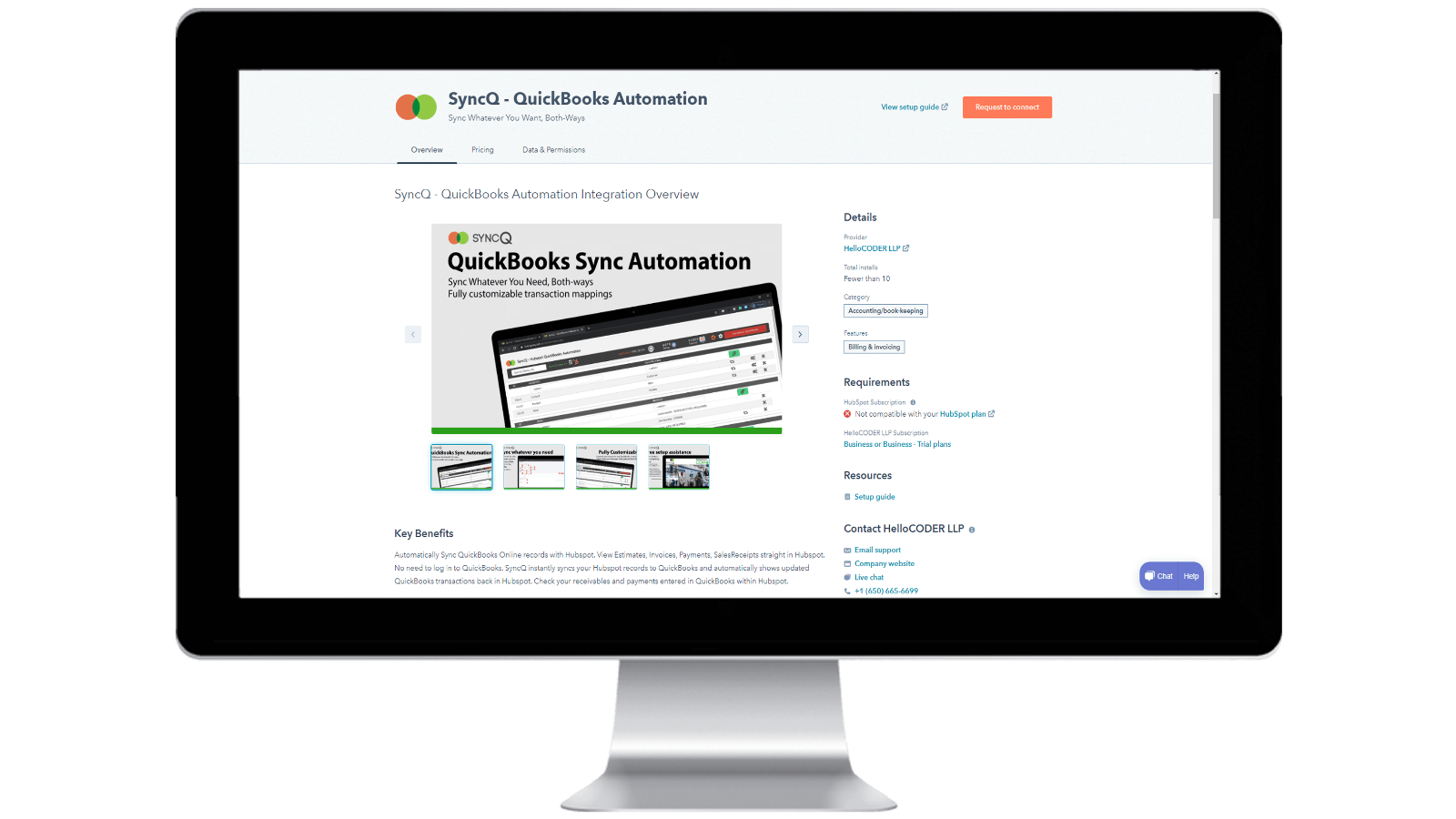
在 HubSpot 账户中安装 SyncQ 并退订 SyncQ
从 Intuit 或 HubSpot AppStore 安装 SyncQ。如需 InstaView,请联系 SyncQ 支持。 要取消订阅SyncQ,请单击SyncQ应用程序中的 "取消订阅 "按钮,或取消Paypal定期付款,或联系SyncQ支持。断开SyncQ应用程序与HubSpot的连接并不能退订SyncQ。
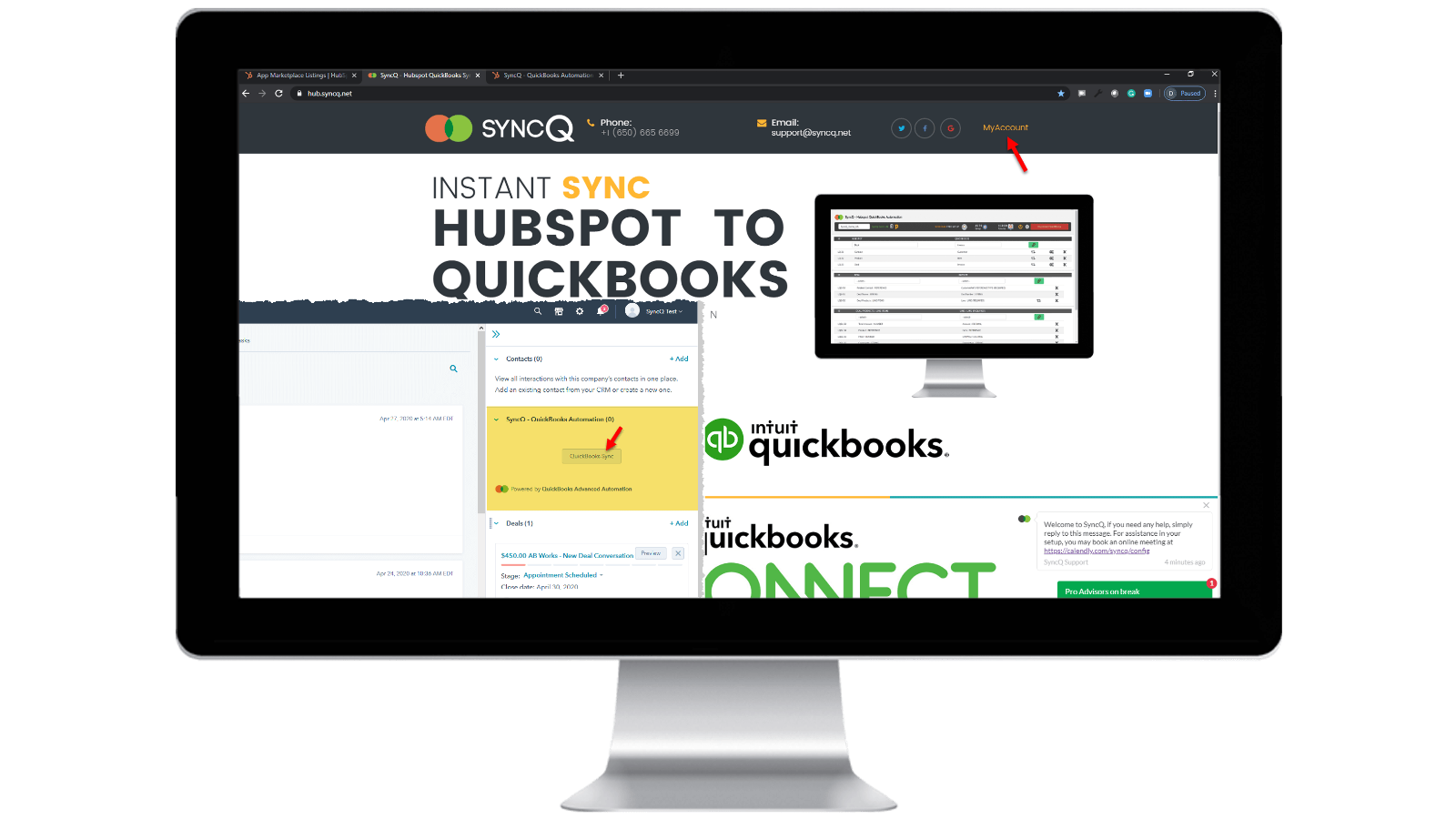
登录 SyncQ 账户
浏览 https://hb.syncq.net,点击 "我的账户"。 简单方法:进入 HubSpot 的任何记录,在右侧标签中找到 SyncQ 卡标签,然后点击 QuickBooks 同步。然后输入你的 HubSpot 用户电子邮件 ID。您将收到一个验证码来验证您的账户。
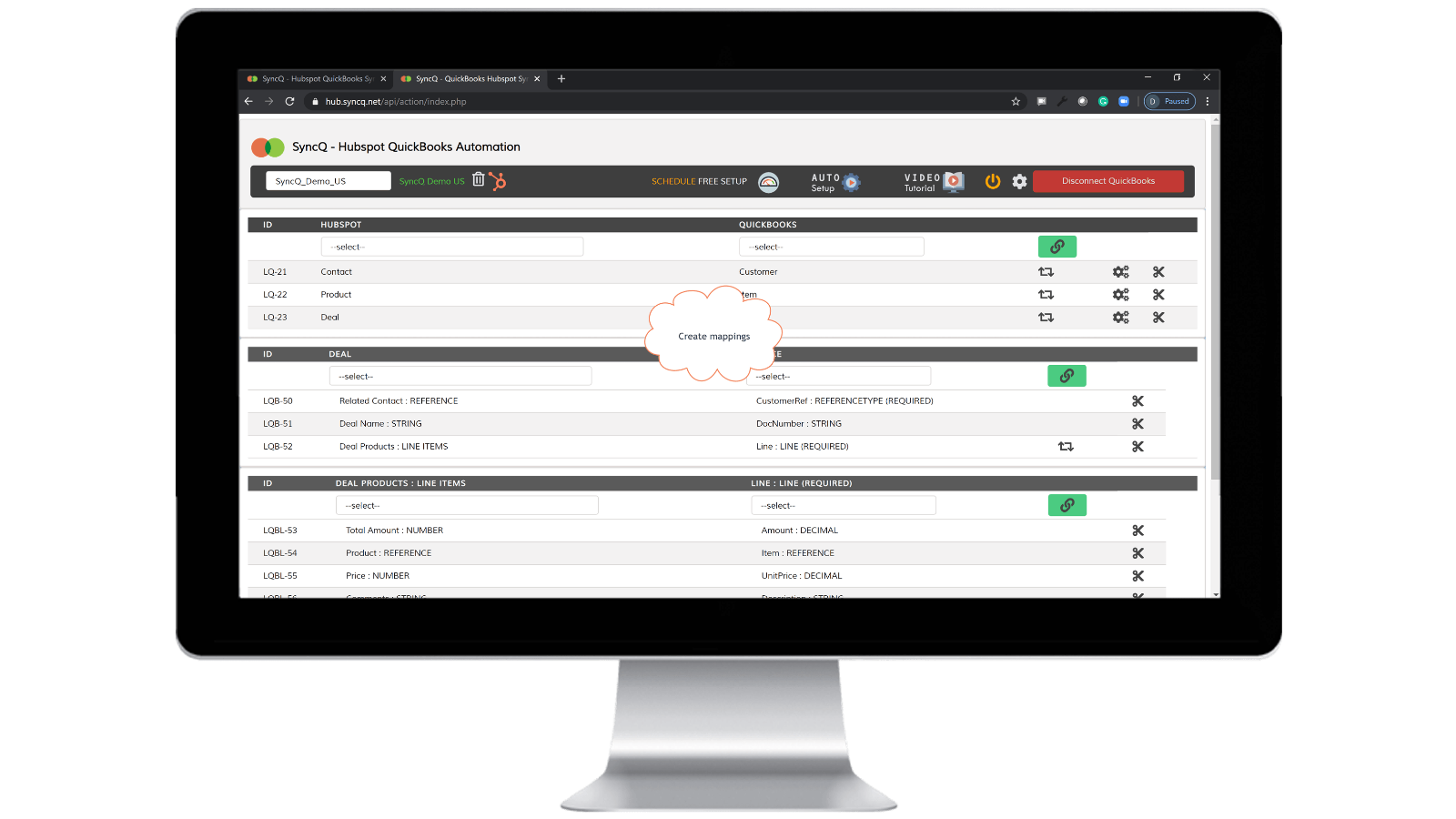
连接 QuickBooks 公司,创建映射并启用自动同步。
点击连接到 QuickBooks,你的 QuickBooks 公司就会自动显示出来。点击设置轮按钮创建映射,或点击自动设置。针对单个映射启用自动同步。您也可以点击 HubSpot 记录中的 SyncQ 卡按钮进行手动同步。

双向手动和即时记录同步
转到要同步的 HubSpot 记录。找到右侧的 SyncQ 卡,然后点击 QuickBooks 同步。你会看到同步相关 HubSpot 记录的选项。点击同步按钮。HubSpot 记录将立即同步到 QuickBooks。QuickBook 的记录摘要将显示出来。
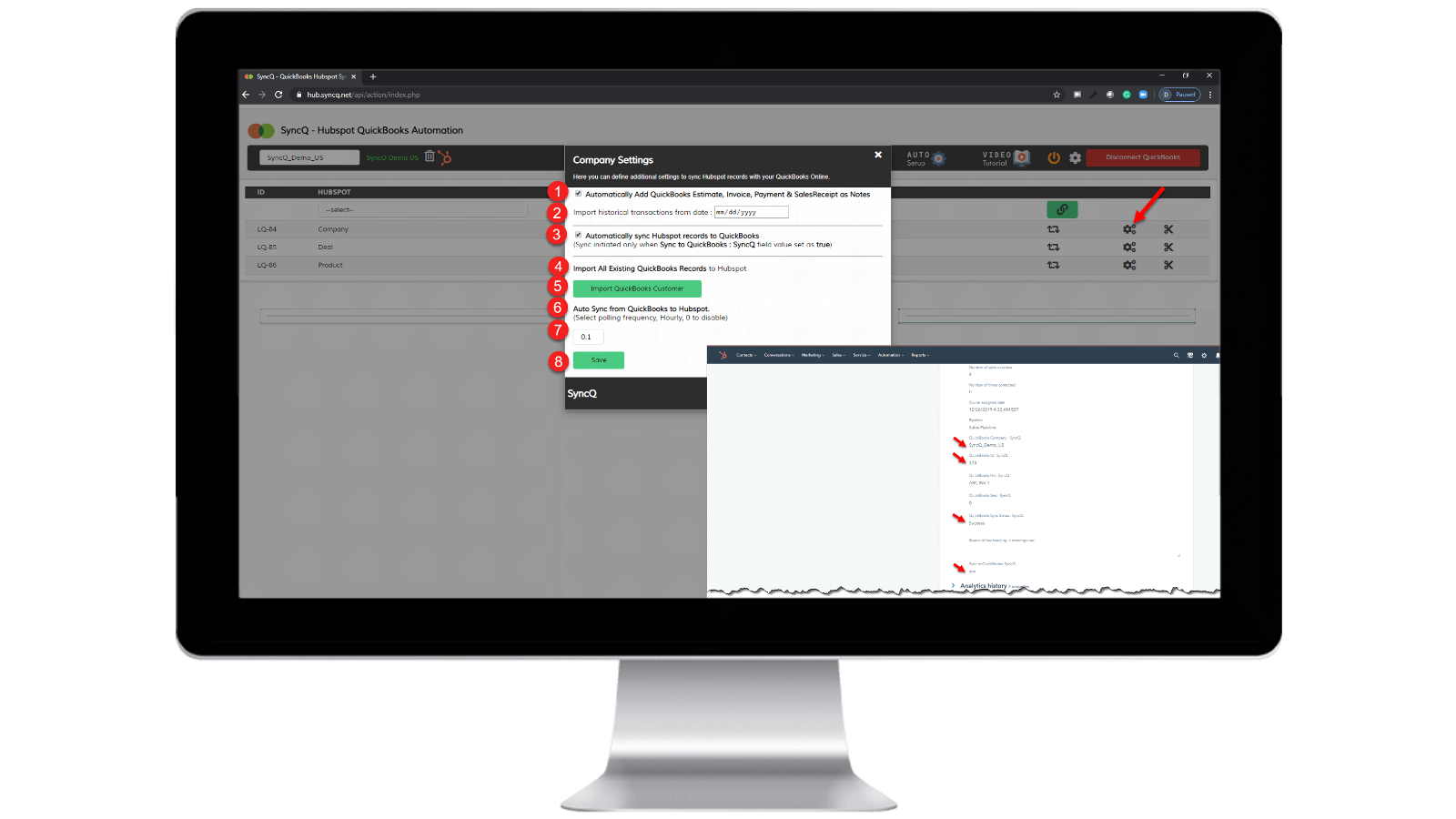
启用自动同步。
从 QuickBooks 到 HubSpot: 1) 选中 "自动同步 HubSpot 记录到 QuickBooks"。 从 HubSpot 到 QuickBooks: 1) 指定 "从 QuickBooks 自动同步到 HubSpot "的每小时频率。 2) 在要同步的特定 HubSpot 记录上,将 "SyncQ 到 QuickBooks:SyncQ "为 "是"。
应用程序功能
共享数据
1. Customers / Vendors | ||
2. Customers / Vendors | ||
3. Items | ||
4. Estimates/Invoice/Bill/PurchaseOrder | ||
5. Inovoice | ||
6. Estimate/Invoice/Deposit/Bill/VendorCredit & More | ||
7. Job / Sub Customer / Project |
评论
4.2
20
4.2
20
- 2025年9月22日
同步功能良好,但用户界面不佳,支持团队也缺乏帮助
总体集成效果良好,但存在一些小问题,需要改进支持
同步效果好、速度快,而且在映射领域有多种选择,包括 HS - QB
同步时仍会出现一些小错误,如联系人无法正常同步、信息被覆盖等。 此外,用户界面也不够直观,需要进一步改进。 下一个支持团队需要对我们面临的同步问题和询问提供更多帮助和更快处理。
Tasnimul, M.
- 2025年7月3日
避免使用此应用程序
我在下载前查看了评论,真希望我听从了其他人的建议--避免使用这款应用程序。 没用
应用程序会立即抓取您的 QB 付款信息(对他们来说很好,但对我来说很糟糕,因为我必须追着他们(英国)取消付款)
该应用程序不起作用 - 什么也没做
McDermott, J.
定价
专业人员
US$49
/月包括 2 个许可证
将 HubSpot 联系人或公司、产品和交易与 QuickBooks 同步。
手动和自动同步
无限同步。
客户人工智能洞察。附加计划的全部功能。
与 HubSpot 双向同步 QuickBooks 客户和供应商。
自动将估算、发票和销售收据导入交易。
自动将估算、发票、付款和销售收据导入到组织或个人。
专业人员
US$49
/月包括 2 个许可证
将 HubSpot 联系人或公司、产品和交易与 QuickBooks 同步。
手动和自动同步
无限同步。
客户人工智能洞察。附加计划的全部功能。
与 HubSpot 双向同步 QuickBooks 客户和供应商。
自动将估算、发票和销售收据导入交易。
自动将估算、发票、付款和销售收据导入到组织或个人。
* 此处的定价仅供展示。所有价格均不包含税、奖励、折扣或其他定价变量。你应联系合作伙伴以获取最新的正确定价信息。HubSpot 对合作伙伴所提供的定价信息不承担任何责任。上次更新定价时间:2026/04/10
新品上市

-1-2.jpeg)
