

DataQuick Property Export
Desarrollado por - BizzyWeb
Instalaciones - <10 instalaciones
Requisitos
Plan de HubSpot Permisos de cuenta de HubSpot - Ver los permisos de cuenta requeridos
Tipo de acceso Compartida Suscripción: DataQuick Property Export - Suscripciones: Pro o Enterprise
Vista general
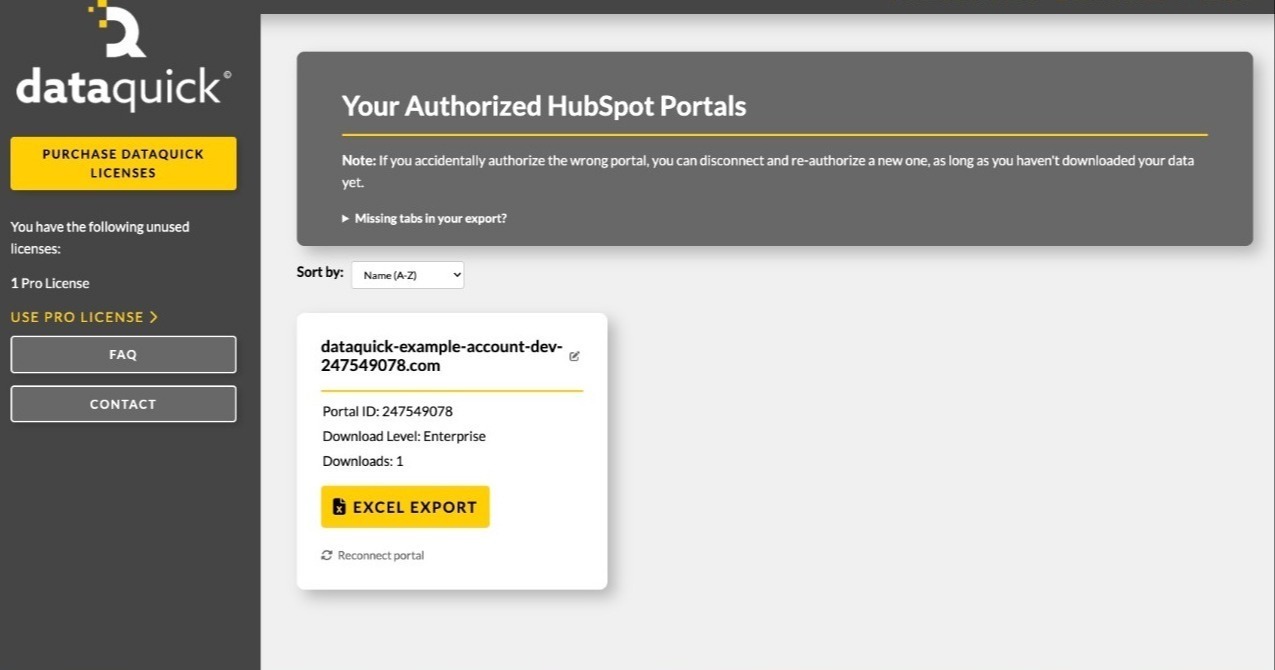
1/3 - Dashboard preview
DataQuick exports your HubSpot portal's complete property architecture to a single Excel workbook — every object's fields, types, groups, descriptions, creators, and which forms use them.
Documenting a HubSpot portal by hand is slow and goes stale immediately. Admins auditing a portal, agencies onboarding a client, and teams planning a migration all need the same thing: an accurate picture of what properties exist and how they're configured. DataQuick produces it in one click.
Each object gets its own sheet listing every visible property with its label, internal name, field type, description, property group, who created it, which forms reference it, and its dropdown options. A summary sheet totals custom and overall property counts per object.
DataQuick reads property definitions only. It does not read, store, or transmit your records — no contacts, no deals, no customer data.
Características
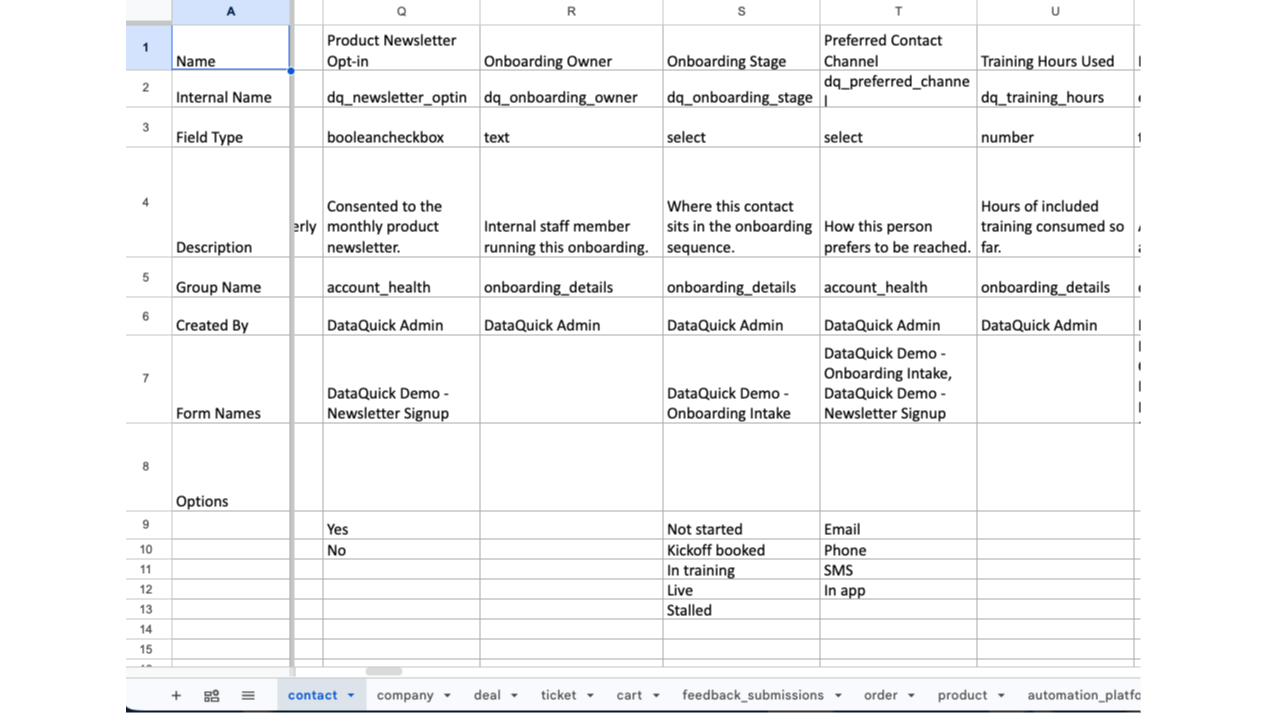
Property Architecture Export
Exports every property definition in your portal to a Excel workbook. One sheet per object. Each property lists its label, internal name, field type, description, group, creator, the forms that use it, and its options. Objects your portal doesn't include, or hasn't granted permission for, are listed in an "Objects Not Included" sheet
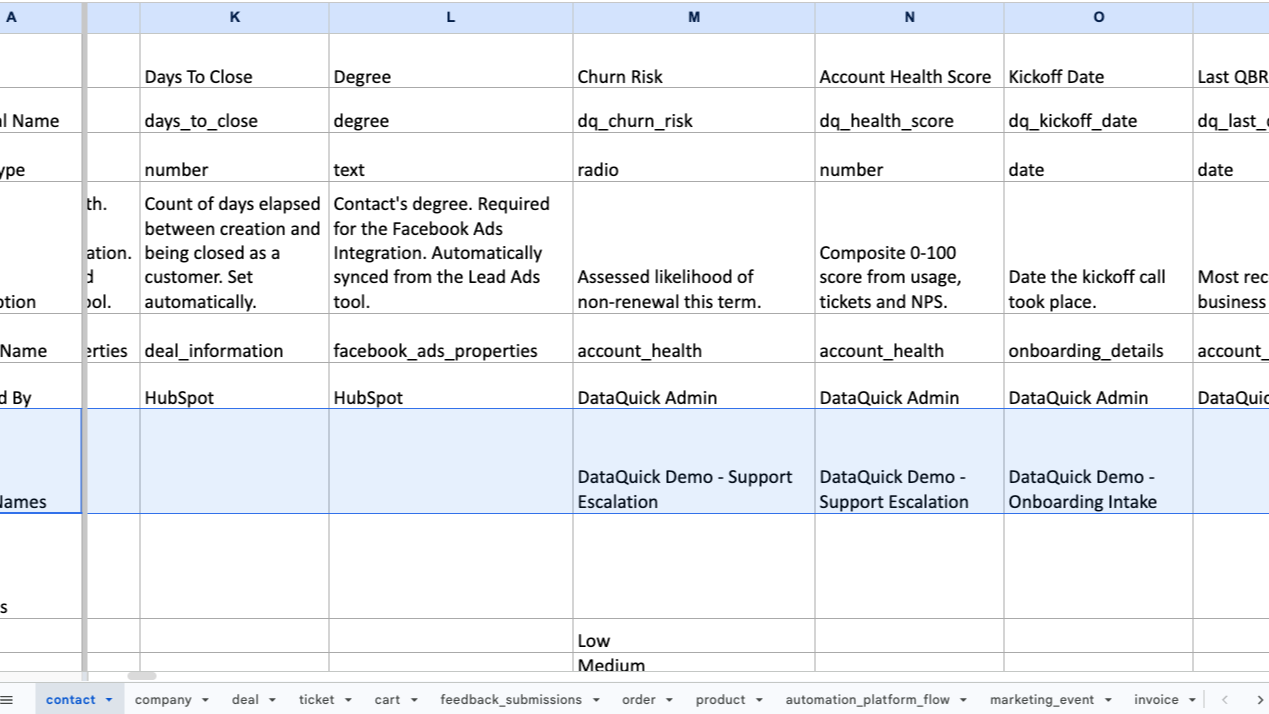
Form Usage Mapping
Every property sheet includes a Form Names row listing the forms that collect that field. Before changing a property's type, renaming it, or deleting it, you can see what breaks — without opening forms one at a time to check
Funcionalidad de la aplicación
Datos compartidos
Property definitions | ||
Form field definitions | ||
User names and email addresses |
DataQuick reads property definitions only — field labels, internal names, types, groups, descriptions, dropdown options, and which forms use each field. It does not read CRM records. No contacts, companies, deals, or other customer data is accessed at any point.
Most of these permissions use HubSpot's crm.schemas.* scopes, which grant access to an object's field definitions and not to the records themselves.
Property data is written directly into the Excel file you download and is never stored by DataQuick. What we do store is the OAuth tokens needed to keep your portal connected, your portal ID and domain, and a count of exports run — nothing more.
HubSpot user names and email addresses are read to attribute who created each property, and appear in the "Created By" column of your export.
Data flows in one direction only. DataQuick never writes anything to HubSpot.
Valoraciones
Precios
Pro
95 US$
/per portal (license-based)Standard object architecture export
One-time purchase. One license connects one HubSpot portal and includes unlimited exports of that portal.Pro
95 US$
/per portal (license-based)Standard object architecture export
One-time purchase. One license connects one HubSpot portal and includes unlimited exports of that portal.* El precio que aparece aquí es solo para fines de visualización. Los precios no incluyen impuestos, incentivos, descuentos u otras variables. Debes comunicarte con nuestro partner para obtener la información de precios más actualizada y correcta. HubSpot no se hace responsable de los precios que proporcionan nuestros partners. Precios actualizados por última vez: 27/10/2026
Más información
Desarrollado por - BizzyWeb
Instalaciones - <10 instalaciones
Categorías Idiomas en los que está disponible esta aplicación Inglés
Recibe atención en el presente

Microsoft Teams
¡Utiliza Microsoft Teams y HubSpot para reuniones, conversaciones y mucho más!

Slack
Gestione registros de CRM, obtenga asistencia de Breeze basada en IA, envíe notificaciones en tiempo real y colabore con su equipo, sin salir de Slack.
