

DataQuick Property Export
Byggd av - BizzyWeb
Installationer - <10 installationer
Krav
HubSpot-plan Behörigheter för HubSpot-konto - Visa de obligatoriska kontobehörigheterna
Åtkomsttyp Delade DataQuick Property Export prenumeration - Pro eller Enterprise planer
Översikt
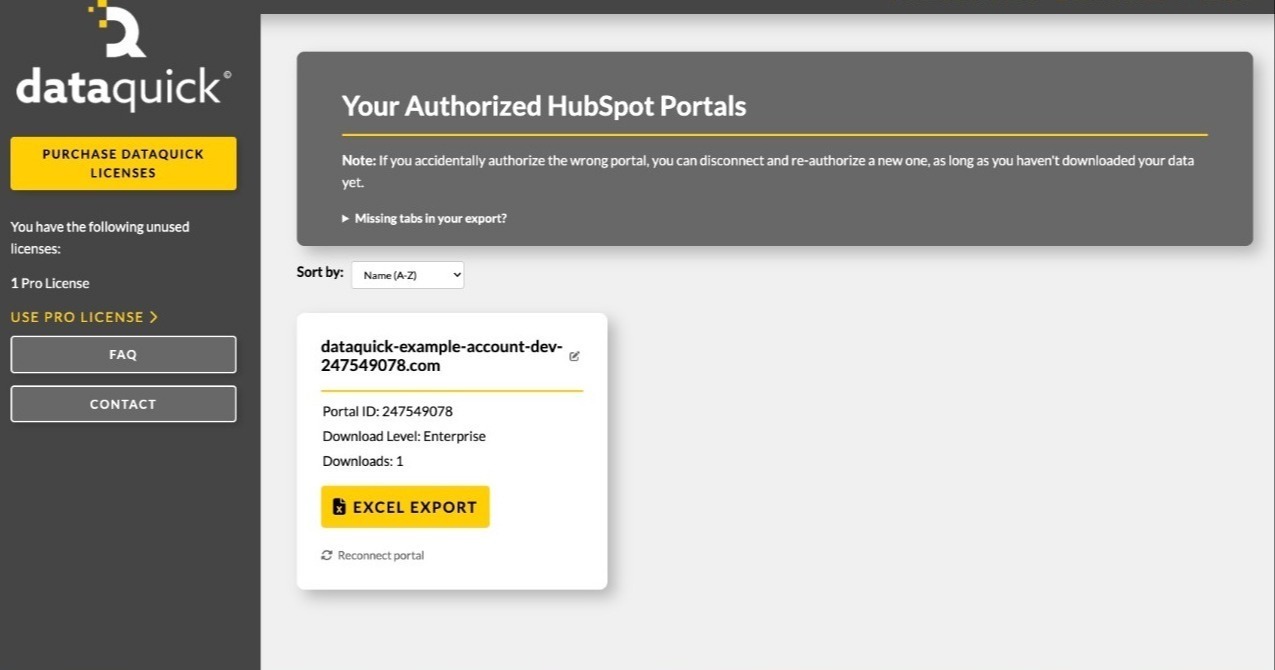
1/3 - Dashboard preview
DataQuick exports your HubSpot portal's complete property architecture to a single Excel workbook — every object's fields, types, groups, descriptions, creators, and which forms use them.
Documenting a HubSpot portal by hand is slow and goes stale immediately. Admins auditing a portal, agencies onboarding a client, and teams planning a migration all need the same thing: an accurate picture of what properties exist and how they're configured. DataQuick produces it in one click.
Each object gets its own sheet listing every visible property with its label, internal name, field type, description, property group, who created it, which forms reference it, and its dropdown options. A summary sheet totals custom and overall property counts per object.
DataQuick reads property definitions only. It does not read, store, or transmit your records — no contacts, no deals, no customer data.
Egenskaper
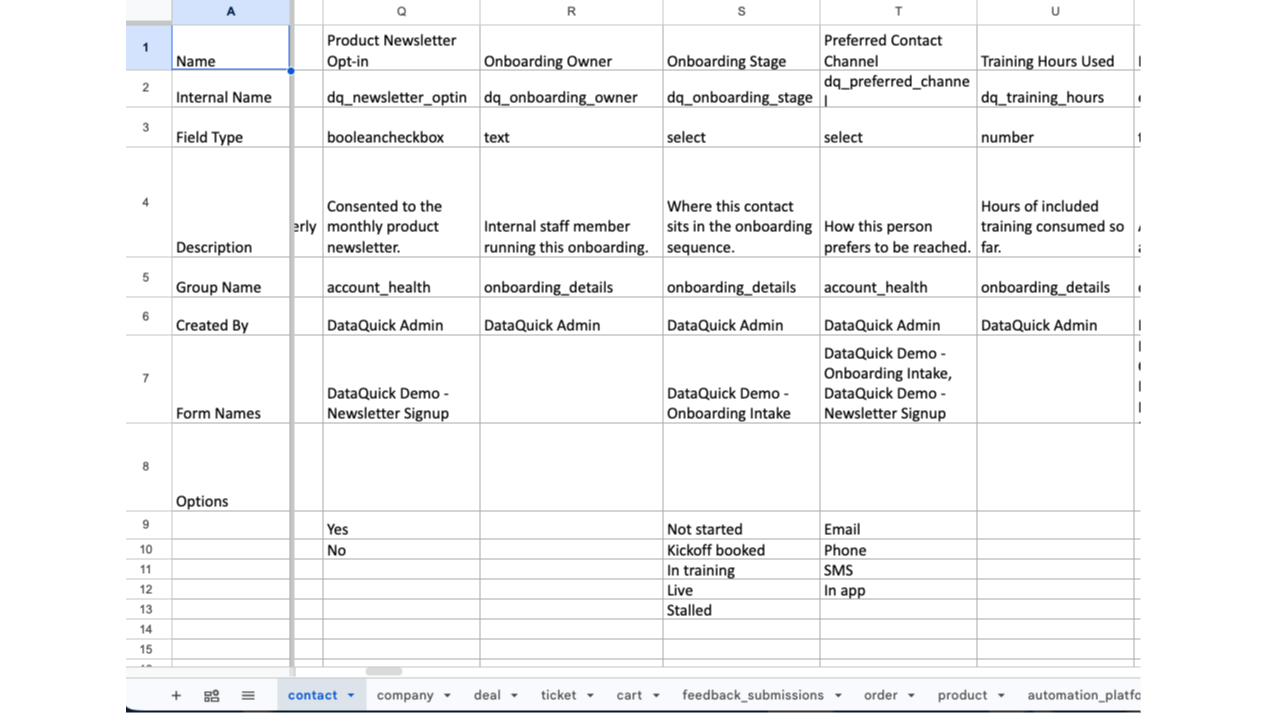
Property Architecture Export
Exports every property definition in your portal to a Excel workbook. One sheet per object. Each property lists its label, internal name, field type, description, group, creator, the forms that use it, and its options. Objects your portal doesn't include, or hasn't granted permission for, are listed in an "Objects Not Included" sheet
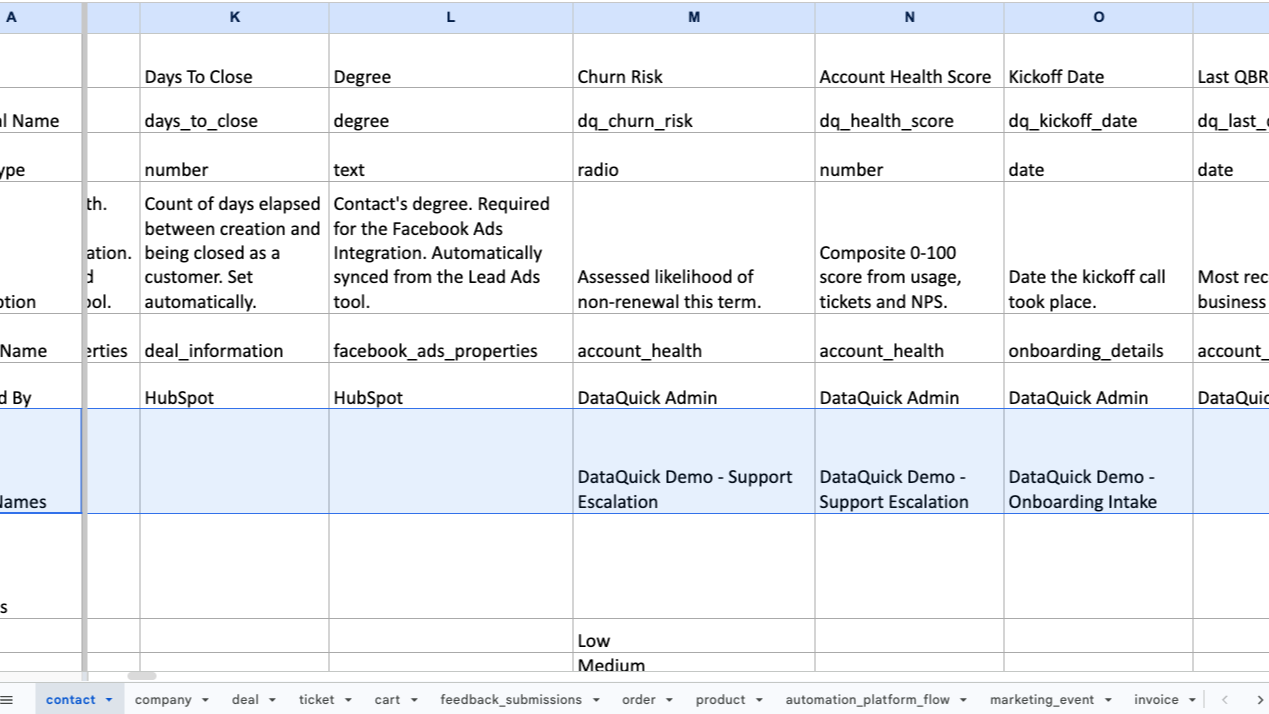
Form Usage Mapping
Every property sheet includes a Form Names row listing the forms that collect that field. Before changing a property's type, renaming it, or deleting it, you can see what breaks — without opening forms one at a time to check
Appfunktionalitet
Delade data
Property definitions | ||
Form field definitions | ||
User names and email addresses |
DataQuick reads property definitions only — field labels, internal names, types, groups, descriptions, dropdown options, and which forms use each field. It does not read CRM records. No contacts, companies, deals, or other customer data is accessed at any point.
Most of these permissions use HubSpot's crm.schemas.* scopes, which grant access to an object's field definitions and not to the records themselves.
Property data is written directly into the Excel file you download and is never stored by DataQuick. What we do store is the OAuth tokens needed to keep your portal connected, your portal ID and domain, and a count of exports run — nothing more.
HubSpot user names and email addresses are read to attribute who created each property, and appear in the "Created By" column of your export.
Data flows in one direction only. DataQuick never writes anything to HubSpot.
Recensioner
Prissättning
Pro
95 US$
/per portal (license-based)Standard object architecture export
One-time purchase. One license connects one HubSpot portal and includes unlimited exports of that portal.Pro
95 US$
/per portal (license-based)Standard object architecture export
One-time purchase. One license connects one HubSpot portal and includes unlimited exports of that portal.*Priserna här är endast avsedda som exempel. I priserna ingår inte skatter, incitament, rabatter eller andra prisvariabler. Ta kontakt med partnern för den senaste och mest uppdaterade prisinformationen. HubSpot har inget ansvar för den här prisinformationen, vilken tillhandahålls av våra partner. Priserna uppdaterades senast: 2026-10-27
Mer information
Byggd av - BizzyWeb
Installationer - <10 installationer
Kategorier Språk som denna app finns på Engelska
Mest populär

Gmail
Bring HubSpot to your inbox with the HubSpot integration for Gmail.

Google Calendar
Book meetings quickly and easily with HubSpot and Google Calendar.
