

DataQuick Property Export
Gemaakt door - BizzyWeb
Installaties - <10 installaties
Vereisten
HubSpot-abonnement HubSpot-accountmachtigingen - Bekijk de vereiste accountmachtigingen
Toegangstype Gedeeld DataQuick Property Export-abonnement - Pro of Enterprise plannen
Overzicht
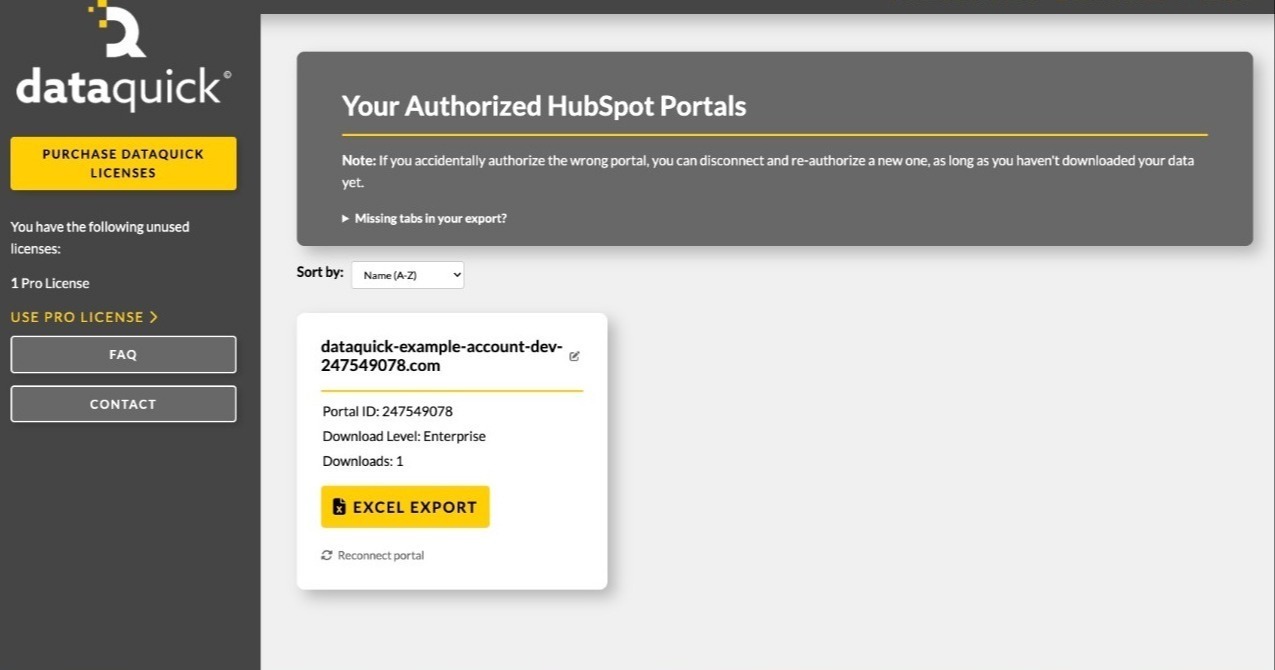
1/3 - Dashboard preview
DataQuick exports your HubSpot portal's complete property architecture to a single Excel workbook — every object's fields, types, groups, descriptions, creators, and which forms use them.
Documenting a HubSpot portal by hand is slow and goes stale immediately. Admins auditing a portal, agencies onboarding a client, and teams planning a migration all need the same thing: an accurate picture of what properties exist and how they're configured. DataQuick produces it in one click.
Each object gets its own sheet listing every visible property with its label, internal name, field type, description, property group, who created it, which forms reference it, and its dropdown options. A summary sheet totals custom and overall property counts per object.
DataQuick reads property definitions only. It does not read, store, or transmit your records — no contacts, no deals, no customer data.
Functies
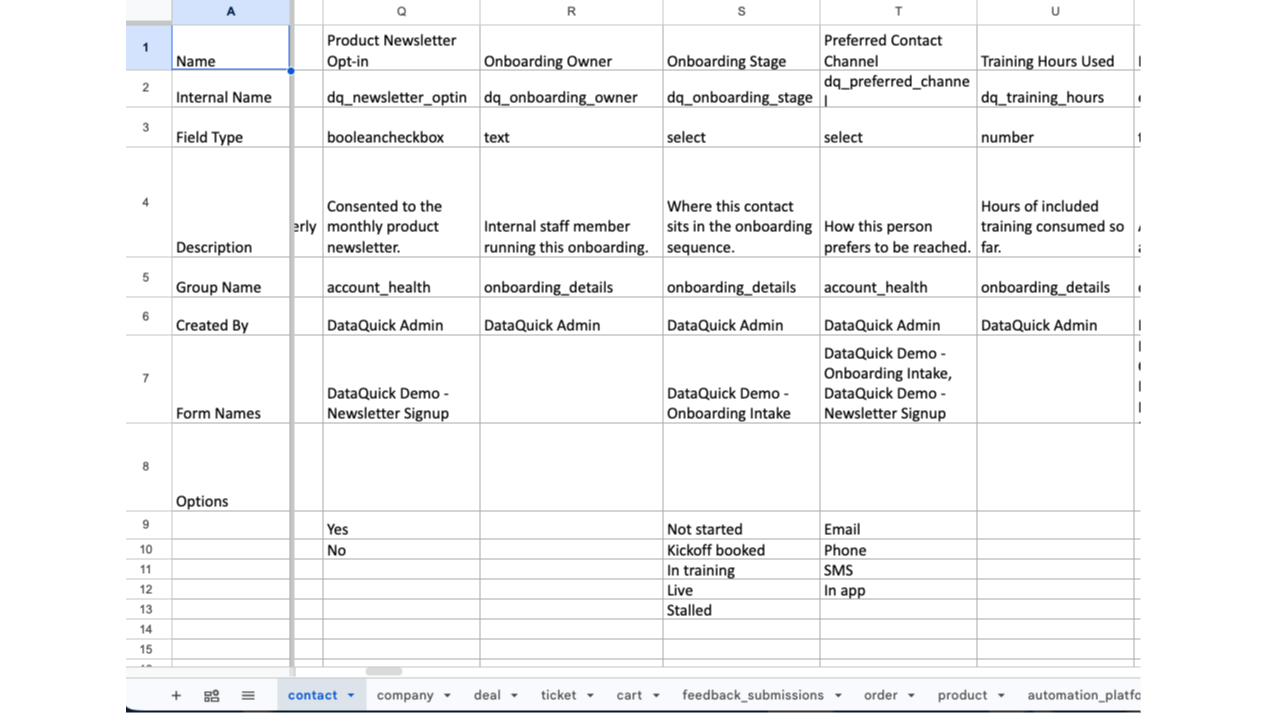
Property Architecture Export
Exports every property definition in your portal to a Excel workbook. One sheet per object. Each property lists its label, internal name, field type, description, group, creator, the forms that use it, and its options. Objects your portal doesn't include, or hasn't granted permission for, are listed in an "Objects Not Included" sheet
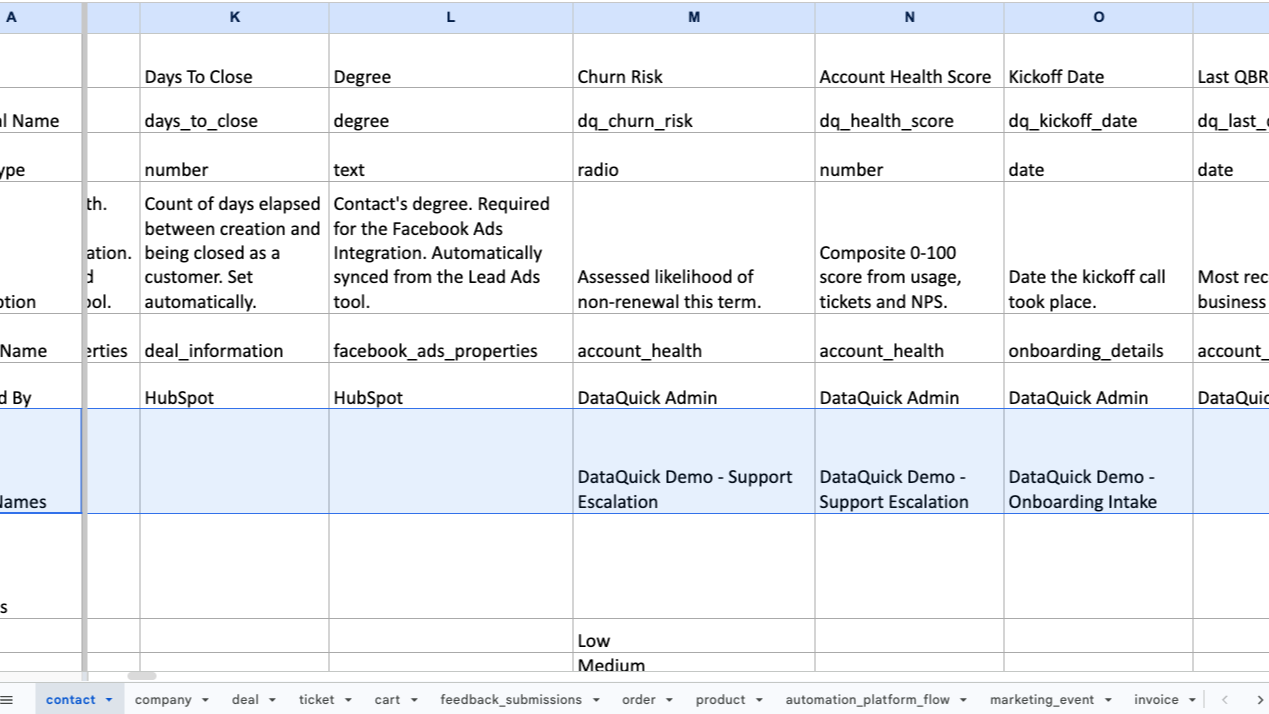
Form Usage Mapping
Every property sheet includes a Form Names row listing the forms that collect that field. Before changing a property's type, renaming it, or deleting it, you can see what breaks — without opening forms one at a time to check
App-functionaliteit
Gedeelde gegevens
Property definitions | ||
Form field definitions | ||
User names and email addresses |
DataQuick reads property definitions only — field labels, internal names, types, groups, descriptions, dropdown options, and which forms use each field. It does not read CRM records. No contacts, companies, deals, or other customer data is accessed at any point.
Most of these permissions use HubSpot's crm.schemas.* scopes, which grant access to an object's field definitions and not to the records themselves.
Property data is written directly into the Excel file you download and is never stored by DataQuick. What we do store is the OAuth tokens needed to keep your portal connected, your portal ID and domain, and a count of exports run — nothing more.
HubSpot user names and email addresses are read to attribute who created each property, and appear in the "Created By" column of your export.
Data flows in one direction only. DataQuick never writes anything to HubSpot.
Reviews
Prijzen
Pro
US$ 95
/per portal (license-based)Standard object architecture export
One-time purchase. One license connects one HubSpot portal and includes unlimited exports of that portal.Pro
US$ 95
/per portal (license-based)Standard object architecture export
One-time purchase. One license connects one HubSpot portal and includes unlimited exports of that portal.* De hier vermelde prijzen dienen alleen ter illustratie. Alle prijzen zijn exclusief belasting, bonussen, kortingen of andere prijsvariabelen. Neem contact op met de partner voor de meest recente en correcte prijsinformatie. HubSpot erkent geen verantwoordelijkheid voor deze prijsinformatie, die wordt verstrekt door onze partners. Prijzen laatst bijgewerkt: 27-10-2026
Meer info
Gemaakt door - BizzyWeb
Installaties - <10 installaties
Categorieën Talen waarin deze app beschikbaar is Engels
Vandaag de aandacht trekken

Microsoft Teams
Gebruik Microsoft Teams en HubSpot voor vergaderingen, gesprekken en nog veel meer!

Slack
Beheer CRM-records, krijg AI-ondersteuning van Breeze, verstuur realtime meldingen en werk samen met je team - zonder Slack te verlaten.
