

iContact
Vaatimukset
HubSpot-tilaus HubSpot-tilin käyttöoikeudet Ei vaadi käyttöoikeuksia Pääsytyyppi Jaettu iContact-tilaus - Review iContact Pricing Page paketti
Yhteenveto
1/2
Sync data between iContact and HubSpot without manual data entry or messy, time-consuming imports. Here’s what you get with Data Sync by HubSpot:
- Two-way sync: Data is shared between iContact and HubSpot in real time
- Default field mappings: Set-up is quick with out-of-the-box field mappings already created for you
- Historical syncing: Your existing data will sync right away, and updates will sync as they happen
Please be aware of some limitations which we'll solve for soon:
- You cannot choose which iContact list contacts will be added to
- You cannot set the iContact status through the sync
Ominaisuudet
%20(2)-2.png)
Default field mappings
Field mappings connect matching information in each app—and we’ve already created them for you. Our out-of-the-box default field mappings make set-up quick and keep your data clean and organized. Plus, there are no surprises: You can see exactly which fields come already mapped in the “Shared data” section below.
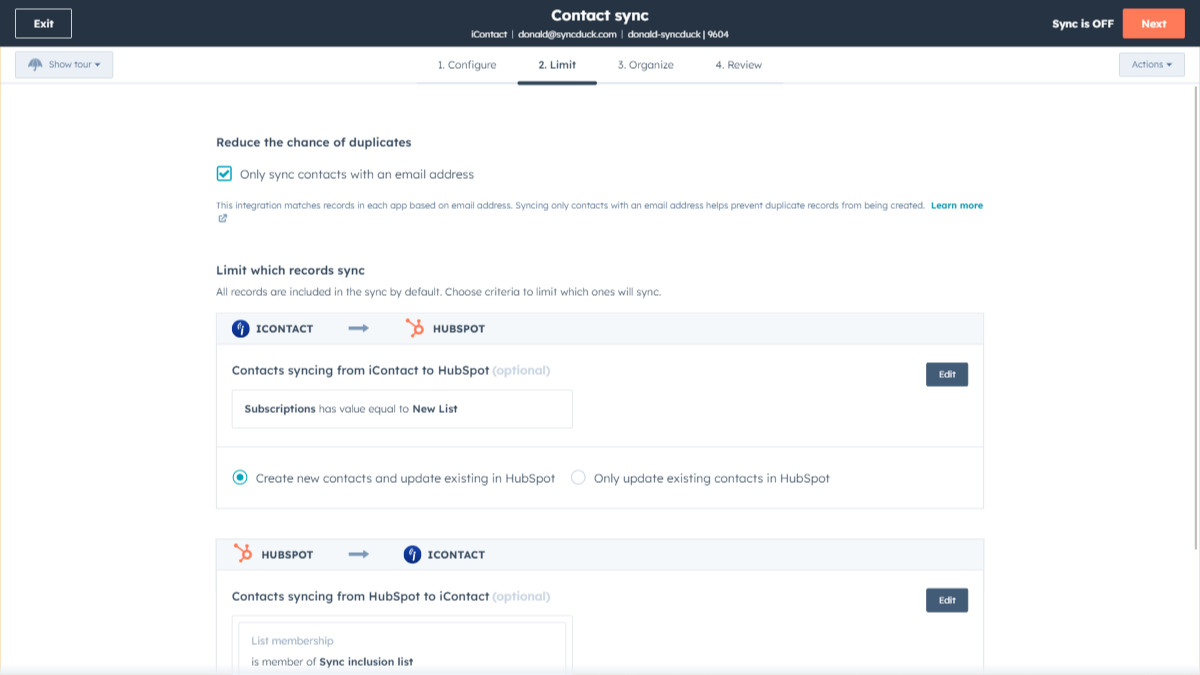
Sync iContact and HubSpot data
Make manual data entry a thing of the past by syncing contacts between HubSpot and iContact. When records are created or updated in either app, that information will be automatically shared with the other one.

Sync only the data you want
You’re in control of your data. You can set up a one- or two-way sync, which means you can either sync data from only one app to the other or back-and-forth between both apps. You can also add a filter for any iContact field (like Status or Subscription) or HubSpot list to sync exactly what you want—and nothing you don’t.
%20(3)-2.png)
Custom field mappings
Custom field mappings are available with Data Hub Starter or Professional plans. Custom mappings add the flexibility to create your own mappings or make changes to your default ones.
Sovelluksen toiminnallisuus
Jaetut tiedot
Each object has field mappings that connect matching information from each app. Default mappings are listed below. If you want to change these default mappings or create your own, custom field mappings are available with Data Hub Starter and up.
Contacts |
Arvostelut
- 18. kesä 2026
Yhteys on muodostettu, mutta synkronointi ei onnistu
Siinä sanottiin, että olen yhdistänyt iContactin ja HubSpotin, mutta jostain syystä pudotusvalikossa ei näy yhtään iContact-tiliä, jota voisin valita tietojen synkronointia varten. HubSpotin tuki ei myöskään ollut avuksi vianmäärityksessä.
En saa sitä toimimaan, eikä asiakastuki auttanut
DeCesare, E.
Hinnoittelu
Review iContact Pricing Page
0 $
Use the 'See all pricing options' link on the righthand side
"Make sure to confirm the HubSpot subscription and the iContact subscription needed to install this integration
Note: ""Free"" is referring to the cost of the integration, not the app subscriptions "
Review iContact Pricing Page
0 $
Use the 'See all pricing options' link on the righthand side
"Make sure to confirm the HubSpot subscription and the iContact subscription needed to install this integration
Note: ""Free"" is referring to the cost of the integration, not the app subscriptions "
*Hinnoittelu tässä on vain esittelytarkoituksessa. Kaikki hinnat eivät sisällä veroja, kannustimia, alennuksia tai muita hinnoittelumuuttujia. Pyydä kumppanilta ajantasaiset ja oikeat hintatiedot. HubSpot ei ota vastuuta näistä kumppaneidemme tarjoamista hintatiedoista. Hinnoittelu päivitetty viimeksi: 03.09.2025
Lisätietoja
Uusia sovelluksia

Finale Composer
Tekoälyn avulla luotu verkkosisältö, joka on suunniteltu HubSpotille.

Synder
Synkronoi HubSpot-laskut QuickBooksiin, NetSuiteen tai Xeroon — suoriteperusteisella kirjanpidolla ja tulojen kirjaamisella
