

요구 사항
HubSpot 요금제 HubSpot 계정 권한 권한이 필요하지 않음 액세스 유형 공유됨 iContact 구독 - Review iContact Pricing Page 플랜
개요
1/2
Sync data between iContact and HubSpot without manual data entry or messy, time-consuming imports. Here’s what you get with Data Sync by HubSpot:
- Two-way sync: Data is shared between iContact and HubSpot in real time
- Default field mappings: Set-up is quick with out-of-the-box field mappings already created for you
- Historical syncing: Your existing data will sync right away, and updates will sync as they happen
Please be aware of some limitations which we'll solve for soon:
- You cannot choose which iContact list contacts will be added to
- You cannot set the iContact status through the sync
기능
%20(2)-2.png)
Default field mappings
Field mappings connect matching information in each app—and we’ve already created them for you. Our out-of-the-box default field mappings make set-up quick and keep your data clean and organized. Plus, there are no surprises: You can see exactly which fields come already mapped in the “Shared data” section below.
Sync iContact and HubSpot data
Make manual data entry a thing of the past by syncing contacts between HubSpot and iContact. When records are created or updated in either app, that information will be automatically shared with the other one.

Sync only the data you want
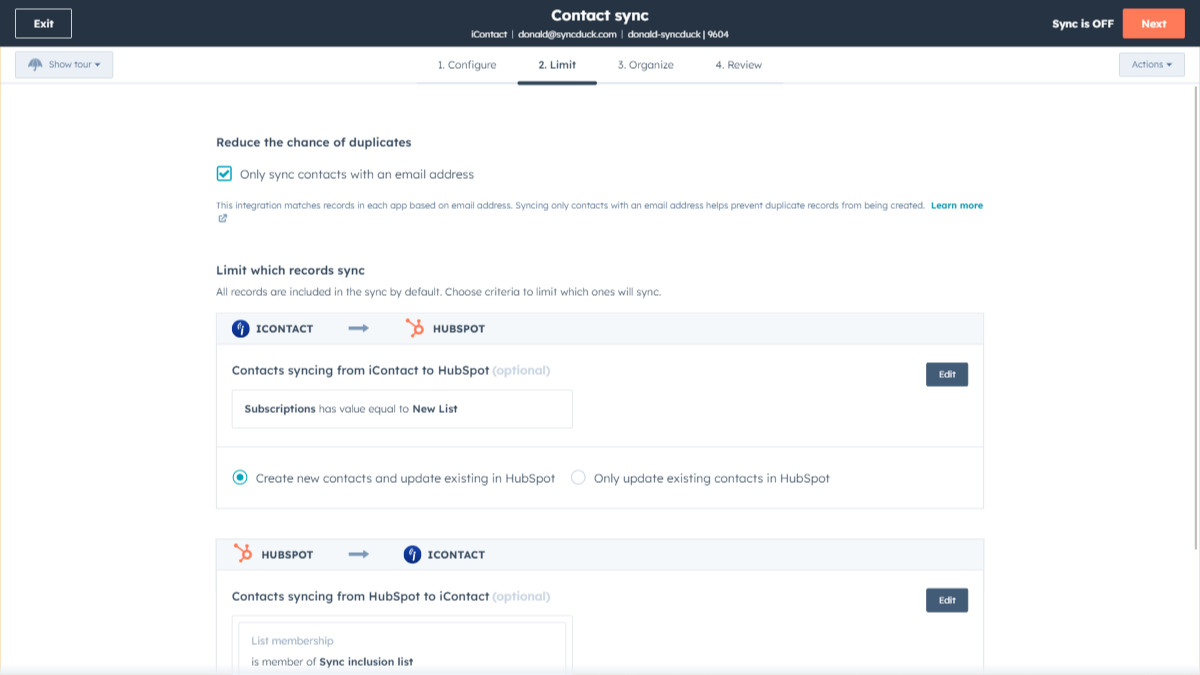
You’re in control of your data. You can set up a one- or two-way sync, which means you can either sync data from only one app to the other or back-and-forth between both apps. You can also add a filter for any iContact field (like Status or Subscription) or HubSpot list to sync exactly what you want—and nothing you don’t.
%20(3)-2.png)
Custom field mappings
Custom field mappings are available with Data Hub Starter or Professional plans. Custom mappings add the flexibility to create your own mappings or make changes to your default ones.
앱 기능
공유 데이터
Each object has field mappings that connect matching information from each app. Default mappings are listed below. If you want to change these default mappings or create your own, custom field mappings are available with Data Hub Starter and up.
Contacts |
리뷰
- 2026년 6월 18일
연결은 되었지만 동기화가 되지 않습니다
아이콘택트와 허브스팟이 연결되었다는 메시지가 뜨는데, 왠지 모르게 데이터 동기화를 위해 선택해야 할 드롭다운 메뉴에 아이콘택트 계정이 하나도 표시되지 않습니다. 게다가 허브스팟 지원팀도 문제 해결에 별 도움이 되지 않았습니다.
작동하지 않는데, 고객 지원팀도 도움이 되지 않았습니다.
DeCesare, E.
가격 책정
Review iContact Pricing Page
US$0
Use the 'See all pricing options' link on the righthand side
"Make sure to confirm the HubSpot subscription and the iContact subscription needed to install this integration
Note: ""Free"" is referring to the cost of the integration, not the app subscriptions "
Review iContact Pricing Page
US$0
Use the 'See all pricing options' link on the righthand side
"Make sure to confirm the HubSpot subscription and the iContact subscription needed to install this integration
Note: ""Free"" is referring to the cost of the integration, not the app subscriptions "
* 여기에 표시된 가격은 표시 목적으로만 사용됩니다. 모든 가격에는 세금, 인센티브, 할인 또는 기타 가격 변수가 포함되어 있지 않습니다. 가장 최신의 정확한 가격 정보를 알고 싶다면 파트너에게 연락해야 합니다. HubSpot은 파트너가 제공하는 이 가격 정보에 대해 어떠한 책임도 지지 않습니다. 마지막 가격 업데이트 날짜: 2025.09.03.