

WHMCS
Ecommerce automation Syncing
Creazione di - Webdew Inc
Installazioni - PIù di 20 installazioni
Valutazione - 1(1)
Requisiti
Piano HubSpot Funziona con tutti i piani HubSpot Scopri di più Autorizzazioni dell'account HubSpot - Visualizza le autorizzazioni dell'account richieste
Abbonamento WHMCS - Piani Daily Sync o Hourly Sync
Panoramica

1/7 - Click on login button to open signin page
Sync Ecommerce data WHMCS to HubSpot.
Version 1.0.1 Release
Released March 2022.
New And Noteworthy
- New Dashboard is installed for the User interface.
Changes In Functionality
We have created a new workflow for new & existing users.
- Payment is now subscription-based. It can be monthly or yearly. There are coupons with promotion codes also available for the new user.
- Payment Successful, Cancelation, Renewal Receipt Emails are automatically sent to each user who has installed the app.
- The payment is non-refundable.
- The Renewal date after the subscription expires is visible to the user once the subscription is created after the payment.
- The subscription expiration date is also made visible to existing users who want to renew the subscription.
- You can only add one application to a single portal. Ambiguity is removed if the portal is already being used by the same app.
- The app will not install if the HubSpot Account Email is different from the Email you have registered on apps.webdew.com. Email should be the same for installation. Otherwise, an error message will pop up.
- User Profile Section has been updated according to the needs of the user ex. A user can now set his profile picture or vice versa.
Note : Payments are subscription based
- Monthly / Yearly.
- Payments are non-refundable.
Note : This application only compatible for sales hub professional account only.
Funzionalità
Viewport
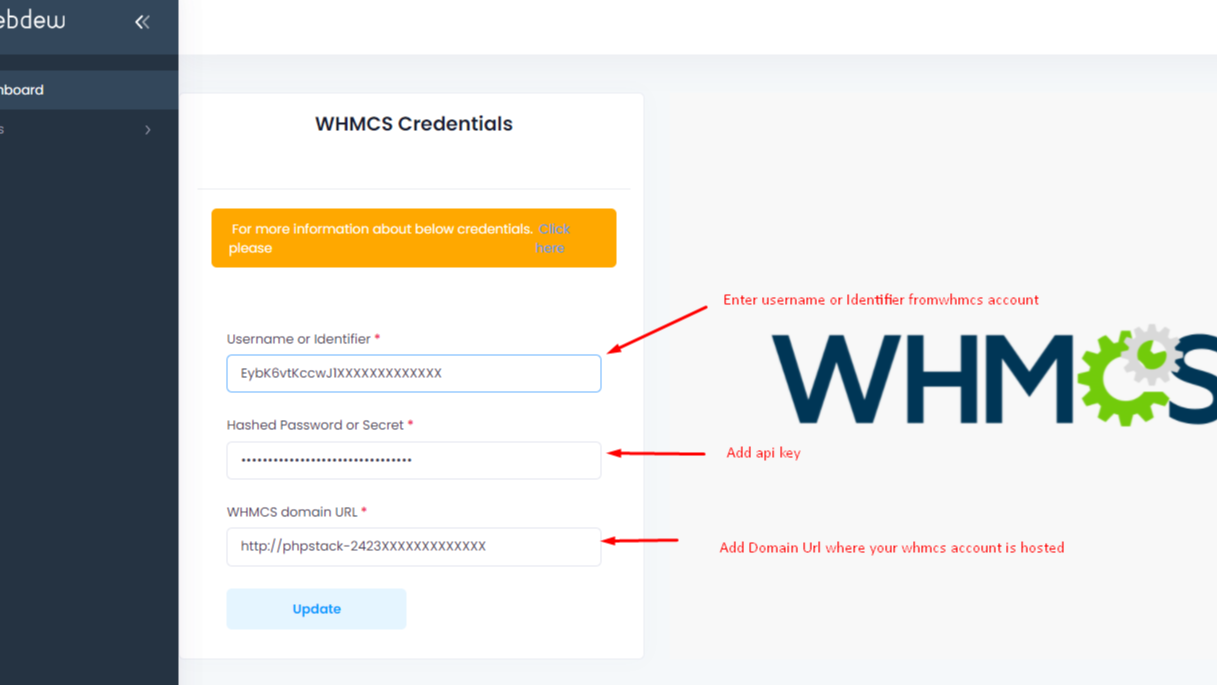
After Login, Click on the Apps menu "WHMCS Settings" to save WHMCS credentials as per shown picture. Note :This application is only compatible with sales hub professional accounts only.

Sync Pipeline
Synced pipeline for stages management of WHMCS and HubSpot.

Sync Products
Click on Data Import then Products, contacts and orders will be synced with WHMCS to HubSpot

Synced Successful
Data has been synced.

Sync WHMCS tickets
Select your WHMCS tickets pipelines and corresponding HubSpot Pipelines. After that go to ticket imports and do the import. Make sure you have given permissions to access tickets of WHCS while generating API key.
Funzionalità dell'app
Dati condivisi
WHMCS Contacts | ||
WHMCS Orders | ||
WHMCS Products | ||
WHMCS ticketing |
Recensioni
- 6 ott 2023
Non preoccupatevi di installare e testare
State alla larga per motivi molto semplici: 1. Non funziona. Non funziona. 2. Assistenza poco reattiva. 3. Persone pigre che non capiscono come funziona il business. Il messaggio agli autori: spegnetelo, non sprecate i soldi e il tempo delle persone. Messaggio finale se state valutando: se nelle caratteristiche c'è scritto "nessun reso supportato" evitatelo a tutti i costi. Queste persone non sono interessate a fare le cose per bene.
Non funziona.
Non funziona.
Frode.
Grizales, M.
Servizi all'impresa - generale - 11 - 25 dipendenti
Prezzi
Daily Sync
After every 24 hours sync your WHMCS to HubSpot.
Monthly : $9
Yearly : $90
Daily Sync
Daily Sync
After every 24 hours sync your WHMCS to HubSpot.
Monthly : $9
Yearly : $90
Daily Sync
* I prezzi riportati sono a scopo informativo. I prezzi non includono tasse, incentivi, sconti o altre variabili. Contatta il partner per ricevere il tariffario aggiornato. HubSpot declina qualsiasi responsabilità circa le informazioni di prezzo fornite dai propri partner. Ultimo aggiornamento tariffario: 18/11/2025
Maggiori informazioni
Creazione di - Webdew Inc
Installazioni - PIù di 20 installazioni
Categorie Lingue in cui è disponibile questa app Inglese
Ora di tendenza

Zoom
Utilizzate Zoom con le riunioni di HubSpot, i flussi di lavoro, i…

