

Requirements
HubSpot Plan HubSpot Account permissions - View the required account permissions
Access Type Shared WHMCS Subscription - Daily Sync or Hourly Sync plans
Overview

1/7 - Click on login button to open signin page
Sync Ecommerce data WHMCS to HubSpot.
Version 1.0.1 Release
Released March 2022.
New And Noteworthy
- New Dashboard is installed for the User interface.
Changes In Functionality
We have created a new workflow for new & existing users.
- Payment is now subscription-based. It can be monthly or yearly. There are coupons with promotion codes also available for the new user.
- Payment Successful, Cancelation, Renewal Receipt Emails are automatically sent to each user who has installed the app.
- The payment is non-refundable.
- The Renewal date after the subscription expires is visible to the user once the subscription is created after the payment.
- The subscription expiration date is also made visible to existing users who want to renew the subscription.
- You can only add one application to a single portal. Ambiguity is removed if the portal is already being used by the same app.
- The app will not install if the HubSpot Account Email is different from the Email you have registered on apps.webdew.com. Email should be the same for installation. Otherwise, an error message will pop up.
- User Profile Section has been updated according to the needs of the user ex. A user can now set his profile picture or vice versa.
Note : Payments are subscription based
- Monthly / Yearly.
- Payments are non-refundable.
Note : This application only compatible for sales hub professional account only.
Features
Viewport
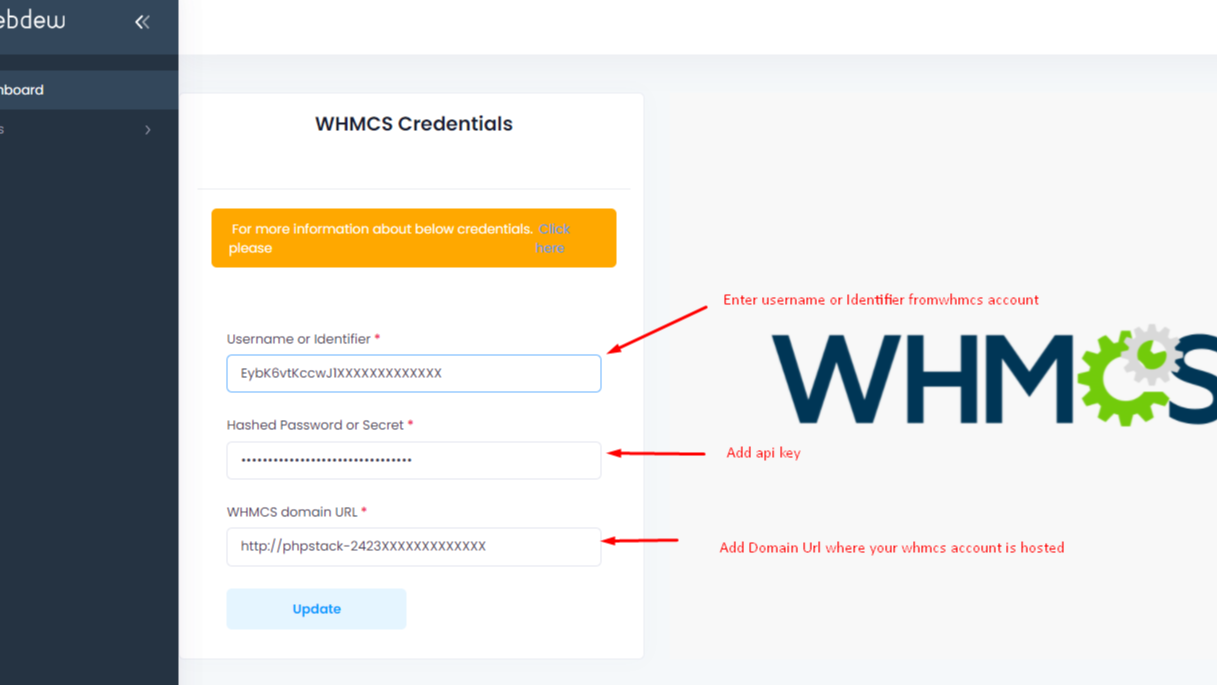
After Login, Click on the Apps menu "WHMCS Settings" to save WHMCS credentials as per shown picture. Note :This application is only compatible with sales hub professional accounts only.

Sync Pipeline
Synced pipeline for stages management of WHMCS and HubSpot.

Sync Products
Click on Data Import then Products, contacts and orders will be synced with WHMCS to HubSpot

Synced Successful
Data has been synced.

Sync WHMCS tickets
Select your WHMCS tickets pipelines and corresponding HubSpot Pipelines. After that go to ticket imports and do the import. Make sure you have given permissions to access tickets of WHCS while generating API key.
App Functionality
Shared Data
WHMCS Contacts | ||
WHMCS Orders | ||
WHMCS Products | ||
WHMCS ticketing |
Reviews
- Oct 6, 2023
Please don't bother to install and test
Stay away for very basic reasons: 1. It doesn't work. 2. Unresponsive support. 3. Lazy people who don't understand how business works. 4. They are playing to have a company really, I guess they are dedicated to other things. Message to the authors: turn this off, don't waste people's money and time. Final message if you are evaluating: if it says in its features "no supported returns" avoid it at all costs. These people are not interested in doing things right.
It doesn't work.
It doesn't work.
Fraud.
Grizales, M.
Business Services - General - 11 to 25 employees
Pricing
Daily Sync
$9
one-time feeAfter every 24 hours sync your WHMCS to HubSpot.
Monthly : $9
Yearly : $90
Daily Sync
Daily Sync
$9
one-time feeAfter every 24 hours sync your WHMCS to HubSpot.
Monthly : $9
Yearly : $90
Daily Sync
* The pricing here is for display purposes only. All prices do not include taxes, incentives, discounts, or other pricing variables. You should contact the partner for the most up to date and correct pricing information. HubSpot does not take any responsibility for this pricing information, which is provided by our partners. Pricing last updated: 08/11/2025
More info
Built by - Webdew Inc
Installs - 20+ installs
Categories Languages this app is available in English
Getting attention today

Zoom Phone for HubSpot
Enhance your HubSpot experience and streamline your workflows.

Zapier
The easiest way to automate and connect HubSpot to 8,000+ apps
