

Wymagania
Plan HubSpot Uprawnienia konta HubSpot - Wyświetl wymagane uprawnienia konta
Typ dostępu Udostępniono Subskrypcja WHMCS - Daily Sync lub Hourly Sync planu
Przegląd

1/7 - Click on login button to open signin page
Sync Ecommerce data WHMCS to HubSpot.
Version 1.0.1 Release
Released March 2022.
New And Noteworthy
- New Dashboard is installed for the User interface.
Changes In Functionality
We have created a new workflow for new & existing users.
- Payment is now subscription-based. It can be monthly or yearly. There are coupons with promotion codes also available for the new user.
- Payment Successful, Cancelation, Renewal Receipt Emails are automatically sent to each user who has installed the app.
- The payment is non-refundable.
- The Renewal date after the subscription expires is visible to the user once the subscription is created after the payment.
- The subscription expiration date is also made visible to existing users who want to renew the subscription.
- You can only add one application to a single portal. Ambiguity is removed if the portal is already being used by the same app.
- The app will not install if the HubSpot Account Email is different from the Email you have registered on apps.webdew.com. Email should be the same for installation. Otherwise, an error message will pop up.
- User Profile Section has been updated according to the needs of the user ex. A user can now set his profile picture or vice versa.
Note : Payments are subscription based
- Monthly / Yearly.
- Payments are non-refundable.
Note : This application only compatible for sales hub professional account only.
Cechy
Viewport
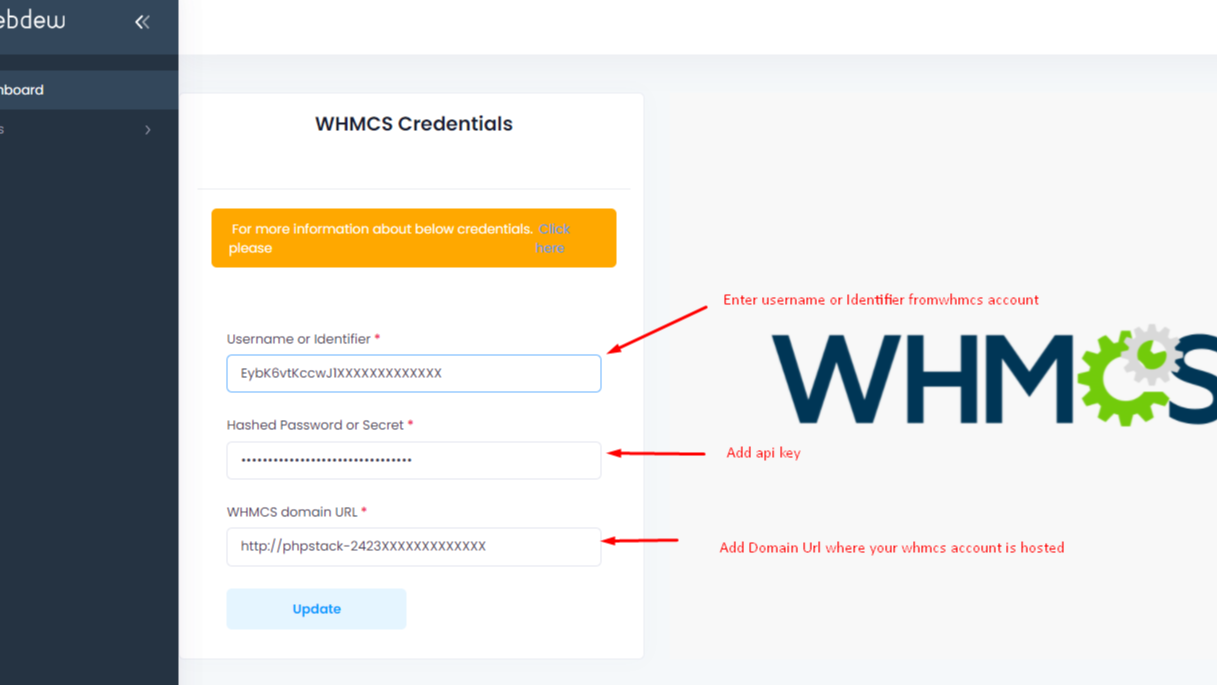
After Login, Click on the Apps menu "WHMCS Settings" to save WHMCS credentials as per shown picture. Note :This application is only compatible with sales hub professional accounts only.

Sync Pipeline
Synced pipeline for stages management of WHMCS and HubSpot.

Sync Products
Click on Data Import then Products, contacts and orders will be synced with WHMCS to HubSpot

Synced Successful
Data has been synced.

Sync WHMCS tickets
Select your WHMCS tickets pipelines and corresponding HubSpot Pipelines. After that go to ticket imports and do the import. Make sure you have given permissions to access tickets of WHCS while generating API key.
Funkcjonalność aplikacji
Udostępnione dane
WHMCS Contacts | ||
WHMCS Orders | ||
WHMCS Products | ||
WHMCS ticketing |
Recenzje
- 6 paź 2023
Nie zawracaj sobie głowy instalacją i testowaniem
Trzymaj się z daleka z bardzo podstawowych powodów: 1. Nie działa. 2. Brak reakcji wsparcia. 3. Leniwi ludzie, którzy nie rozumieją, jak działa biznes. 4. Grają, aby naprawdę mieć firmę, zgaduję, że poświęcają się innym rzeczom. Wiadomość dla autorów: wyłącz to, nie marnuj pieniędzy i czasu ludzi. Ostateczna wiadomość, jeśli oceniasz: jeśli w jego funkcjach jest napisane "brak obsługiwanych zwrotów", unikaj go za wszelką cenę. Ci ludzie nie są zainteresowani robieniem rzeczy dobrze.
To nie działa.
To nie działa.
Oszustwo.
Grizales, M.
Usługi biznesowe – ogólne - Od 11 do 25 pracowników
Ceny
Daily Sync
9 USD
– opłata jednorazowaAfter every 24 hours sync your WHMCS to HubSpot.
Monthly : $9
Yearly : $90
Daily Sync
Daily Sync
9 USD
– opłata jednorazowaAfter every 24 hours sync your WHMCS to HubSpot.
Monthly : $9
Yearly : $90
Daily Sync
* Powyższe ceny zostały podane wyłącznie w celach informacyjnych. Nie zawierają one podatków, premii, zniżek lub innych zmiennych cenowych. Skontaktuj się z partnerem w celu uzyskania najbardziej aktualnych i poprawnych informacji o cenach. HubSpot nie ponosi żadnej odpowiedzialności za informacje cenowe, które są dostarczane przez naszych partnerów. Ostatnia aktualizacja cen: 11.08.2025
Więcej informacji
Utworzone przez - Webdew Inc
Instaluje - Ponad 20 instalacji
Kategorie Języki, w których dostępna jest ta aplikacja Angielski