
요구 사항
HubSpot 요금제 HubSpot 계정 권한 권한이 필요하지 않음 액세스 유형 공유됨 Xero 구독 - Xero의 요금제 페이지 살펴보기 플랜
개요
1/3
수동 데이터 입력이나 번거롭고 시간이 많이 소요되는 가져오기 과정 없이 Xero 연락처를 연동하세요.
이 통합 기능을 설치하기 전에 HubSpot에서 2단계 인증(2FA)을 활성화해 주세요(방법 보기).
다음과 같은 기능을 이용하실 수 있습니다:
Data Hub의 Data Studio와 연동: AI의 도움을 받아 익숙한 스프레드시트 형식의 인터페이스에서 데이터를 통합하세요.
양방향 동기화: Xero와 HubSpot 간에 데이터가 실시간으로 공유됩니다.
기본 필드 매핑: 미리 생성된 기본 필드 매핑을 통해 신속하게 설정할 수 있습니다.
이력 동기화: 기존 데이터는 즉시 동기화되며, 업데이트된 내용은 발생 즉시 동기화됩니다.
청구 프로세스를 간소화하고 Xero를 최신 상태로 유지하세요
Revenue Hub는 견적서, 청구서, 구독, 결제 링크와 같은 도구를 제공하여 고객에게 청구서를 발행하고 대금을 수금할 수 있도록 지원합니다. HubSpot 내에서 청구서를 처음부터 새로 작성하거나, 견적서나 거래를 청구서 또는 구독으로 변환할 수 있습니다. 양방향 청구서 동기화를 통해 HubSpot의 청구서가 Xero에 생성되며, 결제 내역도 자동으로 동기화됩니다.
Revenue Agent는 맞춤형 수금 계획, 결제 알림, 후속 조치 및 승인을 위해 작성된 에스컬레이션을 통해 미결제 청구서를 관리할 수 있도록 지원합니다. 프론트 오피스가 청구서를 발송하고 수금을 관리할 수 있도록 지원하여, 회계 팀이 비즈니스의 재무 건전성에 집중할 수 있게 하세요.
참고: ‘공유 데이터(Shared Data)’ 항목 하에서 어떤 객체가 동기화되는지 아래를 참조해 주세요. 또한 Xero에서 구축한 통합 기능을 확인해 보실 수도 있습니다.
기능
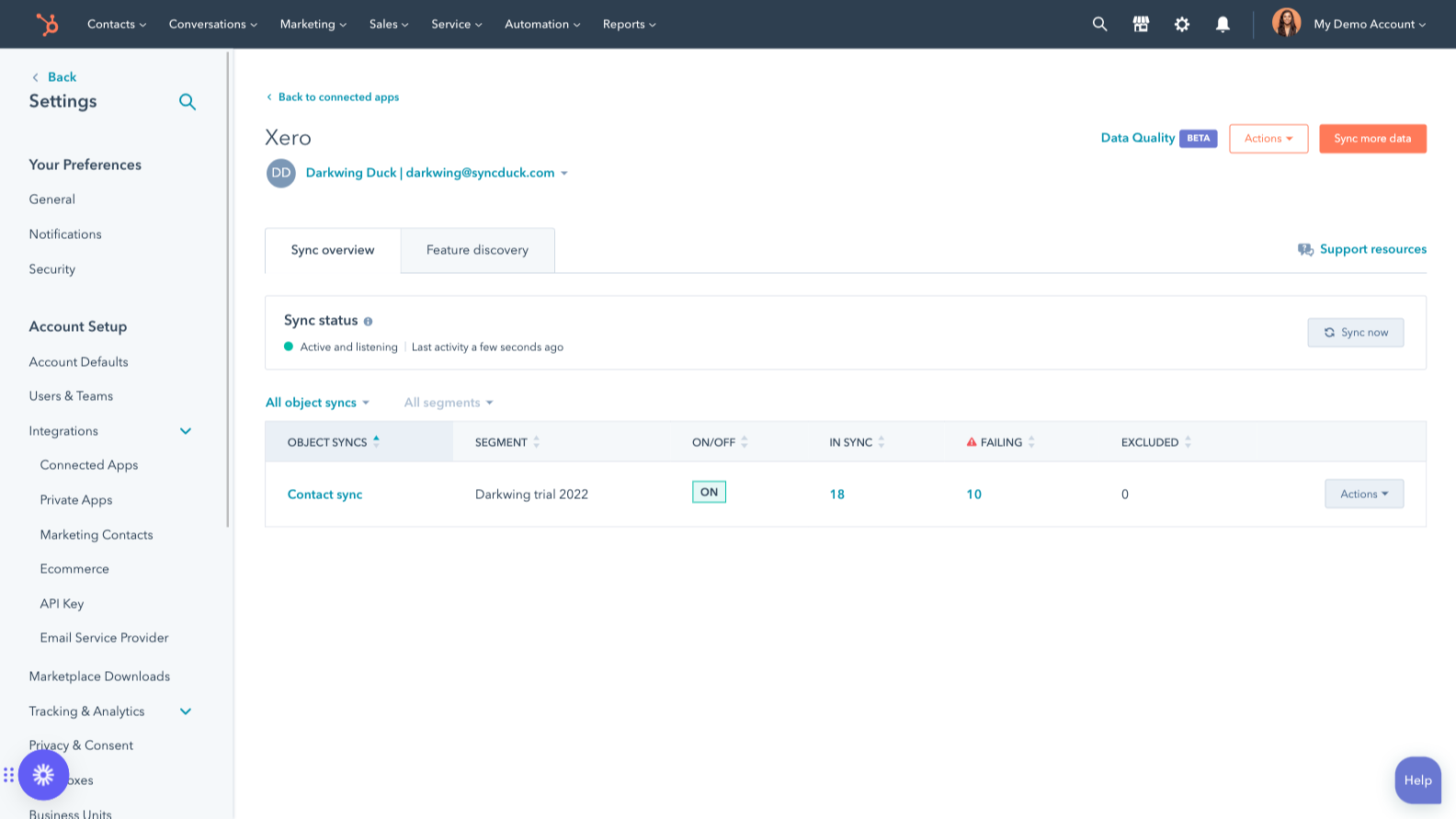
Xero와 HubSpot 데이터 동기화
HubSpot과 Xero 간의 연락처를 동기화하여 수동 데이터 입력을 과거의 일로 만드세요. 한 앱에서 기록이 생성되거나 업데이트되면, 해당 정보가 다른 앱과 자동으로 공유됩니다.
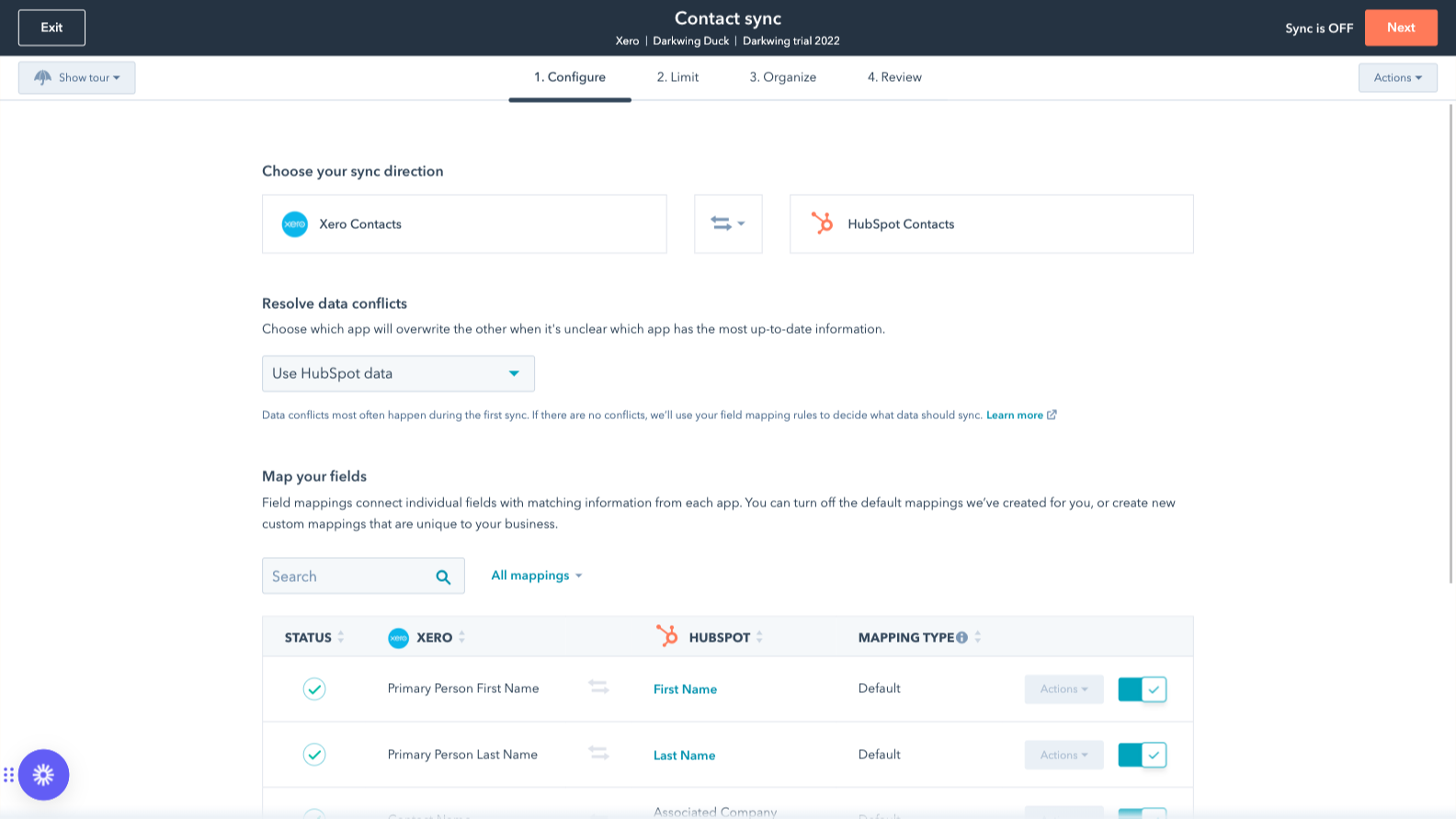
사용자 정의 필드 매핑
사용자 지정 필드 매핑 기능은 Operations Hub Starter 또는 Professional 요금제에서 이용할 수 있습니다. 사용자 지정 매핑을 통해 직접 매핑을 생성하거나 기본 매핑을 수정할 수 있는 유연성을 확보할 수 있습니다.
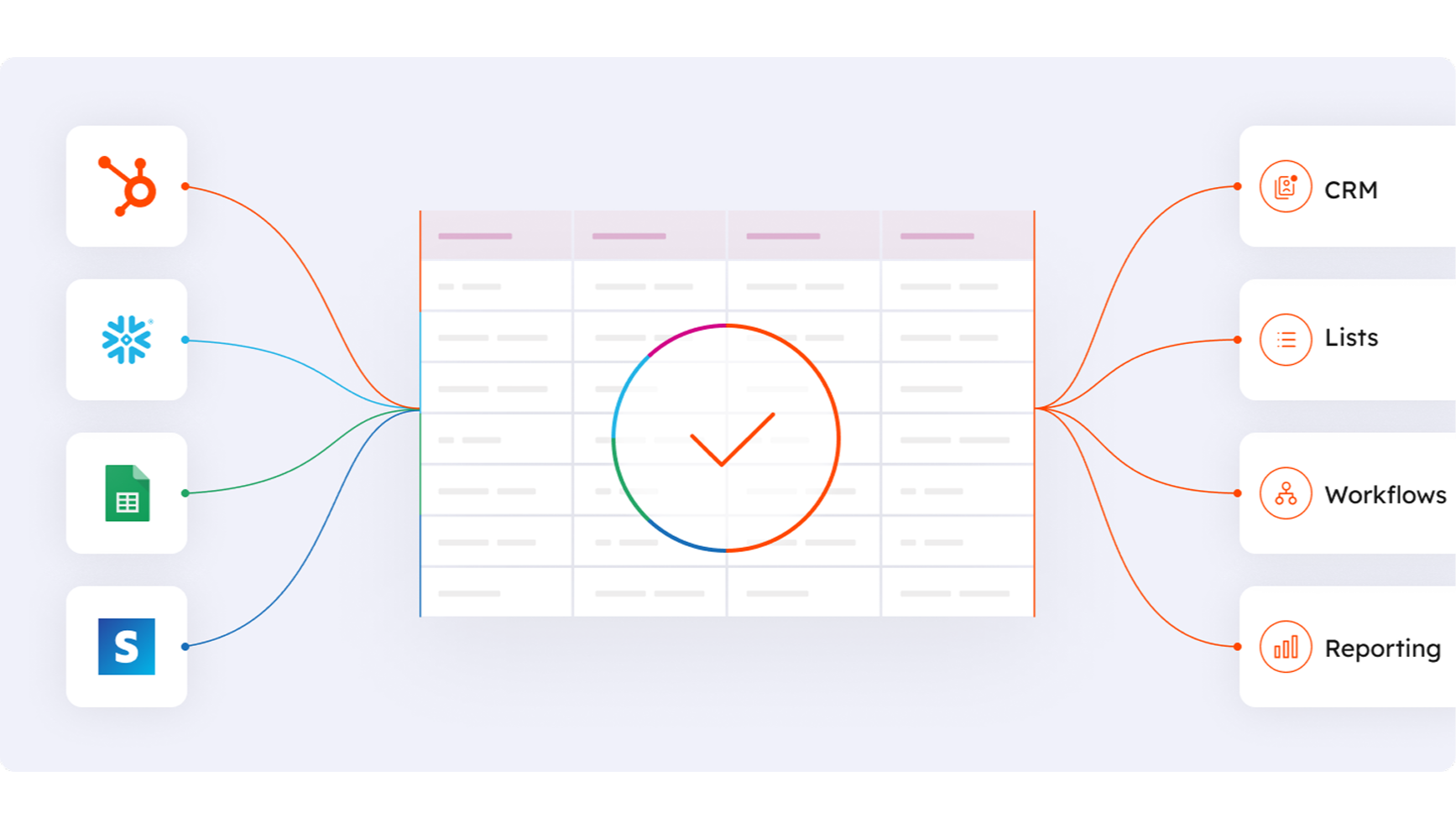
Data Hub의 Data Studio와 연동됩니다
마케팅 담당자를 위해 설계된 Data Hub의 Data Studio를 사용하면 누구나 AI의 도움을 받아 친숙한 스프레드시트 형식의 인터페이스에서 데이터를 결합할 수 있습니다. 고급 세분화, 자동화 및 보고 기능을 지원하는 맞춤형 데이터 세트를 생성하세요. 또한 Stripe를 비롯한 여러 외부 데이터 소스와 HubSpot CRM 간의 데이터 흐름을 손쉽게 관리할 수 있습니다.
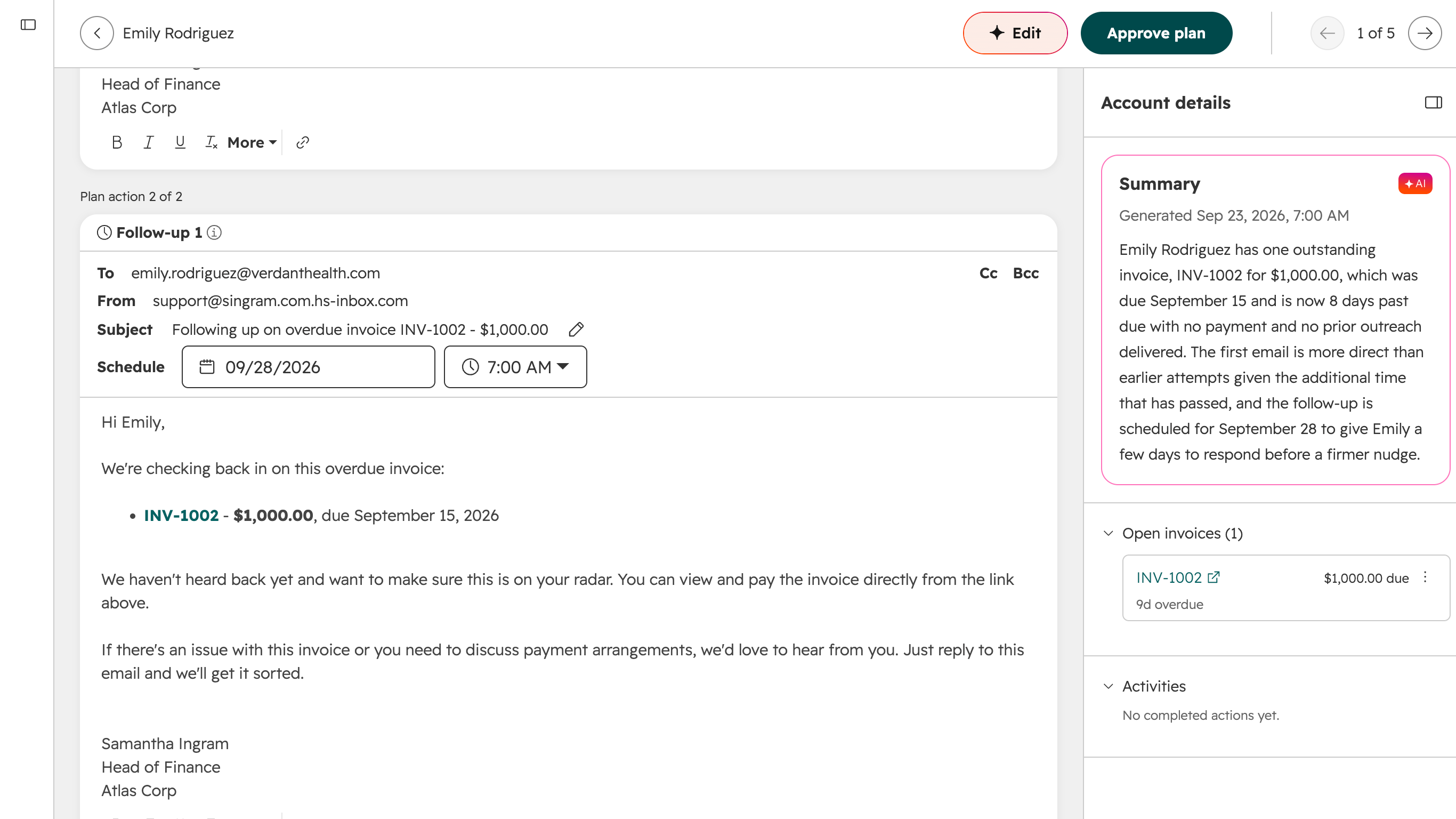
자동 징수를 위해 세무 담당자를 활용하세요
Revenue Agent는 HubSpot과 동기화된 Xero 청구서를 모니터링하고, 알림, 후속 조치 및 에스컬레이션이 포함된 맞춤형 징수 계획을 수립합니다. Revenue Agent는 청구서 및 결제 내역이 변경될 때마다 각 계획을 조정합니다.
앱 기능
공유 데이터
각 개체에는 각 앱의 일치하는 정보를 연결하는 필드 매핑이 있습니다. 기본 매핑은 아래에 나열되어 있습니다. 이러한 기본 매핑을 변경하거나 직접 매핑을 생성하려는 경우, Operations Hub Starter 이상 버전에서 사용자 지정 필드 매핑 기능을 사용할 수 있습니다.
다음 항목은 동기화되지 않습니다: 견적서 . 앞서 언급한 바와 같이, 추가적인 연동 기능을 이용하려면 Xero에서 구축한 연동 기능을 확인해 보시기 바랍니다.
 Contacts | ||
Invoices | ||
Xero data | ||
Items |
리뷰
2.2
46
2.2
46
사용자들은 이 연동 기능이 단방향 동기화만 지원한다고 지적하는데, 이는 HubSpot에서 생성된 청구서를 Xero로 전송할 수 없음을 의미합니다. 또한 리뷰어들은 가끔 발생하는 연결 오류와 기존 연락처 정보를 덮어쓸 수 있는 데이터 매핑 차이점에 대해서도 언급하고 있습니다. 이러한 점에도 불구하고, 일부 팀은 Xero의 결제 상태를 확인하거나 고객 데이터를 HubSpot으로 동기화하는 데 이 애플리케이션이 유용하다고 평가합니다.
- 2026년 9월 29일
매우 형편없는 역사적 동기화 기능
Xero와 HubSpot이 두 플랫폼에 모두 존재하는 세율을 사용자가 매칭할 수 있는 방법을 찾지 못해, 과거 청구서 전체를 Xero와 동기화할 수 없습니다.
Guevara, A.
- 2026년 9월 24일
계정 연결 및 동기화가 자주 끊어집니다
종종 “AuthenticationUnsuccessful” 오류로 인해 레코드의 동기화가 갑자기 중단되거나, 동기화 제한 기준을 충족했음에도 불구하고 레코드가 제외되는 경우가 있습니다. 일주일에 한 번 이상씩 직접 확인하여 동기화가 중단된 원인을 파악해야 하는 것은 매우 답답한 일입니다.
Rapson, T.
가격 책정
Xero의 요금제 페이지 살펴보기
US$0
오른쪽에 있는 ‘모든 가격 옵션 보기’ 링크를 이용하세요
이 연동 기능을 설치하는 데 필요한 HubSpot 구독과 Xero 구독을 반드시 확인해 주세요.
참고: “무료”는 앱 구독료가 아닌 연동 비용을 의미합니다.
Xero의 요금제 페이지 살펴보기
US$0
오른쪽에 있는 ‘모든 가격 옵션 보기’ 링크를 이용하세요
이 연동 기능을 설치하는 데 필요한 HubSpot 구독과 Xero 구독을 반드시 확인해 주세요.
참고: “무료”는 앱 구독료가 아닌 연동 비용을 의미합니다.
* 여기에 표시된 가격은 표시 목적으로만 사용됩니다. 모든 가격에는 세금, 인센티브, 할인 또는 기타 가격 변수가 포함되어 있지 않습니다. 가장 최신의 정확한 가격 정보를 알고 싶다면 파트너에게 연락해야 합니다. HubSpot은 파트너가 제공하는 이 가격 정보에 대해 어떠한 책임도 지지 않습니다. 마지막 가격 업데이트 날짜: 2026.09.25.