

SalesPower PowerSync AMS
Built by - SalesPower
Installs - 10+ installs
Requirements
HubSpot Plan HubSpot Account permissions - View the required account permissions
Access Type Shared SalesPower PowerSync AMS Subscription - SalesPower PowerSync AMS plan
Overview
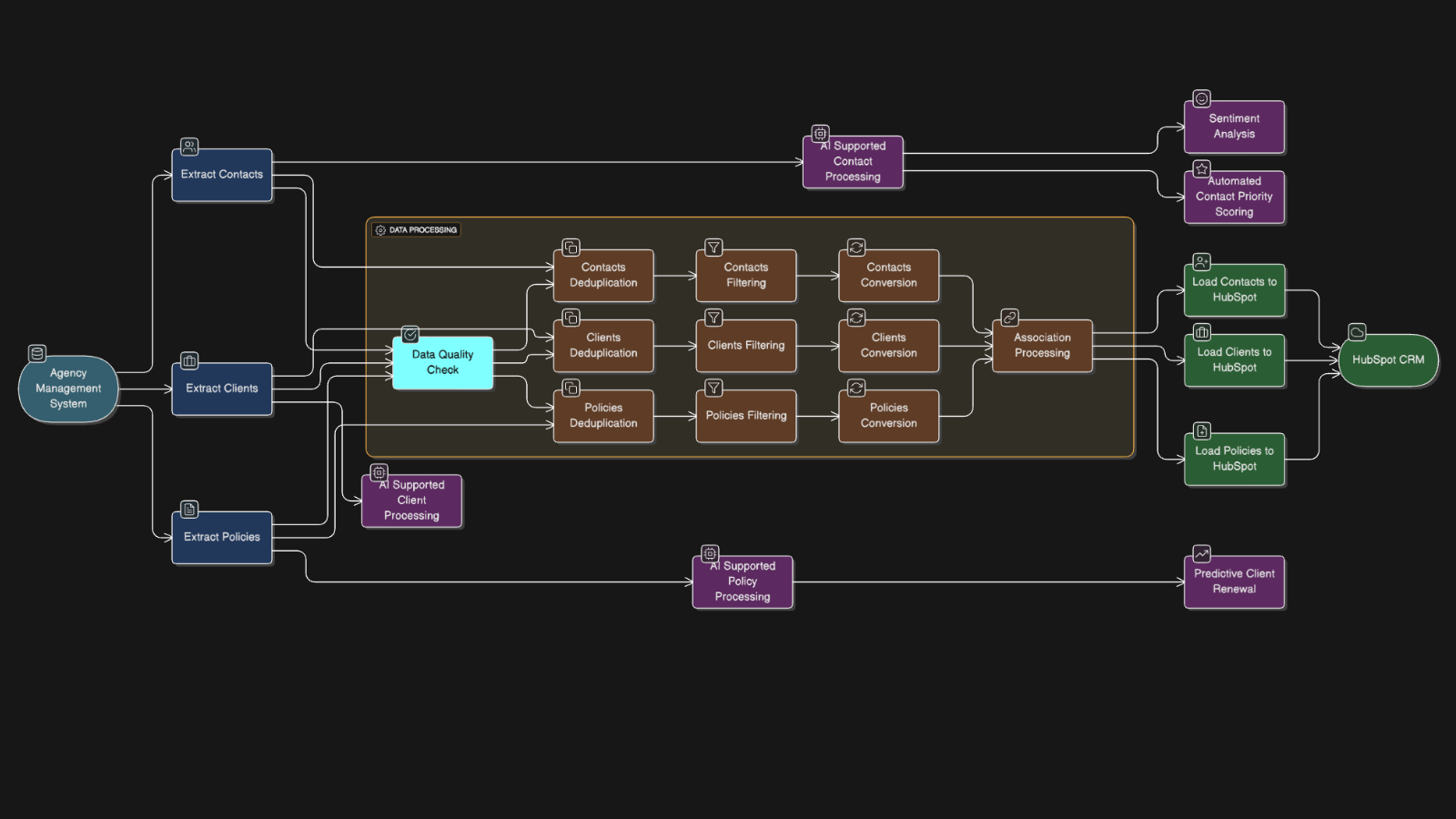
1/3 - PowerSync AMS Data Flow
Effortlessly Integrate Your Agency Management System with HubSpot - And Unlock New Possibilities
Transform your insurance agency with PowerSync AMS. Seamlessly unify client data from your Agency Management System with leads, prospects, emails, call logs, notes, transcriptions, and more — all within HubSpot. With everything in one place, you can fully harness the power of HubSpot and AI to market smarter, sell faster, and support every stage of your client journey with confidence.
Reduce reliance on your Agency Management System and unlock new flexibility. PowerSync AMS and HubSpot empowers insurance agencies to do more with less manual effort and fewer disconnected systems:
Deliver exceptional service with a unified, ticket-based help desk
Automate renewals and eliminate repetitive administrative work
Add structured annual policy reviews to boost client retention
Launch automated outreach campaigns using real-time client, contact, and policy data
Tier and organize clients to prioritize service and support
Connect to a wide ecosystem of third-party tools in the HubSpot Marketplace
...and so much more
Don’t Just Ask What You Can Do — Ask How
Your Agency Management System limits what’s possible. HubSpot frees you to build custom workflows, automation, and integrations tailored to how your agency actually works. With its open architecture and vibrant app ecosystem, HubSpot is your agency’s launchpad for transformation — especially when paired with PowerSync AMS.
Why PowerSync AMS ?
One Contact. One Source of Truth. No more duplicates. PowerSync AMS intelligently merges multiple contact entries from your Agency Management System into a single, unified HubSpot record — creating clarity and simplicity for your team.
Unified Communications Emails, calls, notes, and meetings — all in one place. Bring every client interaction into HubSpot for a centralized view of your sales and service history.
Standardized Phone Numbers Ensure smooth integration with VoIP and call tracking systems. PowerSync AMS automatically formats all numbers to the +1 US standard — no cleanup required.
AI-Ready Data AI is only as smart as the data it has. By consolidating your client information in HubSpot, you’re giving AI the complete picture it needs to deliver smarter insights, better automation, and more personalized client experiences.
Start your transformation today. Unlock the full potential of HubSpot + PowerSync AMS and future-proof your agency’s growth.
Requirements for Custom Objects
Access to custom objects requires the Enterprise Edition.
Since we offer full data migration and real-time sync, a dedicated instance must be provisioned for each new customer.
Features
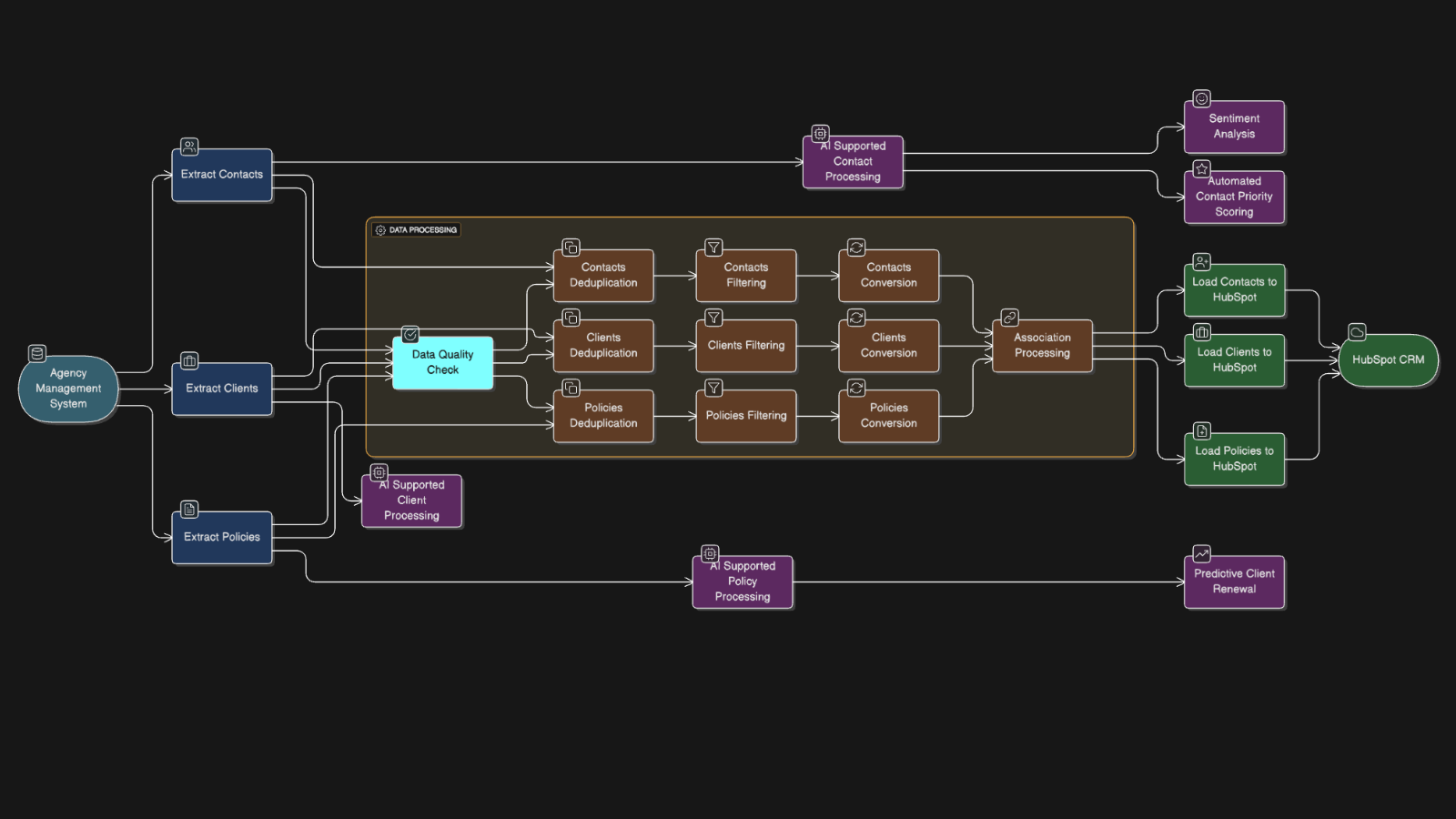
Agency Management System to HubSpot Data Integration
Automatically Sync your data from Agency Management System to HubSpot. You only need to configure the webhook and your API credentials for Agency Management System, Our system will take care of the rest. From Creating custom fields to creating custom objects and labels, PowerSync AMS will take care of everything for you.
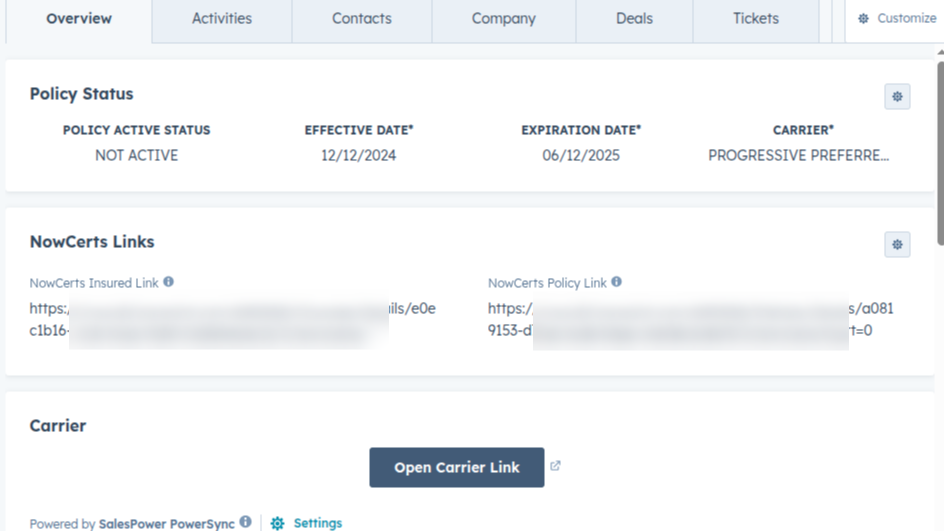
UI Extension and Carrier Link Access
Once you are on board, you get custom UI Extension Cards like Carrier Links and Direct link to Agency Management System object. This allows you to quickly navigate to required portal without need to go back and forth between Agency Management System and HubSpot. You can request custom UI Extensions as well.
App Functionality
Shared Data
Client | ||
Insured | ||
Policy | ||
Insured | ||
Client, Person, Policy | ||
Client Fields | ||
Person Fields |
Reviews
Pricing
SalesPower PowerSync AMS
Pay only for what you need.
Renewal & Annual Policy Review Automation
Clients, Contacts, Policies, & More
Customized HubSpot Interface
Improved CSR & Account Management
Client Tiering
Call Logging
Custom Reports
Automated SMS Texting
SalesPower PowerSync AMS
Pay only for what you need.
Renewal & Annual Policy Review Automation
Clients, Contacts, Policies, & More
Customized HubSpot Interface
Improved CSR & Account Management
Client Tiering
Call Logging
Custom Reports
Automated SMS Texting
* The pricing here is for display purposes only. All prices do not include taxes, incentives, discounts, or other pricing variables. You should contact the partner for the most up to date and correct pricing information. HubSpot does not take any responsibility for this pricing information, which is provided by our partners. Pricing last updated: 06/27/2026
More info
Built by - SalesPower
Installs - 10+ installs
Categories Languages this app is available in English
New arrivals

Template Manager
Capture properties, workflows, segments, and forms from any portal. Deploy them in the right order, every time — or let your AI assistant do it via MCP. Pull from a growing library of proven setups and utilize dynamic variables to set values like CampaignName, EventDate, and ContentName within your workflows, forms, and segments. If you're a consultant or agency, save your core architecture and deploy it across your client base, ensuring consistent delivery and allowing you to perfect your approach.

Pipedrive Migration via MigrateMyCRM
Pipedrive to HubSpot Migration, Made Simple
