

SendGrid Emails + Workflows
Built by - Pepperwire
Installs - <10 installs
Requirements
HubSpot Plan HubSpot Account permissions - View the required account permissions
Access Type Shared SendGrid Emails + Workflows Subscription - Pepperwire Plus plan
Overview
1/7 - sendgrid-emails-and-workflows-demo-video
HubSpot has no native SendGrid integration. Its marketing emails only reach marketing contacts, its automated emails can't carry attachments, and its transactional email add-on needs Marketing Hub Professional or Enterprise. SendGrid Emails + Workflows connects the SendGrid account you already run, so your own dynamic templates go out from HubSpot workflows and contact records, and every email lands on the record with its delivery status. One flat price, unlimited emails.
Send SendGrid templates from any workflow
Add "Send email via SendGrid" to contact, deal, ticket or company workflows. Welcome emails at Closed Won, ticket confirmations, renewal reminders. Pick a dynamic template and a verified sender, loaded live from your SendGrid account. Send to the contact, or to an email property you choose, like a billing email on the company. Fill up to four template variables from HubSpot properties, attach files from a file property, and pick an unsubscribe group. The action tells the next step whether the email was sent, skipped or failed, so you can branch on it. Needs HubSpot Professional or Enterprise.
Send a template from the contact record
A card on the contact record sends any dynamic template by hand. Variables named like contact properties fill themselves in, and you can edit every one. Attach files from the contact's file properties. The contact's 10 latest SendGrid emails sit underneath, each with its status. Works on every HubSpot plan, Free included. An admin adds the card to the contact view once.
Every email logged on the record
Each send is logged as an email on the contact's timeline, and on the deal, ticket or company that sent it. When SendGrid reports it delivered, opened, clicked or bounced, the logged email updates. Five SendGrid contact properties, like SendGrid bounced and SendGrid unsubscribed, update too, so you can build lists and keep people out of workflows.
Suppressed recipients are skipped
Before each send we check SendGrid's bounces, spam reports and unsubscribes, and skip anyone on them, with the reason. That protects your sender reputation and your SendGrid account.
Setup that tells you what's wrong
Paste a SendGrid API key and we check it has every permission it needs. If one's missing, we name it. Delivery events turn on with one click, with nothing to copy into SendGrid.
An email log that keeps your history
Every email from workflows and the card, with its latest status and a plain-English reason for any bounce or drop. SendGrid's activity feed keeps 3 to 7 days on most plans. Our log keeps every email for as long as you have an account.
What you need
A SendGrid account on a paid plan or the free trial
HubSpot Professional or Enterprise for the workflow action
Any HubSpot plan for the contact card
SendGrid and Twilio are trademarks of Twilio Inc. or its affiliates. Pepperwire is an independent product and is not affiliated with or endorsed by Twilio Inc.
Features
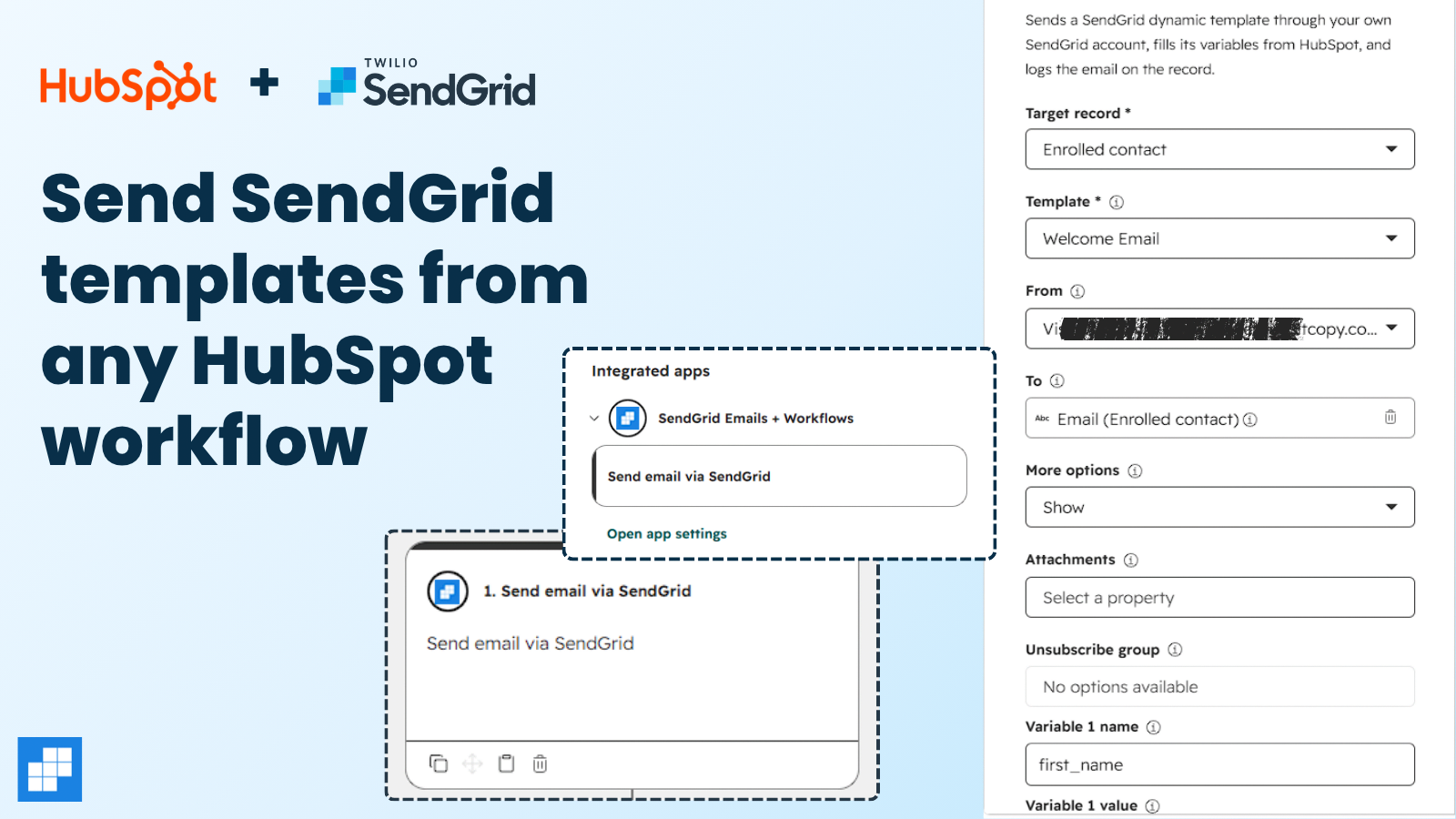
Send SendGrid templates from any workflow
Add "Send email via SendGrid" to a workflow and send your own SendGrid dynamic templates automatically. Pick the template and a verified sender, loaded live from SendGrid. Fill up to four template variables from HubSpot properties. Anyone who bounced or unsubscribed is skipped. Needs HubSpot Professional or Enterprise.
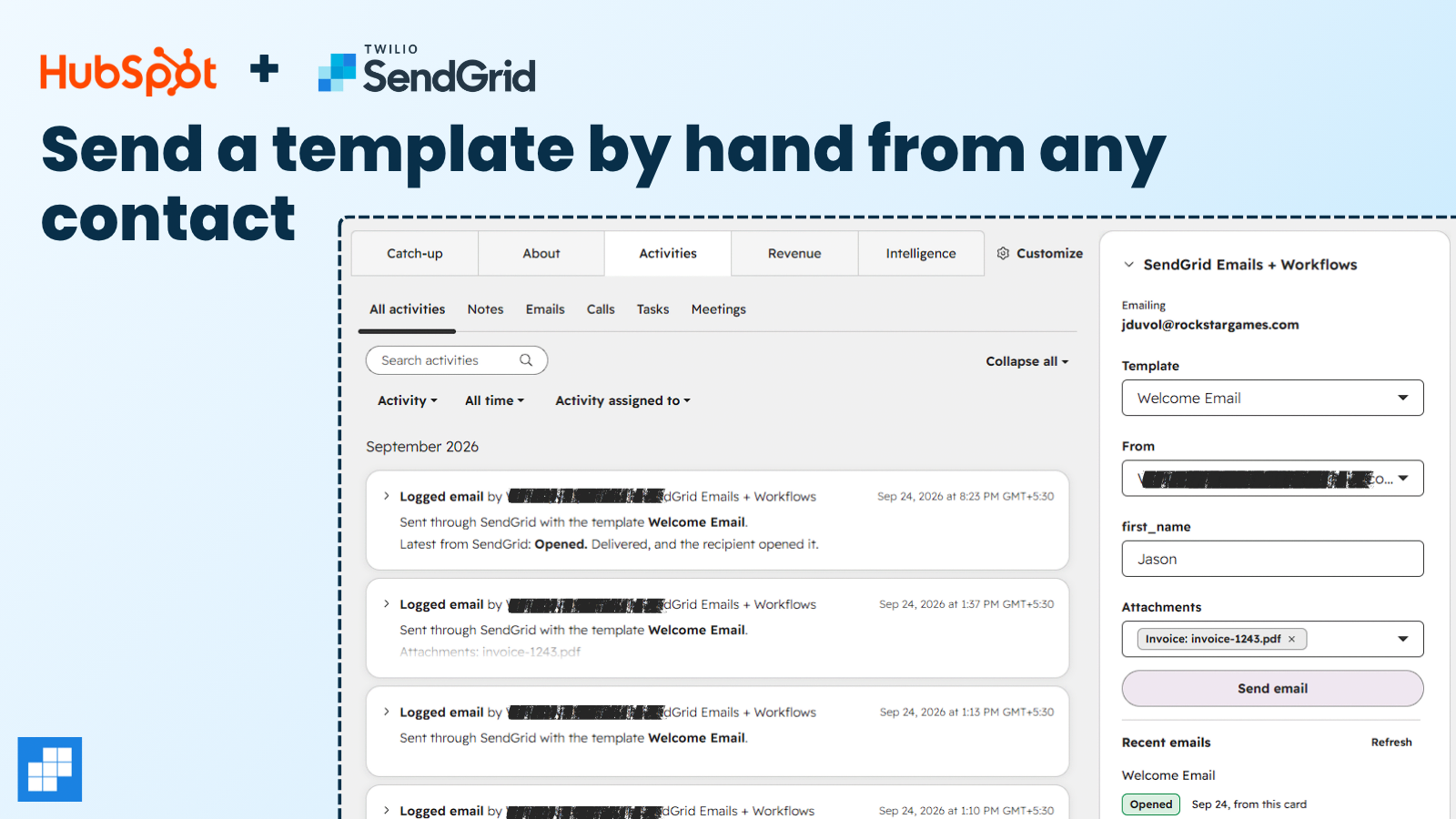
Send a template by hand from any contact
A card on the contact record sends any dynamic template by hand. Variables named like a contact property fill in from the contact, and you can edit each one. Attach files from the contact's file properties. The contact's 10 latest SendGrid emails show underneath, each with its status. Works on every HubSpot plan, Free included.
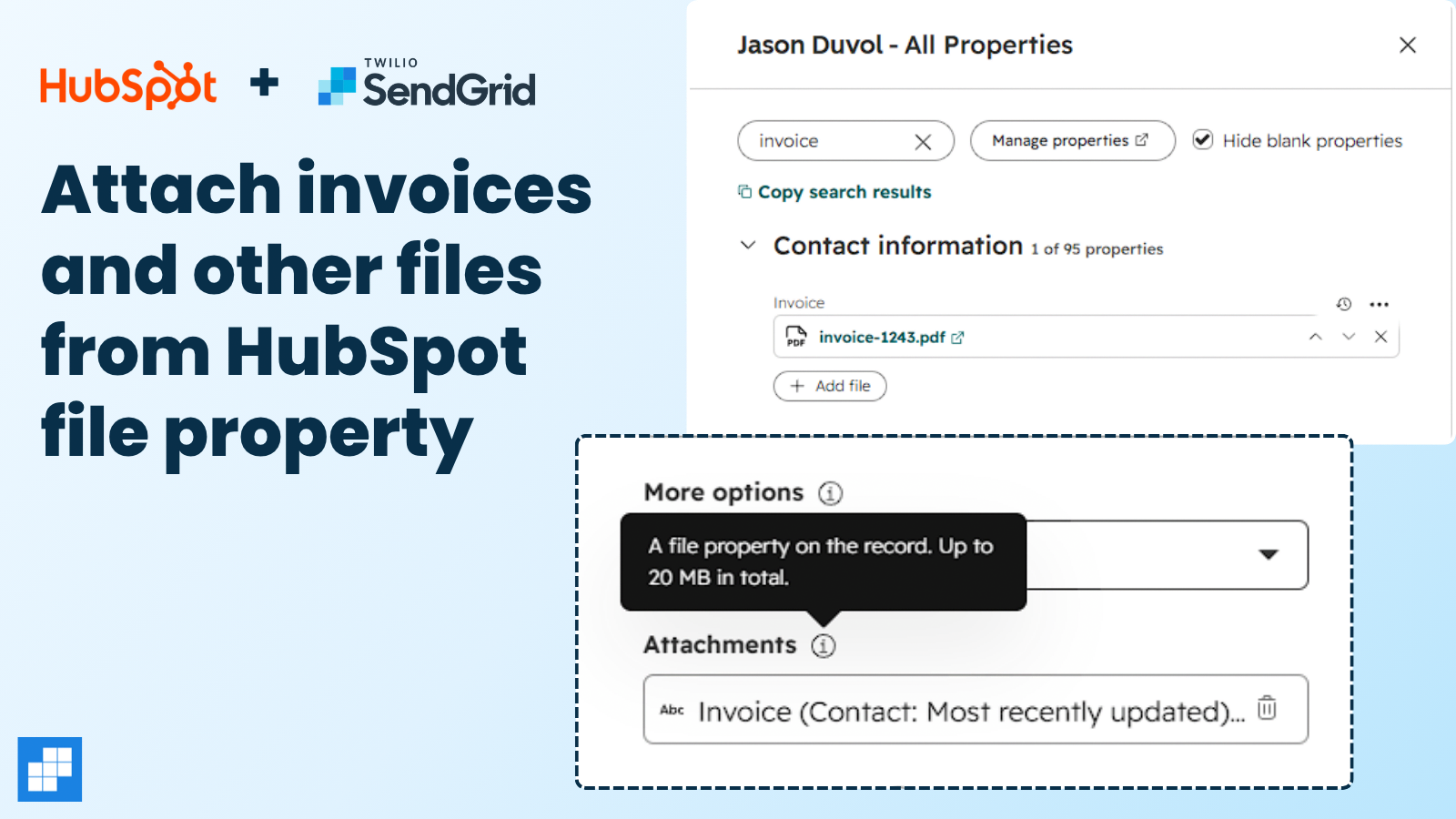
Attach invoices and other files from HubSpot
HubSpot's automated emails can't carry attachments. Point the action at a file property on the record, like an invoice or a contract, and the file goes out attached. The contact card attaches files from the contact's file properties too. Up to 20 MB in total. Files are read at send time and never stored.
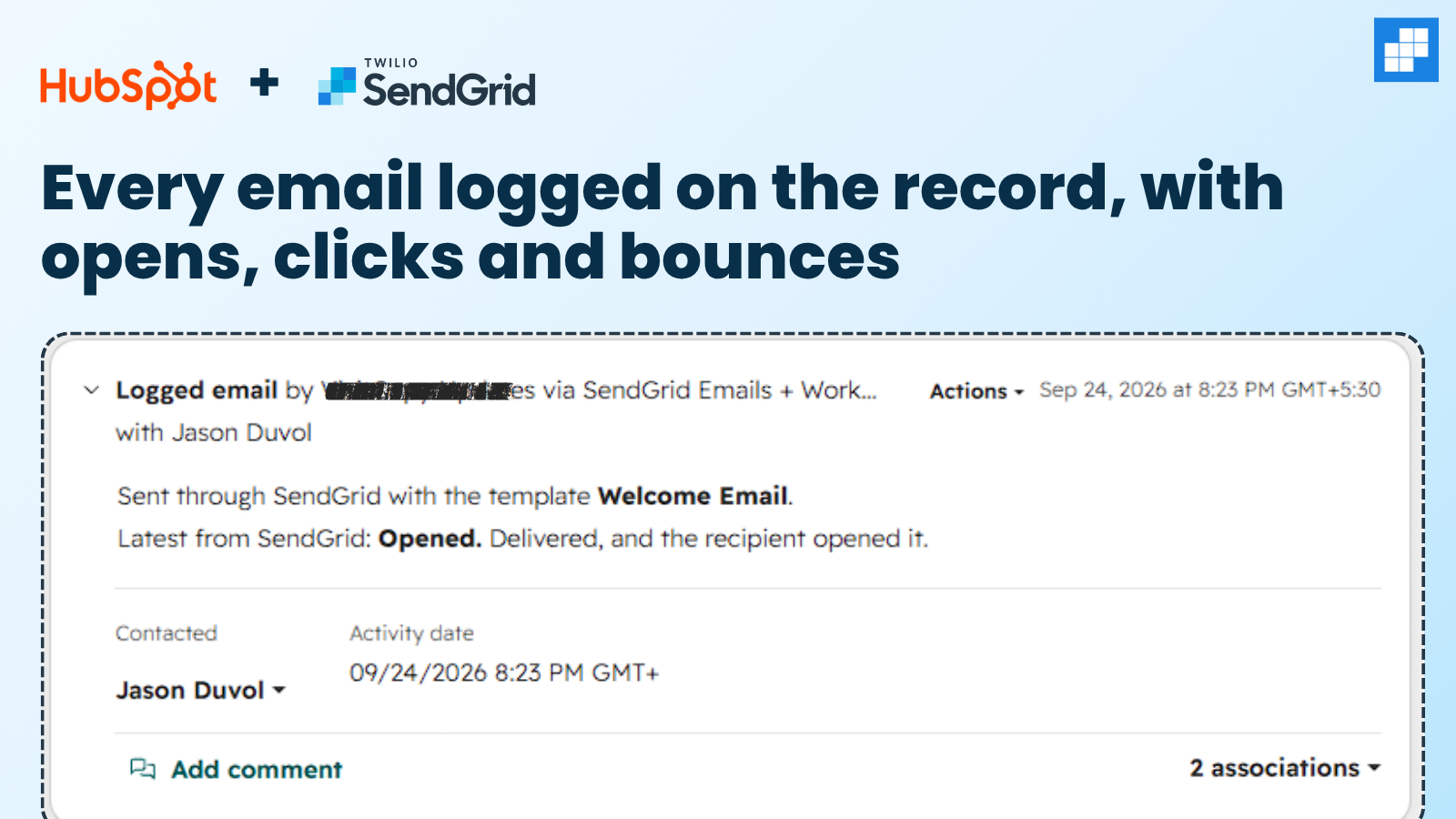
Every email logged on the record, with opens, clicks and bounces
Each email is logged on the contact's timeline, and on the deal, ticket or company that sent it. When SendGrid reports it delivered, opened, clicked or bounced, the logged email updates. Five SendGrid contact properties, like SendGrid bounced and SendGrid unsubscribed, update too, so you can build lists and keep people out of workflows.
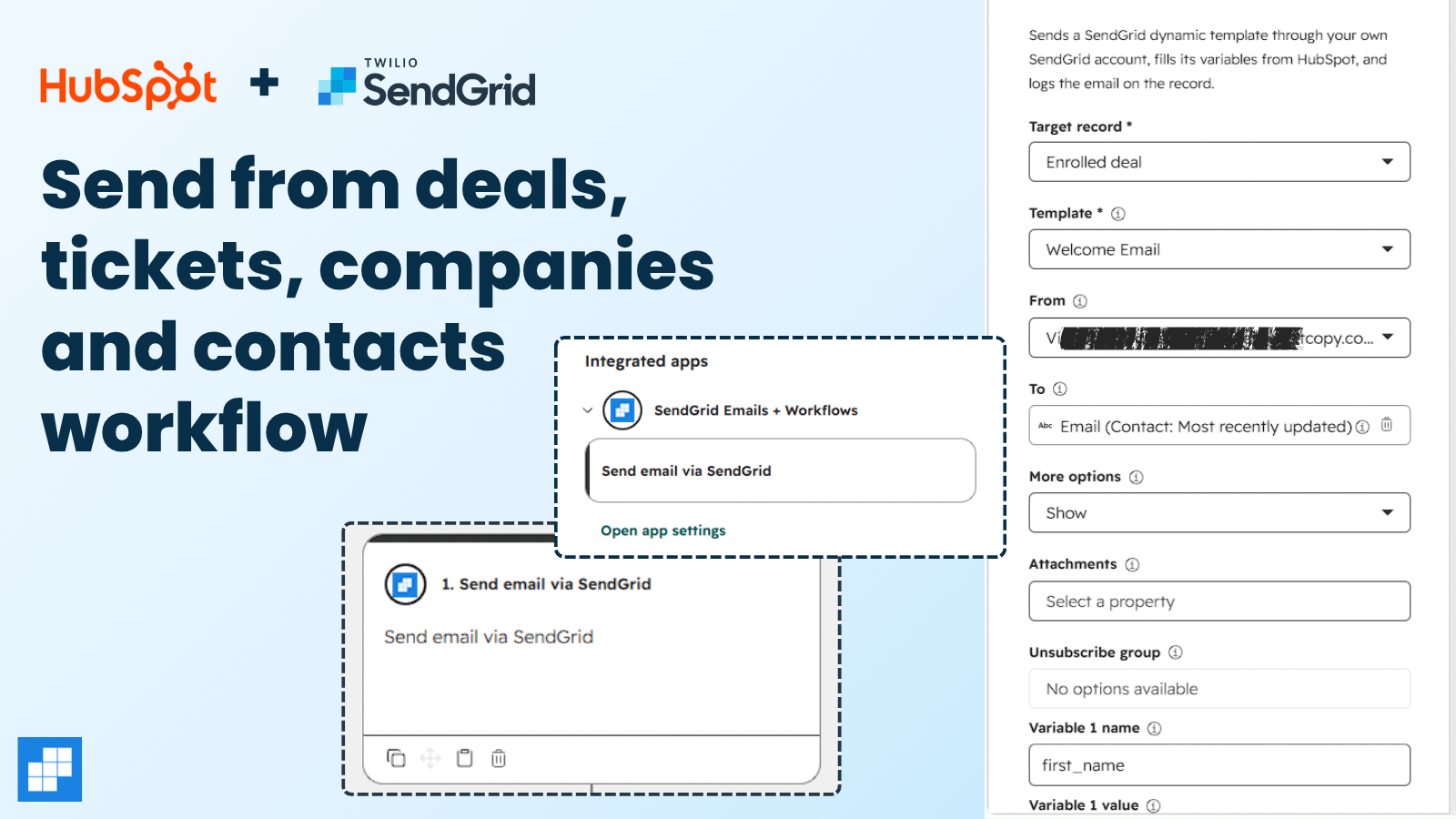
Send from deal, ticket and company workflows
The action works in contact, deal, ticket and company workflows. Send a welcome email when a deal closes, a confirmation when a ticket is created, or a renewal reminder from a company. Send to the record's contact, or to an email property you pick, like a billing email on the company. The email is logged on that record too.
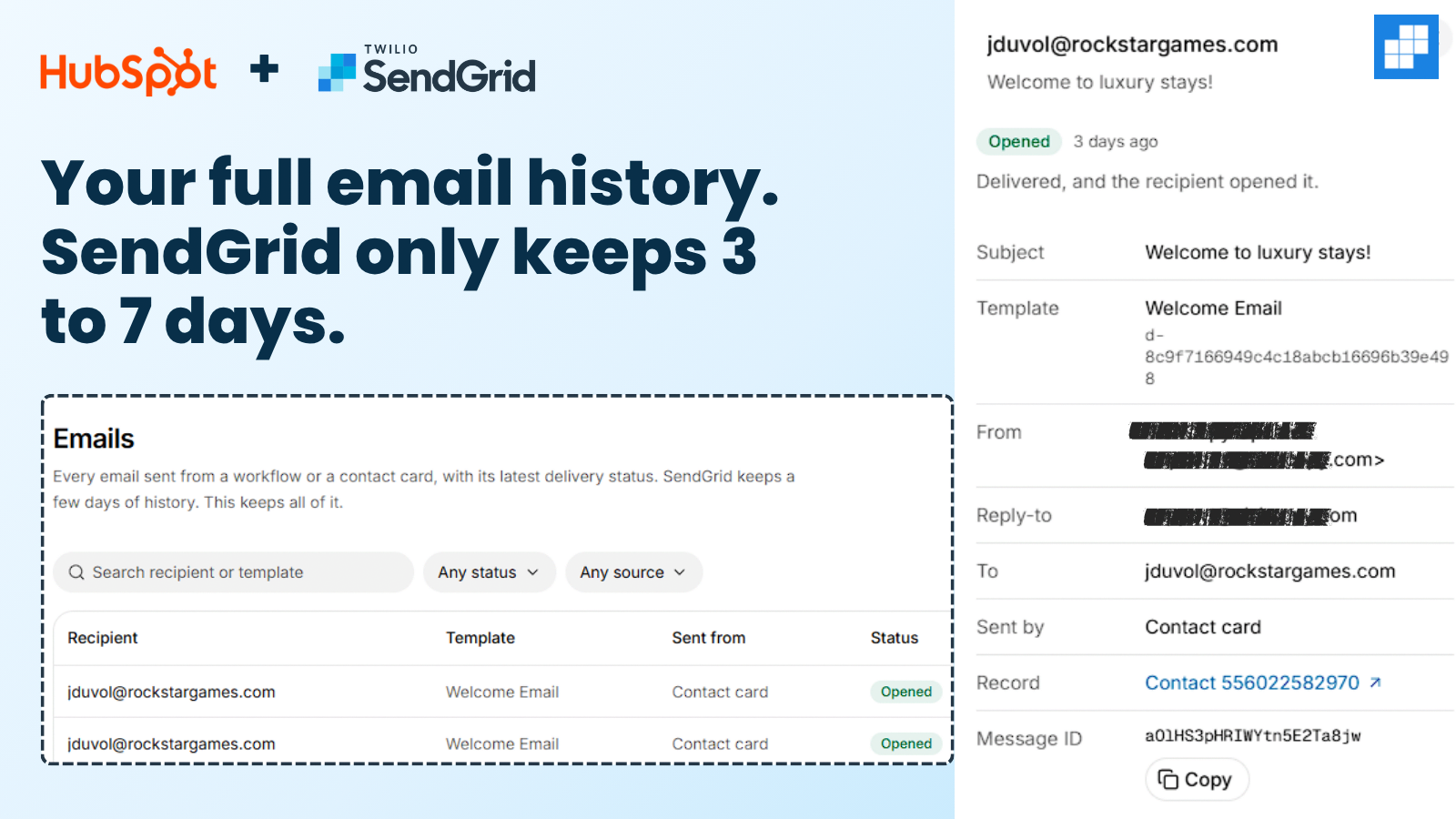
Your full email history in one log
Every email from workflows and the card, in one log with its latest status. Search by recipient or template, filter by status or source, and see a plain-English reason for any bounce or drop. SendGrid's activity feed keeps 3 to 7 days on most plans. This log keeps every email for as long as you have an account.
App Functionality
Email recipients | ||
Sent emails | ||
SendGrid delivery properties | ||
Attachments | ||
Dashboard users |
SendGrid Emails + Workflows sends email through your own SendGrid account. Each row above matches the scopes we request.
Contacts, two-way: crm.objects.contacts.read and crm.objects.contacts.write.
Email, to HubSpot: sales-email-read. HubSpot's Emails API needs it, with the contact scopes, to create a logged email and update its status. We only create and update the emails we log ourselves. We never read any other email, so this one syncs one way.
Contact properties, two-way: crm.schemas.contacts.write, and crm.schemas.contacts.read (optional).
Files, from HubSpot: files.read and files.ui_hidden.read (both optional).
Users, from HubSpot: oauth.
Deals, tickets and companies: we request no scopes for them. In their workflows, HubSpot passes the property values you pick into the action, and the email is logged on the record that sent it.
What goes to SendGrid: the recipient's address, the template variables you choose and any attachments. We don't store template data or files. Our email log keeps each email's recipient, subject, template, sender, attachment names and latest status.
Reviews
Pricing
Pepperwire Plus
$24.17
/monthOne plan with every feature and unlimited emails. No volume tiers, no credit packs.
Contact record card and full email log
Delivery events on the timeline and contact
HubSpot file attachments
Any property as a template variable
Contacts, deals, tickets and companies
Unlimited emails, templates and users
Pepperwire Plus
$24.17
/monthOne plan with every feature and unlimited emails. No volume tiers, no credit packs.
Contact record card and full email log
Delivery events on the timeline and contact
HubSpot file attachments
Any property as a template variable
Contacts, deals, tickets and companies
Unlimited emails, templates and users
* The pricing here is for display purposes only. All prices do not include taxes, incentives, discounts, or other pricing variables. You should contact the partner for the most up to date and correct pricing information. HubSpot does not take any responsibility for this pricing information, which is provided by our partners. Pricing last updated: 10/07/2026
More info
Built by - Pepperwire
Installs - <10 installs
Categories Languages this app is available in English
Getting attention today

Zoom
Use Zoom with HubSpot meetings, workflows, contact records and more.

Microsoft Teams
Use Microsoft Teams and HubSpot for meetings, conversations, and more!
