

Encharge
Marketing automation, 2-way sync of CRM data & sales funnel automation
Bygget av - Encharge Ltd.
Installeringer - 300+ installasjoner
Rangering 5
(5)
Krav
HubSpot-abonnement HubSpot-kontotillatelser - Vis nødvendige kontotillatelser
Tilgangstype Shared Encharge-abonnement - Premium - Up to 2000 subscribers, Premium - Up to 5000 subscribers, Premium - Up to 10,000 subscribers, Premium - Up to 15,000 subscribers eller Premium - Up to 20,000 subscribers-abonnementer
Oversikt
1/8
Encharge is a marketing automation tool that allows you to send behavior-based emails and automate your marketing and sales process across the user journey.
The robust bi-directional HubSpot integration allows you to unify your sales and marketing by syncing live data between the two platforms. Encharge supports a two-way sync with HubSpot — you can sync Contact and Company Properties from HubSpot to Encharge to use for email personalization. And sync Encharge data to HubSpot to store in your CRM.
Main features:
Bi-directional two-way sync of contacts and companies. Sync data to your Source of Truth (HubSpot CRM)
Sync your email marketing activity to HubSpot - see who has engaged with your marketing emails and build HubSpot lists based on email activity.
Automate any sales and marketing process in HubSpot with 13 different Encharge flow steps.
The Encharge visual flow builder allows you to create flows to:
Automate sales tasks in HubSpot and save time
Manage HubSpot booked meetings
Manage HubSpot Submitted Forms
Manage and automate deals
Automatically update lifecycle stage based on user properties or behavior
Some of the specific things you can do with this integration include:
Add HubSpot contacts and companies to Encharge and send them automated behavior-based emails.
Create new deals in HubSpot at specific moments in the customer journey.
Assign sales tasks in HubSpot and proactively follow up with the best leads and users.
Build hyper-targeted user segments that combine product usage data and attributes from your HubSpot CRM.
Update the deal stage in HubSpot based on user activity (e.g, when a user starts a trial, becomes a customer, or engages with your product).
Start an automation flow when someone books a meeting or submits a HubSpot form.
Create or update contacts, companies, deals, tickets, or any other record in HubSpot at certain stages of the automation flow.
Add or remove people from HubSpot lists automatically using flows.
Start sending lead nurturing emails to contacts that enter a HubSpot list.
Build HubSpot lists based on email activity in Encharge. For instance, see all contacts that have clicked or responded to your latest newsletter.
Funksjoner
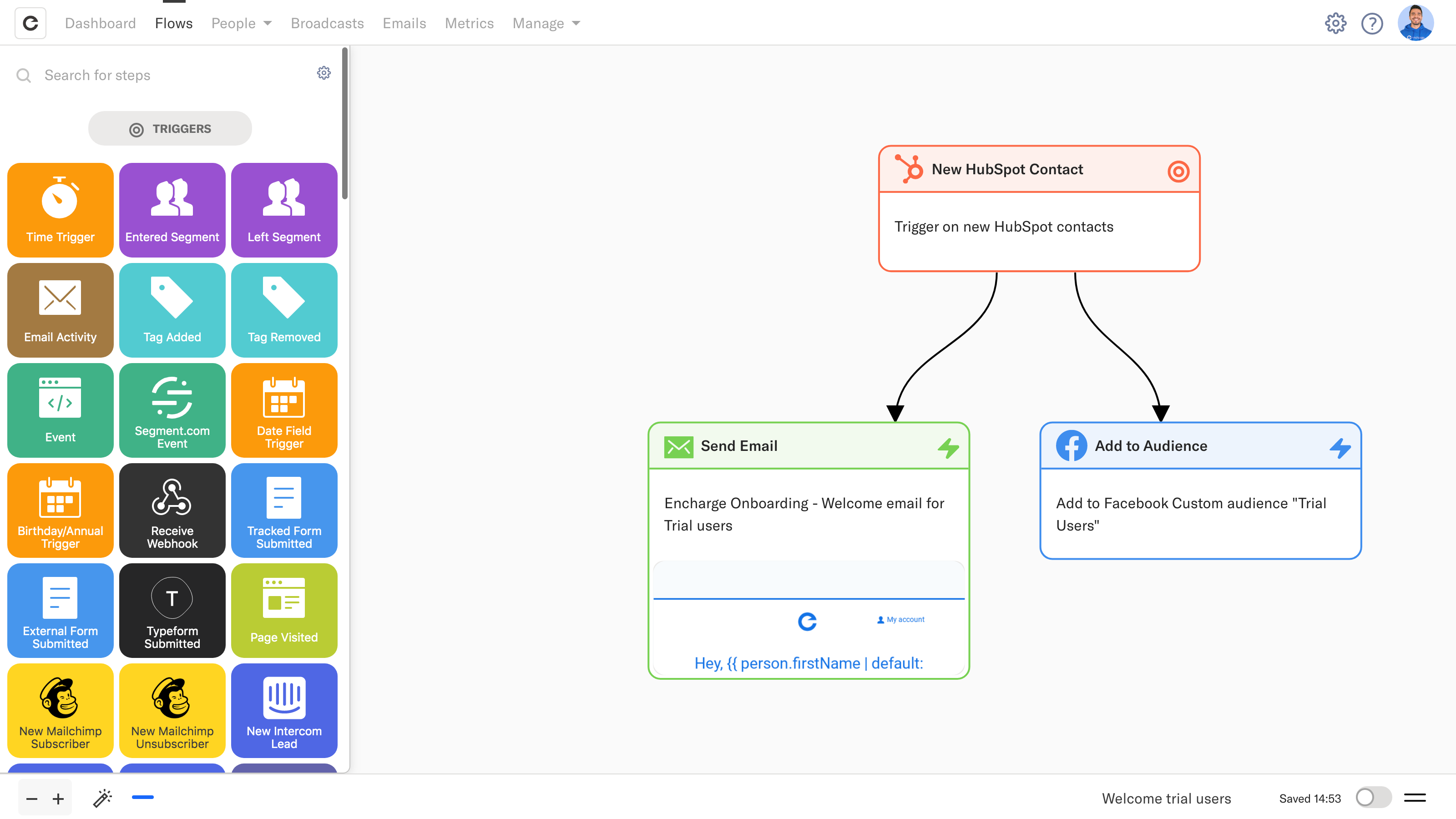
Convert more HubSpot leads with personalized marketing emails
Trigger personalized emails in Encharge when a new HubSpot contact is created. Encharge helps you send automated email messages to the right leads, and orchestrate your whole customer journey. For example, send an automated welcome email, and add that contact to a Facebook Ads audience.
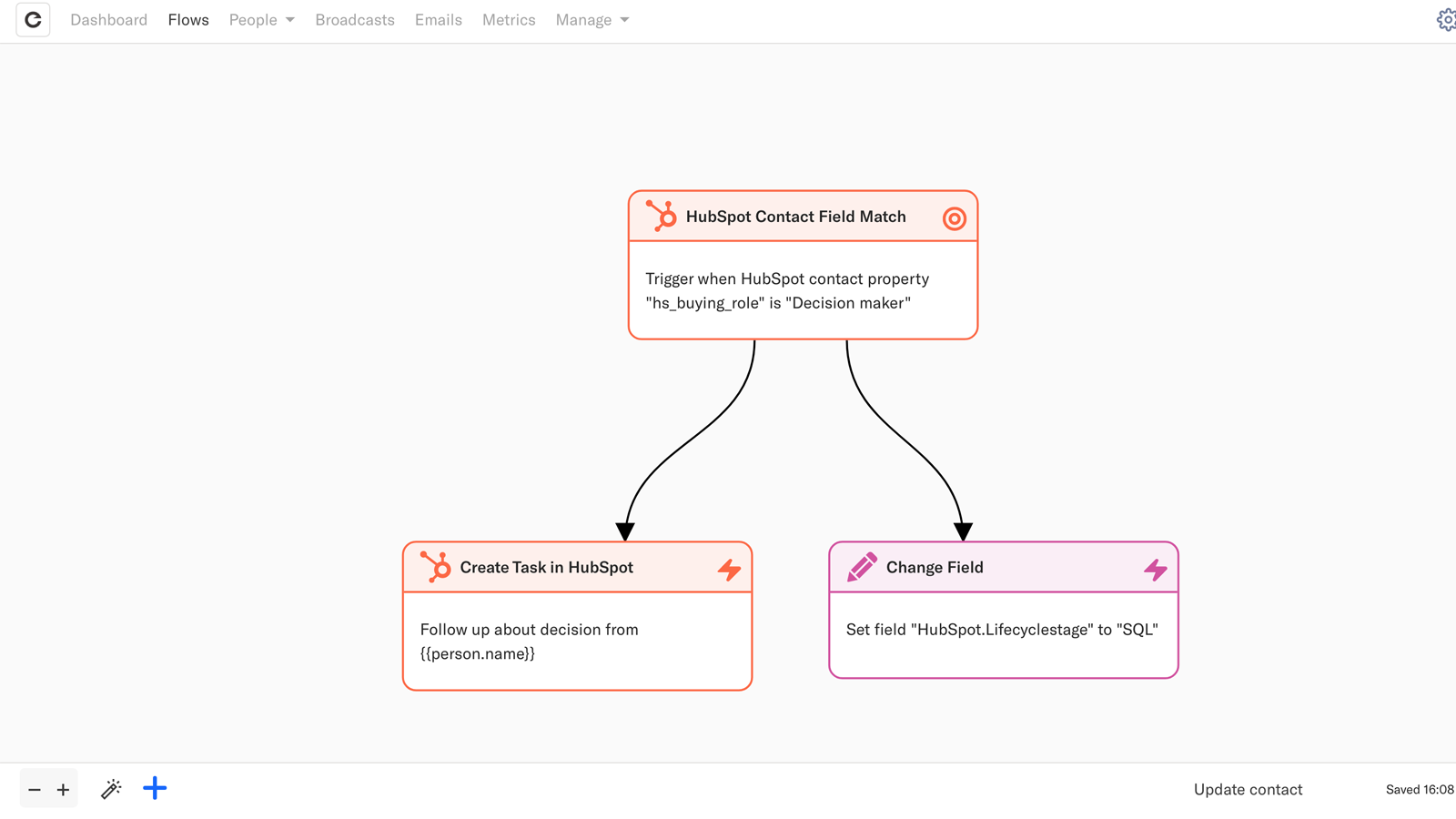
Deliver hyper-personalized experiences when a contact is updated
Create relevant, personalized experiences based on every customer touchpoint and action. Trigger automated workflows in Encharge when a HubSpot contact field matches a specific property. E.g., when the property "Buying role" is changed to "Decision maker" - add a task, and update lifecycle stage.
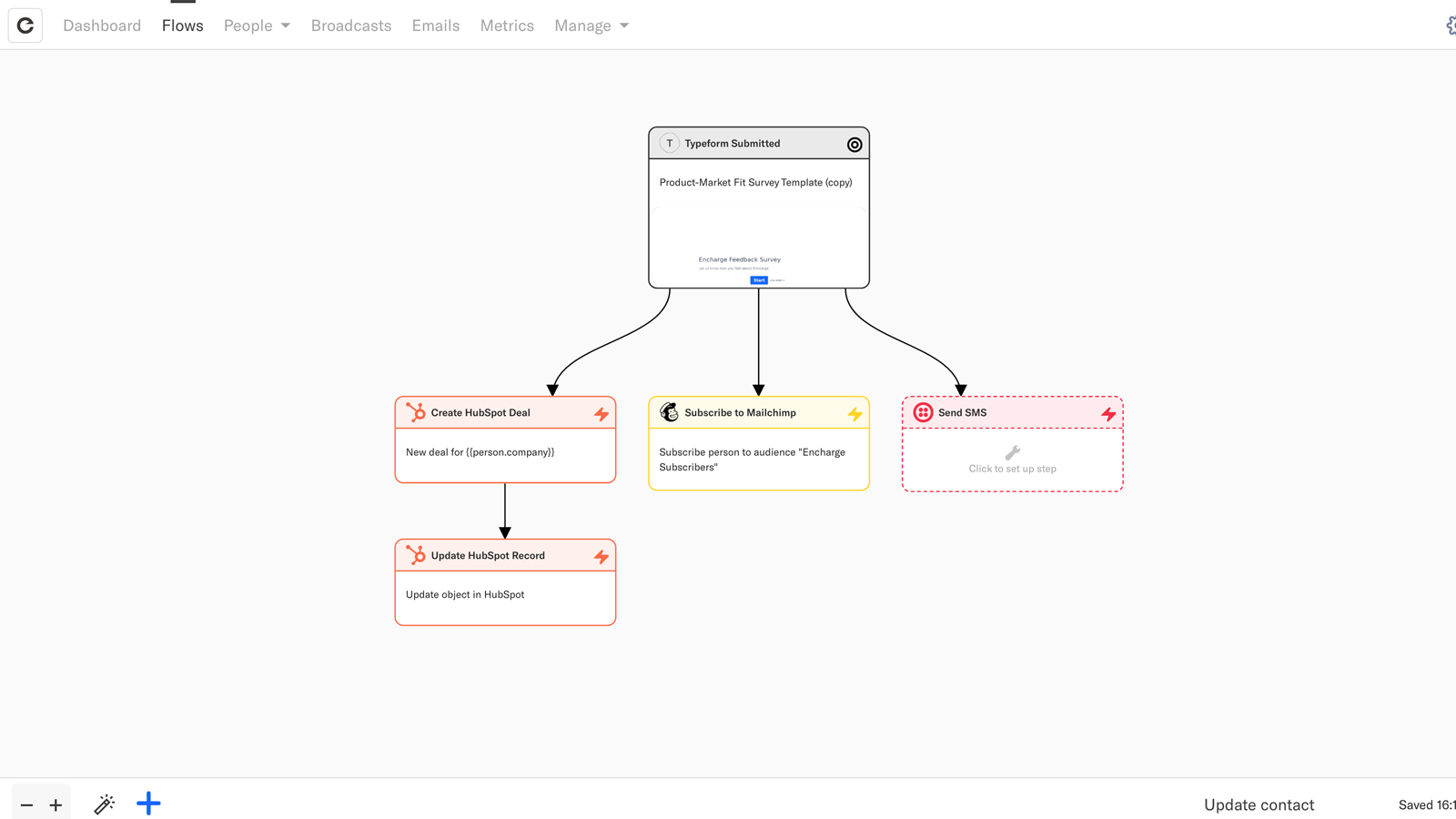
Create deals or qualify leads with data from your marketing apps
Automatically sync Encharge contacts to HubSpot CRM and create targeted deals. Collect data from every customer interaction — page visits, email engagement, Typeform forms, app user activity, and others — qualify leads, and create relevant deals that are more likely to convert.
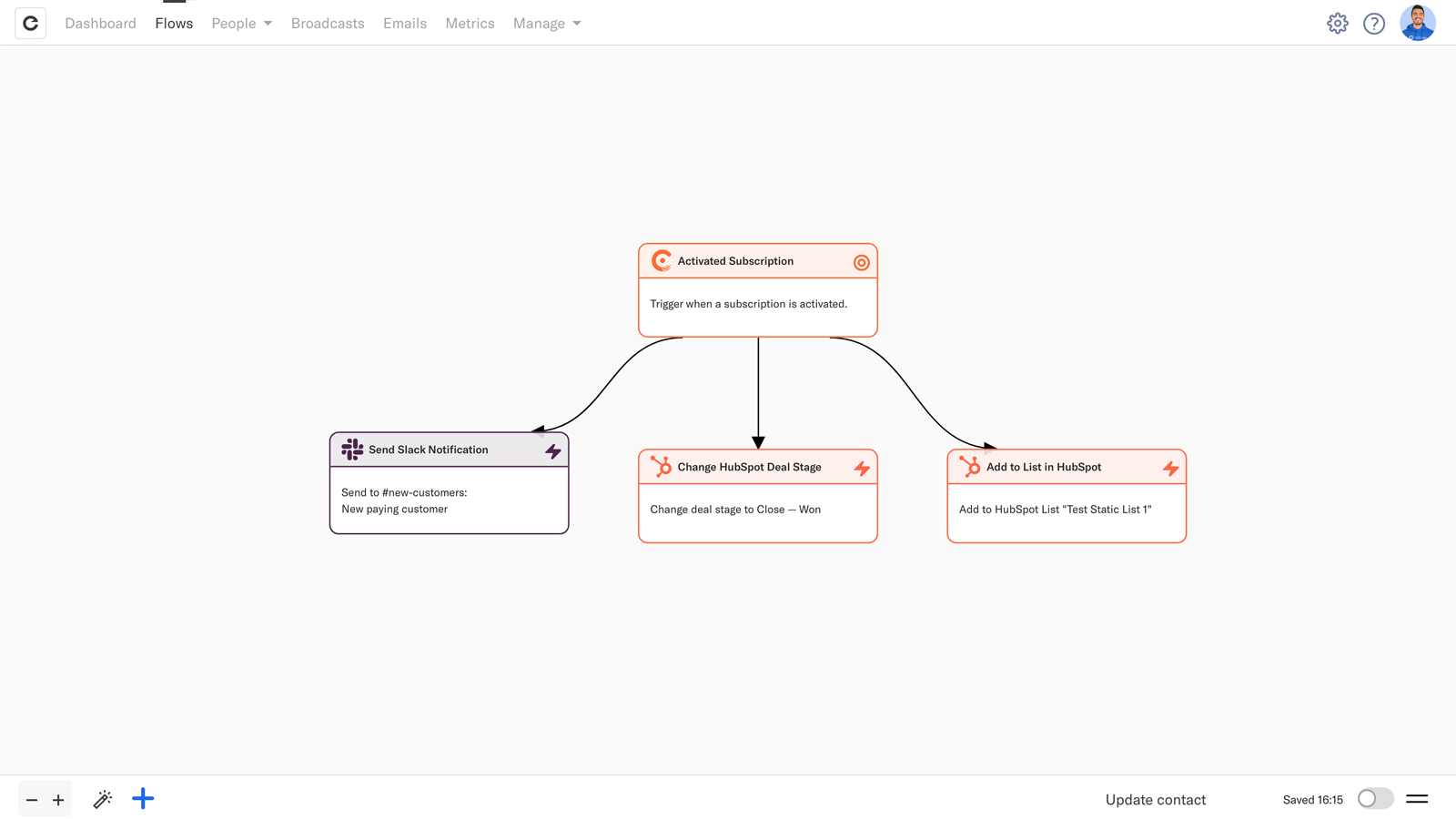
Ensure your deals in HubSpot are always up to date
Save your sales reps time by automatically changing the stage of your HubSpot CRM deals when user data is updated. For example, when a trialing contact converts to a paying customer in your app, change the deal stage to Won.
Appfunksjonalitet
Delt data
Companies | ||
People | ||
People | ||
People | ||
People | ||
People | ||
People | ||
People | ||
People |
Gjennomganger
5,0
5
5,0
5
- 23. okt. 2024
Look no further
Moving to encharge was the best decision we made! Their onboarding is great, and when it comes to support they are hands on and will go out of the way to help us find solutions and workarounds. The tool is robust and has excellent deliverability.
We use Encharge for our onboarding, page visited emails, newsletters, and all follow up emails from HubSpot form submissions. We also use it to handle integrations like ZoomInfo and Amplemarket via webhooks and Two-way automatic data sync.
Robust tool. Great deliverability. Exceptional support that will go out of their way.
Nikitiadis, C.
Teknologi - programvare - 26 til 50 ansatte
- 23. okt. 2024
The only thing better then their product is their support
Enchange is by far the best tool I have in my tech stack, which is now 3-4 tools less due to all the things that Encharge does. Oh, and the support is UNREAL. I have been in digital marketing for over 15 years and this tool is by far best one I have ever used.
Email Marketing, Automation
Reducing your tech stack, complete automation
Absolutely zero.
Borgelt, M.
Markedsføringstjenester - 2 til 5 ansatte
Premium - Up to 2000 subscribers
USD 129
/månedMonthly email sends: 12x subscribers limit
Unlimited flows
Unlimited team members
Behavior-based emails
Advanced user segmentation
Visual workflow automation builder
Robust email designer
Transactional emails
Free email verification
Lead scoring
A/b testing
One-click native integrations with HubSpot, Salesforce, Facebook Ads, Segment, Typeform, Stripe, Chargebee, Intercom, Mailchimp, Webhooks, Zapier, and more.
Chat, email, Slack, and Skype support
Premium - Up to 2000 subscribers
USD 129
/månedMonthly email sends: 12x subscribers limit
Unlimited flows
Unlimited team members
Behavior-based emails
Advanced user segmentation
Visual workflow automation builder
Robust email designer
Transactional emails
Free email verification
Lead scoring
A/b testing
One-click native integrations with HubSpot, Salesforce, Facebook Ads, Segment, Typeform, Stripe, Chargebee, Intercom, Mailchimp, Webhooks, Zapier, and more.
Chat, email, Slack, and Skype support
* Prissettingen her er kun for illustrasjonsformål. Prisene inkluderer ikke avgifter, insentiver, rabatter eller andre prissettingsvariabler. Kontakt partneren for å få oppdatert og riktig prissettingsinformasjon. HubSpot tar ikke ansvar for denne prissettingsinformasjonen, som gis av våre partnere. Prissetting sist oppdatert: 09.08.2025
Mer info
Bygget av - Encharge Ltd.
Installeringer - 300+ installasjoner
Kategorier Språkene appen er tilgjengelig på Engelsk
Å få oppmerksomhet i dag


