

LeadSuccess CRM
สร้างโดย - Convey Information Systems GmbH
ติดตั้ง - 10+ การติดตั้ง
ข้อกำหนด
แผน HubSpot สิทธิ์บัญชี HubSpot - ดูสิทธิ์บัญชี ที่จำเป็น
ประเภทสิทธิ์การเข้าถึง แชร์แล้ว การสมัครใช้บริการ LeadSuccess CRM - LeadSuccess License แพ็กเกจ
ภาพรวม
1/7
LeadSuccess CRM connects your LeadSuccess Portal to HubSpot. Leads your team captures are sent to HubSpot as contacts, created or updated, right from the Portal, so sales can follow up right away. No CSV exports, no manual data entry.
LeadSuccess by Convey helps teams capture qualified leads. With the LeadSuccess CRM integration, those leads can be sent directly into your own HubSpot account. Setup takes a few minutes: connect your HubSpot account securely via OAuth from the LeadSuccess Portal, then send leads to HubSpot whenever you choose, one at a time or in a batch. You can disconnect at any time.
ฟีเจอร์
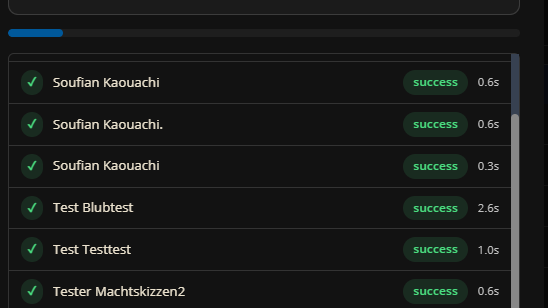
One-click lead transfer
Captured leads are sent to HubSpot contacts on demand, one at a time or in a batch, without exports or imports. Contacts are created or updated right from the LeadSuccess Portal, so sales teams can follow up while the conversation is still fresh.
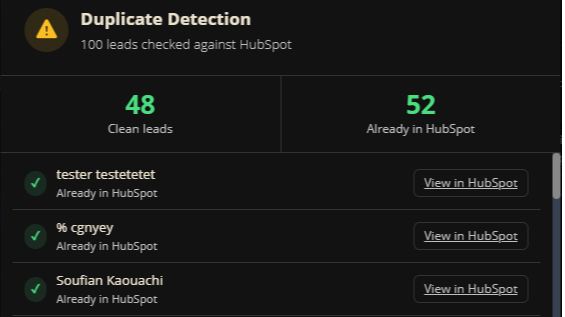
Clean data without duplicates
Lead fields such as name, company, email, phone, notes and qualification answers are mapped to your existing HubSpot contact properties. Once a unique identifier field is mapped, existing contacts are updated instead of duplicated. Related files such as business card scans can be uploaded too.
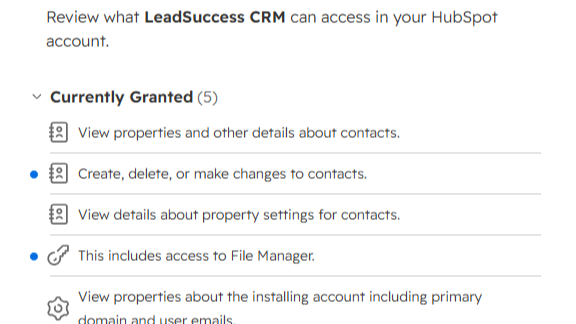
Secure OAuth connection
Connect your HubSpot account in a few minutes via OAuth from the LeadSuccess Portal. LeadSuccess only accesses the data it needs to send leads to HubSpot, and you can disconnect at any time.
ฟังก์ชันการทำงานแอป
ข้อมูลที่แบ่งปัน
Leads | ||
Field mapping | ||
Lead attachments |
รีวิว
การกำหนดราคา
LeadSuccess License
HubSpot integration included with your LeadSuccess license
Single or batch lead transfer
Business card and attachment upload
Custom field mapping to HubSpot contact properties
Secure OAuth connection
LeadSuccess License
HubSpot integration included with your LeadSuccess license
Single or batch lead transfer
Business card and attachment upload
Custom field mapping to HubSpot contact properties
Secure OAuth connection
* ราคาที่แสดงนี้มีไว้เพื่อแสดงข้อมูลเท่านั้น ราคาทั้งหมดยังไม่รวมภาษี สิทธิพิเศษ ส่วนลด หรือตัวแปรราคาอื่นๆ คุณควรติดต่อพาร์ทเนอร์เพื่อรับข้อมูลราคาล่าสุดและถูกต้องที่สุด HubSpot จะไม่รับผิดชอบใดๆ ต่อข้อมูลราคานี้ซึ่งจัดทำโดยพาร์ทเนอร์ของเรา การกำหนดราคาอัปเดตล่าสุด: 16/10/2026
ข้อมูลเพิ่มเติม
สร้างโดย - Convey Information Systems GmbH
ติดตั้ง - 10+ การติดตั้ง
หมวดหมู่ ภาษาที่แอปนี้สามารถใช้ได้ ฝรั่งเศส เยอรมัน อังกฤษ และอิตาลี
สินค้ามาใหม่

Bland
Connect HubSpot to AI agents for inbound and outbound calls and text messaging.
monday.com Sync by StackTie
HubSpot deals land on your monday board at the stage you choose, then keep updating for the life of the deal, custom properties included, so delivery sees the work without buying a HubSpot seat.
