

Salesmsg for WhatsApp Web
สร้างโดย - SalesMessage, Inc
ติดตั้ง - 30+ การติดตั้ง

Leading
ข้อกำหนด
แผน HubSpot สิทธิ์บัญชี HubSpot - ดูสิทธิ์บัญชี ที่จำเป็น
ประเภทสิทธิ์การเข้าถึง แชร์แล้ว การสมัครใช้บริการ Salesmsg for WhatsApp Web - Free แพ็กเกจ
ภาพรวม

1/4 - WhatsApp for HubSpot
Salesmsg for WhatsApp puts your HubSpot CRM right next to every WhatsApp conversation. Open any chat and instantly see the matched contact, their open deals, company info, tickets, and recent activity — no tab switching required.
What you can do:
Auto-match WhatsApp contacts to HubSpot records by phone number
View contact details, deals, companies, and tickets in a collapsible sidebar
Log notes and create tasks without leaving WhatsApp
See deal stages with urgency signals (active, stale, at risk)
Create new HubSpot contacts from unknown WhatsApp numbers
Enroll contacts in sequences, log calls, and book meetings
Manage group chats — see which participants are already in your CRM
How it works
Install the Chrome extension, then connect HubSpot with one click. The admin connects once and the entire team gets immediate access. The sidebar appears automatically on every WhatsApp Web conversation and matches contacts by phone number in real time.
Privacy first
Your WhatsApp messages are never read, stored, or transmitted. HubSpot data flows directly from your browser to HubSpot's API, it never touches Salesmsg servers. OAuth tokens are encrypted with AES-256-GCM.
Built by Salesmsg, a SOC2 Type II and HIPAA-compliant company.
Available in English, Spanish, and Portuguese (Brazil).
ฟีเจอร์

Auto-match WhatsApp contacts to HubSpot contacts
Open any WhatsApp conversation and instantly see the matched HubSpot contact — no searching required. The sidebar looks up the contact by phone number and displays their name, email, lifecycle stage, owner, and associated company in real time.

Create tasks, log calls, and book meetings
After a WhatsApp conversation, log the activity in HubSpot in seconds. Create follow-up tasks with due dates and owners, log calls, or record meetings — all from the sidebar without opening a new tab or switching context.
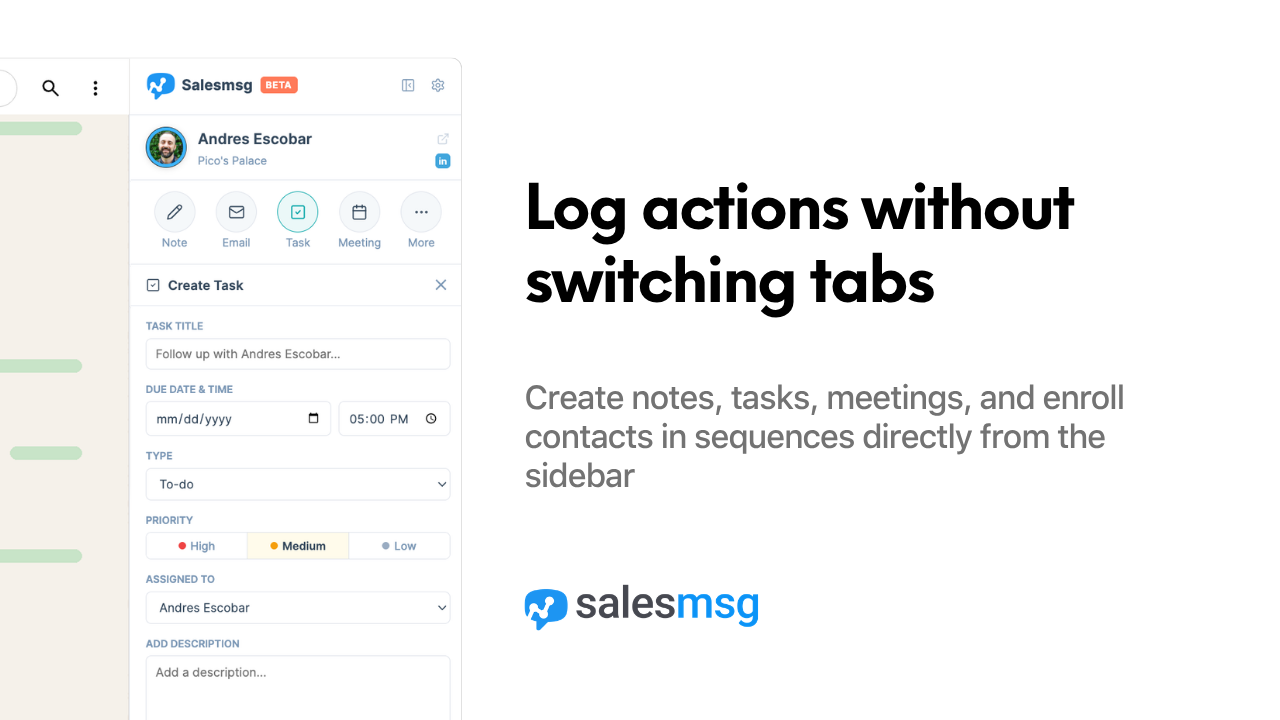
Log notes directly from WhatsApp
Log conversation notes to HubSpot without switching tabs. Type directly in the sidebar and mention HubSpot owners using @name. Notes are saved to the contact's activity timeline instantly, keeping your CRM up to date as conversations happen.
ฟังก์ชันการทำงานแอป
ข้อมูลที่แบ่งปัน
Contacts | ||
Companies | ||
Deals | ||
Tickets | ||
Custom Objects | ||
Owners | ||
Users | ||
Workflows | ||
Meetings |
รีวิว
การกำหนดราคา
Free
US$0
For teams that use WhatsApp to communicate with customers
Enroll contacts in sequences
Create tasks and log calls
View deals, companies, and tickets
Match contacts by phone number
Free
US$0
For teams that use WhatsApp to communicate with customers
Enroll contacts in sequences
Create tasks and log calls
View deals, companies, and tickets
Match contacts by phone number
* ราคาที่แสดงนี้มีไว้เพื่อแสดงข้อมูลเท่านั้น ราคาทั้งหมดยังไม่รวมภาษี สิทธิพิเศษ ส่วนลด หรือตัวแปรราคาอื่นๆ คุณควรติดต่อพาร์ทเนอร์เพื่อรับข้อมูลราคาล่าสุดและถูกต้องที่สุด HubSpot จะไม่รับผิดชอบใดๆ ต่อข้อมูลราคานี้ซึ่งจัดทำโดยพาร์ทเนอร์ของเรา การกำหนดราคาอัปเดตล่าสุด: 06/05/2026
ข้อมูลเพิ่มเติม
สร้างโดย - SalesMessage, Inc
ติดตั้ง - 30+ การติดตั้ง
หมวดหมู่ ภาษาที่แอปนี้สามารถใช้ได้ ดัตช์ โปรตุเกส - บราซิล ฝรั่งเศส เยอรมัน สเปน อังกฤษ และอิตาลี
กำลังได้รับความสนใจในวันนี้

Microsoft Teams
Use Microsoft Teams and HubSpot for meetings, conversations, and more!

Slack
Manage CRM records, get AI-powered assistance from Breeze, send real-time notifications, and collaborate with your team — without leaving Slack.
