

Zoom
Exigences
Abonnement HubSpot Autorisations de compte HubSpot Aucune autorisation requise Type d'accès Partagé Abonnement à Zoom - Abonnements : De base, Pro ou Entreprises
Vue d'ensemble
1/7 - Zoom app for HubSpot demo video
Unifiez les informations sur les réunions, les webinaires et les clients sur vos plates-formes de communication et de gestion de la relation client, afin d'obtenir une vue plus complète de toutes les interactions avec vos clients. Désormais, la latence des données est améliorée pour une synchronisation fiable et plus rapide en quelques heures.
Installez cette application pour :
Créer des réunions Zoom à partir du planificateur de réunions HubSpot.
Synchroniser les détails des réunions Zoom et des webinaires directement dans votre HubSpot CRM pour éviter les silos de données. Capturer automatiquement les informations sur les participants, les enregistrements de réunions et de webinaires, et les transcriptions dans les enregistrements d'objets et de contacts HubSpot pour un historique d'interaction plus complet.
Choisissez quelles données sont synchronisées (par exemple, configurez des exclusions de domaines d'enregistrement pour les réunions internes) et gérez les paramètres des utilisateurs individuels avec des contrôles administratifs (dans les paramètres globaux) qui adaptent l'intégration aux besoins de votre entreprise.
Accédez aux détails des participants et aux informations CRM de HubSpot pendant les réunions Zoom en direct pour fournir aux équipes en contact avec les clients le contexte des conversations sans quitter la salle.
Mettre à jour HubSpot CRM en temps réel pendant les réunions en direct pour réduire la saisie manuelle des données après la fin de la réunion.
Pour les plans Professional et Enterprise, vous pouvez également :
Créer des segments ciblés, des listes et des vues dans HubSpot en fonction des données d'engagement des réunions et des webinaires.
Déclencher des flux de travail automatisés basés sur les inscriptions et la participation aux webinaires pour rationaliser les processus de suivi.
Fonctionnalités
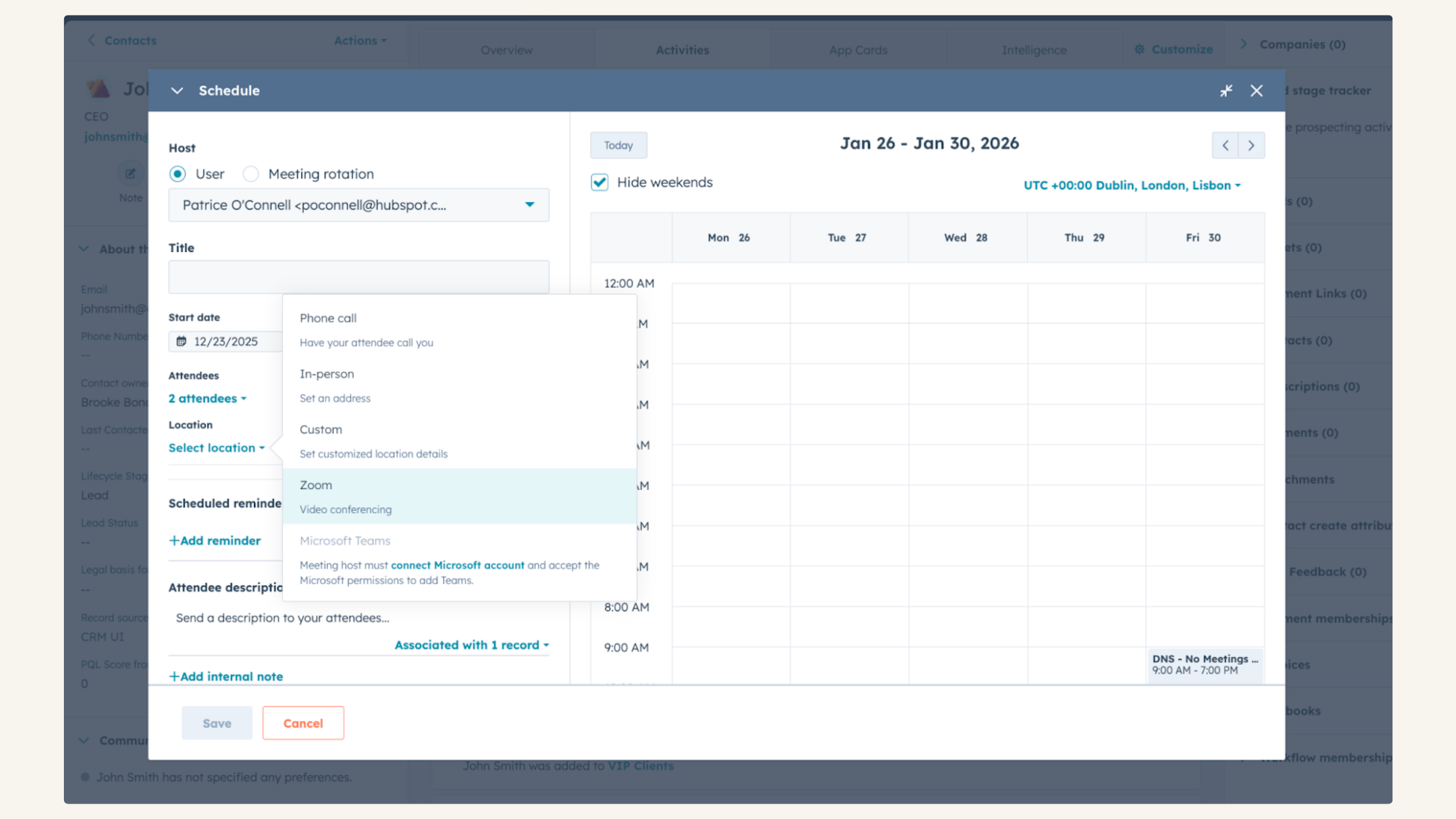
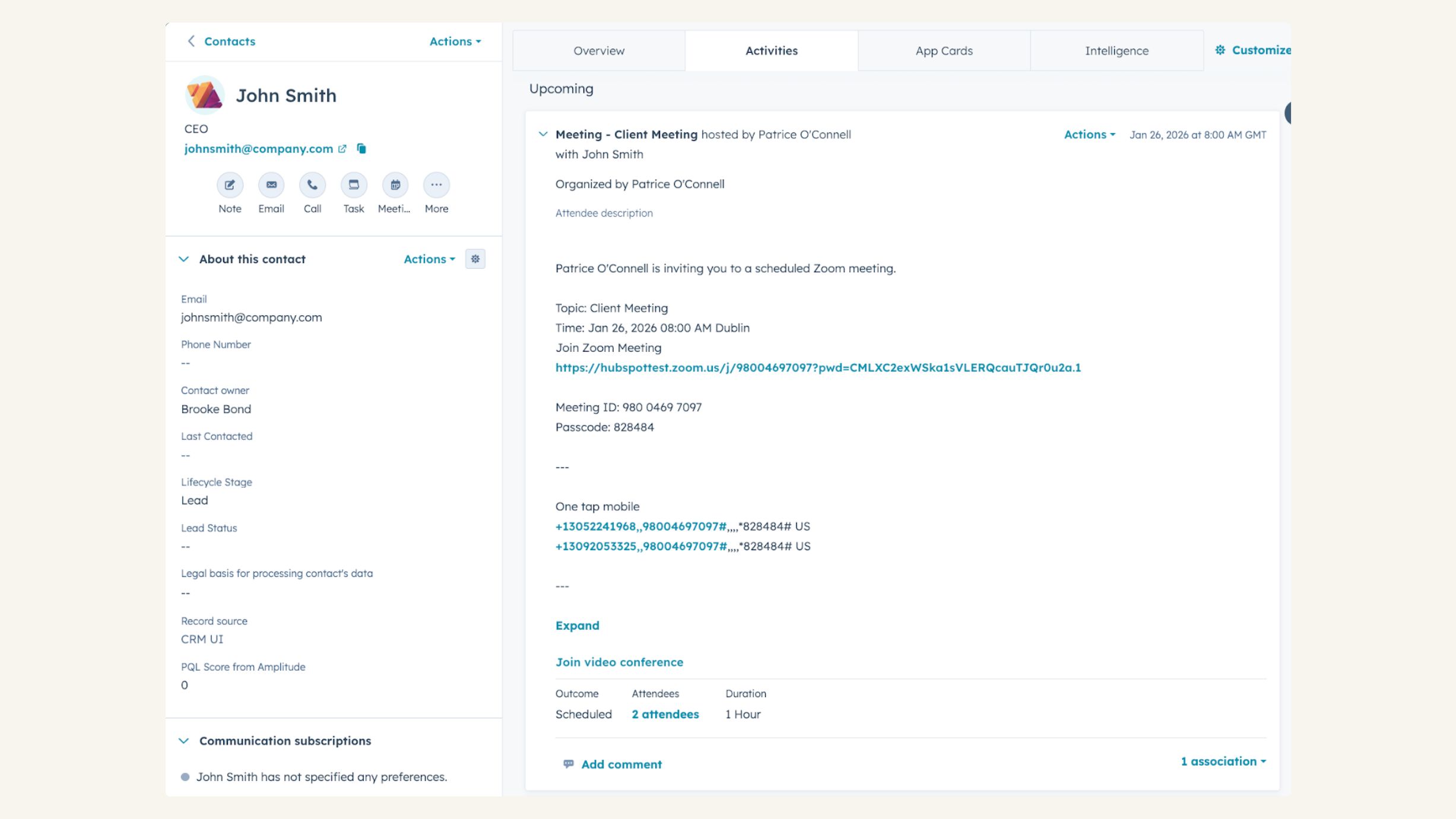
Intégration avec HubSpot Meetings
Vous souhaitez prendre des nouvelles d'un client ou d'un prospect ? En tant que représentant des ventes ou des services, il n'y a rien de mieux qu'une discussion rapide par vidéo pour prendre le pouls de ce dont votre client ou prospect a besoin pour réussir. Planifiez facilement une réunion Zoom à partir de n'importe quel enregistrement de contact pour mettre en place votre chat vidéo.
Suivre la participation aux webinaires Zoom dans HubSpot CRM
Voir les données des webinaires Zoom sur la ligne de temps, y compris si une personne s'est inscrite, a participé, s'est inscrite mais n'a pas participé, la durée de la participation, le nombre de webinaires auxquels elle a participé, le nombre total de webinaires auxquels elle s'est inscrite, et la durée moyenne de la participation.
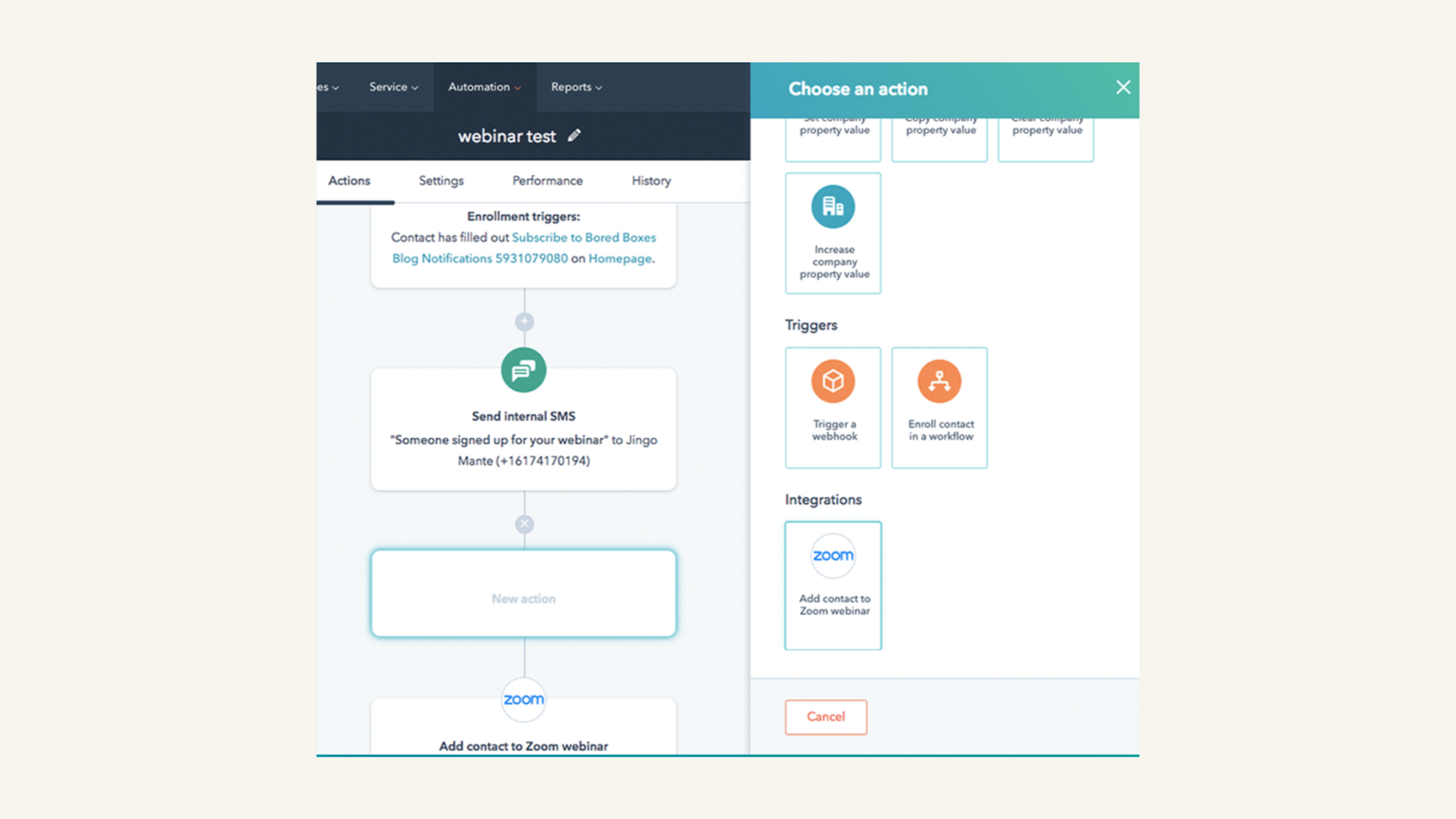
Promouvoir vos webinaires Zoom avec les workflows HubSpot
En tant que responsable marketing, vous voulez vous assurer que les personnes qui s'inscrivent à votre webinaire s'y rendent effectivement - n'est-ce pas ? Créez un workflow dans HubSpot qui envoie des emails de rappel aux personnes avant le webinaire Zoom.
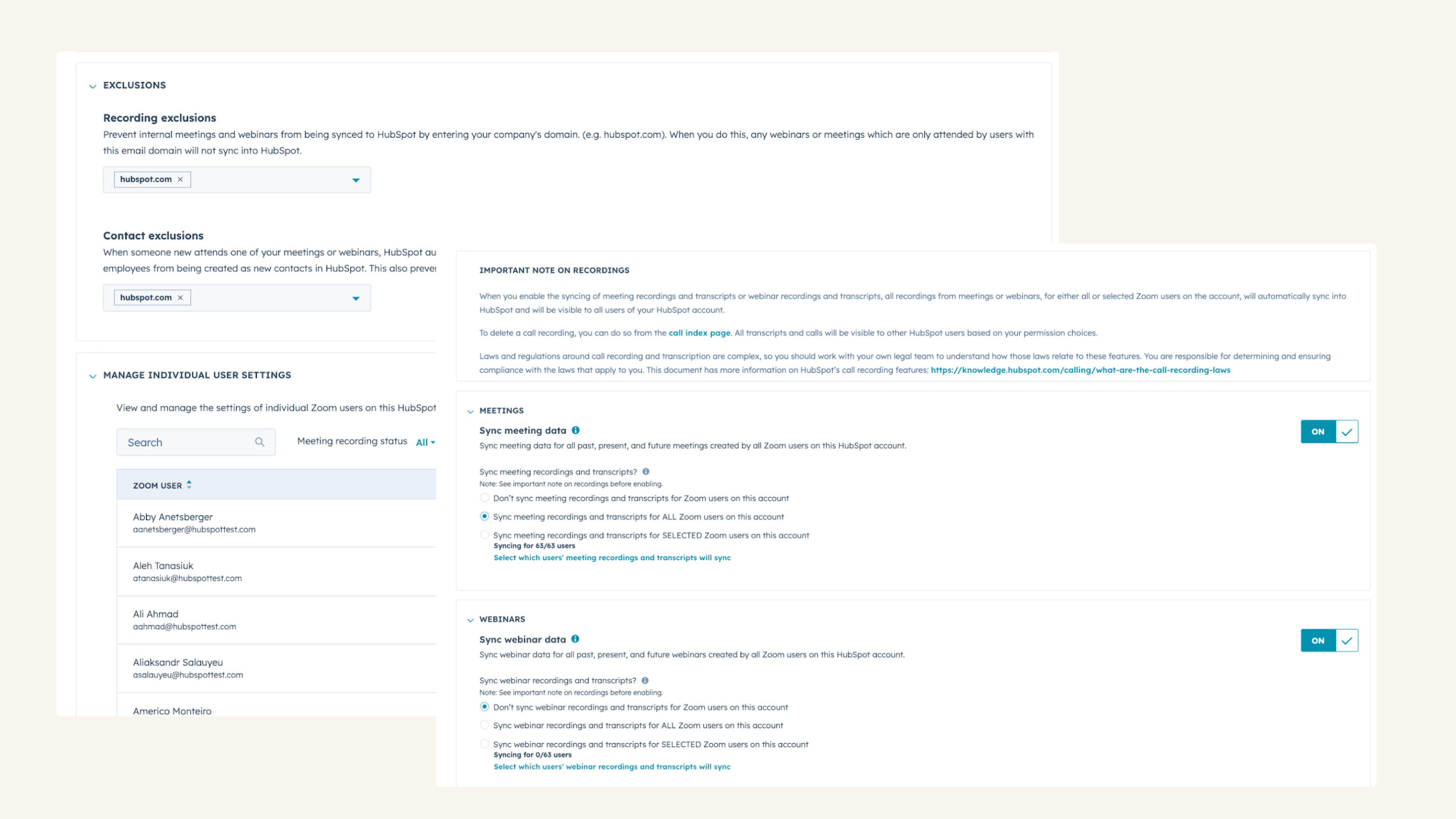
Enregistrez, transcrivez et analysez automatiquement vos appels.
Choisissez les données à synchroniser (par exemple, définissez des exclusions de domaines d'enregistrement pour les réunions internes) et gérez les paramètres des utilisateurs individuels à l'aide de contrôles administratifs qui adaptent l'intégration aux besoins de votre entreprise.
-2.png)
Utilisez HubSpot dans vos réunions Zoom
Consultez les fiches de contact de HubSpot pour les participants aux réunions et ajoutez-y des notes pendant Zoom Meetings. De plus, vous pouvez associer des réunions et des notes à des entreprises, des affaires et des tickets HubSpot. Vous pouvez également accéder à des playbooks pour guider vos conversations avec les clients.
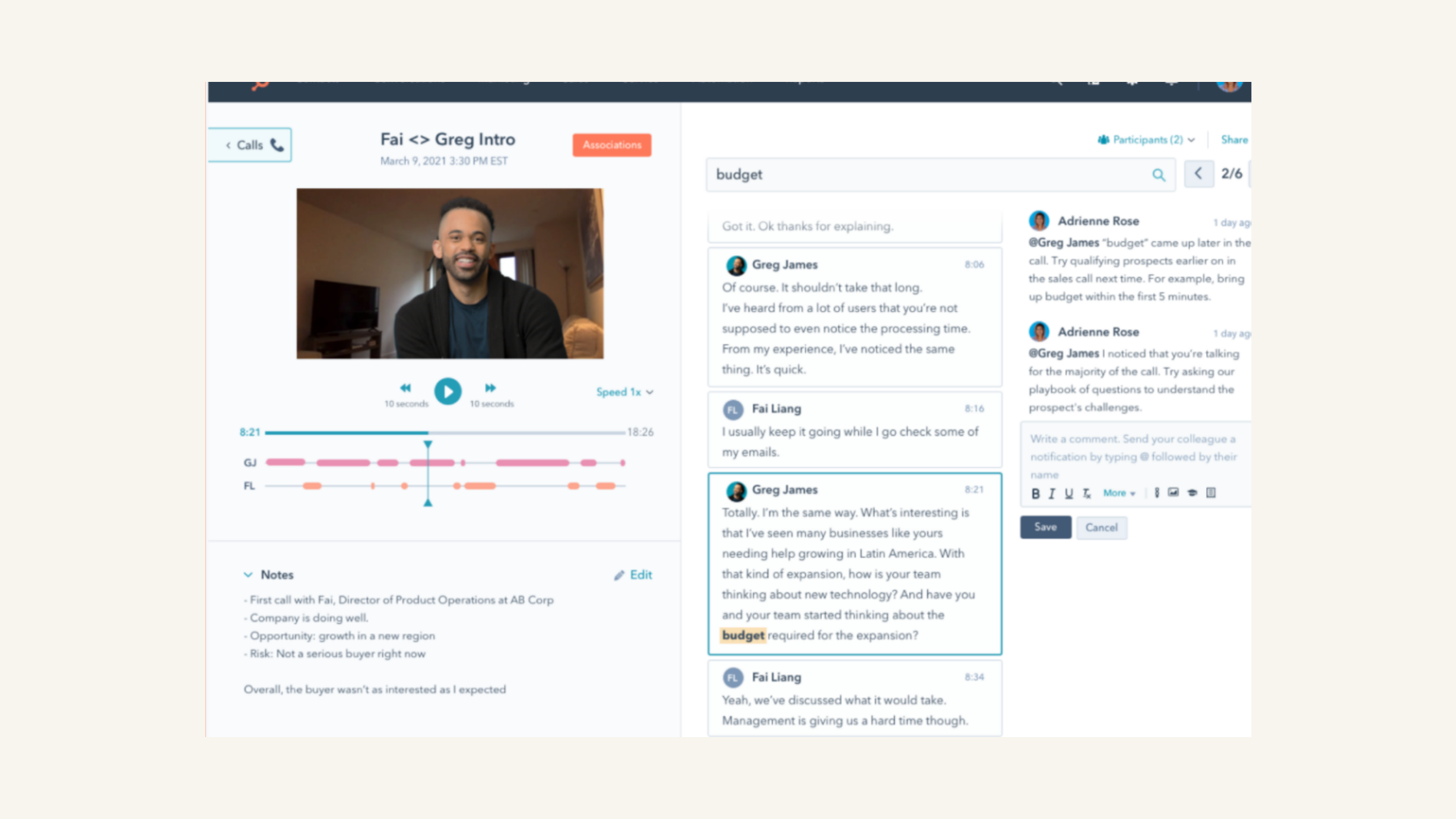
Examiner les enregistrements et les transcriptions de Zoom
Lire les appels et revoir les transcriptions, filtrer les appels en fonction des propriétés des objets et rechercher des termes clés dans les appels.
Fonctionnalité de l'application
Données partagées
Registrants | ||
Average Zoom webinar attendance duration | ||
Last registered Zoom webinar | ||
Total number of Zoom webinar registrations | ||
Total number of Zoom webinars attended | ||
Webinar date | ||
Webinar join time | ||
Webinar leave time | ||
Webinar view time | ||
Recordings | ||
Transcripts | ||
Participants |
3,4
542
3,4
542
Les utilisateurs apprécient le fait que l'intégration génère automatiquement des liens vidéo pour les réunions programmées, ce qui leur fait gagner du temps ; certains signalent toutefois que la connexion est parfois interrompue, ce qui laisse les invitations de calendrier sans lien. Si certains évoquent des difficultés liées à la synchronisation des champs personnalisés d'inscription aux webinaires et à la mise en relation de plusieurs comptes d'équipe individuels, l'outil simplifie le processus de prise de rendez-vous en permettant aux clients de programmer facilement des appels.
- 6 juil. 2026
Henderson, A.
- 30 juin 2026
Trop difficile à utiliser
Je n'ai pas réussi à faire quoi que ce soit avec HubSpot
Trop difficile à utiliser
Montero, R.
Tarification
De base
0 $US
Inclure :
Réunions jusqu'à 40 minutes par réunion
100 participants par réunion
Chat d'équipe
Clips Basic5 vidéos de deux minutes
Courrier et calendrier
Docs BasicPartagez jusqu'à 10 documents
Tâches de baseSaisie manuelle
Notes
Tableau blanc Basic3 tableaux modifiables
De base
0 $US
Inclure :
Réunions jusqu'à 40 minutes par réunion
100 participants par réunion
Chat d'équipe
Clips Basic5 vidéos de deux minutes
Courrier et calendrier
Docs BasicPartagez jusqu'à 10 documents
Tâches de baseSaisie manuelle
Notes
Tableau blanc Basic3 tableaux modifiables
* Les prix mentionnés ici sont uniquement présentés à titre indicatif. Tous les prix n'incluent pas les taxes, les offres spéciales, les réductions ni les autres facteurs pouvant affecter les tarifs. Vous devez contacter le partenaire pour obtenir les tarifs les plus récents. HubSpot n'assume aucune responsabilité pour les informations de tarification fournies par ses partenaires. Dernière mise à jour des prix : 13/04/2026
Informations supplémentaires
Créé par - HubSpot
Installation - 95 k installations
Catégories Langues dans lesquelles cette application est disponible Allemand ,Anglais ,Espagnol ,Français ,Italien ,Japonais etPortugais