

GitHub Sync by IssueLinker
สร้างโดย - IssueLinker
ติดตั้ง - 40+ การติดตั้ง
ข้อกำหนด
แผน HubSpot สิทธิ์บัญชี HubSpot - ดูสิทธิ์บัญชี ที่จำเป็น
ประเภทสิทธิ์การเข้าถึง แชร์แล้ว การสมัครใช้บริการ GitHub Sync by IssueLinker - Growth หรือ Business แพ็กเกจ
ภาพรวม
1/4 - IssueLinker Demo
Built on the same engine as IssueLinker's other HubSpot syncs, rated 5 stars and keeping 21,000+ updates synced between support and engineering at 60+ companies.
🔥 The Pain
Getting a customer's bug to engineering and back feels impossible:
😤 Slack threads nobody answers
📋 Spreadsheets nobody updates
🎟️ GitHub seats bought just so support can check an issue
🔁 "Any update on this?" for the third time
And the customer who reported it three weeks ago is still waiting.
👉 What if escalating wasn't a full-time job?
🚀 The Fix
IssueLinker turns a HubSpot ticket into a GitHub issue in the right repository, and keeps both sides in step from then on.
Built for the support, CS or product-ops lead who escalates to engineering every day, with tickets in HubSpot Service Hub and issues in GitHub. Setup is a GitHub App install plus OAuth and takes about two minutes. No scripts, no engineering time, and it runs on any HubSpot plan including free.
🧩 What you get
Two-way comment sync → Notes become GitHub comments and replies come back as notes, with nothing posted twice.
Two-way close → Close the issue and the ticket shows it, close the ticket and the issue closes too.
One bug, many tickets → Link every affected ticket to the same issue and updates reach all of them.
Any repo you choose → Pick the repo for each issue, private repos included.
AI drafts the issue → AI writes the issue from the ticket conversation and a person reviews it first.
Triaged from the card → Set labels, assignees and milestone before the issue is created.
Ticket owner comes with it → The issue shows who owns the ticket so engineering knows who to ask.
Link from wherever you already work → Link new or existing issues from the ticket card, a ticket property or a HubSpot workflow.
Engineering found it first? → New GitHub issues can open a HubSpot ticket on their own.
Bulk import → Bring your existing GitHub issues into HubSpot in one go.
⚡ Why this one and not a seat
The obvious alternative is adding your support team to your GitHub organization so they can go look. That means paid seats, and often access to your code for people who only needed to see a status.
IssueLinker is one flat price per HubSpot portal. Unlimited tickets, unlimited issues, unlimited repositories, unlimited people. No teammate needs a GitHub seat to create, link, or follow an issue. Your support reps never leave HubSpot, and your organization stays limited to the people who write the code.
It also bills per portal rather than per synced item, so a busy month costs the same as a quiet one.
👉 Take action
Install it and every feature unlocks for 14 days. No credit card.
Thirty-day money back after your first payment, so you get about six weeks to be certain.
Your customers are already waiting on engineering. The only question is whether you find out before they ask.
ฟีเจอร์
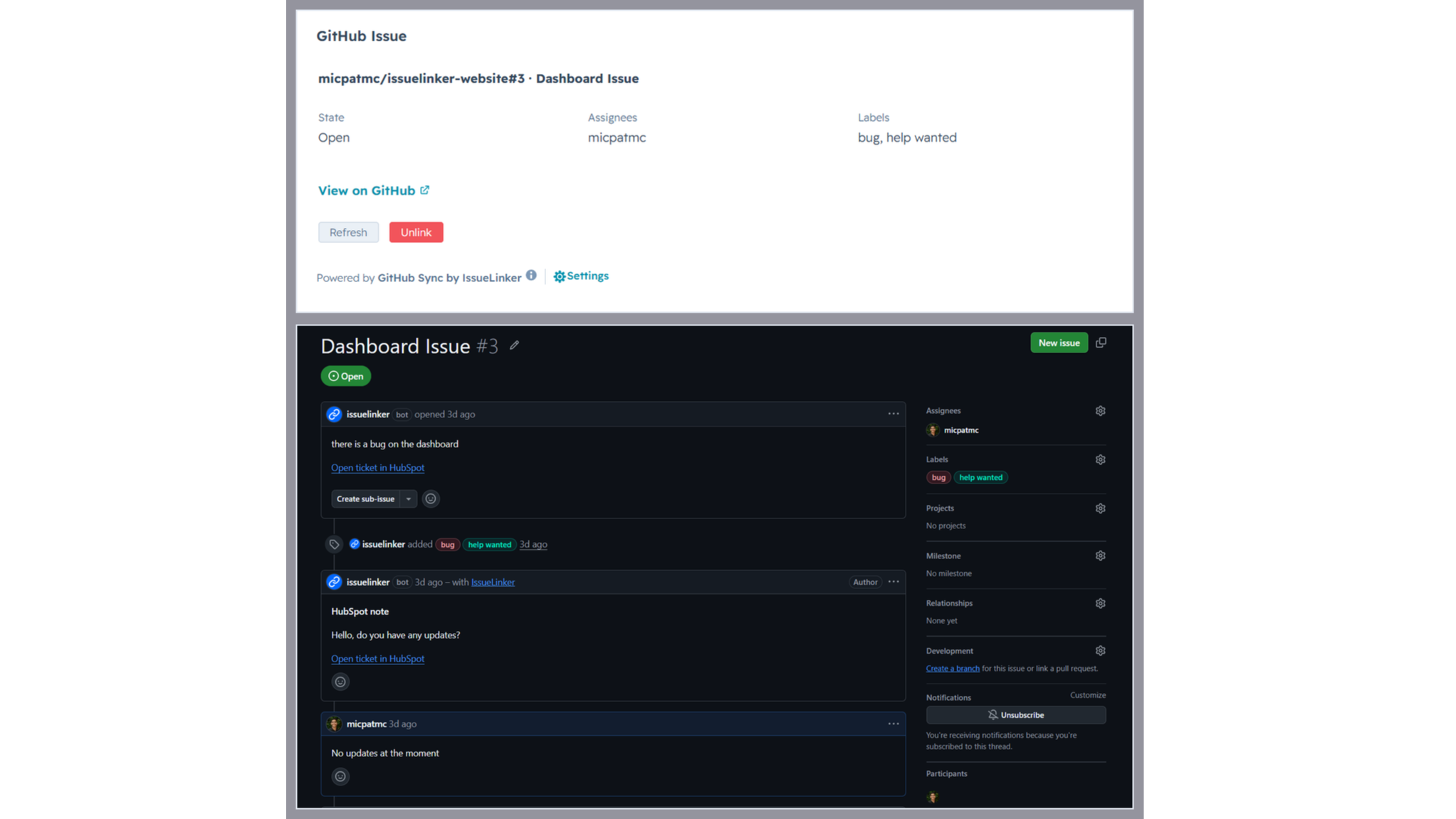
Two-way sync between HubSpot tickets and GitHub issues
Every linked ticket and issue stays in sync automatically. Comments, status changes, and closures flow in both directions in real time. No manual updates, no copy-paste.
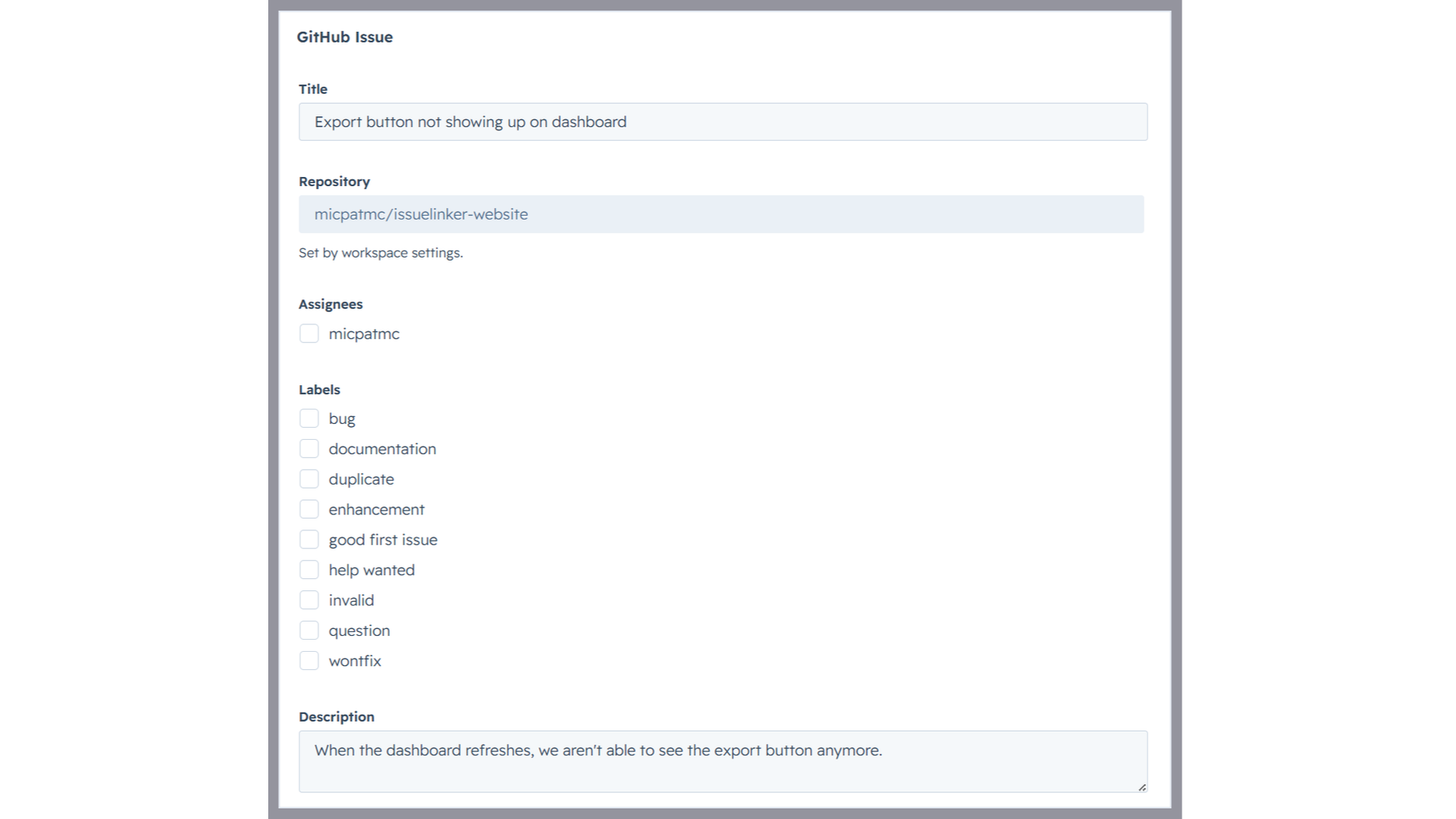
Create GitHub issues from a HubSpot ticket
Open any ticket, click Create Issue on the IssueLinker card, pick a GitHub team, and the new issue is created and linked in one step, with the ticket subject and description already filled in.
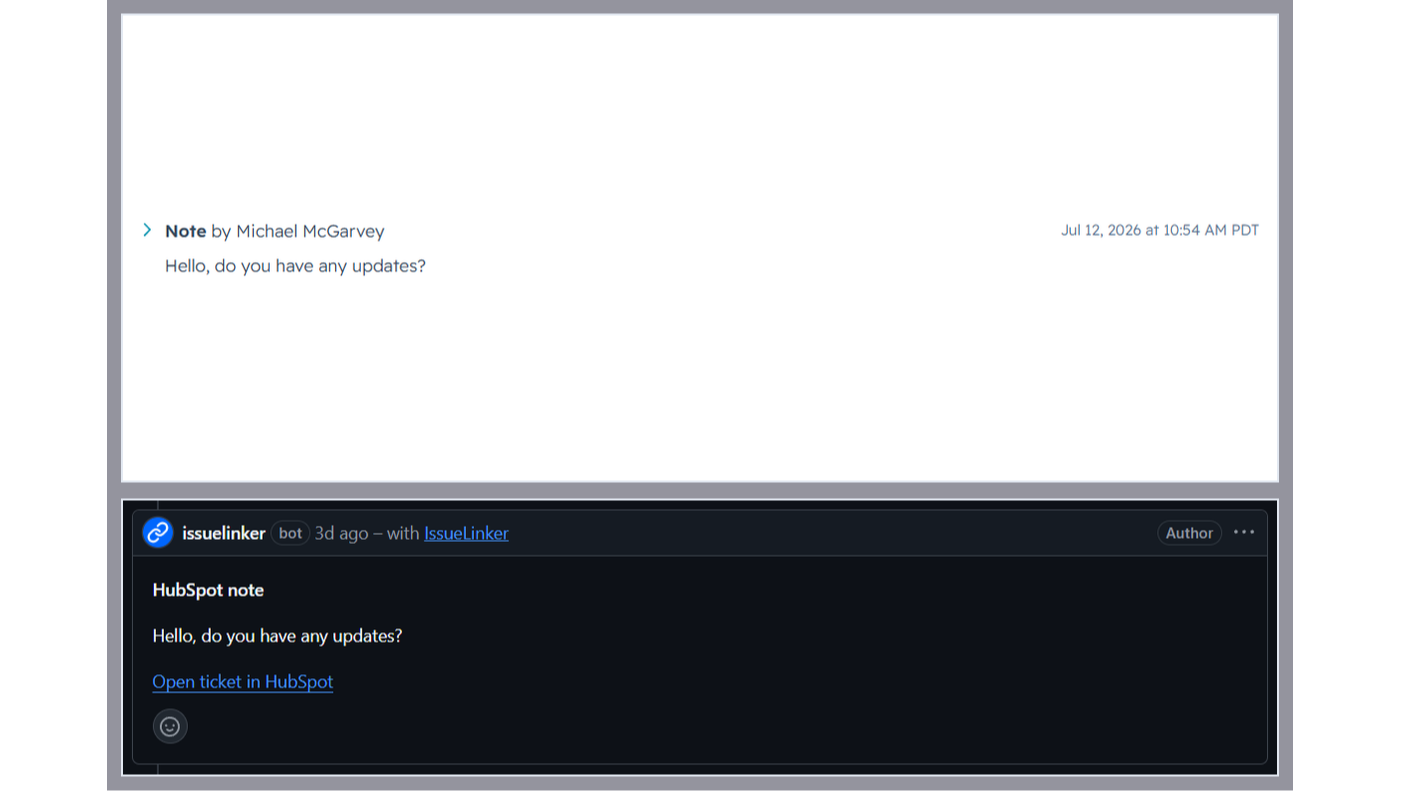
Two-way comment sync
Notes added to a linked HubSpot ticket appear as comments on the GitHub issue, and GitHub comments are mirrored back as ticket notes, so support and engineering stay in the loop without switching tools.
ฟังก์ชันการทำงานแอป
GitHub Issues | ||
Contacts | ||
Owners | ||
Conversations |
IssueLinker only reads HubSpot ticket data (subject, description, notes, pipeline stage) for tickets your team explicitly links or creates a GitHub issue for via the IssueLinker card. We do not crawl, index, or store data from other tickets.
For linked tickets, IssueLinker syncs the following in real time via HubSpot and GitHub webhooks:
• Ticket subject and description → GitHub issue (one-time, on creation)
• HubSpot notes → GitHub comments (whenever a new note is added)
• GitHub comments → HubSpot notes (whenever a new comment is added)
• GitHub issue state → HubSpot "GitHub Issue Status" custom property (whenever the issue is opened or closed)
• HubSpot ticket closed → GitHub issue closed (whenever the pipeline stage changes to closed)
What IssueLinker stores: an installation record per HubSpot portal (portal ID, OAuth tokens, GitHub installation ID), and a link record per ticket↔issue pair (HubSpot ticket ID and GitHub issue number). We do not store the contents of tickets, issues, comments, or notes. Those live in HubSpot and GitHub and are read on demand.
Data is stored in an encrypted Postgres database (Neon, US region). Access is restricted to IssueLinker's serverless functions running on Vercel. We never share, sell, or repurpose your data. On uninstall, all installation and link records for your portal are deleted within 30 days.
รีวิว
การกำหนดราคา
Growth
US$32.50
/เดือนFor support teams escalating to GitHub every day.
Unlimited ticket ↔ GitHub issue links
Unlimited repositories and unlimited users, never charged per seat
Two-way comment sync, with every synced note tracked so replies never echo
Two-way status, so closing the issue closes the ticket and the reverse
AI drafts the issue from the full ticket conversation
Ticket owner carried onto the issue
Works on any HubSpot plan, including free
Email Support
* ราคาที่แสดงนี้มีไว้เพื่อแสดงข้อมูลเท่านั้น ราคาทั้งหมดยังไม่รวมภาษี สิทธิพิเศษ ส่วนลด หรือตัวแปรราคาอื่นๆ คุณควรติดต่อพาร์ทเนอร์เพื่อรับข้อมูลราคาล่าสุดและถูกต้องที่สุด HubSpot จะไม่รับผิดชอบใดๆ ต่อข้อมูลราคานี้ซึ่งจัดทำโดยพาร์ทเนอร์ของเรา การกำหนดราคาอัปเดตล่าสุด: 28/10/2026
ข้อมูลเพิ่มเติม
สร้างโดย - IssueLinker
ติดตั้ง - 40+ การติดตั้ง
หมวดหมู่ ภาษาที่แอปนี้สามารถใช้ได้ อังกฤษ
ยอดนิยม

Gmail
Bring HubSpot to your inbox with the HubSpot integration for Gmail.

Google Calendar
Book meetings quickly and easily with HubSpot and Google Calendar.
