
-1.png)
Google Sheets Connector /Excel
建立者 - Coefficient
安裝次數 - 6k 次安裝
評分 4.7
(90)

要求
HubSpot 版本 HubSpot 帳戶權限 - 檢視所需的帳戶權限
存取權類型 已分享 Google Sheets Connector /Excel 訂閱 - Free、Starter、Pro或Enterprise 版本
總覽
1/9 - Connect HubSpot to Google Sheets or Excel
⭐️⭐️⭐️⭐️⭐️ 4.8/5 Stars
✅ HubSpot Certified App
🛡️ SOC 2 Type II Compliant
Coefficient offers 2-way sync capabilities between HubSpot and Google Sheets or Excel to power real-time analytics and data workflows. Teams of all sizes use Coefficient's Sheets and Excel connector to streamline operations & reporting by connecting Google Sheets or Excel to your HubSpot data and keeping your data imports or exports on a refresh schedule in your spreadsheet.
HubSpot-Powered. Google Sheets + Excel Native. Spreadsheet-Controlled.
Smart Object Mapping: Automatically import in related objects across Contacts, Companies, Deals, Tickets, and Custom Objects — no manual joins or stitching required.
Custom Metrics On-Demand: Build and maintain calculated fields like MRR, Lead Scores, or Forecasted Revenue directly in Sheets. Reuse your logic anytime — no rebuilding formulas every time you refresh.
Reusable Queries: Save your most-used queries as templates so you (and your team) can run them on demand, without rebuilding filters or mappings.
Automate Everything: Use Coefficient’s built-in automation and scheduling to move data exactly where you need it — fully hands-off after setup.
Key Features
2-way Integration: Write back (or export) data from Sheets or Excel directly into HubSpot — whether you’re updating fields, managing pipeline changes, creating a backup, or loading lead lists.
Set It & Forget It Scheduling: Refresh your data every hour, daily, weekly, or on custom intervals — no more manual refresh buttons.
Real-Time Alerts: Trigger notifications via Slack or email when key fields change, new deals hit thresholds, or critical data updates occur.
Secure, Team-Based Collaboration: Share queries safely with colleagues while maintaining admin-level permission controls.
Multi-Source Connectivity: Combine HubSpot with Salesforce, Snowflake, QuickBooks, Google Analytics, Looker, LinkedIn Ads, Jira, Shopify, NetSuite / ERP, Stripe, Google Search Console, and more — all directly in your spreadsheet.
AI for Operators: Use Coefficient’s AI Sheets Assistant as a copilot to build queries, generate formulas, clean data, and create visualizations — all inside Google Sheets.
Common Use Cases
Automate HubSpot Exports to Google Sheets or Excel: Set up scheduled data pulls from HubSpot into Google Sheets or Excel to eliminate manual exports, CSV downloads, and API headaches. Snapshots, extracts, and custom filters run automatically on your schedule.
Build Unified GTM Dashboards: Blend HubSpot CRM data with ad platforms, financial systems, billing tools, and more — all inside your spreadsheet — to create fully-automated sales, marketing, and revenue dashboards for leadership and operators.
Bulk Data Cleanup & Deduplication: Clean up duplicate Contacts, Companies, and Deals using spreadsheet formulas and an AI-powered Sheets Assistant. Push clean records back into HubSpot to improve CRM hygiene, enrich reporting, and maintain better lists for sales and marketing.
Custom Metrics & Calculations: Go beyond HubSpot's native fields by calculating lead scores, weighted pipeline values, customer health scores, commission plans, or forecast adjustments directly in your GSheet or Excel workbook — then sync calculated fields back into HubSpot.
Centralize Data Across Systems: Combine HubSpot data with Salesforce, MySQL, Snowflake, Stripe, QuickBooks, Paid ads data, or internal databases to create multi-source, real-time reporting pipelines.
Power External Dashboards (Looker, Tableau, Data Studio, Power BI): Use Coefficient + Google Sheets as the staging layer to power downstream dashboards, feeding BI tools like Power BI and Looker Studio with live HubSpot data enriched with logic and calculations that HubSpot reporting can’t handle natively. Most BI systems have a free Google Sheets connector, so many of our users leverage Coefficient as middleware to save their budget.
Run Live Sales Operations Workflows: Support sales teams with live deal boards, territory trackers, ranking systems, sales commission calculations, and rep scorecards — all automatically refreshed, customized, and shared across teams.
Support Data Migrations & Audits: Easily extract, inspect, and report on data from HubSpot when preparing for migrations into Salesforce, Snowflake, BigQuery or data warehouses — ensuring accuracy, completeness, and easier validation.
Flexible Ad Hoc Reporting: Answer quick one-off data questions directly inside Google Sheets, filtering, pivoting, and slicing HubSpot data as you need.
Trusted by Modern Teams
🟢 Certified on the HubSpot Marketplace
🟢 SOC 2 Type II compliant
🟢 Supporting growth teams across SaaS, Finance, Healthcare, and B2B services.
Spreadsheets still run your business, but they shouldn't slow you down. Coefficient gives operators complete control over HubSpot data: large-scale syncs, live updates, AI-powered formula or formulas, native HubSpot formulas for Google Sheets, and writebacks, all with enterprise-grade security and flexibility.
Business teams use Coefficient to increase productivity. Stop piecing together brittle automations or clunky native exports. Start running live, integrated, spreadsheet-first reporting that works.
Coefficient extends the value of your HubSpot data. Build your own spreadsheets or get started in seconds with our free HubSpot dashboards build by Ops experts.
功能
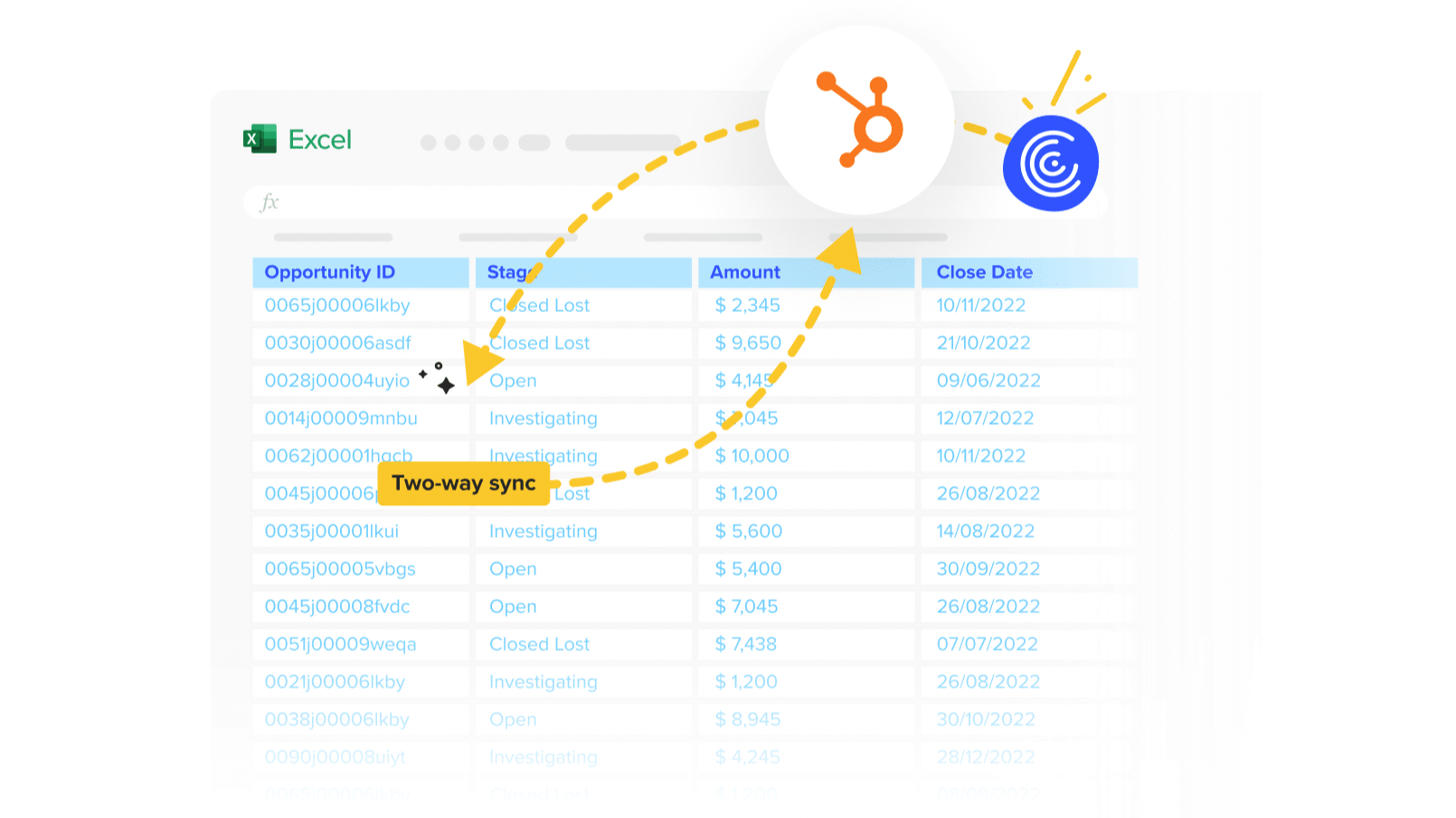
Import HubSpot data to Excel or Google Sheets
Point and click to pull HubSpot data into Google Sheets or Excel. Then, set it on a refresh schedule.
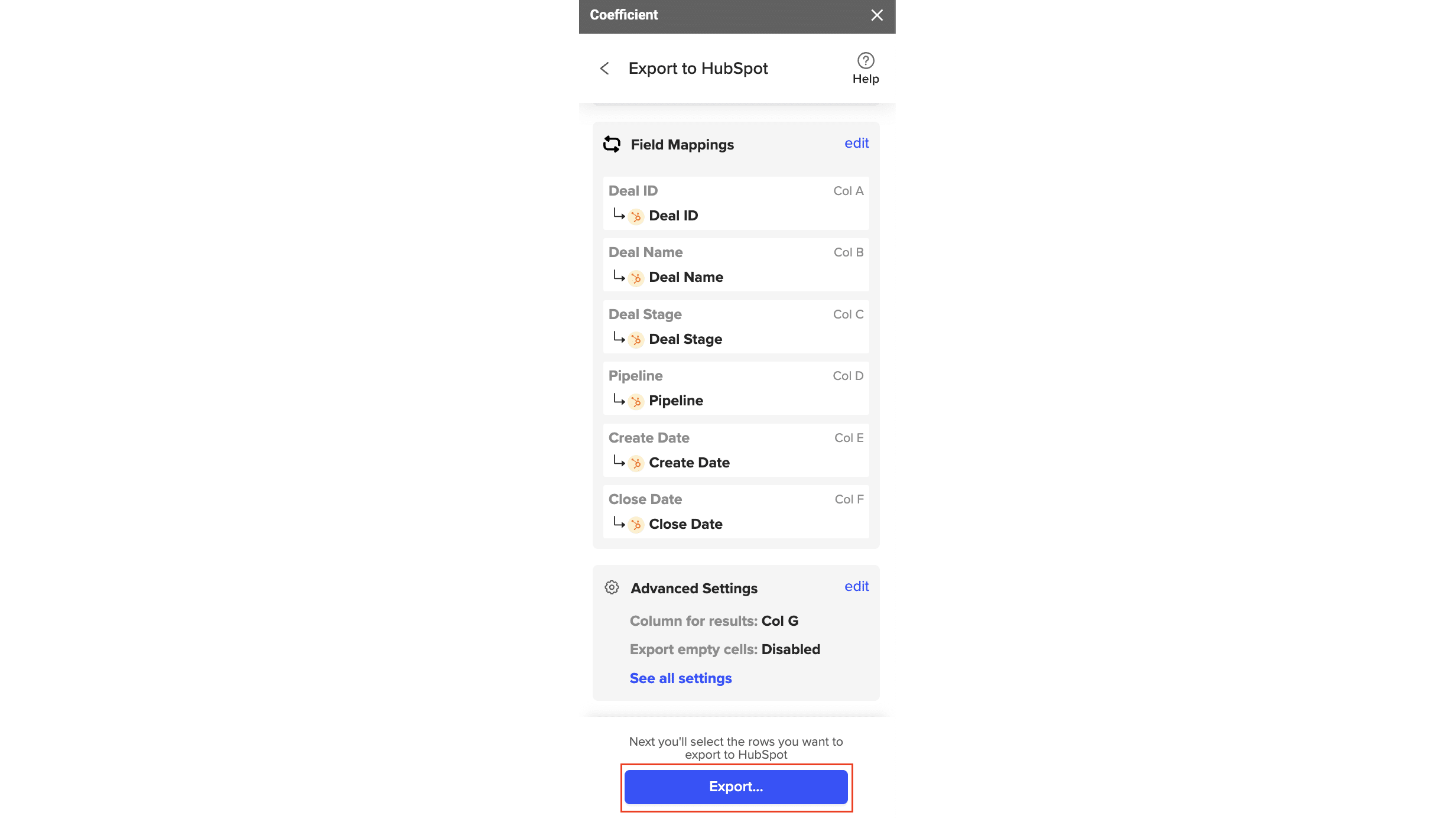
Export data from Google Sheets or Excel to HubSpot
Make bulk data updates in spreadsheets and export changes back to HubSpot.
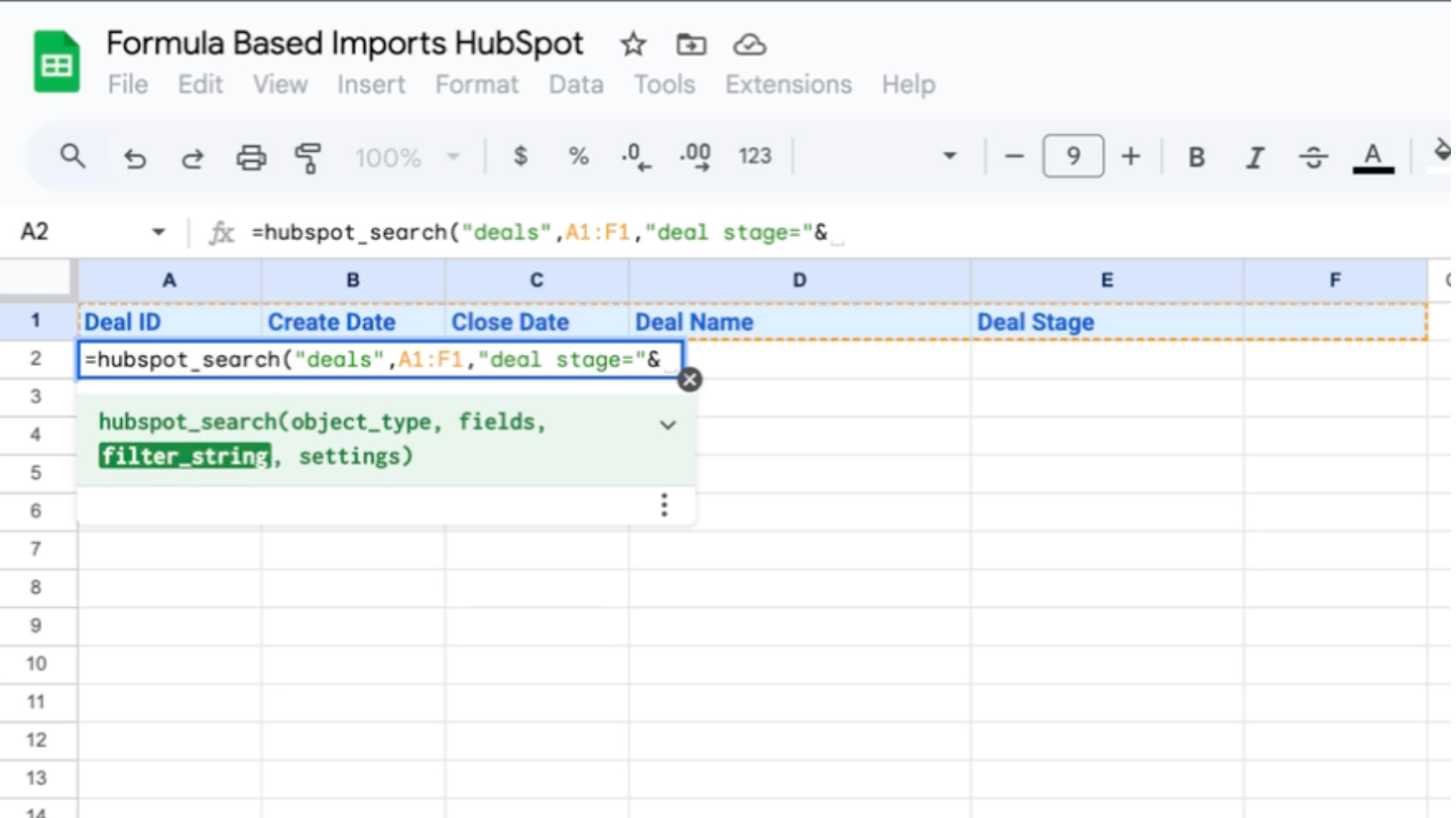
Formula Based Imports Native to Google Sheets
Use native Google Sheets formulas to search across your HubSpot instance for a list of records like deals, contacts, or companies based on specific filters.
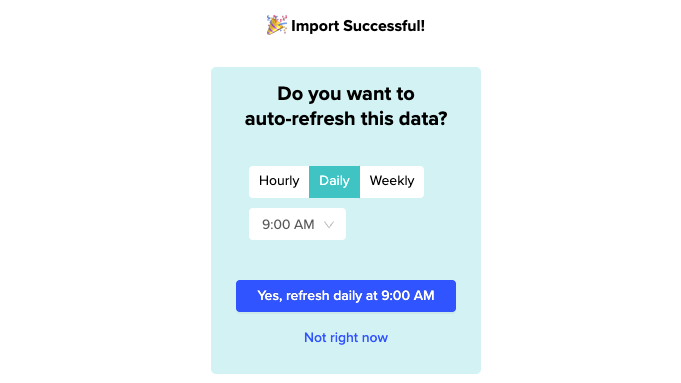
Automate your data Imports/Exports with Refresh Schedules
Always work with live data. Schedule data updates hourly, daily, or weekly, or automatically refresh data in a single click.

Not just HubSpot - connect your spreadsheet to ANY system!
Coefficient offers over 70+ pre-built connectors and Connect Any API. Sync data from your CRM, ERP, ads platforms, database, payment platform, sales tools, and more so your reports tell the whole story!
應用程式功能
共用資料
Companies | ||
Contact List | ||
Contacts | ||
Deals | ||
Line Items | ||
Products | ||
Quotes | ||
Tickets | ||
Goals | ||
Leads | ||
Carts | ||
Discounts | ||
Fees | ||
Invoices | ||
Orders | ||
Payments | ||
Subscriptions | ||
Taxes | ||
Calls | ||
Emails | ||
Meetings | ||
Notes | ||
Postal Mail | ||
Tasks | ||
Custom Object | ||
Contacts | ||
Companies | ||
Payments | ||
Form Analytics | ||
Owners | ||
Analytics | ||
Engagements |
評論
4.7
90
4.7
90
- 2026年8月10日
可靠的自动数据汇总与报告功能
我一直在使用 Coefficient 来设置每日自动更新的报告。它支持生成一系列实用的自定义报告,这些报告会自动更新,无需我进行任何操作。有了这些现成的报告,我每天节省了大量原本用于下载和解析信息的时间。
它允许用户从各种 API 中提取海量信息,并导入到(以我为例)Google 表格中。在此基础上,您可以自动生成大量定制报告——如果没有 Coefficient 插件,这些报告原本是无法生成的。
有时很难区分位于不同存储桶中的同名字段,从而难以确定它们所属的位置。如果能解决这个问题,编制报告将会更加轻松。
Wells, J.
- 2026年7月1日
一款用于将 HubSpot 与 Gsheets 进行数据集成的好工具。
操作简便,支持快速拖放导入数据。全新的 Web 仪表盘功能使其更加实用。
易于集成,具备计划安排功能,并支持基于字段的筛选。
不适用于大型数据源。
Dhote, B.
價格
Free
US$0
For individuals looking to explore the possibilities of live data in sheets
3 Data Sources
1 Account / Source
5,000 Row Import Size
50 Import Refreshes / Mo
Manual Imports
100 Row Export Size
50 Export Refreshes / Mo
Manual Exports
30 Alerts / Mo
On Sheet AI Functions
10K/Lifetime OpenAI API Calls
Help Center Access
Email Support
Free
US$0
For individuals looking to explore the possibilities of live data in sheets
3 Data Sources
1 Account / Source
5,000 Row Import Size
50 Import Refreshes / Mo
Manual Imports
100 Row Export Size
50 Export Refreshes / Mo
Manual Exports
30 Alerts / Mo
On Sheet AI Functions
10K/Lifetime OpenAI API Calls
Help Center Access
Email Support
* 此處顯示的價格僅供參考。所有價格均不包含稅金、獎勵、折扣或其他價格變數。如需最新的正確價格資訊,請連絡合作夥伴。HubSpot 對合作夥伴所提供的價格資訊不承擔任何責任。上次更新價格時間:2026/01/26
更多資訊
建立者 - Coefficient
安裝次數 - 6k 次安裝
類別 此應用程式可用的語言 法文 、英文 和西班牙文