

Linear Sync by IssueLinker
Udviklet af - IssueLinker
Installeringer - 60+ installationer
Rangering 5
(7)
Krav
HubSpot-abonnement Tilladelser til HubSpot-konto - Se de nødvendige kontotilladelser
Adgangstype Delt Linear Sync by IssueLinker abonnement - Growth eller Business planer
Oversigt
1/4 - IssueLinker Demo
IssueLinker keeps your HubSpot tickets and Linear issues in sync, so your support team and your engineering team work from the same source of truth, without copying anything between tools.
When a customer reports a bug in HubSpot, your support team can create or link a Linear issue directly from the ticket card. As engineers update the issue in Linear, the status flows back to HubSpot automatically. Comments work both ways: a note added to the HubSpot ticket appears as a Linear comment, and replies from engineering surface as ticket notes, so support reps always know what's happening without leaving HubSpot.
Built for teams running customer support on HubSpot Service Hub and engineering on Linear. Setup is OAuth only and takes about two minutes, with no scripts or engineering work. It runs on any HubSpot plan, including free, so you can stop bouncing between two tabs every time a customer hits a bug.
Here is how your support and engineering teams stay on the same page:
Two-way sync. Status, comments, and closures move in both directions in real time. Close a ticket and the issue moves to done. Change the issue's status and the ticket updates.
Create or draft issues with AI. Create a linked Linear issue from any ticket in one click with the subject and description pre-filled, or let AI read the full ticket conversation and draft it for you. The draft waits for a teammate to review it before anything reaches Linear.
Customer requests. Attach the requesting account to each Linear issue, so engineering sees which customers are behind every request and can prioritize the highest-impact work. The workflow Linear offers for Intercom, brought to HubSpot.
Attachment sync. Screenshots and files the customer sent come across to the issue. Images show inline in the Linear description, and PDF, CSV, and text files attach to it.
Bulk import. Already using Linear? Import your existing issues into HubSpot in one pass, so nothing starts from zero.
Workflow automation. On Service Hub Professional and above, add the "Create Linear issue" action to a workflow and an issue opens and links itself the moment a ticket hits the stage you pick, with nobody touching the card.
Works on any HubSpot plan. No dependency on paid HubSpot workflows, and any teammate can create or link issues with no Linear seat required.
And much more. Owner stamping, close-on-status automation, and field-level customization. Visit IssueLinker to see everything.
Funktioner
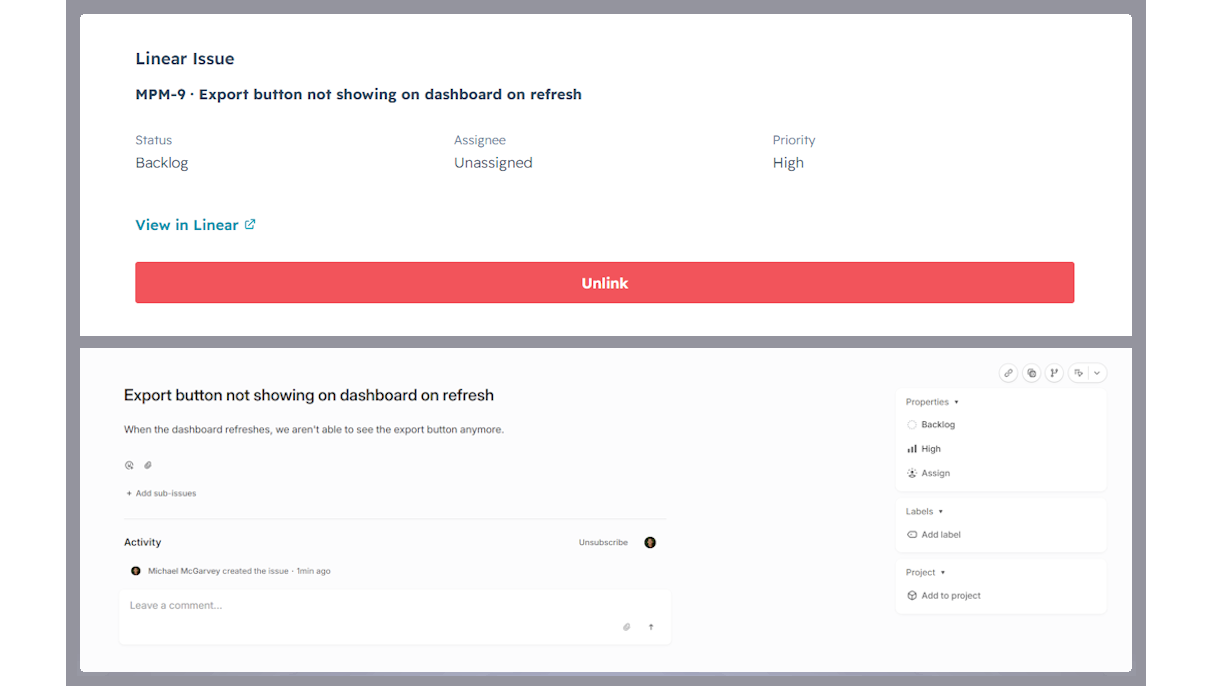
Two-way sync between HubSpot tickets and Linear issues
Every linked ticket and issue stays in sync automatically. Comments, status changes, and closures flow in both directions in real time. No manual updates, no copy-paste.
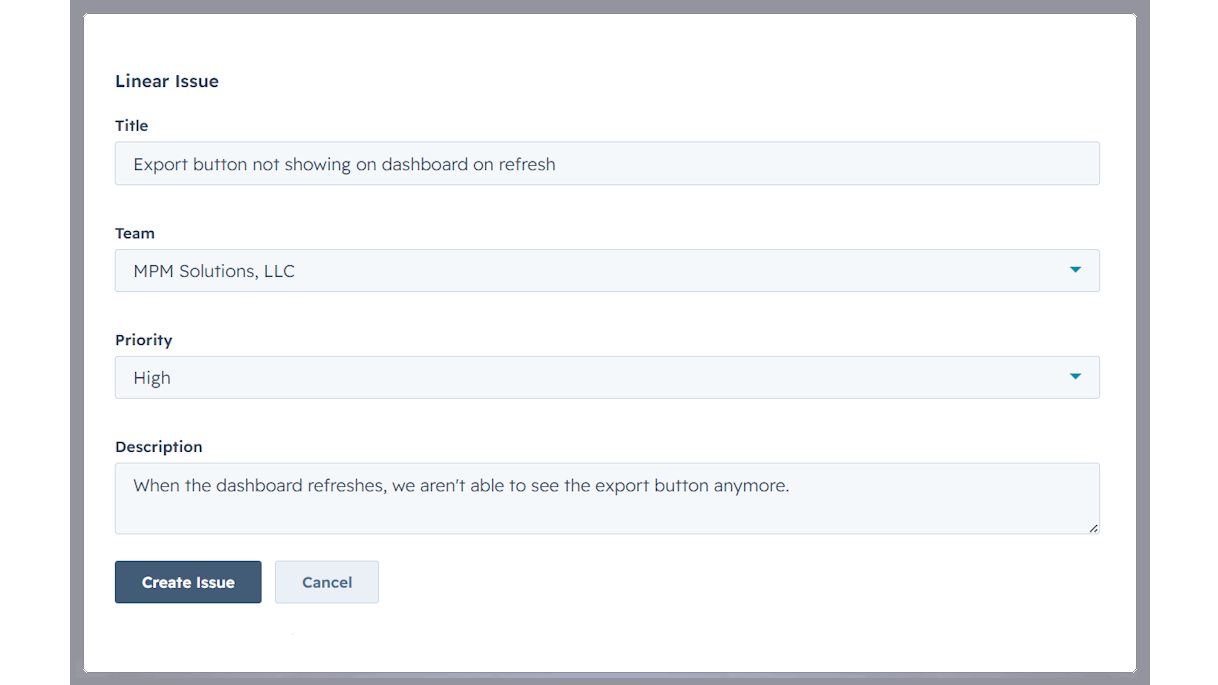
Create Linear issues from a HubSpot ticket
Open any ticket, click Create Issue on the IssueLinker card, pick a Linear team, and the new issue is created and linked in one step, with the ticket subject and description already filled in.
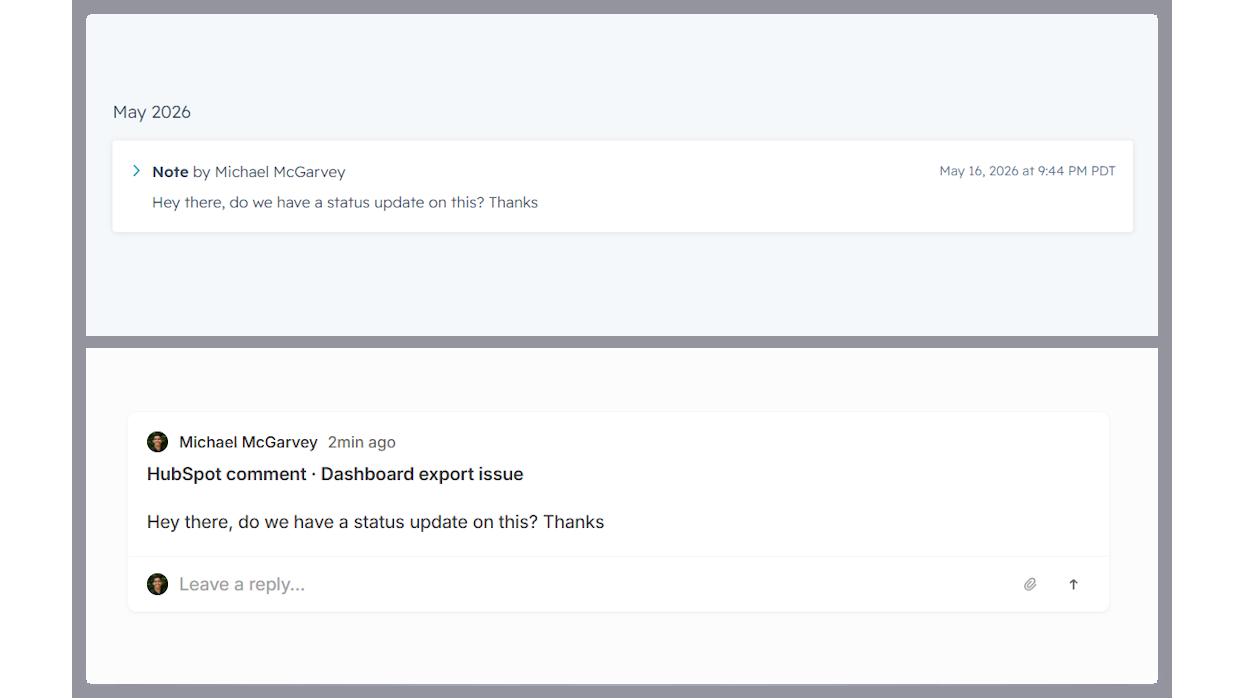
Two-way comment sync
Notes added to a linked HubSpot ticket appear as comments on the Linear issue, and Linear comments are mirrored back as ticket notes, so support and engineering stay in the loop without switching tools.
Appfunktionalitet
Linear Issues |
IssueLinker only reads HubSpot ticket data (subject, description, notes, pipeline stage) for tickets your team explicitly links or creates a Linear issue for via the IssueLinker card. We do not crawl, index, or store data from other tickets.
For linked tickets, IssueLinker syncs the following in real time via HubSpot and Linear webhooks:
• Ticket subject and description → Linear issue (one-time, on creation)
• HubSpot notes → Linear comments (whenever a new note is added)
• Linear comments → HubSpot notes (whenever a new comment is added)
• Linear issue state → HubSpot "Linear Issue Status" custom property (whenever state changes)
• HubSpot ticket closed → Linear issue moved to Completed (whenever the pipeline stage changes to closed)
What IssueLinker stores: an installation record per HubSpot portal (portal ID, OAuth tokens, Linear workspace ID), and a link record per ticket↔issue pair (HubSpot ticket ID and Linear issue ID). We do not store the contents of tickets, issues, comments, or notes. Those live in HubSpot and Linear and are read on demand.
Data is stored in an encrypted Postgres database (Neon, US region). Access is restricted to IssueLinker's serverless functions running on Vercel. We never share, sell, or repurpose your data. On uninstall, all installation and link records for your portal are deleted within 30 days.
Anmeldelser
5,0
7
5,0
7
- 21. aug 2026
Feedback sendes inden for en uge
Forbinder vores HubSpot-fejlmeldinger med Linear, så supportafdelingen kan se, om noget rent faktisk er blevet rettet, uden at skulle åbne Linear. Status, ansvarlig og team vises som egentlige HubSpot-egenskaber, så vi kan filtrere og udarbejde rapporter baseret på dem. Jeg sendte to stykker feedback til Michael i løbet af prøveperioden, fik et ordentligt svar samme dag, og begge ting blev implementeret inden for en uge. Det er ikke noget, jeg er vant til.
Hurtig opsætning, gør præcis, hvad der står. Synkroniserede felter fungerer i listevisninger og rapporter – de er ikke bare låst fast på et kort. Michael svarer faktisk og sender også varen.
Forbindelsen er i øjeblikket begrænset til én-til-én. Linear <> HubSpot
Soderholm, N.
- 18. aug 2026
Hjalp mig med at flytte billetter fra JIRA til Linear
Jeg sad fast med at skulle administrere et team i JIRA, men nu kan jeg flytte dem over på en omkostningseffektiv måde.
Kunderne overføres til Linear, og billederne overføres også. Det er fantastisk, at der er en automatisk funktion til at oprette en billet
Wanless, P.
Priser
Growth
32,50 US$
/månedSimple pricing for teams that move fast.
Two-way sync of comments and status (both directions)
Create, link, and AI-draft Linear issues
Customer requests (link the requesting account to each issue)
Attachment sync (screenshots and files onto the issue)
Unlimited ticket ↔ Linear issue links
Email Support
Growth
32,50 US$
/månedSimple pricing for teams that move fast.
Two-way sync of comments and status (both directions)
Create, link, and AI-draft Linear issues
Customer requests (link the requesting account to each issue)
Attachment sync (screenshots and files onto the issue)
Unlimited ticket ↔ Linear issue links
Email Support
* Priserne her er kun til visningsformål. Alle priser er ekskl. afgifter, incitamenter, rabatter eller andre prisvariabler. Du bør kontakte partneren for at få de mest ajourførte og korrekte prisoplysninger. HubSpot påtager sig intet ansvar for disse prisoplysninger, som leveres af vores partnere. Priser sidst opdateret: 21.08.2026
Flere oplysninger
Udviklet af - IssueLinker
Installeringer - 60+ installationer
Kategorier Sprog som denne app er tilgængelig på Engelsk