

Linear Sync by IssueLinker
建立者 - IssueLinker
安裝次數 - 超過 60 次安裝
評分 5
(7)
要求
HubSpot 版本 HubSpot 帳戶權限 - 檢視所需的帳戶權限
存取權類型 已分享 Linear Sync by IssueLinker 訂閱 - Growth或Business 版本
總覽
1/4 - IssueLinker Demo
IssueLinker keeps your HubSpot tickets and Linear issues in sync, so your support team and your engineering team work from the same source of truth, without copying anything between tools.
When a customer reports a bug in HubSpot, your support team can create or link a Linear issue directly from the ticket card. As engineers update the issue in Linear, the status flows back to HubSpot automatically. Comments work both ways: a note added to the HubSpot ticket appears as a Linear comment, and replies from engineering surface as ticket notes, so support reps always know what's happening without leaving HubSpot.
Built for teams running customer support on HubSpot Service Hub and engineering on Linear. Setup is OAuth only and takes about two minutes, with no scripts or engineering work. It runs on any HubSpot plan, including free, so you can stop bouncing between two tabs every time a customer hits a bug.
Here is how your support and engineering teams stay on the same page:
Two-way sync. Status, comments, and closures move in both directions in real time. Close a ticket and the issue moves to done. Change the issue's status and the ticket updates.
Create or draft issues with AI. Create a linked Linear issue from any ticket in one click with the subject and description pre-filled, or let AI read the full ticket conversation and draft it for you. The draft waits for a teammate to review it before anything reaches Linear.
Customer requests. Attach the requesting account to each Linear issue, so engineering sees which customers are behind every request and can prioritize the highest-impact work. The workflow Linear offers for Intercom, brought to HubSpot.
Attachment sync. Screenshots and files the customer sent come across to the issue. Images show inline in the Linear description, and PDF, CSV, and text files attach to it.
Bulk import. Already using Linear? Import your existing issues into HubSpot in one pass, so nothing starts from zero.
Workflow automation. On Service Hub Professional and above, add the "Create Linear issue" action to a workflow and an issue opens and links itself the moment a ticket hits the stage you pick, with nobody touching the card.
Works on any HubSpot plan. No dependency on paid HubSpot workflows, and any teammate can create or link issues with no Linear seat required.
And much more. Owner stamping, close-on-status automation, and field-level customization. Visit IssueLinker to see everything.
功能
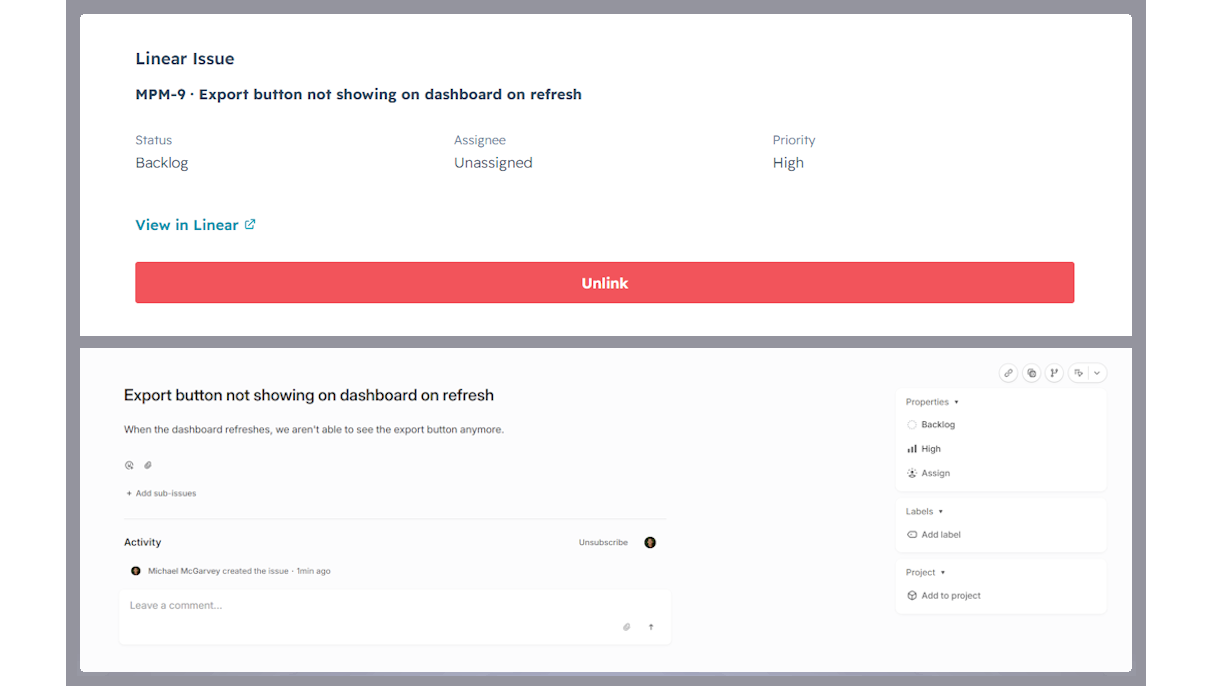
Two-way sync between HubSpot tickets and Linear issues
Every linked ticket and issue stays in sync automatically. Comments, status changes, and closures flow in both directions in real time. No manual updates, no copy-paste.
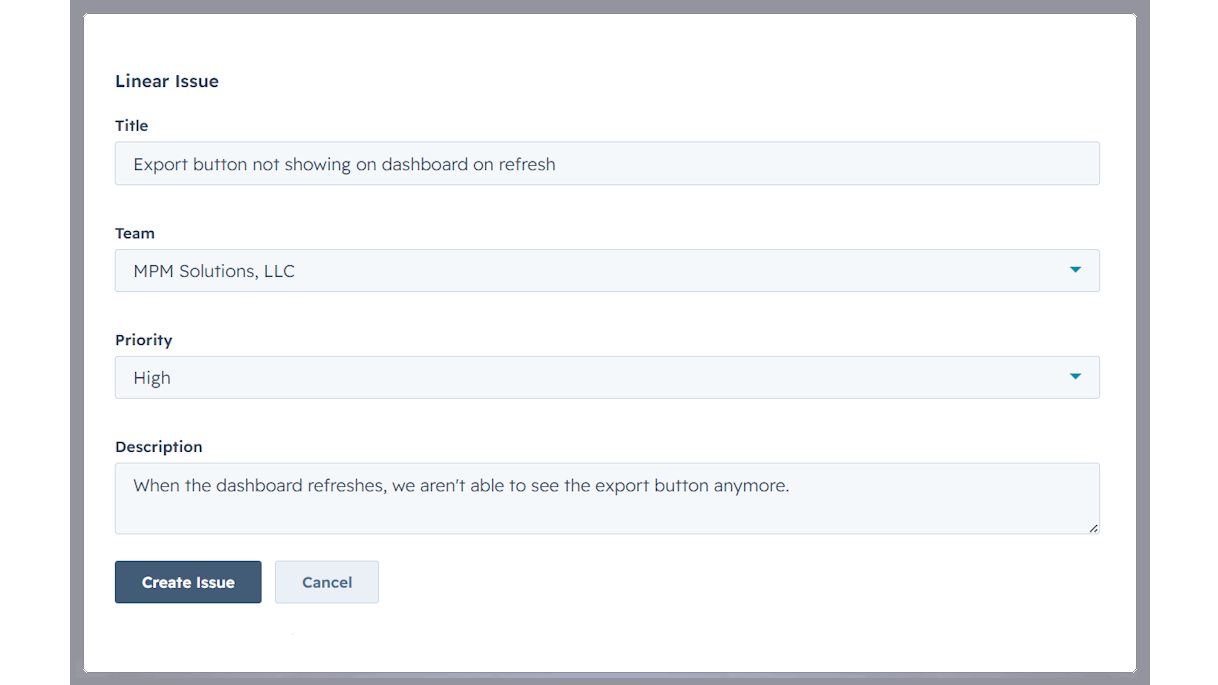
Create Linear issues from a HubSpot ticket
Open any ticket, click Create Issue on the IssueLinker card, pick a Linear team, and the new issue is created and linked in one step, with the ticket subject and description already filled in.
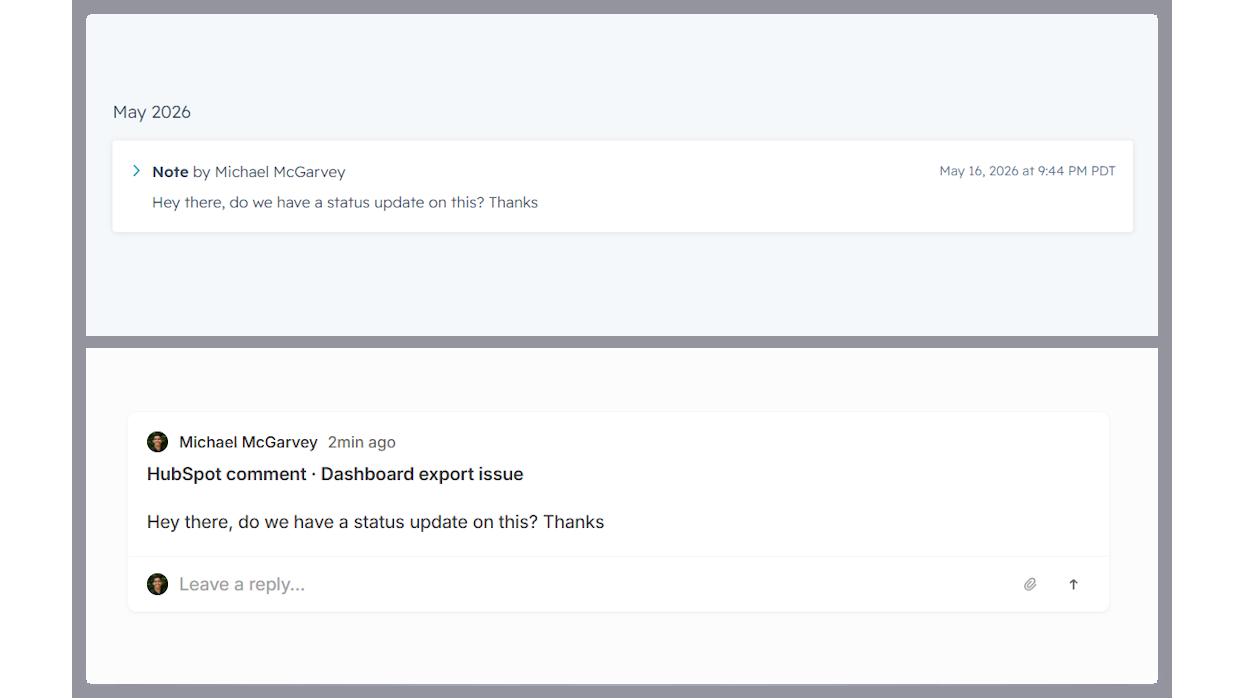
Two-way comment sync
Notes added to a linked HubSpot ticket appear as comments on the Linear issue, and Linear comments are mirrored back as ticket notes, so support and engineering stay in the loop without switching tools.
應用程式功能
Linear Issues |
IssueLinker only reads HubSpot ticket data (subject, description, notes, pipeline stage) for tickets your team explicitly links or creates a Linear issue for via the IssueLinker card. We do not crawl, index, or store data from other tickets.
For linked tickets, IssueLinker syncs the following in real time via HubSpot and Linear webhooks:
• Ticket subject and description → Linear issue (one-time, on creation)
• HubSpot notes → Linear comments (whenever a new note is added)
• Linear comments → HubSpot notes (whenever a new comment is added)
• Linear issue state → HubSpot "Linear Issue Status" custom property (whenever state changes)
• HubSpot ticket closed → Linear issue moved to Completed (whenever the pipeline stage changes to closed)
What IssueLinker stores: an installation record per HubSpot portal (portal ID, OAuth tokens, Linear workspace ID), and a link record per ticket↔issue pair (HubSpot ticket ID and Linear issue ID). We do not store the contents of tickets, issues, comments, or notes. Those live in HubSpot and Linear and are read on demand.
Data is stored in an encrypted Postgres database (Neon, US region). Access is restricted to IssueLinker's serverless functions running on Vercel. We never share, sell, or repurpose your data. On uninstall, all installation and link records for your portal are deleted within 30 days.
評論
5.0
7
5.0
7
- 2026年8月21日
反馈将在一周内寄出
将我们的 HubSpot 错误单与 Linear 关联起来,这样支持团队无需打开 Linear 即可查看问题是否已实际修复。状态、负责人和团队作为真正的 HubSpot 属性被导入,因此我们可以据此进行筛选和生成报告。试用期间向 Michael 提交了两条反馈,当天就收到了正式回复,两条反馈都在一周内得到了处理。 这可不是我习惯的处理方式。
快速设置,完全符合描述。同步字段不仅在卡片视图中有效,在列表视图和报表中也能正常工作。迈克尔不仅会回复消息,还会如期发货。
目前链接仅支持一对一。Linear <> HubSpot
Soderholm, N.
- 2026年8月18日
帮助我将工单从 JIRA 迁移到 Linear
我之前一直被迫让团队在JIRA上工作,现在终于可以以经济高效的方式将他们迁移出来。
客户信息会自动转移到Linear系统,图片也会一并导入。自动生成工单的功能非常棒
Wanless, P.
價格
Growth
US$32.50
/ 月Simple pricing for teams that move fast.
Two-way sync of comments and status (both directions)
Create, link, and AI-draft Linear issues
Customer requests (link the requesting account to each issue)
Attachment sync (screenshots and files onto the issue)
Unlimited ticket ↔ Linear issue links
Email Support
Growth
US$32.50
/ 月Simple pricing for teams that move fast.
Two-way sync of comments and status (both directions)
Create, link, and AI-draft Linear issues
Customer requests (link the requesting account to each issue)
Attachment sync (screenshots and files onto the issue)
Unlimited ticket ↔ Linear issue links
Email Support
* 此處顯示的價格僅供參考。所有價格均不包含稅金、獎勵、折扣或其他價格變數。如需最新的正確價格資訊,請連絡合作夥伴。HubSpot 對合作夥伴所提供的價格資訊不承擔任何責任。上次更新價格時間:2026/08/21