

Linear Sync by IssueLinker
Utworzone przez - IssueLinker
Instaluje - Ponad 60 instalacji
Ocena 5
(7)
Wymagania
Plan HubSpot Uprawnienia konta HubSpot - Wyświetl wymagane uprawnienia konta
Typ dostępu Udostępniono Subskrypcja Linear Sync by IssueLinker - Growth lub Business planu
Przegląd
1/4 - IssueLinker Demo
⭐️⭐️⭐️⭐️⭐️ "Exactly what we were missing in HubSpot" T. Ward
⭐️⭐️⭐️⭐️⭐️ "A fantastic, direct connection" C. Wesselman
⭐️⭐️⭐️⭐️⭐️ "Feedback shipped in a week" N. Soderholm
⭐️⭐️⭐️⭐️⭐️ "Helped me move tickets from Jira to Linear" P. Wanless
⭐️⭐️⭐️⭐️⭐️ "Great customer service" M. Wimmer
💥 14 Day Free Trial: Install the app and every feature is unlocked for 14 days. No credit card required.
IssueLinker keeps your HubSpot tickets and Linear issues in sync, so your support team and your engineering team work from the same source of truth, without copying anything between tools.
When a customer reports a bug in HubSpot, your support team can create or link a Linear issue directly from the ticket card. As engineers update the issue in Linear, the status flows back to HubSpot automatically. Comments work both ways: a note added to the HubSpot ticket appears as a Linear comment, and replies from engineering surface as ticket notes, so support reps always know what's happening without leaving HubSpot.
Built for teams running customer support on HubSpot Service Hub and engineering on Linear. Setup is OAuth only and takes about two minutes, with no scripts or engineering work. It runs on any HubSpot plan, including free, so you can stop bouncing between two tabs every time a customer hits a bug.
Here is how your support and engineering teams stay on the same page:
Two-way sync. Status, comments, and closures move in both directions in real time. Close a ticket and the issue moves to done. Change the issue's status and the ticket updates.
Create or draft issues with AI. Create a linked Linear issue from any ticket in one click with the subject and description pre-filled, or let AI read the full ticket conversation and draft it for you. The draft waits for a teammate to review it before anything reaches Linear.
Customer requests. Attach the requesting account to each Linear issue, so engineering sees which customers are behind every request and can prioritize the highest-impact work. The workflow Linear offers for Intercom, brought to HubSpot.
Attachment sync. Screenshots and files the customer sent come across to the issue. Images show inline in the Linear description, and PDF, CSV, and text files attach to it.
Bulk import. Already using Linear? Import your existing issues into HubSpot in one pass, so nothing starts from zero.
Workflow automation. On Service Hub Professional and above, add the "Create Linear issue" action to a workflow and an issue opens and links itself the moment a ticket hits the stage you pick, with nobody touching the card.
Works on any HubSpot plan. No dependency on paid HubSpot workflows, and any teammate can create or link issues with no Linear seat required.
And much more. Owner stamping, close-on-status automation, and field-level customization. Visit IssueLinker to see everything.
Cechy
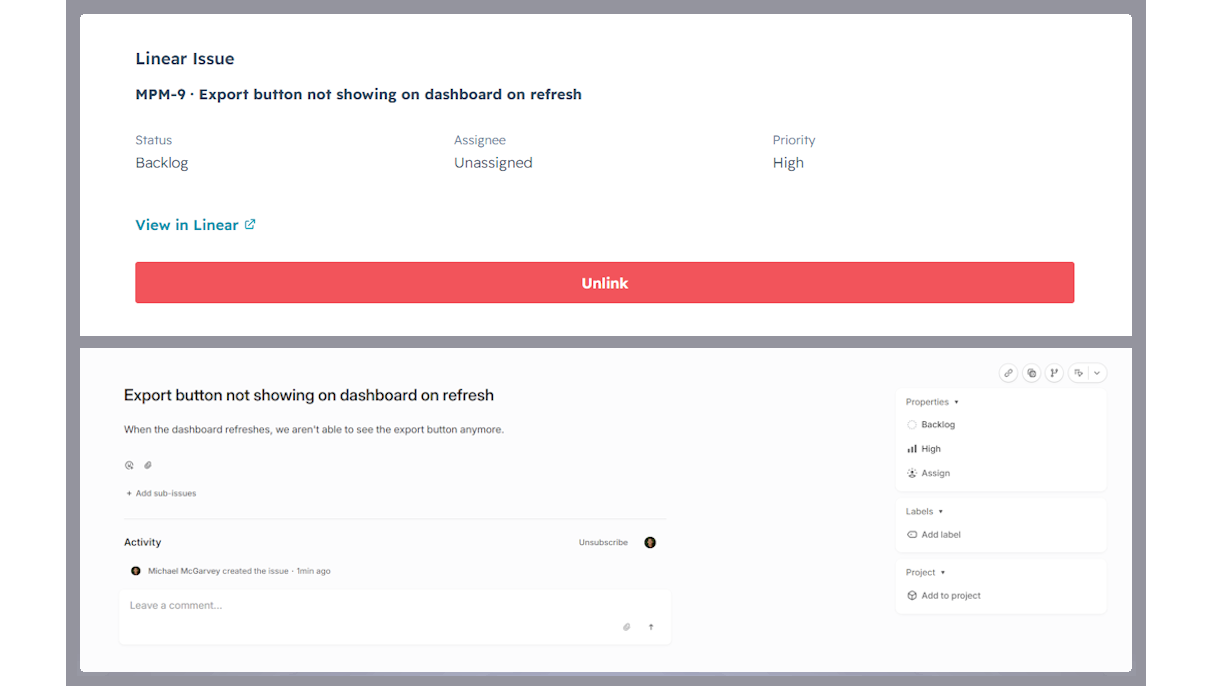
Two-way sync between HubSpot tickets and Linear issues
Every linked ticket and issue stays in sync automatically. Comments, status changes, and closures flow in both directions in real time. No manual updates, no copy-paste.
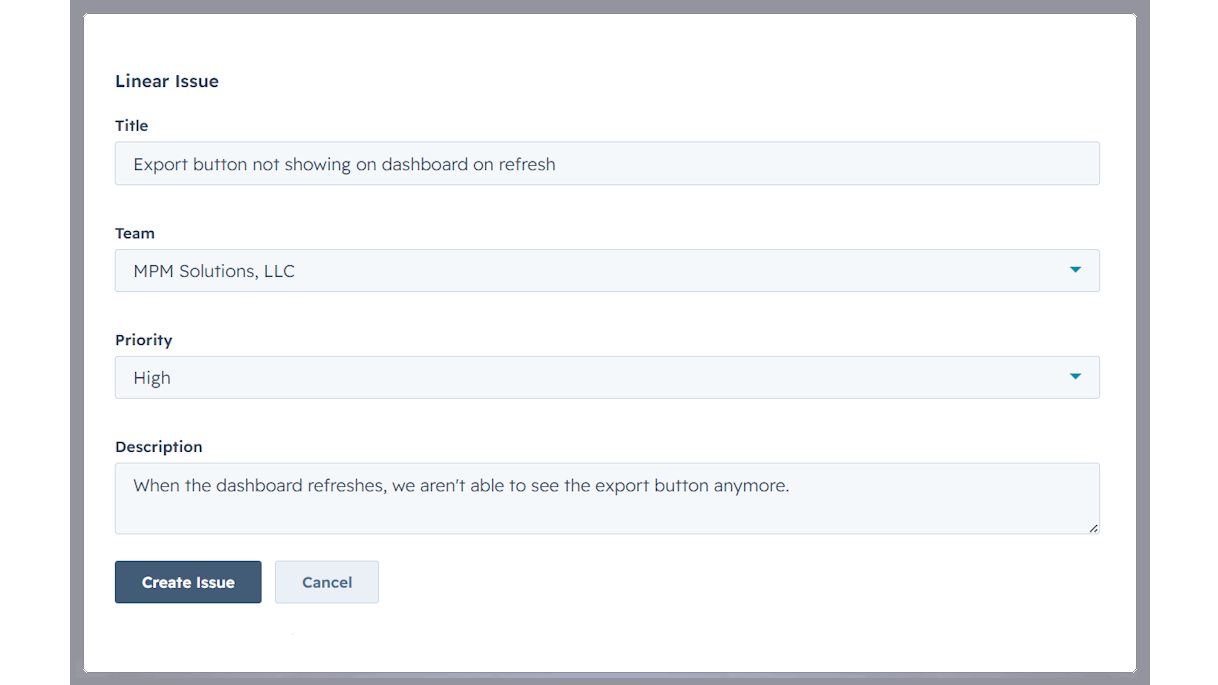
Create Linear issues from a HubSpot ticket
Open any ticket, click Create Issue on the IssueLinker card, pick a Linear team, and the new issue is created and linked in one step, with the ticket subject and description already filled in.
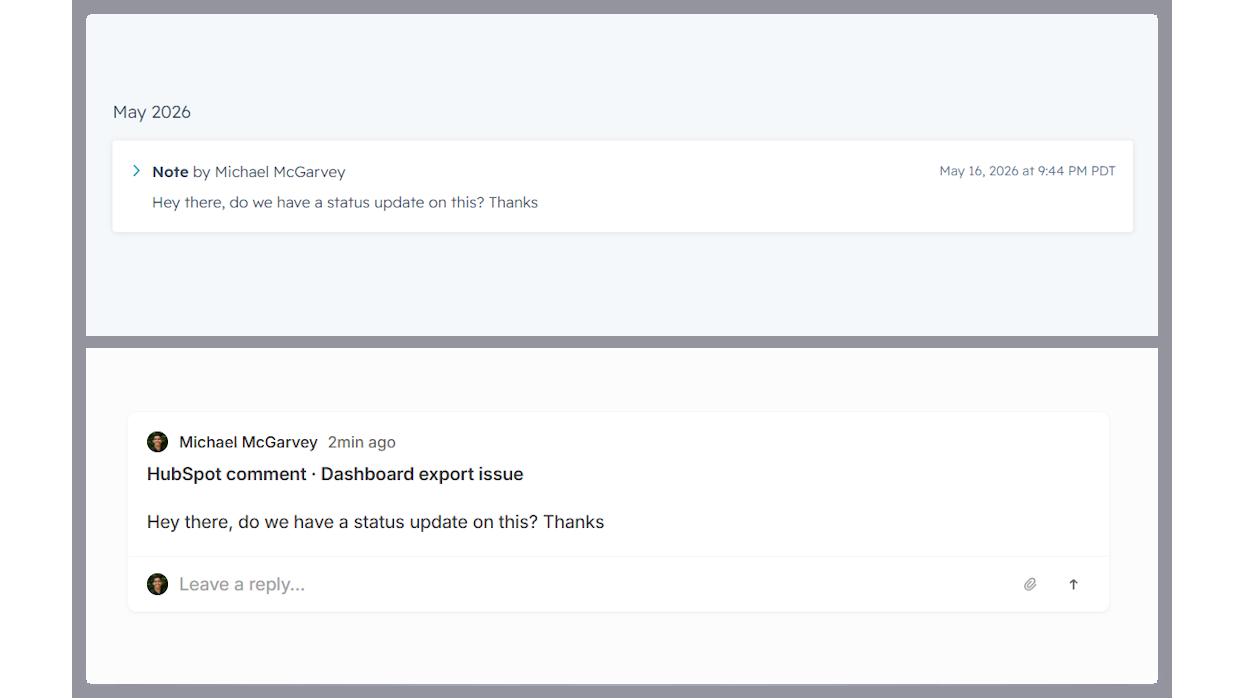
Two-way comment sync
Notes added to a linked HubSpot ticket appear as comments on the Linear issue, and Linear comments are mirrored back as ticket notes, so support and engineering stay in the loop without switching tools.
Funkcjonalność aplikacji
Linear Issues |
IssueLinker only reads HubSpot ticket data (subject, description, notes, pipeline stage) for tickets your team explicitly links or creates a Linear issue for via the IssueLinker card. We do not crawl, index, or store data from other tickets.
For linked tickets, IssueLinker syncs the following in real time via HubSpot and Linear webhooks:
• Ticket subject and description → Linear issue (one-time, on creation)
• HubSpot notes → Linear comments (whenever a new note is added)
• Linear comments → HubSpot notes (whenever a new comment is added)
• Linear issue state → HubSpot "Linear Issue Status" custom property (whenever state changes)
• HubSpot ticket closed → Linear issue moved to Completed (whenever the pipeline stage changes to closed)
What IssueLinker stores: an installation record per HubSpot portal (portal ID, OAuth tokens, Linear workspace ID), and a link record per ticket↔issue pair (HubSpot ticket ID and Linear issue ID). We do not store the contents of tickets, issues, comments, or notes. Those live in HubSpot and Linear and are read on demand.
Data is stored in an encrypted Postgres database (Neon, US region). Access is restricted to IssueLinker's serverless functions running on Vercel. We never share, sell, or repurpose your data. On uninstall, all installation and link records for your portal are deleted within 30 days.
Recenzje
5,0
7
5,0
7
- 21 sie 2026
Opinia zostanie wysłana w ciągu tygodnia
Łączy nasze zgłoszenia błędów w HubSpot z platformą Linear, dzięki czemu dział wsparcia może sprawdzić, czy dana usterka została rzeczywiście naprawiona, bez konieczności otwierania Linear. Status, osoba odpowiedzialna i zespół są przekazywane jako rzeczywiste atrybuty HubSpot, dzięki czemu możemy je filtrować i tworzyć na ich podstawie raporty. W trakcie okresu próbnego przesłałem Michaelowi dwie uwagi, jeszcze tego samego dnia otrzymałem wyczerpującą odpowiedź, a obie zmiany zostały wdrożone w ciągu tygodnia. Nie jestem do tego przyzwyczajony.
Szybka konfiguracja, działa dokładnie tak, jak obiecano. Zsynchronizowane pola działają w widokach listy i raportach, a nie tylko na pojedynczej karcie. Michael naprawdę odpowiada na wiadomości i faktycznie wysyła zamówienia.
Obecnie tworzenie powiązań jest ograniczone do relacji jeden do jednego. Linear <> HubSpot
Soderholm, N.
- 18 sie 2026
Pomógł mi przenieść zgłoszenia z JIRA do Linear
Wcześniej miałem problem z prowadzeniem zespołu w systemie JIRA, a teraz mogę go przenieść w opłacalny sposób.
Klienci są przenoszeni do systemu Linear, a zdjęcia są tam przekazywane. Automatyczne generowanie zgłoszenia to świetne rozwiązanie
Wanless, P.
Growth
32,50 USD
/mies.Simple pricing for teams that move fast.
Two-way sync of comments and status (both directions)
Create, link, and AI-draft Linear issues
Customer requests (link the requesting account to each issue)
Attachment sync (screenshots and files onto the issue)
Unlimited ticket ↔ Linear issue links
Email Support
Growth
32,50 USD
/mies.Simple pricing for teams that move fast.
Two-way sync of comments and status (both directions)
Create, link, and AI-draft Linear issues
Customer requests (link the requesting account to each issue)
Attachment sync (screenshots and files onto the issue)
Unlimited ticket ↔ Linear issue links
Email Support
* Powyższe ceny zostały podane wyłącznie w celach informacyjnych. Nie zawierają one podatków, premii, zniżek lub innych zmiennych cenowych. Skontaktuj się z partnerem w celu uzyskania najbardziej aktualnych i poprawnych informacji o cenach. HubSpot nie ponosi żadnej odpowiedzialności za informacje cenowe, które są dostarczane przez naszych partnerów. Ostatnia aktualizacja cen: 14.09.2026
Więcej informacji
Utworzone przez - IssueLinker
Instaluje - Ponad 60 instalacji
Kategorie Języki, w których dostępna jest ta aplikacja Angielski