
Docusign Enhanced Integration
An improved integration for Docusign that enables better automation
Erstellt von - Integration Glue
Installationen - 200+ Installationen
Bewertung 2,3
(3)

Leading
Anforderungen
HubSpot-Produktversion HubSpot-Account-Berechtigungen - Erforderliche Account-Berechtigungen anzeigen
Zugriffstyp Shared Docusign Enhanced Integration-Abonnement - Produktversionen: Free, Starter, Professional oder Enterprise
Übersicht
1/4
Send Docusign envelopes directly from HubSpot
Trigger contact automation with information from DocuSign
Apply HubSpot Fields in Docusign
Improved sales and marketing workflows: Real-time notifications and document status updates keep your sales teams well-informed throughout the signing process, because they know what documents are being looked at and when
Marketing teams can also incorporate record signing into their campaigns, delivering a more unified customer experience
Enhanced data accuracy and security: Centralised storage of signed documents and associated data makes it simple for your team to access what they need, when they need it.
Secure cloud storage of signed copies mitigates the risk of data loss
This integration ensures adherence to legal and regulatory requirements, offering peace of mind regarding data protection and privacy
Associate documents with relevant records in HubSpot - with the new integration, documents can be associated with specific company or contact records
Get access to custom fields - Integration Glue used in combination with the DocuSign integration allows the user to use any field in the object
Track the signature flow - we can map all Docusign webhooks to HubSpot properties to allow HubSpot users to track the status of the signing process
This integration can read and surface information from custom object properties for the user to view and utilize in workflows if they choose. It can also populate properties on custom objects when a document is sent via the integration.
Fully managed within HubSpot Workflows - once installed you do not need to login to any other system other than Docusign to manage the generation and eSign of documents using Docusign.
When you register for Integration Glue, you will get access to a whole bunch of HubSpot Workflow and Data productivity actions, such as Document Generation, Actions to Clone records (including associated records), get User/Owner information and add to a Property or manage associations.
Integration Glue pricing is based on utilisation, so you can use all of our apps together under a single license and you will only be charged for the total credits you use per month.
Integration Glue does not retain any data when using this app; it simply reads and outputs data to your own HubSpot portal.
Funktionen
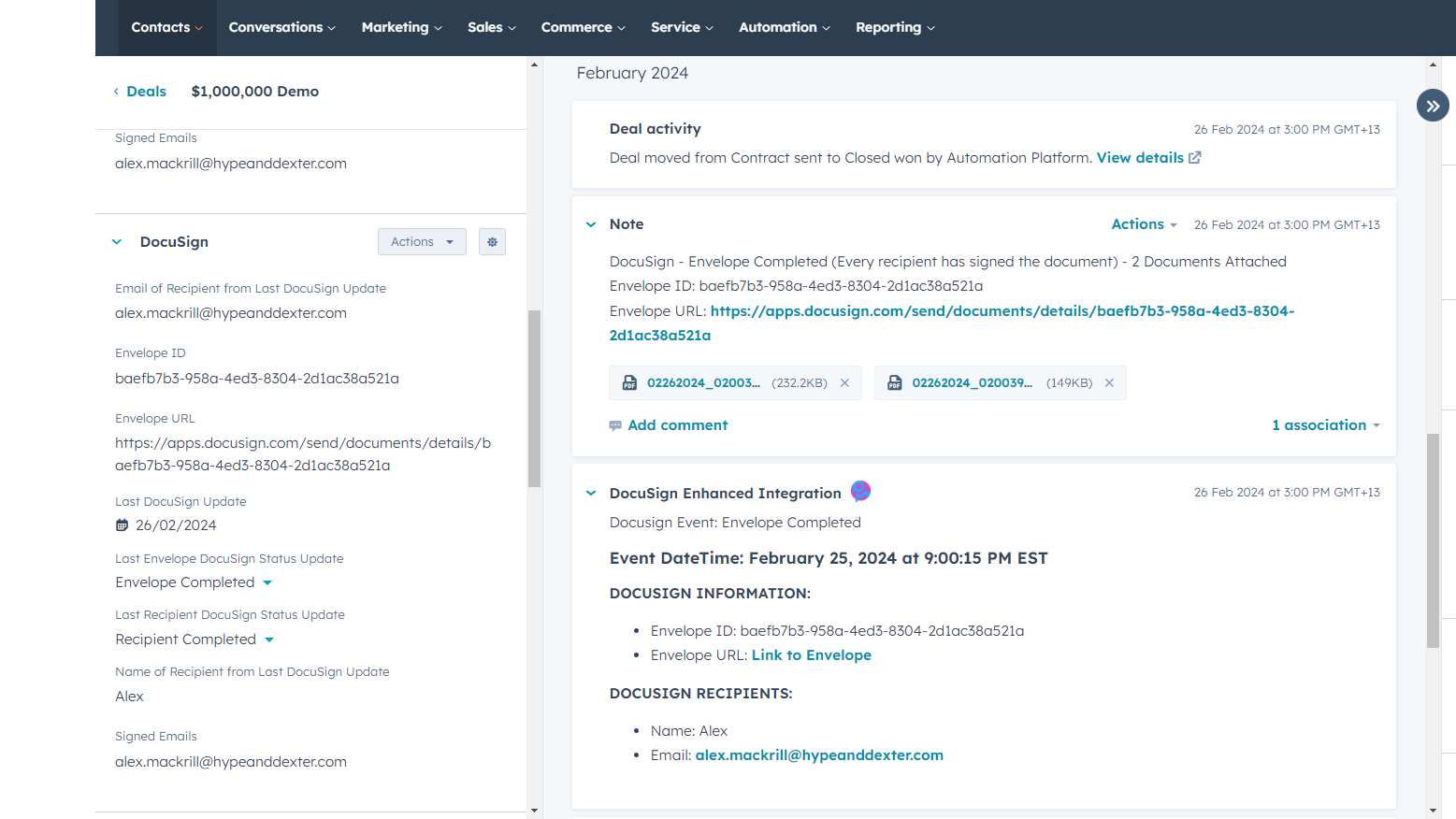
Capture signed documents in HubSpot
Unlike other integrations, our enhanced integration will capture the signed copy of your Docusign document in a note in the object's activity timeline.
Send Docusign documents via workflows
Set up to 4x signatories and contacts to CC on your send, and trigger the send from a HubSpot workflow.
Sending Docusign templated documents from HubSpot
Once created in Docusign, your document templates will work seamlessly with HubSpot.
Void Docusign Envelope
If a document is sent via the integration, the user has the option to void the document. This will trigger an automated email to be sent to the recipient, notifying them that the sender has voided the document, with the appropriate reasoning.
Create and populate custom properties
The integration will automatically give you all the properties you need to manage your Docusign process via HubSpot. And changes to these are updated automatically on the relevant object record.
App-Funktionalität
Datenaustausch
Docusign Envelope | ||
Envelope Status | ||
Signed Documents |
Rezensionen
- 9. Apr. 2026
Völlig kaputt und unbrauchbar - hat überhaupt nichts eingezogen
das tat es nicht
keine
nicht nutzbar
latimer, A.
- 18. März 2026
Äußerst zufrieden mit der Arbeit - nahtloser Workflow für die Vertragsunterzeichnung mit nur einem Klick, der genau das liefert, was wir brauchen
Unser Unternehmen verkauft individuelle Hausbauprodukte, die in der Regel von mehreren Herstellern stammen und in einer Transaktion kombiniert werden. Da wir mehrere Geschäftsvorgänge verwenden, um klare Daten über die an Produkttypen und Hersteller gebundenen Werte zu sammeln, können wir die in HubSpot integrierten Tools nicht verwenden. Da wir diese benutzerdefinierten Produkte auf der Grundlage der Spezifikationen des Kunden bestellen müssen, benötigen wir die Unterschrift und Genehmigung des Kunden, um anzuzeigen, dass er mit allen benutzerdefinierten Spezifikationen einverstanden ist, die wir in den Angeboten, die wir mit den Angebotstools der Hersteller erstellen, verfasst haben. Zuvor mussten wir jeden Kaufvertrag manuell erstellen, indem wir alle Werte aus den Geschäften in eine Vorlage eintippten, diese als PDF ausdruckten und mit mehreren Angeboten im PDF-Format kombinierten und dieses Dokument zur Unterschrift schickten, nachdem wir nach jedem Angebot die Sign Here-Stelle identifiziert hatten. Mit dem Docusign-Produkt von Integration Glue und DocMergy können wir nun mit einem Klick (DocMergy) Vertriebsverträge einschließlich aller zugehörigen Angebotsdokumente erstellen und nach Überprüfung des DocMergy-Ausgabedokuments auf Datengenauigkeit mit einem weiteren Klick (Docusign-Integration) zur Unterschrift versenden. Die automatischen Aktualisierungen in HubSpot nach Abschluss der Unterzeichnung ermöglichen es uns, Statusaktualisierungen und automatische Benachrichtigungen an die Finanzabteilung zur Zahlung zu erstellen. Durch diese Effizienz und Schnelligkeit haben wir für jeden Vertrag und jeden Zahlungsantrag, den wir zuvor manuell ausgefüllt haben, etwa 30 Minuten Arbeit gespart. Multipliziert bedeutet das für unser 8-köpfiges Vertriebsteam eine Zeitersparnis von etwa 300 Stunden im Laufe eines Jahres. Absolut beeindruckend.
Das Team von Integration Glue reagiert während der Geschäftszeiten fast sofort. Meine komplexen Probleme werden sehr schnell gelöst, in der Regel in einer Live-Sitzung, die aufgezeichnet und mir dann zur Verfügung gestellt wird, damit ich die Anweisungen später noch einmal durchgehen kann. In 2-Wochen-Sprints wird der Code um neue Funktionen erweitert. Dinge, um die ich gebeten habe, wurden schnell versprochen und geliefert.
Der einzige Nachteil sind die Zeitzonen. Ich bin in Texas und das Support-Team ist in Neuseeland. Das bedeutet nur, dass ich bis nach 1-2 Uhr nachmittags meiner Zeit warten muss, um eine Live-Person in ihrem Support-Chat zu bekommen. Sie haben einen KI-gesteuerten Chat, um während ihrer Ausfallzeiten zu helfen.
Bidlack, J.
Free
0 $
Great for small teams starting out or anyone who wants to learn more
100 Credits = 20-50 runs of the Custom Actions (dependent on actions used)
Free
0 $
Great for small teams starting out or anyone who wants to learn more
100 Credits = 20-50 runs of the Custom Actions (dependent on actions used)
* Die hier angegebenen Preise dienen nur zu Illustrationszwecken. Alle Preise enthalten keine Steuern, Sonderangebote, Rabatte oder sonstigen Preisvarianten. Bitte wenden Sie sich direkt an den Partner, um aktuelle und korrekte Preisinformationen zu erhalten. HubSpot übernimmt keine Verantwortung für Preisinformationen, die von unseren Partnern bereitgestellt werden. Letzte Aktualisierung der Preisinformationen: 09.08.2025
Weitere Infos
Erstellt von - Integration Glue
Installationen - 200+ Installationen
Kategorien Sprachen, in denen diese App verfügbar ist Englisch
Erhält heute Aufmerksamkeit