

QuickBooks Online
Vereisten
HubSpot-abonnement HubSpot-accountmachtigingen Geen machtigingen vereist Toegangstype Gedeeld QuickBooks Online-abonnement - Eenvoudige start, Basisbenodigdheden, Plus of Gevorderd plannen
Overzicht

1/6 - Connect tools to sync data bidirectionally
Met de QuickBooks Online-integratie van HubSpot kunt u gegevens tussen verschillende tools koppelen om een volledig beeld van de klant te krijgen, uw facturerings- en betalingsproces te stroomlijnen en een nauwkeurige financiële administratie bij te houden.
Synchroniseer gegevens tussen HubSpot en QuickBooks Online met slechts een paar muisklikken
Synchroniseer facturen, contactpersonen/klanten en producten in beide richtingen tussen HubSpot en QuickBooks Online. Of facturen, klanten, producten of betalingen nu in HubSpot of QuickBooks Online worden aangemaakt, de integratie biedt een volledig klantbeeld in HubSpot. Gesynchroniseerde gegevens kunnen worden gebruikt om rapporten te genereren, automatiseringen te activeren of gewoon te worden bekeken door gebruikers met de juiste rechten, zonder dat u HubSpot hoeft te verlaten.
U bepaalt zelf welke gegevens moeten worden gesynchroniseerd en in welke richting de synchronisatie plaatsvindt. Gegevens worden met regelmatige tussenpozen gesynchroniseerd, en u kunt ook op verzoek synchroniseren wanneer u de meest recente updates wilt. De statusrapporten en waarschuwingen van de integratie identificeren records die niet zijn gesynchroniseerd en bieden nuttige aanbevelingen voor het oplossen van synchronisatiefouten.
Stroomlijn je factureringsproces en houd QuickBooks Online up-to-date
Revenue Hub biedt functies zoals offertes, facturen, abonnementen en betalingslinks om facturen te versturen en betalingen te innen. Je kunt facturen helemaal zelf aanmaken, of offertes of deals omzetten in facturen of abonnementen, allemaal binnen HubSpot. Dankzij de tweerichtingssynchronisatie van facturen worden HubSpot-facturen aangemaakt in QuickBooks Online en worden betalingen automatisch gesynchroniseerd.
Geef je front-office de mogelijkheid om facturen te versturen en betalingen op te volgen, zodat de boekhouding zich kan blijven richten op waar ze van houden: het beheren van de financiële gezondheid van het bedrijf.
Functies
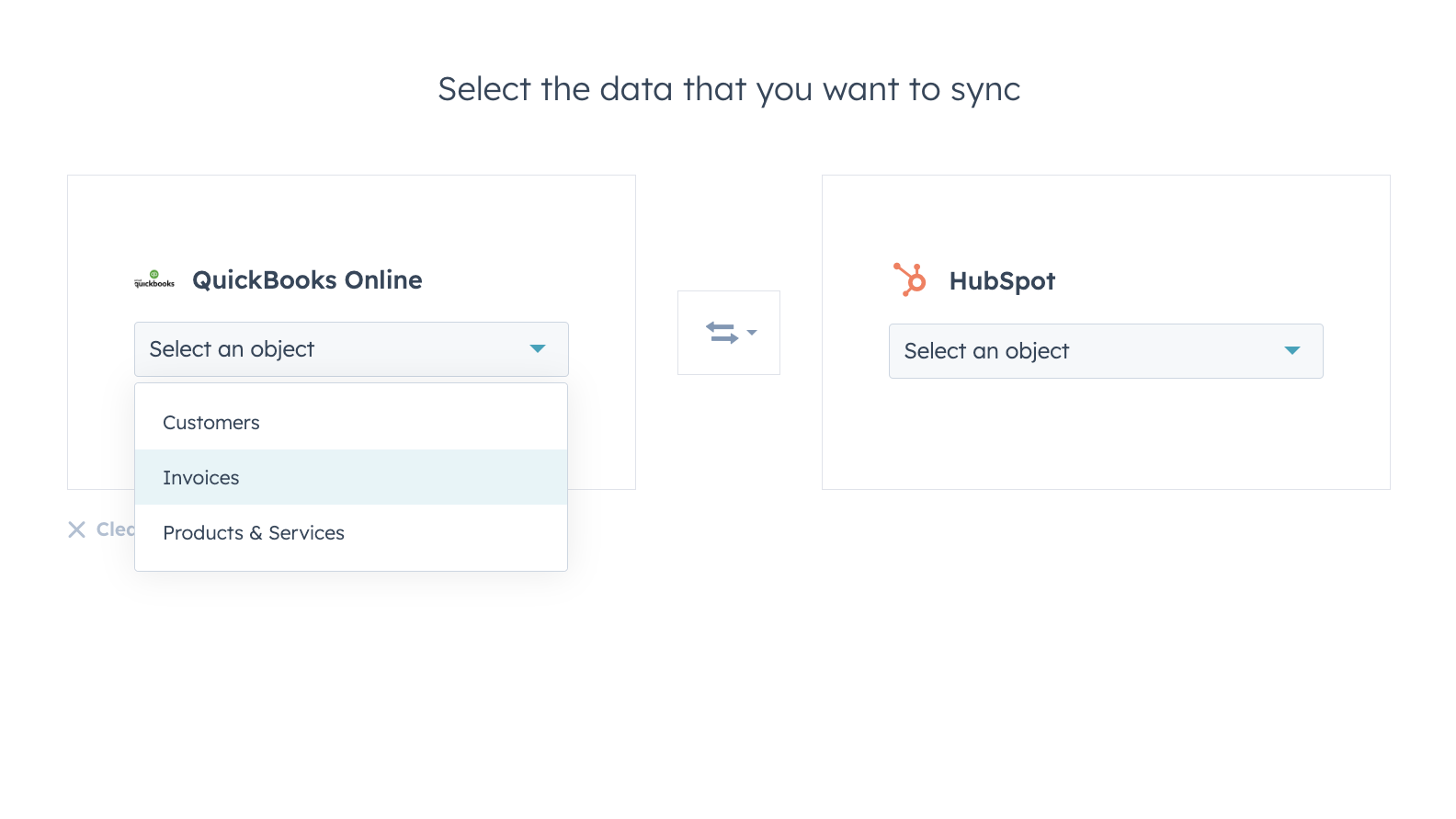
Synchroniseer gegevens tussen HubSpot en QuickBooks Online met een gerust hart
Contacten, facturen en producten kunnen worden gesynchroniseerd naar HubSpot, vanuit HubSpot of in beide richtingen. Met de synchronisatiefilters van de integratie heb je volledige controle over wat, wanneer en hoe je gegevens tussen HubSpot en QuickBooks Online worden gesynchroniseerd.
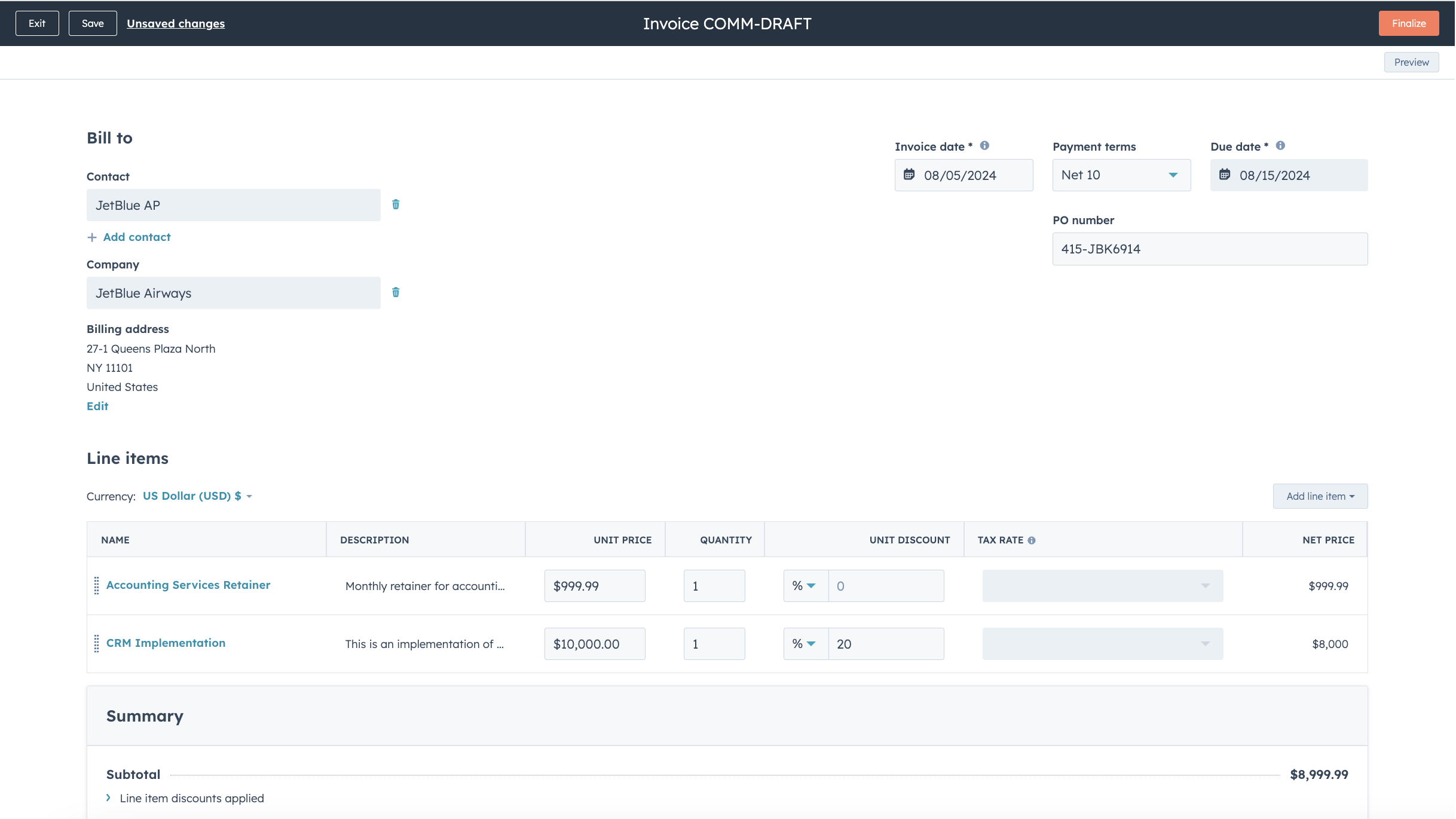
Stroomlijn je factureringsproces en houd QuickBooks Online up-to-date
Zet offertes en deals met slechts een paar muisklikken om in facturen en abonnementen, of maak facturen helemaal zelf aan, zodat je factureringsproces sneller verloopt. Gepubliceerde facturen worden gesynchroniseerd met QuickBooks Online en bijgewerkt met betalingen wanneer deze via HubSpot worden voldaan, of wanneer betalingen in QuickBooks Online worden geregistreerd.
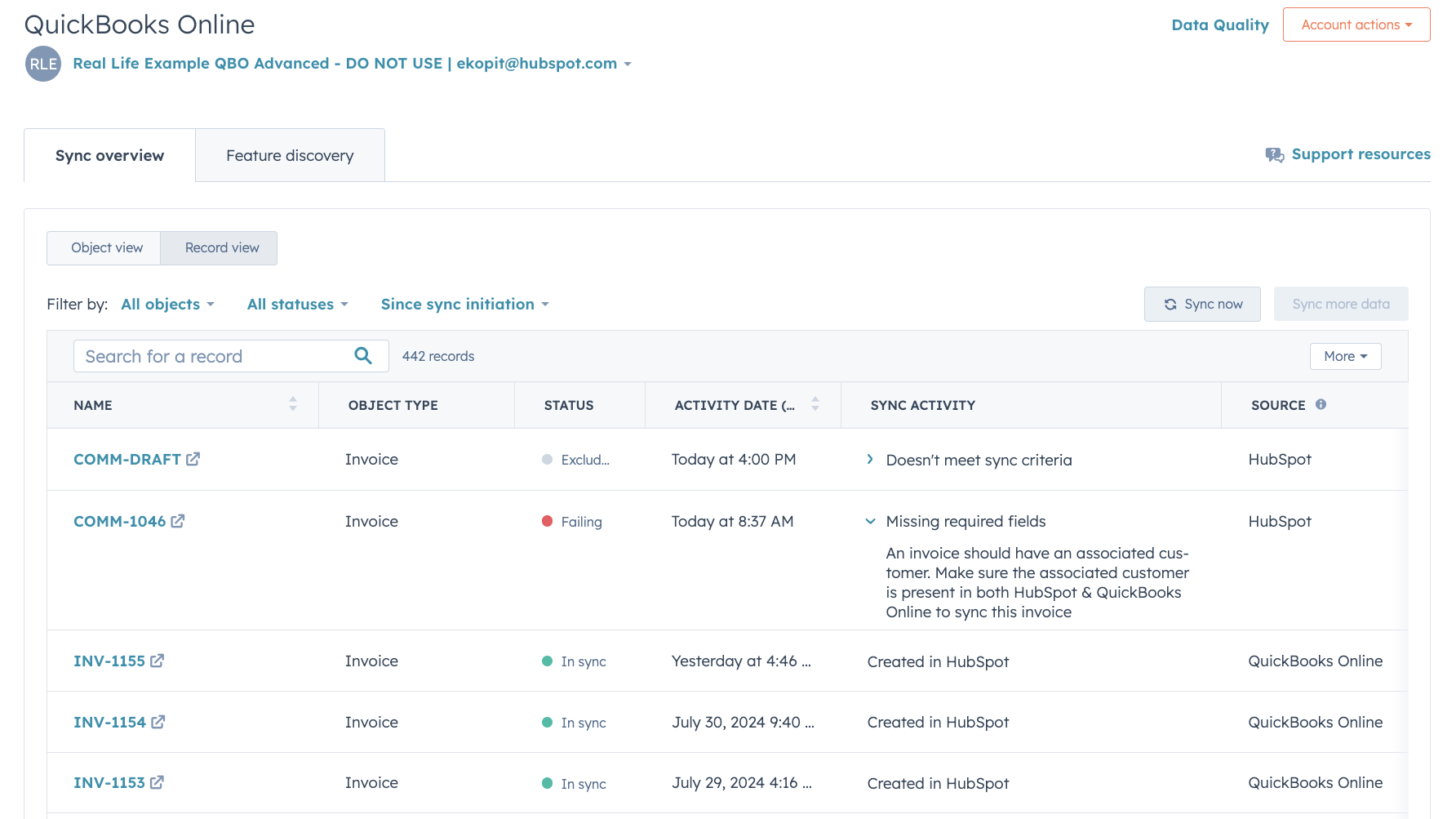
Uitgebreide rapportage over de synchronisatiestatus en het oplossen van fouten
Dankzij gedetailleerde rapportage over de synchronisatiestatus kunt u in realtime zien welke records worden gesynchroniseerd en hoe u synchronisatiefouten snel kunt oplossen.
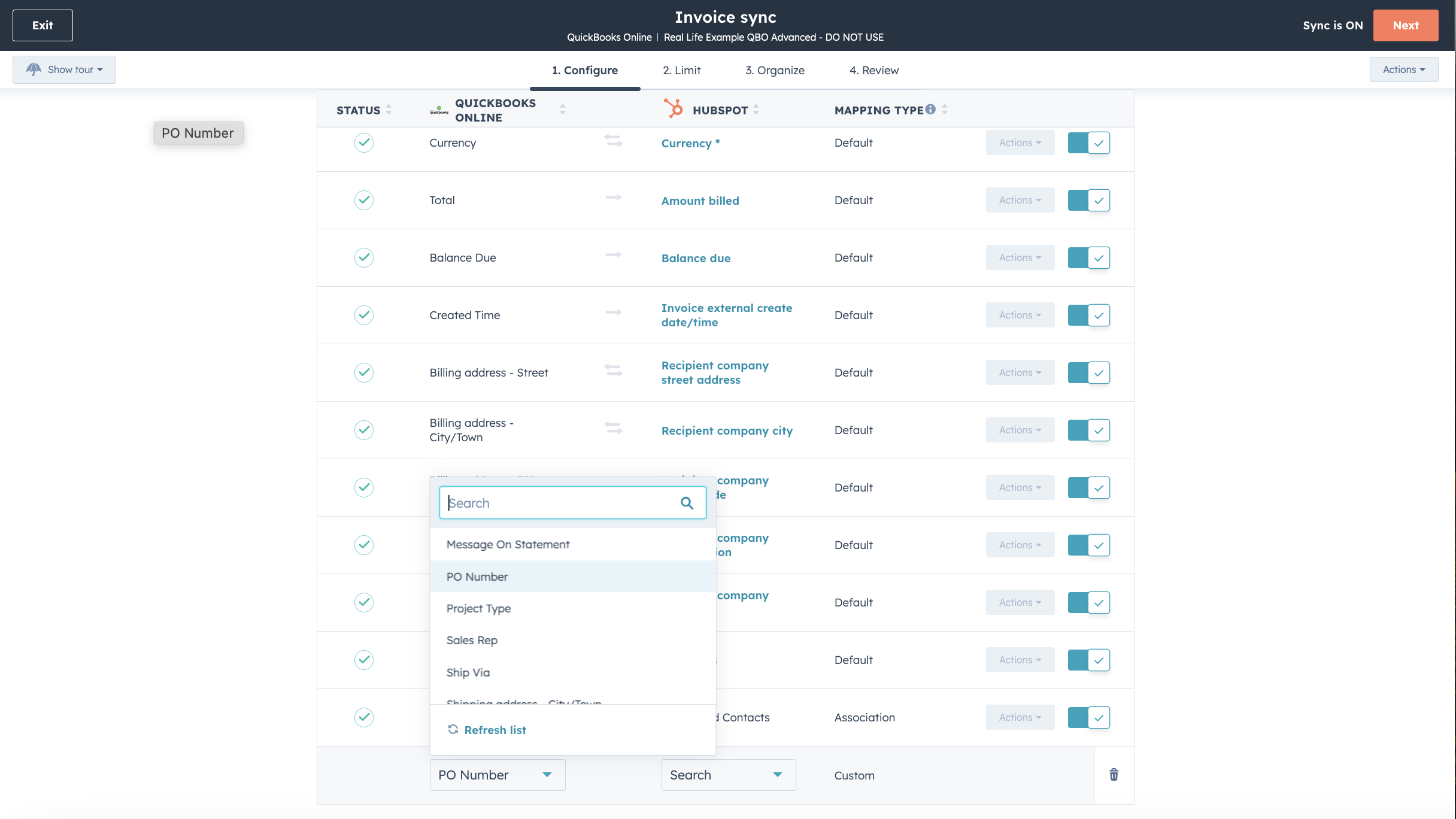
Pas je veldtoewijzingen aan
Met Operations Hub Starter of een hogere versie kun je de veldtoewijzingen voor facturen, contactpersonen of producten aanpassen, zodat deze beter aansluiten bij je datamodel.

Werkt samen met Data Studio in Data Hub
Data Studio in Data Hub is speciaal ontwikkeld voor marketeers en stelt iedereen in staat om met behulp van AI gegevens te combineren in een vertrouwde, spreadsheetachtige interface. Maak aangepaste datasets die geavanceerde segmentatie, automatisering en rapportage mogelijk maken. Je kunt ook eenvoudig de gegevensstroom beheren tussen meerdere externe gegevensbronnen, waaronder Stripe, en het HubSpot CRM
App-functionaliteit
Gedeelde gegevens
Elk object heeft veldtoewijzingen die de informatie in HubSpot en QuickBooks Online met elkaar koppelen. De standaardtoewijzingen staan hieronder vermeld. Om de standaardtoewijzingen te wijzigen, is Operations Hub Starter of hoger vereist. QuickBooks Online biedt beperkte ondersteuning voor aangepaste velden in hun API (maximaal 3, uitsluitend op facturen).
Customers | ||
Invoices | ||
Products & Services | ||
Quickbooks Online data |
Reviews
2,1
101
2,1
101
Hoewel gebruikers melding maken van beperkte synchronisatie in beide richtingen en dubbele records, waarderen sommigen de mogelijkheid om facturen direct in te zien en betalingen bij te houden. Sommigen vinden de integratie nuttig voor het ordenen van verkoopgegevens, terwijl anderen wijzen op problemen bij het koppelen van gegevens en het ontbreken van belastingondersteuning voor internationale accounts.
- 27 jun. 2026
Problemen met de synchronisatie van facturen van HubSpot naar QuickBooks. Facturen kunnen echter alleen van HubSpot naar QuickBooks worden gesynchroniseerd als ze zijn betaald, en dan ook nog eens op een specifieke datum en tijdstip.
Eenvoudig te integreren
Krish, A.
Prijzen
Eenvoudige start
US$ 35
/maandInkomsten en uitgaven bijhouden
Bonnen vastleggen en ordenen
Belastingaftrek maximaliseren
Factureren en betalingen ontvangen
Mijlen bijhouden
Offertes versturen
Verkoopcijfers en omzetbelasting bijhouden
1099-contractanten beheren
Algemene rapporten genereren
Eenvoudige start
US$ 35
/maandInkomsten en uitgaven bijhouden
Bonnen vastleggen en ordenen
Belastingaftrek maximaliseren
Factureren en betalingen ontvangen
Mijlen bijhouden
Offertes versturen
Verkoopcijfers en omzetbelasting bijhouden
1099-contractanten beheren
Algemene rapporten genereren
* De hier vermelde prijzen dienen alleen ter illustratie. Alle prijzen zijn exclusief belasting, bonussen, kortingen of andere prijsvariabelen. Neem contact op met de partner voor de meest recente en correcte prijsinformatie. HubSpot erkent geen verantwoordelijkheid voor deze prijsinformatie, die wordt verstrekt door onze partners. Prijzen laatst bijgewerkt: 01-07-2026
Meer info
Gemaakt door - HubSpot
Installaties - 15K installaties
Categorieën Talen waarin deze app beschikbaar is Chinees ,Engels ,Frans ,Italiaans enSpaans
Vandaag de aandacht trekken

Slack
Beheer CRM-records, krijg AI-ondersteuning van Breeze, verstuur realtime meldingen en werk samen met je team - zonder Slack te verlaten.

Microsoft Teams
Gebruik Microsoft Teams en HubSpot voor vergaderingen, gesprekken en nog veel meer!
